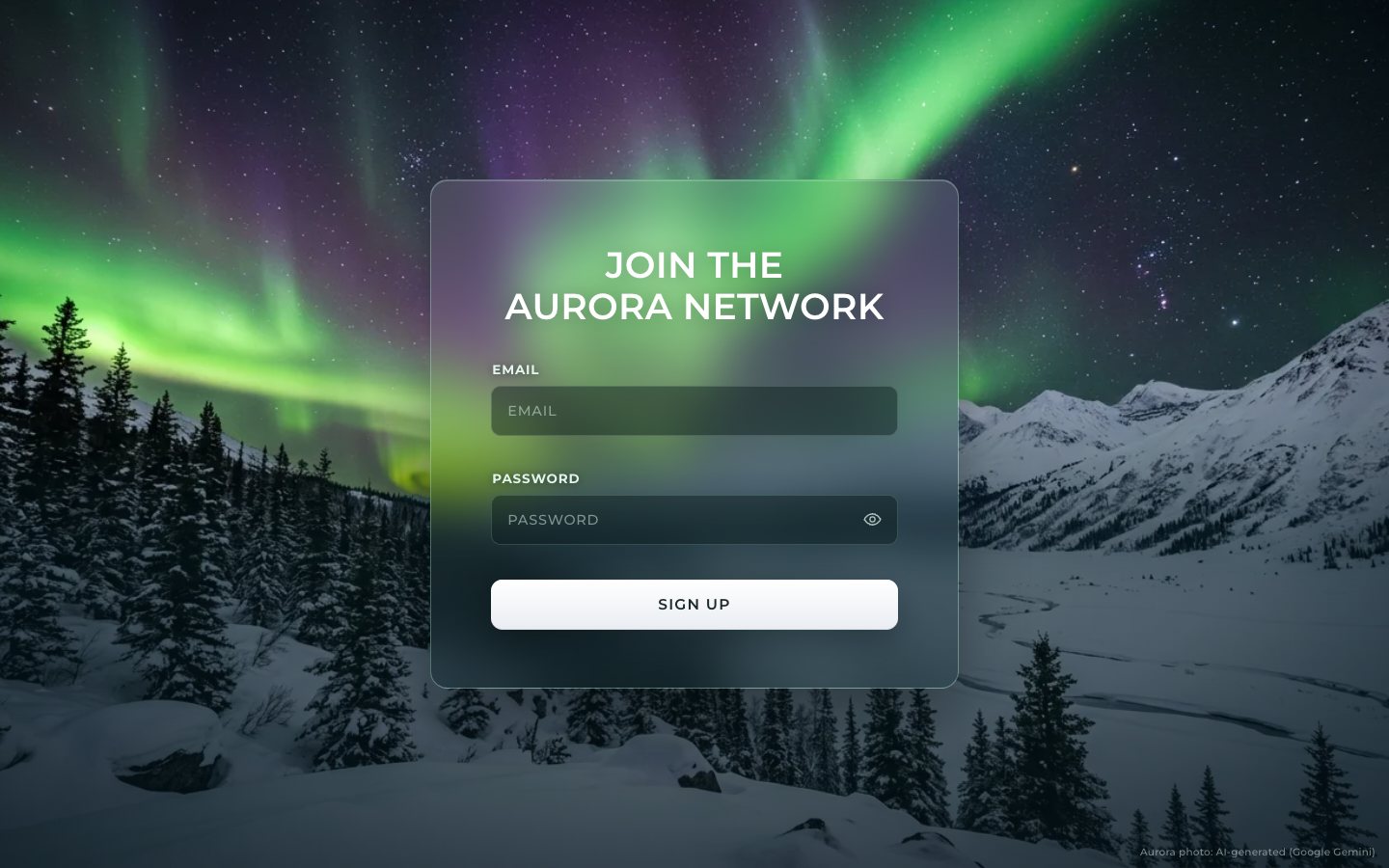
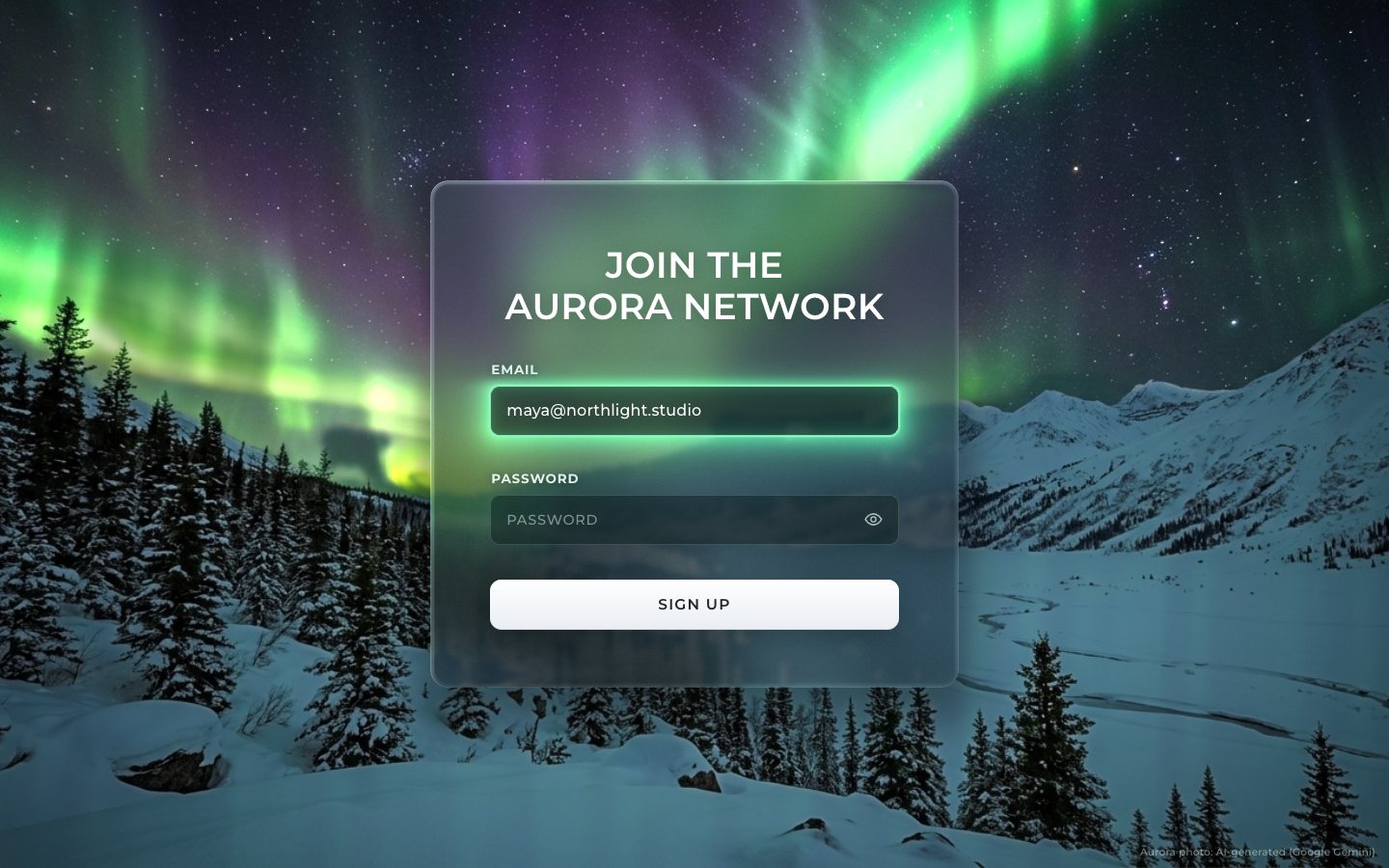
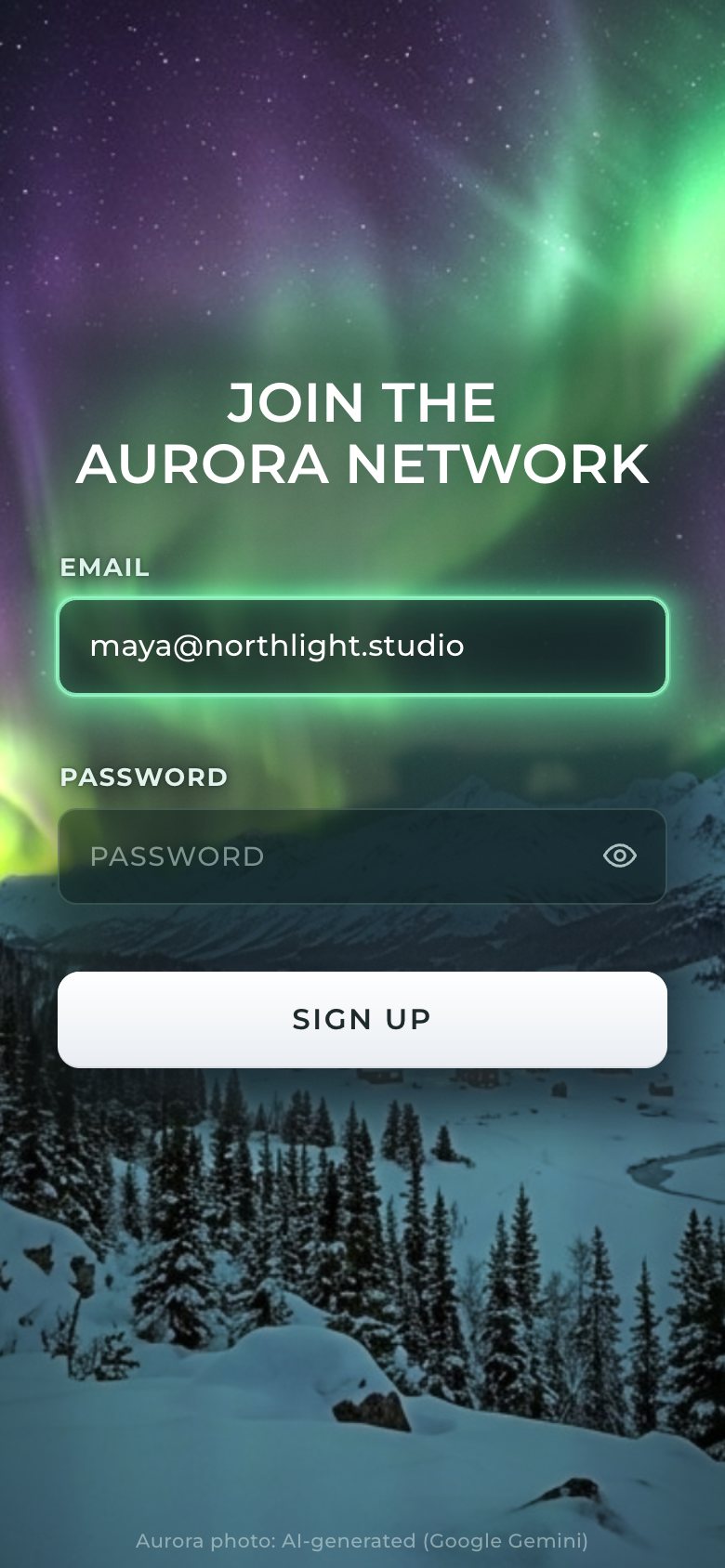
This is the whole build of the aurora sign-up form, in the order it was written: the join page of a made-up network, Aurora Interfaces. A frosted glass card floats inside a living aurora. The field you are typing in glows aurora green and its light bleeds into the frost, a mistake glows the aurora's rose fringe, and a successful sign-up bursts into light and turns the whole night violet. Each stage below is the page as it stood at that step. It shows a still, and Run it here starts the live page in its place. The code under each heading is only what that stage adds. The finished source is at the end, and on GitHub under the MIT licence.
There is no framework and no build step: one HTML page, one style sheet, two ES modules and one photo. The sky and the glass are one WebGL 2 canvas behind the form; every word, field and button is real DOM above it, so autofill, password managers, screen readers and the keyboard all work as they do on any form.
1 · The card, in HTML and CSS
Start with a real form: a heading, two labelled fields with the right type, autocomplete
and inputmode, a show-password button and a submit button. Each field has a message line under it, tied to
the input with aria-describedby.
<div class="field" data-field="email">
  <label for="email">Email</label>
  <div class="control">
    <input id="email" name="email" type="email" inputmode="email" autocomplete="email" autocapitalize="off"
           spellcheck="false" placeholder="Email" required maxlength="254" aria-describedby="email-msg">
    <svg class="ok" viewBox="0 0 24 24" aria-hidden="true"><path d="M5 12.5l4.2 4.2L19 7"/></svg>
  </div>
  <p class="msg" id="email-msg" data-msg></p>
</div>
The aurora is a photo behind everything, with a night grade and a vignette in CSS, so the first paint already looks right.
.backdrop {
  position: fixed; inset: 0; z-index: 0;
  background: #061418 url(img/aurora_1376.webp) 50% 45% / cover no-repeat;
}
.backdrop::after {   /* the same night grade + vignette the shader applies, roughly */
  content: ""; position: absolute; inset: 0;
  background: linear-gradient(180deg, transparent 40%, rgba(4, 26, 34, .5) 62%, rgba(4, 20, 28, .62)),
              radial-gradient(ellipse 80% 75% at 50% 48%, transparent 55%, rgba(0, 6, 10, .5));
}.card {
position: relative; display: grid; width: min(560px, max(400px, 38vw));
padding: clamp(44px, 4.6vw, 66px) clamp(28px, 4.3vw, 62px) clamp(42px, 4.2vw, 60px);
border-radius: var(--r-card);
}Until the WebGL glass arrives in stage 3 the card is frosted in CSS. The finished page keeps this rule as its
fallback: it holds whenever html does not have is-gl, so a browser without WebGL 2 sees exactly
this.
html:not(.is-gl) .card {
  background: linear-gradient(180deg, rgba(255, 255, 255, .13), rgba(200, 255, 235, .05) 60%, rgba(10, 40, 40, .12));
  -webkit-backdrop-filter: blur(26px) saturate(1.35) brightness(.86); backdrop-filter: blur(26px) saturate(1.35) brightness(.86);
  border: 1px solid rgba(190, 255, 225, .3);
  box-shadow: 0 30px 70px rgba(0, 8, 12, .45), inset 0 1px 0 rgba(255, 255, 255, .22);
}
The fields are dark and translucent with uppercase placeholders. Their glow ring is a pseudo-element that only ever changes its opacity, so focusing a field costs the browser almost nothing.
input {
  display: block; width: 100%; height: 52px; margin: 0; padding: 0 44px 0 16px; appearance: none;
  border-radius: var(--r-field); border: 1px solid rgba(200, 255, 230, .17); background: var(--field);
  color: #fff; font-weight: 500; font-size: 16px; line-height: 1.2; font-family: inherit; letter-spacing: .01em; outline: none;
  transition: border-color .25s var(--ease), background-color .25s var(--ease);
  caret-color: rgb(var(--glow));
}.control::after { /* the glow ring: composited opacity only */
content: ""; position: absolute; inset: 0; border-radius: var(--r-field); pointer-events: none; opacity: 0;
box-shadow: 0 0 0 1px rgba(var(--glow), .95), 0 0 0 2px rgba(var(--glow), .28), 0 0 24px rgba(var(--glow-deep), .5), inset 0 0 16px rgba(var(--glow-deep), .2);
transition: opacity .3s var(--ease);
}On a phone the form floats on the aurora with no hard card edge, and the inputs stay at 16 px so iOS does not zoom in on focus.
@media (max-width: 560px) {
  .stage { place-items: center; padding: 28px 16px 12vh; padding-bottom: max(12vh, 60px); }
  .card { width: 100%; padding: 30px 15px 26px; }
  html:not(.is-gl) .card { border-color: transparent; box-shadow: none; background: rgba(6, 30, 30, .22); }
  .title { font-size: clamp(25px, 7.6vw, 31px); margin-bottom: 30px; }
  .field label { text-shadow: 0 1px 12px rgba(0, 16, 14, .75), 0 0 2px rgba(0, 16, 14, .5); }
  .credit { left: 0; right: 0; text-align: center; bottom: 8px; }
}
There is no script yet, so at this stage the form is method="dialog": submitting it goes nowhere.
2 · A real form
Now the module. The rules are plain functions that return a message, or nothing when the value is fine. The email check is strict enough to catch real typos and loose enough not to reject real addresses.
const rules = {
  email(v) {
    v = v.trim();
    if (!v) return 'Enter your email address.';
    if (v.length > 254) return 'That email is too long.';
    const [local, domain = ''] = v.split(/@(?=[^@]*$)/);
    if (!EMAIL_RE.test(v) || local.length > 64 || /\.\./.test(v) || /^\.|\.$/.test(local) || domain.split('.').some((p) => !p || /^-|-$/.test(p)))
      return 'Use a full address, like name@example.com.';
    return '';
  },
  password(v) {
    if (!v) return 'Choose a password.';
    if (v.length < 8) return `Use at least 8 characters (${8 - v.length} more).`;
    if (!/[A-Za-z]/.test(v) || !/\d/.test(v)) return 'Add at least one letter and one number.';
    return '';
  },
};
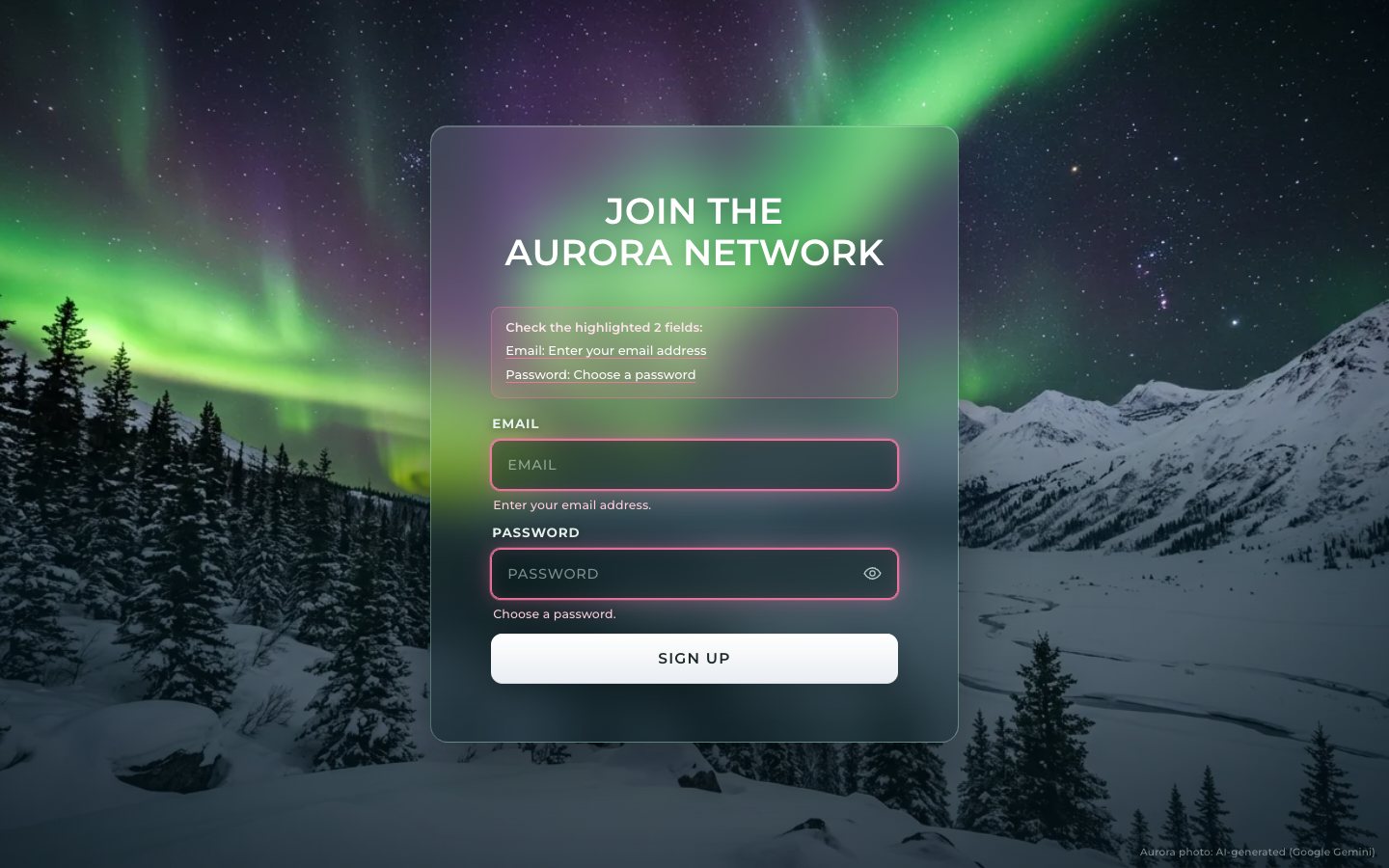
One function draws a field's state: its error, focus and valid classes, aria-invalid, and the line
under it. While you type a password it shows a live checklist instead.
function show(f) {
  const { el, input, msg } = f;
  el.classList.toggle('is-error', !!f.error);
  el.classList.toggle('is-focus', f.focus);
  const valid = !f.error && f.touched && !rules[f.name](input.value);
  el.classList.toggle('is-valid', valid);
  input.setAttribute('aria-invalid', f.error ? 'true' : 'false');
  if (f.error) msg.textContent = f.error;
  else if (f.focus && f.name === 'password' && rules.password(input.value)) msg.innerHTML = passwordHint(input.value);
  else msg.textContent = '';
  invite();
}
Errors wait for you to leave a field, but once a field shows an error it clears the moment you fix it.
for (const f of Object.values(fields)) {
  f.input.addEventListener('focus', () => { f.focus = true; started = true; for (const g of Object.values(fields)) if (g !== f) show(g); show(f); });
  f.input.addEventListener('blur', () => {
    f.focus = false;
    if (f.input.value || f.touched) { f.touched = true; validate(f); }
    show(f); refreshSummary();
  });
  f.input.addEventListener('input', () => {
    if (f.error) validate(f);          // an error clears as soon as it is fixed; new errors wait for blur or submit
    if (f.touched && !f.error && rules[f.name](f.input.value) && f.name === 'email') { /* keep quiet while typing */ }
    show(f); refreshSummary(true);
  });
}.field.is-focus input { border-color: rgba(var(--glow), .9); background: var(--field-focus); }
.field.is-focus .control::after { opacity: 1; }
.field.is-invite .control::after { animation: invite 3.6s ease-in-out infinite; }
.field.is-invite input { border-color: rgba(var(--glow), .62); }
@keyframes invite { 0%, 100% { opacity: .5; } 50% { opacity: .85; } }
.field.is-error input { border-color: rgba(var(--rose), .9); }
.field.is-error .control::after {
opacity: .9; animation: none;
box-shadow: 0 0 0 1px rgba(var(--rose), .9), 0 0 0 2px rgba(var(--rose), .25), 0 0 24px rgba(var(--rose), .42), inset 0 0 16px rgba(var(--rose), .16);
}
.field.is-error.is-focus .control::after { opacity: 1; }A failed submit lists every problem in a summary that takes focus, so a screen reader reads it at once; each item is a link that moves focus to its field.
function fillSummary(bad) {
  summary.dataset.n = bad.length;
  $('[data-summary-count]').textContent = bad.length === 1 ? 'field' : `${bad.length} fields`;
  const ul = $('[data-summary-list]'); ul.textContent = '';
  for (const f of bad) {
    const li = document.createElement('li'), a = document.createElement('a');
    a.href = `#${f.input.id}`; a.textContent = `${NAMES[f.name]}: ${f.error.replace(/\.$/, '')}`;
    a.addEventListener('click', (e) => { e.preventDefault(); f.input.focus(); });
    li.append(a); ul.append(li);
  }
}
A valid submit locks the fields, shows a busy button, waits for a simulated request and opens the success panel. An
address that starts with taken@ takes the server-error path, so you can try that too.
form.addEventListener('submit', async (e) => {
  e.preventDefault();
  if (phase !== 'idle') return;
  started = true;
  const all = Object.values(fields);
  for (const f of all) { f.touched = true; validate(f); show(f); }
  const bad = all.filter((f) => f.error);
  if (bad.length) {
    fillSummary(bad); summary.hidden = false;
    summary.focus();
    return;
  }
  summary.hidden = true;
  setPhase('busy');
  submit.setAttribute('aria-busy', 'true'); label.textContent = 'Signing up';
  for (const f of all) f.input.readOnly = true;
  announce('Creating your account…');
  await wait(reducedMQ.matches ? 500 : 1250);           // a simulated request
  for (const f of all) f.input.readOnly = false;
  submit.removeAttribute('aria-busy'); label.textContent = 'Sign up';
  const email = F('email').input.value.trim();
  if (/^taken@/i.test(email)) {                          // the server-side error path, so it can be tried
    setPhase('idle');
    const f = F('email'); f.error = 'That email already has an account. Try another one.'; show(f);
    fillSummary([f]); summary.hidden = false; summary.focus();
    return;
  }
  succeed(email);
});
3 · The living aurora and the glass, in WebGL
One canvas arrives behind the form, drawn in two passes. The first, at half the CSS resolution, draws four aurora curtains. Each is a band with a wavy lower edge and fine ray striations, green at the hem and violet higher up.
float edge = B.x * sin(along * B.y + t + C.y) + B.x * .55 * sin(along * B.y * 2.31 - t * 1.37 + C.y * 1.7)
           + .035 * (vnoise(vec2(along * 5.5 + C.y, uT * .05)) - .5);
float y = up - edge;
float prof = y > 0. ? exp(-y / B.w) : exp(y * C.w);
// ray striations: fine along the curtain, stretched across it, bending slowly
float bend = vnoise(vec2(along * 2.2 + C.y, uT * .06)) * 3.;
float r = vnoise(vec2(along * 46. + bend * 4., y * 1.2 - uT * .08));
float r2 = vnoise(vec2(along * 120. + bend * 9., y * .8 + uT * .05));
float rays = .32 + 1.15 * r * r + .35 * r2;
The second pass draws the photo and lays the curtains over it with a screen blend, but only where the sky mask says there is sky. A dark gate keeps the spruce tips black.
// curtains in the sky only (the dark gate keeps spruce tips black)
float gate = sky * smoothstep(.015, .09, lum + .02);
vec3 cur = sk.rgb * gate;
col = 1. - (1. - col) * (1. - cur);                // screen
Inside the card the glass is frost: the photo and the curtains blurred through mipmaps, sampled six times with a little per-pixel scatter, and bent inwards at the bevel. The brightest aurora is compressed so the white text keeps its contrast.
// frost: blurred photo (graded like the scene) + blurred curtains, sampled with a little per-pixel scatter
float a0 = h12(fc * .73) * 6.283;
vec2 j = vec2(cos(a0), sin(a0));
vec2 pxToUv = 1. / uCover.zw;
float lod = mix(5.3, 4.6, uSoft) - slope * 1.5 + log2(max(uCover.w / uPhotoPx.y, .5)) * 0.;
float spread = 22. * uDpr;
vec3 fr = vec3(0);
for (int k = 0; k < 6; k++) {
  float an = a0 + float(k) * 1.0472;
  vec2 o2 = vec2(cos(an), sin(an)) * spread * (.45 + .55 * fract(float(k) * .618 + h12(fc)));
  fr += photoAt((fc + refr + o2 - uCover.xy) * pxToUv, lod);
}
vec4 mk = textureLod(uMask, (fc + refr - uCover.xy) * pxToUv, 0.);
fr = grade(fr / 6., mk.g, mk.r);
vec2 su = vec2(fc.x + refr.x, uRes.y - fc.y - refr.y) / uRes;
vec3 cb = textureLod(uSky, su, 2.2).rgb * .9 + textureLod(uSky, su + j * 14. * uDpr / uRes, 3.).rgb * .5;
fr = 1. - (1. - fr) * (1. - cb * .85);
The focused field's light bleeds into the frost around it: green for focus, rose for an error. It spills sideways and down more than up, so the label above stays readable.
// field glows bleeding into the frost (aurora green; the aurora's rose fringe on error)
vec3 G = vec3(.36, 1., .62), R = vec3(1., .40, .62);
float d0 = sdRR(fc, uF0.xy + uF0.zw * .5, uF0.zw * .5, 10. * uDpr);
float d1 = sdRR(fc, uF1.xy + uF1.zw * .5, uF1.zw * .5, 10. * uDpr);
float k0 = max(uFs.x, uFs.z * (.55 + .45 * sin(uT * 1.6))), k1 = uFs.w;
vec3 c0 = mix(G, R, uFs.y), c1 = mix(G, R, uFs2.x);
float h0 = exp(-max(d0, 0.) / (17. * uDpr)) * step(0., d0) + exp(-max(-d0, 0.) / (9. * uDpr)) * step(d0, 0.) * .35;
float h1 = exp(-max(d1, 0.) / (17. * uDpr)) * step(0., d1) + exp(-max(-d1, 0.) / (9. * uDpr)) * step(d1, 0.) * .35;
// the light spills sideways and down more than up, so the label above stays readable
float up0 = mix(.3, 1., smoothstep(uF0.y - 14. * uDpr, uF0.y + 4. * uDpr, fc.y));
float up1 = mix(.3, 1., smoothstep(uF1.y - 14. * uDpr, uF1.y + 4. * uDpr, fc.y));
glass += c0 * h0 * up0 * (k0 * .55 + uFs.y * .35);
glass += c1 * h1 * up1 * (k1 * .55 + uFs2.x * .35);
On success the burst grows from the card: a white core, an expanding ring, and rays that turn violet with distance. Then the night around the lit card turns violet.
float burst = smoothstep(0., .18, B) * (1. - smoothstep(.55, 1., B));
float rays = pow(vnoise(vec2(an * 9.5 + uT * .05, 1.7)), 3.) * 1.6 + pow(vnoise(vec2(an * 23. - uT * .08, 4.2)), 5.) * 2.2;
float fall = exp(-r / (sizeK * (.45 + 1.4 * B)));
vec3 vio = vec3(.62, .46, 1.);
vec3 rayC = mix(vec3(1., .98, 1.), vio, smoothstep(0., sizeK * 1.6, r));
float behind = 1. - inside * L * .8;           // once lit, the rays sit behind the glass so the text stays clear
col += rayC * rays * fall * (burst * 1.4 + L * .42) * behind;
// the expanding ring
float ringR = B * sizeK * 3.2;
col += mix(vec3(1.), vio, .5) * exp(-pow((r - ringR) / (18. + 60. * B), 2.)) * burst * .55;
// a core of light at the centre during the burst, then the soft violet bloom around the card
col += vec3(1., .97, 1.) * exp(-r / (sizeK * (.25 + B))) * burst * .9;
The JavaScript tells the renderer where the card, the fields and the button are, and measures again only when the layout changes: a resize, the fonts arriving, the error summary opening.
function measure() {
  if (!sky) return;
  const r = card.getBoundingClientRect();
  sky.cardRect = [r.left, r.top, r.width, r.height];
  const zoom = card.offsetWidth ? r.width / card.offsetWidth : 1;      // CSS zoom on very large screens
  sky.radius = (parseFloat(getComputedStyle(card).borderTopLeftRadius) || 18) * zoom;
  sky.soft = isPhone() ? 1 : 0;
  const rr = (el) => { const q = el.getBoundingClientRect(); return [q.left, q.top, q.width, q.height]; };
  sky.fields = [rr(F('email').input), rr(F('password').input)];
  sky.btn = rr(submit);
}function syncGlass() {
if (!sky) return;
const e = F('email'), p = F('password');
sky.set('f0', e.focus ? 1 : 0); sky.set('e0', e.error ? 1 : 0);
sky.set('f1', p.focus ? 1 : 0); sky.set('e1', p.error ? 1 : 0);
sky.set('inv', e.el.classList.contains('is-invite') ? 1 : 0);
wake();
}
4 · The finish
A soft light follows the mouse across the glass, the curtains shift a little with it, and hovering SIGN UP gathers light in the glass around the button.
addEventListener('pointermove', (e) => {
  if (!sky) return;
  lastPointer = performance.now();
  sky.ptr = [e.clientX, e.clientY];
  const r = card.getBoundingClientRect();
  sky.ptrOn[1] = e.pointerType === 'mouse' && e.clientX > r.left && e.clientX < r.right && e.clientY > r.top && e.clientY < r.bottom ? 1 : 0;
  sky.ptrPar = [(e.clientX / innerWidth) * 2 - 1, (e.clientY / innerHeight) * 2 - 1];
}, { passive: true });
With reduced motion the aurora stops on one still frame, the springs snap and the loop goes to sleep.
function applyMotion() {
  if (!sky) return;
  const r = reducedMQ.matches;
  sky.motion = r ? 0 : 1; sky.frozen = r;
  if (r) sky.time = 52.0;                 // a still, beautiful moment of the flow
  wake();
}
At rest the aurora drifts slowly, so on a 120 Hz screen it is drawn every other frame; anything you do draws every frame.
// At rest the aurora drifts slowly, so on a 120 Hz screen it is drawn every other frame (60 fps, indistinguishable);
// anything the user does (springs moving, pointer, layout) draws every frame.
const busy = moving || layoutDirty || now < layoutUntil || now - lastPointer < 400;
if (busy || (++tick & 1) || now - lastDraw > 20) { sky.draw(now); lastDraw = now; }
if (!sky.frozen || moving || layoutDirty || now < layoutUntil) raf = requestAnimationFrame(frame);
else last = 0;
Last, nothing is stored, and any key an older build left behind is wiped, so every visit opens on the showcase.
// Nothing is stored. Clean any older DV62 keys so a returning visitor always sees the showcase.
try { for (const k of Object.keys(localStorage)) if (k.startsWith('dv62') && !k.startsWith('dv62.v1.')) localStorage.removeItem(k); } catch (e) { /* storage blocked */ }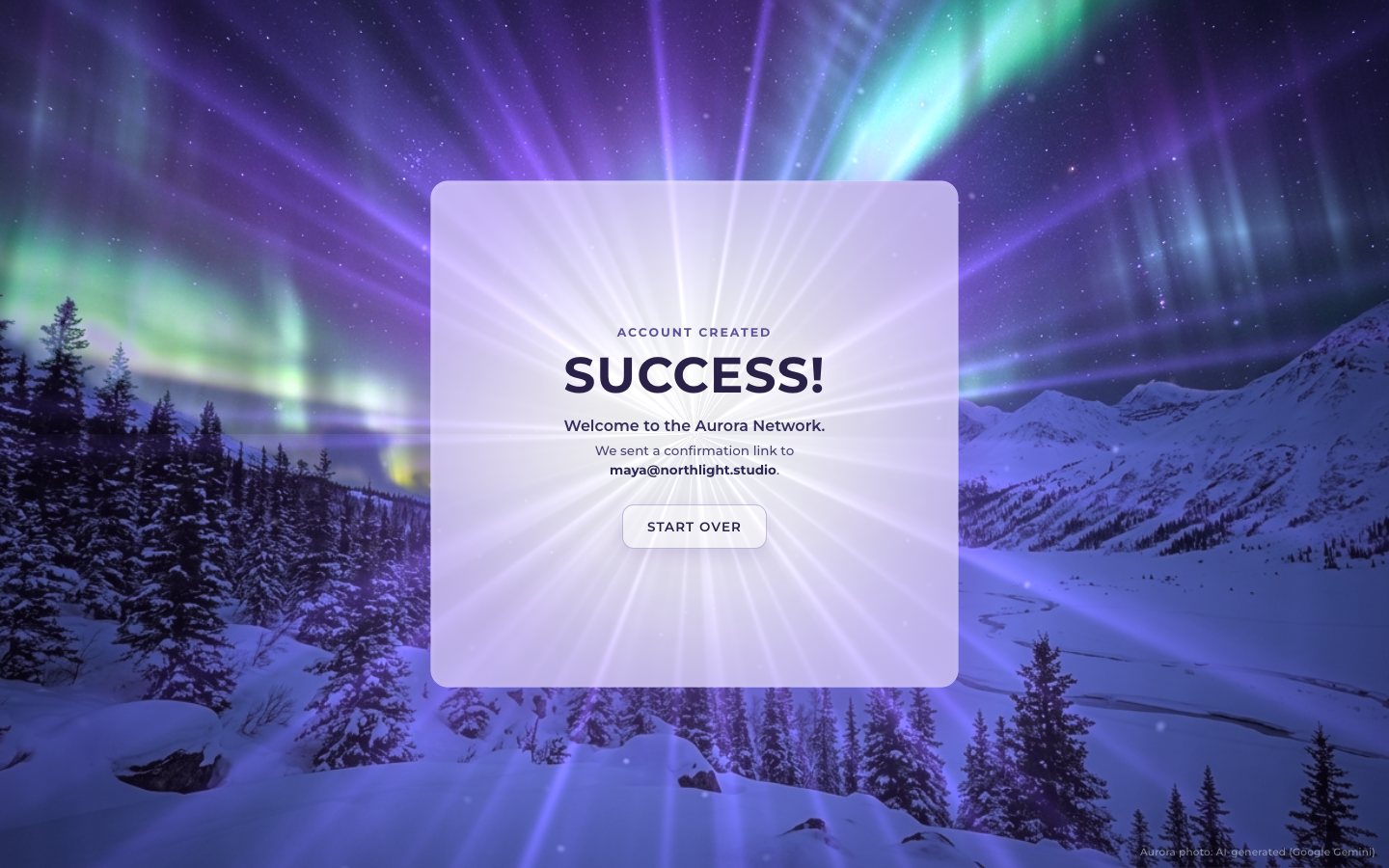
Make it yours
- Your sky is the photo in
img/and its mask:mask.pngholds the sky (red), the snow (green) and the photo's own aurora light (blue). The curtains are theCURTAINSlist inaurora.js: an origin, an angle, a length and a few numbers for the wave, the height and the colour. - Your form is ordinary HTML: add a field, give it a rule in
rules, and pass its rectangle to the glass inmeasure()if you want it to glow. - Accessibility is already there: real labels,
aria-describedbymessages,aria-invalid, a focusable error summary with links, a live region for the request, 44 px targets, visible focus,prefers-reduced-motionhonoured, and a CSS frosted fallback without WebGL 2.
The code is on GitHub at UlviShabanbayli/domvybe-aurora-signup, under the MIT licence: use it in your own projects, commercial ones included. Aurora Interfaces is made up. The aurora photo is AI-generated (Google Gemini); everything else was made in code for this project.
Keep the form in the DOM and draw only light in WebGL. The canvas never holds a word: it reads where the fields are and paints their glow into the glass behind them, so the form stays a real, accessible form while the light does the talking.