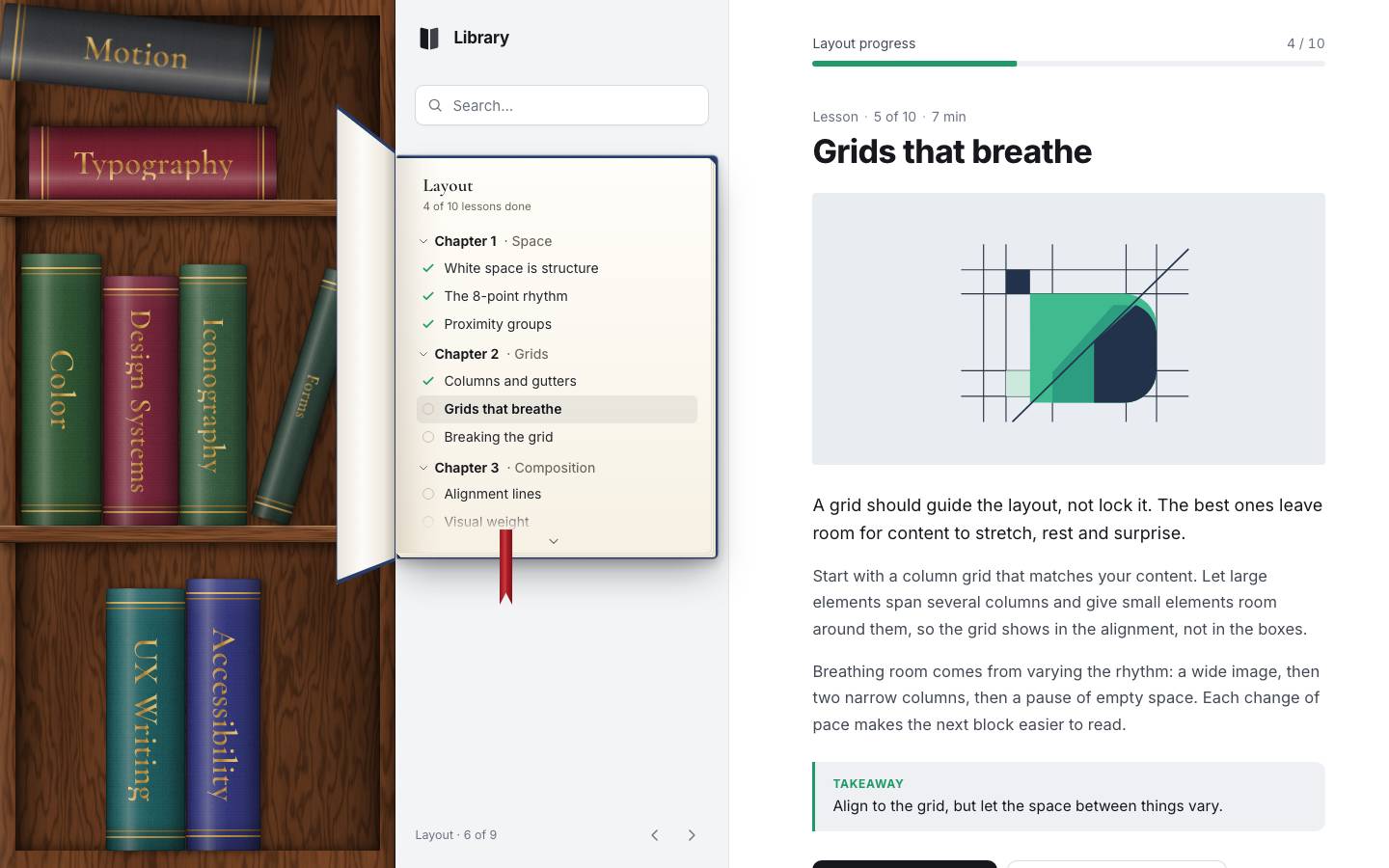
This is the whole build of the bookshelf sidebar, in the order it was written. A course site whose navigation is a walnut bookcase: every course is a cloth book with its title in gold foil. Pick one and it comes off the shelf, turns to face you and opens in the sidebar; its chapters are the menu. Search dims the shelf, you can drag the books into a new order, add a course of your own, fold the case into a rail and switch on an evening lamp. The last stage puts the same engine in a second look, Nordic: a notes app on a light-oak shelf. Each stage below is the component as it stood at that step. It shows a still, and Run it here starts the live page in its place. The code under each heading is only what that stage adds. The finished source is at the end, and on GitHub under the MIT licence.
There is no library and no build step. shared/shelf.js is the shelf engine; it knows nothing about
courses or notebooks. Each look is a page that hands it its books and its taste through an options object:
library/library.js for the Library, nordic/nordic.js for Nordic. shared/sheet.js
is the phone's bottom sheet and shared/util.js holds small helpers (saved state, the live region, the toast,
icons). The wood and cloth are textures made by a script with seeded noise; the lesson pictures are drawn in SVG by
library/art.js. No picture is downloaded and none is AI-made.
1 · The bookcase
The page is three columns: the case, the sidebar, the lesson. In this first stage only the case has anything in it.
<div class="app" id="app" data-layout="desk">

  <nav class="case" aria-label="Course shelf">
    <h2 class="sr-only" id="shelf-title">Courses</h2>
    <div class="case__scene" id="scene"></div>
  </nav>

  <aside class="side" aria-label="Course contents">
    <header class="side__top">
      <a class="logo" href="../" aria-label="SHELF home">
        <svg viewBox="0 0 32 32" aria-hidden="true"><path d="M6 5.5c0-1 .8-1.6 1.8-1.4L15 5.8v22.4l-7.6-1.9A1.8 1.8 0 0 1 6 24.6V5.5Z" fill="currentColor"/><path d="M26 5.5c0-1-.8-1.6-1.8-1.4L17 5.8v22.4l7.6-1.9a1.8 1.8 0 0 0 1.4-1.7V5.5Z" fill="currentColor" opacity=".82"/></svg>
        <span class="logo__word">Library</span>
      </a>
      <div class="side__tools">
      </div>
    </header>

  </aside>

  <main class="main" id="lesson" tabindex="-1">
  </main>
</div>
The engine's whole interface is its options. The page says which books there are and in what order, what a book looks
like (face), how big it is (dims), and which shelf layouts to try (configs).
/**
 * @param {HTMLElement} scene  positioned element that holds the books (perspective lives here); scrolls in strip mode
 * @param {object} o
 *   items: Map(id → item)       order: [id]
 *   face(item, mode) → HTML of the book's faces           label(item) → accessible name
 *   configs(mode, W, H, n) → [{ rows: [...], unit }]     tried in order until every book fits
 *   dims(item, cfg, mode) → { w, h }                        (w = thickness, h = height, px)
 *   afterLayout(pos, cfg, mode)
 */
Every book is an <li> slot with a <button> in it, absolutely placed at the
top-left of the shelf. Its faces are drawn by the page into a .book__lift wrapper; the slot moves the book,
the lift tips it (from stage 2).
make(id) {
  const li = document.createElement('li'); li.className = 'slot'; li.dataset.id = id;
  const b = document.createElement('button'); b.type = 'button'; b.className = 'book'; b.dataset.id = id; b.tabIndex = -1;
  li.append(b); this.nodes.set(id, li); this.paint(id); this.ul.append(li);
  return li;
}paint(id) {
const li = this.nodes.get(id); if (!li) return;
const b = li.firstChild;
const item = this.o.items.get(id);
b.innerHTML = `<span class="book__lift">${this.o.face(item, this.mode)}</span>`;
b.setAttribute('aria-label', this.o.label(item));
if (item && item.color) li.style.setProperty('--c', item.color);
this.o.afterPaint?.(li);
}The Library's case has two boards of 18 px and three compartments: 23 % of the inside for the top, 38.5 % for the middle, the rest at the bottom. Each row has a mode. The top row is flat: at most two books lying on their side. The middle row stands at most four books upright and lets the last one lean up to 17°. The bottom row takes the rest. A book's thickness comes from one unit, so that two books fit lying in the top compartment. If the books don't fit, the next config makes every book a size smaller: the unit times 1, 0.9, 0.8, 0.72, 0.64 and 0.56.
function configs(mode, W, H) {
  if (mode === 'strip') {
    return [{ key: `strip${H}`, rows: [{ mode: 'upright', x: 14, base: H - 16, w: Infinity, h: H, gap: 2 }], unit: { w: H / 4.3, h: H - 34 },
      extent: { w: (pos) => Math.max(...[...pos.values()].map((p) => p.x + p.w)) + 18 } }];
  }
  const b = 18, inner = H - 2 * b, c0 = Math.round(inner * 0.23), c1 = Math.round(inner * 0.385), c2 = inner - c0 - c1;
  const h = Math.min(Math.min(c1, c2) - 18, W - 30);
  return [1, 0.9, 0.8, 0.72, 0.64, 0.56].map((k) => ({
    key: `desk${W}x${H}k${k}`, k, boards: [c0, c0 + b + c1], b,
    rows: [
      { mode: 'flat', x: 10, base: c0, w: W - 20, h: c0 - 16, max: 2, gap: 1, jitter: (id, i) => (hash01(id, 3) - 0.5) * 16 + (i ? 8 : 0) },
      { mode: 'upright', x: 6, base: c0 + b + c1, w: W - 12, h: c1 - 10, max: 4, lean: 17, gap: 1.5 },
      { mode: 'upright', x: 6, base: H, w: W - 12, h: c2 - 10, gap: 1.5 },
    ],
    unit: { w: Math.min((W - 12) / 4.3, (c0 - 18) / 2.3) * k, h },   // two books must lie in the top compartment
  }));
}
Sizes come from the course's id through a small hash, so a book is the same size on every load: its height is 84 to 97 % of the unit, its thickness 95 to 105 %. On a touch screen a spine is never thinner than 44 px, a fingertip.
const hf = (id) => 0.84 + hash01(id, 1) * 0.13;
const tf = (c) => (c.tf || 1) * (0.95 + hash01(c.id, 2) * 0.1);

function configs(mode, W, H) {
  if (mode === 'strip') {
    return [{ key: `strip${H}`, rows: [{ mode: 'upright', x: 14, base: H - 16, w: Infinity, h: H, gap: 2 }], unit: { w: H / 4.3, h: H - 34 },
      extent: { w: (pos) => Math.max(...[...pos.values()].map((p) => p.x + p.w)) + 18 } }];
  }
  const b = 18, inner = H - 2 * b, c0 = Math.round(inner * 0.23), c1 = Math.round(inner * 0.385), c2 = inner - c0 - c1;
  const h = Math.min(Math.min(c1, c2) - 18, W - 30);
  return [1, 0.9, 0.8, 0.72, 0.64, 0.56].map((k) => ({
    key: `desk${W}x${H}k${k}`, k, boards: [c0, c0 + b + c1], b,
    rows: [
      { mode: 'flat', x: 10, base: c0, w: W - 20, h: c0 - 16, max: 2, gap: 1, jitter: (id, i) => (hash01(id, 3) - 0.5) * 16 + (i ? 8 : 0) },
      { mode: 'upright', x: 6, base: c0 + b + c1, w: W - 12, h: c1 - 10, max: 4, lean: 17, gap: 1.5 },
      { mode: 'upright', x: 6, base: H, w: W - 12, h: c2 - 10, gap: 1.5 },
    ],
    unit: { w: Math.min((W - 12) / 4.3, (c0 - 18) / 2.3) * k, h },   // two books must lie in the top compartment
  }));
}

const coarse = matchMedia('(pointer: coarse)');
function dims(c, cfg, mode) {
  // on touch screens a spine is at least a fingertip wide
  if (mode === 'strip') return { w: Math.max(coarse.matches ? 44 : 0, Math.round(cfg.unit.w * tf(c))), h: Math.round(cfg.unit.h * (0.86 + hash01(c.id, 1) * 0.14)) };
  return { w: Math.max(coarse.matches ? 44 : 0, Math.round(cfg.unit.w * tf(c))), h: Math.round(cfg.unit.h * hf(c.id)) };
}
compute() walks the books in order and places each in the first row with room. Upright books go left
to right, 1.5 px apart. Flat books stack up from the board, and afterwards the stack is re-ordered so the first book lies
on top. If a row ends with a gap at least 0.7 × the last book's thickness, that book leans into it: the angle whose sine
is the gap over its height, capped at the row's limit. If nothing fits, the result is null and
layout() tries the next config.
compute(order, cfg, force = false) {
  const rows = cfg.rows, st = rows.map((R) => ({ x: R.x, stack: 0, n: 0, last: null }));
  const pos = new Map(); let ri = 0;
  for (const id of order) {
    const d = this.dim.get(id);
    for (;;) {
      if (ri >= rows.length) { if (!force) return null; ri = rows.length - 1; st[ri].n = 0; }
      const R = rows[ri], s = st[ri];
      const full = R.max && s.n >= R.max;
      if (R.mode === 'upright') {
        if (!full && (s.n === 0 || s.x + d.w <= R.x + R.w + 0.5 || force)) {
          pos.set(id, { x: s.x, y: R.base - d.h, rot: 0, w: d.w, h: d.h, row: ri });
          s.x += d.w + (R.gap ?? 1.5); s.n++; s.last = id; break;
        }
      } else if (R.mode === 'flat') {          // lying, stacked upwards from the board; long side along the row
        if (!full && s.stack + d.w <= R.h + 0.5 && d.h <= R.w + 2) {
          const jx = R.jitter ? (R.jitter(id, s.n)) : 0;
          pos.set(id, { x: R.x + jx, y: R.base - s.stack, rot: -90, w: d.w, h: d.h, row: ri });
          s.stack += d.w + (R.gap ?? 0.5); s.n++; break;
        }
      }
      ri++;
    }
  }
  // a lying stack reads top-down: the first book lies on top
  rows.forEach((R, i) => {
    if (R.mode !== 'flat') return;
    const ids = [...pos.entries()].filter(([, p]) => p.row === i).map(([k]) => k);
    const ws = ids.map((k) => pos.get(k).w);
    let y = R.base; for (let j = ids.length - 1; j >= 0; j--) { pos.get(ids[j]).y = y; y -= ws[j] + (R.gap ?? 0.5); }
  });
  // the last book of a row with room to spare leans on the side of the case
  rows.forEach((R, i) => {
    const s = st[i];
    if (R.mode !== 'upright' || !R.lean || !s.last || s.n < 2) return;
    const p = pos.get(s.last), gap = R.x + R.w - (p.x + p.w);
    if (gap < p.w * 0.7) return;
    p.lean = Math.min(Math.asin(clamp(gap / p.h, 0, 1)) / DEG, R.lean);
  });
  return pos;
}
A position becomes one 2D transform. A leaning book pivots on its bottom-right corner, so the translate is worked out for that pivot. The numbers are rounded to whole pixels: at rest a spine is drawn straight onto the screen and never resampled, which is what keeps the gold titles sharp.
static transform(p, extra = 0) {
  let tx = p.x, ty = p.y, rot = p.rot + extra;
  if (p.lean) {                                   // pivot on the bottom-right corner
    const a = p.lean * DEG, c = Math.cos(a), s = Math.sin(a);
    tx = p.x + p.w - (p.w * c - p.h * s); ty = p.y + p.h - (p.w * s + p.h * c); rot = p.lean + extra;
  }
  // whole pixels and a 2D transform: at rest a spine is drawn straight onto the screen, never resampled
  return `translate(${Math.round(tx)}px, ${Math.round(ty)}px) rotate(${+rot.toFixed(2)}deg)`;
}layout(animate = true) {
const { W, H } = this.size(); if (!W || !H) return;
const cfgs = this.o.configs(this.mode, W, H, this.all.length);
let pos = null, cfg = null;
for (const c of cfgs) {
this.measure(c); pos = this.compute(this.all, c);
if (pos) { cfg = c; break; }
}
if (!pos) { cfg = cfgs[cfgs.length - 1]; this.measure(cfg); pos = this.compute(this.all, cfg, true); }
const cfgChanged = !this.cfg || this.cfg.key !== cfg.key;
this.cfg = cfg;
if (!animate || reducedMotion()) this.ul.classList.add('no-anim');
for (const id of this.all) {
const li = this.nodes.get(id), d = this.dim.get(id);
if (li._w !== d.w || li._h !== d.h) { li._w = d.w; li._h = d.h; li.style.width = d.w + 'px'; li.style.height = d.h + 'px'; }
}
this.apply(pos);
if (cfg.extent) { this.ul.style.width = cfg.extent.w ? cfg.extent.w(pos, this) + 'px' : ''; this.ul.style.height = cfg.extent.h ? cfg.extent.h(pos, this) + 'px' : ''; }
else { this.ul.style.width = ''; this.ul.style.height = ''; }
if (this.o.afterLayout) this.o.afterLayout(pos, cfg, this.mode, cfgChanged);
if (!animate || reducedMotion()) { void this.ul.offsetWidth; requestAnimationFrame(() => this.ul.classList.remove('no-anim')); }
}apply(pos, skip = null) {
for (const [id, p] of pos) {
if (id === skip) continue;
const li = this.nodes.get(id); if (!li) continue;
const tr = Shelf.transform(p);
if (li._tr !== tr) { li._tr = tr; li.style.transform = tr; }
li.classList.toggle('is-flat', p.rot === -90);
li.classList.toggle('is-lean', !!p.lean);
li.dataset.row = p.row;
}
this.pos = pos;
}Moving a book is only ever a change of transform, and the slot has a CSS transition of 0.68 s on a curve that overshoots a little (0.76 s for a book lying down). So every later change, a reorder, a new book, a resize, glides by itself.
.slot { position: absolute; left: 0; top: 0; transform-origin: 0 0; transition: transform .68s cubic-bezier(.22, 1.12, .36, 1); }
.slot.is-flat { transition-duration: .76s; }
.books.no-anim .slot { transition: none; }
The face is a spine with gold bands and the title. The cloth is a 192 px texture shown at 96 px and blended with the course's colour, a sheen a third of the way in rounds it, and the title is text with a metallic gradient clipped to it. The book is a size container, so the title's size follows the spine: at most 46 % of its width, small enough for the whole title to fit its height, between 11 and 36 px.
const face = (c, mode) => `
  <span class="book__spine" style="--len:${Math.max(4, c.title.length)}">
    <span class="book__bands"></span>
    <span class="book__title">${esc(c.title)}</span>
</span>`;.book__spine {
position: absolute; inset: 0; overflow: hidden; border-radius: 3px 3px 2px 2px; backface-visibility: hidden;
background: url(../shared/tex/cloth.png) 0 0 / 96px 96px, var(--c);
background-blend-mode: overlay;
box-shadow: 4px 1px 8px rgba(0, 0, 0, .5), inset 0 0 0 1px rgba(0, 0, 0, .28);
transition: box-shadow .25s;
}
.book__spine::after { /* the round of the spine: a soft sheen a third of the way in, shadow at both edges */
content: ''; position: absolute; inset: 0; pointer-events: none;
background:
linear-gradient(90deg, rgba(0, 0, 0, .46) 0%, rgba(0, 0, 0, .12) 7%, rgba(255, 255, 255, .06) 16%, rgba(255, 245, 230, .26) 29%, rgba(255, 255, 255, .08) 41%, rgba(255, 255, 255, 0) 55%, rgba(0, 0, 0, .12) 78%, rgba(0, 0, 0, .48) 100%),
linear-gradient(180deg, rgba(255, 255, 255, .08), rgba(0, 0, 0, 0) 14%, rgba(0, 0, 0, 0) 88%, rgba(0, 0, 0, .28));
}
.book__bands { position: absolute; inset: 0; pointer-events: none;
background:
linear-gradient(var(--gold), var(--gold)) 0 calc(5% + 0px) / 100% 2px no-repeat,
linear-gradient(var(--gold-lo), var(--gold-lo)) 0 calc(5% + 6px) / 100% 1.5px no-repeat,
linear-gradient(var(--gold-lo), var(--gold-lo)) 0 calc(95% - 6px) / 100% 1.5px no-repeat,
linear-gradient(var(--gold), var(--gold)) 0 95% / 100% 2px no-repeat;
}
.book__title {
position: absolute; left: 50%; top: 50%; transform: translate(-50%, -50%) rotate(90deg); white-space: nowrap; pointer-events: none;
font-family: 'Cormorant', Georgia, serif; font-weight: 600; letter-spacing: .01em; line-height: 1;
background: linear-gradient(180deg, var(--gold-hi) 0%, var(--gold) 42%, var(--gold-lo) 58%, #e9c779 100%);
-webkit-background-clip: text; background-clip: text; color: transparent;
}
.book__title { font-size: clamp(11px, min(46cqw, calc((100cqh - 64px) / (var(--len) * .45))), 36px); }The boards are drawn by the page after every layout, at the heights the config chose; the engine only calls
afterLayout.
function afterLayout(pos, cfg, mode) {
  if (mode !== 'desk' || cfg.key === boardsKey) { if (mode !== 'desk') { scene.querySelectorAll('.board').forEach((e) => e.remove()); boardsKey = ''; } return; }
  boardsKey = cfg.key;
  scene.querySelectorAll('.board').forEach((e) => e.remove());
  for (const y of cfg.boards) {
    const d = document.createElement('div'); d.className = 'board'; d.setAttribute('aria-hidden', 'true');
    d.style.transform = `translate3d(0, ${y}px, 0)`; d.style.height = cfg.b + 'px';
    scene.prepend(d);
  }
}const shelf = new Shelf(scene, {
afterPaint: (li) => markFit(li),
items: courses, order: [...courses.keys()], face, dims, configs, afterLayout,
listLabel: 'Courses',
label: (c) => c.title,
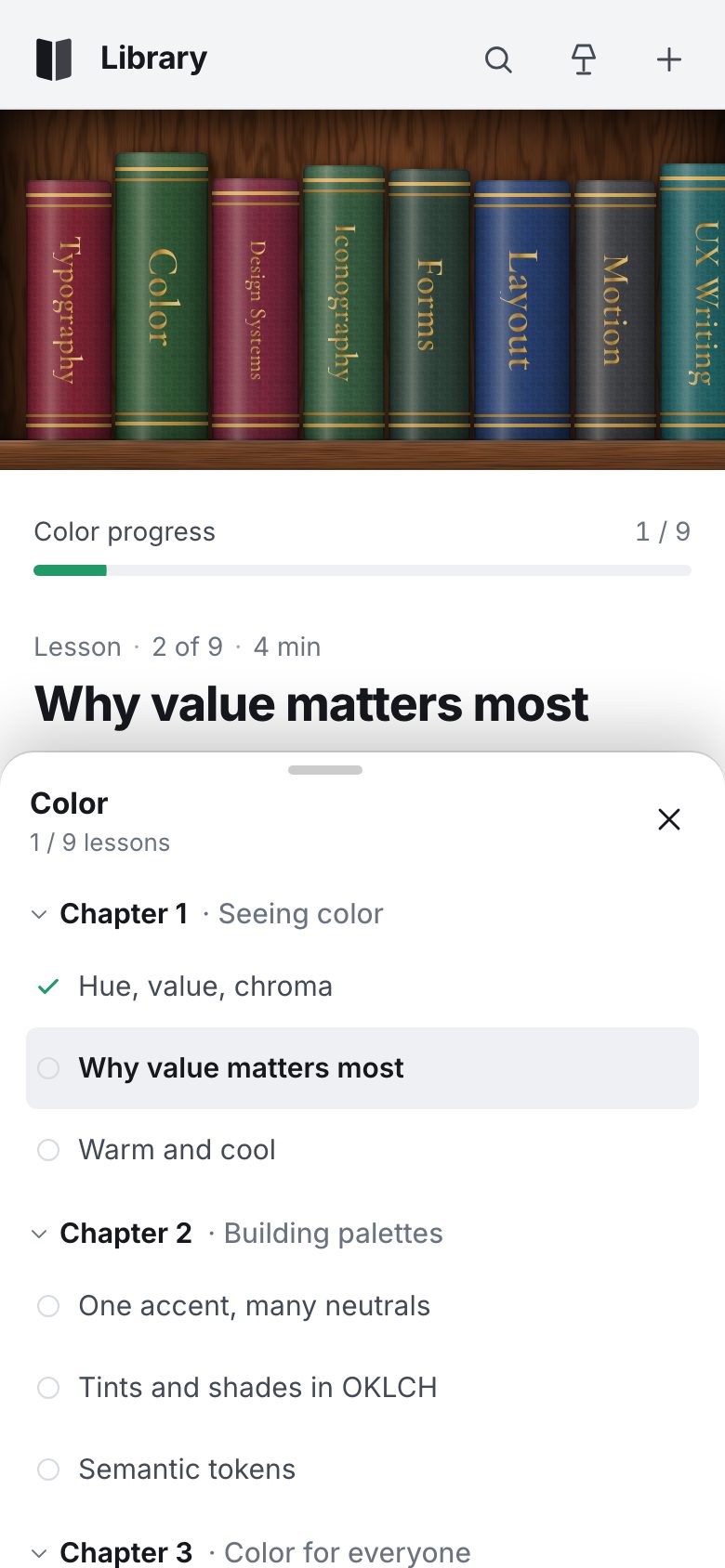
});Under 720 px wide the page is a phone. The case moves under the header as a strip on one board, and the shelf switches to the strip config: one upright row as long as it needs, that scrolls sideways.
function decideLayout() {
  const w = innerWidth;
  if (w < 720) return 'phone';
  return 'desk';
}

function applyLayout(force = false) {
  const next = decideLayout();
  if (next === layout && !force) return;
  layout = next; app.dataset.layout = next;
  shelf.setMode(next === 'phone' ? 'strip' : 'desk');
  requestAnimationFrame(() => markFit());
}

let ro = new ResizeObserver(() => { shelf.layout(false); applyLayout(); });
ro.observe(scene);.app[data-layout="phone"] { grid-template-columns: minmax(0, 1fr); grid-template-rows: auto var(--strip-h) minmax(0, 1fr); grid-template-areas: "side" "case" "main"; }
.app[data-layout="phone"] .side { padding: 6px 8px 0 14px; border-right: 0; border-bottom: 1px solid var(--line); }
.app[data-layout="phone"] .side__top { min-height: 52px; }
.app[data-layout="phone"] .case { --frame: 0px; box-shadow: inset 0 10px 14px -6px rgba(0, 0, 0, .55); }
.app[data-layout="phone"] .case::before { inset: 0 0 16px 0; }
.app[data-layout="phone"] .case::after { /* the board the books stand on */
content: ''; position: absolute; left: 0; right: 0; bottom: 0; height: 16px; z-index: 1;
background: linear-gradient(180deg, rgba(255, 228, 196, .25), rgba(0, 0, 0, 0) 30%, rgba(0, 0, 0, .35)), url(../shared/tex/walnut_h.webp) 0 50% / 1600px 100%, var(--walnut-500);
box-shadow: 0 -1px 0 rgba(0, 0, 0, .4); }
.case__scene[data-mode="strip"] { inset: 0; overflow-x: auto; overflow-y: hidden; scrollbar-width: none; overscroll-behavior-x: contain; z-index: 2; }
.case__scene[data-mode="strip"]::-webkit-scrollbar { display: none; }
.case__scene[data-mode="strip"] .book { touch-action: pan-x; }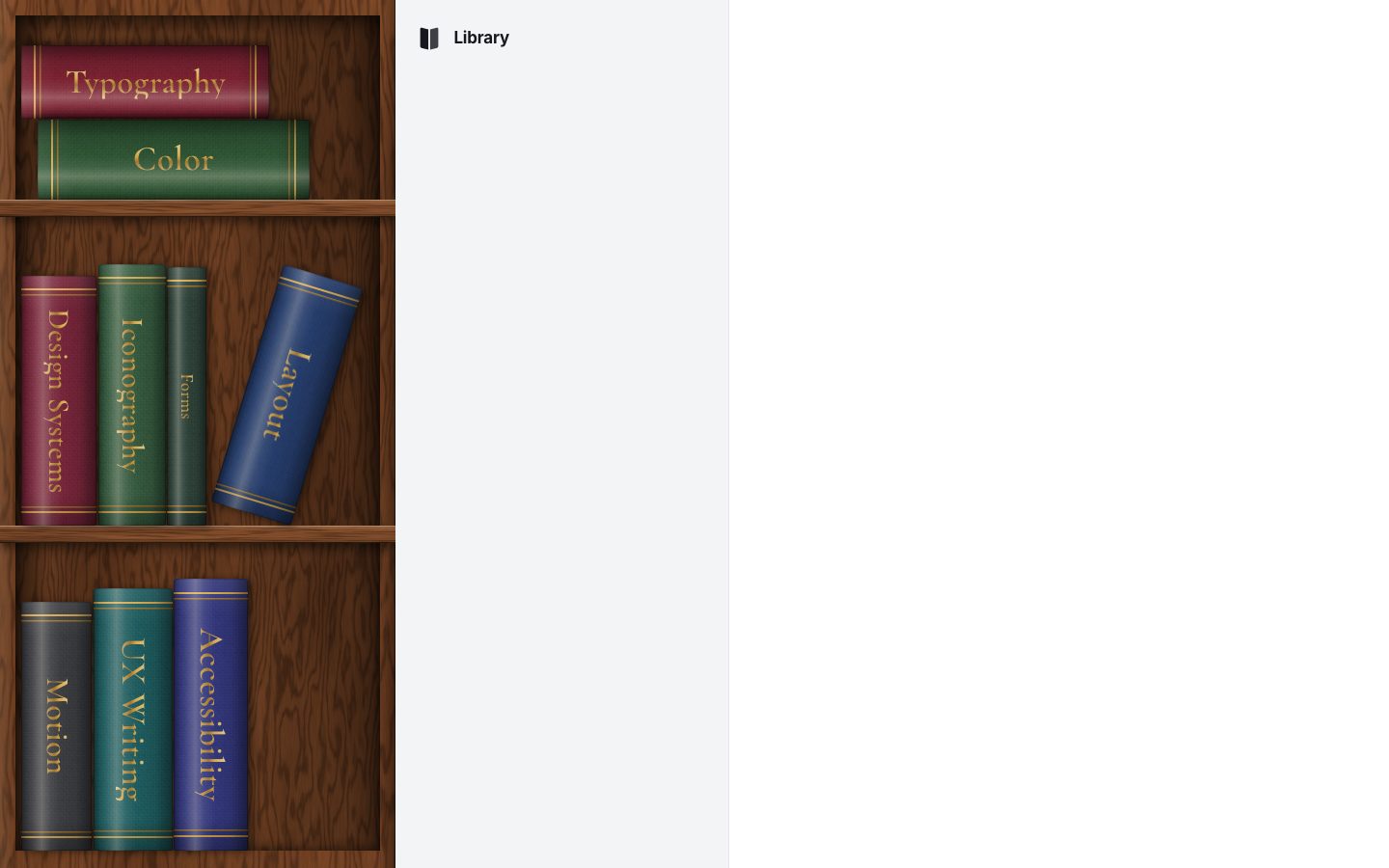
2 · Hover, keys and the open book
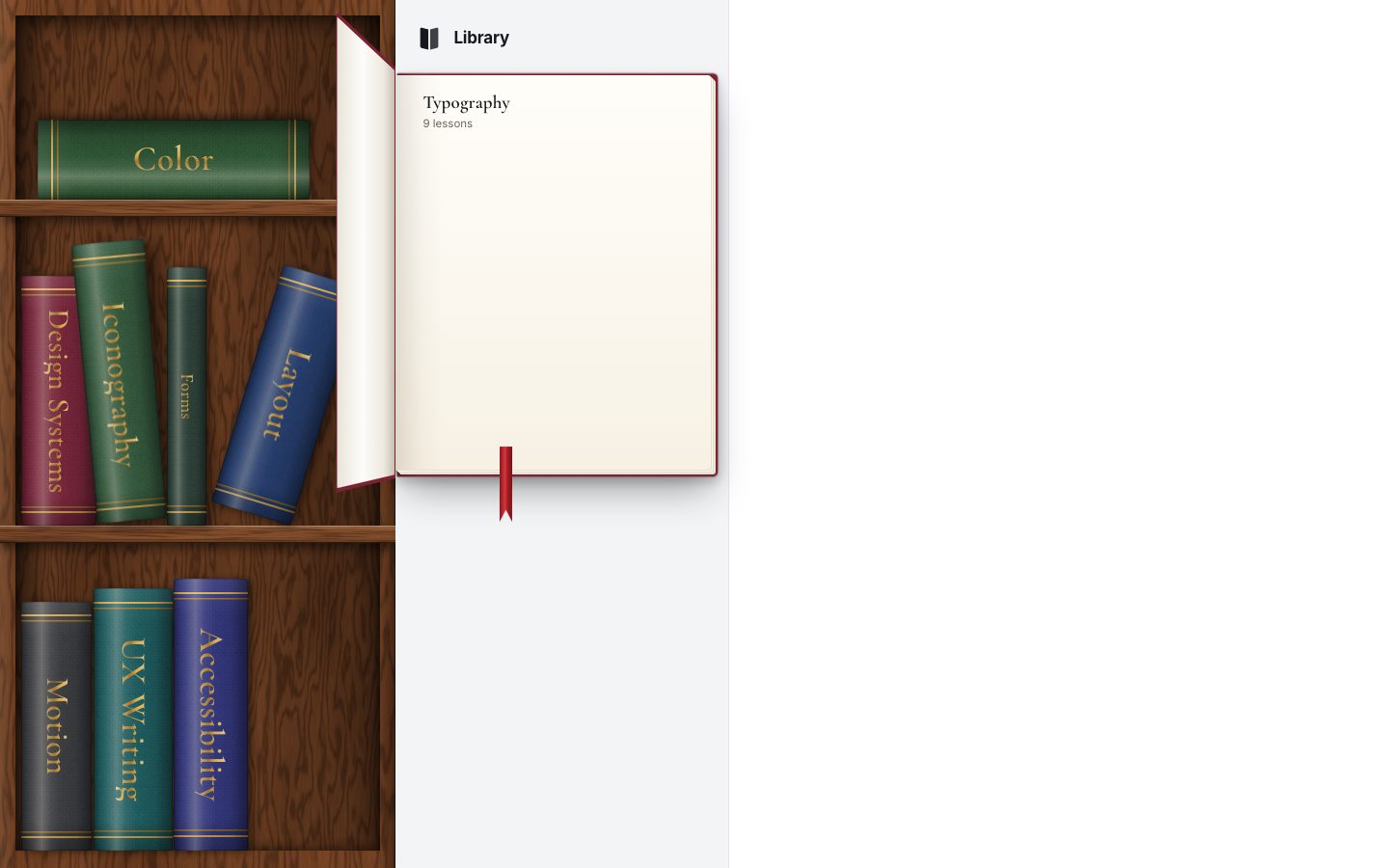
A spine has three more faces, drawn in 3D around it: the cover's side, the back and the page tops. They are hidden at rest, so the shelf reads head-on like a photo, and show only while a book tips out. Under the pointer a standing book comes 16 px forward, rises 5 px and turns (−9° about x, −5° about z) in its own 760 px perspective. The perspective is on that one book, not on the shelf, so the other spines are never resampled.
/* page tops only show when a book is tipped out (hover, drag): at rest the shelf reads head-on, as in the concept */
.book__top, .book__cover, .book__back { opacity: 0; transition: opacity .2s; }
.book:hover .book__top, .book:focus-visible .book__top, .book:hover .book__cover, .book:hover .book__back { opacity: 1; }@media (hover: hover) {
.slot:not(.is-dragging):not(.is-flat):not(.is-out) .book:hover .book__lift { transform: perspective(760px) translateZ(16px) translateY(-5px) rotateX(-9deg) rotateZ(-5deg); }
.slot:not(.is-dragging).is-flat:not(.is-out) .book:hover .book__lift { transform: perspective(760px) translateZ(12px) translateX(5px); }
.slot:not(.is-dragging):not(.is-out) .book:hover .book__spine { box-shadow: 10px 6px 16px rgba(0, 0, 0, .55), inset 0 0 0 1px rgba(0, 0, 0, .28); }
}
.slot:not(.is-out) .book:focus-visible .book__lift { transform: translateY(-3px); }
.slot.is-out .book__lift { transform: perspective(760px) translateZ(70px) translateY(-8px); opacity: 0; transition: transform .3s cubic-bezier(.3, .7, .3, 1), opacity .16s linear .14s; }The shelf is one stop in the tab order: a roving tabindex. Arrow keys, Home and End walk the books; on a
phone the strip scrolls the focused book into view. Enter or a click is the button's click, and the engine passes it to
the page.
setTabStop(id) {
  const ids = this.all; if (!ids.length) return;
  if (!id || !this.nodes.has(id)) id = this.sel && this.nodes.has(this.sel) ? this.sel : ids[0];
  this.focusId = id;
  for (const [k, li] of this.nodes) li.firstChild.tabIndex = k === id ? 0 : -1;
}

focus(id) { this.setTabStop(id); this.nodes.get(id)?.firstChild.focus({ preventScroll: this.mode === 'desk' }); this.reveal(id); }ul.addEventListener('keydown', (e) => {
const b = e.target.closest('.book'); if (!b) return;
const ids = this.all, id = b.dataset.id, i = ids.indexOf(id);
const fwd = e.key === 'ArrowRight' || e.key === 'ArrowDown', back = e.key === 'ArrowLeft' || e.key === 'ArrowUp';
let j = null;
if (fwd) j = Math.min(ids.length - 1, i + 1); else if (back) j = Math.max(0, i - 1);
else if (e.key === 'Home') j = 0; else if (e.key === 'End') j = ids.length - 1;
if (j !== null) { e.preventDefault(); this.focus(ids[j]); }
});select(id) {
const prev = this.sel; this.sel = id;
for (const [k, li] of this.nodes) {
li.classList.toggle('is-selected', k === id);
const b = li.firstChild; b.setAttribute('aria-expanded', String(k === id)); if (k === id) b.setAttribute('aria-current', 'true'); else b.removeAttribute('aria-current');
}
this.setTabStop(this.focusId && this.nodes.has(this.focusId) ? this.focusId : id);
return prev;
}The open book is a 3D object in the sidebar: a back cover, a spine, the page and a front cover. The page sits exactly at z = 0, so the perspective (2300 px) never scales it and its text stays crisp; the covers sit behind and in front of it.
<div class="tome-wrap" id="tome-wrap">
  <div class="tome" id="tome" hidden>
    <div class="tome__body" id="tome-body">
      <div class="tome__back"></div>
      <div class="tome__block"><i></i></div>
      <div class="tome__spine"><span class="tome__spine-t"></span></div>
      <section class="tome__page" id="tome-page" aria-labelledby="tome-title">
        <h2 class="tome__title" id="tome-title"></h2>
        <p class="tome__meta" id="tome-meta"></p>
      </section>
      <div class="tome__front" id="tome-front">
        <div class="tome__out"><span class="tome__foil"></span></div>
        <div class="tome__in"></div>
      </div>
      <i class="tome__ribbon" aria-hidden="true"></i>
    </div>
  </div>
  <p class="side__empty" id="side-empty" hidden>Pick a book from the shelf to open its chapters.</p>
</div>.tome-wrap { position: relative; flex: 1; min-height: 0; perspective: 2300px; perspective-origin: 18% 42%; }
.side__empty { position: absolute; left: 0; right: 0; top: 30%; padding: 0 18px; text-align: center; color: var(--muted); font-size: 14px; }
.tome { position: absolute; left: -20px; top: 14px; width: var(--tw, 260px); height: var(--th, 330px); transform-style: preserve-3d; }
.tome__body { position: absolute; inset: 0; transform-style: preserve-3d; transform-origin: 50% 50%; }
.tome__back { position: absolute; inset: -8px -12px -9px 0; border-radius: 2px 6px 6px 2px; transform: translateZ(calc(var(--tt, 26px) * -1));
background: linear-gradient(90deg, rgba(0, 0, 0, .3), rgba(0, 0, 0, 0) 6%), url(../shared/tex/cloth.png) 0 0 / 96px 96px, var(--c); background-blend-mode: normal, overlay;
box-shadow: 0 22px 38px -8px rgba(0, 0, 0, .35), 0 5px 12px rgba(0, 0, 0, .2); }
.tome__block { display: none; }
.tome__spine { position: absolute; left: 0; top: -6px; bottom: -7px; width: var(--tt, 26px); transform-origin: 0 50%; transform: translateZ(calc(var(--tt, 26px) * -1)) rotateY(-90deg); backface-visibility: hidden;
background: linear-gradient(90deg, rgba(0, 0, 0, .4), rgba(255, 255, 255, .14) 35%, rgba(0, 0, 0, .35)), url(../shared/tex/cloth.png) 0 0 / 96px 96px, var(--c); background-blend-mode: normal, overlay; }
.tome__spine-t { position: absolute; left: 50%; top: 50%; transform: translate(-50%, -50%) rotate(90deg); white-space: nowrap; font: 600 18px/1 'Cormorant', serif; color: var(--gold); }.tome__page {
position: absolute; inset: 0; display: flex; flex-direction: column; padding: 18px 12px 20px 22px; border-radius: 0 3px 3px 0;
background: linear-gradient(90deg, rgba(70, 50, 20, .14), rgba(70, 50, 20, .035) 8%, rgba(0, 0, 0, 0) 15%), linear-gradient(180deg, #fffdf8, var(--paper) 40%, #f7f1e4);
box-shadow: 1px 1px 0 #e6dfcf, 2px 2px 0 #fbf7ee, 3px 3px 0 #e0d8c6, 4px 4px 0 #f7f2e7, 5px 5px 0 #d9d0bd, 6px 6px 0 rgba(0, 0, 0, .06);
color: var(--paper-ink); --ring: #2563eb;
}Its size follows the sidebar: 22 px wider than it (190 to 380 px) and 1.25 × as tall (200 to 480 px). Its thickness follows the book on the shelf: the spine's thickness over its height, times the open book's height and 0.9, between 18 and 40 px.
function sizeTome() {
  if (layout === 'phone') return;
  const W = wrap.clientWidth, H = wrap.clientHeight;
  const tw = clamp(Math.round(W + 22), 190, 380), th = clamp(Math.round(Math.min(H - 24, tw * 1.25)), 200, 480);
  tomeEl.style.setProperty('--tw', tw + 'px'); tomeEl.style.setProperty('--th', th + 'px');
  if (openId) setThickness(openId);
}
function setThickness(id) {
  const p = shelf.pos.get(id), th = parseFloat(tomeEl.style.getPropertyValue('--th')) || 320;
  const t = p ? clamp(Math.round((p.w / p.h) * th * 0.9), 18, 40) : 26;
  tomeEl.style.setProperty('--tt', t + 'px');
}
Opening is a flight. It starts where the spine is: the open book is moved onto the spine's centre, turned with it,
turned 90° about y so you see its spine, and scaled to the spine's height. A Web Animation of 640 ms brings it home
through a point a third of the way, 26 px higher and 70 px nearer, half turned (38°). The slot it came from is marked
is-out, so its spine rushes forward and fades, and the slot stays empty while the book is out.
function spineStart(id) {
  const li = shelf.node(id), p = shelf.pos.get(id); if (!li || !p) return null;
  const r = li.getBoundingClientRect(), t = tomeEl.getBoundingClientRect();
  const th = t.height || 1;
  return { dx: r.left + r.width / 2 - (t.left + t.width / 2), dy: r.top + r.height / 2 - (t.top + t.height / 2), s: clamp(p.h / th, 0.25, 1.4), rot: p.rot + (p.lean || 0) };
}
470 ms in, the front cover swings open to −97° in 0.68 s, on a curve that overshoots, and the red ribbon swings once
(1.6 s). A counter (seq) makes a newer click cancel an older flight at every step.
async function openTome(id, animate = true) {
  const k = ++seq, c = courses.get(id);
  for (const a of body.getAnimations()) a.cancel();
  openId = id; shelf.select(id);
  dressTome(c);
  if (layout === 'phone') { tomeEl.hidden = true; $('#side-empty').hidden = true; return; }
  $('#side-empty').hidden = true;
  tomeEl.hidden = false;
  if (!animate || reducedMotion()) {
    tomeEl.classList.add('no-anim', 'is-open'); shelf.node(id)?.classList.add('is-out');
    await raf(); tomeEl.classList.remove('no-anim'); return;
  }
  tomeEl.classList.add('no-anim'); tomeEl.classList.remove('is-open', 'is-settled');
  const st = spineStart(id);
  await raf(); if (k !== seq) return;
  tomeEl.classList.remove('no-anim');
  shelf.node(id)?.classList.add('is-out');
  if (st) {
    body.animate([
      { transform: `translate3d(${st.dx}px, ${st.dy}px, 0) rotate(${st.rot}deg) rotateY(90deg) scale(${st.s})`, opacity: 0.0, offset: 0 },
      { opacity: 1, offset: 0.12 },
      { transform: `translate3d(${st.dx * 0.32}px, ${st.dy * 0.32 - 26}px, 70px) rotate(${st.rot * 0.25}deg) rotateY(38deg) scale(${(st.s + 1) / 2 * 1.04})`, offset: 0.52 },
      { transform: 'translate3d(0, 0, 0) rotate(0deg) rotateY(0deg) scale(1)', opacity: 1, offset: 1 },
    ], { duration: 640, easing: 'cubic-bezier(.3,.66,.22,1)' });
  }
  await sleep(st ? 470 : 0); if (k !== seq) return;
  tomeEl.classList.add('is-open');
  await sleep(700); if (k !== seq) return;
  tomeEl.classList.add('is-settled');
}.tome__front { position: absolute; inset: -8px -12px -9px 0; transform-origin: 0 50%; transform-style: preserve-3d;
transform: translateZ(1px) rotateY(0deg); transition: transform .68s cubic-bezier(.3, 1.22, .45, 1); }
.tome.is-open .tome__front { transform: translateZ(1px) rotateY(-97deg); }
.tome:not(.is-open) .tome__front { transition-duration: .34s; transition-timing-function: cubic-bezier(.5, 0, .6, 1); }.tome__ribbon { position: absolute; left: 33%; top: calc(100% - 24px); width: 13px; height: 78px; transform: translateZ(.5px); transform-origin: 50% 0;
background: linear-gradient(90deg, #8f141c, #d23a40 45%, #a81c24 60%, #7d1118); clip-path: polygon(0 0, 100% 0, 100% 100%, 50% 84%, 0 100%); opacity: 0; transition: opacity .2s; }
.tome.is-open .tome__ribbon { opacity: 1; transition: opacity .3s .4s; animation: ribbon 1.6s .45s cubic-bezier(.3, .6, .4, 1) both; }
@keyframes ribbon { 0% { transform: translateZ(.5px) rotate(14deg); } 35% { transform: translateZ(.5px) rotate(-8deg); } 65% { transform: translateZ(.5px) rotate(3.5deg); } 100% { transform: translateZ(.5px) rotate(0deg); } }Closing runs it backwards: the cover shuts in 0.34 s, then the book flies home in 440 ms, and 330 ms in the spine reappears in its slot. Picking another book closes the open one first.
async function closeTome(animate = true) {
  const k = ++seq, id = openId; if (!id) return;
  openId = null;
  if (layout === 'phone' || !animate || reducedMotion()) {
    tomeEl.classList.remove('is-open', 'is-settled'); tomeEl.hidden = true; $('#side-empty').hidden = layout === 'phone'; shelf.node(id)?.classList.remove('is-out'); shelf.select(null);
    return;
  }
  tomeEl.classList.remove('is-open', 'is-settled');
  await sleep(300); if (k !== seq) return;
  const st = spineStart(id);
  if (st) {
    const a = body.animate([
      { transform: 'translate3d(0, 0, 0) rotate(0deg) rotateY(0deg) scale(1)', opacity: 1 },
      { transform: `translate3d(${st.dx * 0.3}px, ${st.dy * 0.3 - 20}px, 60px) rotate(${st.rot * 0.3}deg) rotateY(40deg) scale(${(st.s + 1) / 2})`, opacity: 1, offset: 0.45 },
      { transform: `translate3d(${st.dx}px, ${st.dy}px, 0) rotate(${st.rot}deg) rotateY(90deg) scale(${st.s})`, opacity: 0.2 },
    ], { duration: 440, easing: 'cubic-bezier(.5,0,.3,1)', fill: 'forwards' });
    await sleep(330); if (k !== seq) { a.cancel(); return; }
    shelf.node(id)?.classList.remove('is-out');
    await sleep(110); if (k !== seq) { a.cancel(); return; }
    a.cancel();
  } else shelf.node(id)?.classList.remove('is-out');
  if (k !== seq) return;
  tomeEl.hidden = true; $('#side-empty').hidden = false;
}async function switchTo(id, animate) {
if (openId === id) return;
if (openId && layout !== 'phone') { await closeTome(animate); }
await openTome(id, animate);
}function pickCourse(id) {
if (id === openId && layout !== 'phone') { closeTome(); say(`${courses.get(id).title} closed`); return; }
const c = courses.get(id);
switchTo(id, true);
say(`${c.title} opened. ${c.lessons.length} lessons.`);
}
3 · Chapters, lessons and progress
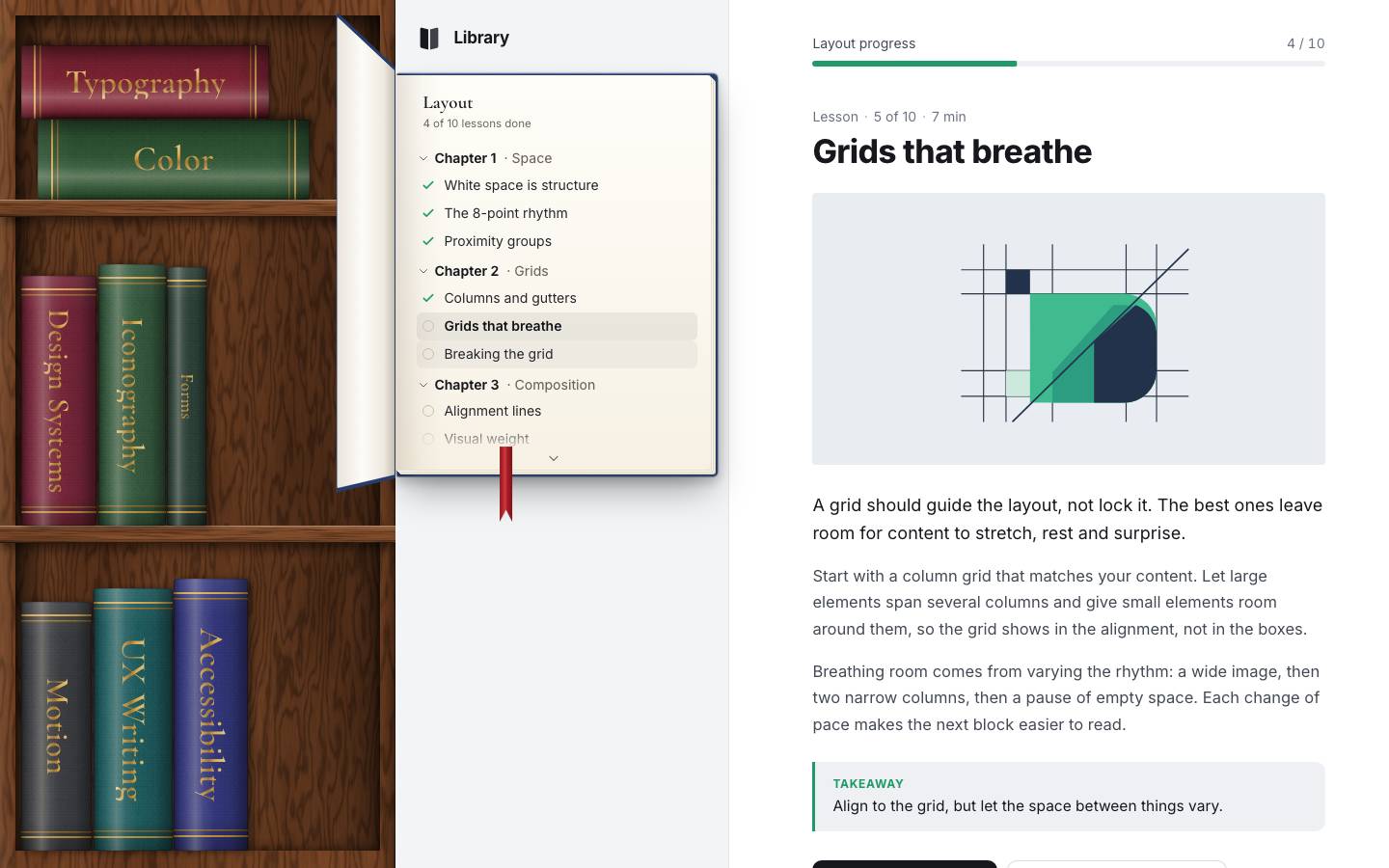
The courses are real: 9 courses and 66 short lessons in data.js, each with a lead, two paragraphs and a
takeaway, and a picture drawn for it in SVG by art.js. What you have done is kept in
localStorage, through a small store that keeps working in memory when storage is blocked (a private
window) and saves 250 ms after the last change. Nine lessons start ticked off so the page shows progress.
export function store(key, defaults) {
  let data;
  try { data = JSON.parse(localStorage.getItem(key)); } catch (e) { data = null; }
  data = Object.assign(structuredClone(defaults), data || {});
  let t = 0;
  const api = {
    data,
    save(now = false) {
      clearTimeout(t);
      const w = () => { try { localStorage.setItem(key, JSON.stringify(data)); } catch (e) { /* storage unavailable: keep working in memory */ } };
      if (now) w(); else t = setTimeout(w, 250);
    },
    reset() { try { localStorage.removeItem(key); } catch (e) {} },
  };
  addEventListener('pagehide', () => api.save(true));
  return api;
}const DEFAULT_DONE = ['layout/white-space-is-structure', 'layout/the-8-point-rhythm', 'layout/proximity-groups', 'layout/columns-and-gutters',
'typography/anatomy-of-a-letter', 'typography/choosing-a-typeface', 'typography/type-on-screens', 'color/hue-value-chroma', 'motion/motion-carries-meaning'];
const S = store('shelf.library.v1', {
done: Object.fromEntries(DEFAULT_DONE.map((k) => [k, 1])),
current: 'layout/grids-that-breathe', last: {}, closed: false,
});
const lessonById = (id) => { const [c] = id.split('/'); return courses.get(c)?.lessons.find((l) => l.id === id) || null; };
const doneCount = (c) => c.lessons.reduce((n, l) => n + (S.data.done[l.id] ? 1 : 0), 0);
const resumeLesson = (c) => lessonById(S.data.last[c.id] || '') || c.lessons.find((l) => !S.data.done[l.id]) || c.lessons[0];The chapters are an ARIA tree: chapters are expandable groups, lessons are tree items and links, and the lesson on
screen has aria-current="page". The tree is rewritten only when the book changes; after that,
updateTree() touches only the attributes that changed.
function treeHTML(c) {
  return `<ul class="tree" id="tree" role="tree" aria-label="${esc(c.title)} chapters">${c.chapters.map((ch) => `
    <li class="ch" role="treeitem" aria-level="1" aria-expanded="true" tabindex="-1" data-ch="${ch.index}">
      <span class="ch__t"><span class="ch__chev" aria-hidden="true">${icon('chevD')}</span><span class="ch__n">Chapter ${ch.index}</span><span class="ch__name">${esc(ch.title)}</span></span>
      <ul role="group">${ch.lessons.map((l) => `<li role="none"><a class="ls" role="treeitem" aria-level="2" href="#/${l.id}" tabindex="-1" data-id="${l.id}"><span class="ls__tick" aria-hidden="true">${icon('check')}</span><span class="ls__t">${esc(l.title)}</span><span class="sr-only ls__s"></span></a></li>`).join('')}</ul>
    </li>`).join('')}</ul>`;
}function updateTree() {
const tree = $('#tree'); if (!tree) return;
const cur = S.data.current;
let stop = null;
const setAttr = (el, k, v) => { if (el.getAttribute(k) !== v) { if (v === null) el.removeAttribute(k); else el.setAttribute(k, v); } };
for (const a of tree.querySelectorAll('.ls')) {
const l = lessonById(a.dataset.id), done = !!S.data.done[l.id], on = l.id === cur;
// touch only what changed: this runs on every route and every keystroke of a search
a.classList.toggle('is-done', done);
setAttr(a, 'aria-selected', String(on));
setAttr(a, 'aria-current', on ? 'page' : null);
if (on) stop = a;
const s = a.querySelector('.ls__s'), st = done ? ', completed' : ''; if (s.textContent !== st) s.textContent = st;
}
const want = stop || tree.querySelector('[role=treeitem]');
if (want.tabIndex !== 0 || tree.querySelectorAll('[tabindex="0"]').length !== 1) { for (const it of tree.querySelectorAll('[role=treeitem]')) if (it !== want && it.tabIndex !== -1) it.tabIndex = -1; want.tabIndex = 0; }
}The tree's keys follow the pattern: ↑ ↓ Home End walk the visible items, → opens a chapter or steps into it, ← closes it or steps out, Enter opens. Escape shuts the book and gives the focus back to its spine.
document.addEventListener('keydown', (e) => {
  const it = e.target.closest?.('#tree [role=treeitem]'); if (!it) return;
  const tree = it.closest('[role=tree]'), vis = visibleItems(tree), i = vis.indexOf(it), isCh = it.classList.contains('ch');
  let handled = true;
  switch (e.key) {
    case 'ArrowDown': if (vis[i + 1]) focusItem(vis[i + 1]); break;
    case 'ArrowUp': if (vis[i - 1]) focusItem(vis[i - 1]); break;
    case 'Home': focusItem(vis[0]); break;
    case 'End': focusItem(vis[vis.length - 1]); break;
    case 'ArrowRight': if (isCh) { if (it.getAttribute('aria-expanded') === 'false') toggleCh(it, true); else focusItem(it.querySelector('.ls')); } break;
    case 'ArrowLeft': if (isCh) { if (it.getAttribute('aria-expanded') === 'true') toggleCh(it, false); } else focusItem(it.closest('.ch')); break;
    case 'Enter': case ' ': if (isCh) toggleCh(it); else { location.hash = it.getAttribute('href'); } break;
    case 'Escape': if (layout !== 'phone' && openId) { const id = openId; closeTome(); S.data.closed = true; S.save(); shelf.focus(id); } else handled = false; break;
    default: handled = false;
  }
  if (handled) { e.preventDefault(); e.stopPropagation(); }
});
The URL holds the lesson (#/layout/grids-that-breathe), so every lesson can be linked and the back
button works. On a route the book opens first and the lesson is written a frame later; the lesson itself arrives over
three frames (heading, then the picture, then the text), so no frame carries the whole job on a slow phone.
async function route() {
  let l = lessonById(parseHash() || '') || lessonById(S.data.current) || courses.get('layout').lessons[4];
  if (!parseHash()) history.replaceState(null, '', `#/${l.id}`);
  const animate = !first; first = false;
  const changedLesson = S.data.current !== l.id || !article.firstChild;
  S.data.current = l.id; S.data.last[l.course] = l.id; S.data.closed = false; S.save();
  if (openId !== l.course) {
    // open the book first, the lesson one frame later: no frame carries both jobs
    switchTo(l.course, animate);
    updateTree();
    if (animate) { await raf(); await raf(); } // the tree lays out in its own frame before the lesson is written
  } else { updateTree(); }
  if (changedLesson) { if (animate) $('#lesson').scrollTop = 0; renderLesson(l, !animate); }
  else updateProgress(courses.get(l.course), false);
  document.title = `${l.title} · ${courses.get(l.course).title} · Library`;
}function renderLesson(l, sync = false) {
const c = courses.get(l.course), i = c.lessons.indexOf(l), next = c.lessons[i + 1];
const done = !!S.data.done[l.id];
const k = ++renderSeq;
// two frames: the heading and picture first, the text a frame later (each half fits a frame on a slow phone)
article.innerHTML = `
<p class="lesson__eyebrow">Lesson <span class="lesson__dot">·</span> ${l.n} of ${c.lessons.length} <span class="lesson__dot">·</span> ${l.min} min</p>
<h1 class="lesson__title" id="lesson-title">${esc(l.title)}</h1>
<figure class="lesson__art"></figure>
<div class="lesson__text"></div>`;
const pic = art(c.art, l.n, l.title);
const rest = `
<p class="lesson__lead">${esc(l.lead)}</p>
${l.body.map((p) => `<p>${esc(p)}</p>`).join('')}
<aside class="lesson__tip" aria-label="Takeaway"><span class="lesson__tip-k">Takeaway</span>${esc(l.tip)}</aside>
<div class="lesson__nav">
<button class="btn btn--done${done ? ' is-done' : ''}" type="button" id="done" aria-pressed="${done}">${icon('check')}<span>${done ? 'Completed' : 'Mark as complete'}</span></button>
${next ? `<a class="btn btn--ghost" href="#/${next.id}">Next: ${esc(next.title)} ${icon('arrowR')}</a>` : `<span class="lesson__end">Last lesson in ${esc(c.title)}</span>`}
</div>`;
// three frames on the way in: heading, then the picture (SVG text is the costly part), then the text
const fillArt = () => { if (k === renderSeq) article.querySelector('.lesson__art').innerHTML = pic; };
const fill = () => { if (k === renderSeq) { const t = article.querySelector('.lesson__text'); t.innerHTML = rest; markFit(t); } };
if (sync) { fillArt(); fill(); } else requestAnimationFrame(() => { fillArt(); requestAnimationFrame(fill); });
updateProgress(c, false);
}Picking a book now opens it where you left off: the last lesson you read in it, or its first unfinished one.
function pickCourse(id) {
  if (id === openId && layout !== 'phone') { closeTome(); S.data.closed = true; S.save(); say(`${courses.get(id).title} closed`); return; }
  if (id === openId && layout === 'phone') { sheet.set('half'); return; }
  const c = courses.get(id), l = resumeLesson(c);
  if (layout === 'phone') setTimeout(() => sheet.set('half'), 30);
  if (location.hash === `#/${l.id}`) { switchTo(id, true); updateTree(); }
  else location.hash = `#/${l.id}`;
  say(`${c.title} opened. ${doneCount(c)} of ${c.lessons.length} lessons done.`);
}
Mark as complete ticks the lesson in the tree, where the check draws itself (a dash offset from 24 to 0 in
0.45 s), moves the progress bar (a scaleX over 0.8 s) and says so in the live region.
article.addEventListener('click', (e) => {
  const b = e.target.closest('#done'); if (!b) return;
  const l = lessonById(S.data.current), c = courses.get(l.course);
  const on = !S.data.done[l.id];
  if (on) S.data.done[l.id] = 1; else delete S.data.done[l.id];
  S.save();
  b.classList.toggle('is-done', on); b.setAttribute('aria-pressed', String(on)); b.querySelector('span').textContent = on ? 'Completed' : 'Mark as complete';
  updateTree(); updateProgress(c);
  const a = $(`#tree .ls[data-id="${CSS.escape(l.id)}"]`); if (a && on) { a.classList.remove('just-done'); void a.offsetWidth; a.classList.add('just-done'); }
  say(on ? `${l.title} completed. ${doneCount(c)} of ${c.lessons.length} done.` : `${l.title} marked as not complete.`);
});.ls__tick svg { width: 16px; height: 16px; stroke-width: 2.4; stroke-dasharray: 24; stroke-dashoffset: 0; transition: stroke-dashoffset .4s cubic-bezier(.4, 0, .2, 1); }
.ls:not(.is-done) .ls__tick { width: 12px; height: 12px; margin: 0 2px; border: 1.5px solid #c9c0ae; border-radius: 50%; }
.ls:not(.is-done) .ls__tick svg { display: none; }
.ls.just-done .ls__tick svg { animation: tick .45s cubic-bezier(.4, 0, .2, 1); }
@keyframes tick { from { stroke-dashoffset: 24; } to { stroke-dashoffset: 0; } }A book you shut stays shut after a reload: the route clears the flag, so it is read first.
const wasClosed = S.data.closed;   // route() opens the current course and clears the flag: read it first
await route();
if (wasClosed && layout !== 'phone') { closeTome(false); S.data.closed = true; S.save(); }
On a phone there is no room for the open book, so the tree moves into a bottom sheet. It snaps to three heights: 74 px (peek), 52 % of the screen and all of it but 64 px. A drag moves it by transform only; past the ends it gives like a rubber band (2.5 × the square root of the overshoot), and on release it goes to the height nearest to where its speed would carry it in 220 ms. Its grip is a button too, for the keyboard and a tap.
const sheet = new Sheet($('#sheet'), {
  handle: $('#sheet-handle'), grip: $('#sheet-grip'),
  snaps: () => ({ peek: 74, half: Math.round(innerHeight * 0.52), full: Math.round(innerHeight - 64) }),
  label: (s) => `Chapters, ${s === 'peek' ? 'lowered' : s === 'half' ? 'half open' : 'open'}. Press to ${s === 'full' ? 'lower' : 'raise'}.`,
  onSnap: (s) => { $('#sheet-x').hidden = s === 'peek'; $('#sheet-body').inert = s === 'peek'; },
});down(e) {
if (!this.enabled || e.button !== 0) return;
if (e.target.closest('button:not(.sheet__grip), a, input, textarea, [role=treeitem], [role=option]')) return;
this.measure();
const y0 = e.clientY, off0 = this.off, max = this.s.full - this.s.peek;
let last = [{ y: y0, t: performance.now() }], dragging = false;
this.moved = false;
const move = (ev) => {
const dy = ev.clientY - y0;
if (!dragging && Math.abs(dy) < 6) return;
if (!dragging) { dragging = true; this.moved = true; this.el.classList.add('no-anim'); this.el.classList.add('is-dragging'); }
let o = off0 + dy;
if (o < 0) o = -Math.sqrt(-o) * 2.5; else if (o > max) o = max + Math.sqrt(o - max) * 2.5; // rubber band
this.off = o; this.el.style.transform = `translate3d(0, ${o}px, 0)`;
last.push({ y: ev.clientY, t: performance.now() }); if (last.length > 6) last.shift();
};
const up = () => {
removeEventListener('pointermove', move); removeEventListener('pointerup', up); removeEventListener('pointercancel', up);
this.el.classList.remove('is-dragging');
if (!dragging) return;
const a = last[0], b = last[last.length - 1], v = (b.y - a.y) / Math.max(16, b.t - a.t); // px per ms
const proj = clamp(this.off + v * 220, 0, max);
const vis = this.s.full - proj;
const pick = Object.entries({ peek: this.s.peek, half: this.s.half, full: this.s.full }).sort((p, q) => Math.abs(p[1] - vis) - Math.abs(q[1] - vis))[0][0];
requestAnimationFrame(() => this.set(pick, true));
setTimeout(() => (this.moved = false), 50);
};
addEventListener('pointermove', move); addEventListener('pointerup', up); addEventListener('pointercancel', up);
}
4 · Search
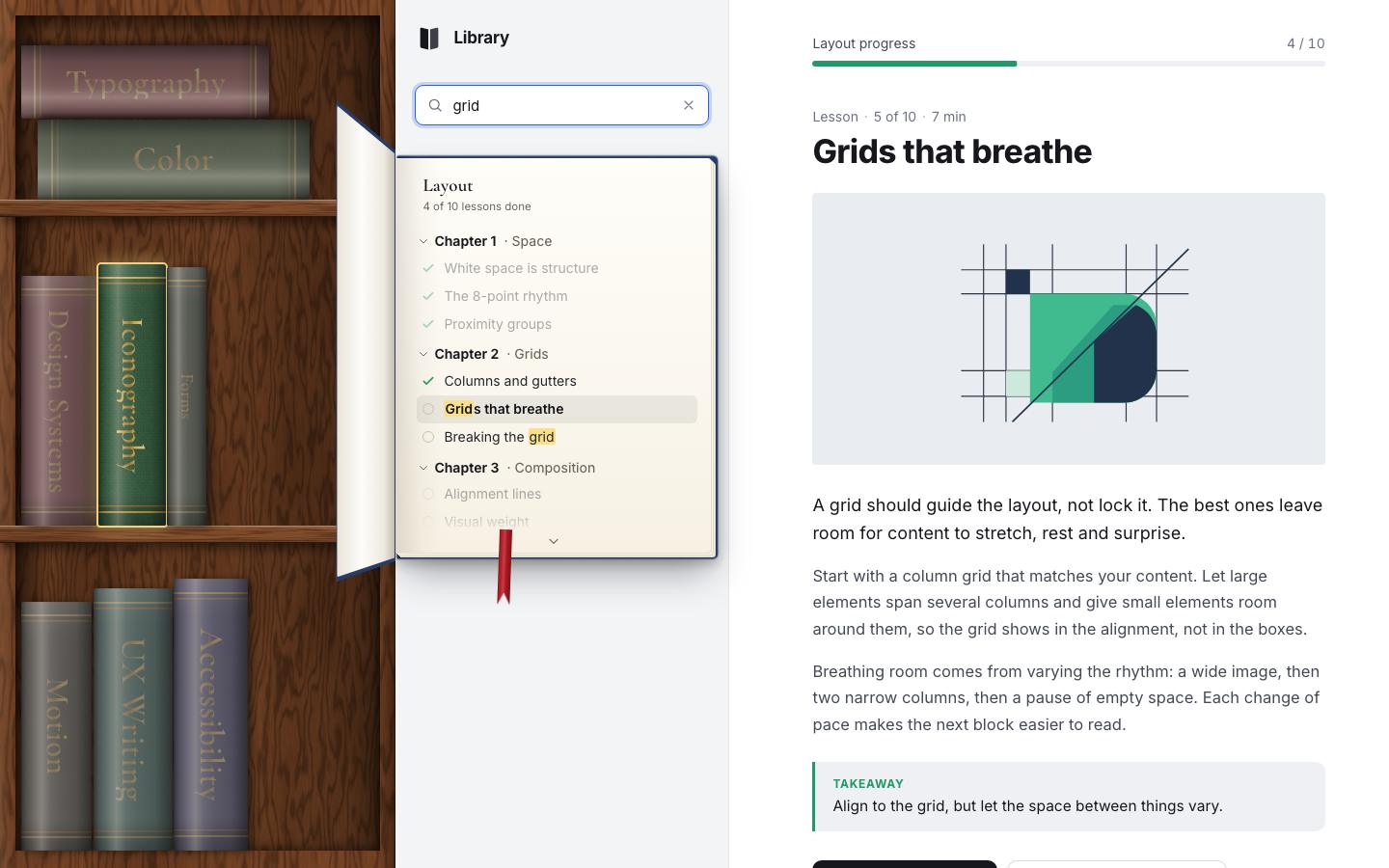
Search looks through the course titles and every lesson's title, lead and text. The books that don't match get a grey veil (68 %); the ones that do get a gold ring and glow. The count is written for screen readers and spoken 450 ms after the last key, so typing is not read out letter by letter.
function runSearch(raw) {
  query = raw.trim();
  $('#q-clear').hidden = !query;
  if (!query) { shelf.setFilter(null); $('#search-count').textContent = ''; updateTree(); return; }
  const q = query.toLowerCase(), hits = new Set();
  for (const c of courses.values()) {
    if (c.title.toLowerCase().includes(q) || c.lessons.some((l) => l.title.toLowerCase().includes(q) || l.lead.toLowerCase().includes(q) || l.body.some((p) => p.toLowerCase().includes(q)))) hits.add(c.id);
  }
  shelf.setFilter(hits);
  updateTree();
  const msg = hits.size ? `${hits.size} ${hits.size === 1 ? 'course matches' : 'courses match'} “${query}”` : `No course matches “${query}”`;
  $('#search-count').textContent = msg;
  clearTimeout(sayT); sayT = setTimeout(() => say(msg), 450);
  return hits;
}setFilter(set) {
this.filter = set;
for (const [id, li] of this.nodes) {
li.classList.toggle('is-dim', !!set && !set.has(id));
li.classList.toggle('is-match', !!set && set.has(id));
}
}.slot.is-dim .book__dim { opacity: .68; }
.slot.is-match .book__spine { box-shadow: 0 0 0 2px #f4d27c, 0 0 20px 2px rgba(244, 210, 124, .5), 4px 1px 8px rgba(0, 0, 0, .5); }Inside the open book, matching lessons are marked and the others fade to 38 %. The marking escapes the text first, so a lesson title can never inject HTML.
const hit = q && (l.title.toLowerCase().includes(q) || l.lead.toLowerCase().includes(q) || l.body.some((p) => p.toLowerCase().includes(q)));
if (a.dataset.q !== q) { a.dataset.q = q; a.querySelector('.ls__t').innerHTML = q ? markText(l.title, query) : esc(l.title); }
a.classList.toggle('is-hit', !!hit);
a.classList.toggle('is-miss', !!q && !hit && !courseTitleHit(l.course));export function markText(text, q) {
if (!q) return esc(text);
const t = String(text), low = t.toLowerCase(), ql = q.toLowerCase();
let out = '', i = 0, j;
while ((j = low.indexOf(ql, i)) !== -1) { out += esc(t.slice(i, j)) + '<mark>' + esc(t.slice(j, j + q.length)) + '</mark>'; i = j + q.length; }
return out + esc(t.slice(i));
}Enter opens the first matching course in shelf order, at the first lesson whose title matches (or else whose text does). Escape clears the field.
q.addEventListener('keydown', (e) => {
  if (e.key === 'Escape') { if (q.value) { q.value = ''; runSearch(''); e.stopPropagation(); } else if (layout === 'phone') searchOpen(false); }
  if (e.key === 'Enter') {
    e.preventDefault(); const hits = runSearch(q.value); if (!hits || !hits.size) return;
    const id = shelf.order.find((k) => hits.has(k)), c = courses.get(id), ql = query.toLowerCase();
    const l = c.lessons.find((x) => x.title.toLowerCase().includes(ql)) || c.lessons.find((x) => x.lead.toLowerCase().includes(ql) || x.body.some((p) => p.toLowerCase().includes(ql))) || resumeLesson(c);
    location.hash = `#/${l.id}`;
    if (layout === 'phone') setTimeout(() => sheet.set('half'), 30);
  }
});
5 · Reordering
A book can be dragged to a new place. With a mouse the drag starts after 6 px. With a finger it starts after a 320 ms long press, and a finger that moves more than 10 px before that is scrolling the strip, not dragging.
down(e) {
  if (e.button !== 0 || this.drag) return;
  const b = e.target.closest('.book'); if (!b) return;
  const id = b.dataset.id;
  if (this.o.canDrag && !this.o.canDrag(id)) return;
  const touch = e.pointerType !== 'mouse';
  const press = this.press = { id, x: e.clientX, y: e.clientY, pid: e.pointerId, touch, t: 0 };
  const move = (ev) => {
    if (ev.pointerId !== press.pid) return;
    if (this.drag) return this.dragMove(ev);
    const dx = ev.clientX - press.x, dy = ev.clientY - press.y, d = Math.hypot(dx, dy);
    if (!press.touch && d > 6) this.startDrag(press, ev);
    else if (press.touch && d > 10) cleanup();      // a finger that moves before the long press is scrolling
  };
  const up = (ev) => {
    if (ev.pointerId !== press.pid) return;
    if (this.drag) { this.endDrag(ev.type === 'pointercancel'); this.suppressClick = true; setTimeout(() => (this.suppressClick = false), 400); }
    cleanup();
  };
  const cleanup = () => { clearTimeout(press.t); removeEventListener('pointermove', move); removeEventListener('pointerup', up); removeEventListener('pointercancel', up); if (this.press === press) this.press = null; };
  addEventListener('pointermove', move); addEventListener('pointerup', up); addEventListener('pointercancel', up);
  if (touch) press.t = setTimeout(() => { if (this.press === press) this.startDrag(press, { clientX: press.x, clientY: press.y }); }, 320);
}
While you drag, the book follows the pointer and tips with its speed, up to 14°, like something held at the top (the speed is smoothed, 0.7 old and 0.3 new). On every move the engine tries every place the book could go, lays the shelf out for each, and keeps the one whose slot is nearest the pointer (height counts 1.3 ×). The others glide into their new slots, and a book dragged into the top compartment lies down while you hold it. Near the strip's ends it scrolls by itself.
dragMove(ev) {
  const D = this.drag; if (!D) return;
  if (this.mode !== 'desk') { const r = this.ul.getBoundingClientRect(); D.ox = r.left; D.oy = r.top; }   // the strip may have scrolled
  const cx = ev.clientX - D.ox - D.gx, cy = ev.clientY - D.oy - D.gy;
  // the book follows the pointer and tips with its speed, like something held at the top
  D.vx = D.vx * 0.7 + (ev.clientX - D.lastX) * 0.3; D.lastX = ev.clientX;
  D.tilt = clamp(D.vx * 1.4, -14, 14);
  const base = { ...this.pos.get(D.id) || D.base };
  const c0 = Shelf.center(base);
  const q = { ...base, x: base.x + (cx - c0.x), y: base.y + (cy - c0.y), lean: 0 };
  D.li.style.transform = Shelf.transform(q, D.tilt);
  // nearest slot: try every insertion point, keep the closest
  const rest = this.order.filter((k) => k !== D.id);
  let best = D.idx, bd = Infinity, bestPos = null;
  for (let i = 0; i <= rest.length; i++) {
    const ord = [...rest.slice(0, i), D.id, ...rest.slice(i)];
    const pos = this.compute(ord, this.cfg, true); if (!pos) continue;
    const c = Shelf.center(pos.get(D.id)), dd = Math.hypot(c.x - cx, (c.y - cy) * 1.3);
    if (dd < bd) { bd = dd; best = i; bestPos = pos; }
  }
  if (best !== D.idx && bestPos) {
    D.idx = best; this.order = [...rest.slice(0, best), D.id, ...rest.slice(best)];
    this.apply(bestPos, D.id); this.o.afterLayout?.(bestPos, this.cfg, this.mode, false);
  }
  // edge auto-scroll in the strip
  const sc = this.scene, sr = sc.getBoundingClientRect();
  if (this.mode === 'strip') { if (ev.clientX < sr.left + 36) sc.scrollLeft -= 10; else if (ev.clientX > sr.right - 36) sc.scrollLeft += 10; }
}.slot.is-dragging .book__lift { transform: perspective(760px) translateZ(36px) scale(1.04); }
.slot.is-dragging .book__spine { box-shadow: 14px 16px 26px rgba(0, 0, 0, .55), inset 0 0 0 1px rgba(0, 0, 0, .3); }On release the book lands. Escape (or a cancelled pointer) puts it back where it was. The order is saved and the move is announced: "Motion moved to position 1 of 9".
endDrag(cancel = false) {
  const D = this.drag; if (!D) return;
  if (cancel) { this.order.splice(this.order.indexOf(D.id), 1); this.order.splice(D.from, 0, D.id); }
  this.drag = null;
  D.li.classList.remove('is-dragging');
  D.li._tr = '';
  this.layout(true); this.syncDom();
  const moved = this.order.indexOf(D.id) !== D.from;
  this.o.onDragEnd?.(D.id, moved);
  if (moved && !cancel) {
    this.o.onReorder?.(this.order, D.id);
    this.o.announce?.(`${this.o.items.get(D.id).title} moved to position ${this.order.indexOf(D.id) + 1} of ${this.order.length}`);
  }
}
The DOM order catches up 760 ms later, after the glide: moving a node in the middle of its transition would cut it. Only the nodes that are out of place move, and the focus is kept.
syncDom() {
  clearTimeout(this._sync);
  this._sync = setTimeout(() => {
    if (this.drag) return this.syncDom();
    const act = document.activeElement;
    // as few moves as possible: a moved node is re-attached and restyled, the rest are left alone
    let cur = this.ul.firstElementChild;
    for (const id of this.all) {
      const n = this.nodes.get(id); if (!n) continue;
      if (n === cur) { cur = cur.nextElementSibling; continue; }
      this.ul.insertBefore(n, cur);
    }
    if (act && this.ul.contains(act) && document.activeElement !== act) act.focus({ preventScroll: true });
  }, 760);
}
Dragging is not the only way. Alt + an arrow key moves the focused book one place (Ctrl + Shift + arrow too), and the ‹ › buttons under the open book move it with a single click, the alternative to dragging that WCAG 2.5.7 asks for.
if ((e.altKey || (e.ctrlKey && e.shiftKey)) && (fwd || back)) {
  e.preventDefault();
  if (this.move(id, fwd ? 1 : -1)) this.o.announce?.(`${this.o.items.get(id).title} moved to position ${this.order.indexOf(id) + 1} of ${this.order.length}`);
  else this.o.announce?.(`${this.o.items.get(id).title} is already ${fwd ? 'last' : 'first'}`);
  return;
}function updateMover() {
const id = openId || S.data.current.split('/')[0], i = shelf.order.indexOf(id);
$('#mover-label').textContent = `${courses.get(id)?.title || ''} · ${i + 1} of ${shelf.order.length}`;
$('#move-prev').disabled = i <= 0; $('#move-next').disabled = i >= shelf.order.length - 1;
}
for (const [sel, d] of [['#move-prev', -1], ['#move-next', 1]]) {
$(sel).addEventListener('click', () => {
const id = openId || S.data.current.split('/')[0];
if (shelf.move(id, d)) { updateMover(); say(`${courses.get(id).title} moved to position ${shelf.order.indexOf(id) + 1} of ${shelf.order.length}`); }
requestAnimationFrame(() => setThickness(id));
});
}
6 · A new course
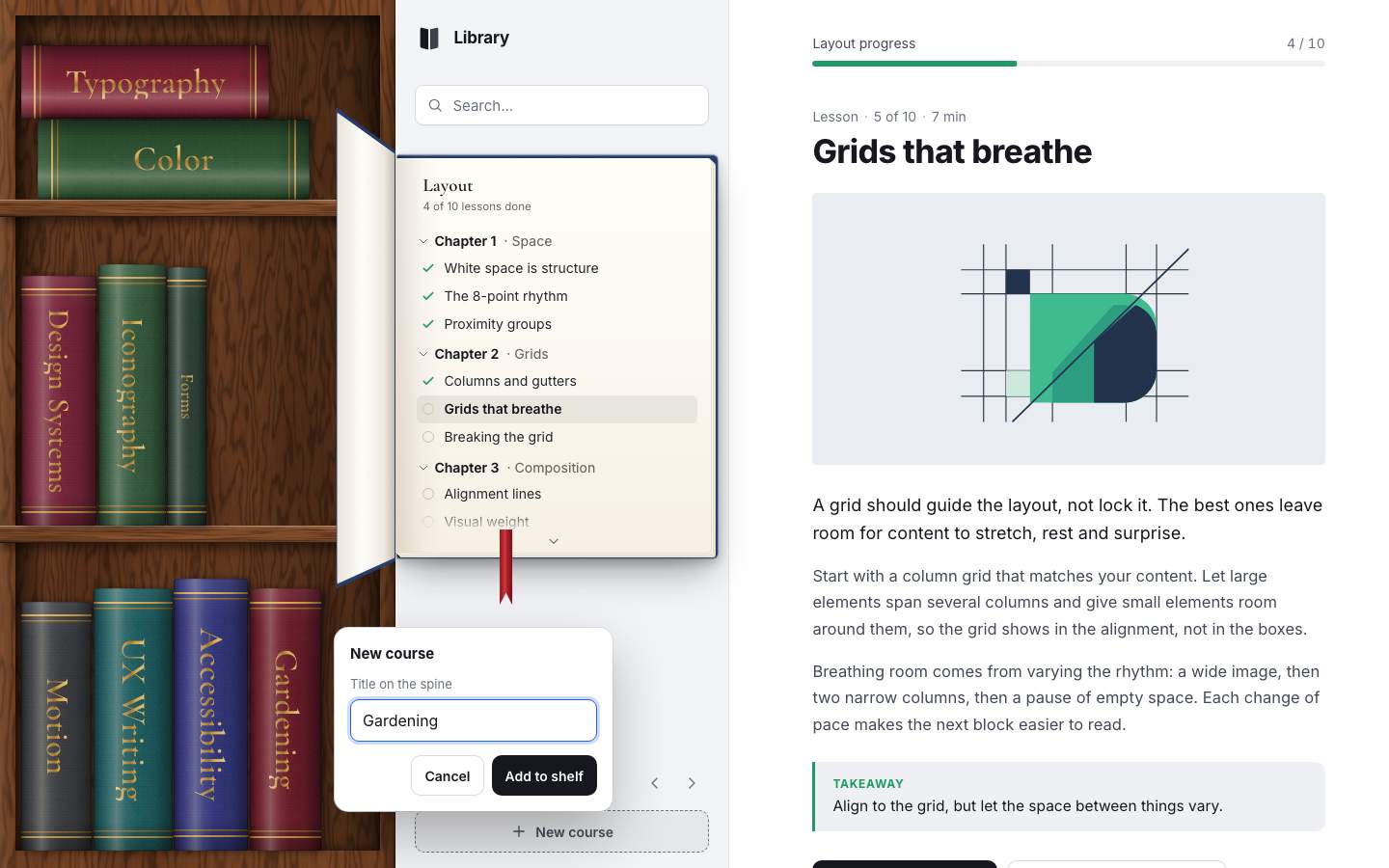
New course (or the + on a phone) adds a book to the end of the shelf. It starts outside the case, 40 px past its right edge and turned 8°, and glides in over 0.9 s. Its cloth is the first of ten colours no other course uses. Up to 14 courses fit.
add(item, from = 'right') {
  this.o.items.set(item.id, item); this.order.push(item.id);
  const li = this.make(item.id);
  this.measure(this.cfg || this.o.configs(this.mode, ...Object.values(this.size()), this.all.length)[0]);
  const d = this.dim.get(item.id); li.style.width = d.w + 'px'; li.style.height = d.h + 'px'; li._w = d.w; li._h = d.h;
  const { W, H } = this.size();
  li.classList.add('is-entering');
  li.style.transition = 'none';
  li.style.transform = from === 'top' ? `translate(${Math.round(W * 0.6)}px, ${Math.round(-d.h - 40)}px) rotate(-14deg)` : `translate(${Math.round(W + 40 + this.scene.scrollLeft)}px, ${Math.round(H * 0.5)}px) rotate(8deg)`;
  li._tr = li.style.transform;
  void li.offsetWidth; li.style.transition = '';
  requestAnimationFrame(() => { this.layout(true); setTimeout(() => li.classList.remove('is-entering'), 900); });
  if (this.filter) this.setFilter(this.filter);
  return li;
}function addCourse() {
if (adding) { popName.focus(); return; }
if (shelf.order.length >= 14) { toast('The shelf is full. Remove a course to add another.'); return; }
const used = new Set([...courses.values()].map((c) => c.color));
const color = CLOTH.find((c) => !used.has(c)) || CLOTH[shelf.order.length % CLOTH.length];
const id = 'c-' + Date.now().toString(36);
const c = prepare(starterCourse(id, 'New course', color));
adding = c;
shelf.add(c, layout === 'desk' ? 'right' : 'right');
popName.value = '';
pop.hidden = false;
placePop(id);
setTimeout(() => placePop(id), 680);
popName.focus();
say('New course added to the shelf. Type its title.');
}A popover beside the new spine takes its title (24 characters at most). The title is set on the spine in gold foil as you type, and the initials for the rail are worked out with it. "Add to shelf" opens the course; it has a real two-lesson outline to start from. Escape or Cancel takes the book away again.
function placePop(id) {
  if (pop.hidden) return;
  const r = shelf.node(id)?.getBoundingClientRect(), pw = pop.offsetWidth, ph = pop.offsetHeight;
  let x, y;
  if (!r || layout === 'phone') { x = (innerWidth - pw) / 2; y = Math.min(innerHeight * 0.3, innerHeight - ph - 20); }
  else { x = r.right + 14; y = r.top + r.height / 2 - ph / 2; if (x + pw > innerWidth - 12) x = r.left - pw - 14; }
  pop.style.transform = `translate3d(${Math.round(clamp(x, 12, innerWidth - pw - 12))}px, ${Math.round(clamp(y, 12, innerHeight - ph - 12))}px, 0)`;
}popName.addEventListener('input', () => {
if (!adding) return;
const t = popName.value.trim() || 'New course';
adding.title = t; adding.abbr = t.split(/\s+/).map((w) => w[0]).join('').slice(0, 2).toUpperCase() || 'N';
shelf.paint(adding.id);
});Your own courses can be removed. The book drops 60 px, turns 10° and fades, and a toast offers Undo for 6 s.
remove(id) {
  const li = this.nodes.get(id); if (!li) return;
  this.order = this.order.filter((k) => k !== id); this.nodes.delete(id); this.o.items.delete(id);
  li.classList.add('is-leaving');
  const p = this.pos.get(id);
  if (p && !reducedMotion()) { li.style.transform = `translate(${Math.round(p.x)}px, ${Math.round(p.y + 60)}px) rotate(${p.rot + 10}deg)`; li.style.opacity = '0'; setTimeout(() => li.remove(), 450); }
  else li.remove();
  this.layout(true);
  if (this.focusId === id) this.setTabStop(null);
}toast(`${c.title} removed`, { label: 'Undo', run: () => {
const back = prepare(starterCourse(saved.id, saved.title, saved.color));
shelf.add(back); shelf.move(back.id, idx - shelf.order.indexOf(back.id));
S.data.custom.push(saved); S.data.order = [...shelf.order]; S.save(); location.hash = `#/${back.lessons[0].id}`;
} });export function toaster(el) {
let t = 0;
return (msg, action) => {
el.innerHTML = ''; const s = document.createElement('span'); s.textContent = msg; el.append(s);
if (action) { const b = document.createElement('button'); b.type = 'button'; b.textContent = action.label; b.onclick = () => { action.run(); el.classList.remove('on'); }; el.append(b); }
el.classList.add('on'); clearTimeout(t); t = setTimeout(() => el.classList.remove('on'), action ? 6000 : 2600);
};
}
7 · The rail and the evening lamp
The case folds into a rail of 78 px: the books lie in one column, 7 px apart, and show their initials instead of a title. The button in the sidebar's header does it, and a window under 1000 px wide or 560 px tall is a rail by itself (the button is hidden then). The open book moves right, so its cover never hides the rail.
function decideLayout() {
  const w = innerWidth, h = innerHeight;
  if (w < 720) return 'phone';
  if (w < 1000 || h < 560 || S.data.rail) return 'rail';
  return 'desk';
}if (mode === 'rail') {
return [{ key: `rail${W}`, rows: [{ mode: 'column', x: 0, top: 10, w: W, h: Infinity, gap: 7 }], unit: { w: 30, h: W - 14 },
extent: { h: (pos) => Math.max(...[...pos.values()].map((p) => p.y)) + 14 } }];
}if (!full && (s.stack + d.w <= R.h + 0.5 || force)) {
pos.set(id, { x: R.x + (R.w - d.h) / 2, y: R.top + s.stack + d.w, rot: -90, w: d.w, h: d.h, row: ri });
s.stack += d.w + (R.gap ?? 6); s.n++; break;
}.case__scene[data-mode="rail"] { inset: 12px 8px 12px 8px; overflow-x: hidden; overflow-y: auto; scrollbar-width: none; }
.case__scene[data-mode="rail"]::-webkit-scrollbar { display: none; }
.case__scene[data-mode="rail"] .book__title { display: none; }
.case__scene[data-mode="rail"] .book__abbr { display: block; }
.case__scene[data-mode="rail"] .book__bands { background-size: 100% 1.5px; }
.app[data-layout="rail"] .case { --frame: 8px; }
.app[data-layout="rail"] .tome { left: 34px; } /* the open cover must not hide the rail */
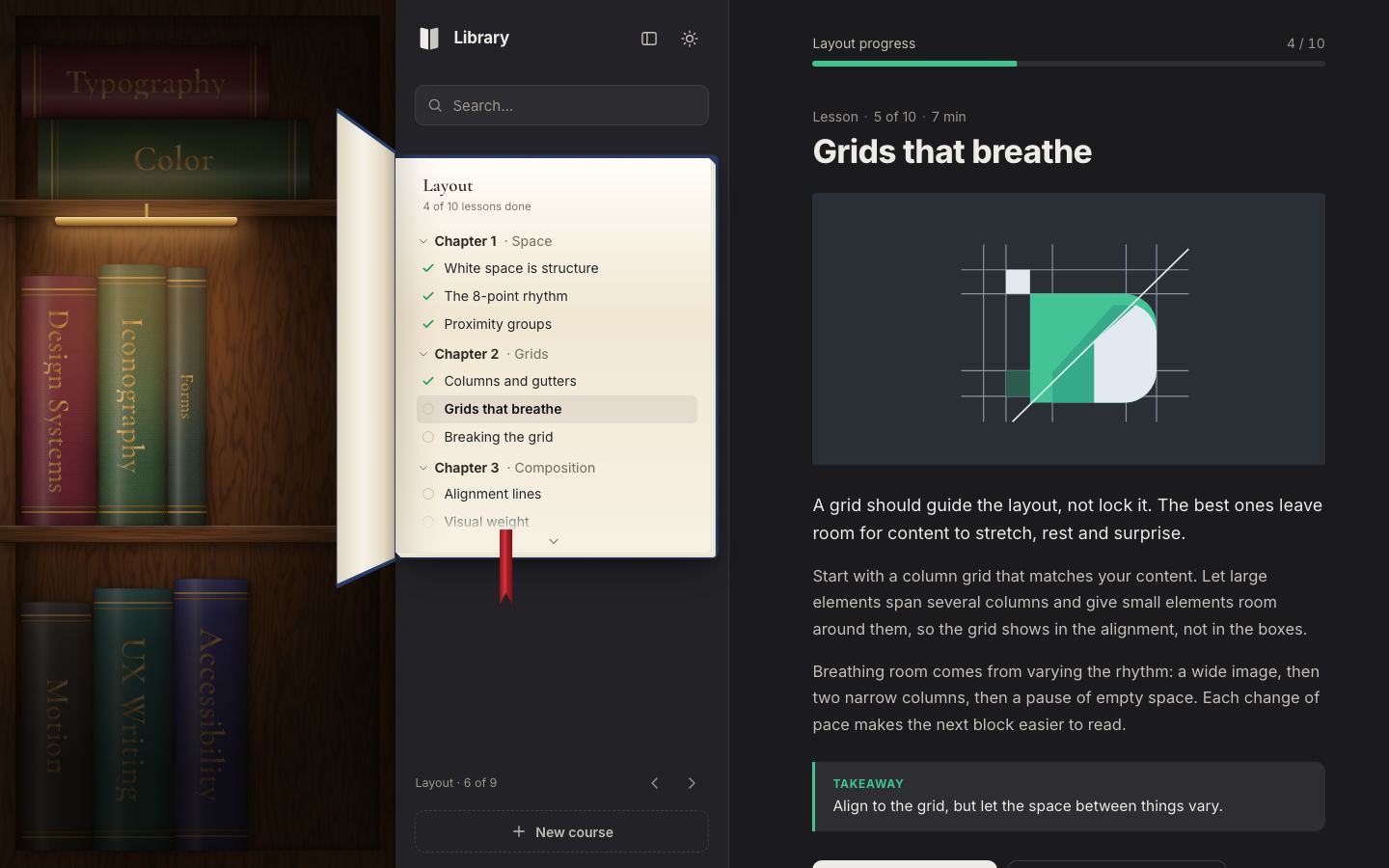
.app[data-layout="rail"] .case::before { inset: 8px; }The evening lamp is the dark theme. The page always opens in the light look; the dark one comes only from the lamp
button and is remembered (shelf.library.theme in localStorage). A one-line script in the
head reads it and sets data-theme before the first paint, so there is no flash; there is no switch on the
system setting, so a Mac in dark mode still opens the daylight study. The case darkens, a brass picture light under the
top board warms the middle shelf, and the pages stay warm cream.
function setTheme(t, persist = true) {
  document.documentElement.dataset.theme = t;
  const dark = t === 'dark';
  $('#theme').innerHTML = icon(dark ? 'sun' : 'lamp');
  $('#theme').setAttribute('aria-pressed', String(dark));
  $('#theme').setAttribute('aria-label', dark ? 'Daylight theme' : 'Evening lamp theme');
  if (persist) try { localStorage.setItem('shelf.library.theme', t); } catch (e) {}
}.case__light { position: absolute; inset: 0; pointer-events: none; z-index: 2; opacity: 0; transition: opacity .8s; }
.case__light::before { content: ''; position: absolute; inset: 0;
background: radial-gradient(ellipse 78% 44% at 36% calc(var(--b0, 30%) + 20%), rgba(255, 196, 120, .06) 0%, rgba(40, 20, 8, .30) 34%, rgba(14, 8, 3, .66) 66%, rgba(8, 5, 2, .82) 100%); }
.case__light::after { content: ''; position: absolute; inset: 0;
background: radial-gradient(ellipse 54% 26% at 34% calc(var(--b0, 30%) + 9%), rgba(255, 170, 84, .30), rgba(255, 140, 60, .10) 50%, transparent 74%); }
.lamp { position: absolute; left: 14%; width: 46%; top: var(--b0, 30%); height: 9px; border-radius: 2px 2px 6px 6px; z-index: 3; opacity: 0; transition: opacity .6s;
background: linear-gradient(180deg, #f6dc9a, #b8873a 60%, #7d5520); box-shadow: 0 2px 4px rgba(0, 0, 0, .5), 0 8px 26px 6px rgba(255, 190, 110, .55); }
.lamp::before { content: ''; position: absolute; left: 50%; top: -14px; width: 4px; height: 14px; transform: translateX(-50%); background: linear-gradient(90deg, #8a6024, #d9b46a, #8a6024); }
:root[data-theme="dark"] .case__light, :root[data-theme="dark"] .lamp { opacity: 1; }
.app[data-layout="rail"] .lamp, .app[data-layout="phone"] .lamp { display: none; }Last, a warm-up. The first tap on a slow phone pays for compiling every function it runs, so once the page is idle it runs the first-open paths on detached nodes: every course's tree and a picture, a lesson and a marked search.
// warm-up: run the first-open code paths once on detached nodes, so the first real tap does not pay for compiling them
const idle = window.requestIdleCallback || ((f) => setTimeout(f, 300));
idle(() => {
  const tmp = document.createElement('div');
  for (const c of courses.values()) { tmp.innerHTML = treeHTML(c); art(c.art, 1, c.title); }
  const l = courses.get('color').lessons[3]; tmp.innerHTML = `${art('color', l.n, l.title)}<p>${esc(l.lead)}</p>${markText(l.title, 'to')}`;
  markFit(tmp); tmp.remove();
});
Reduced motion was built in stage by stage: the book does not fly or swing, books do not glide, and every state changes at once.
@media (prefers-reduced-motion: reduce) {
  .tome__front, .slot, .book__lift { transition-duration: 1ms !important; }
}
Measured with the project's frame probe on a 120 Hz screen (8.3 ms a frame) through a sweep across the spines, three books opened and one closed, a search, a drag and two Alt + arrow moves: no missed frames and no long tasks at 1440 × 900 or on a 390 × 844 phone, even with the CPU slowed 4 ×. The slowest frame took 10.6 ms.
8 · Nordic: the same engine, another shelf
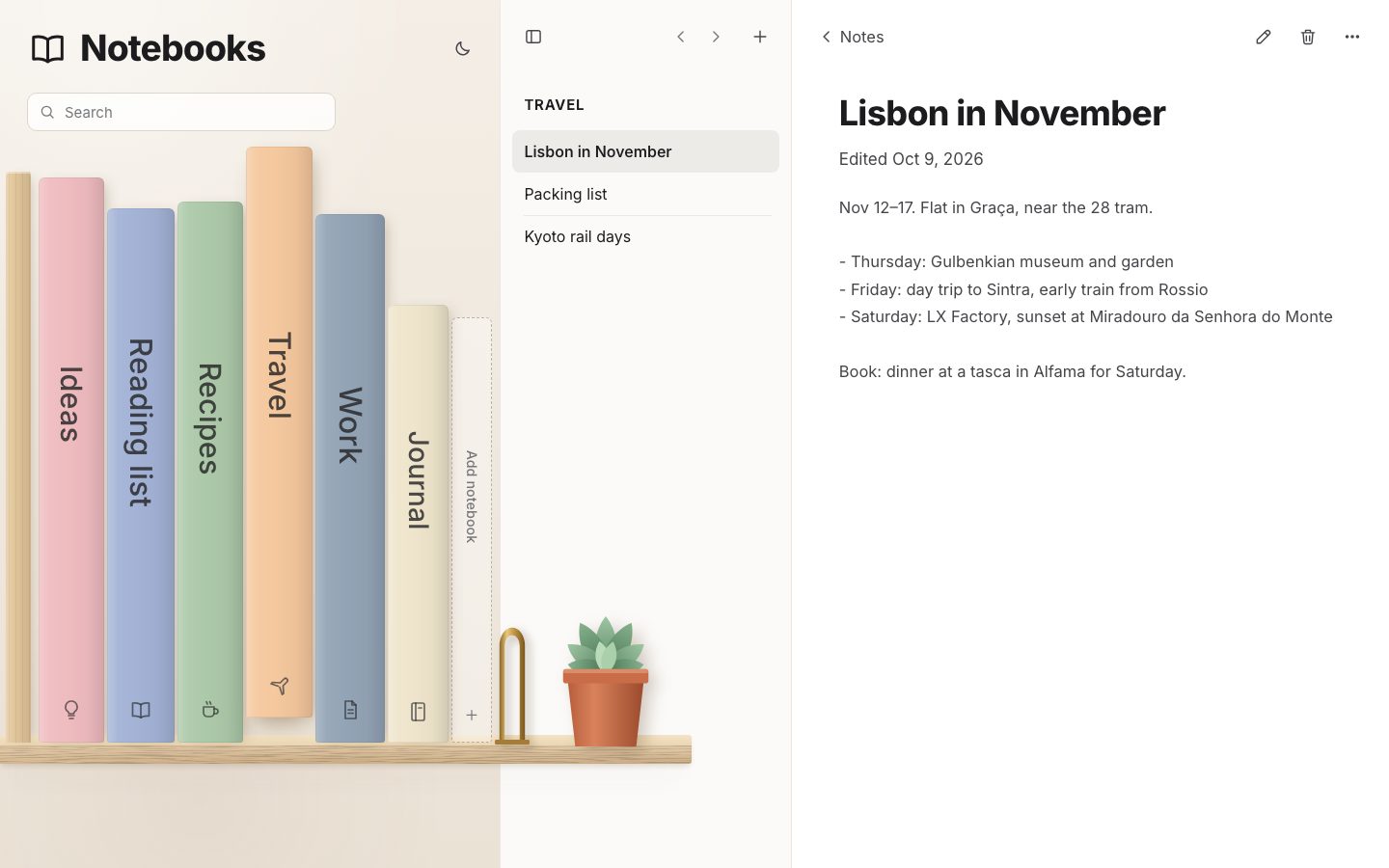
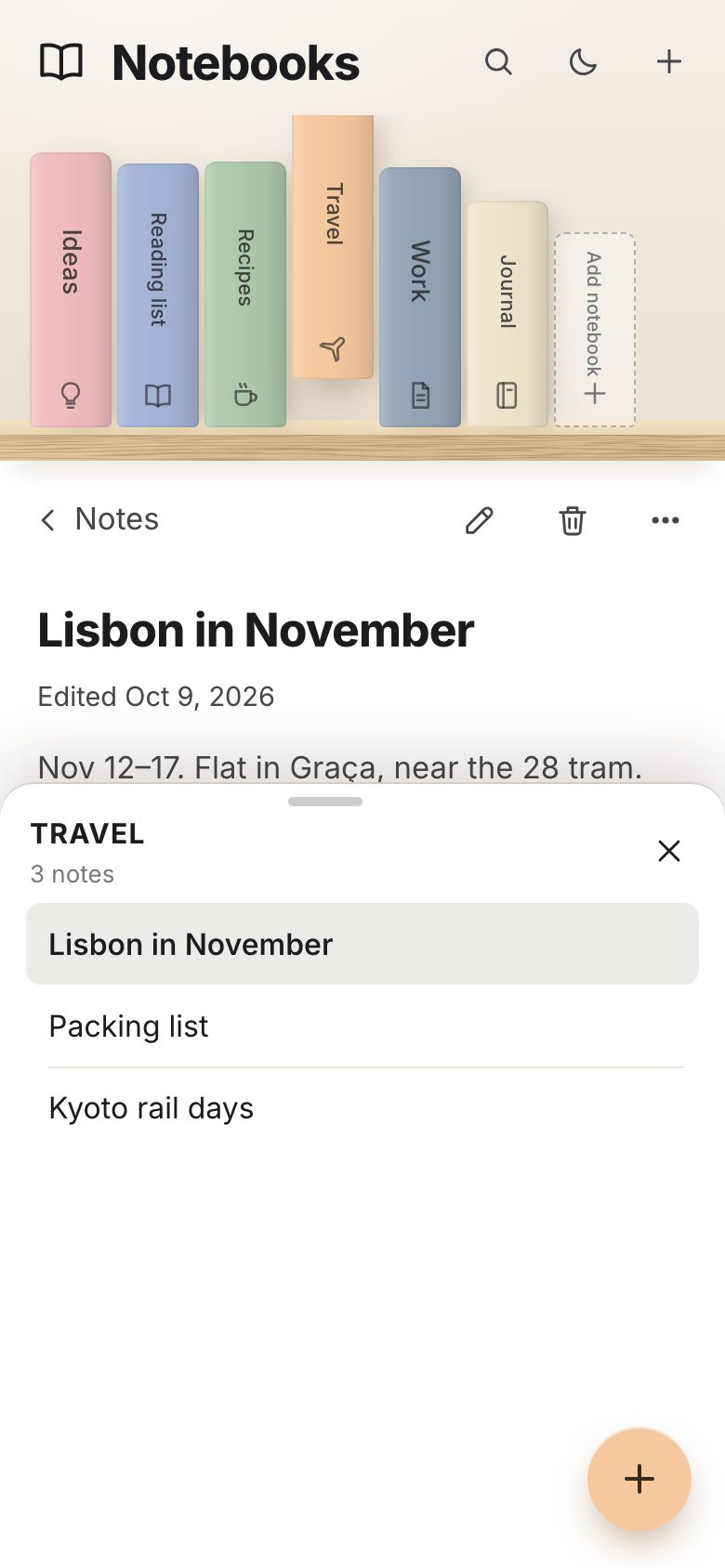
The second look is a notes app on a floating light-oak shelf, with pastel notebooks, a brass bookend and a plant. It is
a new page, nordic/, with its own CSS and its own data (6 notebooks, 21 notes), and the same
shelf.js. The engine gains one option for it: trailing, an "Add notebook" spine that always
stays last, is never dragged, and calls the page when clicked.
const t = this.o.trailing && id === this.o.trailing.id;
const item = t ? null : this.o.items.get(id);
b.innerHTML = `<span class="book__lift">${t ? this.o.trailing.face(this.mode) : this.o.face(item, this.mode)}</span>`;
b.setAttribute('aria-label', t ? this.o.trailing.label : this.o.label(item));const shelf = new Shelf(scene, {
afterPaint: (li) => markFit(li),
items: books, order: S.data.order, face, dims, configs, afterLayout,
listLabel: 'Notebooks', controls: 'notes',
trailing: { id: '__add', face: addFace, label: 'Add notebook' },
label: (b) => b.title,
describe: (b) => `${notesOf(b.id).length} notes`,
announce: say,
onSelect: (id) => pickBook(id),
onTrailing: () => addNotebook(),
onReorder: (order) => { S.data.order = [...order]; persistBooks(); updateMover(); },
});Its configs are its own. The shelf floats 17 % of the height (at least 70 px) above the bottom. One unit is sized so that six notebooks and the add spine fit on the wall, at most 92 px. When a row is full, a second floating shelf appears above it and the books split between the two.
function configs(mode, W, H, n) {
  if (mode === 'rail') return [{ key: `rail${W}`, rows: [{ mode: 'column', x: 0, top: 6, w: W, h: Infinity, gap: 8 }], unit: { w: 30, h: W - 12 },
    extent: { h: (pos) => Math.max(...[...pos.values()].map((p) => p.y)) + 14 } }];
  if (mode === 'strip') return [{ key: `strip${H}`, rows: [{ mode: 'upright', x: 16, base: H - 18, w: Infinity, h: H, gap: 3 }], unit: { w: H / 4.6, h: H - 36 },
    extent: { w: (pos) => Math.max(...[...pos.values()].map((p) => p.x + p.w)) + 20 } }];
  // like the concept, the floating shelf runs past the wall: books fill the wall, the bookend and plant stand beyond it
  // six notebooks fill the wall; the add spine, bookend and plant stand on the part of the shelf that runs past it
  const base = Math.round(H - Math.max(70, H * 0.17)), top = 4, x0 = 40, rowW = W - x0 - 6;
  const u = Math.min(92, (W - x0 - 12) / 6.9);    // six notebooks + the add spine fit on the wall; nothing tall reaches the notes list
  const one = (k) => ({ key: `one${W}x${H}k${k}`, rows: [{ mode: 'upright', x: x0, base, w: rowW, h: base - top, gap: 3 }], boards: [base],
    unit: { w: u * k, h: Math.min(base - top, u * 9.6) } });
  // a second floating shelf appears above when one row is full: the bottom keeps half, the new shelf takes the rest
  const two = (k) => {
    const rowH = (base - top) / 2, b0 = Math.round(base - rowH), half = Math.ceil(n / 2);
    return { key: `two${W}x${H}n${n}k${k}`, rows: [{ mode: 'upright', x: x0, base, w: rowW, h: rowH - 26, gap: 3, max: half }, { mode: 'upright', x: x0, base: b0, w: rowW, h: rowH - 30, gap: 3 }],
      boards: [base, b0], unit: { w: Math.min(u, (W - x0) / (half + 0.4), (rowH - 40) / 5.4) * k, h: rowH - 40 } };
  };
  return [one(1), one(0.92), one(0.84), two(1), two(0.88), two(0.76), two(0.64)];
}
After every layout the page stands the bookend 3 px after the last book on the bottom shelf and the plant 18 px after the bookend, and widens the board under them, so the shelf runs past the wall as in the concept.
// the bookend leans against the last book on the bottom shelf, the plant stands after it
let end = 0;
for (const [, p] of pos) if (p.row === 0) end = Math.max(end, p.x + p.w);
if (desk) {
  const base = cfg.rows[0].base, bw = bookend.offsetWidth, pw = plant.offsetWidth;
  const uh = Math.round(cfg.unit.h * 0.94); upright.style.height = uh + 'px';
  upright.style.transform = `translate3d(6px, ${base - uh}px, 0)`;
  bookend.style.transform = `translate3d(${end + 3}px, ${base - bookend.offsetHeight + 2}px, 0)`;
  const px = end + bw + 18;
  plant.style.transform = `translate3d(${px}px, ${base - plant.offsetHeight + 6}px, 0)`;
  const lower = scene.querySelector('.board:not(.board--upper)'); if (lower) lower.style.width = Math.round(px + pw + 26) + 'px';
  }
}
Nothing else needs JavaScript to look different: a selected notebook slides 26 px up out of the row, hover lifts one with a glow in its own colour.
.slot.is-selected:not(.is-flat) .book__lift { transform: translateY(-26px); }
.slot.is-selected.is-flat .book__lift { transform: translateY(-10px); }
.slot.is-selected .book__spine { box-shadow: 0 16px 22px -10px var(--shadow-wall), 8px 4px 16px -6px var(--shadow-wall), inset 0 0 0 1px rgba(0, 0, 0, .05); }
A note is editable in place. The title grows with its text, Enter jumps to the body, and 350 ms after the last key the note is saved and a quiet "Saved" shows. A new notebook takes a name and one of 8 pastels from a real radio group (arrow keys move the choice) and drops onto the shelf from above.
function touched() {
  if (!editing) return;
  editing.edited = new Date().toISOString().slice(0, 19);
  $('#ed-date').textContent = `Edited ${fmt.format(new Date(editing.edited))}`;
  clearTimeout(saveT);
  saveT = setTimeout(() => { S.save(true); const s = $('#ed-saved'); s.classList.remove('on'); void s.offsetWidth; s.classList.add('on'); }, 350);
}function pickSwatch(c, focus = false) {
for (const b of sw.children) { const on = b.dataset.c === c; b.setAttribute('aria-checked', String(on)); b.tabIndex = on ? 0 : -1; if (on && focus) b.focus(); }
if (adding) { adding.color = c; shelf.paint(adding.id); }
}
Make it yours
- Your courses are
COURSESinlibrary/data.js: a title, two initials, a cloth colour, the kind of picture, and chapters of lessons (title, minutes, lead, two paragraphs, takeaway). The nine lessons that start ticked areDEFAULT_DONEinlibrary.js. - The case is
configs(): the compartment heights (23 % and 38.5 %), how many books lie on top (2), stand in the middle (4) and how far the last one may lean (17°). The cloth isshared/tex/cloth.pngblended with each course's colour;CLOTHholds the ten colours new courses take. - Colours are tokens at the top of
library.css, primitive → semantic → component, with the evening lamp's set under:root[data-theme="dark"]. - Another look is another page: give
Shelfyour ownface,dimsandconfigs, asnordic.jsdoes. - Scripts can drive it through
window.__shelf(state(),open('layout'),search('grid'),progress('layout'),courses()) and Nordic throughwindow.__notes. - Accessibility is already there: one tab stop for the shelf with arrow keys, Alt + arrow and ‹ › buttons to
reorder without dragging, a real ARIA tree for the chapters, a polite live region for what changes, 44 px targets on
touch screens, and
prefers-reduced-motionhonoured.
The code is on GitHub at UlviShabanbayli/domvybe-bookshelf-sidebar, under the MIT licence: use it in your own projects, commercial ones included. The fonts are Inter and Cormorant Garamond (SIL Open Font License). The courses and notes are written for the page, and no AI picture is used: the wood, the cloth, the plant, the bookend and every lesson picture are drawn by code.
Place everything with one transform and let CSS glide it. The shelf never lays out the page: every book is an absolutely placed slot, and a layout, a reorder, a new book or a resize only changes transforms, so one transition animates them all. Rounding them to whole pixels at rest keeps the gold titles as sharp as text.