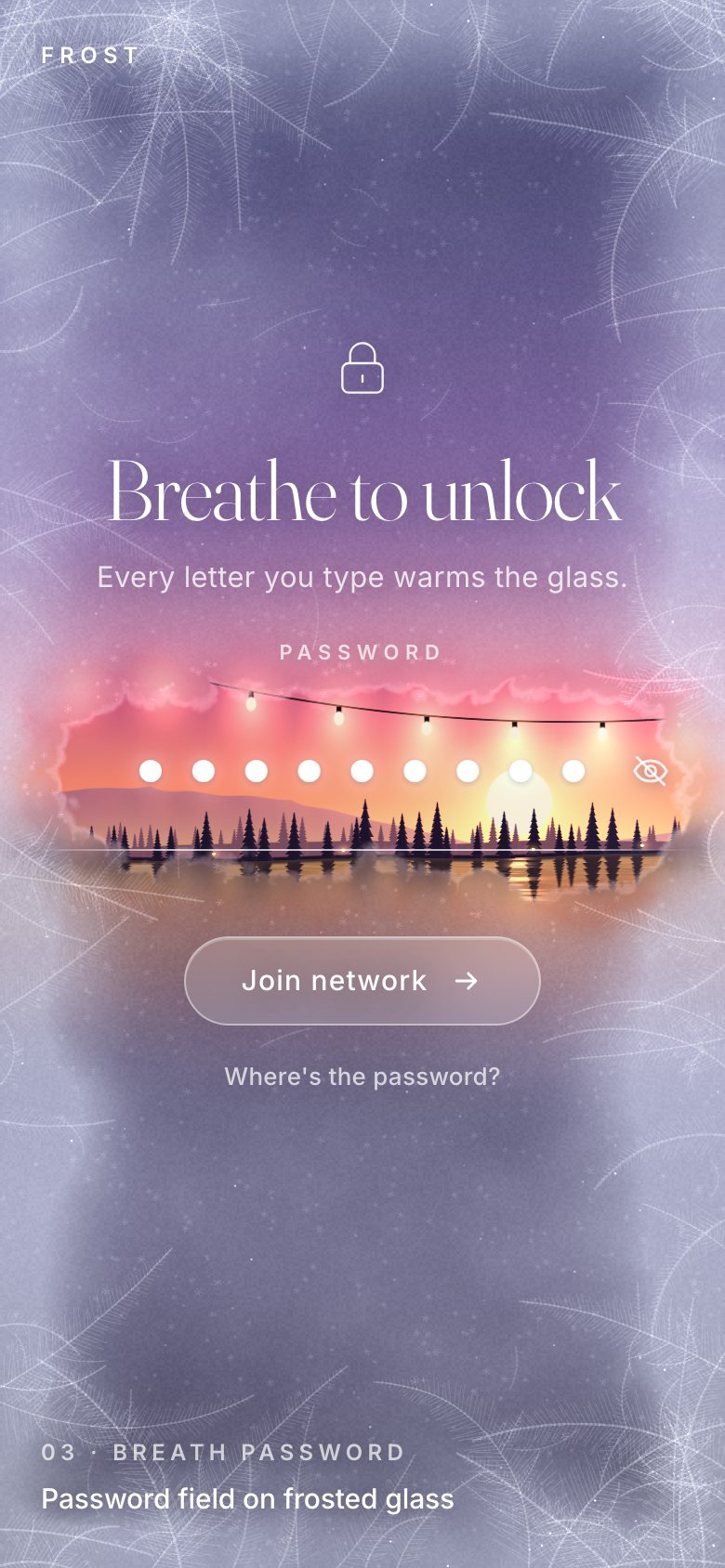
This is the whole build of the breath password, in the order it was written: the "Join Cabin Wi-Fi" page of a made-up cabin, Frost. The whole page is a frosted window over a winter dusk. Each letter you type is a breath: a warm haze ring spreads, the ice gives way into a clear spot over its dot, and the string of bulbs, the low sun and the tree line show through. Stop typing and the ice grows back in along its crystals. The wrong password flash-freezes the field; the right one thaws the whole window outward into a porthole. Each stage below is the page as it stood at that step. It shows a still, and Run it here starts the live page in its place. The code under each heading is only what that stage adds. The finished source is at the end, and on GitHub under the MIT licence.
There is no framework and no build step: one HTML page, one style sheet and four ES modules. Every word, dot and the
caret are DOM; the window is one WebGL canvas under them. The demo password is northstar, and the page
says where to find it.
1 · The field, and a frost in CSS
The field is a real input type="password" with a label and autocomplete="current-password",
so password managers, Enter and the keyboard all work. It is transparent: what you see are the glowing dots, the caret
and the selection drawn in a layer under it.
<div class="field" id="field">
  <label class="label" for="pw" id="pw-label">Password</label>
  <input id="pw" name="password" type="password" autocomplete="current-password" maxlength="63" spellcheck="false" autocapitalize="off" autocorrect="off"
         aria-describedby="msg caps" enterkeyhint="go">
  <span class="glyphs" id="glyphs" aria-hidden="true"><i class="selbar" id="selbar"></i><i class="caret" id="caret"></i></span>
  <button class="eye" id="eye" type="button" aria-controls="pw" aria-pressed="false" aria-label="Show password">
    <svg viewBox="0 0 24 24" aria-hidden="true"><path class="lid" d="M2.6 12c2-3.9 5.3-6 9.4-6s7.4 2.1 9.4 6c-2 3.9-5.3 6-9.4 6s-7.4-2.1-9.4-6z"/><circle cx="12" cy="12" r="3"/><path class="slash" d="M4 4l16 16"/></svg>
  </button>
  <span class="line" aria-hidden="true"></span>
  <span class="ring" aria-hidden="true"></span>
</div>.field input {
position: absolute; inset: 0; width: 100%; height: 100%; margin: 0; border: 0; border-radius: 43px; background: transparent; outline: none;
color: transparent; caret-color: transparent; -webkit-text-fill-color: transparent; text-shadow: none;
font-family: Menlo, 'SF Mono', Consolas, monospace; font-size: var(--fs, 72px); letter-spacing: 0; text-align: center;
padding: 0 var(--pad, 56px); cursor: text; z-index: 2;
}The trick that keeps the native caret honest: the input uses a monospace font whose advance is exactly one dot pitch, so a click, a drag, Shift+Arrow or a double-click lands on the same cell the dots are drawn in.
function measure() {
  const r = field.getBoundingClientRect();
  const phone = innerWidth <= 600;
  const n = pw.value.length;
  lay.fx = r.left; lay.fy = r.top; lay.fw = r.width; lay.fh = r.height; lay.phone = phone;
  lay.pad = phone ? 50 : 58;
  const avail = Math.max(40, lay.fw - 2 * lay.pad);
  const max = phone ? 31 : 43;
  lay.pitch = Math.min(max, (avail - 2) / Math.max(1, n));
  lay.start = (lay.fw - n * lay.pitch) / 2;
  lay.n = n;
  const dot = Math.max(4, Math.min(phone ? 12 : 13, lay.pitch * 0.5));
  field.style.setProperty('--pitch', lay.pitch.toFixed(2) + 'px');
  field.style.setProperty('--dot', dot.toFixed(2) + 'px');
  field.style.setProperty('--fs', (lay.pitch / ratio * 0.998).toFixed(3) + 'px');
  field.style.setProperty('--pad', lay.pad + 'px');
}.glyphs .g::after { content: ''; width: var(--dot); height: var(--dot); border-radius: 50%; background: #fff;
box-shadow: 0 0 12px rgba(255, 255, 255, .62), 0 1px 3px rgba(30, 20, 60, .22); animation: pop .32s cubic-bezier(.2, 1.6, .4, 1) both; }The page opens by typing the demo password by itself, as a showcase. That text is a demo, not a value: the first edit replaces it instead of appending to it (diffed from empty, so every new letter gets a fresh breath), and Enter is not an edit: it submits the demo as it is. Every edit is diffed, so an insert or a delete anywhere, or a paste, is known exactly.
pw.addEventListener('beforeinput', (e) => {
  if (!S.pristine || e.inputType === 'insertLineBreak') return;   // Enter submits the demo as it is
  // the showcase password is a demo: the first edit replaces it instead of appending to it (diffed from empty, so
  // every new letter gets a fresh breath)
  S.pristine = false;
  const prev = pw.value; pw.value = ''; S.last = ''; onEdit(prev, '');
  if (e.inputType.startsWith('delete')) e.preventDefault();
});function onEdit(prev, cur, auto = false) {
let p = 0; const ml = Math.min(prev.length, cur.length);
while (p < ml && prev[p] === cur[p]) p++;
let s = 0; while (s < ml - p && prev[prev.length - 1 - s] === cur[cur.length - 1 - s]) s++;
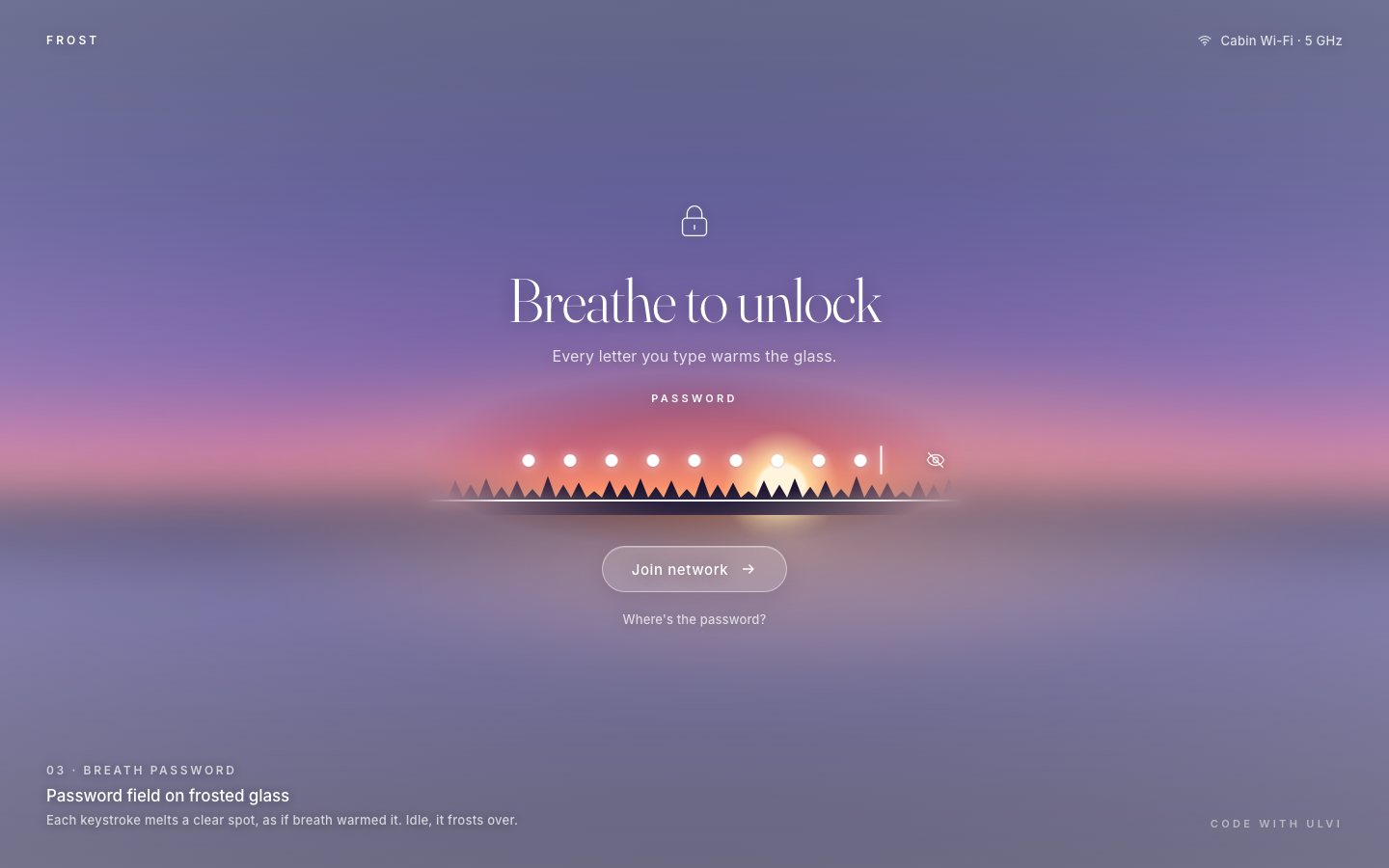
const removed = prev.length - p - s, ins = cur.length - p - s;In this first stage the frost is CSS: a painted dusk under a backdrop-filter layer, whose radial mask
opens a hole over the field while you type and closes slowly when you stop. The hole's size is a registered custom
property, so it can transition.
.cs-frost { position: absolute; inset: 0; -webkit-backdrop-filter: blur(26px) saturate(1.12); backdrop-filter: blur(26px) saturate(1.12);
  background: radial-gradient(120% 90% at 50% 50%, rgba(205, 208, 238, .26), rgba(225, 228, 248, .55) 100%);
  -webkit-mask: radial-gradient(var(--hw) var(--hh) at var(--hx, 50%) var(--hy, 60%), transparent 50%, #000 100%);
          mask: radial-gradient(var(--hw) var(--hh) at var(--hx, 50%) var(--hy, 60%), transparent 50%, #000 100%);
transition: --hw .45s cubic-bezier(.2, .8, .3, 1), --hh .45s cubic-bezier(.2, .8, .3, 1); }function cssHole() {
const n = pw.value.length;
const active = n && (now() - S.lastInput < S.idle) && S.phase !== 'error';
const w = active ? Math.min(lay.fw * 0.62, 70 + n * lay.pitch * 0.55) : 0, h = active ? 92 : 0;
csFrost.classList.toggle('slow', !active);
csFrost.style.setProperty('--hx', lay.fx + lay.fw / 2 + 'px'); csFrost.style.setProperty('--hy', lay.fy + lay.fh / 2 + 'px');
csFrost.style.setProperty('--hw', w + 'px'); csFrost.style.setProperty('--hh', h + 'px');
clearTimeout(cssHole.t);
if (active) cssHole.t = setTimeout(cssHole, (S.idle - (now() - S.lastInput)) * 1000 + 30);
}The wrong password says so in words, in coral and with a shake, and selects everything so you can type it again. The right one opens the lock and thaws the whole window open.
function fail() {
  endBusy(); S.phase = 'ready';
  setMsg("That's not it. The glass froze over, try again.");
  pw.setAttribute('aria-invalid', 'true'); field.classList.add('bad');
  if (!REDUCED) { field.classList.remove('shake'); void field.offsetWidth; field.classList.add('shake'); }
  S.lastInput = -1e9;
  status.textContent = 'Wrong password.';
  pw.focus(); pw.select(); renderGlyphs(); cssHole();
}function cssThaw(on) {
clearTimeout(cssHole.t); // the typing's pending refrost must not undo the thaw
csFrost.classList.remove('slow'); csFrost.classList.add('thaw');
csFrost.style.setProperty('--hw', on ? Math.hypot(innerWidth, innerHeight) * 0.9 + 'px' : '0px');
csFrost.style.setProperty('--hh', on ? Math.hypot(innerWidth, innerHeight) * 0.7 + 'px' : '0px');
setTimeout(() => { csFrost.classList.remove('thaw'); const done = S.gAnim && S.gAnim.done; if (done) { S.phase = done; S.gAnim = null; } }, REDUCED ? 30 : (on ? 1700 : 2700));
}
2 · The frosted window in WebGL
One canvas goes under the page. Everything that does not move is baked once per layout: the dusk scene in a shader, two blurred copies of it for the frost, and the window ice.
<canvas class="fx" id="fx" aria-hidden="true"></canvas>function bakeLayout() {
measure();
const W = innerWidth, H = innerHeight;
let k = Math.min(devicePixelRatio || 1, 2);
const budget = 3.0e6; if (W * H * k * k > budget) k = Math.sqrt(budget / (W * H));
S.k = k;
const Uc = Math.max(340, Math.min(560, H * 0.5));
const fcY = lay.fy + lay.fh / 2;
const hr = h1.getBoundingClientRect(), lr = lock.getBoundingClientRect();
const top = lr.height ? lr.top : hr.top;
const col = { cx: (hr.left + hr.width / 2) * k, cy: ((top + lay.fy + lay.fh) / 2) * k, rx: Math.max(hr.width * 0.62, 200) * k, ry: Math.max(90, (lay.fy + lay.fh - top) * 0.62) * k };
const L = { W: Math.round(W * k), H: Math.round(H * k), k, U: Uc * k, hor: (fcY + 0.11 * Uc) * k, sunX: 0.2, col };
if (!pane.layout(L)) return false;
baked = { W, H, fy: lay.fy, fx: lay.fx, fw: lay.fw };
root.style.setProperty('--hor', ((fcY + 0.11 * Uc) / H * 100).toFixed(2) + '%');
full = true;
return true;
}The ice is drawn once in Canvas2D, the way window frost grows: feathers that curve in from the frame, with dense barbs at about 60 degrees, shortening toward the tip. From it the bake derives a regrowth threshold, so the crystals and their neighbourhood freeze first and the gaps fill in after.
const t = s / n;
const bl = len * 0.2 * Math.pow(1 - t, 0.75) * (0.55 + 0.45 * R()) * bw * 1.6;
if (bl < 1.2 * k) continue;
for (const sd of [-1, 1]) {
  const ba = a + sd * (Math.PI / 3) * (0.88 + R() * 0.2);
  if (every && s % every === 0 && R() < 0.8 && bl > 14 * k) { subs.push([px, py, ba, bl * 1.5]); continue; }
  barbs.moveTo(px, py); barbs.lineTo(px + Math.cos(ba) * bl, py + Math.sin(ba) * bl);
}// regrowth threshold: crystals and their neighbourhood freeze first, then the gaps fill in feathery ridges
float rid=ridged(c/26.0+vec2(4.0,9.0));
float thr=clamp(1.0-(0.55*smoothstep(0.0,0.6,wide)+0.45*rid*1.1)+0.12*(vnoise(c/9.0)-0.5),0.0,1.0);Each letter owns a breath spot: a slightly stretched, slightly jittered warm patch with a heat. It blooms in 0.42 s, holds while you type, and cools after 2.4 s of quiet. A deleted letter leaves a ghost that keeps its place on the glass and freezes over fast.
function newSpot(delay = 0, ring = true) {
  const t = now() + delay;
  return { jx: (R() - 0.5) * 12, jy: 9 + (R() - 0.5) * 14, r: (102 + R() * 18) * scaleR(), sx: 1.06 + R() * 0.12, cool: 0.85 + R() * 0.3,
    heat: 0, from: 0, peak: HEAT, t0: t, born: ring ? t : -1e9, grow: true };
}if (a < BLOOM) { s.heat = s.from + (s.peak - s.from) * ease(a / BLOOM); moving = true; }
else if (a < BLOOM + 0.1 && s.heat !== s.peak && !cool) { s.heat = s.peak; moving = true; }
else if (cool && s.heat > 0) { s.heat = Math.max(0, s.heat - dt * rate * s.cool); moving = true; cooling = true; }// detached: they keep their place on the glass and freeze over fast
gone.forEach((g, j) => { const q = spotAt(p + j); g.x = q.x + g.jx; g.y = q.y + g.jy; g.fast = 1 / 0.45; S.ghosts.push(g); });The pane shader turns heat into glass. The warmth is the maximum of the spots' gaussians; the ice gives way where the warmth passes that pixel's own threshold. So when the heat falls, the frost does not fade, it grows back along the crystals. The same field carries the thaw front of the right password.
vec4 s=uSp[i]; vec2 d=(fc-s.xy)/s.z; d.x/=uSq[i].y;
float q=dot(d,d); if(q>4.0) continue;
m=max(m, s.w*exp(-q*1.6));if(uG.z>=0.0){ float dg=length(fc-uG.xy); m=max(m, clamp((uG.z-dg)/uG.w, 0.0, 1.0)*1.35); }
float T=0.30+0.42*thr;
float clear=smoothstep(T-0.055, T+0.055, m);
float warm=smoothstep(T*0.3, T, m)*(1.0-clear);There are no drops and no drips: the melt edge is a thin wet sheen and an ice fringe.
float rim=4.0*clear*(1.0-clear);
float fringe=smoothstep(0.0,0.5,warm)*(1.0-clear);
col+=vec3(0.86,0.9,1.0)*(rim*(0.06+0.22*sk)+fringe*fern*0.22);// error: the ice flash-freezes over the field
if(uFlash.x>0.0){
float df=length((fc-uFlash.yz)/vec2(1.0,0.42))/uFlash.w;
float inF=exp(-df*df*1.6);
col+=vec3(0.82,0.9,1.0)*uFlash.x*inF*(0.10+fern*0.55+sk*0.3);
}The thaw is a front that grows from the field to the farthest corner (and shrinks back in from the frame when you lock it again).
if (S.gAnim) {
  const A = S.gAnim, u = A.dur ? Math.min(1, (t - A.t0) / A.dur) : 1;
  const e = A.ease ? A.ease(u) : easeIO(u);
  const r = A.from + (A.to - A.from) * e;
  S.g = [A.f.cx * S.k, A.f.cy * S.k, r * S.k, (r * 0.3 + 70) * S.k];
  gChanged = true;
  if (u >= 1) { S.phase = A.done; S.gAnim = null; if (A.to === 0) S.g = null; if (A.done === 'ready') { S.lastInput = -1e9; } } else anim = true;
}
The pane renders on demand and only where something changed: the spots' box, the pointer light's box, or just the ring the thaw front swept, as four strips around the unchanged centre. Between the last key and the refrost it sleeps on a timer.
// only the ring the thaw front swept changes: inside it the glass stays clear, outside it stays frosted
const a = gPrev || [S.g ? S.g[0] : 0, S.g ? S.g[1] : 0, 0, 0], c = S.g || [a[0], a[1], 0, 0];
const cx = c[0], cy = c[1], rOut = Math.max(a[2], c[2]) + 2, rIn = Math.min(a[2] - a[3], c[2] - c[3]);
const o = [cx - rOut, cy - rOut, cx + rOut, cy + rOut], h = rIn > 0 ? rIn / Math.SQRT2 - 2 : 0;
if (h <= 0) rects.push(o);
else rects.push([o[0], o[1], o[2], cy - h], [o[0], cy + h, o[2], o[3]], [o[0], cy - h, cx - h, cy + h], [cx + h, cy - h, o[2], cy + h]);// the ice will start growing back later: wake up then instead of spinning
if (!moving && !cool && S.spots.some((s) => s.heat > 0)) schedule(S.idle - idleFor + 0.01);With a mouse, a soft light follows the pointer and makes the crystals glint.
addEventListener('pointermove', (e) => {
  if (e.pointerType === 'touch' && !e.buttons) return;
  S.light.tx = e.clientX; S.light.ty = e.clientY; S.light.ta = 1;
  if (S.light.a < 0.01) { S.light.x = e.clientX; S.light.y = e.clientY; }
  kick();
}, { passive: true });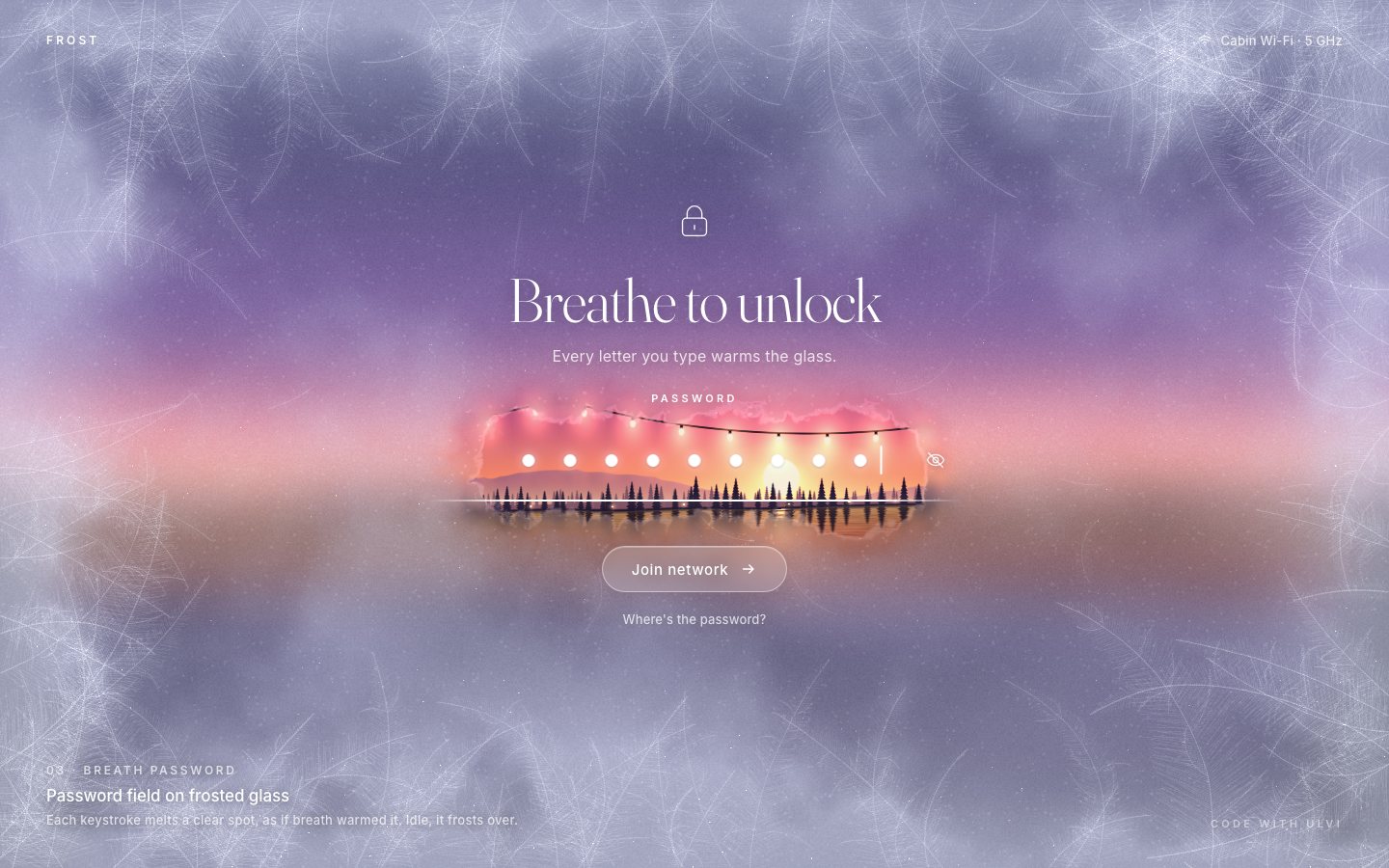
3 · The finish
Only the show-password preference is kept, under one versioned key, never the password. Older keys of the component
are wiped before the first paint, and ?nogl forces the CSS frost.
// storage: versioned keys only (dv68.v1 = the show-password preference); anything older is wiped.
// The page's theme is its own (a dusk window) and never follows the OS.
try {
for (let i = localStorage.length - 1; i >= 0; i--) { const k = localStorage.key(i); if (k && /^dv68/.test(k) && k !== 'dv68.v1') localStorage.removeItem(k); }const store = {
get() { try { return JSON.parse(localStorage.getItem(KEY) || '{}') || {}; } catch (e) { return {}; } },
set(o) { try { localStorage.setItem(KEY, JSON.stringify({ ...store.get(), ...o })); } catch (e) {} },
};A lost WebGL context drops to the CSS frost instead of a blank window, and a small test hook reports the state.
canvas.addEventListener('webglcontextlost', (e) => { e.preventDefault(); S.gl = false; root.classList.add('no-gl'); root.classList.remove('gl-on'); cssLayout(); });window.__breath = {
ready,
get busy() {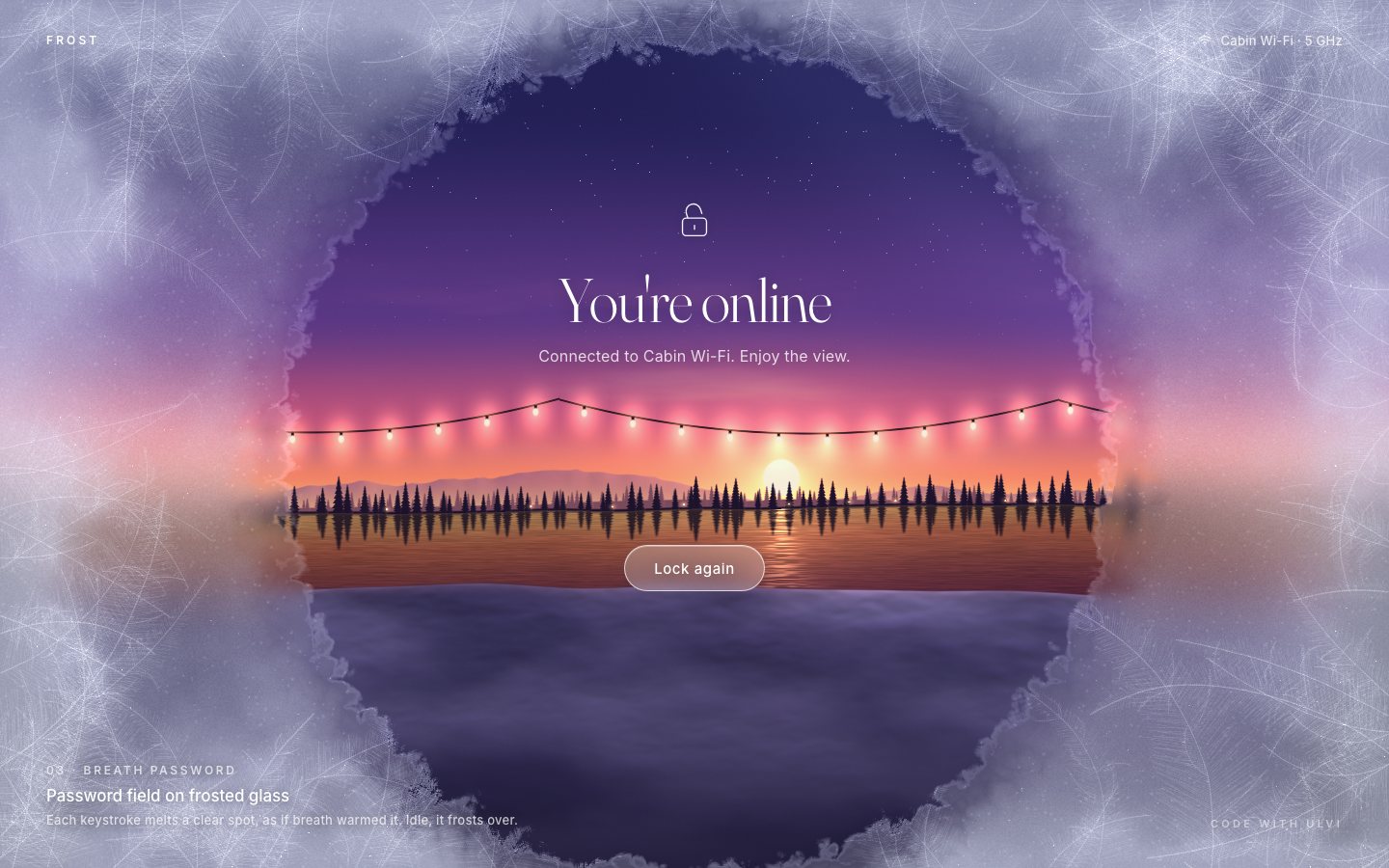
Make it yours
- Your check goes in
join(): replace the simulated 0.9 s check and the demo password with your sign-in request, and keep the flash-freeze and the thaw as its two answers. - Your view is the scene shader in
scene.js: the sky, the ridge, the pines, the lake and the bulbs. A city at night or a sea at dawn is one function away; the frost works over anything. - Your ice: the feather count, length and barb angle in
paintFerns(), and the bloom, idle and refrost times at the top ofapp.js. - Accessibility is already there: a real form and label, Enter to submit, the native caret and selection,
show/hide with
aria-pressed, a Caps Lock notice, errors withrole="alert"andaria-invalid, anaria-disabledJoin that explains itself, a live status line, focus moved where it is needed, 44 px targets,prefers-reduced-motion(spots open and close without the bloom, the thaw is instant) and the CSS frost without WebGL.
Frost and its cabin are made up, and the join is simulated. Everything on the page was made in code for this project: the dusk and the ice are rendered by the shaders, the fallback is CSS.
Give typing a material. A password field hides what you type, so it usually shows nothing at all; here every keystroke changes the glass, you can see how much you have typed, and getting it right has a moment you can see.