This is the whole build of the scroll-to-build sneaker, in the order it was made. A product page for a made-up shoe, the AURORA BRICKRUNNER 01, where scrolling builds the shoe out of 953 real-size plastic bricks, one layer at a time, with a live counter. At the end the shoe turns all the way round and Add to cart appears. It is plain HTML, CSS and JavaScript plus three.js, with no framework and no build step. Every stage below is a working page: look at the still, or run it right here.
Each code block is copied from the stage it belongs to,
unchanged. A … marks lines left out for space. The last stage is byte for byte the finished page, so the
download at the end is exactly what you see on the demo.
1 · The page and its parts list
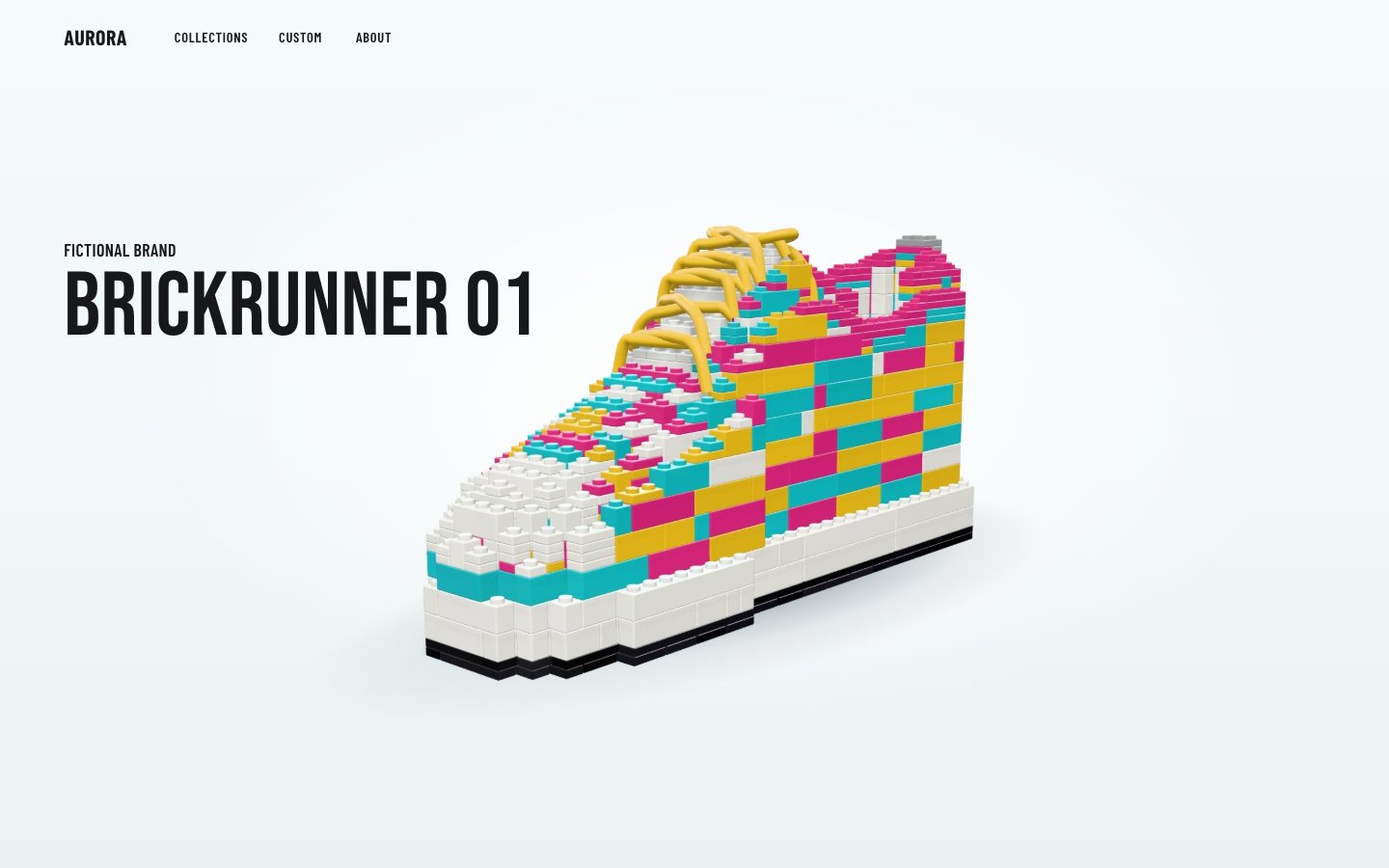
Start without any 3D. The page is a fixed nav, one very tall section and, inside it, a sticky stage the height of the screen. While you scroll through the section, the stage stays put: that is the track scroll will drive in stage 3. Until then a still picture of the finished shoe stands in.
<meta name="color-scheme" content="light">
<meta name="theme-color" content="#F3F9FA">
<title>BRICKRUNNER 01 · AURORA — step 1</title>
<meta name="description" content="Scroll to build the BRICKRUNNER 01 from real-size plastic bricks, one layer at a time. A fictional sneaker by a fictional brand.">
<link rel="preconnect" href="https://fonts.googleapis.com">
<link rel="preconnect" href="https://fonts.gstatic.com" crossorigin>
<link rel="stylesheet" href="https://fonts.googleapis.com/css2?family=Barlow+Condensed:wght@400;500;600;700&family=Bebas+Neue&display=swap">
<link rel="stylesheet" href="css/page.css">
<link rel="modulepreload" href="js/shoe.js"><section class="build" data-build aria-labelledby="title">
<div class="stage" data-stage>
<img class="still" data-still src="assets/brickrunner_built.webp" alt="" width="1600" height="1000" decoding="async">
<div class="intro">
<p class="kicker"><span class="k-desk">Fictional brand</span><span class="k-phone">AURORA</span></p>
<h1 id="title" class="title">Brickrunner 01</h1>
</div>
</div>
</section>:root {
color-scheme: light;
--page: #F3F9FA; --page-2: #E8F0F2; --card: #FFFFFF;
--ink: #17181B; --ink-2: #3A3D42; --dim: #8D9094; --line: #D9E2E5;
--teal: #2EC6CF; --teal-d: #0C838B; --magenta: #E8458E; --yellow: #F4C83A;
--display: 'Bebas Neue', 'Barlow Condensed', Impact, 'Arial Narrow', sans-serif;
--cond: 'Barlow Condensed', 'Arial Narrow', 'Helvetica Neue', Arial, sans-serif;
--gut: clamp(16px, 4.6vw, 112px);
--focus: 0 0 0 3px #fff, 0 0 0 5.5px var(--teal-d);
}.build { position: relative; height: 640vh; }
.stage {
position: sticky; top: 0; height: 100vh; height: 100svh; overflow: hidden;
background:
radial-gradient(60% 55% at 52% 46%, #FFFFFF 0%, rgba(255, 255, 255, 0) 70%),
linear-gradient(180deg, #F5FAFB 0%, #F1F7F8 62%, #E9F1F3 100%);
}The page never follows the OS colour scheme: color-scheme: light and a light theme-color,
with no dark-mode rules anywhere. The shoe is bright on purpose.
The shoe itself is data. shoe.js sculpts it as a height field over a sole outline: how wide the sole is
from heel to toe, where the toe turns in, and how high the upper rises along its centre line.
// sole outline: half-width in studs (to the outer edge) along u = 0 heel … 1 toe
const SOLE = [[0, 2.7], [0.03, 4.3], [0.08, 5.0], [0.18, 5.3], [0.32, 5.05], [0.46, 4.85], [0.6, 5.6], [0.72, 6.05], [0.82, 5.9], [0.9, 5.15], [0.95, 4.1], [0.985, 2.7], [1, 1.3]];
const soleHalf = (u) => lerpTable(SOLE, u);
const centre = (u) => -0.55 * Math.max(0, Math.min(1, (u - 0.45) / 0.55)) ** 1.6;   // the toe turns in a little (medial = +z)
const upperHalf = (u) => Math.max(0.6, soleHalf(u) - (u > 0.9 ? 0.55 : 0.85));
// top line along the centre (absolute plates)
const TOP = [[0, 40], [0.05, 42], [0.14, 40.5], [0.24, 37], [0.34, 38.5], [0.41, 42.5], [0.46, 43.5], [0.52, 40], [0.59, 34], [0.66, 29], [0.74, 25.5], [0.82, 23], [0.9, 20.5], [0.95, 17.5], [0.985, 14], [1, 11.5]];
Those curves fill a grid of cells, one stud wide and one plate high (8 mm and 3.2 mm, the real sizes). Each cell gets a zone: outsole, midsole, upper, and later the toe cap, the collar, the stripe and the lining.
const cells = new Map();                  // "x,y,z" → zone
const colTop = new Map();                 // "x,z" → top (exclusive) plate
const Z0 = -8, Z1 = 8;
for (let x = 0; x < LEN; x++) {
  const u = (x + 0.5) / LEN, c = centre(u);
  for (let z = Z0; z < Z1; z++) {
    const zc = z + 0.5, ds = Math.abs(zc - c);
    if (ds > soleHalf(u) - 0.3) continue;
    // sole
    for (let y = 0; y < SOLE_TOP; y++) cells.set(key(x, y, z), y < 2 ? 'outsole' : 'midsole');
    let top = SOLE_TOP;
    const uh = upperHalf(u);
    if (ds <= uh - 0.2) {
      const zn = (zc - c) / uh;
      top = topAt(u, zn);
      const open = inOpening(u, zn);
      for (let y = SOLE_TOP; y < top; y++) {
        if (open && y >= OPEN.floor) break;
        cells.set(key(x, y, z), 'upper');
      }
      if (open) top = Math.min(top, OPEN.floor);
    }
    colTop.set(x + ',' + z, top);
  }
}
Then the cells are solidified into real parts. Two plates of outsole, then courses three plates high: a column that fills a whole course becomes part of a brick, and a column whose top falls inside a course is finished in plates, so the surface steps down the way a real build does. Each course is packed greedily with real sizes (1×1 to 2×8), and every placement is chosen to bond the most separate groups below it.
function put(kind, w, l, h, zone, x, y, z, rot) {
  const p = { kind, args: kind === 'brick' ? [w, l, h] : [w, l], zone, x, y, z, rot, h };
  const i = parts.length;
  const [fw, fl] = rot % 2 ? [l, w] : [w, l];
  for (let a = 0; a < fw; a++) for (let b = 0; b < fl; b++) for (let c = 0; c < h; c++) {
    const k = key(x + a, y + c, z + b);
    if (owner.has(k)) ERR.push('overlap at ' + k);
    owner.set(k, i);
  }
  parts.push(p); return i;
}// courses: two outsole plates, then 3-plate brick courses; a column whose top falls inside a course is finished in plates
const maxY = Math.max(...[...cells.keys()].map((k) => +k.split(',')[1])) + 1;
const COURSES = [[0, 1], [1, 1]];
for (let y = 2; y < maxY; y += 3) COURSES.push([y, 3]);
COURSES.forEach(([y0, h], ci) => {
const alongZ = ci % 2 === 0;
const full = new Map(), part = new Map();
const add = (m, g, v) => { if (!m.has(g)) m.set(g, new Set()); m.get(g).add(v); };
const cols = new Set();
for (const k of cells.keys()) { const [x, y, z] = k.split(',').map(Number); if (y >= y0 && y < y0 + h) cols.add(x + ',' + z); }
for (const c of cols) {
const [x, z] = c.split(',').map(Number);
const zs = []; for (let y = y0; y < y0 + h; y++) zs.push(cells.get(key(x, y, z)));
if (h > 1 && zs.every((v) => v && v === zs[0])) add(full, zs[0], c);
else zs.forEach((v, i) => { if (v) add(part, (y0 + i) + '|' + v, c); });
}
for (const [zone, cs] of full) pack(cs, LONG.has(zone) ? (zone === 'fill' ? BR_FILL : BR_LONG) : BR_SURF, alongZ, y0, 3, 'brick', zone);
// partial columns: plate by plate, bottom up, so each plate rests on the one before
const ys = [...new Set([...part.keys()].map((g) => +g.split('|')[0]))].sort((a, b) => a - b);
for (const y of ys) for (const [g, cs] of part) {
const [yy, zone] = g.split('|'); if (+yy !== y) continue;
pack(cs, LONG.has(zone) ? PL_LONG : PL_SURF, (alongZ ? 1 : 0) ^ ((y - y0) % 2), y, 1, 'plate', zone);
}
});Colour is per brick, never per cell, so each brick reads as one piece. Fixed zones get fixed colours; the upper is a patchwork that never repeats a touching neighbour's colour.
const FIXED = { outsole: 'black', midsole: 'white', bumper: 'teal', toecap: 'white', stripe: 'yellow', stripe2: 'teal', collar: 'magenta', heeltab: 'grey', tongue: 'white', lining: 'white', insole: 'grey' };
const MOSAIC = [['teal', 0.36], ['magenta', 0.32], ['yellow', 0.2], ['white', 0.12]];
A validator proves the list before the page uses it: no two parts share a cell, every part rests on studs (or names the cell it clips into, like the laces), and the whole shoe is one connected model. The build order is layer by layer, each layer swept heel to toe and back like a print head, laces last, and it counts any part that would be placed floating. The result for this shoe: 953 parts, 1 group, 0 errors, 0 floating.
function joints() {
  const n = parts.length, adj = Array.from({ length: n }, () => new Set());
  const link = (a, b) => { if (a !== b) { adj[a].add(b); adj[b].add(a); } };
  for (let i = 0; i < n; i++) {
    const p = parts[i];
    if (!GRID(p)) { const o = owner.get(key(...p.at)); if (o === undefined) ERR.push(`#${i} ${p.kind} clips into an empty cell`); else link(i, o); continue; }
    const [fw, fl] = p.rot % 2 ? [p.args[1], p.args[0]] : [p.args[0], p.args[1]];
    for (let a = 0; a < fw; a++) for (let b = 0; b < fl; b++) {
      const above = owner.get(key(p.x + a, p.y + p.h, p.z + b));
      if (above !== undefined && parts[above].y === p.y + p.h) link(i, above);
    }
  }
  return adj;
}const order = parts.map((p, i) => i).filter((i) => GRID(parts[i]));
const xc = (p) => p.x + (p.rot % 2 ? p.args[1] : p.args[0]) / 2;
const zcf = (p) => p.z + (p.rot % 2 ? p.args[0] : p.args[1]) / 2;
order.sort((a, b) => {
const A = parts[a], B = parts[b];
if (A.y !== B.y) return A.y - B.y;
const dir = (A.y % 2) ? -1 : 1;
const ka = Math.round(xc(A) * 2) * dir, kb = Math.round(xc(B) * 2) * dir;
return ka - kb || zcf(A) - zcf(B);
});
const seq = order.concat(parts.map((p, i) => i).filter((i) => !GRID(parts[i])));export const PARTS = seq.map((i) => parts[i]);
export const COUNT = PARTS.length;The page prints that count everywhere it needs a number, and counts the inventory from the same list, so the number on screen is the number of parts in the model, never a figure typed by hand.
$$('[data-total]').forEach((e) => { e.textContent = fmt(N); });
$$('[data-layers]').forEach((e) => { e.textContent = LAYER_COUNT; });const byKind = {};
for (const p of PARTS) {
const name = p.kind === 'brick' ? `Brick ${p.args[0]}×${p.args[1]}` : p.kind === 'plate' ? `Plate ${p.args[0]}×${p.args[1]}` : p.kind === 'lace' ? 'Flex tube' : p.kind === 'loop' ? 'Lace loop' : 'Lace end';
const o = byKind[name] || (byKind[name] = { n: 0, cols: new Set(), kind: p.kind, args: p.args });
o.n++; o.cols.add(p.colour);
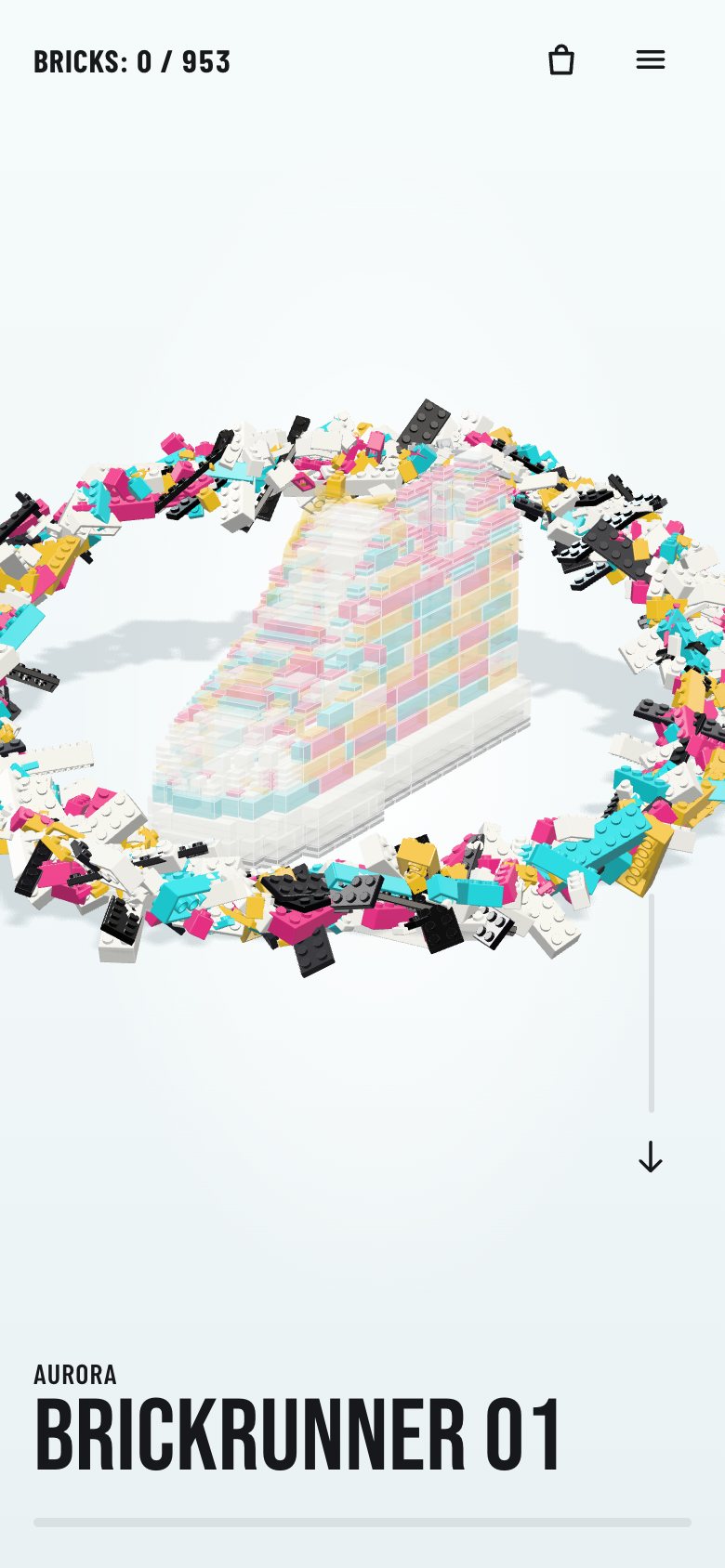
}On a phone the copy moves to the bottom, the nav drops its links, and the section is a little shorter.
@media (max-width: 720px) {
  .nav { height: 64px; gap: 12px; }
  .brand, .links { display: none; }
  .build { height: 560vh; }
  .intro { left: var(--gut); right: var(--gut); top: auto; bottom: calc(44px + env(safe-area-inset-bottom)); width: auto; }
  .k-desk { display: none; }
  .k-phone { display: inline; }
  .intro .kicker { font-size: 15px; letter-spacing: .04em; margin-bottom: 2px; }
  .title { font-size: clamp(46px, 14vw, 62px); }
  …
}
2 · The 3D studio
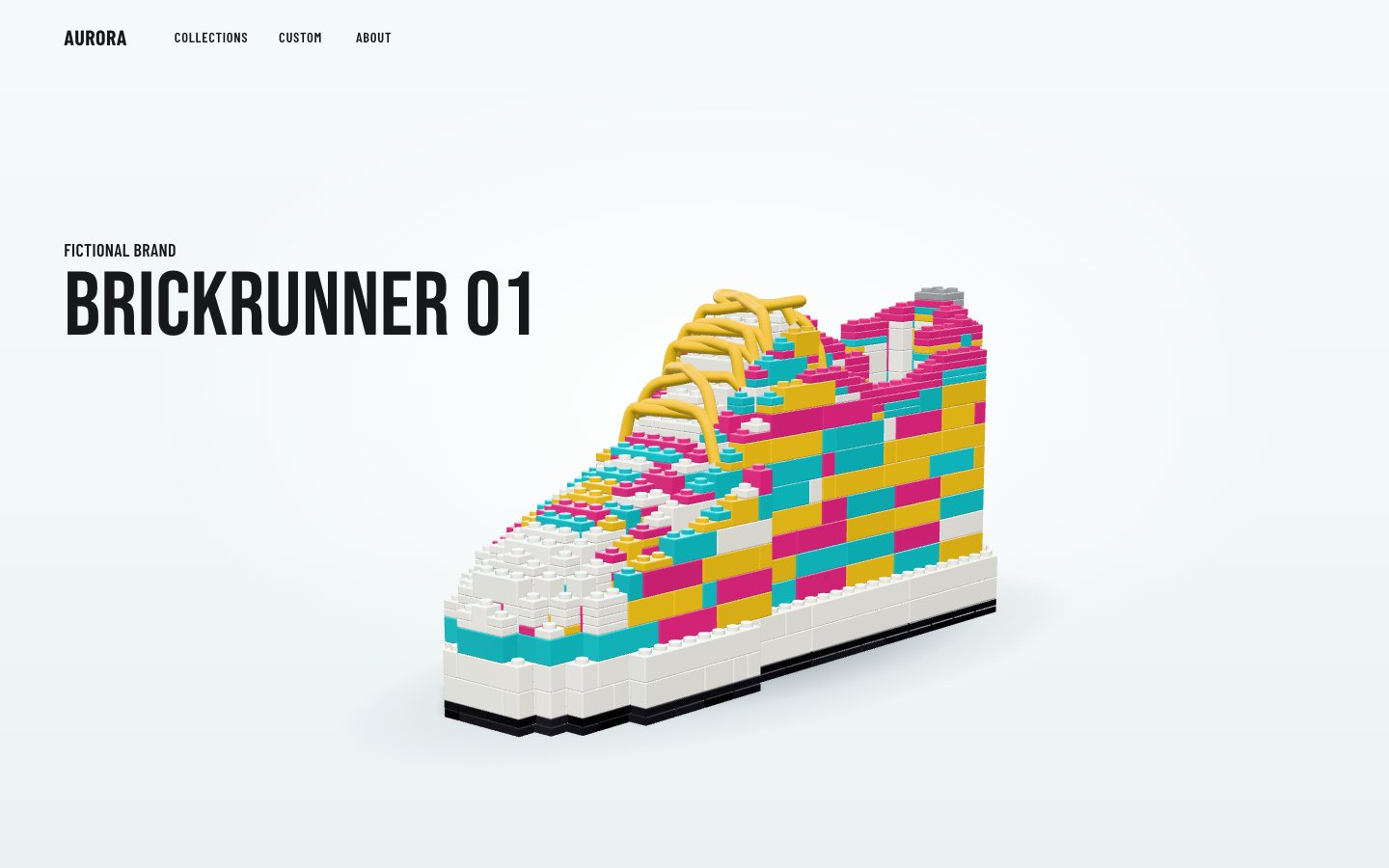
three.js r186 is vendored next to the page and loaded through an import map, so there is no CDN and no bundler.
<script type="importmap">{"imports":{"three":"./vendor/three/build/three.module.js"}}</script>The renderer draws on a transparent canvas over the CSS studio gradient, with neutral tone mapping and a room environment for soft reflections. One warm key light casts the only shadow, onto an invisible floor that only catches it; a rim and a fill light shape the edges.
const renderer = new THREE.WebGLRenderer({ canvas, antialias: true, alpha: true, powerPreference: 'high-performance', preserveDrawingBuffer: false });
renderer.setClearColor(0x000000, 0);
renderer.toneMapping = THREE.NeutralToneMapping; renderer.toneMappingExposure = 1.0;
renderer.outputColorSpace = THREE.SRGBColorSpace;
renderer.shadowMap.enabled = true; renderer.shadowMap.type = THREE.PCFSoftShadowMap; renderer.shadowMap.autoUpdate = false;

const scene = new THREE.Scene();
const pm = new THREE.PMREMGenerator(renderer);
scene.environment = pm.fromScene(new RoomEnvironment(), 0.04).texture; scene.environmentIntensity = 0.6;
pm.dispose();// key light: high, front-left of the camera; its soft shadow falls behind and under the shoe
const key = new THREE.DirectionalLight(0xfffaf2, 2.7);
key.position.set(300, 640, -360); key.castShadow = true;
key.shadow.mapSize.set(1536, 1536);
Object.assign(key.shadow.camera, { left: -420, right: 420, top: 420, bottom: -420, near: 100, far: 2200 });
key.shadow.bias = -0.0006; key.shadow.normalBias = 0.4; key.shadow.radius = 6;
scene.add(key); scene.add(key.target);
const rim = new THREE.DirectionalLight(0xdff6ff, 0.9); rim.position.set(-420, 260, 420); scene.add(rim);
const fill = new THREE.DirectionalLight(0xffffff, 0.35); fill.position.set(-500, 120, -300); scene.add(fill);// ground: shadow catcher + a soft contact shadow that darkens as the sole goes down
const ground = new THREE.Mesh(new THREE.PlaneGeometry(20000, 20000), new THREE.ShadowMaterial({ opacity: 0.13, color: 0x1c2a38 }));
ground.rotation.x = -Math.PI / 2; ground.receiveShadow = true; scene.add(ground);The bricks come from a parts library with real dimensions: studs, tubes underneath, bevelled edges and a clear-coat plastic material with a faint grain.
export function brick(w, l, plates = 3) { const s = shell(w, l, plates * PLATE); return finish(s.body, s.caps); }
export function plate(w, l) { return brick(w, l, 1); }export function materials() {
const body = new THREE.MeshPhysicalMaterial({ color: 0xffffff, roughness: 0.24, metalness: 0, clearcoat: 0.55, clearcoatRoughness: 0.18, sheen: 0.15, sheenRoughness: 0.5 });
const face = new THREE.MeshPhysicalMaterial({ color: 0xffffff, roughness: 0.34, metalness: 0, clearcoat: 0.35, clearcoatRoughness: 0.25, normalMap: studNormalMap(), normalScale: new THREE.Vector2(0.55, 0.55) });
const rubber = new THREE.MeshPhysicalMaterial({ color: 0xffffff, roughness: 0.62, metalness: 0, sheen: 0.4, sheenRoughness: 0.6 });
const grain = new THREE.MeshPhysicalMaterial({ color: 0xffffff, roughness: 0.62, metalness: 0, normalMap: grainNormalMap(), normalScale: new THREE.Vector2(0.35, 0.35) });
const printed = rubber.clone(); printed.userData.keepColor = true;
return { brick: [body, face, grain], rubber: [rubber, printed, rubber] };
}953 meshes would be 953 draw calls. Instead, every shape gets one InstancedMesh and each part is an
instance of it with its own matrix and colour, with a ±2.5 % lightness wobble, because real plastic varies a little
from part to part. In this stage every part goes straight into its seat.
const byShape = new Map(), laceMeshes = {};
PARTS.forEach((p, i) => { const k = GRID(p) ? p.kind + ':' + p.args.join('x') : 'lace#' + i; if (!byShape.has(k)) byShape.set(k, []); byShape.get(k).push(i); });
const N = COUNT;
const rest = new Array(N), cen = new Array(N), slot = new Array(N);
const meshes = [];
const col = new THREE.Color();
for (const [k, idx] of byShape) {
  const p0 = PARTS[idx[0]];
  const geo = GRID(p0) ? SHAPES[p0.kind](...p0.args) : laceGeometry(p0);
  // each lace is its own mesh: before its turn it waits in place as a pale ghost, then drops in solid
  const mesh = new THREE.InstancedMesh(geo, GRID(p0) ? mats : [Object.assign(laceMat[0].clone(), { transparent: true }), mats[1], mats[2]], idx.length);
  if (!GRID(p0)) { mesh.userData.lace = true; laceMeshes[idx[0]] = mesh; }
  mesh.castShadow = true; mesh.receiveShadow = false; mesh.frustumCulled = false;   // only the floor samples the shadow map (bricks are lit from the camera side; self-shadow was invisible and cost the most per pixel)
  idx.forEach((pi, j) => {
    const p = PARTS[pi], m = new THREE.Matrix4();
    if (GRID(p)) {
      const [fw, fl] = p.rot % 2 ? [p.args[1], p.args[0]] : [p.args[0], p.args[1]];
      m.compose(new THREE.Vector3((p.x + fw / 2) * P, p.y * PL, (p.z + fl / 2) * P), new THREE.Quaternion().setFromAxisAngle(new THREE.Vector3(0, 1, 0), p.rot * Math.PI / 2), new THREE.Vector3(1, 1, 1));
      cen[pi] = new THREE.Vector3((p.x + fw / 2) * P, (p.y + p.h / 2) * PL, (p.z + fl / 2) * P);
    } else {
      geo.computeBoundingBox(); cen[pi] = geo.boundingBox.getCenter(new THREE.Vector3());
    }
    rest[pi] = m; slot[pi] = [mesh, j];
    mesh.setMatrixAt(j, m);                                   // stage 2: every part in its seat
    // real ABS varies a little from part to part: ±2.5 % lightness, so a wall of one colour still reads as many parts
    mesh.setColorAt(j, col.set(B.COLOURS[p.colour] ?? 0xff00ff).offsetHSL(0, 0, (rnd() - 0.5) * 0.05));
  });
  mesh.userData.dirty = true;
  inner.add(mesh); meshes.push(mesh);
}
The camera is fitted, not placed by hand: it finds the distance at which the shoe fills a given share of the width, then shifts the projection so the shoe's centre lands where the layout wants it. The page says where that is for each screen.
// fit: find the distance at which the shoe's projected width is `view.width` of the viewport, then shift the
// projection so the shoe's centre lands on (cx, cy)
function fit() {
  camera.clearViewOffset(); camera.aspect = view.w / view.h; camera.updateProjectionMatrix();
  let d = 900;
  for (let k = 0; k < 4; k++) {
    placeCamera(view.yaw, view.pitch, d); camera.updateMatrixWorld();
    let x0 = 1e9, x1 = -1e9;
    for (const c of corners) { const q = c.clone().project(camera); x0 = Math.min(x0, q.x); x1 = Math.max(x1, q.x); }
    d *= ((x1 - x0) / 2) / view.width;
  }
  view.dist = d;
}function frameShift() {
// where does the shoe's centre (mid sole-to-collar) project without an offset?
camera.clearViewOffset(); camera.updateMatrixWorld();
const q = new THREE.Vector3(0, 40, 0).project(camera);
const px = (q.x * 0.5 + 0.5) * view.w, py = (-q.y * 0.5 + 0.5) * view.h;
shift = [px - (view.cx + (view.cxOff || 0)) * view.w, py - view.cy * view.h];
camera.setViewOffset(view.w, view.h, shift[0], shift[1], view.w, view.h);
}function layout() {
const w = innerWidth, h = innerHeight;
if (w <= 720) return { cx: 0.47, cy: 0.45, width: 0.86, yaw: 0.85, pitch: 0.24, zoom0: 1.1 };
if (h <= 500) return { cx: 0.56, cy: 0.62, width: 0.36, yaw: 0.85, pitch: 0.2, zoom0: 1.5 };
if (w <= 1100) return { cx: 0.5, cy: 0.62, width: 0.6, yaw: 0.85, pitch: 0.2, zoom0: 1.4 };
return { cx: 0.53, cy: 0.64, width: 0.5, yaw: 0.85, pitch: 0.2, zoom0: 1.3 };
}The 3D has a pixel budget of about 2.8 million pixels. A 1440 × 900 screen renders at a pixel ratio of about 1.47 and a phone at 2. The text is HTML over the canvas, so it stays sharp at any ratio.
let dpr = Math.min(2, window.devicePixelRatio || 1);
// pixel budget: never more than ~2.8 MP of 3D (the DV49 budget: 1440×900 renders at 1.39, a phone at 2); text is DOM, so it stays sharp
const BUDGET = 2.8e6;
function resize(w, h, layout) {
  Object.assign(view, layout, { w, h });
  dpr = Math.min(dpr, Math.max(1, Math.sqrt(BUDGET / (w * h))));
  renderer.setPixelRatio(dpr); renderer.setSize(w, h, false);
  fit();
}
3 · Scroll is the motor
Nothing on this page plays by itself. One number, the scroll progress through the tall section from 0 to 1, decides everything: how many parts are placed, which are in the air, the camera, the turn at the end. A short hold at the top, the build until 0.79, a pause, a full turn by 0.95, and done.
const T = { hold: 0.035, built: 0.79, turn0: 0.815, turn1: 0.95, done: 0.955 };
// where each layer starts in the build order (laces are the last layer)
const layerStart = []; PARTS.forEach((p, i) => { if (layerStart[p.layer] === undefined) layerStart[p.layer] = i; });
const layerOf = (placedOrFlying) => { let l = 0; for (let k = 0; k < layerStart.length; k++) if (placedOrFlying >= layerStart[k]) l = k; return l; };
const LAYER_LABEL = (l) => (l >= LAYERS.length ? 'Laces' : layerName(LAYERS[l]));let metrics = { top: 0, span: 1 };
function measure() { const r = build.getBoundingClientRect(); metrics = { top: r.top + scrollY, span: Math.max(1, build.offsetHeight - innerHeight) }; }
const progressAt = (y) => clamp((y - metrics.top) / metrics.span);
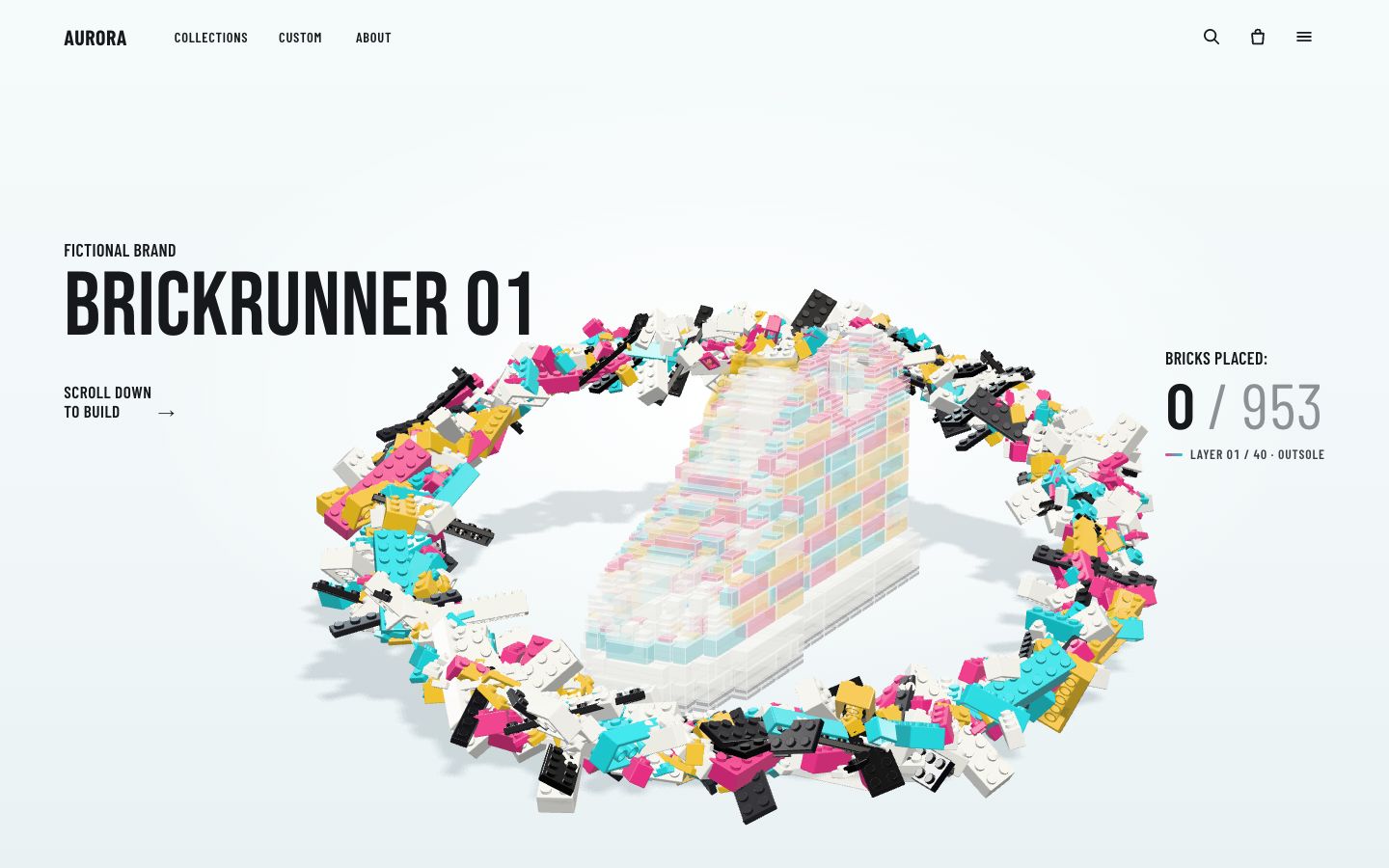
const scrollFor = (p) => metrics.top + p * metrics.span;Before it is placed, every part waits on a tilted ring around the shoe, like Saturn's: low in front, high behind. Each one waits at roughly the angle of its own seat, so its flight is short, and it gets a small random tumble.
const sc = new THREE.Vector3(CENTRE[0], 58, CENTRE[2]);
const FRONT = -0.72;                                     // the ring's angle nearest the camera (yaw 0.85)
for (let i = 0; i < N; i++) {
  const c = cen[i];
  if (reduced) { air[i] = new THREE.Vector3(0, 12, 0); qAir[i] = new THREE.Quaternion(); continue; }
  if (!GRID(PARTS[i])) {                                  // laces wait as a ladder right above the ghost's throat
    air[i] = new THREE.Vector3(0, 26, 0); rnd(); rnd();
    qAir[i] = new THREE.Quaternion();
    continue;
  }
  const th = Math.atan2((c.z - sc.z) / 60, (c.x - sc.x) / 150) + (rnd() - 0.5) * 0.7;
  const rr = (rnd() - 0.5) * 44, rx = 206 + rr, rz = 178 + rr * 0.8;
  const y = sc.y + 4 - 54 * Math.cos(th - FRONT) + (rnd() - 0.5) * 18;
  air[i] = new THREE.Vector3(sc.x + Math.cos(th) * rx - c.x, y - c.y, sc.z + Math.sin(th) * rz - c.z);
  const ax = new THREE.Vector3(rnd() - 0.5, rnd() - 0.5, rnd() - 0.5).normalize();
  qAir[i] = new THREE.Quaternion().setFromAxisAngle(ax, 0.3 + rnd() * 0.9);
}
Inside the ring stands a ghost of the finished shoe: every visible part as a pale box 0.6 mm inside the real one. A placed brick hides its own ghost by the depth test, so nothing has to be tracked per part. The first frame already reads as a sneaker made of bricks.
// the ghost: every visible part as an inset box (fill + edges). Each box sits 0.6 mm inside its real part, so a
// placed brick hides its own ghost by the depth test — nothing to track per part.
const ghost = new THREE.Group(); inner.add(ghost);
{
  const fill = [], cols = [], lines = [];
  const gc = new THREE.Color(), white = new THREE.Color(0xffffff);
  let cur = [1, 1, 1];
  const quad = (a, b2, c2, d) => { fill.push(...a, ...b2, ...c2, ...a, ...c2, ...d); for (let k = 0; k < 6; k++) cols.push(...cur); };
  for (let i = 0; i < N; i++) {
    const p = PARTS[i]; if (!GRID(p) || p.zone === 'fill') continue;
    const [fw, fl] = p.rot % 2 ? [p.args[1], p.args[0]] : [p.args[0], p.args[1]];
    const x0 = p.x * P + 0.7, x1 = (p.x + fw) * P - 0.7, y0 = p.y * PL + 0.6, y1 = (p.y + p.h) * PL - 0.6, z0 = p.z * P + 0.7, z1 = (p.z + fl) * P - 0.7;
    gc.set(B.COLOURS[p.colour] ?? 0xffffff).lerp(white, 0.38); cur = [gc.r, gc.g, gc.b];
    const v = [[x0, y0, z0], [x1, y0, z0], [x1, y0, z1], [x0, y0, z1], [x0, y1, z0], [x1, y1, z0], [x1, y1, z1], [x0, y1, z1]];
    quad(v[4], v[7], v[6], v[5]); quad(v[0], v[1], v[2], v[3]); quad(v[0], v[4], v[5], v[1]); quad(v[2], v[6], v[7], v[3]); quad(v[1], v[5], v[6], v[2]); quad(v[3], v[7], v[4], v[0]);
    for (const [a2, b3] of [[0, 1], [1, 2], [2, 3], [3, 0], [4, 5], [5, 6], [6, 7], [7, 4], [0, 4], [1, 5], [2, 6], [3, 7]]) lines.push(...v[a2], ...v[b3]);
  }
  …
}
A part's flight is a number k from 0 to 1. The position eases out (a fast start, a soft landing), the
tumble unwinds a little earlier, and in the last 8 % the part drops 1.7 mm onto the studs: the click you feel in a real
build.
function partMatrix(i, k) {
  if (k >= 1 || (k === 0 && !GRID(PARTS[i]))) return rest[i];
  // position eases out (fast start, soft landing); the tumble unwinds a little earlier; the last 8 % presses the
  // studs home (a 1.7 mm drop) — the click you feel in a real build
  const e = 1 - Math.pow(1 - k, 3), er = 1 - Math.pow(1 - Math.min(1, k * 1.15), 4);
  pos.copy(air[i]).multiplyScalar((1 - e) * (GRID(PARTS[i]) ? airScale : 1)); if (k > 0) pos.y += k > 0.9 ? 1.7 * (1 - (k - 0.9) / 0.1) : 1.7;
  Q.copy(qAir[i]).slerp(I, er);
  const c = cen[i];
  // M = T(c + pos) · R(Q) · T(-c) · rest
  M.makeRotationFromQuaternion(Q);
  M.setPosition(pos.x + c.x - (M.elements[0] * c.x + M.elements[4] * c.y + M.elements[8] * c.z), pos.y + c.y - (M.elements[1] * c.x + M.elements[5] * c.y + M.elements[9] * c.z), pos.z + c.z - (M.elements[2] * c.x + M.elements[6] * c.y + M.elements[10] * c.z));
  return T1.multiplyMatrices(M, rest[i]);
}
setBuild(b) turns one build value into every part's matrix. Part i is in the air while
b is between i and i + 46, so about 46 parts fly at once. Only the parts whose
state changed are written, and a waiting part's matrix is a cached copy plus the ring's offset.
function setBuild(b, ringScale = 1) {
  const ringMoved = Math.abs(ringScale - airScale) > 1e-4; if (ringMoved) airScale = ringScale;
  let placed = 0, flying = 0;
  for (let i = 0; i < N; i++) {
    const k = Math.min(1, Math.max(0, (b - i) / W));
    if (k >= 1) placed++; else if (k > 0) flying++;
    if (k === f[i] && !(k === 0 && ringMoved)) continue;
    f[i] = k;
    const [mesh, j] = slot[i];
    if (k === 0 && GRID(PARTS[i])) {
      // waiting on the ring: a cached matrix plus the ring's scaled offset (16 copies + 3 adds, no matrix maths)
      const a = mesh.instanceMatrix.array, o = j * 16, m0 = wait0[i];
      a.set(m0, o); a[o + 12] += air[i].x * airScale; a[o + 13] += air[i].y * airScale; a[o + 14] += air[i].z * airScale;
    } else mesh.setMatrixAt(j, partMatrix(i, k));
    mesh.userData.dirty = true;
    if (mesh.userData.lace) {
      const m = mesh.material[0];
      m.opacity = k === 0 ? 0.32 : 0.55 + 0.45 * k; m.depthWrite = k > 0; mesh.castShadow = k > 0;   // stays `transparent`: toggling it would recompile
    }
  }
  for (const m of meshes) if (m.userData.dirty) { m.instanceMatrix.needsUpdate = true; m.userData.dirty = false; }
  state.placed = placed; state.inFlight = flying; state.build = b;
  ghost.visible = placed < N; state.ghost = ghost.visible;
  …
}
The page maps the progress to that build value, to the turn (an ease-in-out over a full circle), to a slow quarter orbit of the camera while it builds, and to a zoom that closes in as the ring draws in.
function stateFor(p) {
  const b = (N + W) * clamp((p - T.hold) / (T.built - T.hold));
  const tt = clamp((p - T.turn0) / (T.turn1 - T.turn0));
  const turn = reduced ? 0 : Math.PI * 2 * (tt < 0.5 ? 4 * tt ** 3 : 1 - (-2 * tt + 2) ** 3 / 2);
  const k = smooth(clamp(p / T.built));
  return {
    b, turn,
    orbit: reduced ? 0 : 0.2 * (1 - k),                         // a slow quarter-orbit while it builds
    zoom: reduced ? 1 : Z0 - (Z0 - 1) * Math.sqrt(k) + 0.3 * Math.sin(Math.PI * tt) - 0.03 * smooth(clamp((p - T.turn0) / (T.done - T.turn0))),
    lift: reduced ? 0 : 0.06 * (1 - k),
    ring: 1 - 0.5 * k,
    cxOff: reduced || innerWidth <= 720 ? 0 : 0.07 * Math.sin(Math.PI * tt) + 0.015 * (1 - k),
  };
}
Scrolling only sets a target. A damped follower moves the shown progress towards it in each animation frame and stops asking for frames when it arrives, so a scroll wheel's jumps become smooth, and the page is idle when you stop. The floor's shadow is refreshed every third frame in motion and always on the resting frame.
function tick(now) {
  raf = 0;
  const dt = Math.min(64, now - (view.last || now));
  view.last = now;
  const follow = STUDIO || reduced ? 1 : 1 - Math.exp(-dt / 85);
  view.shown += (view.target - view.shown) * follow;
  if (Math.abs(view.target - view.shown) < 1e-5) view.shown = view.target;
  const settled = view.shown === view.target;
  view.frame = (view.frame || 0) + 1;
  draw(view.shown, settled || view.frame % 3 === 0);
  if (!settled) want(); else view.last = 0;
}function onScroll() { view.target = progressAt(scrollY); want(); }
function onResize() {
measure();
const L = layout(); Z0 = L.zoom0;
if (stage) stage.resize(innerWidth, innerHeight, L);
view.target = progressAt(scrollY); view.shown = view.target; lastPlaced = -1; lastLayer = -1;
draw(view.shown);
}
addEventListener('scroll', onScroll, { passive: true });Each frame updates the counter, the layer line and the phone's bar and rail, and announces the layer in a polite live region, 0.7 s after it changes so a fast scroll does not flood a screen reader.
function draw(p, shadow = true) {
  const s = stateFor(p);
  let placed;
  if (stage) {
    stage.setBuild(s.b, s.ring);
    stage.render({ turn: s.turn, orbit: s.orbit, zoom: s.zoom, lift: s.lift, cxOff: s.cxOff, shadow });
    placed = stage.state.placed;
  } else placed = N;
  // counter + phase + progress
  if (placed !== lastPlaced) {
    ui.count.textContent = fmt(placed); ui.short.textContent = `${fmt(placed)} / ${fmt(N)}`;
    const pct = placed / N;
    ui.rail.setAttribute('aria-valuenow', Math.round(pct * 100));
    ui.railFill.style.setProperty('--p', pct.toFixed(4)); ui.bar.style.setProperty('--p', pct.toFixed(4));
    lastPlaced = placed;
  }
  …
}<div class="counter" aria-hidden="true">
<p class="clabel">Bricks placed:</p>
<p class="cnum"><b data-count>0</b><span class="of"> / <span data-total>0</span></span></p>
<p class="phase" data-phase>Layer 00 / 00 · Outsole</p>
</div>.counter { position: absolute; right: var(--gut); top: 40%; z-index: 2; text-align: left; min-width: 15ch; }
.clabel { margin: 0 0 4px; font-weight: 600; font-size: clamp(14px, 1.25vw, 28px); letter-spacing: .02em; text-transform: uppercase; }
.cnum { margin: 0; font-family: var(--cond); font-weight: 600; font-size: clamp(44px, 4.6vw, 108px); line-height: 1; letter-spacing: -.005em; font-variant-numeric: tabular-nums; white-space: nowrap; }
.cnum b { font-weight: 600; color: var(--ink); }
.cnum .of { font-weight: 400; color: var(--dim); }
.phase { margin: 10px 0 0; font-weight: 600; font-size: clamp(13.5px, .95vw, 21px); letter-spacing: .06em; text-transform: uppercase; color: var(--ink-2); font-variant-numeric: tabular-nums; }
.phase::before { content: ''; display: inline-block; width: 18px; height: 3px; border-radius: 2px; margin: 0 8px 3px 0; background: linear-gradient(90deg, var(--magenta), var(--teal)); vertical-align: middle; }.foot { display: block; position: absolute; left: var(--gut); right: var(--gut); bottom: calc(22px + env(safe-area-inset-bottom)); }
.bar { height: 5px; border-radius: 3px; background: rgba(23, 24, 27, .08); overflow: hidden; }
.bar span { display: block; height: 100%; width: 100%; transform-origin: left; transform: scaleX(var(--p, 0)); background: linear-gradient(90deg, var(--magenta), #C982B3 45%, var(--teal)); border-radius: 3px; }
.rail { display: block; position: absolute; right: calc(var(--gut) + 20px); top: 57%; width: 3px; height: 14vh; border-radius: 2px; background: rgba(23, 24, 27, .1); overflow: hidden; }
.rail-fill { display: block; width: 100%; height: 100%; transform-origin: top; transform: scaleY(var(--p, 0)); background: linear-gradient(180deg, var(--teal), #20A9B2); }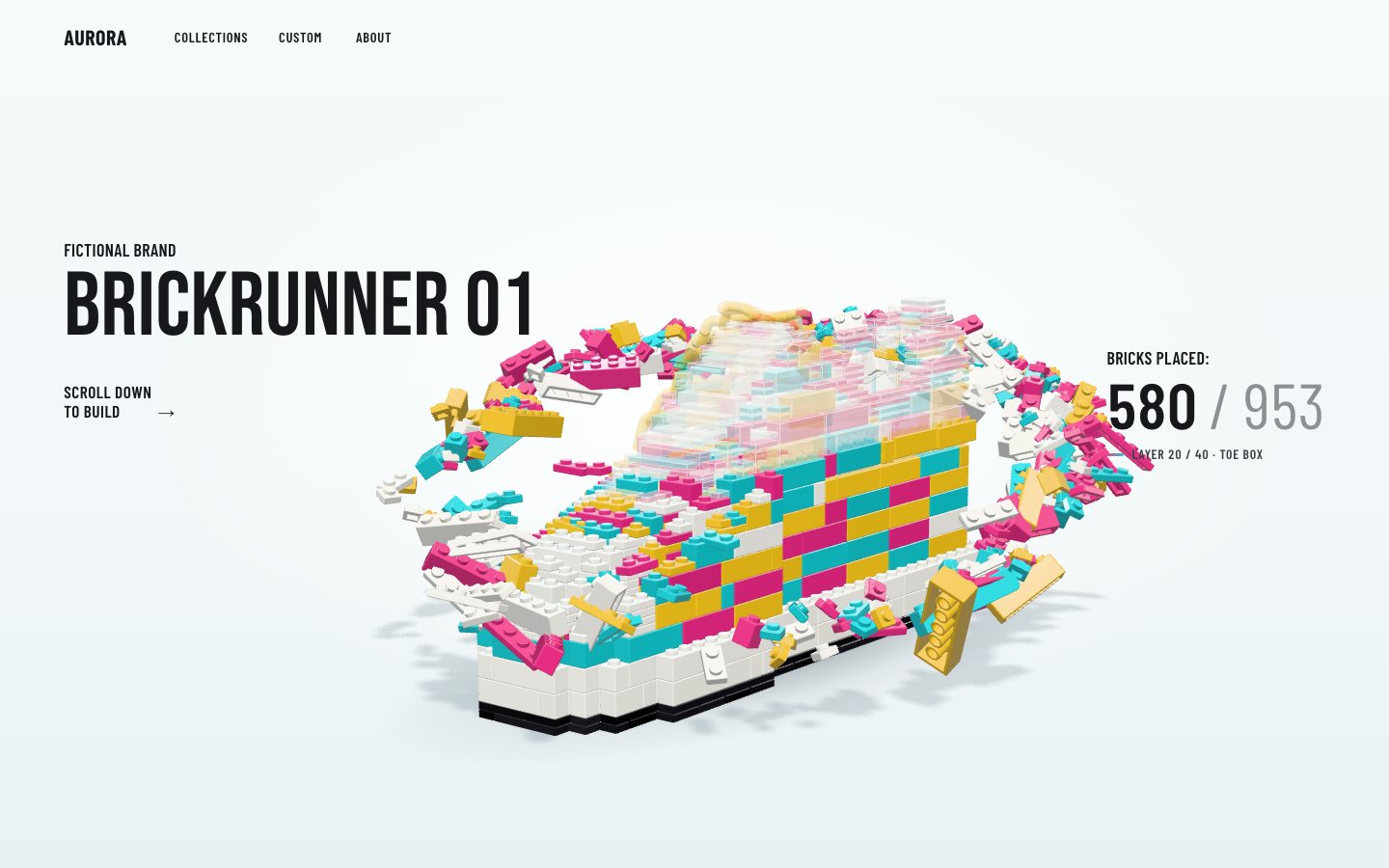
4 · Callouts and the next stop
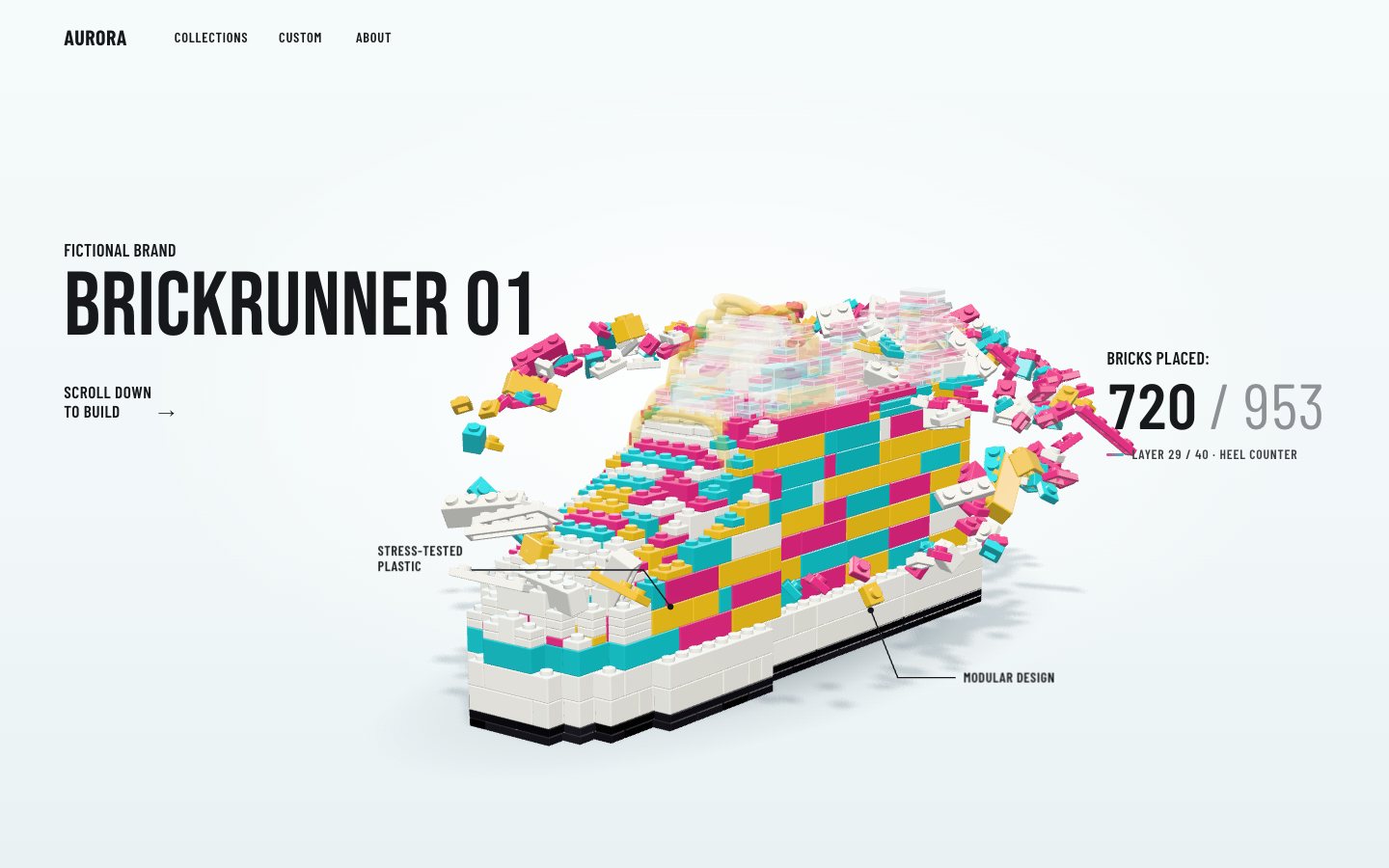
Two callouts point at the shoe on thin leader lines. Their anchors are points on the shoe in millimetres, projected through the live camera every frame, so the lines stay on the toe and the sole while the camera moves.
<svg class="leaders" data-leaders aria-hidden="true"><path data-leader="0"/><path data-leader="1"/><circle data-dot="0" r="3.2"/><circle data-dot="1" r="3.2"/></svg>
<p class="callout" data-callout="0">Stress-tested<br>plastic</p>
<p class="callout" data-callout="1">Modular design</p>// anchors for the two callouts (shoe-local millimetres; the lateral side faces the camera, -z)
const edge = (u, half, y) => [u * LEN * P, y * PL, (centreLine(u) - half(u) + 0.15) * P];
const ANCHORS = [edge(0.83, upperHalf, 14), edge(0.36, soleHalf, 4.5)];
const TOE = [LEN * P + 6, 6 * PL, centreLine(1) * P]; // the toe tip: callout 1 stays left of itfunction project(mm) {
anchorV.set(mm[0], mm[1], mm[2]).applyMatrix4(inner.matrixWorld).project(camera);
return [(anchorV.x * 0.5 + 0.5) * view.w, (-anchorV.y * 0.5 + 0.5) * view.h];
}function callouts(p, placed) {
if (!stage || innerWidth <= 720 || innerHeight <= 500) return;
const turning = p > T.turn0 - 0.01 && p < T.done;
const vis = [placed >= N * 0.62 && !turning ? 1 : 0, placed >= 150 && !turning ? 1 : 0];
for (let k = 0; k < 2; k++) {
const [ax, ay] = stage.project(ANCHORS[k]);
const el = ui.callouts[k], [w, h] = calloutSize[k] || (calloutSize[k] = [el.offsetWidth, el.offsetHeight]);
let tx, ty, d;
if (k === 0) { const [toeX] = stage.project(TOE); tx = Math.min(ax - w - 74, toeX - w - 34); ty = ay - h - 34; d = `M${tx + w + 8} ${ty + h - 4} L${ax - 28} ${ty + h - 4} L${ax} ${ay}`; }
else { tx = ax + 96; ty = ay + 62; d = `M${ax} ${ay} L${ax + 28} ${ty + h / 2} L${tx - 8} ${ty + h / 2}`; }
el.style.transform = `translate(${tx.toFixed(1)}px, ${ty.toFixed(1)}px)`;
el.style.setProperty('--o', vis[k]); ui.leaders[k].style.setProperty('--o', vis[k]); ui.dots[k].style.setProperty('--o', vis[k]);
ui.leaders[k].setAttribute('d', d); ui.dots[k].setAttribute('cx', ax.toFixed(1)); ui.dots[k].setAttribute('cy', ay.toFixed(1));
…
}
}"Scroll down to build" is a real button. It scrolls (smoothly, or at once with reduced motion) to the end of the next layer, then to the turn, then to the end. On a phone the arrow under the rail does the same.
// "Scroll down to build" and the phone's down arrow: glide to the end of the next layer
function nextStop() {
  const p = progressAt(scrollY), s = stateFor(p);
  if (p >= T.done - 0.001) return scrollFor(1);
  if (s.b >= N + W - 0.5) return scrollFor(p < T.turn0 ? T.turn0 + 0.0001 : T.done + 0.002);
  const cur = layerOf(Math.max(0, Math.floor(s.b - W)));
  const nextIdx = cur + 1 < layerStart.length ? layerStart[cur + 1] : N;
  const b = Math.min(N + W, nextIdx + W);
  return scrollFor(T.hold + (b / (N + W)) * (T.built - T.hold) + 0.0005);
}
$$('[data-next]').forEach((btn) => btn.addEventListener('click', () => scrollTo({ top: nextStop(), behavior: reduced ? 'auto' : 'smooth' })));
With a mouse, the camera leans a little towards the pointer. It is a damped target too, so it never jumps, and it is off for touch and for reduced motion.
if (!reduced && matchMedia('(pointer: fine)').matches) {
  stageEl.addEventListener('pointermove', (e) => { view.pointerT = [(e.clientX / innerWidth - 0.5) * 2, (e.clientY / innerHeight - 0.5) * 2]; want(); });
  stageEl.addEventListener('pointerleave', () => { view.pointerT = [0, 0]; want(); });
}
5 · The shop
When the shoe has turned, Add to cart rises next to the price. It is in the page from the start but hidden, and it
only takes pointer events once the stage is done.
<div class="buyline" data-buyline>
  <p class="price"><span class="sr-only">Price </span>$189</p>
  <button class="cta" type="button" data-quickadd aria-haspopup="dialog" aria-controls="sizes">Add to cart</button>
</div>.buyline { position: absolute; z-index: 3; right: var(--gut); top: calc(40% + clamp(150px, 13.6vw, 290px)); display: flex; align-items: center; gap: 18px; opacity: 0; transform: translateY(12px); pointer-events: none; visibility: hidden; transition: opacity .45s ease, transform .45s cubic-bezier(.2, .9, .3, 1.2), visibility 0s .45s; }
.done .buyline { opacity: 1; transform: none; pointer-events: auto; visibility: visible; transition: opacity .45s ease, transform .45s cubic-bezier(.2, .9, .3, 1.2), visibility 0s; }The cart and the chosen size are kept in localStorage under versioned keys, and older dv60
keys are wiped on load, so a changed format never reads stale data. Every access is wrapped: private browsing simply
keeps nothing.
const KEY = 'dv60.v1.';
const store = {
  get(k, d) { try { const v = localStorage.getItem(KEY + k); return v == null ? d : JSON.parse(v); } catch { return d; } },
  set(k, v) { try { localStorage.setItem(KEY + k, JSON.stringify(v)); } catch { /* private mode */ } },
};
try { for (const k of Object.keys(localStorage)) if (k.startsWith('dv60') && !k.startsWith(KEY)) localStorage.removeItem(k); } catch { /* ignore */ }function add(size) {
const l = cart.find((x) => x.size === size); if (l) l.q++; else cart.push({ size, q: 1 });
renderCart();
const b = $('[data-badge]'); b.classList.remove('pop'); void b.offsetWidth; b.classList.add('pop');
toast(`Added: Brickrunner 01 · US ${size}`);
}The buy form validates for real: no size chosen shows an inline error and moves focus to the first size; a sold-out size is disabled.
$('[data-buyform]').addEventListener('submit', (e) => {
  e.preventDefault();
  const sel = $('input[name=size]:checked'), grp = $('[data-size-group]'), err = $('[data-size-err]');
  if (!sel) { err.hidden = false; grp.classList.add('invalid'); $('input[name=size]:not(:disabled)').focus(); return; }
  err.hidden = true; grp.classList.remove('invalid'); add(sel.value);
});
The size sheet, the cart, search and the menu are dialogs with a scrim. They are shown by hand rather than with
showModal(), because making the page inert cost a long frame on a slow phone: focus goes in, Tab and
Shift + Tab are trapped, Escape and the scrim close, and focus returns to the button that opened it.
function openDialog(id, from) {
  if (openId) closeDialog(false);
  const d = document.getElementById(id); opener = from || document.activeElement; openId = id;
  d.hidden = false; scrim.hidden = false;
  if (id === 'cart') renderCart();
  if (id === 'search') { renderResults(''); $('[data-search-input]').value = ''; }
  (id === 'search' ? $('[data-search-input]') : focusables(d)[id === 'sizes' || id === 'menu' ? 1 : 0] || focusables(d)[0]).focus();
}
function closeDialog(restore = true) {
  if (!openId) return;
  document.getElementById(openId).hidden = true; scrim.hidden = true; openId = null;
  if (restore && opener && opener.focus) opener.focus();
}document.addEventListener('keydown', (e) => {
if (!openId) return;
if (e.key === 'Escape') { e.preventDefault(); closeDialog(); return; }
if (e.key === 'Tab') {
const f = focusables(document.getElementById(openId)); if (!f.length) return;
const i = f.indexOf(document.activeElement);
if (e.shiftKey && (i <= 0)) { e.preventDefault(); f[f.length - 1].focus(); } else if (!e.shiftKey && i === f.length - 1) { e.preventDefault(); f[0].focus(); }
}
});.scrim { position: fixed; inset: 0; z-index: 30; background: rgba(15, 30, 36, .28); backdrop-filter: blur(3px); -webkit-backdrop-filter: blur(3px); }
.sheet {
position: fixed; z-index: 31; top: 12px; right: 12px; width: min(400px, calc(100vw - 24px)); max-height: calc(100vh - 24px); overflow: auto;
background: #fff; border-radius: 22px; padding: 14px 18px 20px; box-shadow: 0 30px 80px -30px rgba(10, 40, 50, .55);
animation: sheet-in .28s cubic-bezier(.2, .9, .3, 1);
}
@keyframes sheet-in { from { opacity: 0; transform: translateY(-10px) scale(.98); } }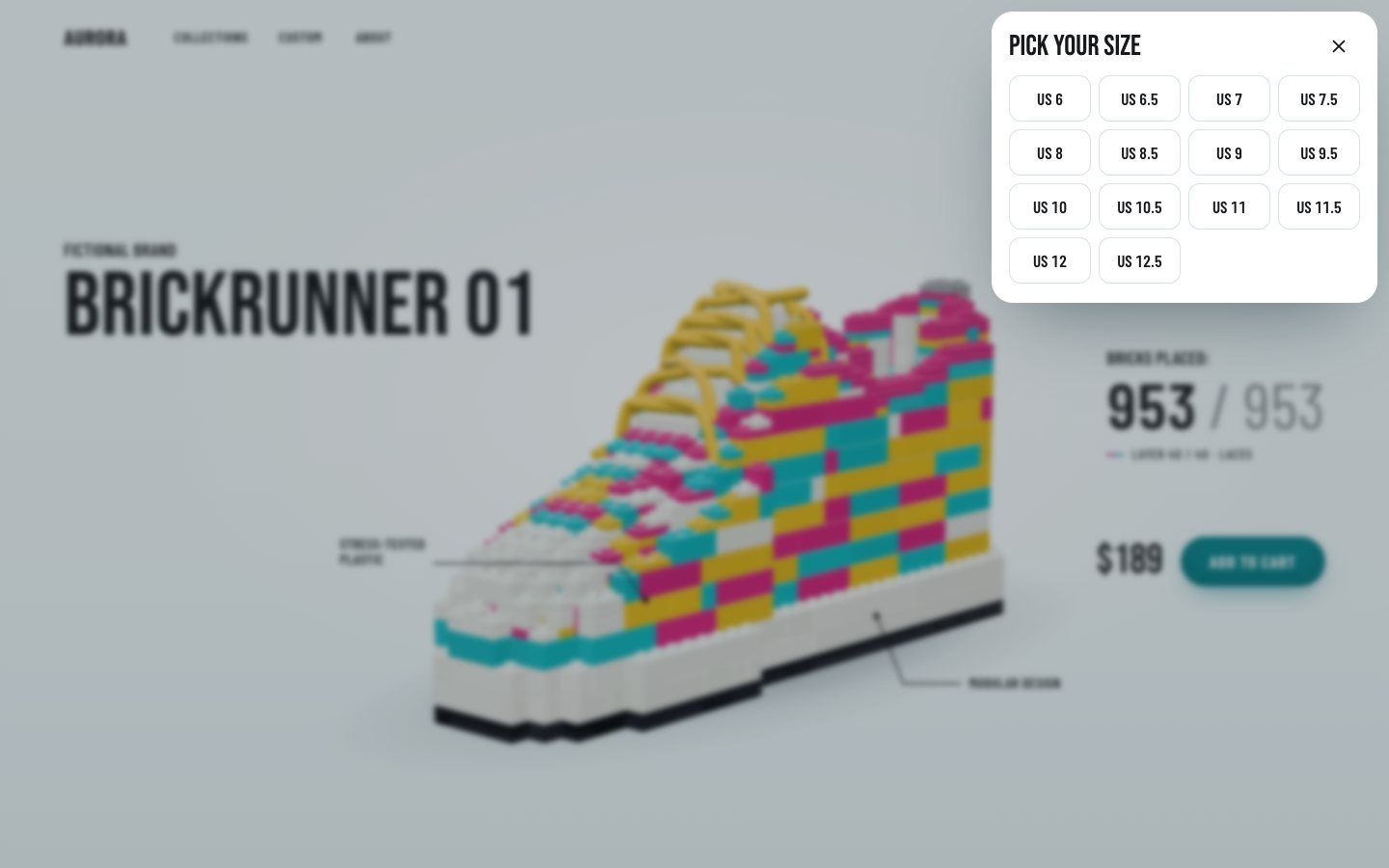
6 · Fallbacks and the frame budget
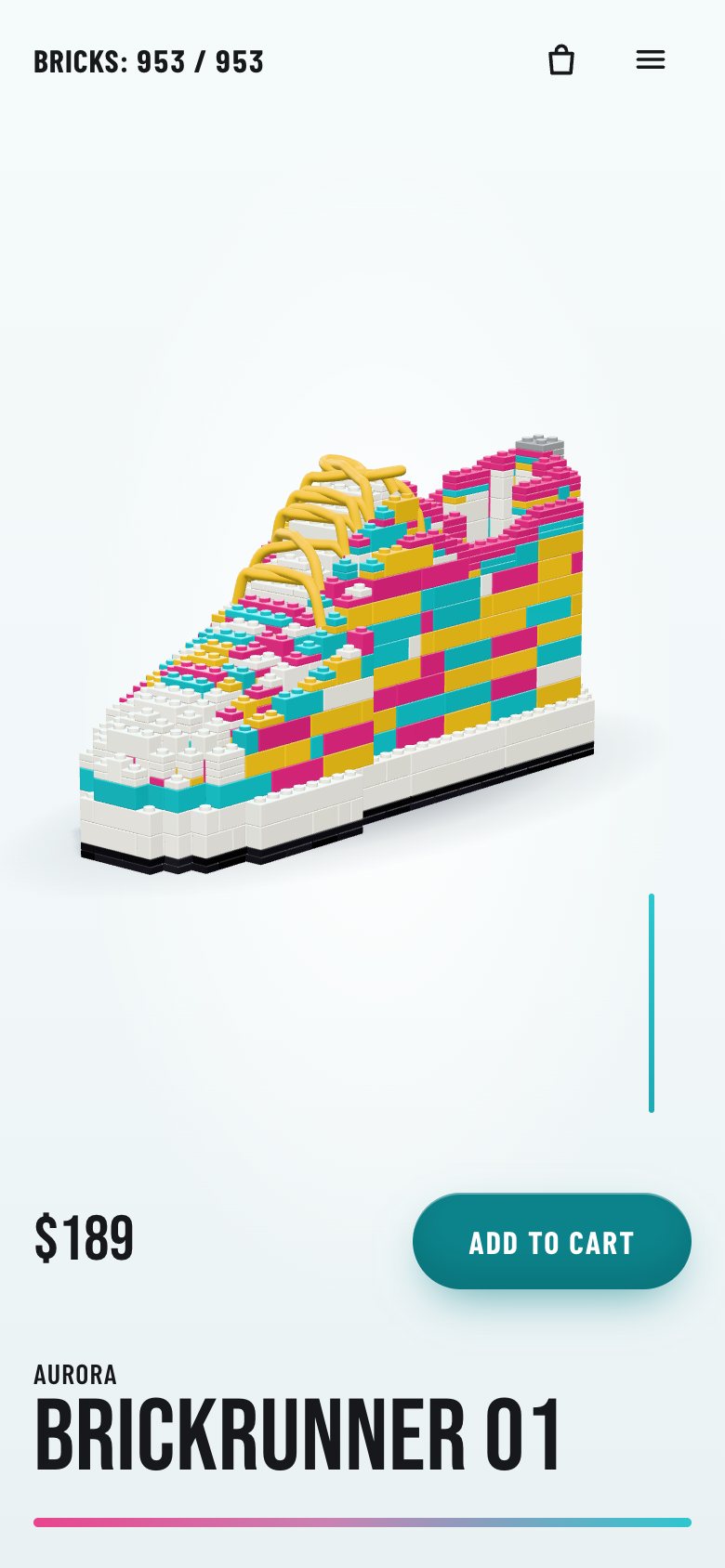
Without WebGL (or with ?nogl), the page shows the still from stage 1 with the same layout, 953 / 953 and
Add to cart, so the shop still works.
const hasGL = (() => { try { const c = document.createElement('canvas'); return !!(c.getContext('webgl2') || c.getContext('webgl')); } catch { return false; } })();
const ready = (async () => {
  if (Q.has('nogl') || !hasGL) { document.documentElement.classList.add('no-gl'); return; }
  try {
    const { createStage } = await import('./stage.js');
    stage = createStage(canvas, { reduced });
  } catch (e) { console.warn('WebGL stage unavailable, showing the still', e); document.documentElement.classList.add('no-gl'); stage = null; }
})();.still { position: absolute; left: 50%; top: 56%; width: min(64vw, 900px); height: auto; transform: translate(-46%, -50%); opacity: 0; pointer-events: none; }
.no-gl .still { opacity: 1; }
.no-gl .gl, .no-gl .leaders, .no-gl .callout { display: none; }Without JavaScript the tall section shrinks to one screen that is no longer sticky: the still and the title show, the counter, the canvas and the scroll hints are hidden, and the buy and parts sections follow straight after.
<noscript><style>.build{height:auto}.stage{position:relative;height:100vh;height:100svh}.gl,.counter,.rail,.rail-next,.leaders,.callout,.hint,.foot,.nav-count{display:none}.still{opacity:1}</style></noscript>If a third of recent animated frames run long, the pixel ratio steps down by 0.25 (to no less than 1.25), applied once scrolling rests, because a resize reallocates buffers. Every shader program is compiled at load, so the first scroll never stalls.
// adaptive quality: if a third of recent animated frames run long, render fewer pixels (2 → 1.75 → 1.5 → 1.25 DPR)
const perf = { best: 1e9, win: [], cool: 0 };
function watchFrame(dt) {
  if (!stage || dt <= 0 || dt > 200) return;
  perf.best = Math.max(6, Math.min(perf.best, dt));
  perf.win.push(dt > perf.best * 1.6 ? 1 : 0); if (perf.win.length > 36) perf.win.shift();
  if (perf.cool > 0) { perf.cool--; return; }
  if (perf.win.length === 36 && perf.win.reduce((a, b) => a + b, 0) >= 12 && stage.dpr > 1.25) {
    perf.pending = Math.max(1.25, stage.dpr - 0.25); perf.win.length = 0; perf.cool = 90;   // applied once scrolling rests (a resize reallocates buffers)
  }
}
With reduced motion there is no ring and no tumble (parts drop 12 mm into place), no turn, no damping and no parallax, and CSS transitions are cut to nothing.
@media (prefers-reduced-motion: reduce) {
  *, *::before, *::after { animation-duration: .001ms !important; transition-duration: .001ms !important; scroll-behavior: auto !important; }
}
Make it yours
- Your object is
SOLE,TOPand the zones injs/shoe.js. Change the curves and the validator tells you if the result still holds together; the count, the inventory and the page follow. - Your colours are
FIXEDandMOSAICinshoe.jsandCOLOURSinbricks.js; the page's are tokens at the top ofcss/page.css. - Your pacing is
Tinjs/page.js(where the build, the turn and done sit in the scroll) and the height of.build; the flight length isW(46 parts in the air). - Scripts can drive it through
window.__dv60:state(),scrollFor(p),pFor(n)(the progress at which partnlands) andat(p). - Accessibility is already there: a polite live region per layer, a labelled progress bar, real buttons and
radio groups, 44 px targets, dialogs with a focus trap, visible focus, and
prefers-reduced-motionhonoured.
The code is under the MIT licence: use it in your own projects, commercial ones included. three.js r186 is MIT too. The fonts are Bebas Neue and Barlow Condensed (SIL Open Font License, from Google Fonts). AURORA and BRICKRUNNER 01 are made up. No AI picture is used: every brick, the ghost and the ring are made in code, and the still is a render of the same scene.
Make the object a list, and make scroll the only motor. The number on the page is the length of the list, the build order is the list's order, and one scroll progress decides what is placed, what is flying and how the camera sits. Nothing plays on its own, so the page can never be somewhere the reader did not take it.