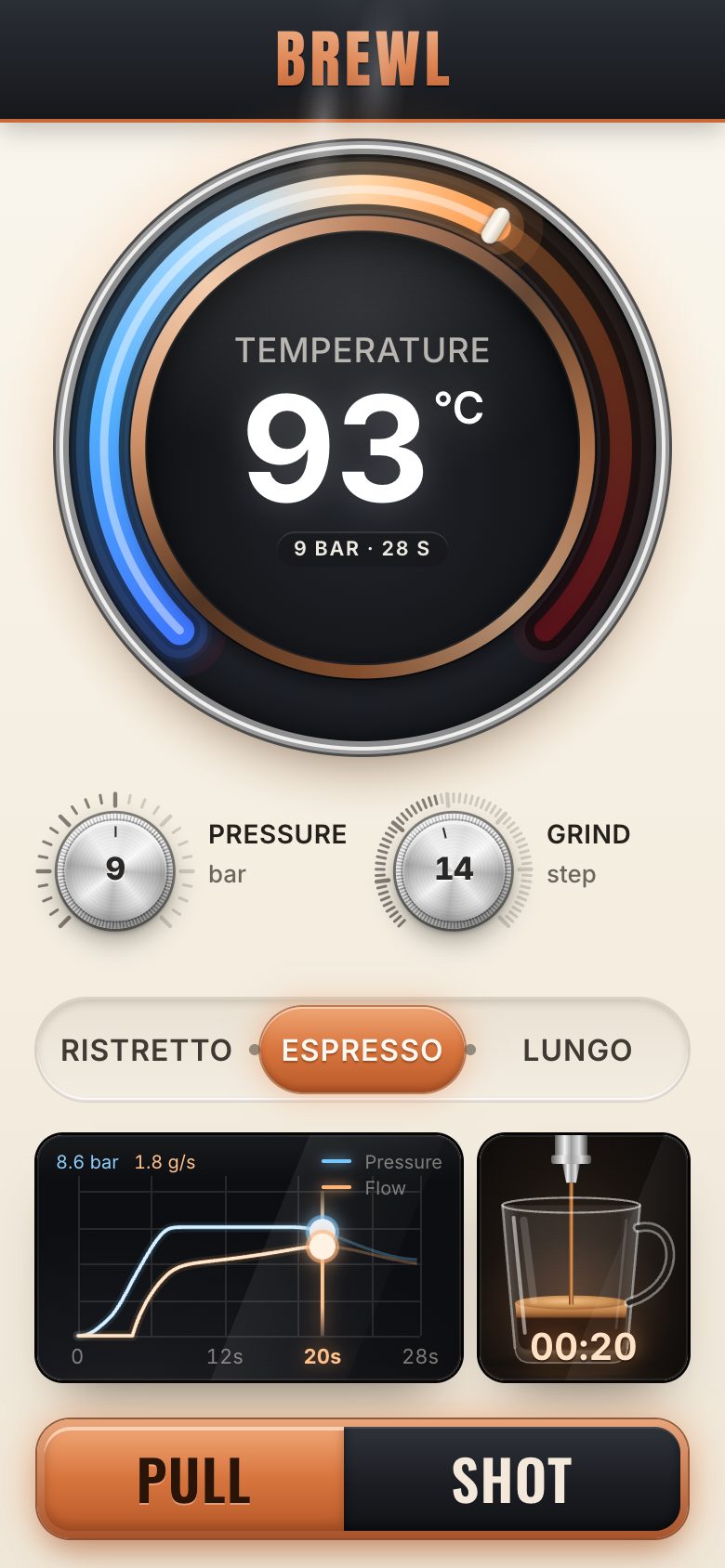
This is the whole build of the espresso machine controls, in the order it was written: the panel of a made-up machine called BREWL. Three rotary dials set the temperature, the pressure and the grind. Each one is a real slider, so you can drag it round, tap its scale, use the wheel or the arrow keys. Three recipes set all three at once. PULL SHOT runs the shot those dials make: a graph draws the pressure and the flow, the cup under the spout fills, and a verdict says how it tastes and which dial to turn. Each stage below is the panel as it stood at that step. It shows a still, and Run it here starts the live page in its place. The code under each heading is only what that stage adds. The finished source is at the end, and on GitHub under the MIT licence.
There is no library, no build step and no picture. Every material is a CSS gradient, the cup is SVG, and the curves
and the heat arc are drawn on canvases. The files: index.html and style.css are the panel;
app.js runs it; dial.js is the rotary dial (stage 2), sim.js the shot model
(stage 5), graph.js the graph (stage 7) and cup.js the cup (stage 8). app.js is
written in six parts with banners of their own; the nine stages follow the build instead, so a stage often adds a few
lines to several parts.
1 · The panel
The page holds three boxes. The stage fills the screen and centres what is inside it. The frame is as
big as the panel will look on screen. The panel itself, .brewl, is laid out at its design size, 1160 ×
886 px, and scaled as a whole. Every size inside it is in the design's own pixels, so it keeps the concept's
proportions on any screen. The two dark boxes are still empty, and PULL SHOT is disabled until stage 5
gives it a shot to pull.
<main class="stage" data-layout="desk">
  <div class="frame">

    <!-- ============================== THE COMPONENT ==============================
         BREWL espresso control, stage 1: the panel and its materials, scaled to the screen. Nothing moves yet; stage 2
         makes the temperature dial a real slider. -->
    <section class="brewl" aria-labelledby="brewl-name">

      <header class="plate">
        <svg class="plate-shape" aria-hidden="true" preserveAspectRatio="none">
          <defs>
            <linearGradient id="plate-fill" x1="0" y1="0" x2="0" y2="1">
              <stop offset="0" stop-color="#2E323A"/><stop offset=".55" stop-color="#1C1F25"/><stop offset="1" stop-color="#15171B"/>
            </linearGradient>
            <linearGradient id="plate-edge" x1="0" y1="0" x2="1" y2="0">
              <stop offset="0" stop-color="#7A3B1D"/><stop offset=".3" stop-color="#E9A57A"/><stop offset=".5" stop-color="#C46A35"/>
              <stop offset=".7" stop-color="#E9A57A"/><stop offset="1" stop-color="#7A3B1D"/>
            </linearGradient>
          </defs>
          <path class="plate-body" fill="url(#plate-fill)"/>
          <path class="plate-lip" fill="none" stroke="url(#plate-edge)" stroke-width="2.5"/>
        </svg>
        <div class="badge"><h1 id="brewl-name" class="badge-word">BREWL</h1></div>
        <p class="plate-sub">Espresso control</p>
      </header>

      <!-- temperature: the big dial (stage 2 makes it turn) -->
      <div class="dial dial--temp" data-dial="temp">
        <div class="bezel" aria-hidden="true"></div>
        <div class="knurl" aria-hidden="true"><i class="knurl-spin"></i><i class="knurl-light"></i></div>
        <div class="face" aria-hidden="true">
          <span class="face-label">Temperature</span>
          <span class="face-value"><b class="num">93</b><sup>°C</sup></span>
        </div>
      </div>

      <div class="knobs">
        <div class="knob-wrap knob-wrap--pressure">
          <span class="knob-label" id="lbl-pressure">Pressure</span>
          <div class="dial dial--knob" data-dial="pressure">
            <div class="knurl" aria-hidden="true"><i class="knurl-spin"></i><i class="knurl-light"></i></div>
            <div class="face" aria-hidden="true"><span class="face-value"><b class="num">9</b></span></div>
          </div>
          <span class="knob-unit" aria-hidden="true">bar</span>
          <span class="knob-end lo" aria-hidden="true">6</span><span class="knob-end hi" aria-hidden="true">12</span>
        </div>
        <div class="knob-wrap knob-wrap--grind">
          <span class="knob-label" id="lbl-grind">Grind</span>
          <div class="dial dial--knob" data-dial="grind">
            <div class="knurl" aria-hidden="true"><i class="knurl-spin"></i><i class="knurl-light"></i></div>
            <div class="face" aria-hidden="true"><span class="face-value"><b class="num">14</b></span></div>
          </div>
          <span class="knob-unit" aria-hidden="true">step</span>
          <span class="knob-end lo" aria-hidden="true">fine</span><span class="knob-end hi" aria-hidden="true">coarse</span>
        </div>
      </div>

      <!-- the extraction graph: dark glass, empty for now (stage 5 puts the verdict in its corner) -->
      <figure class="graph" aria-hidden="true"></figure>

      <!-- the cup under the spout (stage 8 draws the cup and the spout in it) -->
      <div class="cup" aria-hidden="true"></div>

      <!-- PULL SHOT: disabled until stage 5 gives it a shot to pull -->
      <button type="button" class="pull" disabled>
        <span class="pull-a">Pull</span><span class="pull-b">Shot</span>
      </button>
    </section>
  </div>
</main>
A transform scales the panel, and the frame has the panel's scaled size so the stage's grid can centre it. The panel
stays hidden until app.js has measured the screen and marked the stage ready, so it never
shows at the wrong size first.
/* the stage fills the screen; .frame is the panel's scaled footprint; .brewl is the panel at design size, scaled */
.stage { position: relative; height: 100dvh; width: 100%; display: grid; place-items: center; overflow: hidden; }
.frame { position: relative; width: calc(var(--w) * var(--s) * 1px); height: calc(var(--h) * var(--s) * 1px); }
.brewl {
  position: absolute; left: 0; top: 0; width: calc(var(--w) * 1px); height: calc(var(--h) * 1px);
  transform: scale(var(--s)); transform-origin: 0 0;
  background: linear-gradient(180deg, var(--cream-50), var(--panel) 30%, var(--cream-200));
  border-radius: var(--panel-r); box-shadow: var(--panel-drop);
  user-select: none; -webkit-user-select: none;
}
.stage:not(.ready) .brewl { visibility: hidden; }
fit() finds the scale: the largest that fits the window with a margin of 3.5 % of its shorter side
(between 12 and 40 px), and never more than 1.4. At 1440 × 900 that is 0.945. It writes the design size and the scale
as custom properties on the stage. Until stage 9 a phone gets this same desk panel; at 390 × 844 it is scaled to 0.31.
const DESIGN = { desk: [1160, 886] };

function fit() {
  const vw = document.documentElement.clientWidth, vh = window.innerHeight;
  const [w, h] = DESIGN.desk;
  const m = clamp(Math.min(vw, vh) * 0.035, 12, 40);
  scale = Math.min((vw - m * 2) / w, (vh - m * 2) / h, 1.4);
  stage.style.setProperty('--w', w); stage.style.setProperty('--h', h); stage.style.setProperty('--s', scale.toFixed(4));
  plateShape(w);
  stage.classList.add('ready');
}
The tokens come in three layers: primitive values named for what they are (--copper-500), semantic
ones named for their job (--accent), and per-part values. The materials are per-part values. The knurl is
a repeating-conic-gradient that repeats every 3.6°, so it draws 100 ridges round the ring. The chrome face
is a conic gradient of greys under a soft radial highlight.
/* component: per-part values */
:root {
  --panel-r: 22px;
  --panel-drop: 0 2px 0 rgb(255 255 255 / .9) inset, 0 -2px 0 rgb(60 40 20 / .06) inset, 0 40px 70px -30px rgb(70 45 20 / .35), 0 12px 24px -10px rgb(70 45 20 / .18);
  --chrome-face: radial-gradient(circle at 50% 30%, rgb(255 255 255 / .65), transparent 58%),
                 conic-gradient(from 15deg, #C9C9C9, #F6F6F6 10%, #A7A7A7 22%, #E9E9E9 35%, #B4B4B4 48%, #F4F4F4 60%, #A3A3A3 73%, #E6E6E6 86%, #C9C9C9);
  --knurl: repeating-conic-gradient(#F4F4F4 0deg 1.1deg, #9A9A9A 1.6deg 2.4deg, #F4F4F4 2.9deg 3.6deg);
  --copper-fill: linear-gradient(180deg, #F0A676 0%, #D9763F 48%, #B85A2A 100%);
  --dark-fill: linear-gradient(180deg, #2F333A 0%, #1B1D22 55%, #121317 100%);
  --press: cubic-bezier(.2, .8, .2, 1);
}
Every dial is a square box of side --d, and its rings are circles centred in it, sized as fractions of
--d: the bezel --bz, the knurled ring --kn and the face --fc. A
fixed light (.knurl-light) sits over the knurl, so later the knurl can turn under it and still be lit from
the top left. A faint repeating-radial-gradient on the face, one ring every 2 px, makes it look spun.
/* every dial is a square box of side --d; its rings are centred circles sized as fractions of --d */
.dial { position: absolute; width: calc(var(--d) * 1px); height: calc(var(--d) * 1px); border-radius: 50%; }
.dial > * { position: absolute; left: 50%; top: 50%; border-radius: 50%; transform: translate(-50%, -50%); }

.knurl { width: calc(var(--d) * var(--kn) * 1px); height: calc(var(--d) * var(--kn) * 1px); overflow: hidden;
  box-shadow: 0 0 0 1.5px rgb(40 40 40 / .55), 0 6px 14px rgb(0 0 0 / .35), 0 2px 3px rgb(0 0 0 / .3); }
.knurl-spin { position: absolute; inset: 0; border-radius: 50%; background: var(--knurl); }
.knurl-light { position: absolute; inset: 0; border-radius: 50%;
  background: linear-gradient(155deg, rgb(255 255 255 / .55), rgb(255 255 255 / 0) 42%, rgb(0 0 0 / .1) 60%, rgb(0 0 0 / .42)); }
.face {
  width: calc(var(--d) * var(--fc) * 1px); height: calc(var(--d) * var(--fc) * 1px);
  background: var(--chrome-face);
  box-shadow: inset 0 2px 2px rgb(255 255 255 / .9), inset 0 -3px 6px rgb(0 0 0 / .22), 0 0 0 1px rgb(0 0 0 / .25), 0 3px 6px rgb(0 0 0 / .25);
  display: flex; flex-direction: column; align-items: center; justify-content: center;
}
.face::before { content: ''; position: absolute; inset: 0; border-radius: 50%; opacity: .5;
  background: repeating-radial-gradient(circle, rgb(0 0 0 / .035) 0 1px, rgb(255 255 255 / .04) 1px 2px); }
.face > * { position: relative; }
.face-value { display: flex; align-items: flex-start; font-weight: 700; line-height: 1; font-variant-numeric: tabular-nums; letter-spacing: -.02em; }
The layout places every part in design pixels. The temperature dial is 346 px across; the knobs are 176.
.stage[data-layout="desk"] {
  --plate-h: 115px; --tab-h: 44px; --badge-y: 16px; --badge-w: 300px; --badge-h: 82px; --badge-font: 64px; --sub-font: 19px;
  --knob-label: 19px; --knob-unit: 18px;
  --pull-font: 40px;
}
.stage[data-layout="desk"] .dial--temp { --d: 346; --bz: .913; --kn: .69; --fc: .63; left: 59px; top: 150px; }
.stage[data-layout="desk"] .knob-wrap { --d: 176; width: 230px; height: 214px; top: 178px; }
.stage[data-layout="desk"] .knob-wrap .dial { --kn: .74; --fc: .65; top: 32px; }
.stage[data-layout="desk"] .knob-wrap--pressure { left: 505px; }
.stage[data-layout="desk"] .knob-wrap--grind { left: 846px; }
.stage[data-layout="desk"] .graph { left: 24px; top: 513px; width: 762px; height: 339px; }
.stage[data-layout="desk"] .cup { left: 813px; top: 513px; width: 321px; height: 204px; }
.stage[data-layout="desk"] .pull { left: 818px; top: 751px; width: 313px; height: 94px; }
The name plate is a graphite band with a tab hanging from its middle and a copper lip along its lower edge. It is one SVG path, written for the panel's width: straight sides, rounded top corners, and two cubic curves into the tab and out of it.
// the name plate: a graphite band with a tab hanging from its middle, a copper lip along its lower edge
function plateShape(W) {
  const cs = getComputedStyle(stage), H = parseFloat(cs.getPropertyValue('--plate-h')), T = parseFloat(cs.getPropertyValue('--tab-h'));
  const r = 22, cx = W / 2, tw = 452, a = cx - tw / 2, b = cx + tw / 2, e = 54;
  const svg = $('.plate-shape');
  svg.setAttribute('viewBox', `0 0 ${W} ${H + T}`);
  const tab = `L${b} ${H} C${b - 26} ${H} ${b - 28} ${H + T} ${b - e} ${H + T} L${a + e} ${H + T} C${a + 28} ${H + T} ${a + 26} ${H} ${a} ${H}`;
  $('.plate-body', svg).setAttribute('d', `M0 ${H} L0 ${r} Q0 0 ${r} 0 L${W - r} 0 Q${W} 0 ${W} ${r} L${W} ${H} ${tab} Z`);
  $('.plate-lip', svg).setAttribute('d', `M0 ${H - 1} L${a} ${H - 1} C${a + 26} ${H - 1} ${a + 28} ${H + T - 1} ${a + e} ${H + T - 1} L${b - e} ${H + T - 1} C${b - 28} ${H + T - 1} ${b - 26} ${H - 1} ${b} ${H - 1} L${W} ${H - 1}`);
}
The BREWL letters are chrome too: a vertical grey gradient clipped to the text, with a dark drop shadow under it and a faint light one above.
.badge-word {
  position: relative; margin: 0; height: 100%; display: grid; place-items: center;
  font-family: var(--font-display); font-weight: 400; font-size: var(--badge-font); letter-spacing: .07em; line-height: 1; padding-left: .07em;
  background: linear-gradient(180deg, #FFFFFF 0%, #E3E3E3 38%, #8F8F8F 52%, #D9D9D9 70%, #A9A9A9 100%);
  -webkit-background-clip: text; background-clip: text; color: transparent;
  filter: drop-shadow(0 1px 0 rgb(0 0 0 / .8)) drop-shadow(0 -1px 0 rgb(255 255 255 / .12));
}
The graph and the cup sit behind dark glass: a radial gradient, a dark outline, and a diagonal sheen painted by a pseudo-element on top.
.graph {
  position: absolute; margin: 0; border-radius: 16px; overflow: hidden;
  background: radial-gradient(120% 90% at 20% 100%, #1A1B20, #0D0E11 70%);
  box-shadow: 0 0 0 1.5px #050506, inset 0 0 0 1px rgb(255 255 255 / .07), 0 20px 30px -16px rgb(40 25 10 / .6);
}
.graph::after { content: ''; position: absolute; inset: 0; pointer-events: none;
  background: linear-gradient(112deg, transparent 52%, rgb(255 255 255 / .065) 52.2%, rgb(255 255 255 / .02) 78%, transparent 78.2%),
              linear-gradient(180deg, rgb(255 255 255 / .05), transparent 18%); }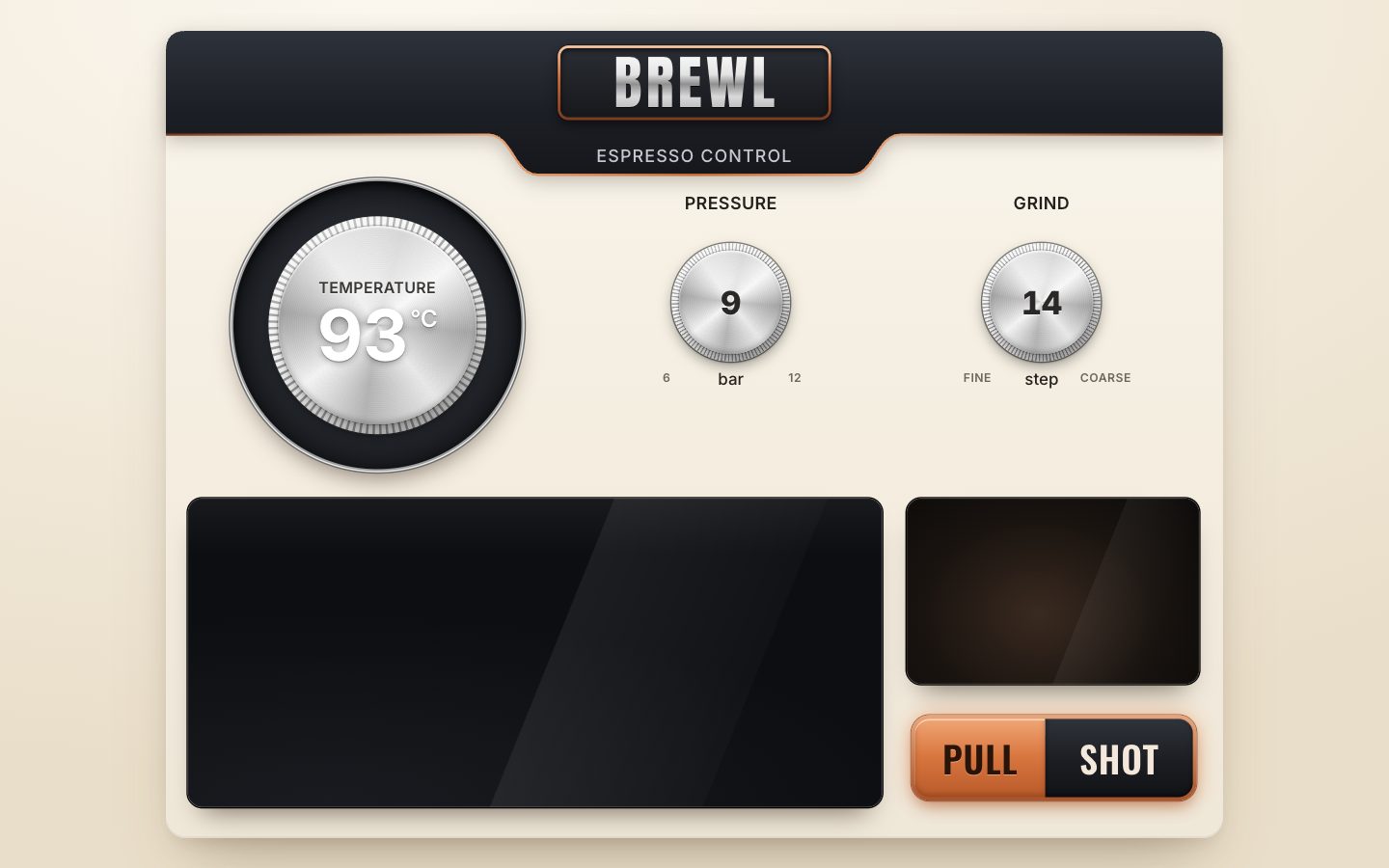
2 · A dial that is a real slider
A dial is a number you turn. So the temperature dial gets role="slider", a place in the tab order and a
name; dial.js sets its aria-valuemin and -valuemax and keeps
aria-valuenow and -valuetext up to date. Screen readers announce it as a slider, and the arrow keys work as they would on
any slider. The marker that rides round the bezel is one <i>.
<div class="dial dial--temp" role="slider" tabindex="0" aria-label="Brew temperature" data-dial="temp">
  <div class="bezel" aria-hidden="true">
    <i class="marker"></i>
  </div>
  <div class="knurl" aria-hidden="true"><i class="knurl-spin"></i><i class="knurl-light"></i></div>
  <div class="face" aria-hidden="true">
    <span class="face-label">Temperature</span>
    <span class="face-value"><b class="num">93</b><sup>°C</sup></span>
  </div>
</div>
The Dial class owns one number and three versions of it. value is the committed value and
always sits on a detent. raw is where the hand is, between detents while you turn. shown is
what is drawn, which eases towards value when it glides. A dial does not draw itself: the owner passes
draw(), and onInput and onCommit report changes.
export class Dial {
  constructor(el, { min, max, step, big, value, sweep = 270, text, draw, onInput, onCommit, faceRadius }) {
    Object.assign(this, { el, min, max, step, big, sweep, text, draw, onInput, onCommit, faceRadius });
    this.value = value;          // the committed value, always on a detent
    this.raw = value;            // where the hand is, between detents while turning
    this.shown = value;          // what is drawn (eases towards value when animating)
    this.from = value; this.t0 = 0; this.dur = 0;
    this.turning = false; this.dirty = true;
    el.setAttribute('aria-valuemin', min); el.setAttribute('aria-valuemax', max);
    this.#aria();
    this.#bind();
  }
The scale is 270° wide, from −135° to +135°, with 0° at twelve o'clock and angles growing clockwise.
snap() puts a number on the nearest detent.
// the angle for a value, in degrees, 0 at twelve o'clock, clockwise; the scale runs from −sweep/2 to +sweep/2
angle(v = this.shown) { return ((v - this.min) / (this.max - this.min) - 0.5) * this.sweep; }
snap(v) { return clamp(Math.round((v - this.min) / this.step) * this.step + this.min, this.min, this.max); }
Every pointer position is turned into an angle round the dial's centre and a distance as a fraction of its radius. An angle in the gap at the bottom of the scale goes to the nearer end.
// where the pointer is, from the dial's centre: its angle (0 at twelve, clockwise) and distance as a fraction of the radius
#polar(e) {
  const r = this.el.getBoundingClientRect(), cx = r.left + r.width / 2, cy = r.top + r.height / 2;
  const dx = e.clientX - cx, dy = e.clientY - cy;
  return { a: (Math.atan2(dx, -dy) * 180) / Math.PI, d: Math.hypot(dx, dy) / (r.width / 2) };
}

#fromAngle(a) {
  // an angle on the scale to a value; the dead band at the bottom goes to the nearer end
  const half = this.sweep / 2;
  if (a > half || a < -half) a = a > 0 ? half : -half;
  return this.min + ((a + half) / this.sweep) * (this.max - this.min);
}
Turning is relative, like a real knob: each move adds the change in angle since the last move, wrapped to
±180° so crossing six o'clock does not jump, scaled from the 270° sweep to the dial's range. You can grab the knob
anywhere and it follows your hand. Near the centre the angle is noise, so moves closer than 0.12 of the radius only
reset the reference. Pressing outside the knurled ring, on the scale, is absolute: the value jumps to that
angle, then follows the drag. The pointer is captured, so the drag keeps working when it leaves the dial, and the dial
takes the focus without scrolling the page. On release, to(value, 160) settles the knob on its detent.
el.addEventListener('pointerdown', (e) => {
  if (e.button !== 0 || id !== null) return;
  id = e.pointerId; this.pointerType = e.pointerType;
  el.setPointerCapture(id);
  el.focus({ preventScroll: true });
  const p = this.#polar(e);
  last = p.a;
  this.turning = true; el.classList.add('is-turning'); this.onCommit?.('start');
  // pressed on the scale, outside the knob: jump to that angle
  if (p.d > this.faceRadius()) this.#set(this.#fromAngle(p.a));
  e.preventDefault();
});
el.addEventListener('pointermove', (e) => {
  if (e.pointerId !== id) return;
  const p = this.#polar(e);
  if (p.d < 0.12) { last = p.a; return; }          // too near the centre: the angle is noise there
  let da = p.a - last; last = p.a;
  if (da > 180) da -= 360; if (da < -180) da += 360;
  this.#set(this.raw + (da / this.sweep) * (this.max - this.min));
});
const end = (e) => {
  if (e.pointerId !== id) return;
  id = null; this.turning = false; el.classList.remove('is-turning');
  this.to(this.value, 160);
  this.onCommit?.('end');
};
el.addEventListener('pointerup', end);
el.addEventListener('pointercancel', end);
The detents are soft. While you turn, the shown value is the nearest detent plus 35 % of the hand's distance from it, so the knob lags behind your hand between notches and catches up at the next one. That reads as notched. Each new detent reports the change at once, and on a touch screen it asks for a 3 ms vibration where the phone supports it.
#set(raw) {
  this.raw = clamp(raw, this.min, this.max);
  const v = this.snap(this.raw);
  // the soft detent: between notches the knob lags a little behind the hand, then catches up at the next one
  this.shown = v + (this.raw - v) * 0.35;
  this.dur = 0; this.dirty = true;
  if (v !== this.value) {
    this.value = v; this.#aria(); this.onInput?.(v);
    if (this.pointerType === 'touch') navigator.vibrate?.(3);
  }
}
A mouse wheel's notch is one detent. A trackpad sends many small deltas, so those add up: one detent per 40 px. The listener is not passive, so it can stop the page from scrolling under the dial.
// the wheel: a mouse wheel's notch is one detent; a trackpad's small deltas add up to one every 40 px
let acc = 0;
el.addEventListener('wheel', (e) => {
  e.preventDefault();
  const dy = e.deltaMode === 1 ? e.deltaY * 40 : e.deltaY;
  let n;
  if (Math.abs(dy) >= 30) { n = Math.sign(dy); acc = 0; }
  else { acc += dy; n = Math.trunc(acc / 40); acc -= n * 40; }
  if (!n) return;
  this.to(this.value - n * this.step, 180);
  this.onCommit?.('nudge');
}, { passive: false });
The keys are a slider's keys: the arrows step one detent, PageUp and PageDown a big step (2 °C on the temperature), Home and End go to the ends.
el.addEventListener('keydown', (e) => {
  const k = e.key, s = this.step, b = this.big;
  const next = { ArrowUp: this.value + s, ArrowRight: this.value + s, ArrowDown: this.value - s, ArrowLeft: this.value - s,
    PageUp: this.value + b, PageDown: this.value - b, Home: this.min, End: this.max }[k];
  if (next === undefined) return;
  e.preventDefault();
  this.to(next, 200);
  this.onCommit?.('nudge');
});
Keys, presets and the release glide with to(): an ease-out cubic over the given time (520 ms unless
told otherwise). Under prefers-reduced-motion, or with a time of 0, it jumps instead. frame()
advances the glide and calls draw() only if something moved, and it returns whether it still needs frames.
// glide to a value (presets, keys, release); `ms` 0 jumps
to(v, ms = 520) {
  v = this.snap(v);
  const changed = v !== this.value;
  this.value = this.raw = v;
  if (calm.matches || ms === 0) { this.shown = v; this.dur = 0; }
  else { this.from = this.shown; this.t0 = performance.now(); this.dur = ms; }
  this.dirty = true;
  this.#aria();
  if (changed) this.onInput?.(v);
  return changed;
}

// one frame: advance the glide, draw if anything moved; returns true while it still needs frames
frame(now) {
  if (this.dur) {
    const k = clamp((now - this.t0) / this.dur, 0, 1), e = 1 - Math.pow(1 - k, 3);
    this.shown = this.from + (this.value - this.from) * e;
    if (k >= 1) { this.dur = 0; this.shown = this.value; }
    this.dirty = true;
  }
  if (this.dirty) { this.dirty = false; this.draw(this.shown, this.angle(), this); }
  return this.dur > 0;
}#aria() {
this.el.setAttribute('aria-valuenow', this.value);
this.el.setAttribute('aria-valuetext', this.text(this.value));
}In app.js the temperature dial runs from 85 to 98 °C in 0.5 °C steps. Its faceRadius is
the knurled ring's size, read from the CSS (--kn), so "outside the knob" always matches what you see.
const temp = new Dial(tempEl, {
  min: 85, max: 98, step: 0.5, big: 2, value: 93,
  text: (v) => `${fmtT(v)} °C`,
  faceRadius: () => +getComputedStyle(tempEl).getPropertyValue('--kn'),
  draw: drawTemp, onInput: changed, onCommit: turning,
});
Drawing it is cheap: one transform for the marker (turn by the angle, then move out to 0.45 of the bezel's size), the number only when it changes, and the knurl turned by one and a half times the angle, so it seems to spin under your fingers. The number shows the committed value, so during a glide it already reads where the knob is going.
function drawTemp(v, angle, d) {
  const R = d.arcSize * 0.45;
  $('.marker:not(.ghost)', d.el).style.transform = `rotate(${angle.toFixed(2)}deg) translateY(${-R}px)`;
  const shown = d.turning ? d.snap(v) : d.value;
  if (shown !== d.lastText) { d.lastText = shown; $('.num', d.el).textContent = fmtT(shown); }
}

// the knurled ring turns too, one and a half times as far as the marker
const tempKnurl = $('.knurl-spin', tempEl);
const tempDraw = temp.draw;
temp.draw = (v, a, d) => { tempDraw(v, a, d); tempKnurl.style.transform = `rotate(${(a * 1.5).toFixed(2)}deg)`; };
One loop draws everything. kick() asks for one animation frame if none is waiting; frame()
draws whatever moved and asks for another frame only if something is still gliding. When nothing moves, no frame
runs.
let raf = 0;
function kick() { if (!raf) raf = requestAnimationFrame(frame); }
function frame(now) {
  raf = 0;
  let more = false;
  for (const d of dials) more = d.frame(now) || more;
  if (more) kick();
}
In the CSS, touch-action: none lets a finger turn the dial instead of scrolling the page, and
:focus-visible draws a copper ring for the keyboard.
.dial { position: absolute; width: calc(var(--d) * 1px); height: calc(var(--d) * 1px); border-radius: 50%; touch-action: none; cursor: grab; outline: none; }
.dial.is-turning { cursor: grabbing; }
.dial > * { position: absolute; left: 50%; top: 50%; border-radius: 50%; transform: translate(-50%, -50%); }
.dial:focus-visible::after { content: ''; position: absolute; inset: -6px; border-radius: 50%; box-shadow: 0 0 0 3px var(--focus); }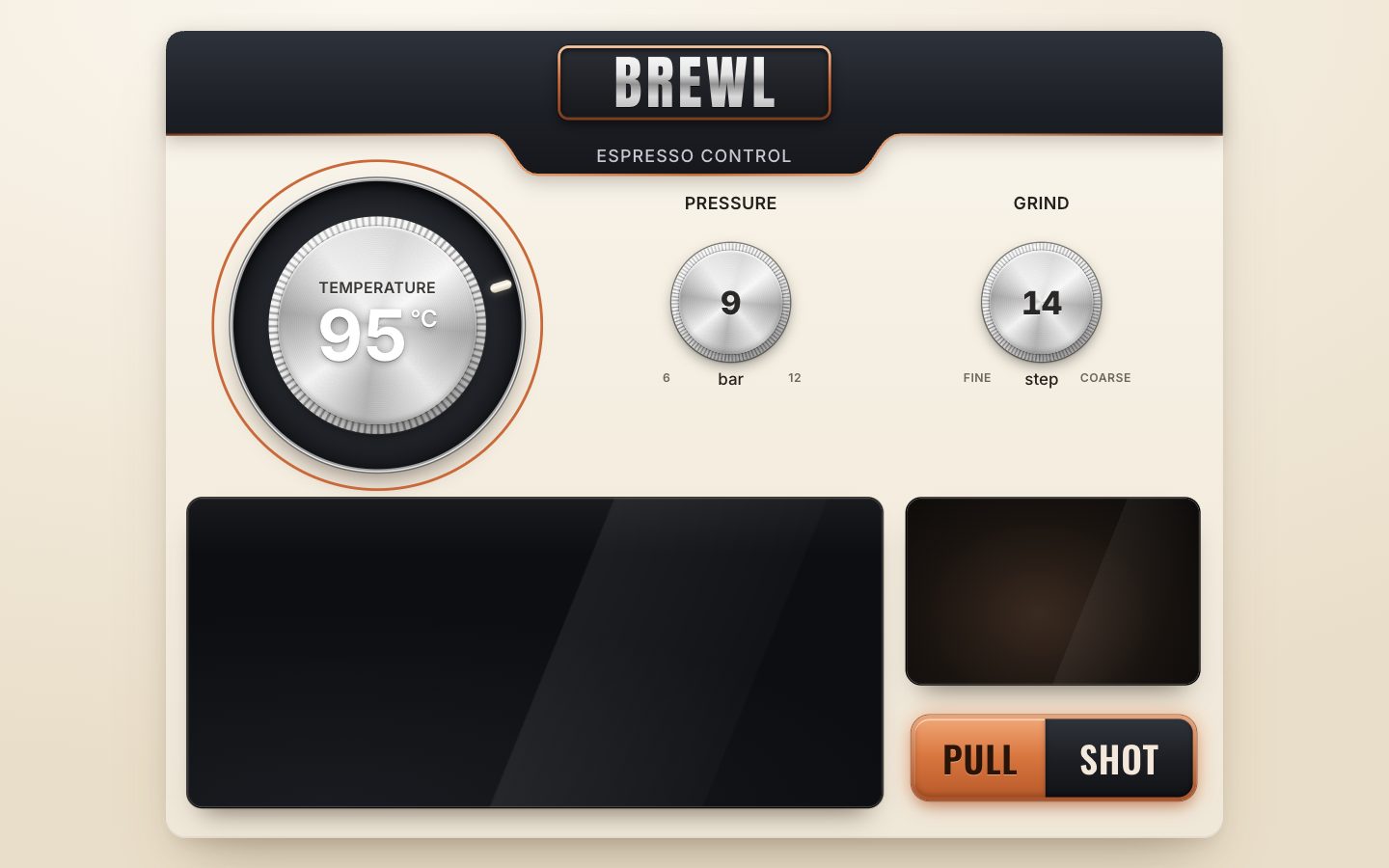
3 · Three dials and their scales
The two small knobs become sliders the same way. Each is labelled by its visible caption through
aria-labelledby, and gets a notch on its face that turns with the value.
<div class="knob-wrap knob-wrap--pressure">
  <span class="knob-label" id="lbl-pressure">Pressure</span>
  <div class="dial dial--knob" role="slider" tabindex="0" aria-labelledby="lbl-pressure" data-dial="pressure">
    <svg class="ticks" aria-hidden="true"></svg>
    <div class="knurl" aria-hidden="true"><i class="knurl-spin"></i><i class="knurl-light"></i></div>
    <div class="face" aria-hidden="true"><i class="notch"></i><span class="face-value"><b class="num">9</b></span></div>
  </div>
  <span class="knob-unit" aria-hidden="true">bar</span>
  <span class="knob-end lo" aria-hidden="true">6</span><span class="knob-end hi" aria-hidden="true">12</span>
</div>
They are the same class with other numbers: pressure from 6 to 12 bar in 0.5 steps, grind from 1 (fine) to 30 (coarse) in whole steps. The grind's spoken text says fine up to 9, coarse from 21, and medium between.
const pressure = new Dial($('[data-dial="pressure"]'), {
  min: 6, max: 12, step: 0.5, big: 1, value: 9,
  text: (v) => `${fmtT(v)} bar`,
  faceRadius: () => 0.74,
  draw: drawKnob, onInput: changed, onCommit: turning,
});
const grind = new Dial($('[data-dial="grind"]'), {
  min: 1, max: 30, step: 1, big: 5, value: 14,
  text: (v) => `${v}, ${v <= 9 ? 'fine' : v >= 21 ? 'coarse' : 'medium'}`,
  faceRadius: () => 0.74,
  draw: drawKnob, onInput: changed, onCommit: turning,
});
const dials = [temp, pressure, grind];
Every dial gets its scale: an SVG of lines drawn from its own range. Temperature and pressure have a tick every 0.25
and a long one every whole unit; grind has a tick every 0.5 and a long one every 5. That makes 53, 25 and 59 ticks.
The scale is rebuilt when the layout changes the dial's size. Ticks up to the value are darker, and
lightTicks() touches them only when the count changes.
// the scale's ticks: one SVG per dial, rebuilt when the layout changes its size; the ones up to the value are darker
const TICKS = { temp: [0.25, 1], pressure: [0.25, 1], grind: [0.5, 5] };
function ticks(d) {
  const svg = $('.ticks', d.el), key = d.el.dataset.dial, [every, major] = TICKS[key];
  const D = parseFloat(getComputedStyle(d.el).getPropertyValue('--d')) || 100, c = D / 2;
  const [r0, r1, rm] = key === 'temp' ? [0.468, 0.497, 0.452] : [0.445, 0.497, 0.42];
  svg.setAttribute('viewBox', `0 0 ${D} ${D}`);
  d.D = D;
  let out = '';
  const n = Math.round((d.max - d.min) / every);
  for (let i = 0; i <= n; i++) {
    const v = d.min + i * every, a = ((d.angle(v) - 90) * Math.PI) / 180, isMajor = Math.abs(v / major - Math.round(v / major)) < 1e-6;
    const ra = (isMajor ? rm : r0) * D, rb = r1 * D;
    out += `<line data-v="${v}" class="${isMajor ? 'major' : ''}" x1="${(c + Math.cos(a) * ra).toFixed(1)}" y1="${(c + Math.sin(a) * ra).toFixed(1)}" x2="${(c + Math.cos(a) * rb).toFixed(1)}" y2="${(c + Math.sin(a) * rb).toFixed(1)}" stroke-width="1.5"/>`;
  }
  svg.innerHTML = out;
  d.tickEls = [...svg.children];
  d.tickOn = -1;
}
function lightTicks(d, v) {
  const n = d.tickEls.filter((t) => +t.dataset.v <= v + 1e-6).length;
  if (n === d.tickOn) return;
  d.tickEls.forEach((t, i) => t.classList.toggle('on', i < n));
  d.tickOn = n;
}
A knob draws its knurl turning one and a half times the angle, the notch turned by the angle and moved out to a quarter of the knob's size, and its number.
function drawKnob(v, angle, d) {
  $('.knurl-spin', d.el).style.transform = `rotate(${(angle * 1.5).toFixed(2)}deg)`;
  const D = d.D || 176;
  $('.notch', d.el).style.transform = `rotate(${angle.toFixed(2)}deg) translateY(${(-D * 0.25).toFixed(1)}px)`;
  const shown = d.turning ? d.snap(v) : d.value;
  if (shown !== d.lastText) { d.lastText = shown; $('.num', d.el).textContent = fmtT(shown); }
  lightTicks(d, v);
}.dial .ticks { width: 100%; height: 100%; border-radius: 0; overflow: visible; }
.dial .ticks line { stroke: var(--tick-faint); stroke-linecap: round; }
.dial .ticks line.on { stroke: var(--tick); }
.dial .ticks line.major { stroke-width: 2.2; }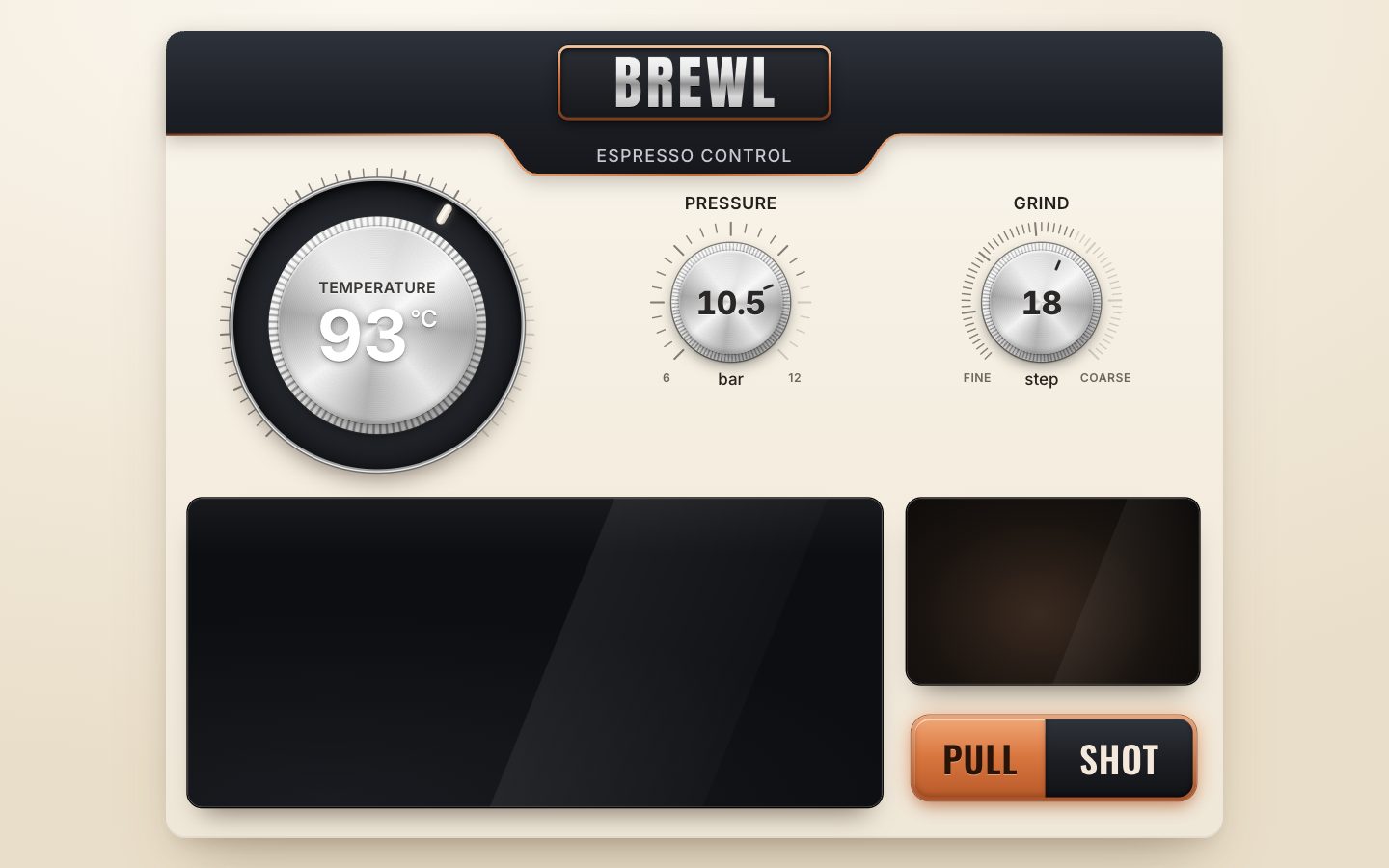
4 · The heat arc and the temperature states
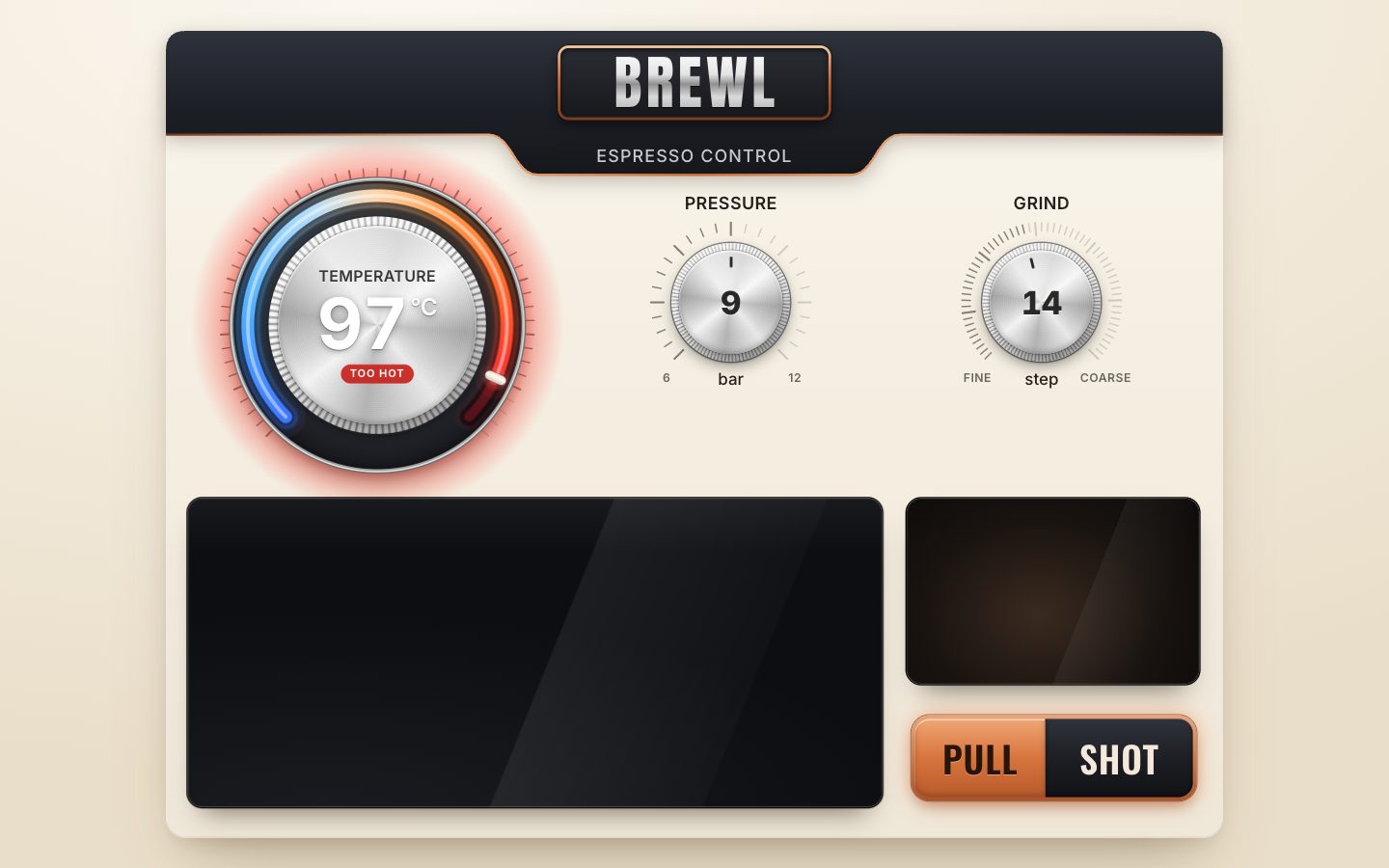
The bezel gets a glowing arc, coloured like a thermometer: every point on it has the colour of the temperature it
stands for. The colours come from a table of eight stops, from blue at 85 °C through ice at 90 °C and orange at 93 °C
to red at 98 °C, and heat() blends between the two around a temperature.
// heat: the arc is a thermometer — every point on it is coloured by the temperature it stands for
const HEAT = [[85, [63, 120, 255]], [87.5, [80, 175, 255]], [90, [178, 222, 255]], [91.5, [255, 214, 170]], [93, [255, 154, 74]], [95, [255, 106, 43]], [96.5, [255, 59, 47]], [98, [226, 24, 43]]];
function heat(t) {
  for (let i = 1; i < HEAT.length; i++) if (t <= HEAT[i][0]) {
    const [t0, a] = HEAT[i - 1], [t1, b] = HEAT[i], k = clamp((t - t0) / (t1 - t0), 0, 1);
    return a.map((v, j) => Math.round(v + (b[j] - v) * k));
  }
  return HEAT[HEAT.length - 1][1];
}
const rgb = (c, a = 1) => `rgba(${c[0]},${c[1]},${c[2]},${a})`;
The arc is drawn on a canvas inside the bezel, with as many pixels as the bezel covers on screen: its design size, times the panel's scale, times the screen's pixel density (at most 3).
// the arc canvas: as many pixels as the bezel has on screen
function sizeArc() {
  const r = parseFloat(getComputedStyle(tempEl).getPropertyValue('--d')) * parseFloat(getComputedStyle(tempEl).getPropertyValue('--bz'));
  const px = Math.round(r * scale * Math.min(devicePixelRatio || 1, 3));
  arcCanvas.width = arcCanvas.height = px;
  temp.arcSize = r; temp.lastArc = null;
}
One conic gradient carries the colours: it starts at the scale's start (135°, the lower left), 21 colour stops spread over three quarters of the circle; the rest holds the hottest colour and then turns back to the coolest, so the gradient meets itself without a seam. The whole scale is painted first in a black groove and twice more, faintly, so at 93 °C the full blue-to-red ring still reads. Then the lit part, from the start to the value: a wide haze, a softer glow, the core, and a thin white thread down its middle. The canvas draws round caps, so the ends are rounded.
function paintArc(v) {
  const c = arcCtx, px = arcCanvas.width, k = px / temp.arcSize, size = temp.arcSize, mid = size / 2;
  const R = size * 0.45, W = size * 0.044;
  const start = (135 * Math.PI) / 180, sweep = (270 * Math.PI) / 180, q = (v - temp.min) / (temp.max - temp.min);
  c.setTransform(1, 0, 0, 1, 0, 0); c.clearRect(0, 0, px, px);
  c.setTransform(k, 0, 0, k, 0, 0);
  // the thermometer gradient, once per paint: 270° of the circle carry the scale, the rest wraps to its start
  const g = c.createConicGradient(start, mid, mid);
  for (let i = 0; i <= 20; i++) g.addColorStop((i / 20) * 0.75, rgb(heat(temp.min + (i / 20) * (temp.max - temp.min))));
  g.addColorStop(0.97, rgb(heat(temp.max))); g.addColorStop(0.985, rgb(heat(temp.min)));
  c.lineCap = 'round';
  // the groove the light runs in, and the rest of the scale, faint
  c.strokeStyle = 'rgba(0,0,0,0.55)'; c.lineWidth = W + 6; c.beginPath(); c.arc(mid, mid, R, start, start + sweep); c.stroke();
  c.strokeStyle = g; c.globalAlpha = 0.07; c.lineWidth = W * 2.2; c.beginPath(); c.arc(mid, mid, R, start, start + sweep); c.stroke();
  c.globalAlpha = 0.3; c.lineWidth = W * 0.75; c.beginPath(); c.arc(mid, mid, R, start, start + sweep); c.stroke();
  // the lit part: a wide haze, a softer glow, the core, and a hot white thread down its middle
  const end = start + Math.max(0.001, q) * sweep;
  for (const [a, w] of [[0.1, W * 3.2], [0.22, W * 1.9], [1, W]]) { c.globalAlpha = a; c.lineWidth = w; c.beginPath(); c.arc(mid, mid, R, start, end); c.stroke(); }
  c.globalAlpha = 0.45; c.strokeStyle = '#FFFFFF'; c.lineWidth = W * 0.28; c.beginPath(); c.arc(mid, mid, R, start, end); c.stroke();
  c.globalAlpha = 1;
}
The temperature has three states: idle below 90 °C, ready up to 95.5 °C, too hot from 96 °C. The state goes into the dial's spoken text too, for example "93 °C, ready".
const tempState = (v) => (v >= 96 ? 'hot' : v < 90 ? 'idle' : 'ready');
const STATE_WORD = { idle: 'below brewing range', ready: 'ready', hot: 'too hot' };
drawTemp() now repaints the arc only when the drawn value has moved by more than 0.004 °C, writes the
state onto the panel as data-temp-state, and updates the chip under the number. The chip shows the
pressure, or "Too hot".
function drawTemp(v, angle, d) {
  // the arc, only when the drawn value moved by a visible amount
  if (d.lastArc === null || Math.abs(d.lastArc - v) > 0.004) { d.lastArc = v; paintArc(v); }
  const R = d.arcSize * 0.45;
  $('.marker:not(.ghost)', d.el).style.transform = `rotate(${angle.toFixed(2)}deg) translateY(${-R}px)`;
  d.markR = R;
  const shown = d.turning ? d.snap(v) : d.value;
  if (shown !== d.lastText) { d.lastText = shown; $('.num', d.el).textContent = fmtT(shown); }
  lightTicks(d, v);
  const s = tempState(d.value);
  if (panel.dataset.tempState !== s) panel.dataset.tempState = s;
  chip();
}
While you turn, two faded copies of the marker trail the real one. Each frame the first moves 30 % of the way to the
marker and the second 30 % of the way to the first, so they lag and then catch up. The trail switches on when a turn
starts and stops once the turn is over and the last copy is within 0.05° of the marker. CSS shows the copies at 35 %
and 16 % opacity while the dial has is-turning.
// the turning trail: two faded markers follow the real one with a lag (component.jpg, "Turning")
const ghosts = { on: false, a1: null, a2: null, els: [$('.marker.g1', tempEl), $('.marker.g2', tempEl)] };
function ghostFrame() {
  const a = temp.angle();
  if (ghosts.a1 === null) ghosts.a1 = ghosts.a2 = a;
  ghosts.a1 += (a - ghosts.a1) * 0.3; ghosts.a2 += (ghosts.a1 - ghosts.a2) * 0.3;
  const R = temp.markR || 140;
  ghosts.els[0].style.transform = `rotate(${ghosts.a1.toFixed(2)}deg) translateY(${-R}px)`;
  ghosts.els[1].style.transform = `rotate(${ghosts.a2.toFixed(2)}deg) translateY(${-R}px)`;
  const settled = Math.abs(a - ghosts.a2) < 0.05;
  if (!temp.turning && settled) ghosts.on = false;
  return ghosts.on;
}function turning(phase) { if (phase === 'start') ghosts.on = true; kick(); }The states are pure CSS on data-temp-state: a warm halo behind the bezel when ready, a red halo that
pulses when too hot, a red chip, a blue chip when idle.
.brewl[data-temp-state="ready"] .dial--temp .halo { opacity: .55; }
.brewl[data-temp-state="hot"] .dial--temp .halo {
  background: radial-gradient(closest-side, rgb(255 45 35 / .85) 70%, rgb(255 45 35 / .3) 84%, transparent);
  animation: hot-pulse 1.1s ease-in-out infinite alternate;
}
.brewl[data-temp-state="hot"] .face-chip { background: rgb(200 30 25 / .9); color: #FFFFFF; }
.brewl[data-temp-state="idle"] .face-chip { background: rgb(30 60 110 / .75); }
@keyframes hot-pulse { from { opacity: .45; transform: translate(-50%, -50%) scale(.97); } to { opacity: 1; transform: translate(-50%, -50%) scale(1.05); } }
When the water is ready, four soft wisps of steam rise off the dial: radial gradients that drift, grow and fade, each on its own delay and duration (4.8 to 5.8 s), so they never line up.
/* steam: four soft wisps rising off the dial when the water is ready (and the cup, while it fills) */
.steam { width: calc(var(--d) * .5px); height: calc(var(--d) * .6px); top: calc(var(--d) * -.05px); border-radius: 0; pointer-events: none; opacity: 0; transition: opacity .8s; }
.brewl[data-temp-state="ready"] .dial--temp .steam { opacity: 1; }
.steam i { position: absolute; bottom: 0; width: 24%; aspect-ratio: 1 / 2.6; border-radius: 50%; opacity: 0;
  background: radial-gradient(closest-side, rgb(255 255 255 / .42), rgb(255 255 255 / .12) 60%, transparent); animation: wisp 4.8s linear infinite; }
.steam i:nth-child(1) { left: 22%; animation-delay: -.4s; }
.steam i:nth-child(2) { left: 40%; animation-delay: -1.6s; animation-duration: 5.4s; }
.steam i:nth-child(3) { left: 56%; animation-delay: -2.8s; }
.steam i:nth-child(4) { left: 34%; animation-delay: -3.9s; animation-duration: 5.8s; }
@keyframes wisp {
  0% { transform: translate(0, 10%) scale(.55, .5); opacity: 0; }
  18% { opacity: .9; }
  55% { transform: translate(14%, -70%) scale(.9, 1) rotate(8deg); opacity: .55; }
  100% { transform: translate(-10%, -150%) scale(1.25, 1.3) rotate(-6deg); opacity: 0; }
}
5 · The shot model and its verdict
To pull a shot we need a shot. sim.js is a small, deterministic sketch of one espresso, in plain
numbers and with no DOM. Each effect points the right way: a finer grind is slower, more pressure is faster, hotter
water flows a touch faster. Every recipe uses an 18 g dose; a sample is taken every 0.05 s; a shot that has not filled
the cup by 60 s is cut off as choked. The three recipes are a table: their dials, the weight in the cup, and how long
the pre-infusion lasts.
export const DOSE = 18;           // grams of ground coffee in the basket, the same for every recipe
export const DT = 0.05;           // seconds per sample
export const MAX_TIME = 60;       // a choked shot is cut off here

// the three recipes the preset buttons load (their dials, and the cup they aim for)
export const RECIPES = {
  ristretto: { label: 'Ristretto', temp: 92, pressure: 9, grind: 10, yield: 20, time: 18, pre: 1.5 },
  espresso:  { label: 'Espresso',  temp: 93, pressure: 9, grind: 14, yield: 36, time: 28, pre: 4 },
  lungo:     { label: 'Lungo',     temp: 94, pressure: 8, grind: 18, yield: 60, time: 40, pre: 5 },
};
The puck's resistance comes from the grind. Each step finer multiplies it by e0.05, about 5 % more, and grind 14 is the reference at 6.1.
// the puck's resistance for a grind setting (1 = powder, 30 = coarse): every step finer adds ~6 %
const resistance = (grind) => 6.1 * Math.exp(0.05 * (14 - grind));
simulate() runs the whole shot, sample by sample:
- The pump rises softly through 3 bar of pre-infusion, then ramps to the set pressure. Over the second half of the cup it eases off by up to 30 %, the classic lever profile. The real pressure follows the pump with a 0.35 s lag.
- The puck soaks up water first, faster at higher pressure and slower when it is finer. The first drop falls when it is wet through, about 4.5 s into an espresso. From then on it slowly erodes, so its resistance falls to 70 % over the next 22 s.
- The flow is pressure over resistance, times 1.2 % more for every °C above 93 (and less below), and it follows that with a 0.9 s lag. The weight in the cup adds up the flow.
It stops when the cup reaches the recipe's weight. The espresso recipe on its own dials takes 27.75 s, the ristretto 20.15 s and the lungo 38 s.
export function simulate({ temp, pressure, grind }, recipe) {
  const R0 = resistance(grind), soak = 7 * Math.pow(R0 / 6.1, 0.35);
  const thin = 1 + (temp - 93) * 0.012;
  const s = [{ t: 0, p: 0, f: 0, w: 0 }];
  let t = 0, p = 0, f = 0, w = 0, wet = 0, first = null;
  while (t < MAX_TIME) {
    t += DT;
    // the pump: a soft rise through 3 bar of pre-infusion (as long as the recipe asks), up to the set pressure, then a
    // gentle decline over the second half of the cup (the classic lever profile)
    const pre = recipe.pre;
    const target = 3 * smooth(0, pre + 0.6, t) + (pressure - 3) * smooth(pre * 0.6, pre + 3.5, t);
    const pump = target * (1 - 0.3 * smooth(0.5, 1, w / recipe.yield));
    p += (pump - p) * (DT / 0.35);
    // the puck soaks up water first; the first drop falls when it is wet through
    if (wet < 1) { wet += (p * DT) / soak; if (wet >= 1) first = t; }
    const erode = 1 - 0.3 * smooth(first ?? t, (first ?? t) + 22, t);
    const want = wet >= 1 ? (p / (R0 * erode)) * thin : 0;
    f += (want - f) * (DT / 0.9);
    w += f * DT;
    s.push({ t: +t.toFixed(3), p, f, w });
    if (w >= recipe.yield) break;
  }
  const last = s[s.length - 1];
  return { samples: s, end: last.t, yield: Math.min(last.w, recipe.yield), firstDrop: first, choked: last.w < recipe.yield };
}
The verdict compares the shot with the same recipe pulled on its own dials. Time counts in steps of 16 % of that ideal time, temperature in steps of 2.5 °C, and the two add up. Above +1 the cup is over-extracted (bitter), below −1 under-extracted (sour). The advice names the dial that is furthest off: the temperature if it weighs more than the time; the pressure if it is 2 bar or more off in the direction that explains the time; otherwise the grind. A shot that chokes, or is stopped by hand, says so instead.
export function verdict({ temp, pressure }, recipe, time, grams, ideal = recipe.time, how = 'done') {
  const head = `${Math.round(grams)} g in ${Math.round(time)} s`;
  const ratio = `1:${(grams / DOSE).toFixed(1)}`;
  if (how === 'stopped') return { kind: 'stopped', score: 0, ratio, title: `${head} · stopped`, advice: 'Stopped by hand. Pull again for the full cup.' };
  if (how === 'choked') return { kind: 'over', score: 9, ratio, title: `${head} · choked`, advice: 'The puck choked. Grind much coarser.' };
  const timeScore = (time - ideal) / (ideal * 0.16);
  const tempScore = (temp - recipe.temp) / 2.5;
  const score = timeScore + tempScore;
  const off = pressure - recipe.pressure;
  const by = Math.abs(tempScore) > Math.abs(timeScore) ? 'temp' : Math.abs(off) >= 2 && Math.sign(off) === -Math.sign(timeScore) ? 'pressure' : 'grind';
  if (score > 1) return { kind: 'over', score, ratio, title: `${head} · over-extracted`,
    advice: 'Bitter and dry. ' + { temp: 'Lower the temperature.', pressure: 'Raise the pressure.', grind: 'Grind coarser.' }[by] };
  if (score < -1) return { kind: 'under', score, ratio, title: `${head} · under-extracted`,
    advice: 'Sour and thin. ' + { temp: 'Raise the temperature.', pressure: 'Lower the pressure.', grind: 'Grind finer.' }[by] };
  return { kind: 'balanced', score, ratio, title: `${head} · balanced`, advice: 'Sweet and syrupy. Keep this recipe.' };
}
What the model says, starting from the espresso recipe (93 °C, 9 bar, grind 14, 36 g):
| Change | Verdict | Advice |
|---|---|---|
| none | 36 g in 28 s · balanced | Sweet and syrupy. Keep this recipe. |
| grind 8 | 36 g in 34 s · over-extracted | Grind coarser. |
| grind 22 | 36 g in 21 s · under-extracted | Grind finer. |
| 97 °C | 36 g in 27 s · over-extracted | Lower the temperature. |
| 12 bar | 36 g in 23 s · under-extracted | Lower the pressure. |
| 6 bar | 36 g in 37 s · over-extracted | Raise the pressure. |
| 6 bar, grind 1 | 34 g in 60 s · choked | The puck choked. Grind much coarser. |
In app.js, the shot the current dials will pull is the preview. It is cached under a key of the
three values and the recipe, so asking for it twice costs nothing. A change to a dial marks it dirty and clears the
last verdict.
// any dial moved: the preview shot changes, the last verdict no longer applies
let previewCache = null;
function preview() {
  const key = `${temp.value}|${pressure.value}|${grind.value}|${state.recipe}`;
  if (!previewCache || previewCache.key !== key) previewCache = { key, trace: simulate(settings(), RECIPES[state.recipe]) };
  return previewCache.trace;
}
const settings = () => ({ temp: temp.value, pressure: pressure.value, grind: grind.value });
let previewDirty = true;
// (after a shot, the first change clears the verdict)
function changed() { if (!state.shot) { previewDirty = true; clearLast(); } kick(); }
function clearLast() {
  if (!state.last) return;
  state.last = null; hideResult();
}
The loop works the preview out at most once a frame, however many detents a turn crosses, and the chip under the temperature now shows its time: "9 bar · 28 s".
if (previewDirty && !state.shot) {
  previewDirty = false;
  chip();
}// the chip under the temperature: the recipe at a glance, or the warning
function chip() {
const el = $('.face-chip', tempEl);
const text = tempState(temp.value) === 'hot' ? 'Too hot' : `${fmtT(pressure.value)} bar · ${Math.round(preview().end)} s`;
if (el.textContent !== text) el.textContent = text;
}In this stage PULL SHOT works the whole shot out at once and shows its verdict in a glass card in the graph's corner. The ratio is the cup's weight over the dose: 36 g from 18 g is 1:2.0.
// (stage 8 plays the shot out in time; here PULL SHOT works the whole shot out at once and gives its verdict)
function startShot() {
  const recipe = RECIPES[state.recipe], s = settings();
  const trace = simulate(s, recipe);
  state.shot = { trace, recipe, settings: s, t: trace.end, ideal: simulate(recipe, recipe).end };
  finish(trace.choked ? 'choked' : 'done');
}
function finish(how) {
  const sh = state.shot; if (!sh) return;
  const v = sampleAt(sh.trace, sh.t);
  const res = verdict(sh.settings, sh.recipe, sh.t, v.w, sh.ideal, how);
  state.last = { ...res, time: sh.t, grams: v.w, recipe: state.recipe };
  state.shot = null;
  result.dataset.kind = res.kind;
  $('.result-title').textContent = res.title;
  $('.result-advice').textContent = `${res.advice}${res.ratio ? ` Ratio ${res.ratio}.` : ''}`;
  result.classList.add('on');
}/* the verdict, a glass card over the graph's empty corner */
.result {
position: absolute; left: 18px; top: 46px; max-width: 66%; padding: 12px 16px 13px; border-radius: 12px;
background: rgb(26 27 32 / .82); box-shadow: inset 0 0 0 1px rgb(255 255 255 / .1), 0 10px 24px rgb(0 0 0 / .4);
opacity: 0; transform: translateY(-6px); transition: opacity .35s, transform .45s var(--press); pointer-events: none;
}
.result.on { opacity: 1; transform: none; }
.result p { margin: 0; }
.result-title { font-size: var(--result-font); font-weight: 700; color: #FFF4E8; letter-spacing: -.005em; white-space: nowrap; }
.result-advice { margin-top: 3px !important; font-size: calc(var(--result-font) * .8); color: var(--on-glass-muted); }
.result::before { content: ''; position: absolute; left: 0; top: 12px; bottom: 12px; width: 3px; border-radius: 0 3px 3px 0; background: var(--verdict, #7DDB8F); }
.result[data-kind="balanced"] { --verdict: #7DDB8F; }
.result[data-kind="under"] { --verdict: var(--pressure-line); }
.result[data-kind="over"] { --verdict: var(--heat-red); }
.result[data-kind="stopped"] { --verdict: var(--graphite-400); }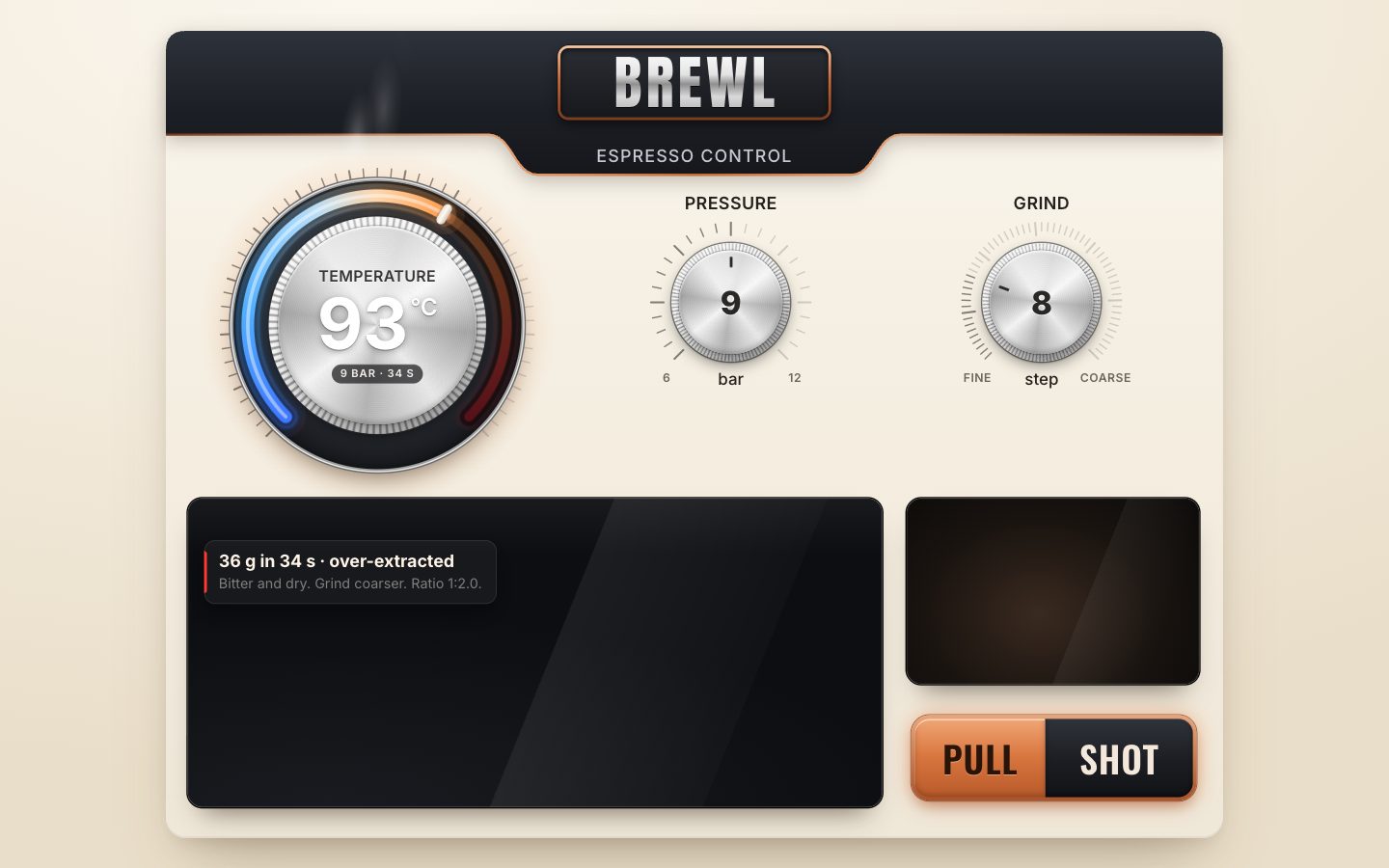
6 · The recipes
The recipes are a radio group: three buttons with role="radio" and aria-checked, two dots
between them, and a copper thumb behind them.
<div class="presets" role="radiogroup" aria-label="Recipe">
  <i class="presets-thumb" aria-hidden="true"></i>
  <button type="button" role="radio" class="preset" data-recipe="ristretto" aria-checked="false">Ristretto</button>
  <i class="presets-dot" aria-hidden="true"></i>
  <button type="button" role="radio" class="preset" data-recipe="espresso" aria-checked="true">Espresso</button>
  <i class="presets-dot" aria-hidden="true"></i>
  <button type="button" role="radio" class="preset" data-recipe="lungo" aria-checked="false">Lungo</button>
</div>
The thumb moves with a transform and a width, both eased over 0.45 s.
.presets-thumb {
  position: absolute; left: 0; top: 5px; bottom: 5px; border-radius: 999px; will-change: transform;
  background: var(--copper-fill);
  box-shadow: 0 0 18px var(--accent-glow), 0 0 0 1px rgb(120 50 15 / .6), inset 0 1px 0 rgb(255 220 190 / .7), inset 0 -2px 4px rgb(90 35 10 / .35);
  transition: transform .45s var(--press), width .45s var(--press);
}
thumb() sizes the thumb to the chosen button and moves it under it. Without animation (on a resize) it
switches the transition off, forces a layout so the jump lands, and switches it back on. choose() checks
the radio and glides the three dials to the recipe's numbers, each at its own pace (650, 600 and 700 ms), so they
settle one after another. A tap picks a recipe; inside the group the arrow keys move the choice and
the focus, wrapping round at the ends.
const presetEls = $$('.preset'), thumbEl = $('.presets-thumb');
function thumb(animate = true) {
  const b = presetEls.find((p) => p.dataset.recipe === state.recipe);
  if (!animate) thumbEl.style.transition = 'none';
  thumbEl.style.width = `${b.offsetWidth}px`;
  thumbEl.style.transform = `translateX(${b.offsetLeft}px)`;
  if (!animate) { thumbEl.offsetWidth; thumbEl.style.transition = ''; }
}
function choose(name, focus = false) {
  const r = RECIPES[name];
  state.recipe = name;
  for (const p of presetEls) { const on = p.dataset.recipe === name; p.setAttribute('aria-checked', on); p.tabIndex = on ? 0 : -1; if (on && focus) p.focus(); }
  thumb(true);
  temp.to(r.temp, 650); pressure.to(r.pressure, 600); grind.to(r.grind, 700);
  if (!state.shot) { previewDirty = true; clearLast(); }
  kick();
}
for (const p of presetEls) {
  p.addEventListener('click', () => choose(p.dataset.recipe));
  p.addEventListener('keydown', (e) => {
    const i = presetEls.indexOf(p), d = { ArrowRight: 1, ArrowDown: 1, ArrowLeft: -1, ArrowUp: -1 }[e.key];
    if (!d) return;
    e.preventDefault();
    choose(presetEls[(i + d + presetEls.length) % presetEls.length].dataset.recipe, true);
  });
}
Only the checked radio is in the tab order, so Tab enters the group once and the arrows move inside it.
for (const p of presetEls) p.tabIndex = p.getAttribute('aria-checked') === 'true' ? 0 : -1;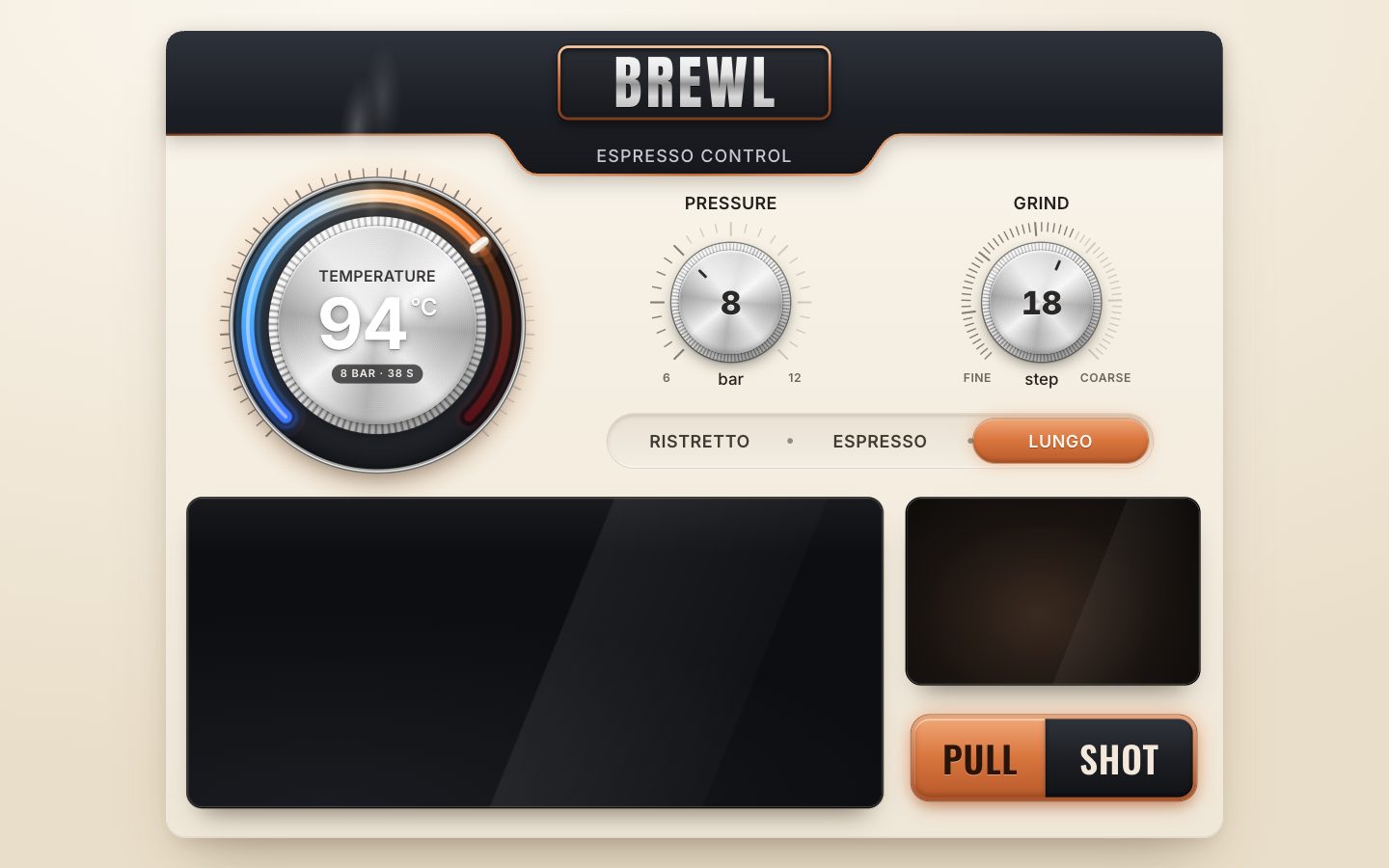
7 · The extraction graph
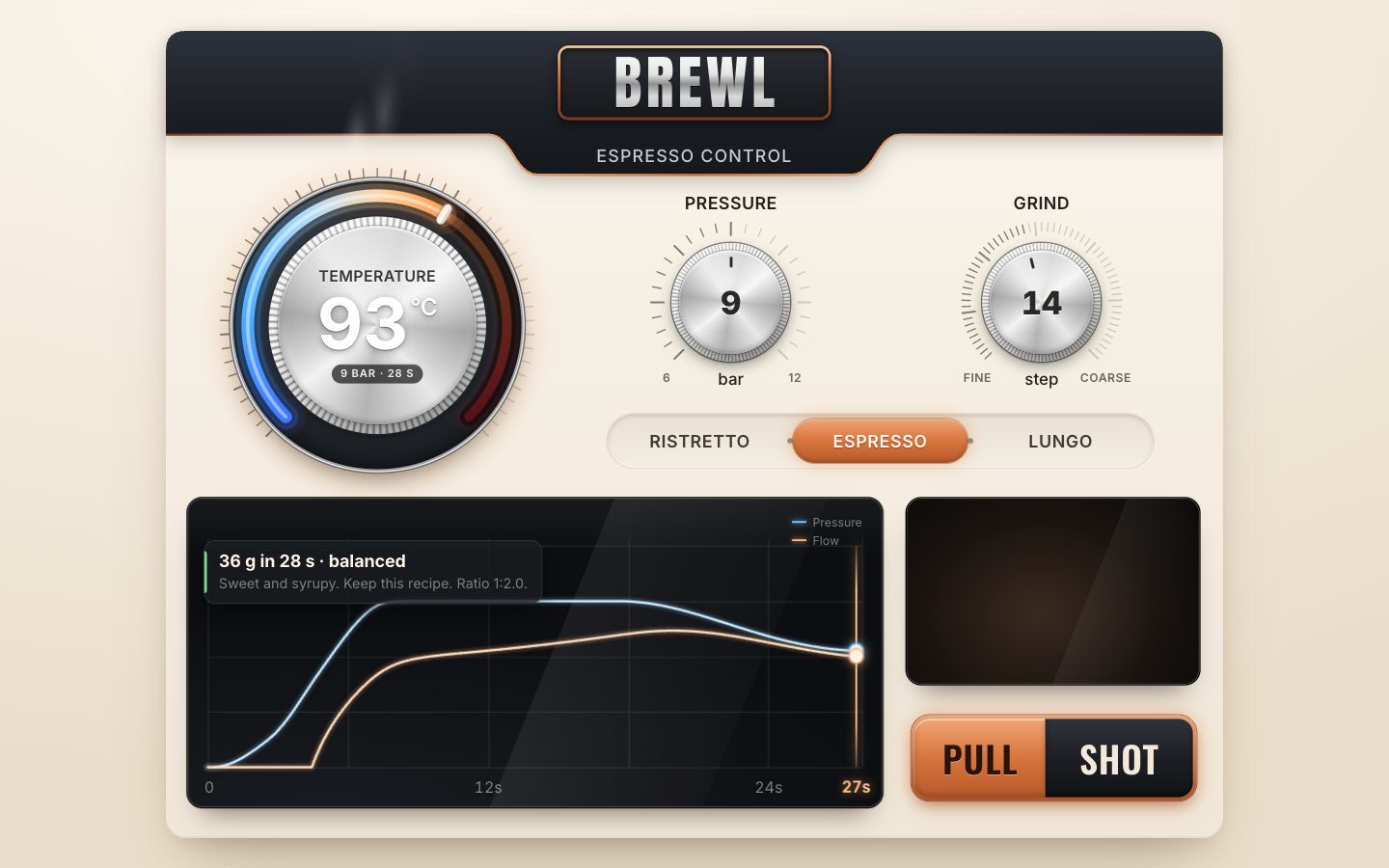
The graph is one canvas under some HTML: the legend, the time axis and the playhead (a line, two dots and the time) are elements moved with transforms. Text in HTML stays sharp at any scale.
<figure class="graph">
  <canvas class="graph-canvas" aria-hidden="true"></canvas>
  <div class="graph-legend" aria-hidden="true"><span class="lg lg-p">Pressure</span><span class="lg lg-f">Flow</span></div>
  <div class="graph-axis" aria-hidden="true"></div>
  <div class="playhead" aria-hidden="true"><i class="ph-line"></i><i class="ph-dot ph-p"></i><i class="ph-dot ph-f"></i><span class="ph-time">0s</span></div>
  <div class="result">
    <p class="result-title"></p>
    <p class="result-advice"></p>
  </div>
</figure>
The canvas has as many pixels as the graph covers on screen. Pressure runs from 0 to 12 bar up the plot; flow gets its own scale, set from the shot. Time runs across.
// the plot's box in design px, and the canvas's pixels for the panel's scale and the screen's density
resize(scale) {
  const cs = getComputedStyle(this.el);
  this.w = this.el.offsetWidth; this.h = this.el.offsetHeight;
  this.top = parseFloat(cs.getPropertyValue('--plot-top')) || 50;
  this.bottom = parseFloat(cs.getPropertyValue('--plot-bottom')) || 44;
  this.k = scale * Math.min(devicePixelRatio || 1, 3);
  for (const c of [this.canvas, this.cache]) { c.width = Math.round(this.w * this.k); c.height = Math.round(this.h * this.k); }
  if (this.preview) this.setPreview(this.preview);
}

x(t) { return PAD_X + (t / this.end) * (this.w - PAD_X * 2); }
yP(p) { return this.h - this.bottom - (p / P_MAX) * (this.h - this.top - this.bottom); }
yF(f) { return this.h - this.bottom - (f / this.fMax) * (this.h - this.top - this.bottom); }
Whenever the dials change, the preview shot sets the axes: the time axis ends at the shot's length rounded up (at least 8 s), and the flow scale tops out at 1.15 times the shot's highest flow (at least 3 g/s). The grid (a column every 6 s, four rows) and the preview, thin and at 30 % opacity, are painted once into a cached canvas, so a frame of a live shot only copies that and adds the live curves.
// the shot these dials will pull: sets the time axis and paints the grid and the faint preview into the cache
setPreview(trace) {
  this.preview = trace;
  this.end = Math.max(8, Math.ceil(trace.end));
  this.fMax = Math.max(3, Math.max(...trace.samples.map((s) => s.f)) * 1.15);
  this.#labels();
  const g = this.cache.getContext('2d'), k = this.k;
  g.setTransform(k, 0, 0, k, 0, 0);
  g.clearRect(0, 0, this.w, this.h);
  // grid: a column every 6 s, four rows
  g.lineWidth = 1; g.strokeStyle = 'rgba(255,255,255,0.1)';
  g.beginPath();
  for (let t = 0; t <= this.end + 0.01; t += 6) { const x = Math.round(this.x(t)) + 0.5; g.moveTo(x, this.top - 8); g.lineTo(x, this.h - this.bottom); }
  const x1 = Math.round(this.x(this.end)) + 0.5; g.moveTo(x1, this.top - 8); g.lineTo(x1, this.h - this.bottom);
  for (let i = 0; i <= 4; i++) { const y = Math.round(this.top + (i / 4) * (this.h - this.top - this.bottom)) + 0.5; g.moveTo(PAD_X, y); g.lineTo(this.w - PAD_X, y); }
  g.stroke();
  // the preview: thin and faint, so the live shot reads as filling it in
  g.globalAlpha = 0.3; g.lineWidth = 1.6;
  this.#curve(g, trace, this.end + 1, 'p', '#6EC3FF');
  this.#curve(g, trace, this.end + 1, 'f', '#FFB070');
  g.globalAlpha = 1;
  this.draw();
}
A live curve gets its glow from being drawn three times, without any canvas blur: a wide faint stroke (10 % opacity), a narrower one (22 %), and a bright core in a lighter colour. The widths follow the graph's size.
draw() {
  const c = this.ctx, k = this.k;
  c.setTransform(1, 0, 0, 1, 0, 0);
  c.clearRect(0, 0, this.canvas.width, this.canvas.height);
  c.drawImage(this.cache, 0, 0);
  if (!this.live) { this.head.classList.remove('on'); return; }
  c.setTransform(k, 0, 0, k, 0, 0);
  c.lineJoin = 'round'; c.lineCap = 'round';
  const u = Math.min(1, Math.max(0.55, this.w / 700));      // the glow's width follows the graph's size
  for (const [key, color, core] of [['p', '#6EC3FF', '#D8F0FF'], ['f', '#FFB070', '#FFE6CC']]) {
    c.globalAlpha = 0.1; c.lineWidth = 10 * u; this.#curve(c, this.live, this.liveT, key, color);
    c.globalAlpha = 0.22; c.lineWidth = 5 * u; this.#curve(c, this.live, this.liveT, key, color);
    c.globalAlpha = 1; c.lineWidth = 2.4 * Math.max(0.75, u); this.#curve(c, this.live, this.liveT, key, core);
  }
  c.globalAlpha = 1;
  this.#playhead();
}
A curve takes every second sample, one point every 0.1 s, and ends exactly at the playhead's time.
#curve(c, trace, upTo, key, color) {
  const s = trace.samples, y = key === 'p' ? (v) => this.yP(v) : (v) => this.yF(v);
  c.strokeStyle = color;
  c.beginPath();
  c.moveTo(this.x(0), y(s[0][key]));
  let i = 1;
  for (; i < s.length && s[i].t <= upTo; i += 2) c.lineTo(this.x(s[i].t), y(s[i][key]));
  const last = s[Math.min(i, s.length - 1)];
  if (last.t <= upTo + 0.1) c.lineTo(this.x(Math.min(last.t, upTo)), y(last[key]));
  c.stroke();
}
The playhead moves with transforms: the line across, each dot up and down. Its time label changes once a second, and an axis label it would sit on is hidden while it is within 34 px.
#playhead() {
  const s = this.live.samples, i = Math.min(s.length - 1, Math.max(0, Math.round(this.liveT / 0.05))), v = s[i];
  const x = this.x(Math.min(this.liveT, this.end));
  this.head.classList.add('on');
  this.head.style.transform = `translateX(${x.toFixed(2)}px)`;
  this.dotP.style.transform = `translateY(${this.yP(v.p).toFixed(2)}px)`;
  this.dotF.style.transform = `translateY(${this.yF(v.f).toFixed(2)}px)`;
  const sec = Math.floor(this.liveT);
  if (sec !== this.lastSec) {
    this.lastSec = sec;
    this.headTime.textContent = `${sec}s`;
    // hide an axis word the playhead's own time would sit on
    for (const sp of this.axis.children) sp.classList.toggle('hide', Math.abs(+sp.dataset.x - x) < 34);
  }
}// the time axis: 0, every 12 s, and the end
#labels() {
const marks = [0];
for (let t = 12; t < this.end * 0.9; t += 12) marks.push(t);
marks.push(this.end);
this.axis.innerHTML = marks.map((t, i) => {
const x = this.x(t);
return `<span class="${i === 0 ? 'first' : ''}" data-x="${x}" style="left:${i === 0 ? PAD_X - 4 : x}px">${t === 0 ? '0' : t + 's'}</span>`;
}).join('');
this.lastSec = -1;
}In app.js the frame loop now paints the preview when the dials change, and PULL SHOT draws the whole
shot bright with the playhead at its end. A dial change after that clears it again.
if (previewDirty && !state.shot) {
  previewDirty = false;
  const tr = preview();
  graph.setPreview(tr);
  if (!state.last) graph.setLive(null, 0);
  chip();
}
8 · The cup, and the shot played out in time
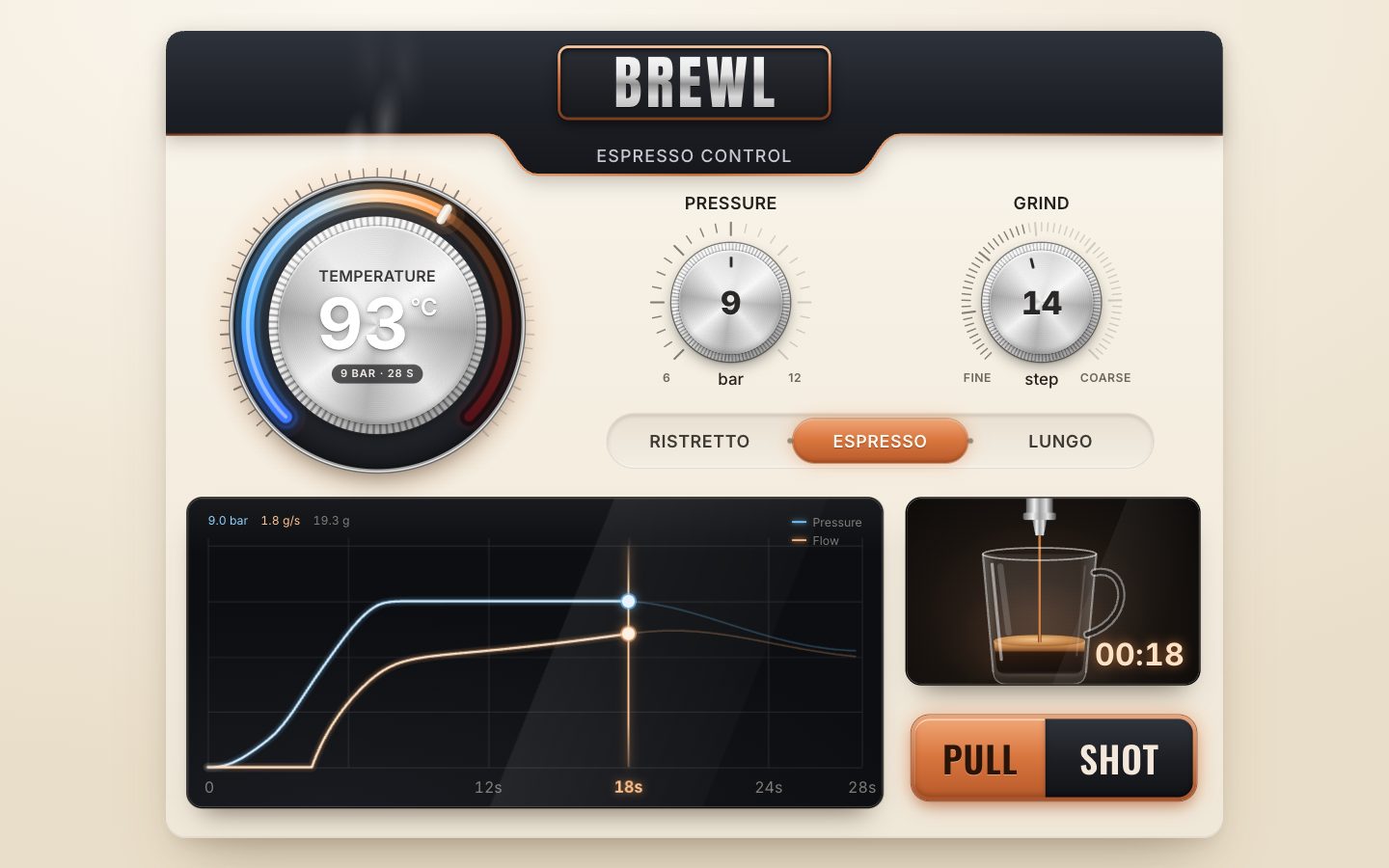
The cup is one SVG, drawn once: a chrome spout, a glass cup with a handle, reflections, a shadow and a warm glow that grows as the cup fills. Its numbers are the cup's inside in scene pixels; 66 g fills it to the rim.
const NS = 'http://www.w3.org/2000/svg';
const RIM = 58, BASE = 172, TOP_L = 98, TOP_R = 202, BOT_L = 108, BOT_R = 192;   // the cup's inside, scene px
const SPOUT = 38, CX = 150;                                                        // where the stream leaves the spout
const FULL = 66;                                                                   // grams that fill the cup to the rim
const calm = matchMedia('(prefers-reduced-motion: reduce)');
Five elements move, and the glow brightens with the level. The coffee and the crema are rectangles clipped to the cup's inside, so they take its tapered shape. The surface is an ellipse, the stream a rectangle from the spout down to the surface, and a drop falls when the flow is only a trickle.
<g clip-path="url(#cup-inside)">
  <rect class="cup-coffee" x="${TOP_L - 4}" y="${BASE}" width="${TOP_R - TOP_L + 8}" height="0" fill="url(#cup-coffee)"/>
  <rect class="cup-crema" x="${TOP_L - 4}" y="${BASE}" width="${TOP_R - TOP_L + 8}" height="0" fill="url(#cup-crema)"/>
</g>
<ellipse class="cup-surface" cx="${CX}" cy="${BASE}" rx="0" ry="5" fill="url(#cup-top)" opacity="0"/>
<rect class="cup-stream" x="${CX}" y="${SPOUT}" width="0" height="0" rx="1.2" fill="url(#cup-stream)"/>
<circle class="cup-drop" cx="${CX}" cy="${SPOUT + 4}" r="2.2" fill="#B87436" opacity="0"/>
set() works out the level, the crema (it grows with the first 30 g), the surface ellipse as wide as the cup at that
height, and the stream's width, which follows the flow and wobbles a little (not under reduced motion). It
builds a key of what would change on screen and returns early when the key is the same, so a frame where nothing
visible moved writes nothing.
set(grams, flow, t, pouring) {
  const level = Math.min(1, grams / FULL), h = level * (BASE - RIM - 4);
  const top = BASE - h;
  const crema = Math.min(h, 2.5 + Math.min(grams, 30) * 0.42);
  // the inside narrows towards the base: the surface ellipse is as wide as the cup at its height
  const half = ((BOT_R - BOT_L) + ((TOP_R - TOP_L) - (BOT_R - BOT_L)) * ((BASE - top) / (BASE - RIM))) / 2;
  const wob = calm.matches ? 0 : Math.sin(t * 23) * 0.25 + Math.sin(t * 9.7) * 0.2;
  const w = flow > 0.04 && pouring ? Math.min(4.6, 0.8 + flow * 1.55) + wob : 0;
  const dropOn = pouring && flow > 0.002 && flow <= 0.12;
  const dropY = SPOUT + 4 + ((t * 2.4) % 1) * (top - SPOUT - 6);
  const key = `${top.toFixed(2)}|${w.toFixed(2)}|${dropOn ? dropY.toFixed(1) : ''}`;
  if (key === this.last) return;
  this.last = key;
  this.coffee.setAttribute('y', top.toFixed(2)); this.coffee.setAttribute('height', h.toFixed(2));
  this.crema.setAttribute('y', top.toFixed(2)); this.crema.setAttribute('height', crema.toFixed(2));
  this.surface.setAttribute('cy', top.toFixed(2)); this.surface.setAttribute('rx', Math.max(0, half - 1).toFixed(2));
  this.surface.setAttribute('ry', (Math.min(5.5, 1 + h * 0.4)).toFixed(2));
  this.surface.setAttribute('opacity', h > 0.5 ? '1' : '0');
  this.stream.setAttribute('x', (CX - w / 2).toFixed(2)); this.stream.setAttribute('width', Math.max(0, w).toFixed(2));
  this.stream.setAttribute('height', w > 0 ? (top - SPOUT + 2).toFixed(2) : '0');
  this.drop.setAttribute('opacity', dropOn ? '1' : '0');
  if (dropOn) this.drop.setAttribute('cy', dropY.toFixed(1));
  this.glow.setAttribute('opacity', (level * 1.6).toFixed(2));
}
Now PULL SHOT starts a clock instead of finishing at once. The button turns into STOP (its label, its class and its name for screen readers), and the loop is kicked.
let speed = 1;
function startShot() {
  const recipe = RECIPES[state.recipe], s = settings();
  const trace = simulate(s, recipe);
  state.shot = { trace, recipe, settings: s, t0: performance.now(), t: 0, ideal: simulate(recipe, recipe).end };
  hideResult();
  pull.classList.add('is-running'); pullA.textContent = 'Stop'; pull.setAttribute('aria-label', 'Stop shot');
  graph.setPreview(trace);
  kick();
}
Each frame works out the shot's time from the clock (times speed, which scripts can raise) and shows
that moment on every readout: the graph, the cup, the timer, the live numbers and a progress line along the foot of
the button. The timer and the numbers are written only when their text changes. At the end of the trace the shot
finishes: done, or choked.
function shotFrame(now) {
  const sh = state.shot;
  sh.t = Math.min(sh.trace.end, ((now - sh.t0) / 1000) * speed);
  showShot(sh.trace, sh.t, true, sh.recipe.yield);
  if (sh.t >= sh.trace.end) finish(sh.trace.choked ? 'choked' : 'done');
  return !!state.shot;
}
// one moment of a shot on every readout: the graph, the cup, the timer, the numbers, the button's progress line
let lastTimer = '';
function showShot(trace, t, pouring, target) {
  const v = sampleAt(trace, t);
  graph.setLive(trace, t);
  cup.set(v.w, v.f, t, pouring && t < trace.end);
  const tm = `00:${String(Math.floor(t)).padStart(2, '0')}`;
  if (tm !== lastTimer) { lastTimer = tm; timer.textContent = tm; }
  readout(v);
  progress.style.transform = `scaleX(${clamp(v.w / target, 0, 1).toFixed(4)})`;
}
The model's samples are 0.05 s apart; the cup and the numbers read between them.
// the sample at time t (linear between neighbours), for the playhead
export function sampleAt(trace, t) {
  const s = trace.samples, i = clamp(Math.floor(t / DT), 0, s.length - 1), a = s[i], b = s[Math.min(i + 1, s.length - 1)];
  const k = clamp((t - a.t) / DT, 0, 1);
  return { t, p: a.p + (b.p - a.p) * k, f: a.f + (b.f - a.f) * k, w: a.w + (b.w - a.w) * k };
}
Finishing stops the clock, shows the last moment, turns STOP back into PULL and shows the verdict. Pressed while a shot runs, the button stops it, and the verdict says it was stopped by hand.
function finish(how) {
  const sh = state.shot; if (!sh) return;
  const v = sampleAt(sh.trace, sh.t);
  const res = verdict(sh.settings, sh.recipe, sh.t, v.w, sh.ideal, how);
  state.last = { ...res, time: sh.t, grams: v.w, recipe: state.recipe };
  state.shot = null;
  showShot(sh.trace, sh.t, false, sh.recipe.yield);
  pull.classList.remove('is-running'); pullA.textContent = 'Pull'; pull.removeAttribute('aria-label');
  result.dataset.kind = res.kind;
  $('.result-title').textContent = res.title;
  $('.result-advice').textContent = `${res.advice}${res.ratio ? ` Ratio ${res.ratio}.` : ''}`;
  result.classList.add('on');
}pull.addEventListener('click', () => (state.shot ? finish('stopped') : startShot()));
pull.addEventListener('pointerdown', () => pull.classList.add('is-pressed'));
for (const ev of ['pointerup', 'pointerleave', 'pointercancel']) pull.addEventListener(ev, () => pull.classList.remove('is-pressed'));The loop now has three things to run. It still sleeps when a dial has settled, the trail has caught up and no shot is pouring. Measured on the finished panel over a scripted run (turning the dials, three recipes, a full ristretto, a stopped espresso; about 4,900 frames at 120 Hz), no frame was missed at 1440 × 900 or on a phone, even with the CPU slowed four times; the median frame took 8.3 ms.
let raf = 0;
function kick() { if (!raf) raf = requestAnimationFrame(frame); }
function frame(now) {
  raf = 0;
  let more = false;
  for (const d of dials) more = d.frame(now) || more;
  if (ghosts.on) more = ghostFrame() || more;
  if (previewDirty && !state.shot) {
    previewDirty = false;
    const tr = preview();
    graph.setPreview(tr);
    if (!state.last) { graph.setLive(null, 0); cup.set(0, 0, 0, false); }
    chip();
  }
  if (state.shot) more = shotFrame(now) || more;
  if (more) kick();
}
For stills and tests, window.__brew.at(t) freezes the shot the dials would pull at t
seconds.
// freeze a shot at t seconds (for stills): the graph, cup and timer show that moment of the shot these dials pull
at: (t) => {
  if (state.shot) finish('stopped');
  const recipe = RECIPES[state.recipe], trace = simulate(settings(), recipe);
  graph.setPreview(trace);
  showShot(trace, Math.min(t, trace.end), true, recipe.yield);
  state.last = { kind: 'frozen' };
  return { end: trace.end };
},
9 · Phones, reduced motion and the live regions
The finished panel has three layouts. Below 700 px wide it is a phone column, 390 design pixels wide; on a screen under 560 px tall and more than 1.5 times as wide as it is tall it is the wide panel for a phone on its side, 1400 × 640; otherwise the desk panel. The phone column is as tall as the screen allows (700 to 900 design px). Its fixed parts take 434 px; the temperature dial gets what is left, from 170 up to the concept's 316 px, and anything beyond that opens the five gaps between the parts. At 390 × 844 the dial is 316 px and each gap 18.8 px.
const DESIGN = { desk: [1160, 886], wide: [1400, 640] };
const PHONE = { w: 390, minH: 700, maxH: 900, fixed: 64 + 102 + 132 + 54 + 64 + 18, gaps: 5 };

function fit() {
  const vw = document.documentElement.clientWidth, vh = window.innerHeight;
  const next = vw < 700 ? 'phone' : vh < 560 && vw / vh > 1.5 ? 'wide' : 'desk';
  let w, h;
  if (next === 'phone') {
    scale = Math.min(vw / PHONE.w, vh / PHONE.minH, 1.6);
    w = PHONE.w; h = Math.min(PHONE.maxH, Math.floor(vh / scale));
    // the dial takes what the column leaves, up to the concept's size; anything left over opens the gaps
    const room = h - PHONE.fixed - PHONE.gaps * 12;
    const d = clamp(room, 170, 316);
    const gap = 12 + Math.max(0, room - d) / PHONE.gaps;
    stage.style.setProperty('--pd', d);
    stage.style.setProperty('--gap', `${gap.toFixed(1)}px`);
    stage.style.setProperty('--band', ((vh - h * scale) / 2 + 64 * scale).toFixed(1));
  } else {
    [w, h] = DESIGN[next];
    const m = next === 'wide' ? 8 : clamp(Math.min(vw, vh) * 0.035, 12, 40);
    scale = Math.min((vw - m * 2) / w, (vh - m * 2) / h, 1.4);
  }
  layout = next;
  stage.dataset.layout = layout;
On the phone the panel is a flex column, and everything placed absolutely on the desk becomes part of the flow.
/* phone: the concept's phone, a column 390 wide; app.js sets the height and the dial's size (--pd) */
.stage[data-layout="phone"] {
  --plate-h: 64px; --tab-h: 0px; --badge-font: 34px; --sub-font: 11px;
  --knob-label: 14px; --knob-unit: 12px; --preset-font: 16px; --legend-font: 10px; --axis-font: 11px; --axis-y: 6px; --result-font: 13px;
  --timer-font: 20px; --pull-font: 30px; --plot-top: 30px; --plot-bottom: 24px;
  background: linear-gradient(180deg, var(--graphite-900) 0 calc(var(--band) * 1px), transparent calc(var(--band) * 1px));
}
.stage[data-layout="phone"] .brewl { border-radius: 0; box-shadow: none; background: linear-gradient(180deg, var(--cream-50), var(--panel) 40%, var(--cream-200)); display: flex; flex-direction: column; align-items: center; padding: 0 20px 18px; }
.stage[data-layout="phone"] .brewl > * { position: relative; left: auto; top: auto; flex: none; }
The graph and the cup share a row there. On the desk they are placed one by one, so their wrapper is
display: contents, a box that is not there; on the phone it is a flex row.
.readout { display: contents; }
.stage[data-layout="phone"] .readout { display: flex; gap: 10px; width: 100%; height: 132px; margin-top: var(--gap); }
.stage[data-layout="phone"] .graph, .stage[data-layout="phone"] .cup { position: relative; height: 100%; border-radius: 14px; }
.stage[data-layout="phone"] .graph { flex: 1 1 auto; }
.stage[data-layout="phone"] .cup { flex: 0 0 112px; }
The cup's narrow box on the phone shows a crop of the scene around the cup and the spout, through its
viewBox.
// the desk shows the whole scene; the phone's narrow box shows the cup and spout only
frameFor(layout) { this.svg.setAttribute('viewBox', layout === 'phone' ? '82 0 156 196' : '22 2 282 180'); }
Under prefers-reduced-motion the dials already jump instead of gliding (stage 2) and the stream does not
wobble (stage 8). The CSS stills the steam and the hot halo's pulse and drops the transitions. app.js
also kicks the loop again when the setting changes.
@media (prefers-reduced-motion: reduce) {
  .steam i { animation: none; opacity: .35; transform: translateY(-30%); }
  .brewl[data-temp-state="hot"] .dial--temp .halo { animation: none; opacity: .9; }
  .presets-thumb, .result, .playhead, .marker.ghost { transition: none; }
}calm.addEventListener?.('change', () => kick());Last, the live regions. The verdict card becomes a polite role="status", so the verdict is read out
when it appears. PULL SHOT is described by a hint, and a hidden polite region says what the shot will be when it
starts. The graph's caption describes it in words: the shot the dials will pull, then the last shot.
<div class="result" role="status" aria-live="polite">
  <p class="result-title"></p>
  <p class="result-advice"></p>
</div>
<figcaption id="graph-desc" class="sr-only">Extraction graph</figcaption><p id="pull-hint" class="sr-only">Runs the shot with the current dials. Press again to stop.</p>
<p class="sr-only" aria-live="polite" id="announce"></p>function say(text) { announce.textContent = ''; requestAnimationFrame(() => { announce.textContent = text; }); }$('#graph-desc').textContent = `Extraction graph. These dials pull ${RECIPES[state.recipe].yield} grams in about ${Math.round(tr.end)} seconds at ${fmtT(pressure.value)} bar.`;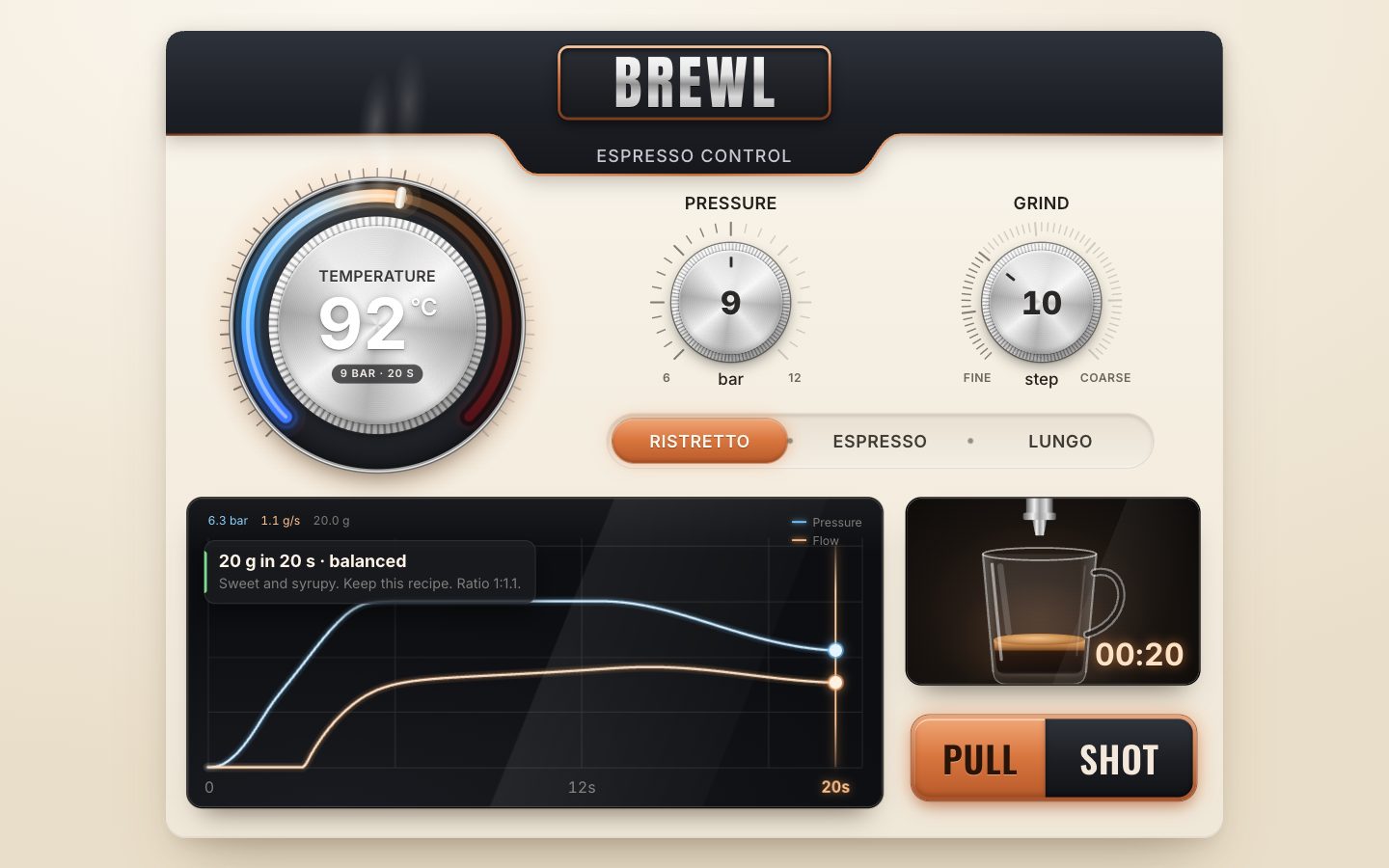
Make it yours
- The recipes are the
RECIPEStable insim.js: each has its temperature, pressure, grind, the weight in the cup and how long its pre-infusion lasts. A recipe's ideal time comes from pulling it on its own dials. - The model's feel is a handful of numbers: the puck's resistance (6.1, and 0.05 per grind step), the soak (7), the hot water's speed-up (1.2 % per °C), the pump's decline (30 %) and the puck's erosion (30 % over 22 s).
- How strict the verdict is: 16 % of the ideal time and 2.5 °C each count as one step, and a cup is balanced between −1 and +1.
- Any dial is
new Dial(element, { min, max, step, big, value, text, draw, faceRadius })on an element withrole="slider";sweep(270° by default) changes the scale's width. - The heat colours are the
HEATtable, and the states' limits (90 and 96 °C) are intempState(). - Scripts can drive it through
window.__brew:state(),set({ temp, pressure, grind }, ms),preset('lungo'),pull(),stop(),speed,at(t)anddials. - Accessibility is already there: three real sliders with spoken values and states, the full keyboard
(arrows, PageUp/PageDown, Home/End), a radio group with one tab stop, visible focus rings, the verdict and the shot
announced through polite live regions, the graph described in words, and
prefers-reduced-motion.
The code is on GitHub at UlviShabanbayli/domvybe-espresso-dial, under the MIT licence: use it in your own projects, commercial ones included. BREWL is a made-up machine, and the shot is a model, not a measurement.
Work the whole shot out before it starts, then play it back. The preview, the live curves, the cup, the timer and the verdict all read the same samples, so they can never disagree, and turning a dial only means asking the model again.