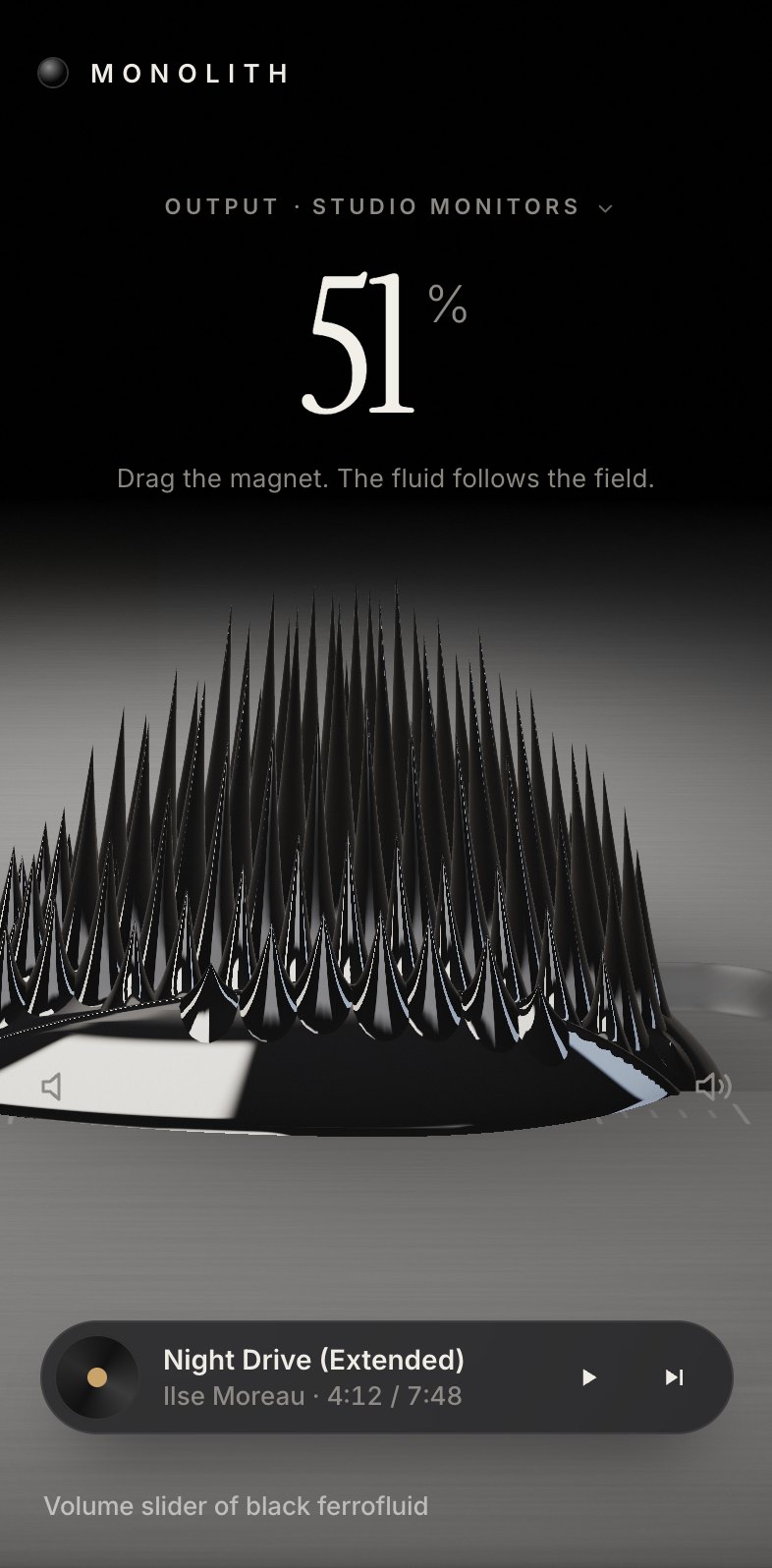
This is the whole build of the ferrofluid volume slider, in the order it was written. It is the output page of a made-up music system, Monolith: one volume control for the studio monitors, the headphones and an offline living room. The thumb is a magnet under a pool of black ferrofluid in a milled titanium tray. The fluid follows the magnet, a crown of spikes stands up over it and leans as you drag, mute lets the magnet go and the spikes melt into a puddle, and with the track playing they pulse on every kick. Each stage below is the page as it stood at that step. It shows a still, and Run it here starts the live page in its place. The code under each heading is only what that stage adds. The finished source is at the end, and on GitHub under the MIT licence.
There is no framework, no library and no build step: one HTML page, one style sheet, a state module, a camera, the WebGL2 renderer with its shaders, and a small Web Audio synth. The value lives in a real range input, so the keyboard and screen readers work before a single pixel of fluid is drawn.
1 · The page, the control and every state
Start with the control a screen reader and a keyboard need: a native input type="range" with a label, a
value text and a description. It sits invisible inside a control box that will later be laid over the projected tray,
so arrows, Page keys, Home and End work for free.
<div class="ctrl" id="ctrl">
  <input type="range" id="vol" min="0" max="100" step="1" value="72" aria-label="Volume, Studio monitors" aria-describedby="hint" aria-valuetext="72 percent">
</div>
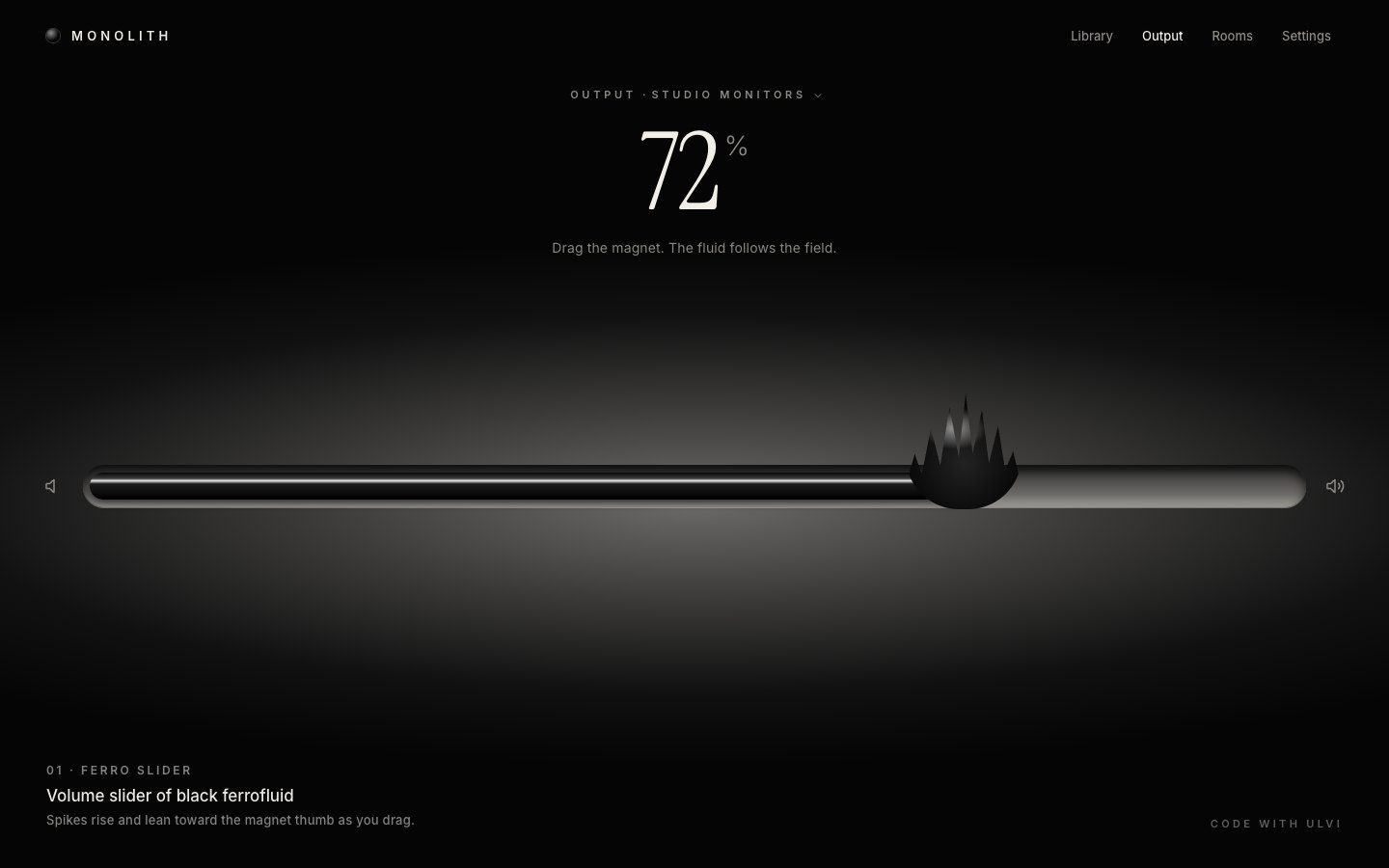
Until there is WebGL the tray is CSS: a milled pill, a glossy fill and a spiky heap cut with a clip path. It stays in
the finished build as the fallback (no WebGL2, or ?nogl in the URL).
<div class="fallback" id="fallback" aria-hidden="true">
  <div class="fb-plate"></div>
  <div class="fb-tray"><div class="fb-fill" id="fbFill"></div><div class="fb-heap" id="fbHeap"></div></div>
</div>.fb-tray { position: fixed; left: 6%; right: 6%; top: 56%; height: 44px; margin-top: -22px; border-radius: 22px; background: linear-gradient(#2a2a2a, #6d6b69 70%, #a09d99); box-shadow: inset 0 6px 10px rgba(0, 0, 0, .7), 0 1px 0 rgba(255, 255, 255, .35); }
.fb-fill { position: absolute; left: 7px; top: 8px; bottom: 8px; width: 72%; border-radius: 14px; background: linear-gradient(#050505 0%, #3d3d3d 22%, #e6e5e2 30%, #1a1a1a 42%, #000 100%); box-shadow: 0 4px 8px rgba(0, 0, 0, .6); }
.fb-heap { position: absolute; top: 50%; left: 72%; width: 120px; height: 120px; margin: -96px 0 0 -60px; border-radius: 50% 50% 46% 46%; background: radial-gradient(40% 26% at 42% 30%, rgba(255, 255, 255, .55), transparent 70%), radial-gradient(circle at 50% 60%, #222 0%, #050505 70%); clip-path: polygon(0 80%, 8% 52%, 14% 70%, 22% 30%, 30% 62%, 38% 12%, 46% 55%, 52% 0, 58% 52%, 66% 14%, 72% 60%, 80% 28%, 86% 66%, 93% 50%, 100% 80%, 100% 100%, 0 100%); }One function sets the value and one paints every state from it: the readout, the range, the hearing warning above 85 % on the headphones, mute, offline, and the hint under the number.
function setValue(v, { commit = false } = {}) {
  v = clamp(v, 0, 1);
  if (Math.abs(v - st.target) < 1e-6 && !commit) return;
  st.target = v; D().vol = v;
  if (st.muted && v > 0 && commit) st.muted = false;
  refresh();
  if (commit) save();
}function refresh() {
const d = D(), n = Math.round(st.target * 100);
num.textContent = String(n);
vol.value = String(n);
const loud = d.online && !st.muted && d.safe && st.target > d.safe;
html.classList.toggle('loud', !!loud);
html.classList.toggle('muted', st.muted);
html.classList.toggle('offline', !d.online);
vol.disabled = !d.online;
$('#mute').disabled = !d.online; $('#louder').disabled = !d.online;
vol.setAttribute('aria-valuetext', !d.online ? `${d.name} is offline` : st.muted ? `Muted, ${n} percent` : `${n} percent${loud ? ', loud' : ''}`);
$('#mute').setAttribute('aria-pressed', String(st.muted));
$('#mute').setAttribute('aria-label', st.muted ? 'Unmute' : 'Mute');
st.mT = !d.online || st.muted ? 0 : st.drag ? 1.1 : st.hover ? 1.04 : 1;
st.expoT = d.online ? 1 : 0.62;
$('#reconnect').hidden = d.online;
if (!flash) {
if (!d.online) setHint(`${d.name} is offline. Reconnect to set its level.`);
else if (loud) setHint('Loud. Long listening above 85 % can damage hearing.');
else if (st.muted) setHint('Muted. The magnet lets go; tap the speaker to bring it back.');
else setHint(HINT);
}
wake();
}A press on the heap grabs it where you touched it (no jump); a press anywhere else on the tray jumps there. The pointer is captured, so a drag keeps working outside the box.
ctrl.addEventListener('pointerdown', (e) => {
  if (!D().online || e.button > 0) return;
  e.preventDefault();
  const x = valAt(e);
  grab = Math.abs(x - st.target) * SPAN() < 0.15 ? st.target - x : 0;           // on the heap: hold it where you grabbed it
  st.drag = true; ctrl.classList.add('drag'); capId = e.pointerId; ctrl.setPointerCapture(e.pointerId);
  vol.focus({ preventScroll: true }); st.kbd = false; html.classList.remove('kbd');
  setValue(x + grab);
  refresh();
});vol.addEventListener('input', () => setValue(+vol.value / 100, { commit: true }));
vol.addEventListener('keydown', (e) => {
if (e.key === 'm' || e.key === 'M') { e.preventDefault(); toggleMute(); }
});Each device keeps its own level in one versioned storage key; older keys are wiped, and an offline device is never restored as the current one.
function load() {
  try {
    for (let i = localStorage.length - 1; i >= 0; i--) { const k = localStorage.key(i); if (k && k.startsWith('dv66.') && k !== KEY) localStorage.removeItem(k); }
    const s = JSON.parse(localStorage.getItem(KEY) || 'null');
    if (s && s.vol) { for (const k in DEVICES) if (typeof s.vol[k] === 'number') DEVICES[k].vol = clamp(s.vol[k], 0, 1); }
    if (s && s.dev in DEVICES && s.dev !== 'living') return s.dev;
  } catch (e) {}
  return 'monitors';
}
2 · The renderer: a room and the fluid as geometry
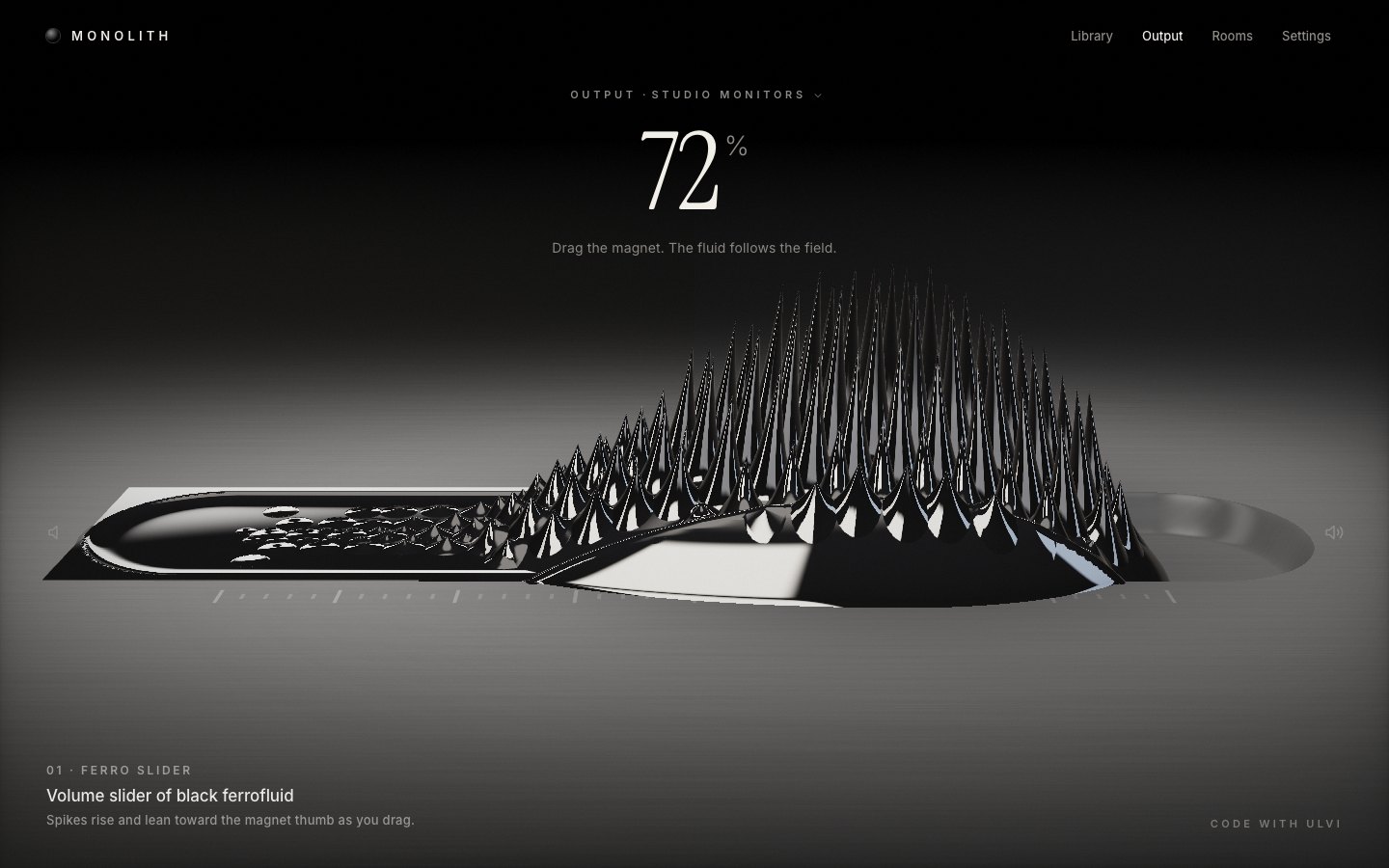
The shape and the framing live in one small file: a short, wide tray with the liquid pooled almost to its rim, a hero-sized crown, and a camera for each screen shape. On a phone the camera comes closer and lower and the spikes grow taller, so the crown is the hero of the frame.
export const OPT = {
  mode: 1,                     // liquid pooled in a tray (meniscus climbing the walls)
  x0: -0.42, x1: 0.42,         // the tray (value 0 → 100)
  gw: 0.115, gd: 0.042,        // channel half width and depth
  heapScale: 1.45, spikeScale: 1.5, latX: 0.36, latZ: 0.17, spkGap: 0.035,
  // Desktop: the chosen option C framing. Phone: closer and lower, taller spikes, so the crown is the hero of the frame
  // and the tray runs across the lower middle with the readout above and the player below.
  cam(W, H) {
    const a = W / H;
    if (a < 0.82) {
      const k = Math.min(1, a / 0.49);
      return { ro: [0, 0.55, 1.2], ta: [0, 0.2, 0], fl: 1.02 * k, pitch: 0.33, spikeScale: 2.2, heapScale: 1.5, follow: true, back: 1 };
A camera turns track coordinates (0 % to 100 % along the tray) into the screen.
cam.project = (Pt) => {
  const d = sub(Pt, ro), z = dot(d, f);
  return [W / 2 + dot(d, r) / z * fl * H, H / 2 - dot(d, u) / z * fl * H, z];
};
The same camera works backwards for the pointer: a press is cast onto the plate, so dragging follows the tray in 3D, and the control box, the speaker buttons and the keyboard focus ring are all placed on the projected tray.
function valAt(e) {
  if (!cam || !fluid) { const r = $('.fb-tray').getBoundingClientRect(); return (e.clientX - r.left) / r.width; }
  const vx = e.clientX + (follow ? st.pan : 0);
  const p = cam.unproject(vx, e.clientY, 0.03) || cam.unproject(vx, e.clientY, 0);
  if (!p) return st.target;
  if (MODE > 1.5) { let a = Math.atan2(p[2], p[0]); while (a < ARC[0] - (2 * Math.PI - (ARC[1] - ARC[0])) / 2) a += 2 * Math.PI; return (a - ARC[0]) / (ARC[1] - ARC[0]); }
  return (p[0] - X0) / (X1 - X0);
}
On a phone that close camera makes the tray wider than the screen. The room is rendered once for a wider virtual view and slid sideways with a CSS transform, and the fluid re-projects with the same shift, so the view follows the magnet. A drag there is a horizontal scrub, about one screen width from 0 to 100 %, and a tap on the tray jumps to that spot.
// Phone ("follow"): the camera is close enough that the crown fills the frame, so the tray is wider than the screen.
// The room is rendered ONCE for a wider virtual view (a shifted lens, so perspective stays exact) and slid sideways
// with a CSS transform; the fluid canvas stays on screen and re-projects with the same shift. The view eases after
// the magnet, so the crown stays the hero wherever the level is.
let follow = false, VW = 0, SW = 0;
const panEls = () => [$('#room'), $('#ring')];
function applyPan() {
  const x = -Math.round(st.pan * 4) / 4;
  for (const el of panEls()) el.style.transform = follow ? `translate3d(${x}px,0,0)` : '';
}
function panTarget(s) {
  if (!follow) return 0;
  const p = cam.project([s.hx, 0.05, 0]);
  return clamp(p[0] - SW / 2, 0, VW - SW);
}if (rel) { const dx = e.clientX - rel.x; if (Math.abs(dx) > 6) rel.moved = true; if (rel.moved) setValue(rel.v + dx / (SW * 0.95)); }if (rel && !rel.moved && e.type === 'pointerup') setValue(rel.abs); // a tap jumps thereThe room (the brushed titanium plate, its light pool, the etched ticks and the milled tray) is one fragment shader drawn once per resize and then left alone. The fluid gets its own canvas, cropped to the tray, with MSAA.
// crop the fluid canvas to the tray's projected box (with room for the tallest spike)
let x0 = 1e9, y0 = 1e9, x1 = -1e9, y1 = -1e9;
const ex = MODE > 1.5 ? [-DR - 0.3, DR + 0.3] : [X0 - 0.36, X1 + 0.36], ez = MODE > 1.5 ? ex : [-0.4, 0.4];
const yTop = 0.15 * C('spikeScale') + 0.13 * C('heapScale') + 0.02;
const corners = [];
for (const x of ex) { for (const z of ez) corners.push([x, -0.05, z]); for (const z of [-0.22, 0.22]) corners.push([x, yTop, z]); }
for (const c of corners) {
  const p = cam.project(c); x0 = Math.min(x0, p[0]); x1 = Math.max(x1, p[0]); y0 = Math.min(y0, p[1]); y1 = Math.max(y1, p[1]);
}
if (follow) { x0 = 0; x1 = W; }
x0 = Math.max(0, Math.floor(x0)); y0 = Math.max(0, Math.floor(y0)); x1 = Math.min(VW, Math.ceil(x1)); y1 = Math.min(H, Math.ceil(y1));
fluid.layout(cam, { x: x0, y: y0, w: x1 - x0, h: y1 - y0 }, DPR_MAX);
The fluid body is a height field: a pool filled almost to the rim, its meniscus climbing the walls and ending in a rounded front at the level, and a dome over the magnet. A mesh whose outer rows lie on the fluid's edge draws it.
float threadH(vec2 p){
  if(uMode<0.5){
    float xc=clamp(p.x, uX0, uT); float r=threadR(xc); float d=length(vec2((p.x-xc)*1.4,p.y));
    return sqrt(max(r*r-d*d,0.0))*0.95*step(uX0+1e-4, uT+1e-4);
  }
  float gs=grooveSoft(p);
  float L=-0.0032+0.0055*exp(-max(-trayD(p),0.0)/0.006);
  float s=L-gs;
  if(uMode<1.5){ float dx=max(p.x-uT,0.0)*1.15/GW; s*=sqrt(max(1.0-dx*dx,0.0)); }
  return max(s,0.0);
}
float heapH(vec2 p){
  vec2 q=(p-vec2(uHx,uHz))/vec2(heapRx(p.x),uHr.y); float rq=dot(q,q);
  return uHh*pow(max(1.0-rq,0.0),0.8)*(1.0-0.1*rq);
}
float body(vec2 p){ return max(threadH(p), heapH(p)); }
The spikes are 265 instanced cones on two hexagonal lattices that ride with the heap: one at the Rosensweig spacing over the magnet, a finer one trailing behind it. Each cone stands on the body and takes its height and lean from JavaScript.
// the heap: a hex lattice at the Rosensweig spacing
for (let j = -6; j <= 6; j++) for (let i = -15; i <= 9; i++) {
  const ox = i * CELL + (j & 1 ? CELL / 2 : 0), oz = j * CELL * 0.8660254;
  if (ox < -0.6 || ox > (OPT.latX || 0.27) || Math.abs(oz) > (OPT.latZ || 0.112)) continue;
  const a = rnd(i, j, 1), b = rnd(i, j, 2);
  cellsArr.push(ox + (a - 0.5) * 0.006, oz + (b - 0.5) * 0.006, (a + b) * 0.5, 1);
}float prof(float u, float h){ return h*pow(1.0-u,1.75)*(1.0-0.08*u*u) - 0.0016*smoothstep(0.7,1.0,u); }
float gRad;
vec3 spikeP(float u, float th, vec2 c, float h, vec2 lean){
float s=prof(u,h);
vec2 xz=c+u*gRad*vec2(cos(th),sin(th))+lean*max(s,0.0);
return vec3(xz.x, F(xz)+s, xz.y);
}Ferrofluid is a black mirror, so the shading is almost all reflection: a studio (soft box, rim strip, warm key) looked up along the reflected ray, weighted by Fresnel.
vec3 rf=reflect(rd,n);
vec3 rw=toWorld(rf);
float cosv=max(dot(-rd,n),0.0);
float Fr=0.05+0.95*pow(1.0-cosv,5.0);
vec3 env=env3(rw);
float ao=mix(0.6,1.0,smoothstep(0.0,0.7,vH))*mix(0.55,1.0,smoothstep(-0.2,0.6,rw.y));
vec3 col=env*mix(Fr,1.0,0.12)*ao*1.25;// body
gl.useProgram(body.p); common(body);
gl.bindVertexArray(bodyVao);
s.parts.forEach(([xa, xb], i) => {
if (xb - xa < 1e-3) return;
body.set('uPart', i); body.set('uXa', xa); body.set('uXb', xb);
gl.drawElements(gl.TRIANGLES, bodyCount, gl.UNSIGNED_INT, 0);
});
// spikes
gl.useProgram(spike.p); common(spike);
gl.bindVertexArray(spikeVao);
gl.bindBuffer(gl.ARRAY_BUFFER, dynBuf); gl.bufferSubData(gl.ARRAY_BUFFER, 0, dyn);
gl.drawElementsInstanced(gl.TRIANGLES, spikeCount, gl.UNSIGNED_SHORT, 0, N);In this stage every spike simply takes its target height: the crown jumps to each new value.
function spikes(s) {
  const mE = Math.max(0, st.m);
  const sx = s.hr[0];
  for (let i = 0; i < NC; i++) {
    const ox = cells[i * 4], oz = cells[i * 4 + 1], seed = cells[i * 4 + 2], rs = cells[i * 4 + 3];
    const cx = s.hx + ox, cz = s.hz + oz;
    let g = Math.exp(-((ox / sx) * (ox / sx) + (oz / 0.112) * (oz / 0.112)));
    let tr = ox < 0.02 && ox > -0.55 ? smooth(-0.55, 0, ox) * 0.12 * Math.exp(-oz * oz / 0.0016) : 0;
    if (rs < 1) { g *= 0.35; tr = smooth(-0.7, -0.12, ox) * 0.2; }
    if (MODE > 0.5) tr *= MODE > 1.5 ? 0 : 0.6;
    if (MODE > 1.5) g *= smooth(0.12, 0.35, g);      // in the dish only the crown over the magnet stands
    // the whole foot must stand on fluid, or a cone at the edge hangs over it like a drop
    const R = 0.0245 * rs, bm = Math.min(bodyAt(cx, cz, s), bodyAt(cx + R, cz, s), bodyAt(cx - R, cz, s), bodyAt(cx, cz + R, s), bodyAt(cx, cz - R, s));
    const mask = smooth(0.012, 0.05, bm);
    const hT = mE * 0.115 * C('spikeScale') * (MODE > 0.5 ? s.G : 1) * Math.max(g, tr) * mask * (0.9 + 0.2 * seed);
    st.h[i] = hT;
    // lean: toward the magnet, plus the drag
    const tx = -ox, tz = -oz, d = Math.hypot(tx, tz) + 1e-4, a = Math.min(d * 0.9, 0.12) / d;
    const lxT = tx * a + st.lean * s.dir[0], lzT = tz * a + st.lean * s.dir[1];
    st.lx[i] = lxT; st.lz[i] = lzT;
  }
}
3 · Springs: stand up, lean, let go
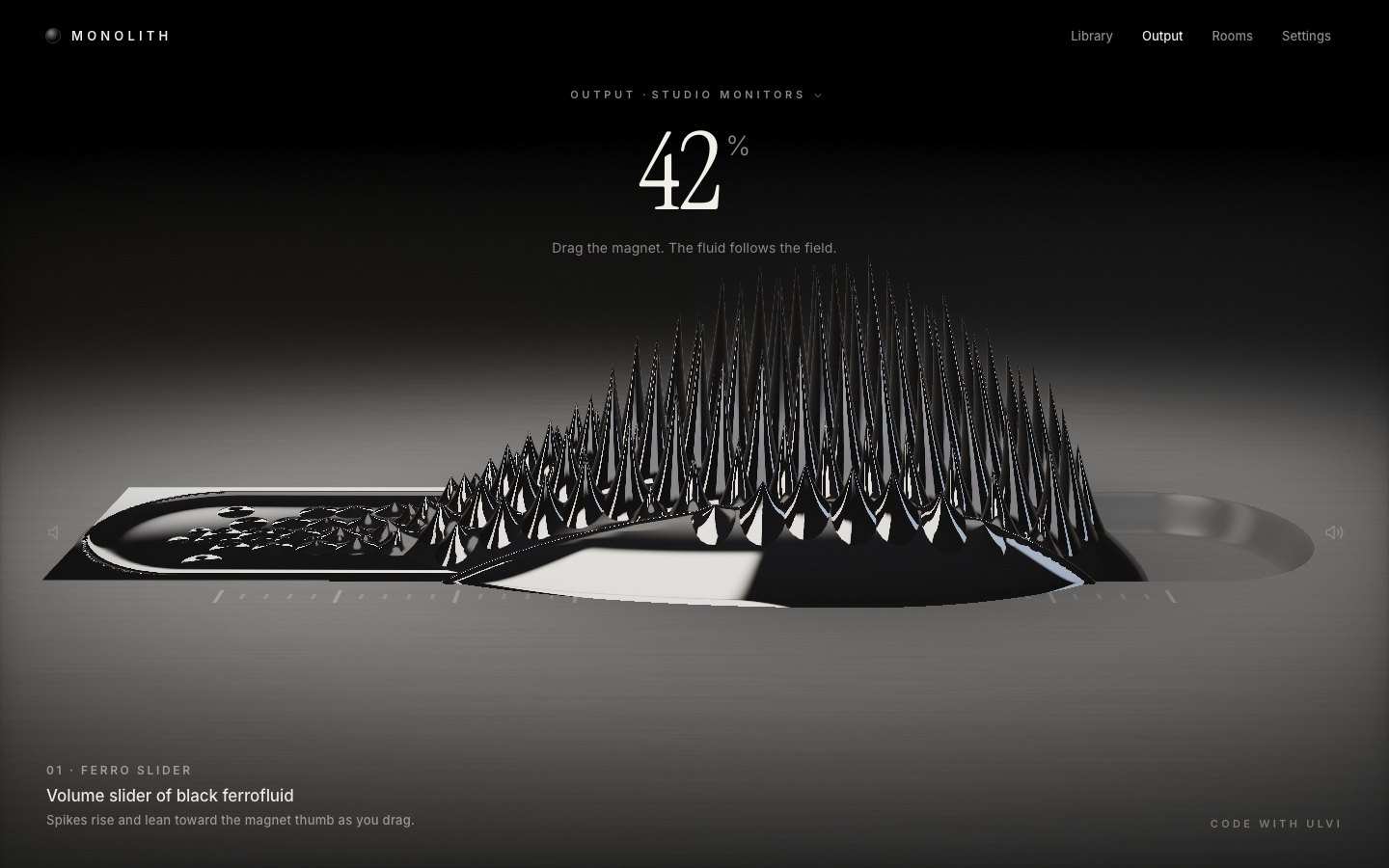
Now it moves like a liquid. The magnet runs ahead on a stiff spring while the fluid follows; the heap stretches with the speed and the whole crown leans against it. The magnet's strength is a spring too, so it overshoots when it grabs. The physics runs in sub-steps of at most 1/120 s.
function step(dt) {
  const k = st.drag ? 170 : 70, z = st.drag ? 0.9 : 0.62;               // the magnet runs ahead, the fluid follows
  const acc = k * (st.target - st.v) - 2 * z * Math.sqrt(k) * st.vel;
  st.vel += acc * dt; st.v += st.vel * dt;
  const sp = Math.min(Math.abs(st.vel) * SPAN() * 0.32, 0.65);
  st.stretch += (sp - st.stretch) * Math.min(1, dt * 9);
  const leanT = clamp(st.vel * SPAN() * 0.55, -0.55, 0.55);
  st.leanV += (95 * (leanT - st.lean) - 2 * 0.5 * Math.sqrt(95) * st.leanV) * dt; st.lean += st.leanV * dt;
  const mk = 70, mz = 0.42;
  st.mv += (mk * (st.mT - st.m) - 2 * mz * Math.sqrt(mk) * st.mv) * dt; st.m += st.mv * dt;
  st.expo += (st.expoT - st.expo) * Math.min(1, dt * 5);
  if (follow) { const pt = panTarget(fluidShape()), pk = 30; st.panV += (pk * (pt - st.pan) - 2 * 0.9 * Math.sqrt(pk) * st.panV) * dt; st.pan += st.panV * dt; }
}
Every spike is its own damped spring for height and for lean, with a slightly different frequency, so the crown ripples instead of moving as one block.
const w = 2 * Math.PI * (4.2 + 2.2 * seed), kk = w * w, zz = reduced ? 1 : 0.3;
st.hv[i] += (kk * (hT - st.h[i]) - 2 * zz * w * st.hv[i]) * dt; st.h[i] += st.hv[i] * dt;
if (st.h[i] < 0) { st.h[i] = 0; if (st.hv[i] < 0) st.hv[i] = 0; }
// lean: toward the magnet, plus the drag
const tx = -ox, tz = -oz, d = Math.hypot(tx, tz) + 1e-4, a = Math.min(d * 0.9, 0.12) / d;
const lxT = tx * a + st.lean * s.dir[0], lzT = tz * a + st.lean * s.dir[1];
const wl = 2 * Math.PI * (3 + 1.4 * seed), kl = wl * wl, zl = reduced ? 1 : 0.38;
st.lxv[i] += (kl * (lxT - st.lx[i]) - 2 * zl * wl * st.lxv[i]) * dt; st.lx[i] += st.lxv[i] * dt;
st.lzv[i] += (kl * (lzT - st.lz[i]) - 2 * zl * wl * st.lzv[i]) * dt; st.lz[i] += st.lzv[i] * dt;
Mute (and an offline device) set the magnet's target strength to zero: the spikes melt into a puddle. Dragging pulls a little harder and hovering perks them up.
st.mT = !d.online || st.muted || st.intro ? 0 : st.drag ? 1.1 : st.hover ? 1.04 : 1;The loop runs only while something moves and sleeps at rest. The page opens on a calm puddle that the magnet then pulls up; with reduced motion everything starts settled.
function frame(now) {
  raf = 0;
  const dt = Math.min(0.05, last ? (now - last) / 1000 : 1 / 60); last = now;
  if (reduced) settleNow();
  else {
    const n = Math.max(1, Math.ceil(dt / (1 / 120)));
    for (let i = 0; i < n; i++) { step(dt / n); spikes(dt / n, fluidShape()); }
  }
  draw(); if (follow) applyPan();
  if (!atRest()) raf = requestAnimationFrame(frame);
  else last = 0;
}
function wake() { if (!raf) { last = 0; raf = requestAnimationFrame(frame); } }if (reduced || Q.has('still')) settleNow();
else {
// the fluid arrives as a calm puddle, flows to the level, then the magnet engages and the spikes stand up
st.intro = true; st.m = 0; st.v = Math.max(0, st.target - 0.14); refresh();
}
4 · Sound, and spikes that pulse on the kick
A volume slider should set the level of something real, so the page gets a small deep-house player, synthesised with Web Audio (nothing is downloaded), and a now-playing pill.
<section class="np" id="np" aria-label="Now playing">
  <span class="art" aria-hidden="true"></span>
  <div class="meta"><b id="npTitle">Night Drive (Extended)</b><span id="npSub">Ilse Moreau · 4:12 / 7:48</span></div>
The scheduler knows when every kick lands, so there is no analyser: it keeps the kick times, and the fluid reads an envelope from them on the audio clock.
function kick(t) {
  const o = ctx.createOscillator(), g = ctx.createGain();
  o.frequency.setValueAtTime(150, t); o.frequency.exponentialRampToValueAtTime(46, t + 0.11);
  g.gain.setValueAtTime(0.0001, t); g.gain.exponentialRampToValueAtTime(0.95, t + 0.004); g.gain.exponentialRampToValueAtTime(0.0001, t + 0.38);
  o.connect(g); g.connect(bus); o.start(t); o.stop(t + 0.4);
  kicks.push(t); if (kicks.length > 8) kicks.shift();
}kick() {
if (!playing || !ctx) return 0;
const now = ctx.currentTime - (ctx.outputLatency || 0) * 0.5;
let e = 0; for (const t of kicks) if (t <= now) e = Math.max(e, Math.exp(-(now - t) * 9));
return e;
},The envelope, scaled by the volume, makes the magnet pull harder for a moment: the spikes jump on the beat like a ferrofluid speaker. Muted or offline, nothing pulses.
st.pulse = reduced ? 0 : player.kick() * st.v * (st.muted || !D().online ? 0 : 1);const mE = Math.max(0, st.m) * (1 + st.pulse * 0.34);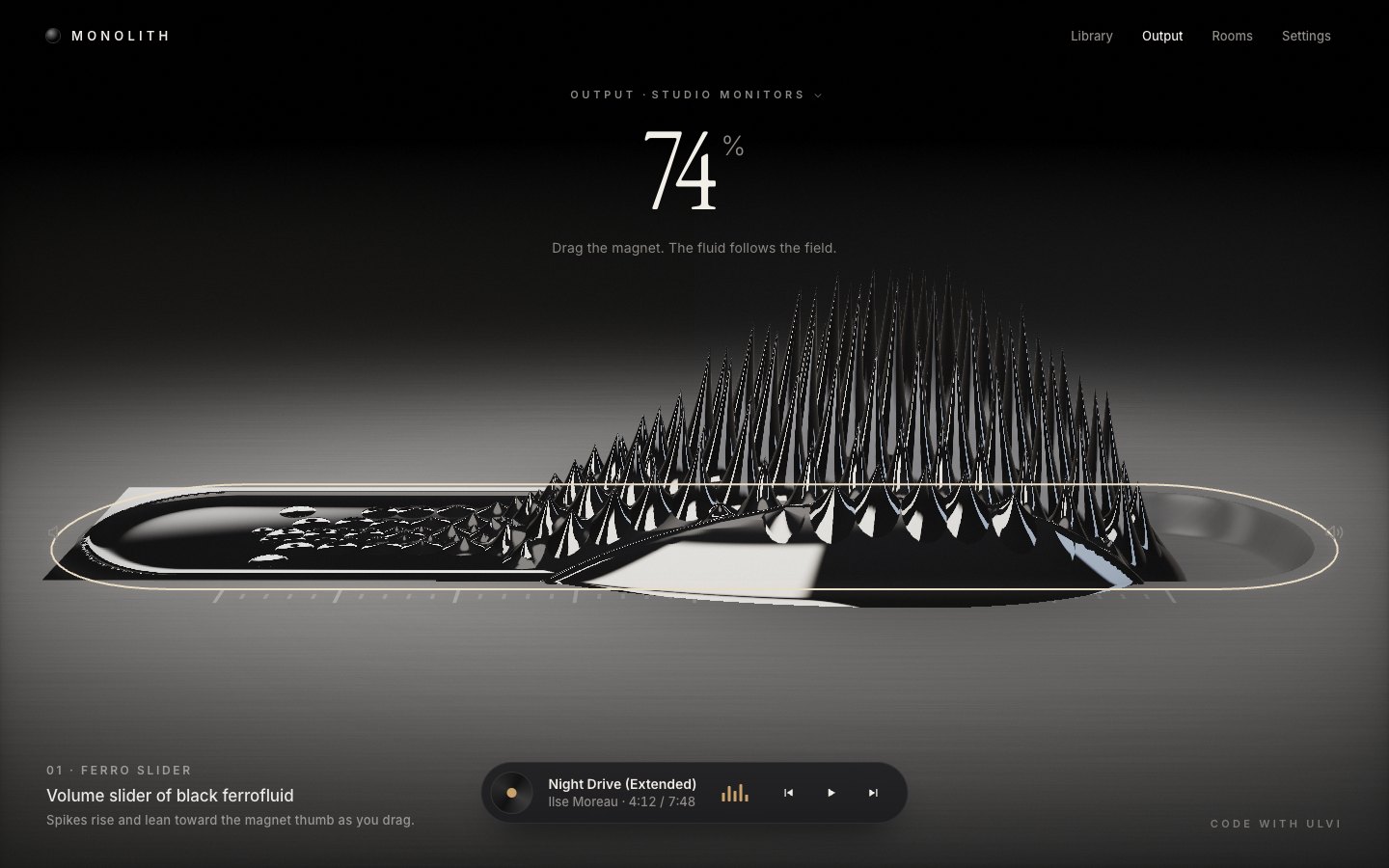
Make it yours
- Your devices are
DEVICESinapp.js: a name, a level, online or not, and an optionalsafelevel for the hearing warning. - The feel is a handful of numbers in
step()andspikes(): the magnet's spring (70, 170 while dragging), the spikes' frequencies (4.2 to 6.4 Hz) and damping (0.3), and the lean. - The shape and the framing are
config.js: the tray's length, width and depth, the crown's size, and a camera for each screen shape. - The crown is the lattice: the cell size (
CELL), the heap's extent and the trail. - Accessibility is already there: a native range input with a value text, keyboard and M for mute, a listbox for
the devices, visible focus traced on the tray, 44 px targets, a CSS fallback without WebGL, and
prefers-reduced-motionhonoured.
The code is on GitHub at UlviShabanbayli/domvybe-ferro-slider, under the MIT licence: use it in your own projects, commercial ones included. Monolith, its devices and its tracks are made up. Everything on the page was made in code for this project: the fluid, the room and the music.
Make the spikes real geometry that stands on the fluid, and give each one its own spring. A height field can draw a pool, but the crown only looks like ferrofluid when every spike is a cone with a foot on the surface, leaning and settling a little out of step with its neighbours.