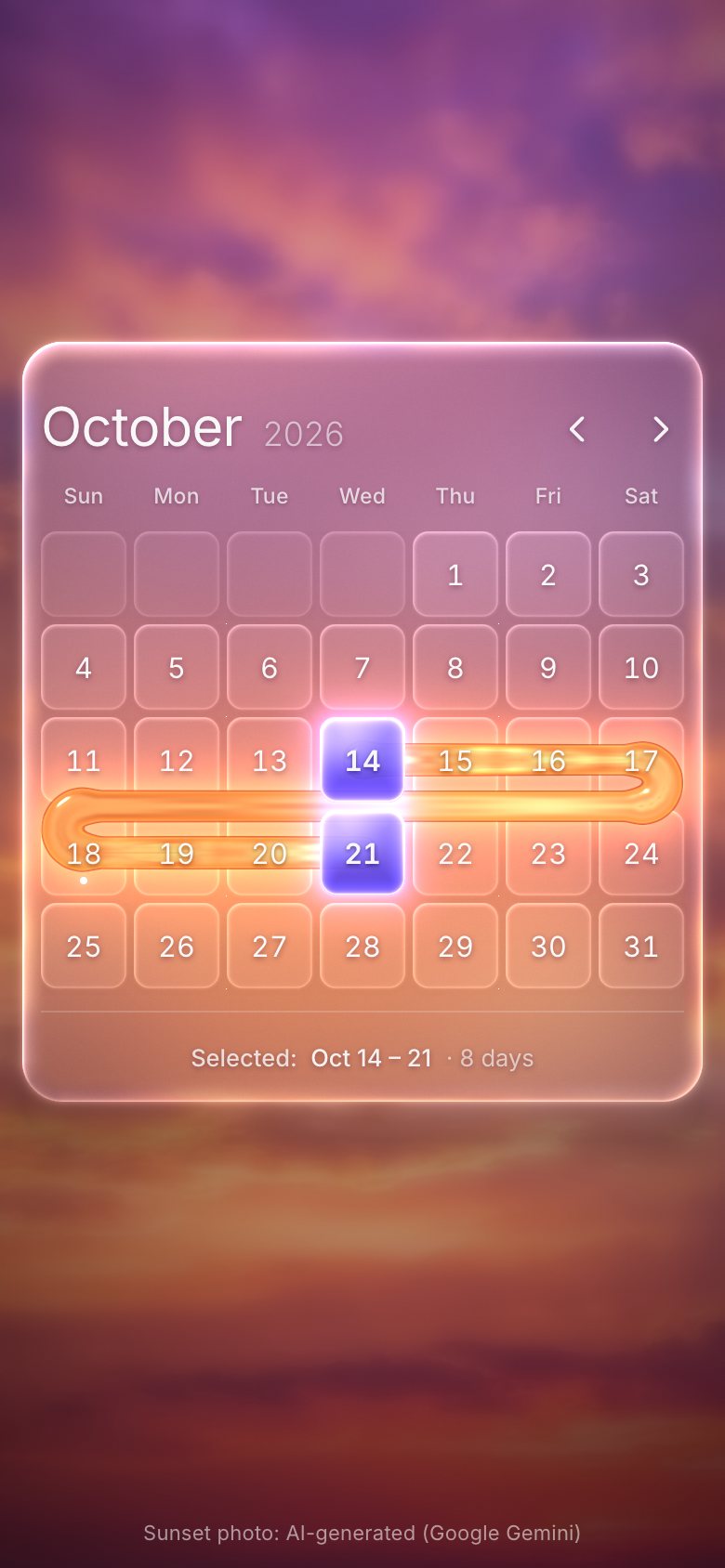
This is the whole build of the glass date-range picker, in the order it was written. Three months of liquid glass stand in a shallow arc over a sunset. Pick a first date and it lights violet; move to the last and molten amber pours out of a glass tube beside the calendar and runs through the days you chose, week by week, like water in a channel. Each stage below is the page as it stood at that step. It shows a still, and Run it here starts the live page in its place. The code under each heading is only what that stage adds. The finished source is at the end, and on GitHub under the MIT licence.
There is no framework and no build step: one HTML page, one style sheet, three ES modules and one photo. The glass, the tiles and the liquid are one WebGL 2 canvas behind the calendar; every day, title and button is real DOM above it, so the keyboard, screen readers and text selection all work as they do on any page.
1 · One month, in HTML and CSS
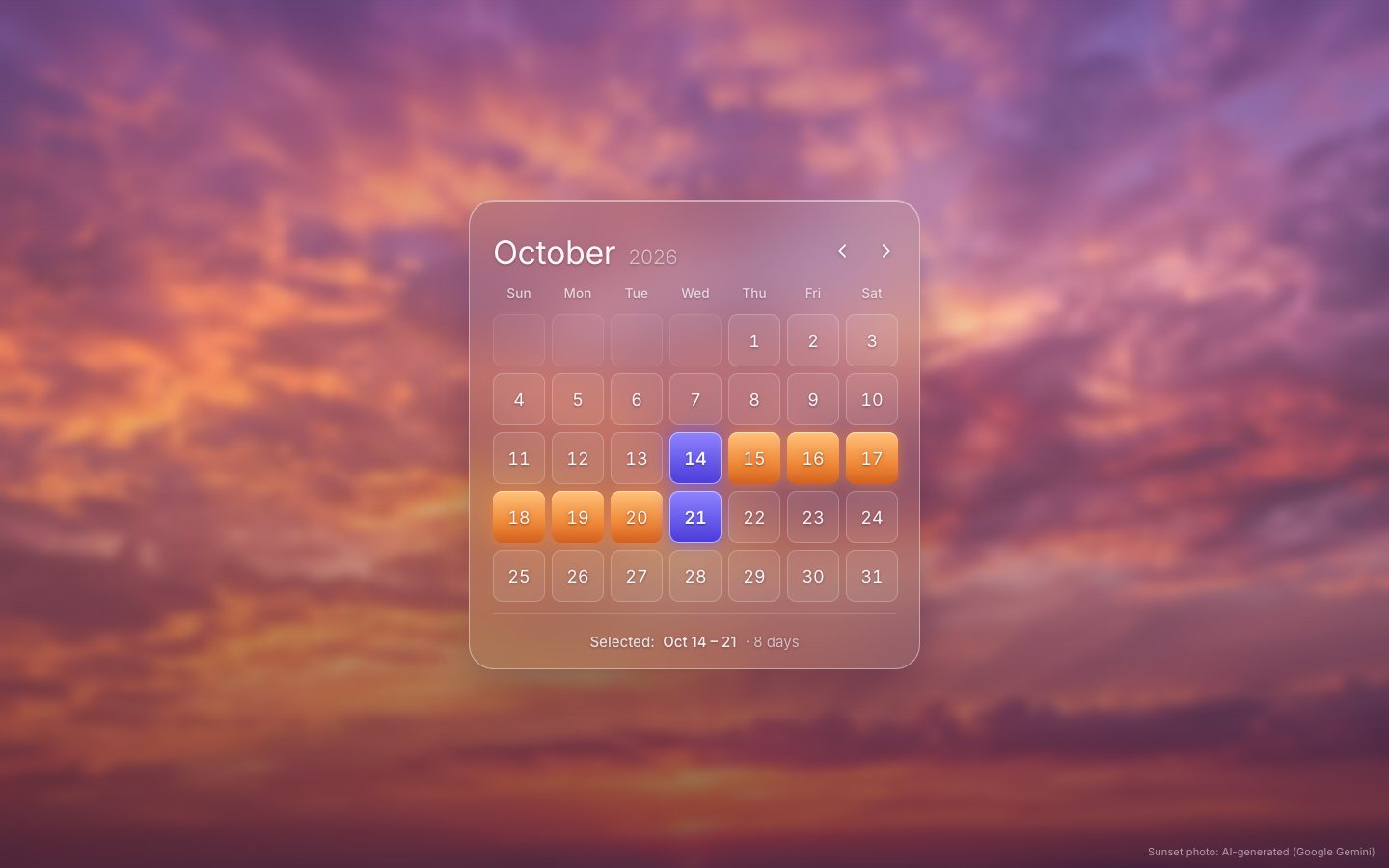
Start with the month itself, written out by hand: a title, a weekday row and five weeks of day tiles. Blank tiles
fill the days before the 1st. The range is plain classes for now: is-start, in-range and
is-end. Each day carries its day number (days since 1 January 1970), which the script will read later.
<div class="row">
  <div class="cell" data-dn="20737"><span class="num">11</span></div>
  <div class="cell" data-dn="20738"><span class="num">12</span></div>
  <div class="cell" data-dn="20739"><span class="num">13</span></div>
  <div class="cell in-range is-start" data-dn="20740"><span class="num">14</span></div>
  <div class="cell in-range" data-dn="20741"><span class="num">15</span></div>
  <div class="cell in-range" data-dn="20742"><span class="num">16</span></div>
  <div class="cell in-range" data-dn="20743"><span class="num">17</span></div>
</div><div class="foot"><span class="sel"><b>Selected:</b> Oct 14 – 21 <i>· 8 days</i></span></div>The sunset is a photo behind everything.
.stage { position: relative; width: 100%; min-height: 100svh; overflow: hidden; touch-action: pan-y; user-select: none; -webkit-user-select: none;
  background: #3b1a3c url(../img/wallpaper-1376.webp) center / cover no-repeat; }
Until the WebGL glass arrives in stage 3, the pane is frosted in CSS. The finished page keeps this rule as its
fallback: it holds whenever html does not have the gl class, so a browser without WebGL 2 sees
exactly this.
html:not(.gl) .pane { background: rgba(255, 255, 255, .13); border: 1px solid rgba(255, 255, 255, .42);
box-shadow: inset 0 1px 0 rgba(255, 255, 255, .45), 0 24px 60px rgba(40, 8, 40, .35); backdrop-filter: blur(26px) saturate(1.25) brightness(.82); -webkit-backdrop-filter: blur(26px) saturate(1.25) brightness(.82); }.cell { position: relative; width: var(--cell); height: var(--cell); display: grid; place-items: center; border-radius: calc(10px * var(--sc));
font-size: calc(18px * var(--sc)); font-weight: 400; font-variant-numeric: tabular-nums; color: var(--ink); cursor: pointer; outline: none;
-webkit-tap-highlight-color: transparent; text-shadow: 0 1px 3px rgba(60, 14, 40, .5); }The range is CSS too: amber days and violet glass at the two ends.
html:not(.gl) .cell[data-dn] { background: rgba(255, 255, 255, .07); box-shadow: inset 0 0 0 1px rgba(255, 255, 255, .22); }
html:not(.gl) .cell.blank { background: rgba(255, 255, 255, .03); box-shadow: inset 0 0 0 1px rgba(255, 255, 255, .1); }
html:not(.gl) .cell.in-range { background: linear-gradient(180deg, #ffc27a, #f08a3a 60%, #d2601f); box-shadow: 0 0 14px rgba(255, 140, 60, .55), inset 0 1px 0 rgba(255, 240, 210, .7); }
html:not(.gl) .cell.is-start, html:not(.gl) .cell.is-end { background: linear-gradient(180deg, #8f84ff, #4a3ad8); box-shadow: 0 0 16px rgba(110, 90, 255, .75), inset 0 0 0 1px rgba(210, 205, 255, .85); }
Every size in the sheet is a custom property: the tile, the gap, the padding, the rows. From stage 2 on, the script measures the screen and sets them. With no script yet, a small style block in the head sets them, with a tighter set for phones.
.stage { --sc: 1; --cell: 54px; --gap: 7px; --pad: 24px; --top: 19px; --headH: 69px; --wdH: 30px; --footGap: 14px; --footH: 57px; --r: 26px;
  --w: calc(2 * var(--pad) + 7 * var(--cell) + 6 * var(--gap));
  --h: calc(var(--top) + var(--headH) + var(--wdH) + 5 * (var(--cell) + var(--gap)) - var(--gap) + var(--footGap) + var(--footH)); }
.pane { left: calc(50% - var(--w) / 2); top: calc(50% - var(--h) / 2); height: var(--h); }
.nav { left: calc(50% + var(--w) / 2 - var(--pad) + 10px * var(--sc) - 88px); top: calc(50% - var(--h) / 2 + var(--top) + (var(--headH) - 44px) / 2); }
@media (max-width: 639px) {
  .stage { --sc: .85; --gap: 4px; --pad: 10px; --cell: calc((100vw - 28px - 2 * var(--pad) - 6 * var(--gap)) / 7);
    --top: 17px; --headH: 59px; --wdH: 26px; --footGap: 12px; --footH: 49px; --r: 22px; }
}
2 · A real date-range picker
Now the modules. All the calendar maths works on whole day numbers, counted in UTC, so daylight saving can never move a date. The day of the week falls out of the number, because 1 January 1970 was a Thursday.
export const DAY = 86400000;
export const dn = (y, m, d) => Math.round(Date.UTC(y, m, d) / DAY);
export const ymd = (n) => { const t = new Date(n * DAY); return { y: t.getUTCFullYear(), m: t.getUTCMonth(), d: t.getUTCDate() }; };
export const dow = (n) => ((n + 4) % 7 + 7) % 7; // 0 = Sunday (1970-01-01 was a Thursday)export function monthGrid(mi) {
const { y, m } = ym(mi);
const first = dn(y, m, 1), lead = dow(first), days = daysIn(y, m);
return { mi, y, m, first, lead, days, rows: Math.ceil((lead + days) / 7), last: first + days - 1 };
}A pane is built from that grid. Each day is a gridcell with its full date as its label, and only one day
in the grid is in the tab order at a time (a roving tabindex).
for (let r = 0; r < g.rows; r++) {
  const row = document.createElement('div'); row.className = 'row'; row.setAttribute('role', 'row');
  for (let c = 0; c < 7; c++) {
    const idx = r * 7 + c, day = idx - g.lead + 1;
    const cell = document.createElement('div');
    cell.setAttribute('role', 'gridcell');
    if (day >= 1 && day <= g.days) {
      const n = g.first + day - 1;
      cell.className = 'cell'; cell.dataset.dn = n; cell.tabIndex = -1; cell._n = n; cell._base = C.longDate(n) + (n === TODAY ? ', today' : ''); cell._st = '';
      cell.innerHTML = `<span class="num">${day}</span>`;
      if (n === TODAY) cell.setAttribute('aria-current', 'date');
      this.cells[idx] = cell;
    } else cell.className = 'cell blank';
    row.append(cell);
  }
  rows.append(row);
}
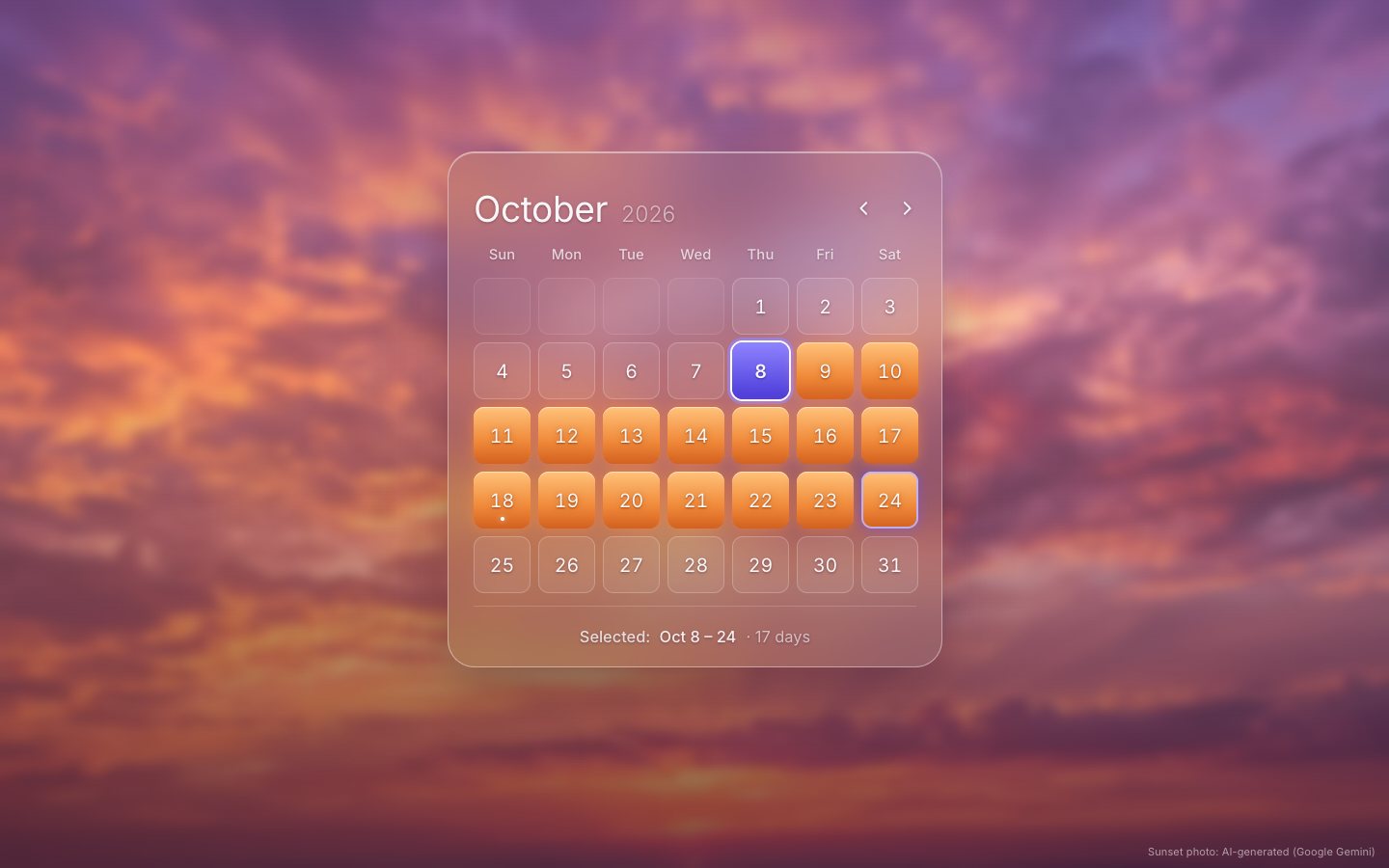
Picking is two steps. The first pick is the anchor; the second closes the range, whichever way round. Both are
announced in a live region, and the finished range goes out as a rangechange event.
function pick(n) {
  if (S.anchor == null) {
    S.saved = { lo: S.lo, hi: S.hi, origin: S.origin };
    S.anchor = n; S.preview = n;
    announce(`Range start ${C.longDate(n)}. Choose an end date.`);
  } else {
    const a = S.anchor;
    S.lo = Math.min(a, n); S.hi = Math.max(a, n); S.origin = a; S.anchor = null; S.preview = null; S.saved = null;
    const days = S.hi - S.lo + 1;
    announce(`Selected ${C.longDate(S.lo)} to ${C.longDate(S.hi)}, ${days} day${days > 1 ? 's' : ''}.`);
    stage.dispatchEvent(new CustomEvent('rangechange', { bubbles: true, detail: { start: C.iso(S.lo), end: C.iso(S.hi) } }));
  }
  syncSelection(); kick();
}
One pass draws the state onto every day: in the range or not, the two ends, the ring on the end you are hovering
while you pick, and aria-selected.
const inR = n >= lo && n <= hi, isS = pending ? n === S.anchor : n === lo, isE = !pending && n === hi;
const ring = pending && n === S.preview && n !== S.anchor;
const tab = n === S.focus && isFrontPane;
const key = `${+inR}${+isS}${+isE}${+ring}${+tab}${+pending}${+(lo === hi)}`;
if (key === cell._st) continue;                     // nothing changed for this day
cell._st = key;
cell.classList.toggle('in-range', inR); cell.classList.toggle('is-start', isS); cell.classList.toggle('is-end', isE);
cell.classList.toggle('is-ring', ring);
cell.setAttribute('aria-selected', pending ? String(n === S.anchor) : String(inR));html:not(.gl) .cell.is-ring { box-shadow: inset 0 0 0 2px rgba(190, 180, 255, .9), 0 0 12px rgba(110, 90, 255, .5); }The keyboard follows the ARIA grid pattern: arrows by day and week, Home and End to the ends of the week, Page Up and Page Down by month, with Shift by year, Enter or Space to pick and Escape to cancel. Moving past the edge of the month turns to the next one, and while you pick, the focus previews the end.
panesEl.addEventListener('keydown', (e) => {
  const cell = e.target.closest?.('.cell[data-dn]'); if (!cell) return;
  const n = +cell.dataset.dn, d = C.dow(n);
  let to = null;
  switch (e.key) {
    case 'ArrowLeft': to = n - 1; break;
    case 'ArrowRight': to = n + 1; break;
    case 'ArrowUp': to = n - 7; break;
    case 'ArrowDown': to = n + 7; break;
    case 'Home': to = n - d; break;
    case 'End': to = n + (6 - d); break;
    case 'PageUp': to = C.addMonths(n, e.shiftKey ? -12 : -1); break;
    case 'PageDown': to = C.addMonths(n, e.shiftKey ? 12 : 1); break;
    case 'Enter': case ' ': e.preventDefault(); pick(n); return;
    case 'Escape': if (S.anchor != null) { e.preventDefault(); cancelPick(); } return;
    default: return;
  }
  e.preventDefault(); moveFocus(to);
});function moveFocus(n) {
const mi = C.mOf(n);
S.focus = n;
if (mi !== S.month) goMonth(mi - S.month, { focusCell: true, keepFocusDate: true });
else { syncSelection(); focusDate(); }
setPreview(n);
}With a mouse you can click twice or press, drag and release. A tap works like a click.
addEventListener('pointerup', (e) => {
  const D = UI.down; UI.down = null;
  if (!D) { kick(); return; }
  const cell = D.cell;
  if (!cell) return;
  const n = +cell.dataset.dn;
  if (D.type === 'mouse') {
    const up = cellAt(e.clientX, e.clientY);
    if (D.started) { if (up && +up.dataset.dn !== n) pick(+up.dataset.dn); }      // press-drag-release
    else pick(+(up?.dataset.dn ?? n));                                             // second click
  } else { S.focus = n; pick(n); }
  kick();
});
The readout says the range the short way: “Oct 14 – 21”, “Oct 28 – Nov 3”, and the years only when they differ.
export function rangeLabel(a, b) {
  const A = ymd(a), B = ymd(b), ma = fShort.format(at(a)), mb = fShort.format(at(b));
  if (a === b) return `${ma} ${A.d}`;
  if (A.y !== B.y) return `${ma} ${A.d}, ${A.y} – ${mb} ${B.d}, ${B.y}`;
  if (A.m !== B.m) return `${ma} ${A.d} – ${mb} ${B.d}`;
  return `${ma} ${A.d} – ${B.d}`;
}
3 · The glass, in WebGL
The neighbouring months join the current one in a concave arc. A pane's place on the arc is one number, its distance from the front, which gives a sideways offset, a depth and a turn about the vertical axis. Projecting its four corners gives the quad it fills on screen.
function pose(s) {
  const u = Math.abs(s), sg = Math.sign(s);
  let X, Z, th, a;
  if (u <= 1) {
    X = M.Xs * Math.sin(u * Math.PI / 2); Z = M.Zs * (1 - Math.cos(u * Math.PI / 2));
    th = M.A * (u + 0.32 * Math.sin(u * Math.PI));
    a = M.sideA ? 1 : 1 - smooth(0.2, 0.8, u);
  } else {
    const v = Math.min(u - 1, 1.6);
    X = M.Xs * (1 + 0.6 * v); Z = M.Zs * (1 + 1.1 * v); th = M.A * (1 + 0.45 * v);
    a = M.sideA ? 1 - smooth(0.1, 0.7, v) : 0;
  }
  if (sg > 0) X += M.Xextra * Math.min(u, 1);
  return { X: sg * X, Z, th: sg * th, a };
}function project(ps, w, lx, ly) {
const rx = lx - w / 2, ry = ly - M.h6 / 2, c = Math.cos(ps.th), s = Math.sin(ps.th);
const x3 = ps.X + rx * c, z3 = ps.Z + rx * s;
const k = M.F / (M.F - z3);
return [M.cx + x3 * k, M.cy + ry * k];
}The DOM pane is put on that quad with a CSS matrix3d, and the shader gets the very same matrix, so the
glass and the numbers on it can never drift apart. At rest the front pane is a plain 2D translate, so its text stays
crisp.
const q = [project(ps, M.w, 0, 0), project(ps, M.w, M.w, 0), project(ps, M.w, M.w, h), project(ps, M.w, 0, h)];
H = homography(q, M.w, h);
const t = `matrix3d(${f2(H[0])},${f2(H[3])},0,${f2(H[6])},${f2(H[1])},${f2(H[4])},0,${f2(H[7])},0,0,1,0,${f2(H[2])},${f2(H[5])},0,${f2(H[8])})`;
if (pn.tf !== t) { pn.tf = t; pn.el.style.transform = t; }
Turning the month moves the arc on a damped spring.
function stepCarousel(dt) {
  const k = 135, c = 2 * Math.sqrt(k) * 0.74;
  P.v += (k * (S.month - P.p) - c * P.v) * dt; P.p += P.v * dt;
  if (Math.abs(S.month - P.p) < 0.0004 && Math.abs(P.v) < 0.003) { P.p = S.month; P.v = 0; }
}
The liquid follows one rule: it behaves like water. It is a single ribbon of even width that runs through the chosen days in date order, with no drips, no drops and no bubbles. At the end of a week it turns in a U into the gap between the rows, runs back along it like water in a channel, and turns again into the next week.
// The liquid in one month pane: ONE continuous ribbon of water of uniform width (Ulvi's water rule, 2026-10-18: no
// drips, no droplets, no necks, no bulbs). It runs from the origin along the selected days in date order; at the end
// of a week it turns in a U into the gutter between the rows, runs back along the gutter like water in a channel and
// turns again into the start of the next week. Arrival s of every point = when the pour reaches it (1 per day, 1.5 for
// the channel); the shader shows s < G. Returns segments [ax, ay, ar, sA, bx, by, br, sB] and the largest arrival.
const RIBBON = () => M.cell * 0.19;
const CHANNEL_T = 1.5;// the channel: U-turn into the gutter, back along it, U-turn into the next week
const N = cc(rn, xn), yg = (B[1] + N[1]) / 2, v = Math.sign(N[1] - B[1]), bulge = Math.sign(B[0] - N[0]) || 1, rho = Math.abs(yg - B[1]) / 2;
const pts = [];
for (let j = 0; j <= 7; j++) { const t = j / 7; pts.push([B[0] + bulge * rho * Math.sin(Math.PI * t), (B[1] + yg) / 2 - v * rho * Math.cos(Math.PI * t)]); }
for (let j = 0; j <= 7; j++) { const t = j / 7; pts.push([N[0] - bulge * rho * Math.sin(Math.PI * t), (yg + N[1]) / 2 - v * rho * Math.cos(Math.PI * t)]); }
let L = 0; const acc = [0]; for (let j = 1; j < pts.length; j++) { L += Math.hypot(pts[j][0] - pts[j - 1][0], pts[j][1] - pts[j - 1][1]); acc.push(L); }
for (let j = 0; j < pts.length - 1; j++) {
if (acc[j + 1] - acc[j] < 1e-3) continue;
out.push([pts[j][0], pts[j][1], R, k + acc[j] / L * CHANNEL_T, pts[j + 1][0], pts[j + 1][1], R, k + acc[j + 1] / L * CHANNEL_T]);
}
k += CHANNEL_T; max = Math.max(max, k);Every point along the ribbon has an arrival time: when the pour reaches it. The flow front moves toward its target with a little inertia, so the liquid pours out, runs back when the range shrinks, and stops cleanly at the last day.
function stepLiquid(dt) {
  const W = wantedSpec(), C0 = LQ.spec;
  const sgn = (sp) => Math.sign(sp.far - sp.origin);
  if (W.origin !== C0.origin) {                           // a new first pick: pour again, from the tube
    LQ.spec = W; LQ.max = specMax(W); LQ.G = -FEED(); LQ.target = LQ.max;
  } else if (sgn(W) && sgn(C0) && sgn(W) !== sgn(C0) && LQ.G > 0.31) {
    LQ.target = 0.3;                                      // flowing the other way: pull back into the origin first
  } else if (W.far !== C0.far) {
    const mW = specMax(W);
    const grows = (sgn(W) === sgn(C0) || !sgn(C0)) && Math.abs(W.far - W.origin) >= Math.abs(C0.far - C0.origin);
    if (grows || LQ.G <= mW + 0.01) { LQ.spec = W; LQ.max = mW; LQ.target = mW; }
    else LQ.target = mW;                                  // shrinking: let the liquid run back, then drop the cells
  } else LQ.target = LQ.max;
  const diff = LQ.target - LQ.G;
  const v = Math.sign(diff) * Math.min(Math.abs(diff) * 9, Math.max(5, Math.abs(diff) * 3.6), 40);
  LQ.gv += (v - LQ.gv) * Math.min(1, dt * 14);
  LQ.G += LQ.gv * dt;
  if ((diff > 0 && LQ.G > LQ.target) || (diff < 0 && LQ.G < LQ.target) || Math.abs(diff) < 0.002) { LQ.G = LQ.target; LQ.gv = 0; }
}
In the shader the ribbon is a smooth union of round segments, cut off at the flow front. Its distance field is lifted into a height, so the liquid gets real normals for its light.
for (int j = 0; j < MAXSEG; j++) {
  if (j >= n) break;
  vec4 A = texelFetch(uSeg, ivec2(2 * j, i), 0);
  if (G <= A.w) continue;
  vec4 B = texelFetch(uSeg, ivec2(2 * j + 1, i), 0);
  float t = clamp((G - A.w) / max(B.w - A.w, 1e-4), 0., 1.);
  vec2 b = mix(A.xy, B.xy, t); float ra = A.z, rb = mix(A.z, B.z, t);
  if (B.w <= 0.0001) { ra *= fr; rb *= fr; }
  vec2 ba = b - A.xy; float bb = dot(ba, ba);
  vec2 pa = q - A.xy; float h = bb > 0.01 ? clamp(dot(pa, ba) / bb, 0., 1.) : 0.;
  float r0 = bb > 0.01 ? mix(ra, rb, h) : rb;
  float d0 = length(pa - ba * h) - r0;
  if (wantS) {
    float wj = exp(-clamp(d0, -Rb, 4. * Rb) / (0.3 * Rb)) * (B.w <= 0.0001 ? 0. : 1.);
    ss += wj * mix(A.w, mix(A.w, B.w, t), h); sw += wj;
  }
  d = smin(d, d0, k);
}
The only motion on its surface is a long, shallow swell that travels with the flow. It changes the height, never the width, so it can never pinch into beads.
// a long, shallow swell travelling with the flow (no beads: the width stays even)
float breathe = sin(s * 1.1 - uTime * 1.3);
d0 -= breathe * 0.35 * uFx.w; D.yz -= breathe * 0.35 * uFx.w;vec3 molten(float th, float fl, float s){
vec3 deep = vec3(0.60, 0.16, 0.05), body = vec3(0.98, 0.48, 0.14), hot = vec3(1.0, 0.88, 0.60);
vec3 c = mix(deep, body, smoothstep(0.0, 0.55, th));
c = mix(c, hot, smoothstep(0.42, 1.0, th) * (0.35 + 0.65 * fl));
return c;
}The glass is heavy frost of the photo, with a bevel that bends a sharper copy of it and splits it slightly into colours at the rim.
// refraction at the bevel (+ chromatic dispersion), frost inside
float bend = x * x * x * 34. * sc;
vec2 o0 = proj(uFwd[i], q - g * bend + rip) - p;
vec2 o1 = o0 * 1.12, o2 = o0 * 1.24;
vec3 frost = photoH(p + o0 * 0.5);
vec3 img = frost;
if (x > 0.02) {
  vec3 rim = vec3(texture(uBgM, uvOf(p + o0)).r, texture(uBgM, uvOf(p + o1)).g, texture(uBgM, uvOf(p + o2)).b);
  img = mix(frost, grade(rim, p), smoothstep(0.05, 0.9, x));
}
The tube beside the front pane is a calm gauge: its level falls when a new pick begins and rises with the range. Its surface sways gently, and the meniscus climbs the glass wall.
float lvl = uTubeL.x;
float surf = (TS.y - wall) - (TS.y - 2. * wall) * lvl + uTubeL.y * (tq.x - tr) + uTubeL.z * sin(tq.x * 0.32 / sc + uTime * 2.8);
surf -= 2.6 * sc * pow(abs(xn), 4.);                                       // meniscus climbs the wall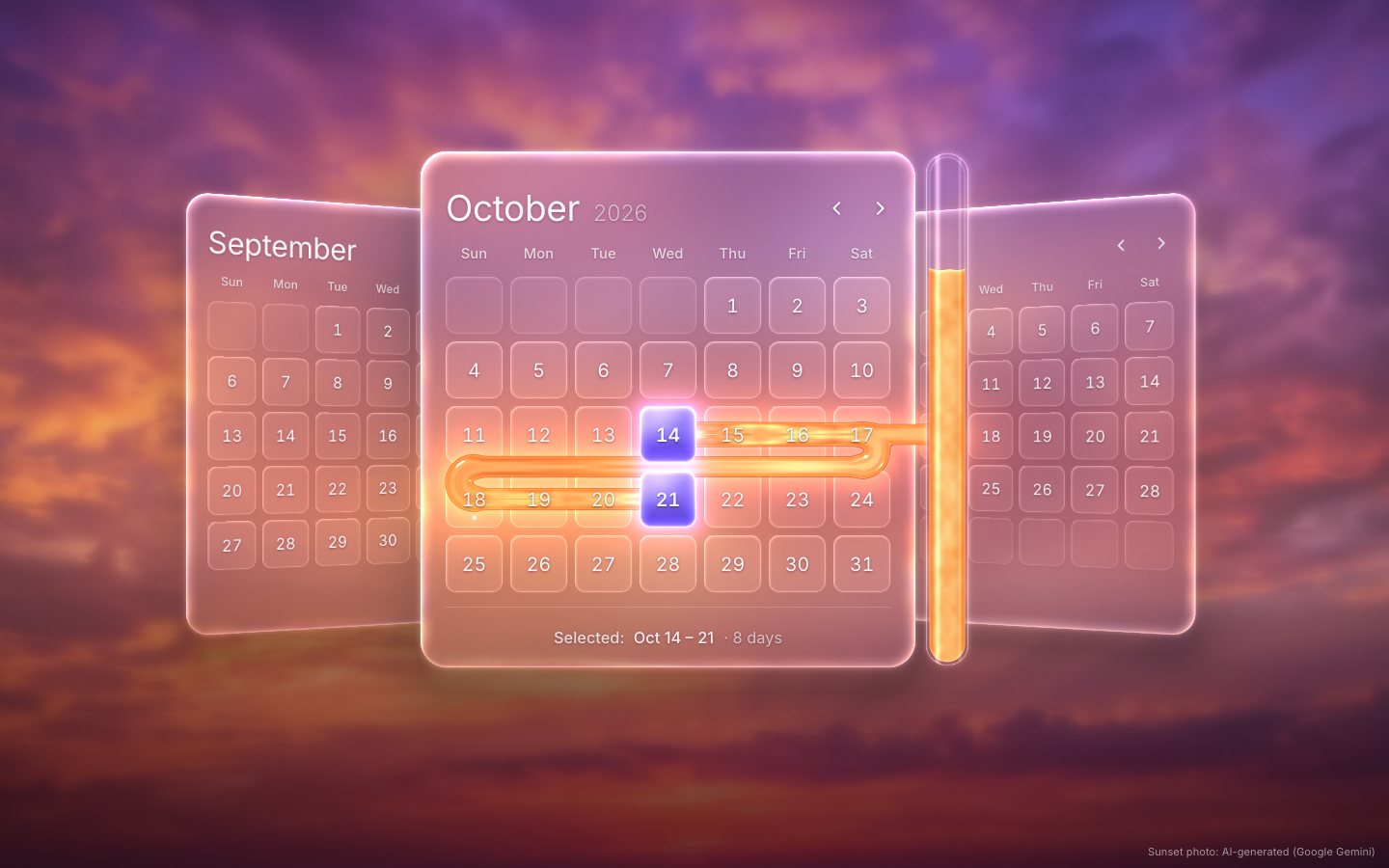
4 · The finish
A new first pick no longer replaces the liquid at once. The old ribbon drains back into the tube first, and the new one pours from the new date.
if (W.origin !== C0.origin) {                           // drain back into the tube, then pour from the new origin
  LQ.target = -FEED();
  if (LQ.G <= -FEED() + 0.02 || reduced) { LQ.spec = W; LQ.max = specMax(W); LQ.G = reduced ? LQ.max : -FEED(); LQ.target = LQ.max; }
}
On a touch screen, or with the mouse on the glass away from the days, a horizontal drag scrubs through the months. On release, the drag's speed carries it on to the nearest month.
function dragMove(e) {
  const D = P.drag; const dx = e.clientX - D.x0;
  if (!D.live && Math.abs(dx) > 12 && Math.abs(dx) > Math.abs(e.clientY - UI.down.y)) { D.live = true; stage.setPointerCapture?.(D.id); UI.down.moved = true; root.classList.add('dragging'); }
  if (!D.live) return;
  const now = performance.now(), span = M.w * 0.85;
  D.v = 0.8 * D.v + 0.2 * (-(e.clientX - D.last) / span) / Math.max((now - D.t) / 1000, 1e-3);
  D.last = e.clientX; D.t = now;
  P.p = D.p0 - dx / span; P.v = 0;
  ensurePanes(); kick();
}if (P.drag) {
const dg = P.drag; P.drag = null; root.classList.remove('dragging');
if (dg.live) {
const proj = P.p + clamp(dg.v, -6, 6) * 0.18;
const to = clamp(Math.round(proj), S.month - 3, S.month + 3);
P.v = dg.v; if (to !== S.month) goMonth(to - S.month); else kick();
return;
}
}A sideways swipe on a trackpad turns one month per swipe.
stage.addEventListener('wheel', (e) => {
  if (Math.abs(e.deltaX) <= Math.abs(e.deltaY) * 1.2) return;
  e.preventDefault();
  const now = performance.now();
  if (now - UI.wheelT > 260) UI.wheel = 0;
  UI.wheelT = now; UI.wheel += e.deltaX;
  if (Math.abs(UI.wheel) > 70 && !UI.wheelLock) { goMonth(Math.sign(UI.wheel)); UI.wheel = 0; UI.wheelLock = true; setTimeout(() => { UI.wheelLock = false; }, 420); }
}, { passive: false });
With reduced motion, the months swap without swinging, the liquid appears in place, the light sweep stops and the loop goes to sleep.
const mq = matchMedia('(prefers-reduced-motion: reduce)');
let reduced = mq.matches || qs.has('reduced');
mq.addEventListener?.('change', (e) => { reduced = e.matches || qs.has('reduced'); root.classList.toggle('reduced', reduced); kick(); });
root.classList.toggle('reduced', reduced);
When nothing moves, only the slow light changes, so it is drawn every other frame. While the panes swing or the liquid runs, the glass renders at a lower resolution; the motion hides it.
// at rest only the slow idle light moves: draw it at half rate and give the GPU back every other frame
const moving = P.p !== S.month || LQ.G !== LQ.target || UI.rip || P.drag || Math.abs(TUBE.lv) > 0.002 || Math.abs(TUBE.tv) > 0.01 || now - UI.lastInput < 400;
frameN++;
if (moving || frameN % 2 === 0 || reduced) layoutAndRender(now);// dynamic resolution: the swing renders at 0.62, a moving liquid at 0.8 (both hide it); everything at rest is full
F.scale = (Math.abs(P.p - S.month) > 0.03 || P.drag?.live) ? 0.62 : (Math.abs(LQ.gv) > 0.05 || UI.rip) && !reduced ? 0.8 : 1;
if (F.scale < 1 && now - UI.stress < 600) F.scale *= 0.8; // a late frame while moving: one step lower for a momentLast, nothing is stored, and any key an older build left behind is wiped, so every visit opens on the showcase.
// storage hygiene: nothing is persisted (the page always opens on the showcase); drop any older dv64 keys
try { for (const k of Object.keys(localStorage)) if (k.startsWith('dv64.') && !k.startsWith('dv64.v1.')) localStorage.removeItem(k); } catch (e) { /* private mode */ }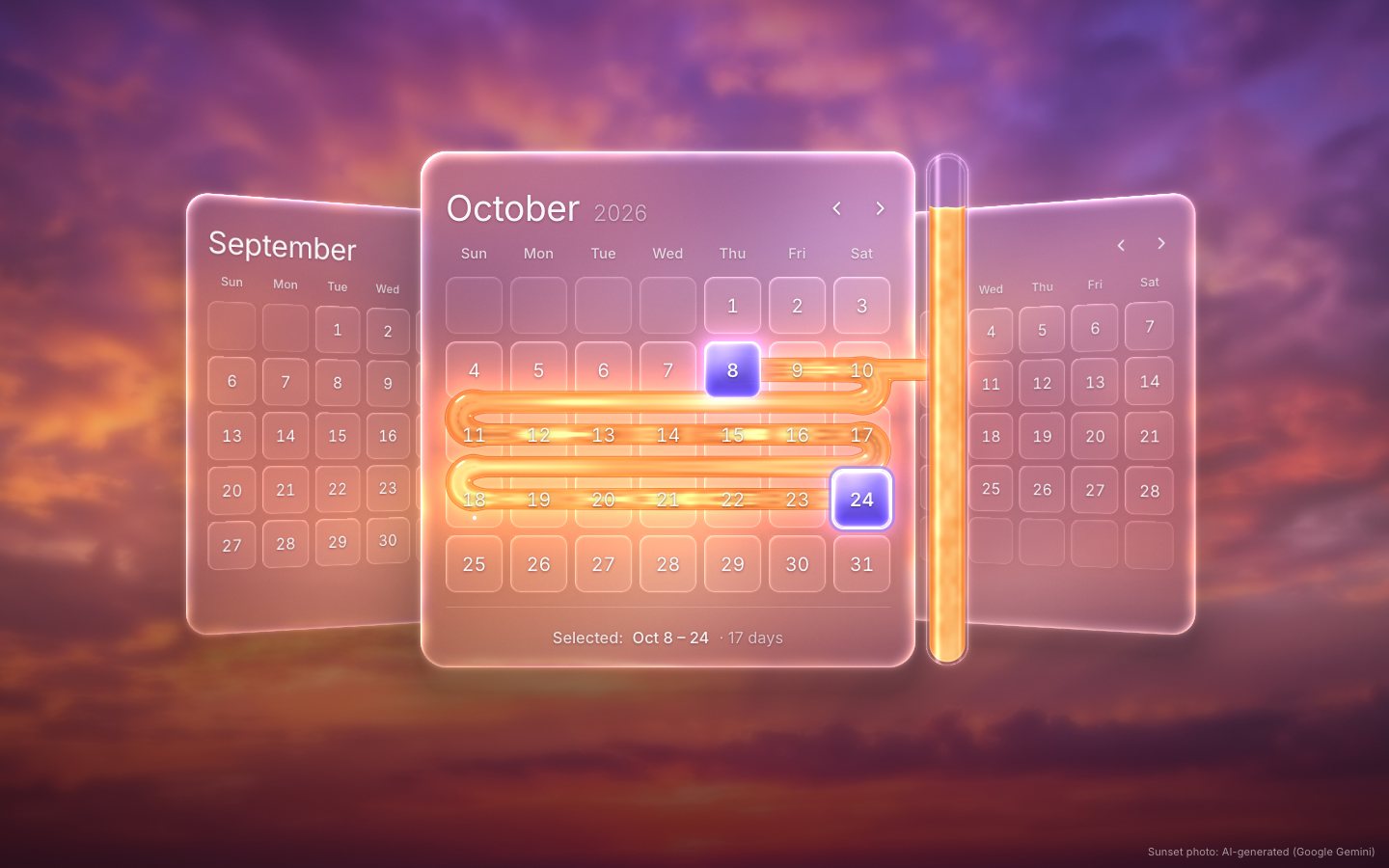
Make it yours
- Your backdrop is the photo in
img/;manifest.jslists its sizes and its credit. The grade inglass.jspulls it toward the violet sky and the plum floor. - Your colours are a few lines:
molten()for the liquid,endTile()for the violet ends, and thehtml:not(.gl)rules for the CSS fallback. - Your form: the range is in
<output name="range">and in therangechangeevent, as ISO dates. - Accessibility is already there: an ARIA grid with a roving tabindex and the full keyboard pattern, full-date
labels,
aria-selectedandaria-current, a live region, 44 px targets on a phone, a visible focus ring,prefers-reduced-motionhonoured, and a CSS glass fallback without WebGL 2.
The code is on GitHub at UlviShabanbayli/domvybe-glass-datepicker, under the MIT licence: use it in your own projects, commercial ones included. The sunset photo is AI-generated (Google Gemini); the glass and the liquid are made in code.
Give the DOM and the GPU the same matrix. Each month is a real, accessible grid in the DOM; the shader only paints glass and light under it, through the very matrix the pane wears in CSS, so the two never come apart, whatever the arc does.