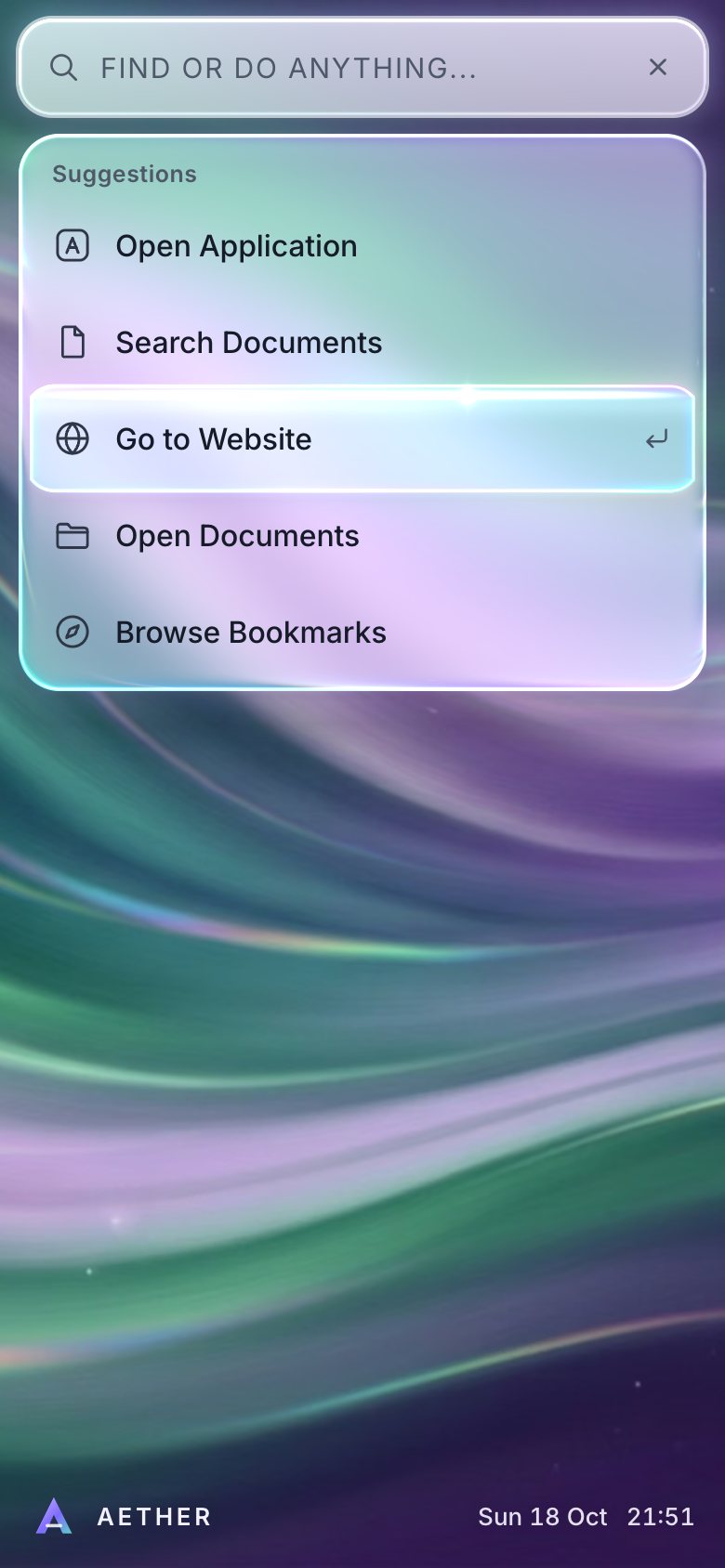
This is the whole build of the glass command palette, in the order it was written. Press Cmd/Ctrl+K and a bar of thick glass pours open over a silk-aurora desktop; type, and it grows into grouped results; the selected row is a glowing glass capsule that glides, stretches and settles. Each stage below is the page as it stood at that step. It shows a still, and Run it here starts the live page in its place. The code under each heading is only what that stage adds. The finished source is at the end, and on GitHub under the MIT licence.
The rule that holds it together: the words are DOM and the glass is WebGL. Every row is a real
option in a listbox that a screen reader and the keyboard understand; one canvas under it
draws the glass from the rectangles the DOM reports. There is no framework, no library and no build step: one HTML page,
one style sheet and four ES modules.
1 · The combobox, in the DOM
The palette is a modal dialog holding a combobox: the input owns the list (aria-controls), says which
option is selected (aria-activedescendant) and whether the list is open (aria-expanded).
<div id="pal" class="pal" role="dialog" aria-modal="true" aria-label="Command palette">
  <div class="pal-panel">
    <div class="pal-field">
      <svg class="ic pal-search-ic" viewBox="0 0 24 24" aria-hidden="true"><circle cx="10.8" cy="10.8" r="6.3"/><path d="m15.6 15.6 4.6 4.6"/></svg>
      <input id="pal-input" class="pal-input" type="text" role="combobox" aria-expanded="true" aria-controls="pal-list" aria-autocomplete="list"
             aria-haspopup="listbox" aria-label="Find or do anything" aria-describedby="pal-help" placeholder="Find or do anything..." autocomplete="off" autocapitalize="off" spellcheck="false" enterkeyhint="go">
The search is fuzzy in three tiers: a substring scores highest (more if it starts a word), then the first letters of words ("nn" finds New Note), then a loose match that must start on a word. It returns the matched letters so the row can light them up.
export function fuzzy(q, text) {
  q = q.trim().toLowerCase(); if (!q || !text) return null;
  const t = text.toLowerCase();
  const ws = (i) => i === 0 || /[\s/·.,\-–—_(]/.test(t[i - 1]);
  let idx = t.indexOf(q);
  if (q.length === 1) { idx = -1; for (let i = t.indexOf(q); i >= 0; i = t.indexOf(q, i + 1)) if (ws(i)) { idx = i; break; } if (idx < 0) return null; }
  if (idx >= 0) {
    // prefer an occurrence on a word start
    let best = idx; for (let i = idx; i >= 0 && i < t.length; i = t.indexOf(q, i + 1)) if (ws(i)) { best = i; break; }
    const hits = []; for (let i = 0; i < q.length; i++) hits.push(best + i);
    return { score: 100 + (ws(best) ? 30 : 0) + (best === 0 ? 25 : 0) + q.length * 3 - t.length * 0.15, hits };
  }
  const qs = q.replace(/\s+/g, '');
  // word-start acronym, allowing runs inside a word
  let qi = 0, run = false; const hits = [];
  for (let i = 0; i < t.length && qi < qs.length; i++) {
    if (t[i] === qs[qi] && (ws(i) || run)) { hits.push(i); qi++; run = true; } else if (t[i] === ' ' || ws(i)) run = false; else run = run && false;
  }
  if (qi === qs.length) return { score: 60 + hits.length * 4 - t.length * 0.15, hits };
  // loose: first letter on a word start, the rest in order with limited gaps
  const first = [...t].findIndex((c, i) => c === qs[0] && ws(i)); if (first < 0) return null;
  const h2 = [first]; let gaps = 0;
  for (let i = first + 1, k = 1; k < qs.length; i++) {
    if (i >= t.length) return null;
    if (t[i] === qs[k]) { h2.push(i); k++; } else gaps++;
  }
  if (gaps > Math.max(4, qs.length * 2)) return null;
  return { score: 30 - gaps * 2 + qs.length * 2 - t.length * 0.1, hits: h2 };
}
On a wide screen a broad query splits its groups into two balanced columns, filled so that reading order is arrow order: down the left column, then the right.
// two balanced columns of groups on wide screens (reading order = arrow order: down the left column, then the right)
let cols = [res.groups];
if (wide) {
  const w = (g) => g.rows.length + 0.6; const half = res.groups.reduce((n, g) => n + w(g), 0) / 2;
  let acc = 0, cut = 1;
  for (let i = 0; i < res.groups.length - 1; i++) { acc += w(res.groups[i]); cut = i + 1; if (acc >= half) break; }
  cols = [res.groups.slice(0, cut), res.groups.slice(cut)];
}
The keys are the combobox pattern: arrows move and wrap, PageUp/PageDown jump five, Ctrl/Cmd+Home/End go to the ends, Enter runs, and Escape clears the query before it closes.
E.input.addEventListener('keydown', (e) => {
  if (e.isComposing) return;
  const n = S.rows.length;
  if (e.key === 'ArrowDown') { e.preventDefault(); move(S.sel + 1); }
  else if (e.key === 'ArrowUp') { e.preventDefault(); move(S.sel - 1); }
  else if (e.key === 'PageDown') { e.preventDefault(); if (n) move(Math.min(n - 1, S.sel + 5)); }
  else if (e.key === 'PageUp') { e.preventDefault(); if (n) move(Math.max(0, S.sel - 5)); }
  else if ((e.key === 'Home' || e.key === 'End') && (e.ctrlKey || e.metaKey)) { e.preventDefault(); if (n) move(e.key === 'Home' ? 0 : n - 1); }
  else if (e.key === 'Enter') { e.preventDefault(); run(S.sel); }
  else if (e.key === 'Escape') {
    e.preventDefault(); e.stopPropagation();
    if (S.q) { E.input.value = ''; S.q = ''; render(); layout(); } else close();
  }
});
Opening makes everything behind the dialog inert, and closing gives focus back to the trigger.
Cmd/Ctrl+K (or /) toggles it from anywhere.
function setBackgroundInert(on) {
  for (const el of E.bg) el.inert = on;
  E.trigger.inert = on; E.pal.inert = !on;
  E.trigger.setAttribute('aria-expanded', on ? 'true' : 'false');
  E.input.setAttribute('aria-expanded', on ? 'true' : 'false');
}

function open(q = '') {
  if (S.open) return;
  S.returnTo = document.activeElement;
  S.open = true; S.q = q; E.input.value = q;
  root.classList.add('is-open'); E.pal.classList.add('is-shown'); S.pouring = !reduced();
  setBackgroundInert(true);
  render(); layout();
  E.input.focus({ preventScroll: true });
}

function close({ restore = true } = {}) {
  if (!S.open) return;
  S.open = false;
  root.classList.remove('is-open'); E.pal.classList.remove('is-shown');
  setBackgroundInert(false);
  paintSel();
  layout();
  if (restore) E.trigger.focus({ preventScroll: true });
}if ((e.metaKey || e.ctrlKey) && !e.altKey && e.key.toLowerCase() === 'k') { e.preventDefault(); S.open ? close() : open(); return; }
if (!S.open && e.key === '/' && !/INPUT|TEXTAREA/.test(document.activeElement.tagName)) { e.preventDefault(); open(); }For now the glass is CSS: a blurred, saturated backdrop and a few inset highlights. It stays as the fallback when WebGL is not there.
html:not(.gl-on) .trigger, html:not(.gl-on) .pal-panel, html:not(.gl-on) .cap {
  -webkit-backdrop-filter: blur(26px) saturate(165%) brightness(1.08); backdrop-filter: blur(26px) saturate(165%) brightness(1.08); }
html:not(.gl-on) .trigger, html:not(.gl-on) .pal-panel {
  background: linear-gradient(180deg, rgba(255, 255, 255, .5), rgba(255, 255, 255, .36));
  box-shadow: inset 0 0 0 1px rgba(255, 255, 255, .6), inset 0 1px 0 rgba(255, 255, 255, .9), inset 0 -1px 0 rgba(150, 240, 255, .7), 0 20px 50px rgba(20, 12, 60, .3); }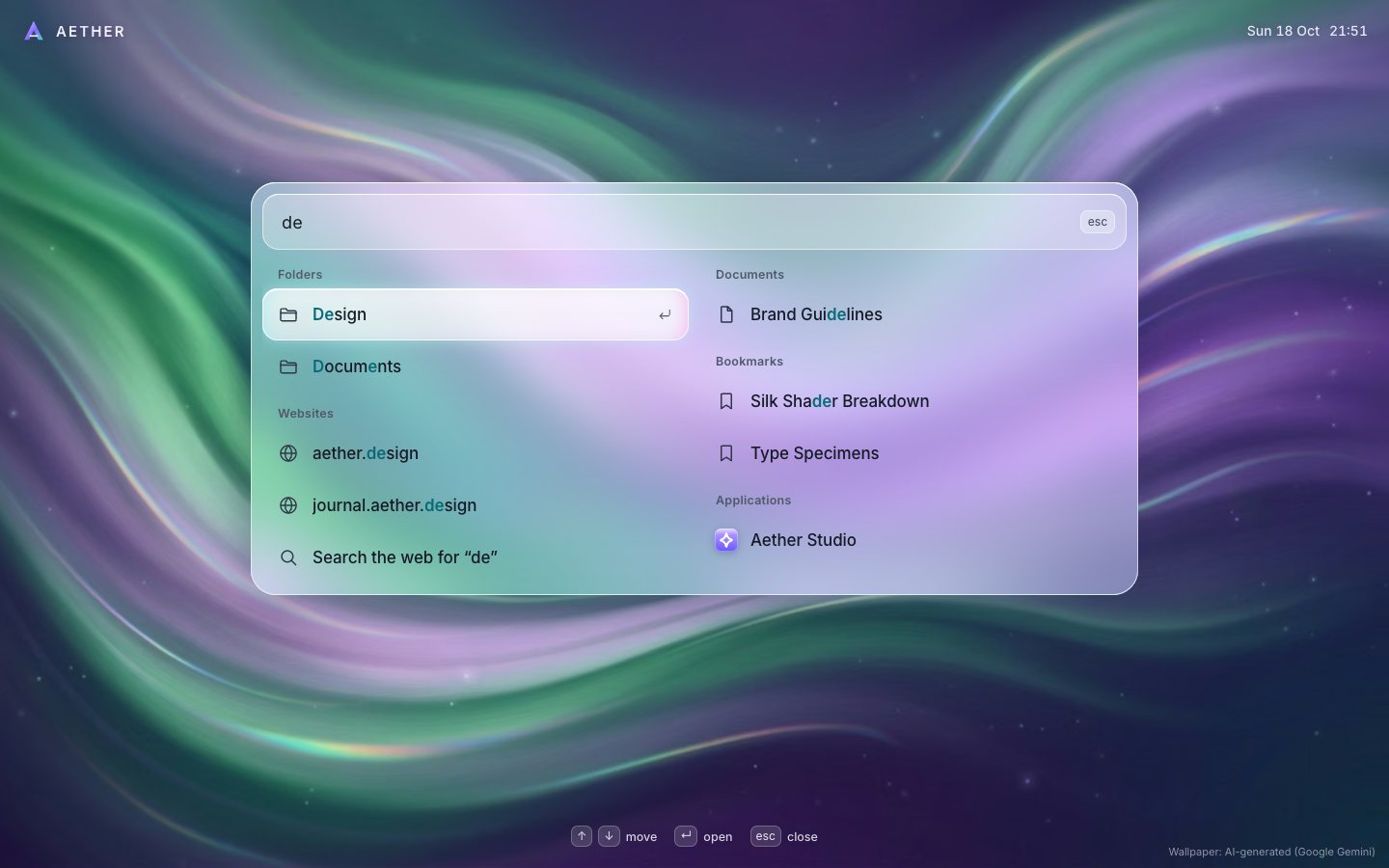
2 · The glass
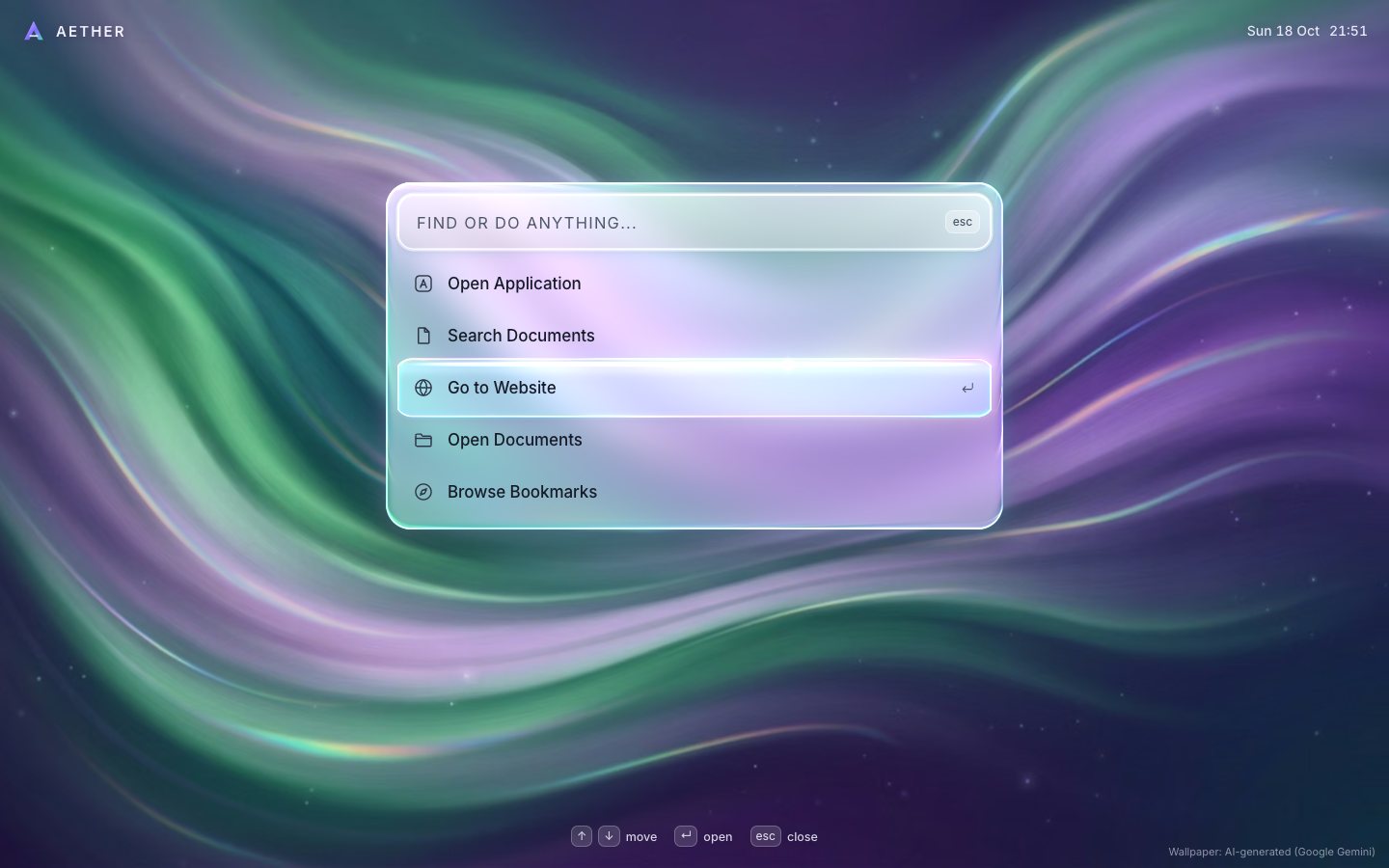
One canvas goes under the palette. If WebGL starts, the page switches from the CSS frost to the glass.
try { glass = new Glass(E.canvas, { onFrame: onGlassFrame }); } catch (e) { glass = null; }
if (!glass || glass.failed) { glass = null; root.classList.add('no-gl'); }
Everything in the glass is a signed distance: how far a pixel is from the edge of a rounded rectangle. The palette is one, the field another, the capsule a third; two bodies can be melted together with a smooth minimum.
float sdR(vec2 p, vec4 r, float rad){
  vec2 c=(r.xy+r.zw)*0.5; vec2 b=max((r.zw-r.xy)*0.5, vec2(0.5));
  rad=min(rad, min(b.x,b.y));
  vec2 q=abs(p-c)-b+rad;
  return length(max(q,0.0))+min(max(q.x,q.y),0.0)-rad;
}
float smin(float a,float b,float k){ float h=max(k-abs(a-b),0.0)/k; return min(a,b)-h*h*k*0.25; }
float slab(vec2 p){ float a=sdR(p,uA,uAR); if(uBOn>0.5) a=smin(a, sdR(p,uB,uBR), uK); return a; }
Near the edge the distance turns into a bevel: a surface normal that tilts more the closer the pixel is to the rim. That normal is what makes it read as thick glass.
vec3 bevelN(float d, vec2 g, float bw, float k){
  float s=1.0-clamp(-d/bw,0.0,1.0);
  float slope=min(s/sqrt(max(1.0-s*s,0.02)), 7.0);
  return normalize(vec3(g*slope*k,1.0));
}
The middle of the slab shows a frosted copy of the wallpaper; the bevel refracts the sharp wallpaper from just outside the edge, a little more for blue than for red, so the rim splits light like a prism.
vec3 n=bevelN(d,g,24.0*D,0.62);
float rim=1.0-n.z;
vec2 off=g*rim*88.0*D;
float rimMix=smoothstep(0.03,0.42,rim);
vec3 c=frost(p);
if(rimMix>0.0){
  vec3 s3=vec3(sharp(p+off*0.9).r, sharp(p+off).g, sharp(p+off*1.12).b);
  c=mix(c, s3, rimMix*0.92);
}
The frost is not a blur per frame: the wallpaper is blurred once, on the CPU, into a small texture when it loads.
// the sharp wallpaper as the page shows it, plus a frosted copy (box blur ×3 ≈ gaussian, ~18 css px at 1440 wide)
setWallpaper(img) {
  this._img = img;
  const gl = this.gl; if (!gl) return;
  gl.activeTexture(gl.TEXTURE0); gl.bindTexture(gl.TEXTURE_2D, this.texS);
  gl.texImage2D(gl.TEXTURE_2D, 0, gl.RGBA, gl.RGBA, gl.UNSIGNED_BYTE, img);
  const w = 400, h = Math.round(w * img.naturalHeight / img.naturalWidth);
  const cv = document.createElement('canvas'); cv.width = w; cv.height = h;
  const cx = cv.getContext('2d', { willReadFrequently: true });
  cx.drawImage(img, 0, 0, w, h);
  const id = cx.getImageData(0, 0, w, h);
  blur(id.data, w, h, 4); blur(id.data, w, h, 4); blur(id.data, w, h, 4);
  gl.activeTexture(gl.TEXTURE1); gl.bindTexture(gl.TEXTURE_2D, this.texB);
  gl.texImage2D(gl.TEXTURE_2D, 0, gl.RGBA, w, h, 0, gl.RGBA, gl.UNSIGNED_BYTE, new Uint8Array(id.data.buffer));
  this.ready = true; this.fade = 1;
  this.kick();
}
Each frame the page tells the glass where the palette, the field and the selected row are, and every edge springs to its target on its own. When it opens the bottom edge leads, so the glass pours down out of the pill.
let A, B;
if (S.open) {
  if (phone) { A = { ...targets.field, r: 18 }; B = { ...targets.body, r: 22 }; }
  else A = { ...targets.panel, r: metrics().rPanel };
} else {
  const t = rectOf(E.trigger); A = { ...t, r: phone ? 18 : (t.y1 - t.y0) / 2 };
  if (phone) B = { ...A, y0: A.y0 + 6, y1: A.y1 - 6, x0: A.x0 + 10, x1: A.x1 - 10 };
}
// the row's layout box (not its transformed box: rows fade up into place, the capsule must aim at where they land)
const el = cur && cur.el, cap = S.open && el && !E.list.hidden
  ? { x0: list.x0 + el.offsetLeft, y0: list.y0 + el.offsetTop - E.list.scrollTop, x1: list.x0 + el.offsetLeft + el.offsetWidth, y1: list.y0 + el.offsetTop - E.list.scrollTop + el.offsetHeight } : null;
glass.set({ A, B, bOn: phone, cap, capInstant, clip: list, open: S.open, mode });
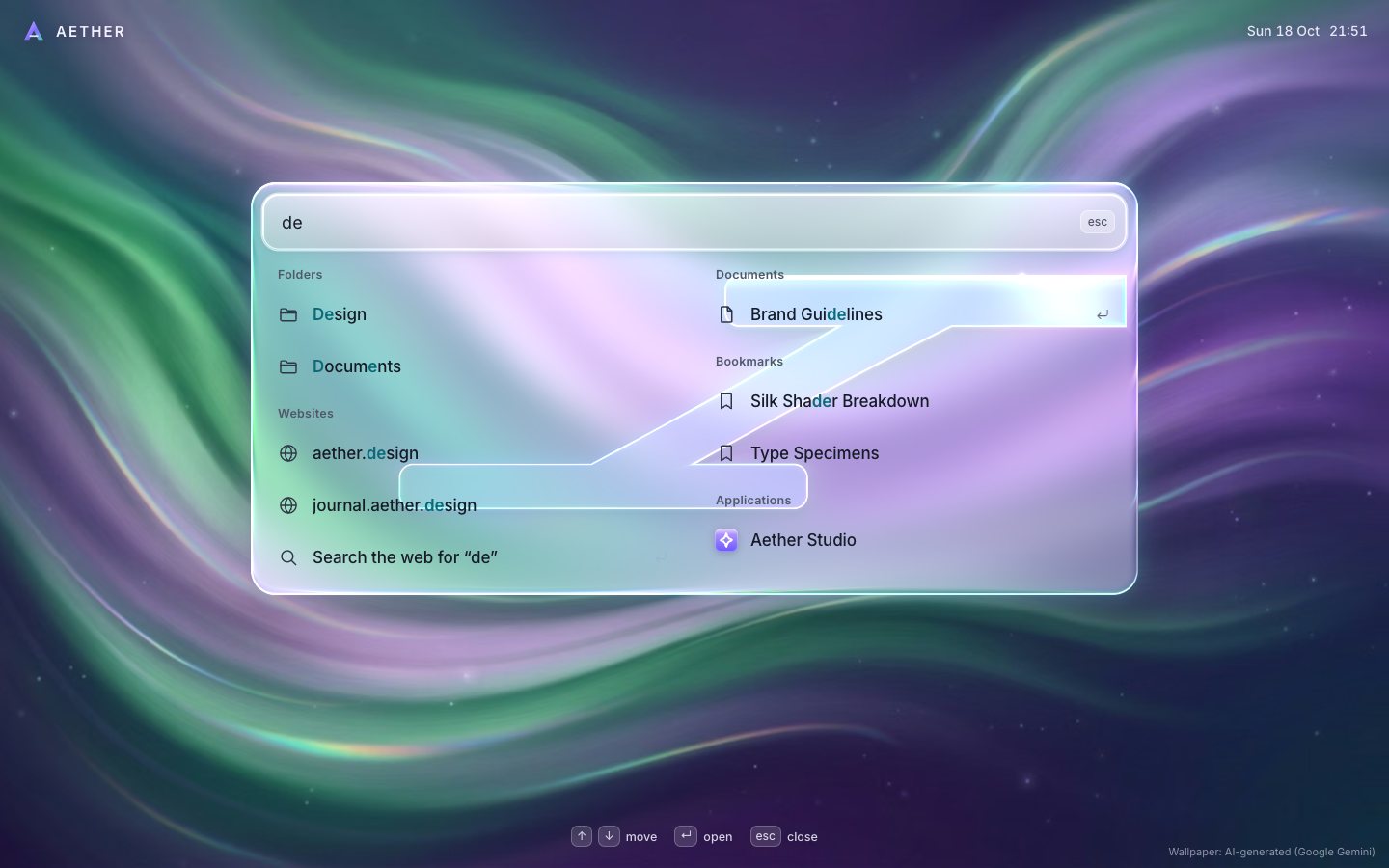
The capsule is a liquid body: a head that springs quickly to the new row and overshoots, a tail that chases the head (not the target), and a neck between them that thins as it stretches. Across columns it pours diagonally.
step(h) {
  // the tail chases the head, not the target: that is what makes the drop stretch and then catch up
  this.tx.t = this.hx.v; this.ty.t = this.hy.v;
  for (const s of [this.hx, this.hy, this.tx, this.ty, this.hw, this.hh]) s.step(h);
}// the capsule is a liquid body: the head pill, the tail pill and an oriented neck between them, smooth-unioned
float capS(vec2 p){
float k=uCR*0.9;
float s=smin(sdR(p,uH,uCR), sdR(p,uTl,uCR*0.92), k);
if(uNk.z>0.25){
// neck: a thinner copy of the pill slid along the path (the slice nearest p), so the body sweeps like poured glass
vec2 T=(uTl.xy+uTl.zw)*0.5, H=(uH.xy+uH.zw)*0.5, Dv=H-T;
float t=clamp(dot(p-T,Dv)/max(dot(Dv,Dv),1.0),0.0,1.0);
vec2 c=mix(T,H,t);
vec2 hb=mix((uTl.zw-uTl.xy)*0.5, (uH.zw-uH.xy)*0.5, t)*(1.0-uNk.w*4.0*t*(1.0-t));
s=min(s, sdR(p, vec4(c-hb, c+hb), uCR));
}
return max(s, sdR(p,uClip,0.0));
}The words never go through the shader. While the glass pours, the labels wait until it has nearly reached its size, so no word ever sits outside a moving edge.
// opening: the labels only appear once the glass has (nearly) reached its size, so no word ever sits outside a moving
// edge; only opacity changes per frame (composited), nothing is re-laid-out or repainted
const fadeEl = targets.phone ? E.body : E.panel, base = targets.phone ? targets.body : targets.panel, r = targets.phone ? st.B : st.A;
// (the per-frame value is the fade, so the element's own CSS opacity transition is switched off meanwhile: otherwise
// every write restarts its delayed transition and the card stays empty until the pour has ended)
if (done || !r || !S.open || S.motion !== 'open') { fadeEl.style.opacity = ''; fadeEl.style.willChange = ''; fadeEl.style.transition = ''; }
else {
  const pw = (r.x1 - r.x0) / (base.x1 - base.x0), ph = (r.y1 - r.y0) / (base.y1 - base.y0);
  const dy = Math.abs(r.y0 - base.y0) + Math.abs(r.y1 - base.y1);
  fadeEl.style.willChange = 'opacity'; fadeEl.style.transition = 'none';
  fadeEl.style.opacity = Math.max(0, Math.min(1, (Math.min(pw, ph) - 0.86) / 0.12, 1 - dy / 60)).toFixed(3);
}
3 · It does things
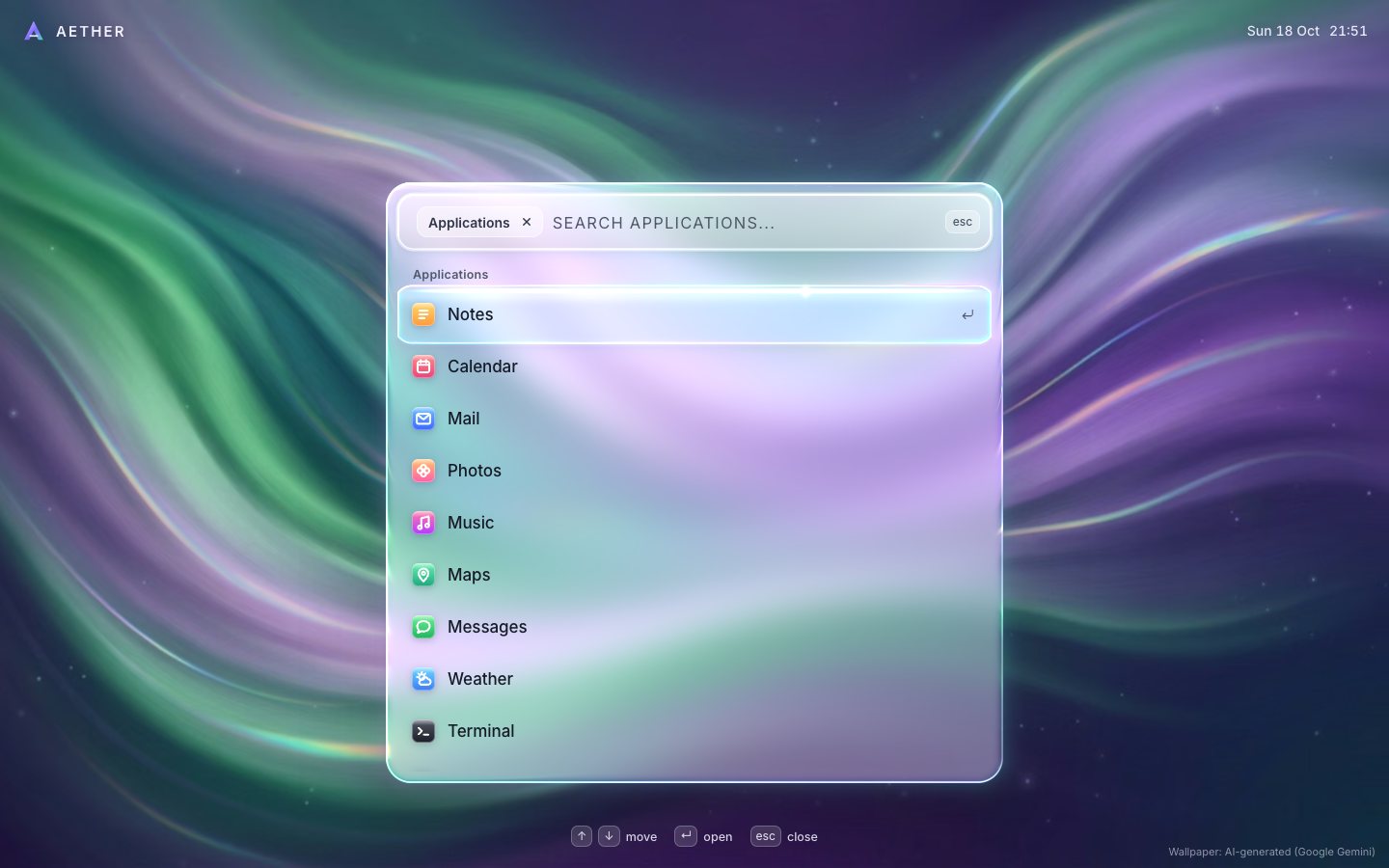
The five suggestions open scopes. The scope shows as a chip in the field, and Backspace or Escape leaves it, with the capsule gliding back to the suggestion it came from.
function enterScope(id) {
  S.scope = id; S.q = ''; E.input.value = ''; showScope();
  render(); layout();
  E.input.focus({ preventScroll: true });
}function leaveScope() {
const was = S.scope; S.scope = null; S.q = ''; E.input.value = ''; showScope();
render(); S.sel = Math.max(0, SUGGESTIONS.findIndex((s) => s.scope === was)); paintSel(); layout();
E.input.focus({ preventScroll: true });
}Enter runs a command: the capsule flashes, the glass drains back into the pill and a small glass toast says what happened. Three commands change the page for real.
function run(i) {
  const it = S.rows[i]; if (!it) return;
  const r = it.row;
  S.sel = i; paintSel(); layout();
  glass && glass.pulse();
  if (r.scope) { enterScope(r.scope); return; }
  if (r.toggle) {
    if (r.toggle === 'theme') { S.theme = S.theme === 'smoke' ? 'frost' : 'smoke'; store.set('theme', S.theme); look(); E.announce.textContent = `${S.theme === 'smoke' ? 'Smoke' : 'Frost'} glass`; }
    if (r.toggle === 'dnd') { S.dnd = !S.dnd; toast(`Do Not Disturb ${S.dnd ? 'on' : 'off'}`, icon('moon')); }
    if (r.toggle === 'motion') { S.motionOff = !S.motionOff; store.set('motion', S.motionOff ? 'off' : 'on'); applyMotion(); toast(`Reduce Motion ${reduced() ? 'on' : 'off'}`, icon('wave')); }
    const keep = S.sel; render({ keepSel: true }); S.sel = keep; paintSel(); layout();
    return;
  }
  const ic = r.app ? appTile(r.app[0], r.app[1], r.glyph) : icon(r.icon);
  const msg = r.web ? `Searching the web for “${r.web}”`
    : { apps: `Opening ${r.label}`, docs: `Opening “${r.label}”`, folders: `Opening ${r.label}`, web: `Going to ${r.label}`, marks: `Opening “${r.label}”`, settings: `Opening ${r.label} settings` }[r.g]
    || { 'x-note': 'New note created', 'x-window': 'New window opened', 'x-focus': 'Focus timer started · 25:00', 'x-shot': 'Screenshot saved to Desktop', 'x-lock': 'Screen locked (demo)' }[r.id] || r.label;
  setTimeout(() => { close(); toast(msg, ic); }, reduced() ? 0 : 140);
}.toast { display: inline-flex; align-items: center; gap: 10px; padding: 11px 18px 11px 12px; border-radius: 18px; font-size: 14.5px; font-weight: 500; color: var(--ink);
background: rgba(255, 255, 255, .44); -webkit-backdrop-filter: blur(22px) saturate(170%); backdrop-filter: blur(22px) saturate(170%);
box-shadow: inset 0 0 0 1px rgba(255, 255, 255, .62), inset 0 1px 0 rgba(255, 255, 255, .8), 0 14px 34px rgba(20, 14, 60, .28);
animation: toastin .42s var(--ease) both; }Smoke Glass swaps the tint of the same shader for a dark one. It is remembered, and it never follows the OS.
function look() {
  const smoke = S.theme === 'smoke', solid = mqTransp.matches;
  root.dataset.theme = smoke ? 'smoke' : 'frost';
  glass && glass.setLook(smoke ? { tint: [0.055, 0.06, 0.1], tintAmt: solid ? 0.86 : 0.56, dark: 1 } : { tint: [1, 1, 1], tintAmt: solid ? 0.8 : 0.39, dark: 0 });
}
4 · The frame budget
Last, it has to stay smooth at 120 Hz and on a slow phone. Typing renders once per frame, however fast the keys come.
// results are rebuilt in the next frame's rAF (one per frame however fast the typing): DOM changes, layout and paint then
// land in a single frame instead of a forced layout in the input task plus a second pass in the frame
let typeRaf = 0;
E.input.addEventListener('input', () => {
  S.q = E.input.value;
  if (!typeRaf) typeRaf = requestAnimationFrame(() => { typeRaf = 0; render(); layout(); });
});
Every row is built and laid out once while the page is idle, so a keystroke never parses an icon or shapes text for the first time.
// build every option node once while the page is idle, so typing never parses an icon
const idle = window.requestIdleCallback || ((f) => setTimeout(() => f({ timeRemaining: () => 8 }), 200));
// …and lay them out once in an invisible staging list, so their text is already shaped when they are first shown
const stage = document.createElement('div'); stage.className = 'pal-stage'; stage.setAttribute('aria-hidden', 'true'); E.body.append(stage);
for (const id of Object.keys(GROUPS)) { const g = groupEl({ id }); if (!g.parentNode) stage.append(g); }
let k = 0; const warm = (dl) => {
  const batch = [];
  while (k < ITEMS.length && dl.timeRemaining() > 2) { const o = optionEl(ITEMS[k++]); if (!o.parentNode) batch.push(o); }
  stage.append(...batch); void stage.offsetHeight;
  if (k < ITEMS.length) idle(warm);
  else {
    // paint every icon once (nearly transparent, for two frames) so no SVG image is parsed during a keystroke
    const strip = document.createElement('div'); strip.className = 'pal-warm'; strip.setAttribute('aria-hidden', 'true');
    strip.innerHTML = [...new Set(ITEMS.map((r) => (r.app ? appTile(r.app[0], r.app[1], r.glyph) : icon(r.icon))))].join('') + icon('search');
    document.body.append(strip);
    requestAnimationFrame(() => requestAnimationFrame(() => requestAnimationFrame(() => {
      strip.remove(); stage.remove(); })));
  }
};
idle(warm);
The shader is drawn only around the glass, and the loop sleeps: springs step only while something moves, and at rest only the slow light drifting across the glass is drawn.
const x0 = Math.min(a.x0, b.x0) - 90, x1 = Math.max(a.x1, b.x1) + 90, y0 = Math.min(a.y0, b.y0) - 70, y1 = Math.max(a.y1, b.y1) + 120;
const sx = clamp(Math.floor(x0 * D), 0, W), sy = clamp(Math.floor((this.vh - y1) * D), 0, H);
gl.scissor(sx, sy, clamp(Math.ceil((x1 - x0) * D), 0, W - sx), clamp(Math.ceil((y1 - y0) * D), 0, H - sy));_tick(now) {
if (!this.running) return;
const dt = clamp((now - this.last) / 1000, 0, 1 / 30); this.last = now;
if (!this.frozen) {
const moving = !this.settled;
if (moving) {
const sub = Math.max(1, Math.ceil(dt / (1 / 240))), h = dt / sub;
for (let i = 0; i < sub; i++) { this.A.step(h); if (this.bOn) this.B.step(h); this.C.step(h); this.open.step(h); this.capOn.step(h); }
this.flash *= Math.exp(-dt * 7);
}
const idle = this.idle && !this.reduced;
if (idle) this.time += dt;
this.draw();
if (moving && this.onFrame) this.onFrame(this);
if (!moving && !idle) { this.running = false; if (this.onFrame) this.onFrame(this); return; }
}
requestAnimationFrame(this._tick);
}Measured with the project's frame probe at 120 Hz through glides, typing, the two-column morph, scopes and the pour: no missed frames and no long tasks at 1440 × 900 or on a 390 × 844 phone. The shader costs about half a millisecond of GPU time per frame on the widest palette.
Make it yours
- What it finds is
ITEMSindata.js: a label, a group, an icon and optional keywords, meta text or a shortcut. - Your wallpaper: replace the images in
assets/; the glass frosts and refracts whatever is there. - The look of the glass is a tint and an amount in
look(), and the rim, prism and light are a few lines each in the shader. - No WebGL:
?noglshows the frosted CSS palette; search, scopes, commands and the keyboard all still work. - Accessibility is already there: a modal dialog, a combobox with a grouped listbox, a polite live count,
everything behind it inert, Tab kept inside, focus returned, 44 px rows,
prefers-reduced-motionandprefers-reduced-transparencyhonoured.
The code is on GitHub at UlviShabanbayli/domvybe-glass-palette, under the MIT licence: use it in your own projects, commercial ones included. Aether and everything it finds are made up. The glass is WebGL made in code; the wallpaper is AI-generated (Google Gemini).
Let the DOM say where things are and let the GPU decide how they look. The words stay sharp and accessible; the glass can pour, stretch and refract.