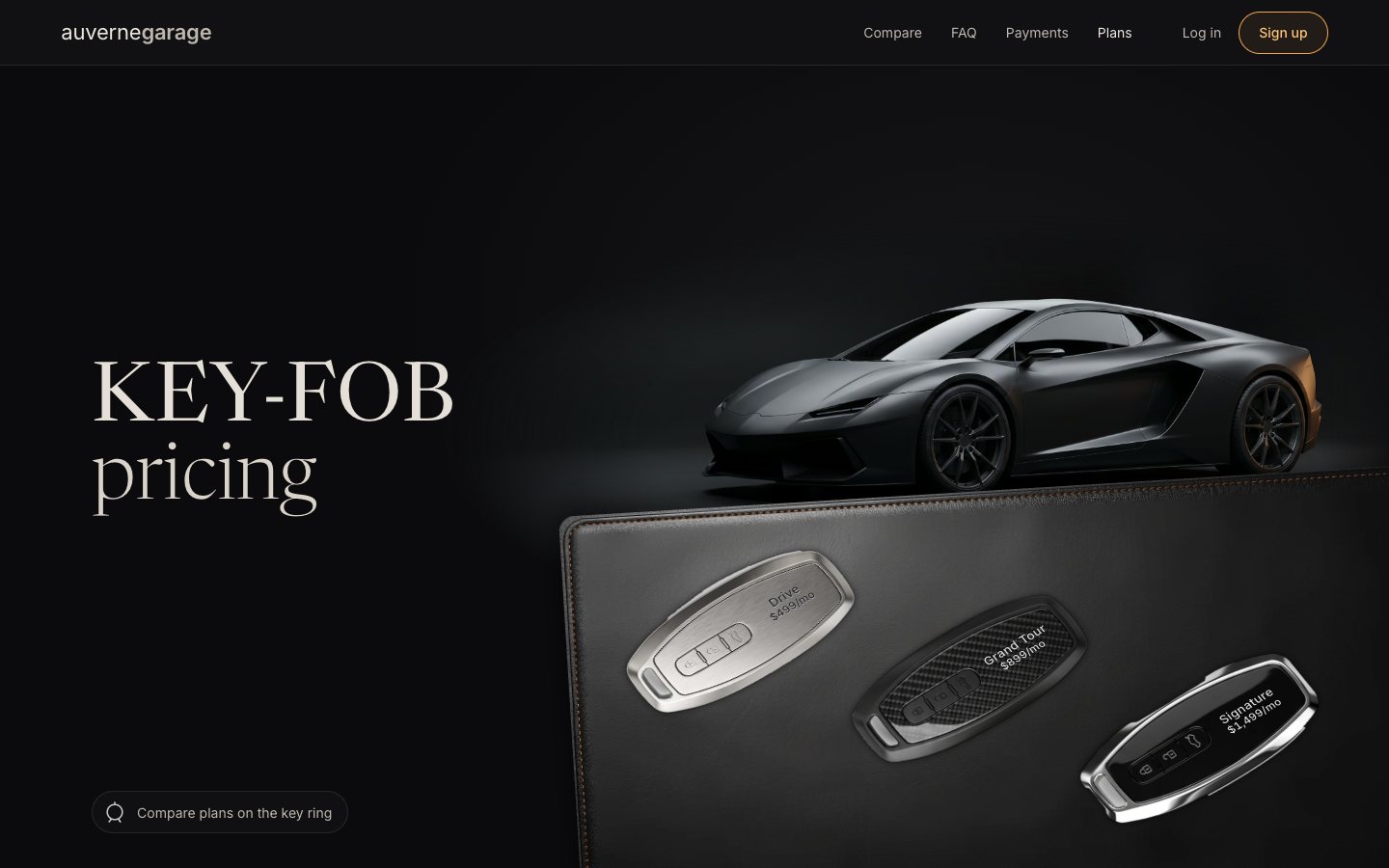
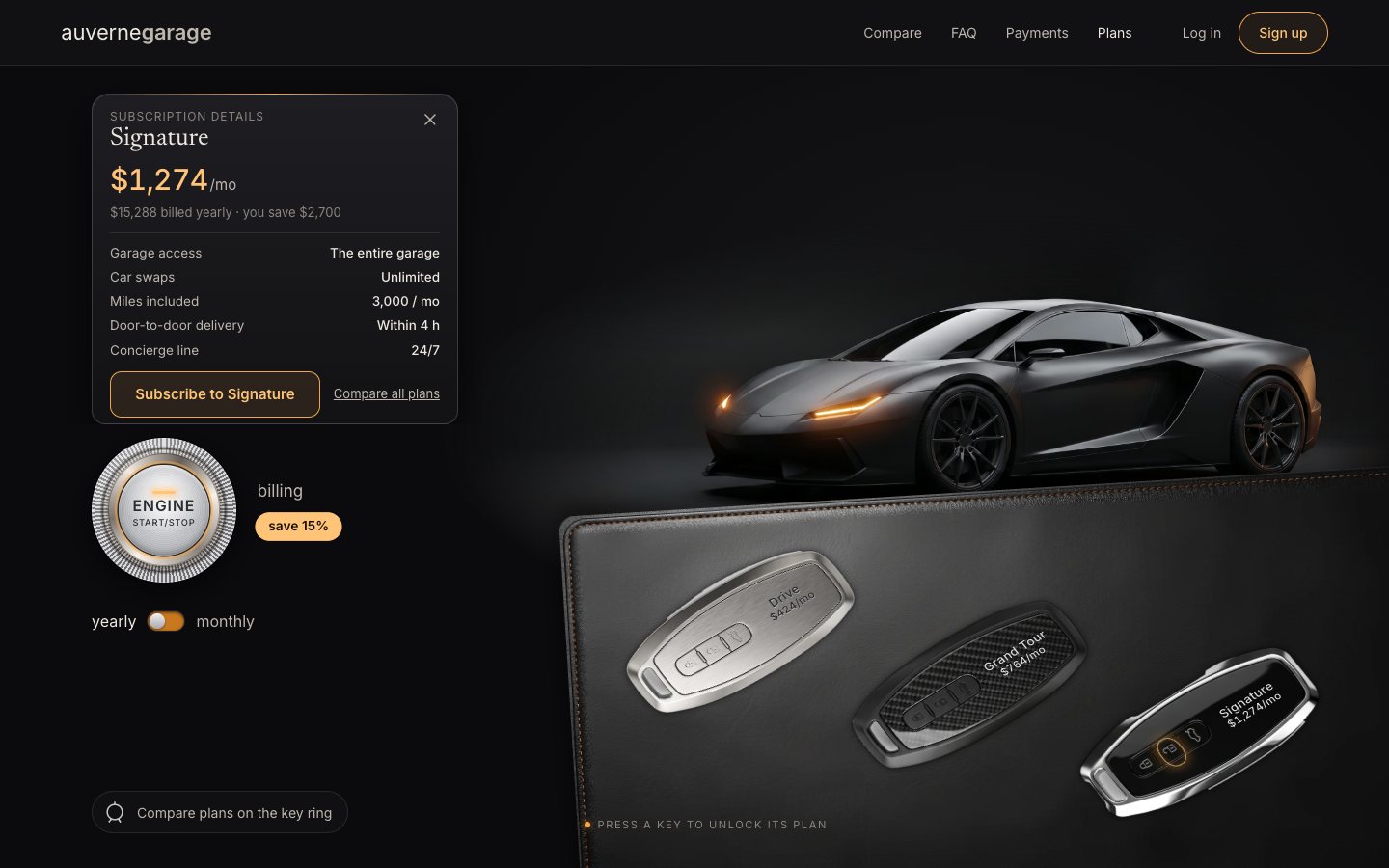
This is the whole build of the key-fob pricing section, in the order it was written: the plans page of a made-up car-subscription club, auvernegarage. The plans are three car keys lying on a leather desk pad, each engraved with its name and price. Press a key and the car above it flashes its headlights, then that plan's card rises beside it. The chrome ENGINE START/STOP button is the billing switch: press it and every price counts down to the yearly figure. Each stage below is the page as it stood at that step. It shows a still, and Run it here starts the live page in its place. The code under each heading is only what that stage adds. The finished source is at the end, and on GitHub under the MIT licence.
There is no framework and no build step: one HTML page, two style sheets and one ES module of about 260 lines. The photos (the car with its lamps off and on, the three fobs, the leather pad) were generated with Google Gemini and cut out by a small Python script; the engraving on the keys is live text, so the prices can change.
1 · The showroom, in HTML and CSS
Start with the scene. The right-hand side of the hero is a .rig: one box whose width sets every size
inside it. With container-type: inline-size, 1cqw is one percent of the rig's width, so the car,
the pad and the keys keep their places on any screen.
.rig {
  grid-area: rig; position: relative; justify-self: end; align-self: end;
  width: min(100%, calc((100svh - var(--hdr)) * 1000 / 760)); aspect-ratio: 1000 / 760;
  container-type: inline-size;
}
The car is two photos of the same frame, lamps off and lamps on, stacked. A mask fades the studio around it into the page: an ellipse around the car, crossed with soft left and right edges.
<div class="car" aria-hidden="true"><div class="car-plate car-off"></div><div class="car-plate car-on"></div><div class="car-flare"></div></div>.car {
/* the car is the hero: ~72% of the rig wide, centred at 56%, wheels just behind the pad's far edge */
--plate-w: calc(72cqw / var(--car-w));
position: absolute; width: var(--plate-w); aspect-ratio: 21 / 9;
left: calc(56cqw - var(--car-cx) * var(--plate-w));
top: calc(33.5cqw - var(--car-floor) * var(--plate-w) * 9 / 21);
/* fade the plate into the stage: an ellipse around the car, intersected with soft left/right edges */
-webkit-mask-image: radial-gradient(56% 50% at calc(var(--car-cx) * 100%) 60%, #000 64%, transparent 100%), linear-gradient(90deg, transparent, #000 10%, #000 90%, transparent);
-webkit-mask-composite: source-in;
mask-image: radial-gradient(56% 50% at calc(var(--car-cx) * 100%) 60%, #000 64%, transparent 100%), linear-gradient(90deg, transparent, #000 10%, #000 90%, transparent);
mask-composite: intersect;
pointer-events: none;
}The leather pad is the one image that has to work at every size. A stretched photo of leather turns into glittery
asphalt, because its grain stretches with it. So the photo only gives what it is good at: its stitched rim, as a 9-slice
border-image with no fill; its light, blurred and stretched (a blur can't show stretching); and
a seamless tile of its grain at the photo's own scale, softened and at about 40 % of its contrast, laid over the light
with overlay.
/* the leather pad: the photo’s stitched rim as a 9-slice (no fill); in the middle, the photo’s light map stretched
   (it is blurred, so stretching cannot show) under a seamless grain tile at the photo’s own scale (never stretched) */
:root .pad { border-style: solid; border-image: image-set(url("../assets/img/leather_pad.webp") type("image/webp"), url("../assets/img/leather_pad.png") type("image/png")) 64 / calc(0.0253 * 112cqw) stretch;
  border-radius: calc(0.0170 * 112cqw); box-shadow: 0 -1.2cqw 3cqw rgba(0, 0, 0, .6);
  background: image-set(url("../assets/img/leather_grain.webp") type("image/webp"), url("../assets/img/leather_grain.png") type("image/png")) 0 0 / calc(0.3031 * 112cqw) repeat, image-set(url("../assets/img/leather_light.webp") type("image/webp"), url("../assets/img/leather_light.png") type("image/png")) 0 0 / 100% 100% no-repeat, #141312;
  background-origin: border-box; background-blend-mode: overlay, normal; }
Each key is a radio button in a radio group, with its plan name and price in the markup. The photo comes from CSS; the engraving is real text, turned to lie along the key.
<div class="fob" role="radio" aria-checked="true" tabindex="0" data-plan="grand" data-finish="carbon">
  <span class="fob-body">
    <span class="fob-led" aria-hidden="true"></span>
    <span class="fob-engrave" aria-hidden="true"><span class="fob-name">Grand Tour</span><span class="fob-price"><span class="amt" data-amt="grand">$899</span>/mo</span></span>
  </span>
  <span class="sr fob-sr">Grand Tour, <span class="amt" data-amt="grand">$899</span> a month, most chosen</span>
</div>.fob {
--L: 32cqw; --x: 50%; --y: 70%;
position: absolute; left: var(--x); top: var(--y); width: calc(var(--L) * var(--fob-ar)); height: var(--L);
margin: calc(var(--L) * -.5) 0 0 calc(var(--L) * var(--fob-ar) / -2);
outline: none; -webkit-tap-highlight-color: transparent;
}.fob-body {
position: absolute; inset: 0; pointer-events: auto; cursor: pointer; touch-action: manipulation;
border-radius: 40% / 18%;
background-position: center; background-size: contain; background-repeat: no-repeat;
transform: scale(1, .86) rotate(-125deg);
transition: translate .35s var(--ease-out);
}.fob-engrave {
position: absolute; left: 50%; top: var(--engrave-y); width: 0; height: 0;
display: grid; place-content: center; justify-items: center; white-space: nowrap; transform: rotate(90deg);
font-family: var(--sans); line-height: 1.1; pointer-events: none;
}One small script in the head picks the photo set before the first paint (a meta tag says which; ?fobs=
overrides it). Below the hero come the compare table and the FAQ, plain HTML.
// JS on, and the fob photo set (a | b | svg), before first paint.
(function () {
  var d = document.documentElement; d.classList.remove('no-js'); d.classList.add('js');
  var q = /[?&]fobs=(a|b|svg)\b/.exec(location.search), m = document.querySelector('meta[name="dv51:fobs"]');
  d.dataset.fobs = q ? q[1] : (m && m.content) || 'b';
})();
2 · The keys are a radio group
Now the module. Choosing a key sets aria-checked on it and keeps only that key in the tab order (a roving
tabindex). The compare table's column and the key ring in the compare section follow.
function setPlan(id) {
  state.plan = id;
  el.fobs.forEach((f) => { const on = f.dataset.plan === id; f.setAttribute('aria-checked', String(on)); f.tabIndex = on ? 0 : -1; });
  const syncCompare = () => {
    if (state.plan !== id) return;
    el.colBtns.forEach((b) => b.setAttribute('aria-pressed', String(b.dataset.plan === id)));
    el.cells.forEach((c) => c.classList.toggle('is-sel', c.dataset.col === id));
    el.hangs.forEach((h) => h.classList.toggle('is-sel', h.dataset.plan === id));
  };
  syncCompare();
}
A click chooses, and so do the arrow keys (they wrap), Home and End, as the WAI-ARIA radio group pattern asks.
el.fobs.forEach((f) => { const on = f.dataset.plan === id; f.setAttribute('aria-checked', String(on)); f.tabIndex = on ? 0 : -1; });
  const syncCompare = () => {
    if (state.plan !== id) return;
    el.colBtns.forEach((b) => b.setAttribute('aria-pressed', String(b.dataset.plan === id)));
    el.cells.forEach((c) => c.classList.toggle('is-sel', c.dataset.col === id));
    el.hangs.forEach((h) => h.classList.toggle('is-sel', h.dataset.plan === id));
  };
  syncCompare();
}

el.fobs.forEach((f) => {
  f.addEventListener('click', () => { f.focus({ preventScroll: true }); setPlan(f.dataset.plan); });
  f.addEventListener('keydown', (e) => {
    const i = ORDER.indexOf(f.dataset.plan);
    let j = null;
    if (e.key === 'ArrowRight' || e.key === 'ArrowDown') j = (i + 1) % 3;
    else if (e.key === 'ArrowLeft' || e.key === 'ArrowUp') j = (i + 2) % 3;
    else if (e.key === 'Home') j = 0;
    else if (e.key === 'End') j = 2;
    else if (e.key === ' ' || e.key === 'Enter') { e.preventDefault(); setPlan(f.dataset.plan); return; }
    if (j === null) return;
    e.preventDefault();
    const n = el.fobs.find((x) => x.dataset.plan === ORDER[j]);
    n.focus(); setPlan(ORDER[j]);
  });
});
The script also switches the headlights on: the lamps-on photo simply becomes opaque.
.lights-on .car-on { opacity: 1; }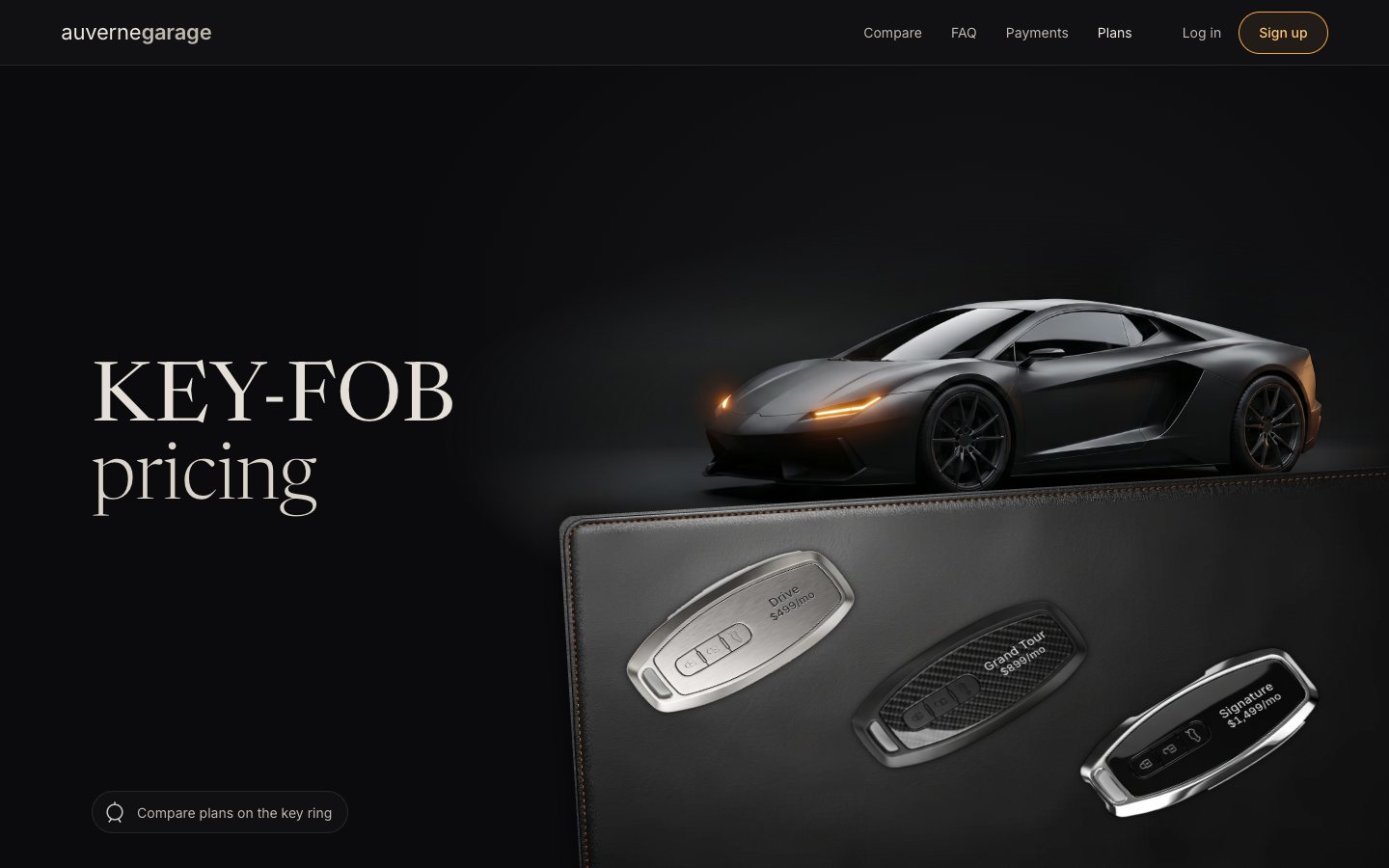
3 · Press a key, the car answers
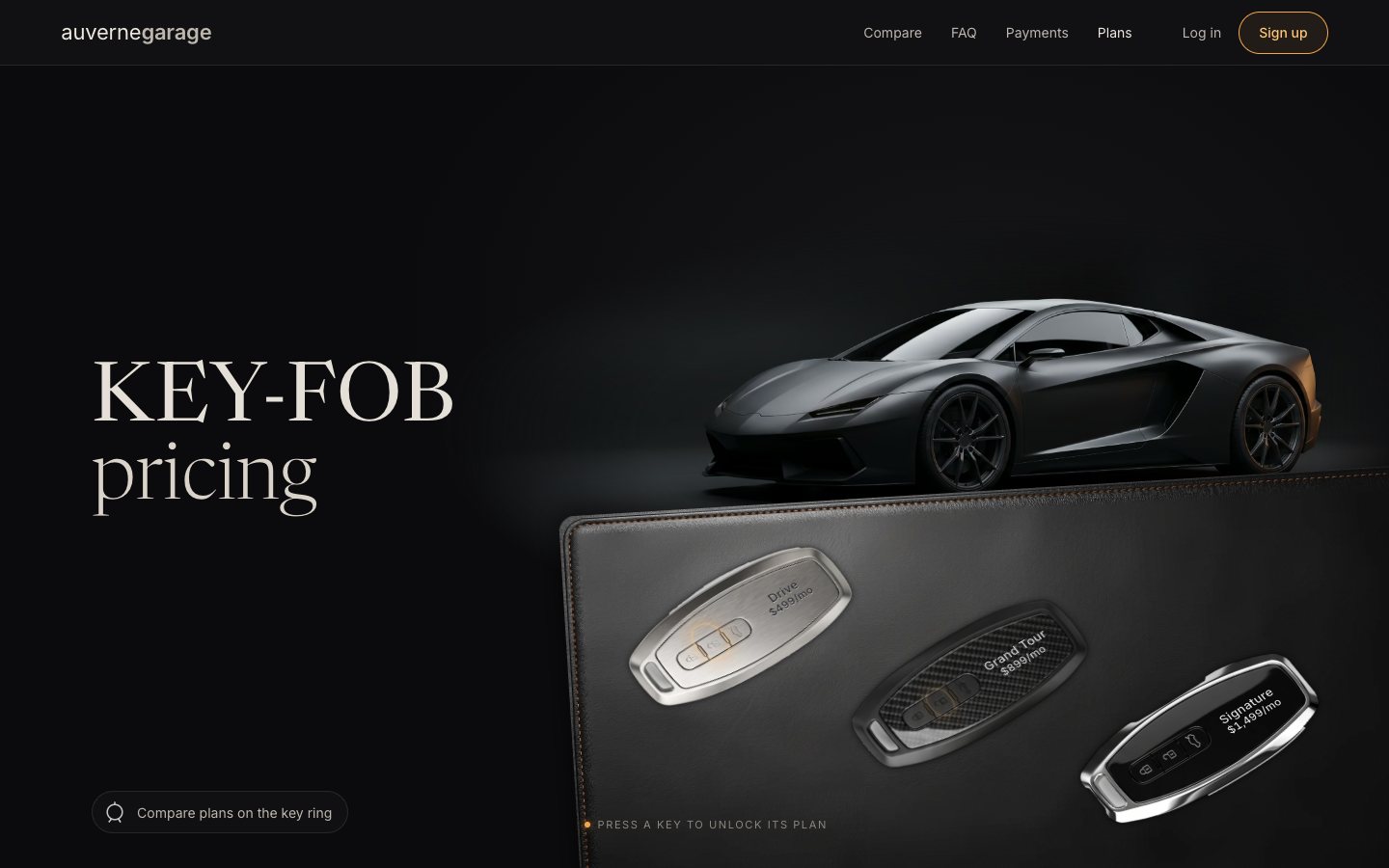
Choosing a key now "unlocks" it. The car double-blinks, the way a real car answers its key: the lamps go off, on with an amber flare, off, on with a flare, on, in 760 ms. Three layers animate their opacity with the Web Animations API: the lamps-on photo, the flare on the lamps, and a glow the lamps throw onto the leather. Only opacity changes, on layers that stay composited, so no frame is ever repainted.
function blink() {   // the double blink: lamps off → on + flare → off → on + flare → on, light spilling onto the leather
  const o = { duration: 760, easing: 'linear' };
  el.carOn.animate([{ opacity: 1 }, { opacity: 0, offset: .16 }, { opacity: 1, offset: .3 }, { opacity: 0, offset: .5 }, { opacity: 1, offset: .64 }, { opacity: 1 }], o);
  el.flare.animate([{ opacity: 0 }, { opacity: 0, offset: .16 }, { opacity: 1, offset: .3 }, { opacity: 0, offset: .5 }, { opacity: 1, offset: .64 }, { opacity: 0 }], o);
  el.padGlow.animate([{ opacity: .55 }, { opacity: 0, offset: .16 }, { opacity: 1, offset: .3 }, { opacity: 0, offset: .5 }, { opacity: 1, offset: .64 }, { opacity: .55 }], o);
}.car-flare {
position: absolute; inset: 0; opacity: 0; mix-blend-mode: screen;
background: radial-gradient(18% 16% at calc(var(--lamp-x, .5) * 100%) calc(var(--lamp-y, .6) * 100%), rgba(255, 176, 80, .7), rgba(255, 150, 60, .18) 45%, transparent 75%);
}function flash() { // a fob's unlock
state.flashes++;
if (reduce.matches) { el.car.classList.add('lights-on'); return; }
blink();
}The key itself dips, and its middle button (the open padlock) is backlit amber and pings.
function unlock(id) {
  setPlan(id, { defer: true });
  const f = el.fobs.find((x) => x.dataset.plan === id);
  if (!reduce.matches) {
    f.querySelector('.fob-body').animate([{ scale: 1 }, { scale: .965, offset: .3 }, { scale: 1 }], { duration: 300, easing: 'ease-out' });
    f.querySelector('.fob-unlock').animate([{ opacity: 1, scale: .8 }, { opacity: 0, scale: 1.7 }], { duration: 600, easing: 'ease-out' });
  }
  flash();
}.fob-unlock { /* the open-padlock button: backlit amber on the chosen fob, pings when pressed */
position: absolute; left: 50%; top: var(--unlock-y); width: var(--unlock-w); height: var(--unlock-h); translate: -50% -50%;
border-radius: 42%; opacity: 0; transition: opacity .3s;
box-shadow: 0 0 0 .15cqw rgba(255, 196, 119, .85), 0 0 1.4cqw .4cqw rgba(255, 170, 70, .55), inset 0 0 1cqw rgba(255, 170, 70, .35); }
.fob[aria-checked="true"] .fob-unlock { opacity: .7; }The chosen plan is saved. Every storage access is wrapped, so a blocked storage (a private window) just forgets.
const store = {
  get(k) { try { return localStorage.getItem(k); } catch (e) { return null; } },
  set(k, v) { try { localStorage.setItem(k, v); } catch (e) { /* storage blocked: the page still works */ } },
};
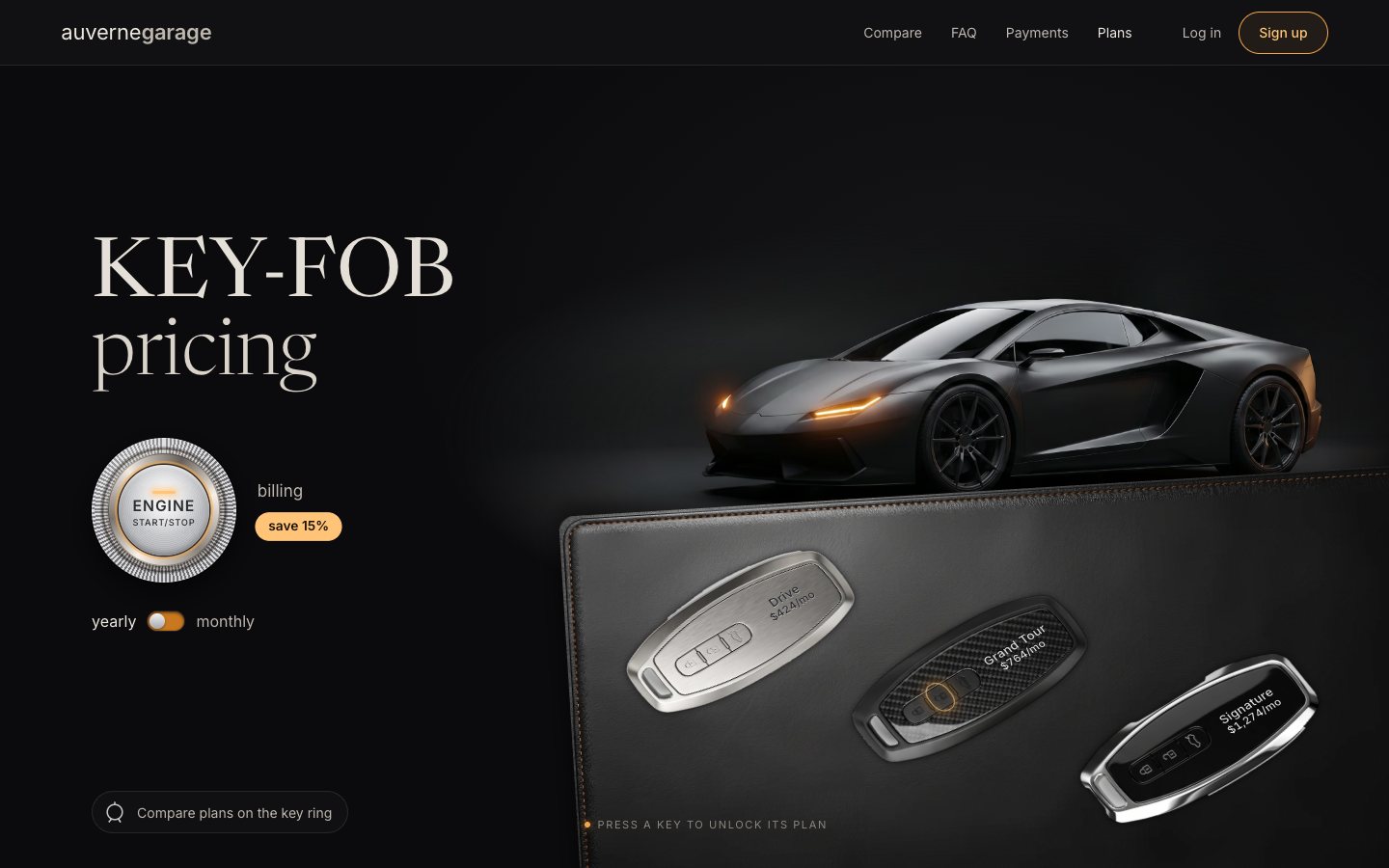
4 · ENGINE START/STOP switches the billing
The billing switch is a push-to-start button: a real <button aria-pressed> drawn in CSS only, a
knurled chrome ring (a repeating conic gradient), a polished bezel, a brushed cap and an amber ring light.
<button class="engine" type="button" aria-pressed="false" aria-describedby="billing-note" data-js-only>
  <span class="engine-knurl" aria-hidden="true"></span>
  <span class="engine-bezel" aria-hidden="true"></span>
  <span class="engine-cap" aria-hidden="true"><span class="engine-led"></span><b>ENGINE</b><small>START/STOP</small></span>
  <span class="sr">Yearly billing</span>
</button>.engine-knurl {
position: absolute; inset: 0; border-radius: 50%;
background:
radial-gradient(circle at 50% 50%, transparent 58%, rgba(0, 0, 0, .55) 60%, transparent 63%),
radial-gradient(circle at 35% 25%, rgba(255, 255, 255, .45), transparent 55%),
repeating-conic-gradient(#d8d8dc 0 1.6deg, #6e6f74 1.6deg 3.2deg);
box-shadow: 0 10px 30px rgba(0, 0, 0, .65), 0 0 0 1px rgba(0, 0, 0, .7), inset 0 0 0 1px rgba(255, 255, 255, .25);
}.engine[aria-pressed="true"] .engine-led { background: var(--amber-2); box-shadow: 0 0 8px 2px rgba(255, 176, 80, .75); }Pressing it takes 15 % off. Every price on the page follows: they count to their new figure in 620 ms, and the car answers with the same double blink.
function setBilling(b, { animate = true, save = true } = {}) {
  state.billing = b === 'yearly' ? 'yearly' : 'monthly';
  if (state.billing === 'yearly') root.dataset.billing = 'yearly'; else delete root.dataset.billing;
  el.engine.setAttribute('aria-pressed', String(state.billing === 'yearly'));
  setBillingText(); setPrices(animate);
  if (save) store.set(KEY.billing, state.billing);
  if (animate) rev();
}function setPrices(animate) {
const targets = $$('[data-amt]').map((n) => [n, perMonth(n.dataset.amt, state.billing)]);
const from = targets.map(([n]) => shown.get(n) ?? parseInt(n.textContent.replace(/\D/g, ''), 10));
if (!animate || reduce.matches) {
targets.forEach(([n, v]) => { n.textContent = fmt(v); shown.set(n, v); });
return;
}
const t0 = performance.now(), dur = 620;
const step = (t) => {
const k = Math.min(1, (t - t0) / dur), e = 1 - Math.pow(1 - k, 3);
targets.forEach(([n, v], i) => { const x = Math.round(from[i] + (v - from[i]) * e); if (shown.get(n) !== x) { n.textContent = fmt(x); shown.set(n, x); } });
if (k < 1) requestAnimationFrame(step);
};
requestAnimationFrame(step);
}The choice is saved, and the head script applies it before the first paint, so a yearly visitor never sees monthly prices flash.
// JS on; the fob photo set and the saved billing choice are applied before first paint.
(function () {
  var d = document.documentElement; d.classList.remove('no-js'); d.classList.add('js');
  var q = /[?&]fobs=(a|b|svg)\b/.exec(location.search), m = document.querySelector('meta[name="dv51:fobs"]');
  d.dataset.fobs = q ? q[1] : (m && m.content) || 'b';
  try {
    if (localStorage.getItem('dv51a.billing') === 'yearly') d.dataset.billing = 'yearly';
  } catch (e) {}
})();
5 · The plan card
Unlocking a key opens its plan's card. The card does not repeat the plans: it reads its features from the compare table, the single source.
const FEATS = Object.fromEntries(ORDER.map((id) => [id, [...document.querySelectorAll('.cmp tbody tr[data-card]')].map((tr) => {
  const td = tr.querySelector(`td[data-col="${id}"]`);
  if (td.querySelector('.no')) return null;
  return [tr.querySelector('th').textContent.trim(), td.querySelector('.yes') ? 'Included' : td.textContent.trim()];
}).filter(Boolean).slice(0, 5)]));function unlock(id, { focus = false } = {}) {
const changed = id !== state.plan;
setPlan(id, { defer: true });
const f = el.fobs.find((x) => x.dataset.plan === id);
if (!reduce.matches) {
f.querySelector('.fob-body').animate([{ scale: 1 }, { scale: .965, offset: .3 }, { scale: 1 }], { duration: 300, easing: 'ease-out' });
f.querySelector('.fob-unlock').animate([{ opacity: 1, scale: .8 }, { opacity: 0, scale: 1.7 }], { duration: 600, easing: 'ease-out' });
}
flash();
if (changed && state.open) rise();
openCard({ focus });
}Where it opens matters. Over the car it would hide the very flash the press just caused, so on wide screens it rises in the intro column, over the headline, out of a clip line just above the ENGINE button. On a short screen it drops its kicker and two features; only if it still does not fit does it reach over the button. All the reads come before the writes, so opening it never forces a layout.
function placeCard() {
  const side = state.open && !SHEET.matches;
  if (!side) {
    el.stage.classList.remove('card-side'); el.card.classList.remove('compact');
    el.clip.style.removeProperty('--cx'); el.clip.style.removeProperty('--cb'); el.clip.classList.remove('over'); return;
  }
  // every read first, then the writes: no forced layout in the unlock path
  const rr = el.stage.getBoundingClientRect(), ir = el.intro.getBoundingClientRect(), er = el.engine.getBoundingClientRect();
  const hb = el.top.getBoundingClientRect().bottom;
  const w = el.card.offsetWidth || 340, full = el.card.offsetHeight || 360;
  // short screens: a compact card (no kicker, three features) when the full one would reach the engine
  const wasCompact = el.card.classList.contains('compact');
  if (!wasCompact) placeCard.extra = [$('.card-kicker', el.card), ...$$('.card-feats li', el.card).slice(3)].reduce((n, e) => n + e.offsetHeight + 5, 0);
  const extra = placeCard.extra || 0;
  const cx = ir.left - rr.left + w / 2;
  let bottom = rr.bottom - (er.top - 14);
  const topLimit = Math.max(12, hb - rr.top + 12);
  const room = rr.height - bottom - topLimit;
  const fullH = wasCompact ? full + extra : full, compact = fullH > room;
  el.card.classList.toggle('compact', compact);
  const h = compact === wasCompact ? full : el.card.offsetHeight;   // re-measured only when the mode changed (short screens)
  const over = h > room;                                     // still too tall: the card may cover the engine's top
  if (over) bottom = rr.height - h - topLimit;
  el.clip.style.setProperty('--cx', cx + 'px');
  el.clip.style.setProperty('--cb', bottom + 'px');
  el.clip.classList.toggle('over', over);
  el.stage.classList.add('card-side');
}.card-clip {
--w: clamp(280px, 31vw, 380px);
position: absolute; z-index: 6; left: var(--cx, 50%); bottom: var(--cb, 40%); width: var(--w); margin-left: calc(var(--w) / -2);
overflow: hidden; padding: 24px 24px 0; margin-bottom: 0; translate: -24px 0; box-sizing: content-box; pointer-events: none;
}function rise() {
if (reduce.matches) el.card.animate([{ opacity: 0 }, { opacity: 1 }], { duration: 200 });
else el.card.animate([{ transform: 'translateY(105%)' }, { transform: 'none' }], { duration: 520, easing: 'cubic-bezier(.2, .8, .2, 1)' });
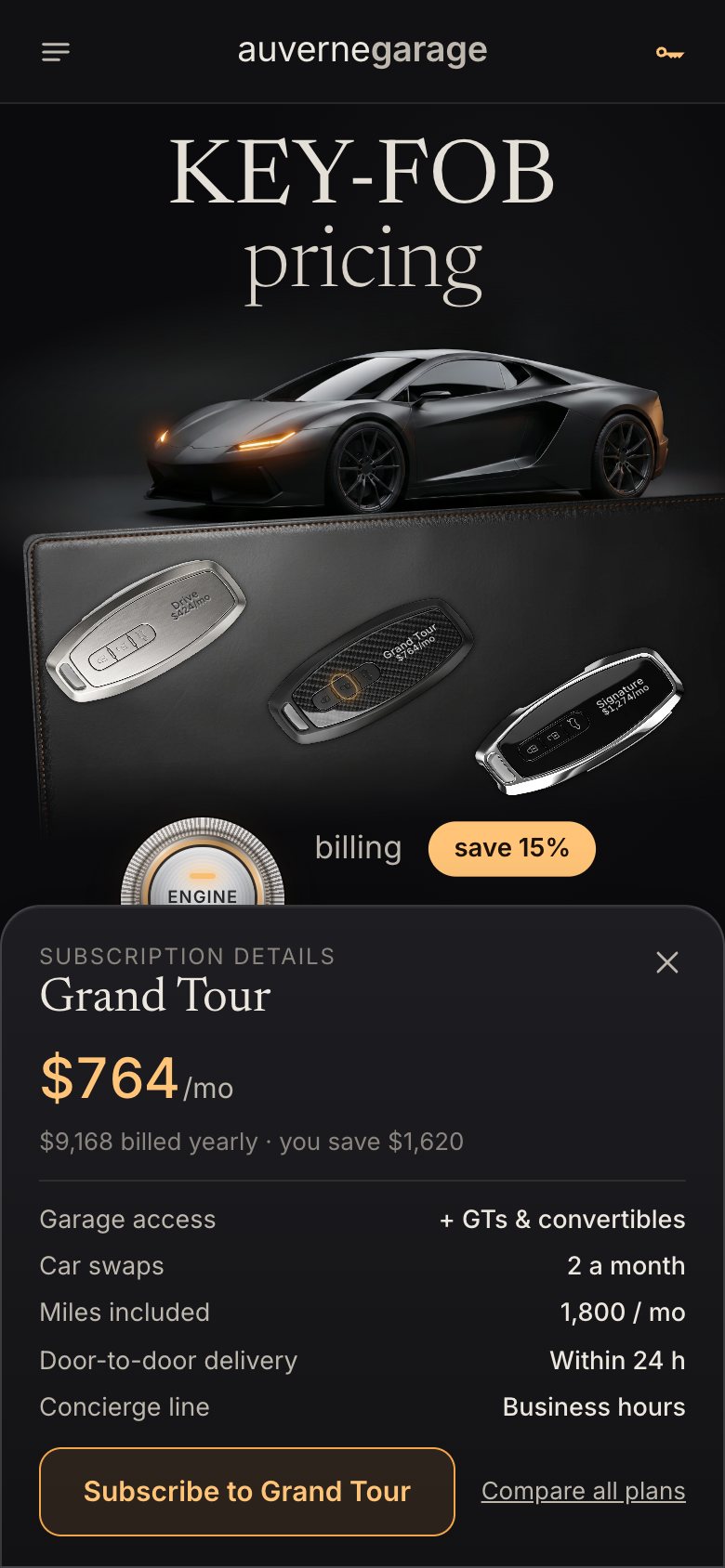
}.stage.card-side h1 { opacity: 0; }On phones, portrait tablets and short screens it is a bottom sheet.
/* the card becomes a bottom sheet where there is no room above the fobs */
@media (max-width: 719.98px), (max-height: 560px), (max-aspect-ratio: 6/5) {
  .card-clip { position: fixed; z-index: 55; left: 0; right: 0; bottom: 0; width: auto; margin: 0; translate: none; padding: 30px 0 0; }
  .card { border-radius: 22px 22px 0 0; padding: 18px 20px calc(16px + env(safe-area-inset-bottom)); max-height: calc(100svh - var(--hdr) - 30px); overflow: auto; overscroll-behavior: contain; }
  .card-clip { pointer-events: none; }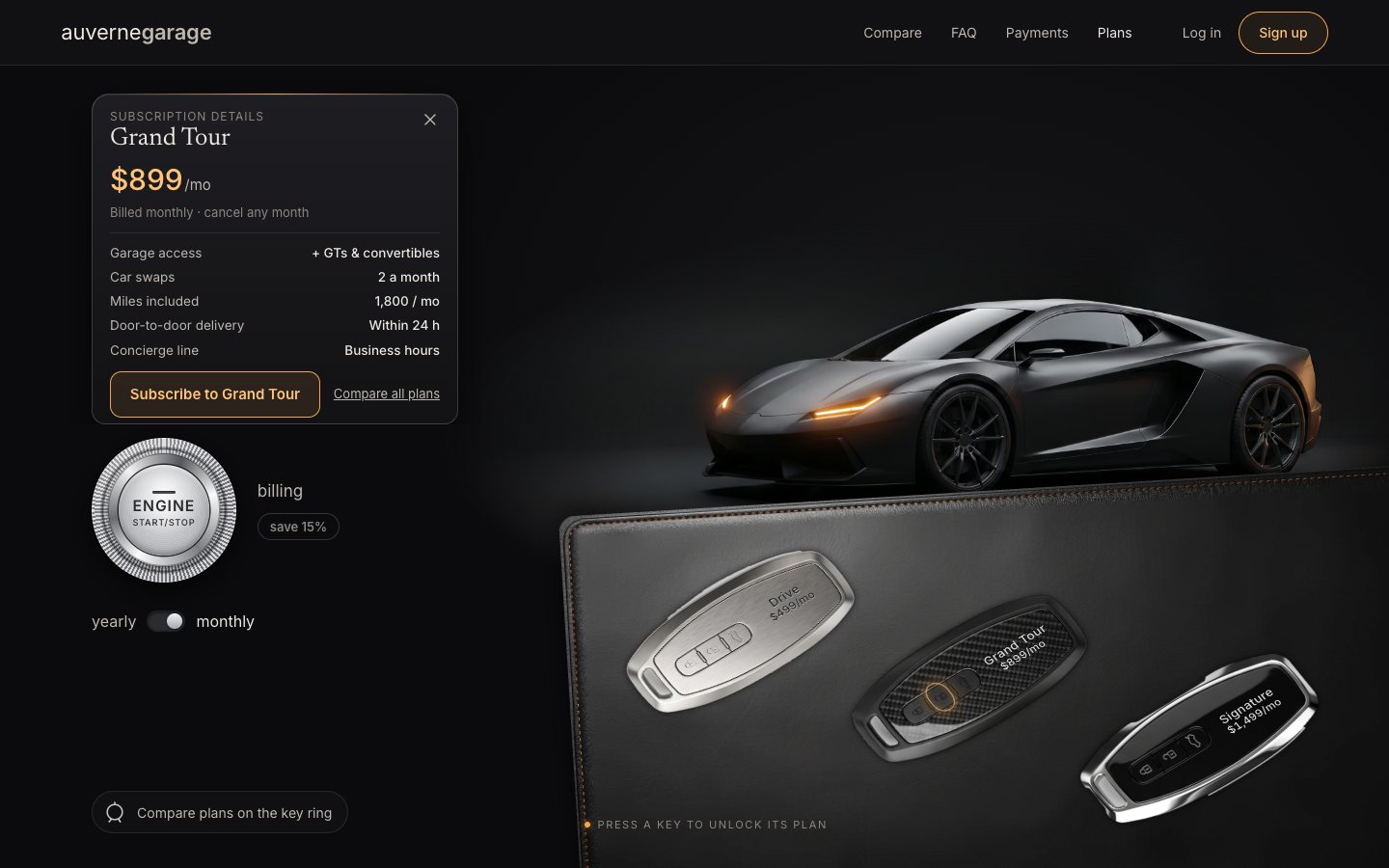
6 · The phone, and the finish
A phone has no room for the navigation, so the header becomes a menu button, the wordmark and a key button that opens the chosen plan's sheet.
<button class="menu-btn" type="button" aria-expanded="false" aria-controls="menu" data-js-only>
  <svg viewBox="0 0 24 24" aria-hidden="true"><path d="M4 7h16M4 12h16M4 17h10"/></svg><span class="sr">Menu</span>
</button>
<button class="bag-btn" type="button" aria-controls="plan-card" data-js-only>
<svg viewBox="0 0 24 24" aria-hidden="true"><path d="M7 14.5a2.5 2.5 0 1 1 0-5 2.5 2.5 0 0 1 0 5Zm2.4-1.3H20l-1.5 1.6-1.4-1.1-1.3 1.2-1.3-1.2-1.3 1.2-1.5-1.2"/></svg><span class="sr">Your key: </span><span class="bag-plan">Grand Tour</span>function setMenu(on) { el.menuBtn.setAttribute('aria-expanded', String(on)); el.menu.hidden = !on; }
el.menuBtn.addEventListener('click', () => setMenu(el.menu.hidden));
$$('#menu a').forEach((a) => a.addEventListener('click', () => setMenu(false)));
document.addEventListener('keydown', (e) => {
if (e.key !== 'Escape') return;
if (!el.menu.hidden) { setMenu(false); el.menuBtn.focus(); } else if (state.open) closeCard();
});
document.addEventListener('pointerdown', (e) => { if (!el.menu.hidden && !el.menu.contains(e.target) && !el.menuBtn.contains(e.target)) setMenu(false); });Log in is not part of a pricing demo, so it says so politely.
function toast(msg) {
  el.toast.textContent = msg; el.toast.classList.add('is-on');
  clearTimeout(toast.t); toast.t = setTimeout(() => el.toast.classList.remove('is-on'), 2800);
}
Last, the saved keys are versioned (dv51a.*), and anything older is wiped before it can confuse the page.
// JS on; the billing choice is applied before first paint. Keys are versioned (dv51a.*); anything older is wiped.
(function () {
  var d = document.documentElement; d.classList.remove('no-js'); d.classList.add('js');
  var q = /[?&]fobs=(a|b|svg)\b/.exec(location.search), m = document.querySelector('meta[name="dv51:fobs"]');
  d.dataset.fobs = q ? q[1] : (m && m.content) || 'b';
  try {
    for (var i = localStorage.length - 1; i >= 0; i--) { var k = localStorage.key(i); if (/^dv51/.test(k) && !/^dv51a\./.test(k)) localStorage.removeItem(k); }
    if (localStorage.getItem('dv51a.billing') === 'yearly') d.dataset.billing = 'yearly';
  } catch (e) {}
})();
Measured with the project's frame probe on a 120 Hz screen through presses, blinks, the billing switch, the card and the compare view: no long tasks and no missed frames at 1440 × 900, on a 390 × 844 phone, or with the CPU slowed 4 ×.
Make it yours
- Your plans are
PLANSinkeyfob.js(name and monthly price) and the compare table in the HTML; the card reads its five features from the table rows markeddata-card. - Your photos: drop a car with its lamps off and on (the same frame), a sheet of three keys and a leather pad into
assets/incoming/and runscripts/ingest.py. It finds the car and its lamps, cuts the keys out and writesassets.css; the page code does not change. - The yearly discount is
YEARLY_OFF. - Accessibility is already there: a real radio group with roving tabindex, a toggle button with
aria-pressed, a real table with captions and headers, focus that returns to the key when the card closes, 44 px targets, andprefers-reduced-motionhonoured.
The code is on GitHub at UlviShabanbayli/domvybe-keyfob-pricing, under the MIT licence: use it in your own projects, commercial ones included. auvernegarage is made up. The car and key fob photos and the leather were generated with Google Gemini; everything else was made for this project.
Let the page answer the press where the eye already is. The key is pressed, the car answers with its lamps, and the card opens where it hides nothing: three reactions to one press, and not one of them covers another.