This is the whole build of the liquid glass calculator, in the order it was written: a working scientific calculator made of one slab of clear glass, standing in a photographer's studio. Every key is a lens that bends what is behind it. Inside the glass sits a liquid: it rises with the size of your number, ripples when you type, and sloshes when you drag the glass. Each stage below is the calculator as it stood at that step. It shows a still, and Run it here starts the live page in its place. The code under each heading is only what that stage adds. The finished source is at the end, and on GitHub under the MIT licence.
There is no library and no build step, and no picture: the studio, the glass, the keys and the liquid are all drawn
by one fragment shader. The files: index.html and style.css lay out the real HTML (the display
and the keys); glass.js is the WebGL 2 shader; keypad.js knows the keys and where they sit;
app.js runs the calculator. Later stages add spring.js, liquid.js,
engine.js and history.js. app.js is written in seven parts with banners of its
own; the tutorial's nine stages follow the build instead, so a stage often adds a few lines to several parts.
1 · One pass of glass
The page is a canvas behind everything, and ordinary HTML on top of it. The canvas draws the studio and the glass;
the display and the keys are real elements: a role="group" labelled Calculator, a number, and twenty real
<button>s. The slab itself is transparent HTML. The shader draws the glass exactly under it.
<div class="page">
  <!-- the studio and the glass are drawn on this one canvas (glass.js).
       Everything you read or press sits on top of it as ordinary HTML -->
  <canvas class="gl" aria-hidden="true"></canvas>
  <div class="fallback-bg" aria-hidden="true"></div>

  <main class="stage">
    <!-- ============================== THE COMPONENT ==============================
         A calculator made of a slab of clear glass, drawn on the canvas behind it; the display and the keys are
         ordinary HTML on top. (Stage 3 makes the keys lenses, stage 4 puts a liquid inside, stage 5 gives it a brain.) -->
    <div class="calc-home">
      <div class="calc" id="calc" role="group" aria-label="Calculator">
        <div class="display">
          <div class="readout">
            <div class="num">0</div>
          </div>
        </div>
        <div class="keys"></div>
      </div>
    </div>
  </main>
Why a shader and not CSS backdrop-filter? Real refraction needs the picture behind the glass,
bent by the glass's shape. A blur cannot bend. In a shader the studio is a function we can ask "what colour is at this
point?", so the glass simply asks at a different point. To run that function for every pixel, the program draws one
triangle big enough to cover the screen: three corners at (−1, −1), (3, −1) and (−1, 3), so the screen is the part of
it that is on screen.
function build() {
  main = program(FRAG, UNIFORMS);
  gl.bindBuffer(gl.ARRAY_BUFFER, gl.createBuffer());       // one triangle that covers the screen
  gl.bufferData(gl.ARRAY_BUFFER, new Float32Array([-1, -1, 3, -1, -1, 3]), gl.STATIC_DRAW);
  gl.enableVertexAttribArray(0);
  gl.vertexAttribPointer(0, 2, gl.FLOAT, false, 0, 0);
}
The slab is a rounded rectangle, and the shader describes it by a signed distance: how far a point is from
its edge, negative inside, positive outside. Its gradient, nRR, points straight out of the nearest edge.
Those two numbers are all the glass needs.
// a rounded rectangle: signed distance, and its outward direction (the gradient)
float sdRR(vec2 p, vec2 b, float r) {
  vec2 q = abs(p) - b + r;
  return min(max(q.x, q.y), 0.0) + length(max(q, 0.0)) - r;
}
vec2 nRR(vec2 p, vec2 b, float r) {
  vec2 q = abs(p) - b + r, s = sign(p + 1e-5);
  if (q.x > 0.0 && q.y > 0.0) return normalize(q) * s;
  return q.x > q.y ? vec2(s.x, 0.0) : vec2(0.0, s.y);
}`;
For now the studio is computed for every pixel: a cool grey wall that curves into a bright floor, and two soft
glows. The colours come from the tone in app.js.
// ---------------------------------------------------------------- 1. the studio: a wall that curves into a bright floor
// and two soft glows, computed for every pixel (stage 2 bakes a fuller studio into a texture once per resize)
vec3 studio(vec2 w) {
  float y = w.y / uRes.y;
  vec3 c = mix(uWall, uFloor, smoothstep(0.30, 0.95, y));
  float soft1 = exp(-pow(length((w - vec2(uRes.x * 0.16, uRes.y * 0.30)) / vec2(uRes.x * 0.34, uRes.y * 0.55)), 2.0));
  float soft2 = exp(-pow(length((w - vec2(uRes.x * 0.88, uRes.y * 0.16)) / vec2(uRes.x * 0.30, uRes.y * 0.32)), 2.0));
  c += vec3(0.08) * soft1 + vec3(0.05, 0.05, 0.06) * soft2;
  return clamp(c, 0.0, 1.0);
}
Inside the slab, within 26 px of the edge (the bevel), a pixel looks further out the closer it is to the edge: the offset grows with the square of how near the edge it is, along the outward direction. Red, green and blue look 0.92, 1.0 and 1.10 times as far, which splits the colours slightly at the rim, as real glass does. Clear glass is a little cooler than what it shows, and lighter towards the top.
vec3 slab(vec2 q) {
  float d = sdRR(q, uBodyH, uBodyR);
  float e = 1.0 - clamp(-d / BEVEL, 0.0, 1.0);               // sampling further out the closer it gets to the edge
  vec2 off = nRR(q, uBodyH, uBodyR) * e * e * BEVEL * 1.6;
  vec3 c = e > 0.0 ? vec3(studio(toWorld(q + off * 0.92)).r, studio(toWorld(q + off)).g, studio(toWorld(q + off * 1.10)).b) : studio(toWorld(q));
  // clear glass: the studio behind it, a little cooler, and lighter towards the top where it catches the light
  c = c * 0.90 + vec3(0.004, 0.012, 0.024) + vec3(0.025) * smoothstep(0.0, -uBodyH.y, q.y);
  return c;
}
The edge itself is where glass reads as glass: on a bright page its outline is a little darker, with a bright line where it faces the light and a band just inside, strongest towards the light. The light is a point 260 px above the page; in this stage it waits above the glass's top-left corner.
vec3 inside(vec2 q, float d, vec3 Lq) {
  vec3 c = slab(q);
  // the slab's own edge: on a bright page its outline reads darker, with a bright line where the light catches it
  if (d < -EDGE_REACH) return c;
  vec2 nb = nRR(q, uBodyH, uBodyR);
  float facing = dot(nb, normalize(Lq.xy - q + 1e-4));
  float outline = 1.0 - smoothstep(0.0, 2.2, -d);
  float inEdge = exp(-max(-d - 3.0, 0.0) / 10.0) * (1.0 - outline);
  c = mix(c, c * 0.72, outline * 0.55);
  // a crystal bevel: a bright band just inside the edge, strongest where it faces the light, a softer one opposite
  c += vec3(1.0) * (outline * 0.6 * max(facing, 0.0) + inEdge * (0.42 * max(facing, 0.0) + 0.16 * max(-facing, 0.0)));
  return c;
}
main() works in CSS pixels, y down. Outside the slab a pixel shows the studio; across the edge it is
blended over one device pixel, which antialiases the curve; a little grain (±1/255) stops the soft gradients from
banding.
void main() {
  vec2 p = vec2(gl_FragCoord.x, uRes.y * uPx.y - gl_FragCoord.y) / uPx;
  vec2 q = p - uBodyC;                                        // everything below is in the slab's own units
  gPx = uPx.x;
  float d = sdRR(q, uBodyH, uBodyR);
  vec3 Lq = vec3(uLight.xy - uBodyC, uLight.z);
  vec3 col = vec3(0.0);
  if (d > 0.0) {
    col = studio(p);
  }
  if (d < 1.0) { vec3 inner = inside(q, d, Lq); col = d > 0.0 ? mix(col, inner, clamp(0.5 - d * gPx, 0.0, 1.0)) : inner; }
  col += (hash(gl_FragCoord.xy + fract(uTime * 7.0) * 113.0) - 0.5) * (2.0 / 255.0);   // grain, against banding
  outColor = vec4(col, 1.0);
}
Everything on the HTML side is sized from one number, the key's side. The slab is so many keys wide and tall
(the gap is 0.175 of a key, the padding 0.27, the display 2.3 keys tall), so app.js works out the largest
key that fits the screen's width and height, at most 130 px.
// Every size is one number, the key's side. The slab is, in keys:
//   wide:  cols + (cols − 1) × GAP + 2 × PAD          tall:  DISPLAY + rows + (rows − 1) × GAP + PAD
// and the key is the largest that fits the room left on the screen in both directions (style.css draws the rest).
const RATIO = { gap: 0.175, pad: 0.27 };
const DISPLAY = { basic: 2.3 };                                // the display's height, in keys
const KEY_PX = { max: 130 };                                 // a key's largest side, px (the smallest is whatever fits)
const HEIGHT_SHARE = 0.84, TALL_SCREEN = 600;               // on a tall screen the glass leaves some air above and below

let layout = 'basic';

// the key size for the layout, on this screen (nothing is written)
function sizing() {
  const vw = html.clientWidth, vh = innerHeight;
  const st = getComputedStyle(stage);
  const padX = parseFloat(st.paddingLeft) + parseFloat(st.paddingRight);
  const padY = parseFloat(st.paddingTop) + parseFloat(st.paddingBottom);
  const roomW = vw - padX;
  const roomH = Math.min(vh - padY, vh > TALL_SCREEN ? vh * HEIGHT_SHARE : Infinity);
  const keyFor = (name) => {
    const L = Keypad.LAYOUTS[name];
    const wide = L.cols + (L.cols - 1) * RATIO.gap + 2 * RATIO.pad;
    const tall = DISPLAY[name] + L.rows + (L.rows - 1) * RATIO.gap + RATIO.pad;
    return Math.min(Math.floor(Math.min(roomW / wide, roomH / tall)), KEY_PX.max);   // never bigger than fits
  };
  return { layout: 'basic', key: keyFor('basic') };
}
style.css derives every other size from --key. The variables are set on
.stage, so a new size restyles the calculator and nothing else.
.stage {
  --key: 72px; --gap-r: .175; --pad-r: .27; --display-r: 2.3; --cols: 4; --rows: 5;
  --key-gap: calc(var(--key) * var(--gap-r));
  --calc-pad: calc(var(--key) * var(--pad-r));
  --calc-radius: calc(var(--key) * .64);
  --display-h: calc(var(--key) * var(--display-r));
  --num-size: calc(var(--key) * 1.02);
  --key-label-size: calc(var(--key) * .42);
  --key-fn-size: calc(var(--key) * .33);
  --key-op-size: calc(var(--key) * .5);
}.calc { position: relative; flex: none; width: calc(var(--cols) * var(--key) + (var(--cols) - 1) * var(--key-gap) + 2 * var(--calc-pad));
padding: 0 var(--calc-pad) var(--calc-pad); border-radius: var(--calc-radius);
user-select: none; -webkit-user-select: none; transform-origin: 50% 50%; }The keys come from keypad.js: what each one prints, its spoken name, its kind of glass (digit,
function, operator) and its place in a 4 × 5 grid. The 0 is wide: it fills two cells.
const MAIN = [
  ['clear', '±', '%', '÷'],
  ['7', '8', '9', '×'],
  ['4', '5', '6', '−'],
  ['1', '2', '3', '+'],
  ['0', '0', '.', '='],                                    // 0 is wide: it fills two cells
];
const BLOCKS = { main: MAIN };
// where each block's top-left cell sits in the layout's grid (1-based CSS grid lines)
const LAYOUTS = {
  basic: { cols: 4, rows: 5, main: [1, 1] },
};function build(container) {
const keys = [];
for (const [block, rows] of Object.entries(BLOCKS)) {
rows.forEach((row, r) => row.forEach((name, c) => {
if (row.indexOf(name) !== c) return; // the second cell of the wide 0
const def = KEYS[name];
const el = document.createElement('button');
el.type = 'button';
el.className = `key ${def.kind}${name === '0' ? ' zero' : ''}`;
el.dataset.k = name;
el.innerHTML = `<span class="lbl">${def.label}</span>`;
if (def.say !== name) el.setAttribute('aria-label', def.say);
container.append(el);
const span = row.lastIndexOf(name) - c + 1;
keys.push({ el, name, block, row: r, col: c, span, kind: def.kind === 'op' ? KIND.op : def.kind === 'digit' ? KIND.digit : KIND.fn });
}));
}
return keys;
}After a resize, measure() reads where the slab really is on the page and hands it to the shader. Nothing
moves yet, so the glass is drawn once per resize.
function measure() {
  // the home of the slab (its home box is never transformed, so the numbers stay true while it is dragged)
  const pr = page.getBoundingClientRect(), hr = home.getBoundingClientRect();
  const W = calcEl.offsetWidth, H = calcEl.offsetHeight, style = getComputedStyle(calcEl);
  body.cx = hr.left - pr.left + calcEl.offsetLeft + W / 2;
  body.cy = hr.top - pr.top + calcEl.offsetTop + H / 2;
  body.hx = W / 2; body.hy = H / 2;
  body.r = parseFloat(style.borderTopLeftRadius) || 40;
  resizeCanvas();
  restLight();
  if (glass) paint(0);                                         // drawn once: nothing moves yet (stage 3 adds the loop)
}render(f) {
const { loc } = main;
gl.useProgram(main.prog);
gl.uniform3fv(loc.uWall, f.tone.wall);
gl.uniform3fv(loc.uFloor, f.tone.floor);
gl.uniform2f(loc.uRes, size.w, size.h);
gl.uniform2f(loc.uPx, size.rw / size.w, size.rh / size.h);
gl.uniform1f(loc.uTime, f.time);
gl.uniform2f(loc.uBodyC, f.body.cx, f.body.cy);
gl.uniform2f(loc.uBodyH, f.body.hx, f.body.hy);
gl.uniform1f(loc.uBodyR, f.body.r);
gl.uniform3f(loc.uLight, f.light.x, f.light.y, f.light.z);
gl.drawArrays(gl.TRIANGLES, 0, 3);
},Without WebGL 2 the slab and the keys are frosted CSS, so the calculator still reads and works.
/* ---- 8. when there is no WebGL 2: a frosted slab and frosted keys over a still studio ---- */
.no-gl .gl { display: none; }
.no-gl .fallback-bg { display: block; background: radial-gradient(60% 50% at 50% 40%, var(--studio-50), var(--studio-100) 70%, var(--studio-200)); }
.no-gl .calc { background: linear-gradient(180deg, rgb(255 255 255 / .45), rgb(255 255 255 / .2));
  box-shadow: inset 0 0 0 1.5px rgb(255 255 255 / .8), 0 40px 80px -30px rgb(40 40 60 / .4); overflow: hidden; }
.no-gl .key { background: radial-gradient(120% 120% at 30% 20%, rgb(255 255 255 / .45), rgb(255 255 255 / .1) 60%); box-shadow: inset 0 1px 0 rgb(255 255 255 / .7), inset 0 0 0 1px rgb(255 255 255 / .35); }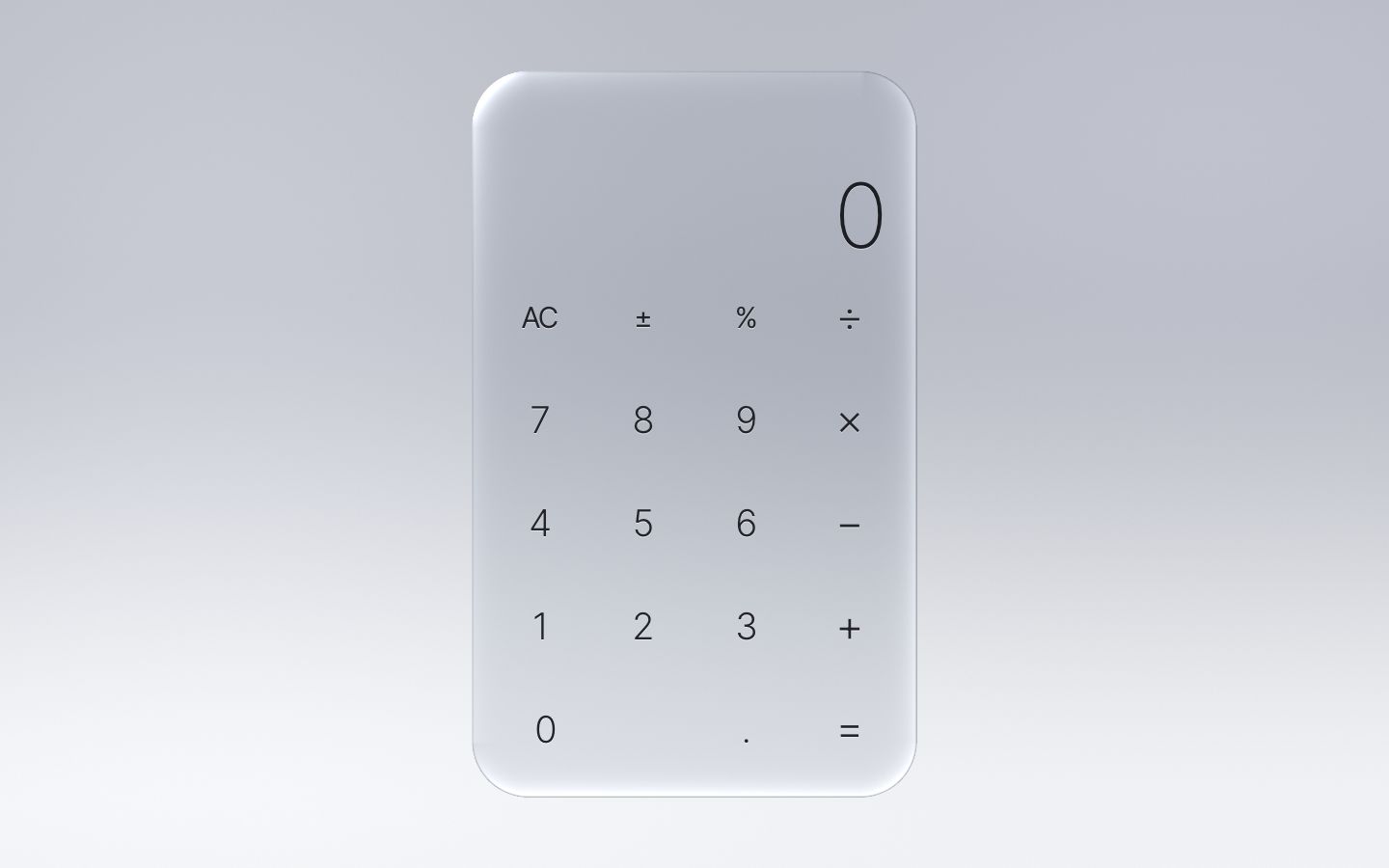
2 · The studio, baked once per resize
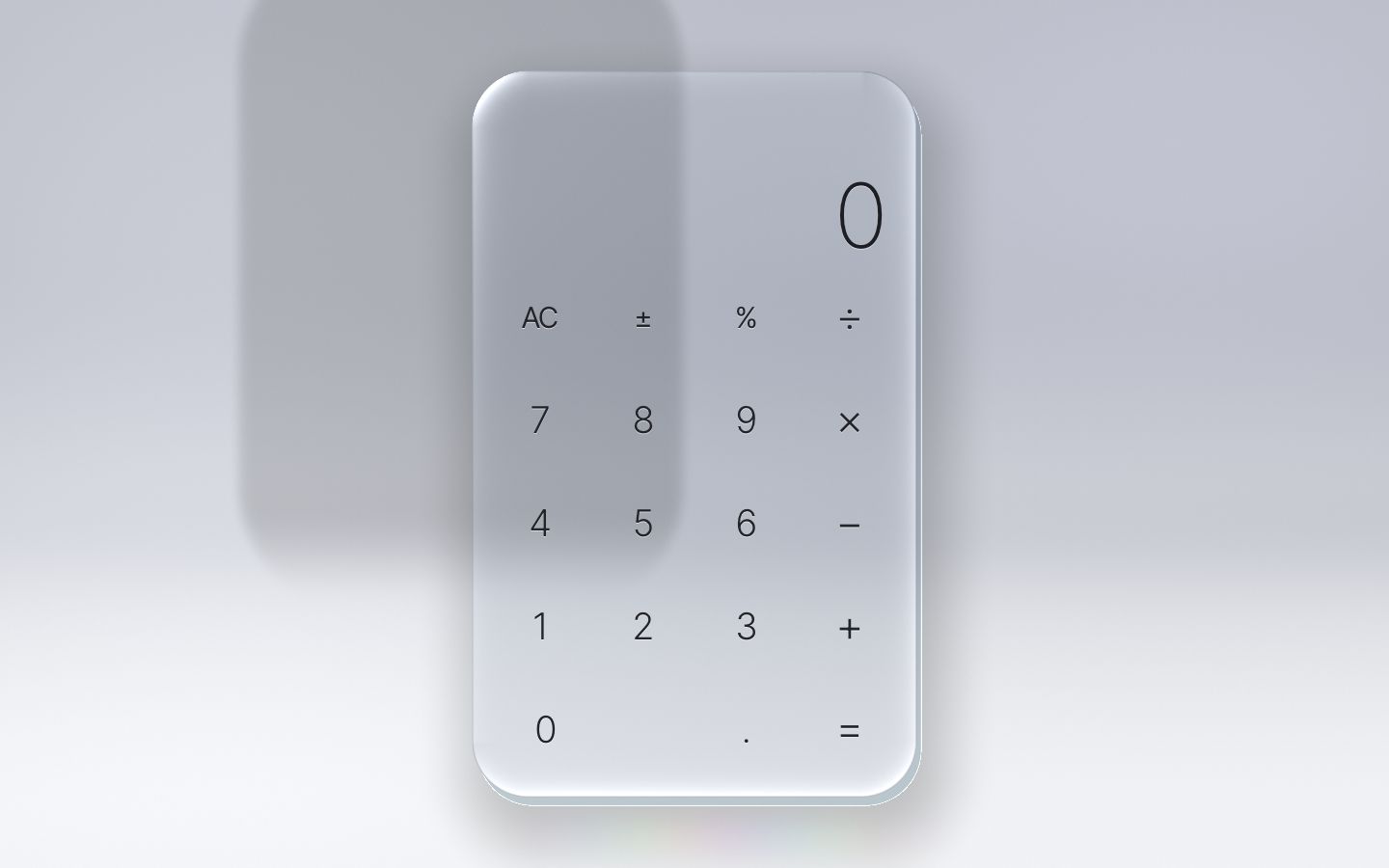
Clear glass shows what is behind it, so the studio has to give it something to bend. It becomes a photographer's sweep: the wall curving into a bright floor, two softbox glows, a curved partition standing behind the glass's left half (its rounded top is the sharp thing the bevel bends) and a soft cove where the wall meets the floor.
None of it moves. Computing it for every pixel of every frame is wasted work, so a second, small program draws it
once per resize into a texture: one texel per CSS pixel, plus 128 px all round, because the bevels look past the
screen's edge. It is a half-float texture (RGBA16F, where EXT_color_buffer_float allows), so
the soft gradients stay exact.
const STUDIO_FRAG = `#version 300 es
precision highp float;
out vec4 outColor;
uniform vec2 uRes;          // the screen, CSS px
uniform float uMargin;      // texel (0, 0) sits this far above and left of the screen
uniform vec2 uHome;         // the slab's home: its centre and half size (the partition stands behind it)
uniform vec2 uHomeH;
uniform vec3 uWall, uFloor;
uniform vec2 uToneK;        // x: the partition's shade, y: 1 on a dark studio
${SHAPES}
void main() {
  vec2 w = gl_FragCoord.xy - uMargin;
  float y = w.y / uRes.y, x = w.x / uRes.x;
  vec3 c = mix(uWall, uFloor, smoothstep(0.30, 0.95, y));
  float soft1 = exp(-pow(length((w - vec2(uRes.x * 0.16, uRes.y * 0.30)) / vec2(uRes.x * 0.34, uRes.y * 0.55)), 2.0));
  float soft2 = exp(-pow(length((w - vec2(uRes.x * 0.88, uRes.y * 0.16)) / vec2(uRes.x * 0.30, uRes.y * 0.32)), 2.0));
  c += (vec3(0.08) * soft1 + vec3(0.05, 0.05, 0.06) * soft2) * (1.0 - 0.55 * uToneK.y);
  // the partition: from above the glass's top down into the cove, its rounded top edge something sharp to bend
  float top = uHome.y - uHomeH.y * 1.35, bottom = uRes.y * 0.70;
  vec2 centre = vec2(uHome.x - uHomeH.x * 1.05, (top + bottom) * 0.5);
  float pd = sdRR(w - centre, vec2(uHomeH.x * 0.95, (bottom - top) * 0.5), uHomeH.x * 0.55);
  float panel = (1.0 - smoothstep(-6.0, 22.0, pd)) * (1.0 - smoothstep(0.58, 0.70, y));
  c = mix(c, c * uToneK.x, panel);
  c += vec3(0.05 + 0.05 * uToneK.y) * exp(-pow(max(pd + 4.0, 0.0) / 10.0, 2.0)) * panel;   // its lit edge
  // the cove: a soft shade where the wall turns into the floor
  c -= vec3(0.035, 0.035, 0.03) * (1.0 - 0.7 * uToneK.y) * exp(-pow((y - 0.62) / 0.06, 2.0)) * (0.6 + 0.4 * x);
  outColor = vec4(c, 1.0);    // not clamped yet: the drifting wash is added on top, then it is clamped
}`;// the studio texture: one texel per CSS px, plus the margin all round; half floats keep the soft gradients exact.
// It is made again only when the screen's size changes; a new home for the slab just draws into it again.
let studioW = 0, studioH = 0;
function bakeStudio() {
const W = Math.round(size.w + 2 * STUDIO_MARGIN), H = Math.round(size.h + 2 * STUDIO_MARGIN);
if (W !== studioW || H !== studioH) {
studioW = W; studioH = H;
if (studioTex) gl.deleteTexture(studioTex);
if (studioFbo) gl.deleteFramebuffer(studioFbo);
studioTex = gl.createTexture();
gl.bindTexture(gl.TEXTURE_2D, studioTex);
gl.texStorage2D(gl.TEXTURE_2D, 1, floatStudio ? gl.RGBA16F : gl.RGBA8, W, H);
gl.texParameteri(gl.TEXTURE_2D, gl.TEXTURE_MIN_FILTER, gl.LINEAR);
gl.texParameteri(gl.TEXTURE_2D, gl.TEXTURE_MAG_FILTER, gl.LINEAR);
gl.texParameteri(gl.TEXTURE_2D, gl.TEXTURE_WRAP_S, gl.CLAMP_TO_EDGE);
gl.texParameteri(gl.TEXTURE_2D, gl.TEXTURE_WRAP_T, gl.CLAMP_TO_EDGE);
studioFbo = gl.createFramebuffer();
gl.bindFramebuffer(gl.FRAMEBUFFER, studioFbo);
gl.framebufferTexture2D(gl.FRAMEBUFFER, gl.COLOR_ATTACHMENT0, gl.TEXTURE_2D, studioTex, 0);
} else gl.bindFramebuffer(gl.FRAMEBUFFER, studioFbo);
gl.viewport(0, 0, W, H);
const { loc } = bake, T = scene.tone;
gl.useProgram(bake.prog);
gl.uniform2f(loc.uRes, size.w, size.h);
gl.uniform1f(loc.uMargin, STUDIO_MARGIN);
gl.uniform2f(loc.uHome, scene.home.x, scene.home.y);
gl.uniform2f(loc.uHomeH, scene.home.hx, scene.home.hy);
gl.uniform3fv(loc.uWall, T.wall);
gl.uniform3fv(loc.uFloor, T.floor);
gl.uniform2f(loc.uToneK, T.panel, T.dark);
gl.drawArrays(gl.TRIANGLES, 0, 3);
gl.bindFramebuffer(gl.FRAMEBUFFER, null);
gl.viewport(0, 0, size.rw, size.rh);
studioDirty = false;
}The frame shader now reads the studio back with one texture fetch. Only a faint colour wash, drifting across the top of the wall once every 40 seconds, is still computed live; it is added before the clamp, so the result is the same as computing it all. In the measured performance pass this made the background cost what a shader that writes plain white costs.
// ---------------------------------------------------------------- 1. the studio: baked, plus a faint slow wash
// high on the wall, so the clear top of the glass has something to bend
vec3 studio(vec2 w) {
  vec2 size = uRes + 2.0 * uMargin;
  vec3 c = texture(uStudio, (w + uMargin) / size).rgb;
  float y = w.y / uRes.y, x = w.x / uRes.x;
  c += vec3(0.010, 0.010, 0.016) * (0.5 + 0.5 * sin(uTime * 0.15 + x * 3.0)) * (1.0 - smoothstep(0.30, 0.95, y));
  return clamp(c, 0.0, 1.0);
}
The partition stands behind wherever the glass's home is, so measure() passes the home on, and a change
marks the bake dirty.
// what the studio is built around: the slab's home ({ cx, cy, hx, hy }) and the tone. A change rebakes it.
setScene(home, tone) {
  const h = scene.home;
  if (h.x === home.cx && h.y === home.cy && h.hx === home.hx && h.hy === home.hy && scene.tone === tone) return;
  h.x = home.cx; h.y = home.cy; h.hx = home.hx; h.hy = home.hy; scene.tone = tone;
  studioDirty = true;
},
The slab now stands in the studio. Seen a little from above, its thick side shows along the bottom and the right; it throws a soft shadow down and to the right; and a faint rainbow caustic lies on the floor below it. All three fade out within 160 px of the slab's edge, so they are evaluated only there.
// ---------------------------------------------------------------- 4. around the slab: its side, shadow and caustic
vec3 surround(vec3 col, vec2 p, vec2 q) {
  // the slab is thick: seen a little from above, its side shows along the bottom and the right
  float dsd = sdRR(q - vec2(5.0, 9.0), uBodyH, uBodyR);
  if (dsd < 0.0) {
    vec3 side = studio(p - vec2(3.0, 6.0)) * vec3(0.74, 0.80, 0.82);
    side += vec3(0.45) * (1.0 - smoothstep(0.0, 1.4, -dsd));
    return mix(col, side, clamp(0.5 - dsd * gPx, 0.0, 1.0) * 0.88);
  }
  // its shadow on the floor, soft and offset down
  float ds = sdRR(q - vec2(12.0, 34.0), uBodyH * vec2(0.97, 0.985), uBodyR);
  col *= 1.0 - 0.20 * (1.0 - smoothstep(-26.0, 80.0, ds));
  // the caustic: the glass splits the light into a little rainbow on the floor below it
  float below = q.y - uBodyH.y;
  if (below > 0.0) {
    float band = exp(-pow((below - 40.0) / 24.0, 2.0)) * (1.0 - smoothstep(uBodyH.x * 0.25, uBodyH.x * 1.15, abs(q.x - uBodyH.x * 0.15)));
    vec3 rainbow = 0.5 + 0.5 * cos(6.2831 * (q.x / (uBodyH.x * 0.9) + vec3(0.0, 0.33, 0.67)));
    col += rainbow * band * 0.04;
  }
  return col;
}
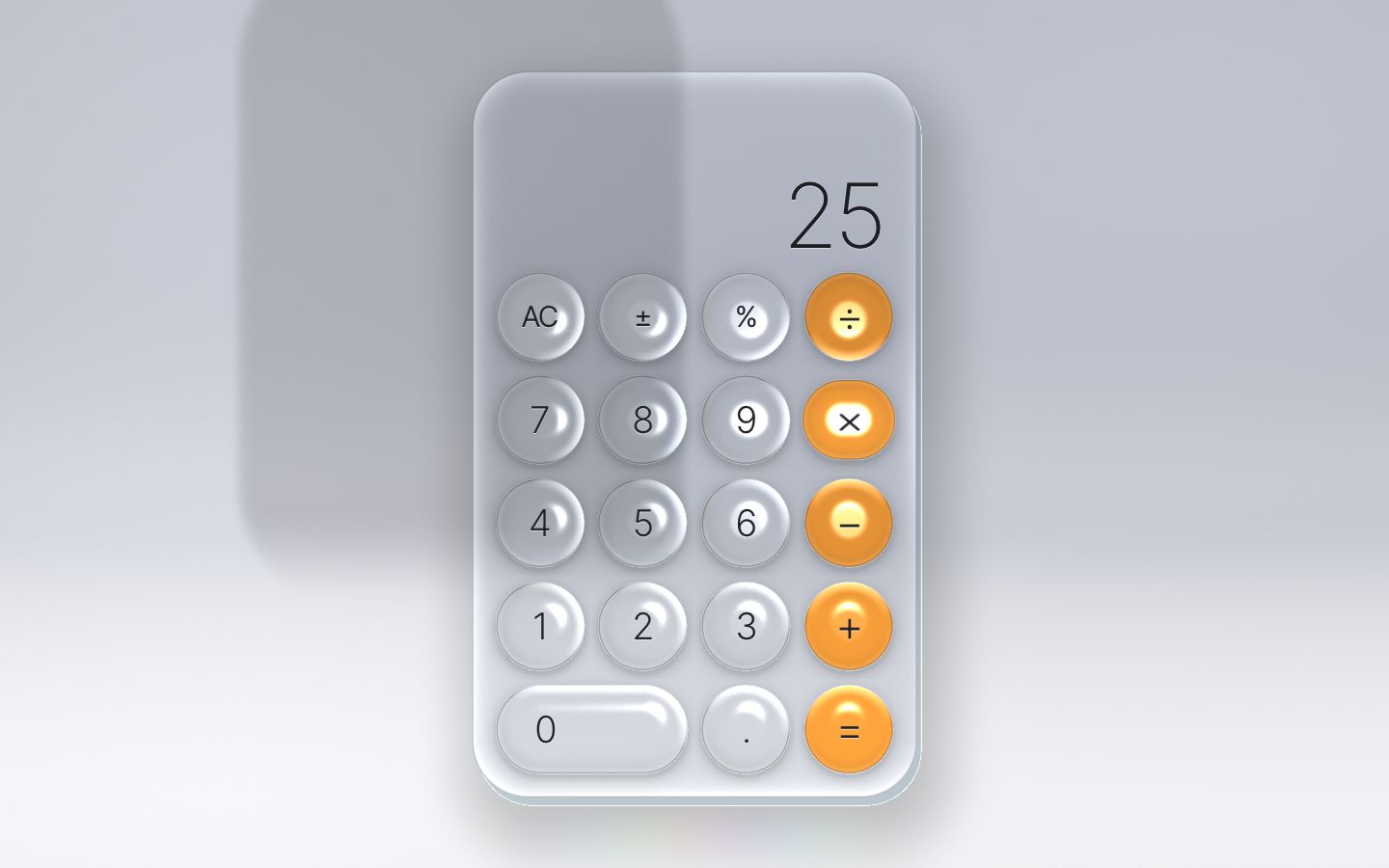
3 · The keys become lenses
Things start to move here, so they need springs. spring.js is a mass on a spring with a damper, stepped
in fixed slices of 1/240 s, so it moves the same on a 60 Hz and a 120 Hz screen. Changing the target never jumps the
value: an interrupted animation just bends towards the new target.
// A spring, written from scratch: a mass on a spring with a damper.
//   acceleration = stiffness × (target − value) − damping × velocity
// It is stepped in small fixed slices (1/240 s), so it moves the same on a 60 Hz and a 120 Hz screen.
// Changing the target never moves the value: an interrupted animation just bends towards the new target.
class Spring {
  constructor(value = 0, { stiffness = 170, damping = 26 } = {}) {
    this.value = value;
    this.target = value;
    this.velocity = 0;
    this.stiffness = stiffness;
    this.damping = damping;
  }

  set(options) { Object.assign(this, options); return this; }

  step(dt) {
    const slice = 1 / 240;
    for (let t = dt; t > 0; t -= slice) {
      const h = Math.min(slice, t);
      const acceleration = this.stiffness * (this.target - this.value) - this.damping * this.velocity;
      this.velocity += acceleration * h;
      this.value += this.velocity * h;
    }
    return this.value;
  }

  resting(epsilon = 0.01) {
    return Math.abs(this.target - this.value) < epsilon && Math.abs(this.velocity) < epsilon * 10;
  }
}
Under prefers-reduced-motion every spring is critically damped: it still arrives, it just never
overshoots.
// a spring with a little bounce, or none at all under reduced motion
const spring = (stiffness, damping) => ({ stiffness, damping: calm ? 2 * Math.sqrt(stiffness) : damping });
const critical = (stiffness) => ({ stiffness, damping: 2 * Math.sqrt(stiffness) });
Each key gets two springs: the press (stiffness 900, damping 20, so it squashes and wobbles back) and the hover (critically damped). A full press widens the lens 4.5 % and flattens it 7.5 %.
const SQUASH = { x: 0.045, y: 0.075 };                         // a full press widens a lens 4.5 % and flattens it 7.5 %

// each key: its button, its name for the engine, its block and cell, its kind of glass, its springs — the press
// (squash, with a wobble) and the hover (a little brighter) — and its rectangle in the slab's coordinates (lx, ly,
// hw, hh)
const keysEl = $('.keys');
const keys = Keypad.build(keysEl).map((k) => Object.assign(k, {
  press: new Spring(0, spring(900, 20)),
  hover: new Spring(0, critical(260)),
  writer: transformWriter(k.el),
  held: false, upAt: 0, shown: false,
  lx: 0, ly: 0, hw: 0, hh: 0,
}));
The shader has to know the keys. Each key's rectangle (in the slab's own coordinates), its corner radius, press,
kind and hover go into two uniform arrays of vec4, filled in place every frame (no allocation).
const n = Math.min(MAX_KEYS, f.keys.length);
for (let i = 0; i < n; i++) {
  const k = f.keys[i], j = i * 4;
  KA[j] = k.cx; KA[j + 1] = k.cy; KA[j + 2] = k.hx; KA[j + 3] = k.hy;
  KB[j] = k.r; KB[j + 1] = k.press; KB[j + 2] = k.kind; KB[j + 3] = k.hover;
}
gl.uniform4fv(loc.uKA, KA, 0, n * 4 || 4);
gl.uniform4fv(loc.uKB, KB, 0, n * 4 || 4);
for (let b = 0; b < f.blocks.length; b++) {               // a block with no keys is switched off (one block until stage 7)
  const g = f.blocks[b], on = n > 0 && g.cols > 0;
  BLOCK[b * 4] = g.x0; BLOCK[b * 4 + 1] = g.y0; BLOCK[b * 4 + 2] = g.pitchX; BLOCK[b * 4 + 3] = g.pitchY;
  BLOCK_N[b * 2] = on ? g.cols : 0; BLOCK_N[b * 2 + 1] = on ? g.rows : 0;
}
gl.uniform4fv(loc.uBlock, BLOCK);
gl.uniform2iv(loc.uBlockN, BLOCK_N);
gl.uniform2i(loc.uBase, 0, base);
gl.uniform4iv(loc.uCells, CELLS);
The obvious shader tests every key at every pixel. With 19 keys that is 19 rounded-rectangle tests per slab pixel,
and 19 more for the shadow between them; with the scientific keypad (stage 7) it would be 49. But the keys sit in a
regular grid, so a pixel can find the only key that can cover it from its cell: subtract the grid's
corner, divide by the pitch, floor. measure() reads the grid from three corner keys, and a table says
which key fills each cell (the wide 0 fills two).
// the block's grid, from its three corner keys: where its first cell starts, and the pitch from cell to cell
for (const b of blocks) {
  const [k00, k01, k10] = b.corner, g = b.now;
  g.pitchX = k01.lx - k00.lx; g.pitchY = k10.ly - k00.ly;
  g.x0 = k00.lx - g.pitchX / 2; g.y0 = k00.ly - g.pitchY / 2;
  g.cols = b.cols; g.rows = b.rows;
}// which key fills each cell of each block (a wide key fills two): fixed, whatever the layout
const cellsOf = (b) => {
const out = [];
for (let r = 0; r < b.rows; r++) for (let c = 0; c < b.cols; c++) out.push(keys.findIndex((k) => k.block === b.name && k.row === r && c >= k.col && c < k.col + k.span));
return out;
};// the key blocks: which key sits in a cell (a point outside a block takes the block's nearest edge cell)
ivec2 cellOf(int b, vec2 q, float shift) { return ivec2(floor((q - uBlock[b].xy) / uBlock[b].zw - shift)); }
int keyIn(int b, ivec2 cell) {
cell = clamp(cell, ivec2(0), uBlockN[b] - 1);
int i = uBase[b] + cell.y * uBlockN[b].x + cell.x;
return uCells[i >> 2][i & 3];
}
float keyDistance(vec2 q, int k) { return sdRR(q - uKA[k].xy, uKA[k].zw, uKB[k].x); }
// how far a point is outside a block's grid (0 inside it)
float outside(int b, vec2 q) {
vec2 size = vec2(uBlockN[b]) * uBlock[b].zw;
vec2 d = max(uBlock[b].xy - q, q - uBlock[b].xy - size);
return max(max(d.x, d.y), 0.0);
}
const float SHADOW_REACH = 30.0; // beyond this the keys' contact shadow is below 1/1000
// the key under a point: in each block only the key of the point's own cell can reach it
int keyAt(vec2 q, out float kd) {
int best = -1; kd = 1e5;
for (int b = 0; b < 2; b++) {
if (uBlockN[b].x == 0 || outside(b, q) > 0.0) continue;
int k = keyIn(b, cellOf(b, q, 0.0));
if (k < 0) continue;
float d = keyDistance(q, k);
if (d < kd) { kd = d; best = k; }
}
return best;
}The keys' soft contact shadow, a little below each key, needs the keys around a gap pixel. Only the 2 × 2 cells nearest to it can reach it: a key further away is more than half a cell off, where the shadow has faded to nothing. So the shadow costs four lookups, whatever the number of keys.
// the keys' soft contact shadow on the slab, a little below each. Only the four cells around a point can reach it:
// a key further away is more than half a cell off, where the shadow has faded to nothing
float keyShadow(vec2 q) {
  float ks = 1e5;
  for (int b = 0; b < 2; b++) {
    if (uBlockN[b].x == 0 || outside(b, q) > SHADOW_REACH) continue;
    ivec2 c0 = cellOf(b, q, 0.5);
    for (int j = 0; j < 4; j++) {
      int k = keyIn(b, c0 + ivec2(j & 1, j >> 1));
      if (k >= 0) ks = min(ks, keyDistance(q - vec2(0.0, 4.0), k));
    }
  }
  return 1.0 - 0.16 * exp(-max(ks, 0.0) / 6.0);
}
A lens is the slab trick one level down: a key looks at the slab through its own shape, and the slab looks at the studio. The rim pulls the outside in, the middle magnifies (more when pressed), and near the rim red and blue look a little further and nearer than green.
// A lens looks at the slab through its own shape: the rim pulls the outside in, the middle magnifies, and near the
// rim, where the bend is strong, red and blue look a little further and nearer than green (the colour split).
struct Lens { vec2 at; vec2 off; vec2 n; float e; float split; };
Lens lensGeometry(vec2 q, vec4 A, vec4 B, float d) {
  Lens l;
  vec2 kq = q - A.xy;
  float press = B.y;
  float bev = min(A.z, A.w) * 0.70;                           // a bubble is curved almost to its middle
  l.e = 1.0 - clamp(-d / bev, 0.0, 1.0);                      // 1 at the edge, 0 where it is flat
  l.n = nRR(kq, A.zw, B.x);
  l.off = l.n * pow(l.e, 2.0) * bev * 1.35 * (1.0 + 0.8 * press);   // the rim pulls the outside in
  l.at = q - kq * (0.22 + 0.12 * press);                      // the middle magnifies
  l.split = l.e > 0.32 ? smoothstep(0.32, 0.5, l.e) : 0.0;    // the middle takes one sample, the rim three
  return l;
}
Inside the slab a pixel may need the slab at up to four points: one through the middle of a lens, three near its
rim (one per colour), and the bare slab where the lens's edge is antialiased. They are gathered first and the slab is
evaluated in one loop, so the program holds one copy of slab() instead of five. That kept it small and
the GPU busy; it was one of the changes that halved the shader's cost (stage 8).
// A pixel sees the slab at up to four points: through a lens one point (three near its rim, one per colour), and the
// slab itself where the lens's edge is antialiased. They are gathered first and the slab is evaluated in one loop:
// one copy of slab() in the program instead of five keeps the shader small and the GPU busy.
vec3 inside(vec2 q, float d, vec3 Lq) {
  float kd;
  int k = keyAt(q, kd);
  bool onKey = kd < 1.0;
  Lens l;
  vec2 base = q, off = vec2(0.0);
  float w = 0.0;
  int n = 1;
  bool edge = false;                                           // the lens's antialiased edge also needs the bare slab
  if (onKey) {
    l = lensGeometry(q, uKA[k], uKB[k], kd);
    base = l.at; off = l.off; w = l.split;
    if (l.e > 0.32) n = 3;
    edge = kd > -1.0;
  }
  // sample i: 0 green (and all three in the middle), 1 red, 2 blue; the last one, on an edge, the bare slab
  vec3 c = vec3(0.0), bare = vec3(0.0);
  for (int i = 0; i < 4; i++) {
    if (i > n || (i == n && !edge)) break;
    vec2 at = i == n ? q : base + off * (i == 1 ? 0.88 : i == 2 ? 1.14 : 1.0);
    vec3 s = slab(at);
    if (i == n) bare = s;
    else c += s * (i == 0 ? vec3(1.0 - w, 1.0, 1.0 - w) : i == 1 ? vec3(w, 0.0, 0.0) : vec3(0.0, 0.0, w));
  }
  if (onKey) {
    vec3 lc = shadeLens(c, q, uKB[k], kd, Lq, l);
    c = mix(edge ? bare : lc, lc, clamp(0.5 - kd * gPx, 0.0, 1.0));
  } else c *= keyShadow(q);
The HTML label sits on the lens and must squash with it. A pointer press puts the key down at once; the click does
the typing, so Enter and Space on a focused key, and screen readers, work the same way. preventDefault()
on the press keeps the focus where it was, so the keyboard keeps typing into the calculator instead of re-pressing the
key you clicked; Tab still reaches every key.
// pointer: the key goes down under the finger at once, the press happens on click (so Enter and Space on a focused
// key, and screen readers, work the same way). A pointer press does not take the focus: the keyboard keeps typing
// into the calculator instead of re-pressing the last key clicked. Tab still reaches every key.
for (const key of keys) {
  key.el.addEventListener('pointerdown', (e) => {
    if (e.button !== 0) return;
    e.preventDefault();
    key.held = true; key.press.target = 1; wake();
  });
  const up = () => { key.held = false; };
  key.el.addEventListener('pointerup', up);
  key.el.addEventListener('pointercancel', () => { up(); key.press.target = 0; wake(); });
  key.el.addEventListener('pointerleave', () => { up(); key.hover.target = 0; wake(); });
  key.el.addEventListener('pointerenter', (e) => { if (e.pointerType === 'mouse') { key.hover.target = 1; wake(); } });
  key.el.addEventListener('click', () => pressKey(key));
}for (let i = 0; i < keys.length; i++) {
const key = keys[i], o = s.keys[i], p = key.press.value;
const sx = calm ? 1 : 1 + SQUASH.x * p, sy = calm ? 1 : 1 - SQUASH.y * p; // a press squashes the lens (and wobbles back)
o.cx = key.lx; o.cy = key.ly; o.hx = key.hw * sx; o.hy = key.hh * sy;
o.r = Math.min(o.hx, o.hy);
o.press = clamp(p, 0, 1.3); o.hover = key.hover.value;
o.kind = key.kind;
}The light the rims catch now follows the pointer, on two critically damped springs, and goes back above the glass when the pointer leaves.
// the light the rims catch: it follows the pointer, and waits above the glass's top-left when there is none
const LIGHT_HEIGHT = 260;
const light = { x: new Spring(0, critical(90)), y: new Spring(0, critical(90)), set: false };
addEventListener('pointermove', (e) => {
  light.x.target = e.pageX; light.y.target = e.pageY;
  if (!light.set) { light.set = true; light.x.value = e.pageX; light.y.value = e.pageY; }
  wake();
}, { passive: true });
function restLight() { if (!light.set) { light.x.target = body.cx - body.hx * 1.2; light.y.target = body.cy - body.hy * 1.1; } }
document.addEventListener('pointerleave', () => { light.set = false; restLight(); wake(); });
The loop arrives: every frame it lets go of the keys that are no longer held, steps the springs, writes each label's squash and draws the glass. (Stage 8 makes it draw every other frame at rest, and sleep under reduced motion.) Until stage 5 the display only shows the digits keyed in.
function frame(now) {
  const dt = Math.min(0.05, Math.max(0, (now - last) / 1000));
  last = now;
  const t = studio.now();
  for (const key of keys) {
    if (key.upAt && !key.held && t >= key.upAt) { key.press.target = 0; key.upAt = 0; }
    if (!key.held && !key.upAt && key.press.target === 1) key.press.target = 0;
    key.press.step(dt); key.hover.step(dt);
  }
  light.x.step(dt); light.y.step(dt);

  // the HTML follows the glass: each key's squash
  for (const key of keys) {
    if (!key.shown) continue;
    const p = calm || Math.abs(key.press.value) < 0.002 ? 0 : key.press.value;
    key.writer.set(0, 0, 0, 1 + SQUASH.x * p, 1 - SQUASH.y * p);
  }

  if (glass) paint(t / 1000);
  requestAnimationFrame(frame);
}
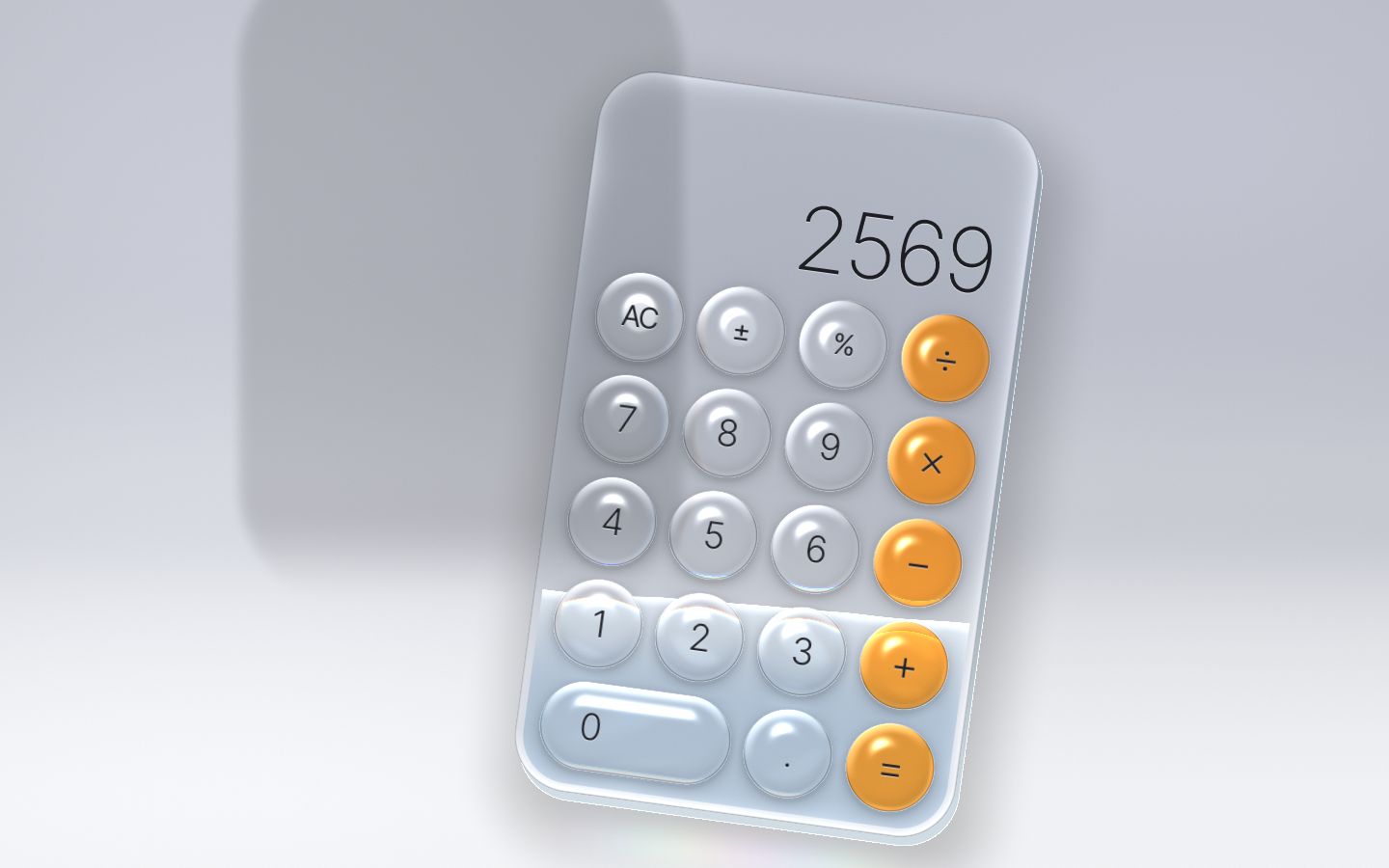
4 · The liquid, and dragging the glass
The liquid is a row of 64 columns, each a little spring: a height field. Every column is pulled back to where the surface should be (stiffness 34) and towards its two neighbours (2,600). That pull between neighbours carries a splash along the surface as a wave; the walls reflect it. It is stepped in fixed 1/240 s slices like the springs, and after every slice the average height is put back, so the liquid never gains or loses volume.
function slice(h) {
  const mid = (x0 + x1) / 2;
  let sum = 0;
  for (let i = 0; i < cols; i++) {
    const target = slope * (xAt(i) - mid);
    const l = u[i > 0 ? i - 1 : 1], r = u[i < cols - 1 ? i + 1 : cols - 2];   // the walls reflect a wave back
    const a = LEVEL * (target - u[i]) + WAVE * (l + r - 2 * u[i]) - DAMP * v[i];
    v[i] += a * h;
  }
  for (let i = 0; i < cols; i++) { u[i] += v[i] * h; sum += u[i]; }
  const mean = sum / cols;                                    // keep the volume
  for (let i = 0; i < cols; i++) u[i] -= mean;
}
Three ways to disturb it: a kick pushes the columns under a point down (a drop falling in), a slosh gives the whole surface a tilted velocity (one side up, the other down), and fizz releases bubbles from the bottom, at most twelve, seeded so the page draws the same bubbles every time. Bubbles rise, wobble, and pop at the surface with a tiny dent.
// a drop falling in at x: the columns under it are pushed down (a negative amount lifts them)
function kick(x, amount, width = 22) {
  if (calm) return;
  for (let i = 0; i < cols; i++) {
    const k = (xAt(i) - x) / width;
    v[i] += amount * Math.exp(-k * k);
  }
}
// the whole surface rocks: one side up, the other down (a sideways shove of the glass)
function slosh(amount) {
  if (calm) return;
  const mid = (x0 + x1) / 2, half = (x1 - x0) / 2;
  for (let i = 0; i < cols; i++) v[i] += amount * ((xAt(i) - mid) / half);
}
In app.js each key answers in its own way: a digit drops in under its key, + and × rock it one way, −
and ÷ the other, = splashes and fizzes. The level is the number's size: one digit is one ninth of the glass, from the
bottom row at 0 to the top row at 999,999,999.
// one digit is one ninth of the glass: 0 covers the bottom row, 999,999,999 fills it to the top row
const levelFor = (v) => (Number.isFinite(v) ? 0.13 + 0.82 * Math.pow(clamp(Math.log10(1 + Math.abs(v)) / 9, 0, 1), 1.2) : 0);
// the level rocks slowly into place; under reduced motion it settles quickly and without overshoot, and the loop sleeps
const level = new Spring(levelFor(0), calm ? critical(160) : spring(26, 9));// how the liquid answers a key: digits drop in, + and × rock it one way, − and ÷ the other, = splashes and fizzes
function react(name, key) {
const x = key ? key.lx : 0;
const value = parseFloat(typed) || 0; // stage 5: the engine's live result
if (/^[0-9]$/.test(name)) { liquid.kick(x, 150); liquid.fizz(x, 1, 10); }
else if (name === '.') liquid.kick(x, 70, 14);
else if (name === '=') { liquid.kick(0, 260, 60); liquid.fizz(0, 9, 120); }
else if (name === '+' || name === '×') liquid.slosh(80);
else if (name === '−' || name === '÷') liquid.slosh(-80);
else if (name === '±') liquid.slosh(140);
else if (name === 'clear') liquid.slosh(-130);
level.target = levelFor(value);
}The glass can be dragged anywhere but on a key. It follows the pointer on a rubber band (at most 150 px across and 110 px down), leans into the drag, and springs home when you let go. The liquid feels both: the lean tilts the line the surface is pulled to, and the glass's sideways acceleration sloshes it.
// drag the slab (anywhere but a key, a tool or the number): it follows on a rubber band and springs home; its sideways
// acceleration and its lean are what make the liquid slosh
const gx = new Spring(0, spring(150, 10)), gy = new Spring(0, spring(150, 12)), tilt = new Spring(0, spring(120, 9));
const slab = transformWriter(calcEl);
const RUBBER = { x: 150, y: 110 };                           // how far the glass can be pulled, px
const rubber = (v, max) => Math.sign(v) * max * (1 - Math.exp(-Math.abs(v) / max));
let drag = null;
calcEl.addEventListener('pointerdown', (e) => {
  if (calm || e.button !== 0 || e.target.closest('.key, .tool, .num')) return;
  drag = { x: e.clientX, y: e.clientY };
  calcEl.setPointerCapture(e.pointerId);
  calcEl.classList.add('is-dragging');
  gx.set(critical(900)); gy.set(critical(900));                // while held, it follows the hand closely
  wake();
});
calcEl.addEventListener('pointermove', (e) => {
  if (!drag) return;
  gx.target = rubber(e.clientX - drag.x, RUBBER.x);
  gy.target = rubber(e.clientY - drag.y, RUBBER.y);
  wake();
});
const letGo = () => {
  if (!drag) return;
  drag = null;
  calcEl.classList.remove('is-dragging');
  gx.set(spring(150, 10)); gy.set(spring(150, 12));
  gx.target = gy.target = 0;
  wake();
};
calcEl.addEventListener('pointerup', letGo);
calcEl.addEventListener('pointercancel', letGo);gx.step(dt); gy.step(dt);
tilt.target = clamp(gx.velocity * 0.00018 + gx.value * 0.0011, -0.24, 0.24); // it leans into the drag
tilt.step(dt);
level.step(dt);
light.x.step(dt); light.y.step(dt);
// the liquid: its resting height, the glass's lean, and the shove of the glass moving sideways
liquid.rest = restFor(level.value);
liquid.slope = -Math.tan(tilt.value);
if (dt > 0) { liquid.slosh(clamp((gx.velocity - prevVx) * 0.22, -160, 160)); prevVx = gx.velocity; }
liquid.step(dt);The 64 heights go to the shader as 16 vec4s, and a Catmull-Rom curve through them gives a smooth
surface between the columns.
float column(int i) { return uLiq[i >> 2][i & 3]; }
float surfaceAt(float x) {                                    // Catmull-Rom through the columns: a smooth surface
  float s = clamp((x - uLiqX.x) / (uLiqX.y - uLiqX.x), 0.0, 1.0) * float(${COLS - 1});
  int i = int(floor(s)); float f = s - float(i);
  float p0 = column(max(i - 1, 0)), p1 = column(i), p2 = column(min(i + 1, ${COLS - 1})), p3 = column(min(i + 2, ${COLS - 1}));
  return p1 + 0.5 * f * (p2 - p0 + f * (2.0 * p0 - 5.0 * p1 + 4.0 * p2 - p3 + f * (3.0 * (p1 - p2) + p3 - p0)));
}
The liquid lives in a tank 8 px inside the slab's wall. Its colour runs from the surface to the deep over 110 px, it has a bright meniscus, a slow shimmer that is brightest near the surface, and each bubble is a bright rim around a faint fill.
float din = d + 8.0;                                        // the tank's wall is 8 px thick
if (din < 0.0) {
  float wall = smoothstep(0.0, -1.5, din);
  float sy = uLiqOn > 0.0 ? surfaceAt(q.x) : uBodyH.y;
  float depth = q.y - sy;
  if (uLiqOn > 0.0 && depth > -1.0) c = liquid(c, q, depth, wall);
}vec3 liquid(vec3 c, vec2 q, float depth, float wall) {
float a = clamp(depth * gPx + 0.5, 0.0, 1.0) * wall;
vec3 lc = mix(uLiqTop, uLiqDeep, smoothstep(0.0, 110.0, depth));
lc = mix(lc, uLiqTop * 1.2 + 0.08, (1.0 - smoothstep(3.0, 12.0, depth)) * 0.55);
// a slow shimmer, brightest near the surface
float k = sin(q.x * 0.045 + uTime * 1.3 + sin(q.y * 0.03 - uTime * 0.9) * 2.0) * sin(q.y * 0.05 - uTime * 0.7 + q.x * 0.01);
lc *= 0.93 + 0.16 * smoothstep(0.2, 1.0, k) * exp(-depth / 140.0);
lc += vec3(1.0) * exp(-depth * 1.1) * 0.6 + uLiqTop * exp(-depth / 14.0) * 0.25;
for (int j = 0; j < uBubN; j++) { // each bubble: a bright rim and a faint fill
vec4 b = uBub[j];
vec2 rel = abs(q - b.xy);
if (max(rel.x, rel.y) > b.z + 1.5) continue; // too far to touch this pixel
float bd = length(q - b.xy) - b.z;
lc += vec3(1.0) * (1.0 - smoothstep(0.0, 1.3, abs(bd))) * 0.6 * b.w + vec3(0.7, 0.95, 1.0) * (1.0 - smoothstep(-0.5, 0.5, bd)) * 0.12 * b.w;
}
return mix(c, lc, a * uToneK.y * uLiqOn);
}
5 · The expression engine
Now the calculator gets a brain. engine.js works like a phone calculator in expression mode: the whole
sum is kept as you typed it, the result is previewed live, and = commits it. There is no eval and no
new Function: every number and operator goes through tables.
// It works like a modern phone calculator in expression mode: the whole sum is kept and shown as you typed it
// (12 + 7 × 3 − 4 ÷ 2), the result is previewed live while you type, and = commits it. The sum is a list of tokens;
// a small Pratt parser turns the tokens into a tree and the tree is evaluated with the usual precedence:
//
//   postfix   x!  x²  x³  %          binds tightest
//   power     ^  yˣ  ʸ√  logᵧ          right to left: 2^3^2 is 2^9
//   unary −                          so −2² is −4, and (−2)² is 4
//   × ÷ and implicit ×               2π, 3(4 + 5), (1 + 2)(3 + 4)
//   + −                              loosest
//
// No eval, no new Function: every number and operator goes through the tables below.
The sum is a list of tokens. A number being typed stays text ("12.50" keeps its zero), a function carries its
own open bracket (sin( goes in and out as one), and a finished value (a result, memory, Rand) is a number.
Keys push tokens; a pasted sum or a history row goes through tokenize(), which reads text into the same
tokens.
// token types
const NUM = 'num', VAL = 'val', CONST = 'const', OP = 'op', NEG = 'neg', LP = 'lp', FN = 'fn', RP = 'rp', POST = 'post';
const tok = {
  num: (text) => ({ type: NUM, text }),                       // a number being typed, as text: "12.50", "2e-3"
  val: (value) => ({ type: VAL, value: value === 0 ? 0 : value }),   // a finished number: a result, memory, rand
  konst: (name) => ({ type: CONST, name }),                   // π or e
  op: (op) => ({ type: OP, op }),
  neg: () => ({ type: NEG }),
  lp: () => ({ type: LP }),
  fn: (name) => ({ type: FN, name }),                         // a function together with its own open bracket: sin(
  rp: () => ({ type: RP }),
  post: (op) => ({ type: POST, op }),
};// binary operators: what they look like in the expression, how tightly they bind, what they do, how they are said
const BINARY = {
'+': { label: ' + ', bp: BP.ADD, apply: (a, b) => a + b, word: 'plus' },
'−': { label: ` ${MINUS} `, bp: BP.ADD, apply: (a, b) => a - b, word: 'minus' },
'×': { label: ' × ', bp: BP.MUL, apply: (a, b) => a * b, word: 'times' },
'÷': { label: ' ÷ ', bp: BP.MUL, apply: divide, word: 'divided by' },
'^': { label: '^', bp: BP.POW, right: true, apply: power, word: 'to the power of' },
'yˣ': { label: ' yˣ ', bp: BP.POW, right: true, apply: (a, b) => power(b, a), word: 'as the power of' },
'ʸ√': { label: ' ʸ√ ', bp: BP.POW, right: true, apply: nthRoot, word: 'root' },
'logᵧ': { label: ' logᵧ ', bp: BP.POW, right: true, apply: logBase, word: 'log base' },
};A Pratt parser turns the tokens into a tree. expr(minBp) reads an operand, then keeps taking
operators that bind tighter than minBp. That one rule gives the whole precedence table. A right-to-left
operator passes bp − 1 to its right side, so 2^3^2 is 2^9. Unary minus binds at
25, between × and ^, so −2² is −4. Two operands side by side multiply, so 2π and
3(4 + 5) just work.
function parse(tokens) {
  let i = 0;
  const next = () => tokens[i];
  function close() {
    if (!next() || next().type !== RP) fail('syntax');
    i++;
  }
  function leaf(v) { return { k: 'num', v: checked(v) }; }
  function operand() {
    const t = tokens[i++];
    if (!t) fail('syntax');
    switch (t.type) {
      case NUM: return leaf(numberOf(t.text));
      case VAL: return leaf(t.value);
      case CONST: return leaf(CONSTANTS[t.name]);
      case NEG: return { k: 'neg', a: expr(BP.NEG) };
      case LP: { const inner = expr(0); close(); return inner; }
      case FN: {
        const inner = expr(0);
        close();
        return { k: 'fn', name: t.name, a: FUNCS[t.name].power ? climb(inner, BP.POW - 1) : inner };
      }
      default: return fail('syntax');
    }
  }
  const expr = (minBp) => climb(operand(), minBp);
  // keep taking operators that bind tighter than minBp; two operands side by side multiply (2π, 3(4 + 5))
  function climb(left, minBp) {
    for (let t = next(); t; t = next()) {
      if (t.type === POST) {
        if (BP.POST <= minBp) break;
        i++;
        left = { k: 'post', op: t.op, a: left };
        continue;
      }
      const implicit = startsOperand(t);
      if (t.type !== OP && !implicit) break;
      const op = implicit ? '×' : t.op;
      const { bp, right } = BINARY[op];
      if (bp <= minBp) break;
      if (!implicit) i++;
      left = { k: 'bin', op, a: left, b: expr(right ? bp - 1 : bp) };
    }
    return left;
  }
  const tree = expr(0);
  if (i < tokens.length) fail('syntax');
  return tree;
}
Evaluating the tree is a walk. Percent is the one rule that needs context: next to + or − it is a share of the left side (50 + 10 % is 55), next to × or ÷ it is just a hundredth (50 × 10 % is 5).
function evaluate(node, angle) {
  switch (node.k) {
    case 'num': return node.v;
    case 'neg': return -evaluate(node.a, angle);
    case 'post': return checked(POSTFIX[node.op].apply(evaluate(node.a, angle)));
    case 'fn': return checked(FUNCS[node.name].apply(evaluate(node.a, angle), angle));
    default: return binary(node, angle).value;
  }
}
// a + b% is a share of a: 50 + 10% is 55 and 200 − 10% is 180; next to × or ÷ it is just b/100 (50 × 10% is 5)
function binary(node, angle) {
  const a = evaluate(node.a, angle);
  const share = (node.op === '+' || node.op === '−') && node.b.k === 'post' && node.b.op === '%';
  const b = share ? (a * evaluate(node.b.a, angle)) / 100 : evaluate(node.b, angle);
  return { a, b, value: checked(BINARY[node.op].apply(a, b)) };
}
Floating point is tidied where people would notice. Results are rounded to 15 significant digits, so 0.1 + 0.2 is 0.3. In degrees, the zeros and poles of the trig functions are exact: sin 180° is 0, not 1.2 × 10⁻¹⁶, and tan 90° is an error.
// in degrees the zeros and the poles are exact: sin 180° is 0, tan 90° has no value
function sinOf(x, angle) {
  if (angle === 'deg' && isMultiple(x, 180)) return 0;
  return snapZero(Math.sin(toRad(x, angle)));
}// a value for the display: grouped, at most 12 significant digits, scientific when too long. −0 is 0.
function format(value, opts = {}) {
const { maxChars = MAX_CHARS, digits = SHOWN_DIGITS, notation = 'e', grouping = true } = opts;
if (typeof value !== 'number' || !Number.isFinite(value)) return 'Error';
const rounded = Number(value.toPrecision(digits));
if (rounded === 0) return '0';
const abs = Math.abs(rounded);
const exp = Math.floor(Math.log10(abs));
if (exp < digits && exp >= MIN_PLAIN_EXPONENT) {
const fixed = trimZeros(abs.toFixed(Math.min(100, Math.max(0, digits - 1 - exp))));
const [int, frac] = fixed.split('.');
const plain = (rounded < 0 ? MINUS : '') + (grouping ? group(int) : int) + (frac ? '.' + frac : '');
if (plain.length <= maxChars) return plain;
}
return scientific(rounded, maxChars, digits, notation);
}The engine has its own test suite (188 tests under Node). These are the sums the stage checker types into the live page, key by key; every stage from 5 on passes them all:
| Typed | The big number | The line above it |
|---|---|---|
12+7*3-4/2= | 31 | 12 + 7 × 3 − 4 ÷ 2 = |
12+7*3 | 33 (live, before =) | 12 + 7 × 3 |
2+3*4= | 14 | 2 + 3 × 4 = |
100-10*2/4+6= | 101 | 100 − 10 × 2 ÷ 4 + 6 = |
(2+3)*4= | 20 | |
2*3=+4= | 10 (carries on from the result) | |
5-8= | −3 | |
0.1+0.2= | 0.3 | |
1/0= | Error | Cannot divide by zero |
123456789*987654321= | 1.21932631113e+17 | 123,456,789 × 987,654,321 = |
In app.js, press() hands a key to the engine, squashes its lens and lets the liquid answer.
The top-left key is ⌫ while you type and AC otherwise.
// press a key by name: the engine works it out, the glass squashes, the liquid answers, the display updates
function press(raw) {
  let name = raw === '⌫' || raw === 'back' ? 'back' : CalcEngine.normalizeKey(raw);
  if (name === 'clear') name = 'AC';                           // Escape, Delete, c: clear everything
  const before = ui.previewValue ?? ui.value;
  if (!engine.input(name)) { show(); return false; }
  const key = name === 'back' || name === 'AC' || name === 'C' ? clearKey : byName.get(name);
  if (key && key.shown) { key.press.target = 1; key.upAt = studio.now() + PRESS_HOLD_MS; }   // let go by itself unless a finger holds it
  show();
  react(name, key && key.shown ? key : null, before);
  wake();
  return true;
}
// the on-screen top-left key is ⌫ while typing and AC otherwise
const pressKey = (key) => press(key === clearKey ? (typing ? 'back' : 'AC') : key.name);
The big number is the live result while you type and the answer after =; the line above it is the whole sum, hidden
while it is only the number below it. The operator the sum ends on is lit (aria-pressed), and the screen
reader hears the sum in words through a polite live region.
const bigNumber = (st) => (st.error ? 'Error' : st.done ? st.display : st.preview || st.display);
function show() {
  const st = (ui = engine.state());
  typing = !st.done && !st.error && st.expression.trim() !== '';   // the top-left key is ⌫ while a sum is typed
  const end = st.expression.trim().slice(-1);
  litOp = !st.done && !st.error && OPS.includes(end) ? end : null;   // the operator the sum ends on waits, lit
  render();
  wake();
}
function render(refit = false) {
  const st = ui, big = bigNumber(st);
  if (setText(numEl, big) || refit) fitNumber();
  // the sum: hidden while it is only the number below it; the error's reason when there is one
  const sum = st.error ? st.errorMessage : !st.done && st.expression.trim() === big ? '' : st.expression;
  if (setText(exprText, sum) || refit) fitExpression();
  exprEl.classList.toggle('is-error', !!st.error);
  setText(saidEl, st.spoken);

  // the keys that say something about the state: the lit operator, and the ⌫/AC face (keypad.js)
  for (const key of keys) {
    if (key.kind !== KIND.op || key.name === '=') continue;
    const pressed = String(key.name === litOp);
    if (key.el.getAttribute('aria-pressed') !== pressed) key.el.setAttribute('aria-pressed', pressed);
  }
  Keypad.relabel(keysEl, keys, { typing });
}
The top-left key carries both faces from the start, laid out in the same grid cell. One attribute on the keypad says which shows, so switching between AC and ⌫ repaints one key and lays out nothing.
/* a key with two faces (AC and ⌫): both are laid out in the same cell, one attribute on the keypad shows one of
   them (keypad.js) — switching repaints the key and lays out nothing */
.key > .lbl { grid-area: 1 / 1; }
.lbl-b { opacity: 0; }
.keys[data-typing="true"] [data-face="typing"] .lbl-a { opacity: 0; }
.keys[data-typing="true"] [data-face="typing"] .lbl-b { opacity: 1; }
The keyboard works anywhere on the page: digits and operators, * and /, Enter for =,
Backspace, Escape for AC, ^ ! ( ). Enter on a focused button stays that button's.
// the keyboard, anywhere on the page (not while typing in a field, and Enter on a focused button stays that button's)
addEventListener('keydown', (e) => {
  if (e.metaKey || e.ctrlKey || e.altKey) return;              // Cmd/Ctrl+V arrives as a paste event
  const t = e.target;
  if (t.closest && t.closest('input, textarea, select, [contenteditable]')) return;
  if ((e.key === 'Enter' || e.key === ' ') && t.closest && t.closest('button, a')) return;
  const name = e.key === 'Escape' ? 'AC' : CalcEngine.normalizeKey(e.key);
  if (!CalcEngine.KEYS.includes(name) && name !== 'AC') return;
  e.preventDefault();
  if (e.repeat && name !== 'back') return;
  press(name);
});
The liquid now stands for the number: its height is the number's size, it turns coral below zero and grey on an error, each on its own critically damped spring.
// the liquid's colour: the tone's above zero, coral below, grey when it is an error
const liquidColour = (j, depth) => mix(mix(COLOUR.pos[depth][j], COLOUR.neg[depth][j], neg.value), COLOUR.err[depth][j], err.value);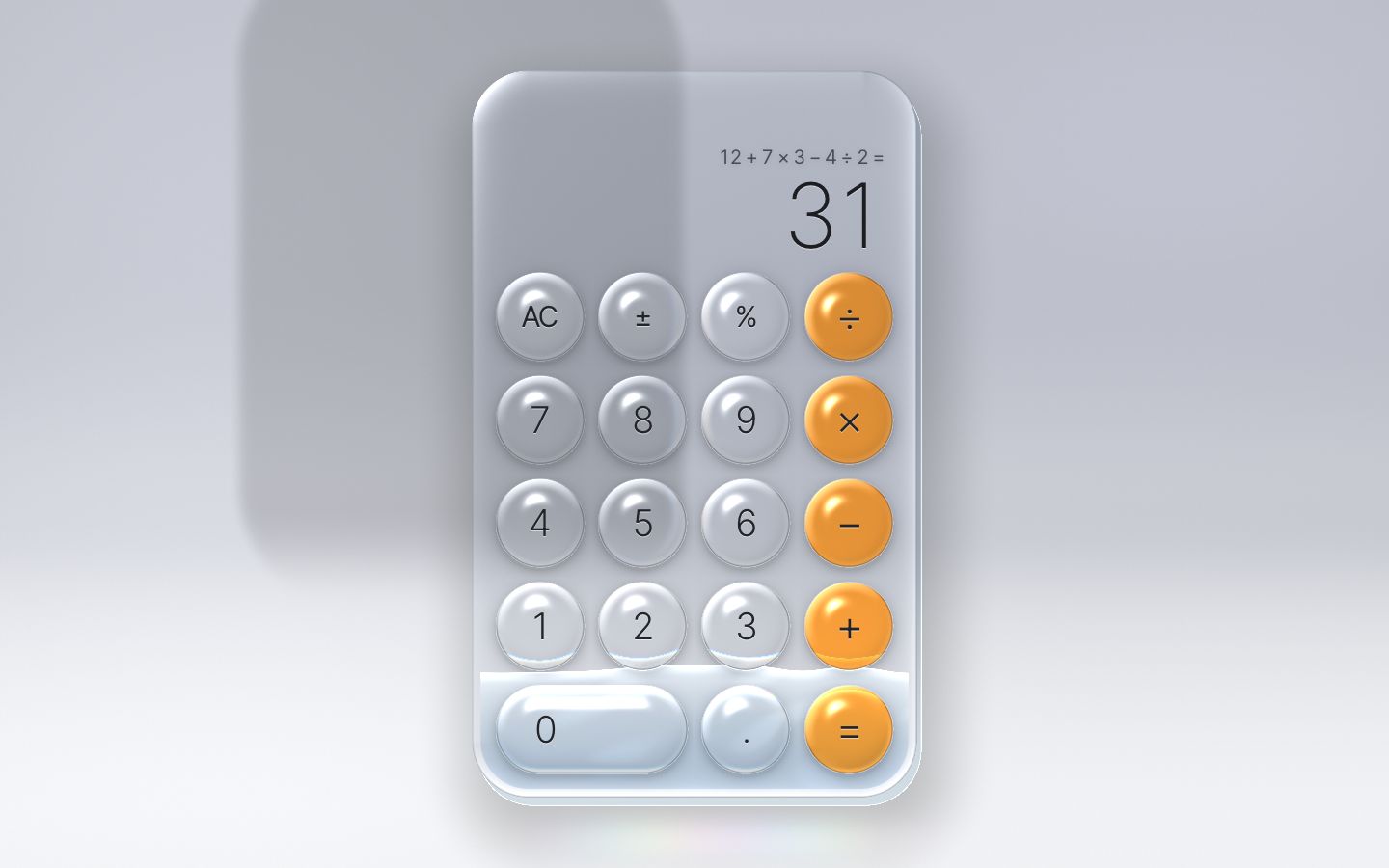
6 · The display, and the history tape
The number becomes a button. A tap copies it (a "Copied" toast says so), and a sideways swipe of more than 30 px deletes the last digit, as on a phone. Cmd/Ctrl+V pastes a number or a whole sum anywhere outside a text field.
// tap the number to copy it; swipe it sideways to delete the last digit (as on a phone)
const SWIPE_PX = 30;
let swipe = null, swiped = false;
numEl.addEventListener('pointerdown', (e) => { swipe = { x: e.clientX, y: e.clientY }; swiped = false; });
numEl.addEventListener('pointermove', (e) => {
  if (!swipe) return;
  const dx = e.clientX - swipe.x, dy = e.clientY - swipe.y;
  if (Math.abs(dx) > SWIPE_PX && Math.abs(dy) < SWIPE_PX) { swipe = null; swiped = true; press('back'); }
});
numEl.addEventListener('pointerup', () => { swipe = null; });
numEl.addEventListener('click', async () => {
  if (swiped) { swiped = false; return; }
  if (ui.error) return;
  try { await navigator.clipboard.writeText(PLAIN(bigNumber(ui))); toast('Copied'); } catch { toast('Copy is not allowed here'); }
});// paste a number or a whole sum (Cmd/Ctrl+V anywhere but a text field)
document.addEventListener('paste', (e) => {
if (e.target.closest && e.target.closest('input, textarea, [contenteditable]')) return;
const text = e.clipboardData && e.clipboardData.getData('text');
if (!text) return;
e.preventDefault();
const before = ui.previewValue ?? ui.value;
if (engine.paste(text)) { show(); react('paste', null, before); wake(); } else toast('That is not a number or a sum');
});history.js is a frosted glass panel that keeps every finished sum, newest first, at most 100 rows, in
localStorage (versioned, so a broken record is simply an empty tape). It is a list of real buttons: tap a
row to reuse its result, long-press it (or Shift+Enter) to reuse the whole sum, the arrow keys move between rows, Escape
closes it, and closing gives the focus back. On a phone it is a modal sheet from the bottom; on a wide screen it docks
beside the glass.
function add(entry) {
  const row = { expr: stripEquals(entry && entry.expr), value: entry && entry.value, at: (entry && entry.at) || Date.now() };
  if (!isRow(row) || !row.expr) return false;
  const top = rows[0];
  if (top && top.expr === row.expr && top.value === row.value) return false;   // the same sum twice in a row
  rows = [row, ...rows].slice(0, MAX_ROWS);
  current = 0;
  fresh = true;
  save(rows);
  render();
  return true;
}const tapeEl = $('.tape');
tape = CalcHistory.mount(tapeEl, {
tone: TONE_NAME,
onReuseResult(value) { const before = ui.value; if (engine.useResult(value)) { show(); react('reuse', null, before); wake(); } },
onReuseExpression(expr) { const before = ui.value; if (engine.useExpression(expr)) { show(); react('reuse', null, before); wake(); } },
});
historyBtn.setAttribute('aria-controls', tape.element.id);
historyBtn.addEventListener('click', () => tape.toggle());
// the tape also opens and closes itself (Esc, the scrim, reusing a row): follow it, and move the glass aside or home
new MutationObserver(() => {
const open = tape.isOpen();
historyBtn.setAttribute('aria-expanded', String(open));
setView(open ? viewOpen : null);
}).observe(tape.element, { attributes: true, attributeFilter: ['data-open'] });Opening the tape must not re-lay out the calculator: that would re-measure and re-shape every key. Instead the glass moves aside and shrinks as a whole, as a transform on the HTML and a scale in the shader, and the docked tape is placed once per layout. In the measured run, opening and closing it went from a 15–25 ms frame to a 0.1–0.9 ms task.
// ---- the view: the history tape opens without touching the layout ----
// Opening the tape never resizes the calculator (that would lay out and re-shape every key). The glass instead moves
// aside and shrinks as a whole — a compositor transform on the HTML and a scale in the shader — and the tape is placed
// beside where the glass will be, once per layout (placeTape). So opening and closing it costs no layout at all.
//   docked (wide screens)   the glass and the tape side by side, centred together
//   bottom sheet (phones)   the sheet covers the keys; the glass stays
const view = { s: 1, dx: 0, dy: 0 }, viewFrom = { s: 1, dx: 0, dy: 0 }, viewOpen = { s: 1, dx: 0, dy: 0 };
const viewMove = new Spring(1, spring(170, 22));               // 0 → 1: from where the glass was to where it goes
let viewTo = { s: 1, dx: 0, dy: 0 };
function placeTape() {
  const vw = html.clientWidth, st = getComputedStyle(stage);
  const room = vw - parseFloat(st.paddingLeft) - parseFloat(st.paddingRight);
  const W = 2 * body.hx, H = 2 * body.hy;
  viewOpen.s = 1; viewOpen.dx = 0; viewOpen.dy = 0;
  if (dockable.matches) {
    const tapeW = tapeWidth(vw);
    const s = Math.min(1, (room - tapeW - TAPE.gap) / W);
    const left = (vw - (W * s + TAPE.gap + tapeW)) / 2;        // the pair, centred
    viewOpen.s = s; viewOpen.dx = left + (W * s) / 2 - body.cx;
    const t = tapeEl.style, pr = page.getBoundingClientRect();   // the panel is fixed: screen coordinates
    t.setProperty('--tape-x', `${pr.left + left + W * s + TAPE.gap}px`);
    t.setProperty('--tape-y', `${pr.top + body.cy - (H * s) / 2}px`);
    t.setProperty('--tape-w', `${tapeW}px`);
    t.setProperty('--ch-dock-h', `${H * s}px`);
  }
  setView(tape && tape.isOpen() ? viewOpen : null, false);
}
In the shader the whole glass is evaluated in the slab's own units, so one number, uScale, shrinks the
slab, its keys and its liquid together.
vec2 toWorld(vec2 q) { return uBodyC + rot(uAngle) * (q * uScale); }

vec2 p = vec2(gl_FragCoord.x, uRes.y * uPx.y - gl_FragCoord.y) / uPx;
vec2 q = rot(-uAngle) * (p - uBodyC) / uScale;              // everything below is in the slab's own units
gPx = uPx.x * uScale;
float d = sdRR(q, uBodyH, uBodyR);
vec3 Lq = vec3(rot(-uAngle) * (uLight.xy - uBodyC), uLight.z) / uScale;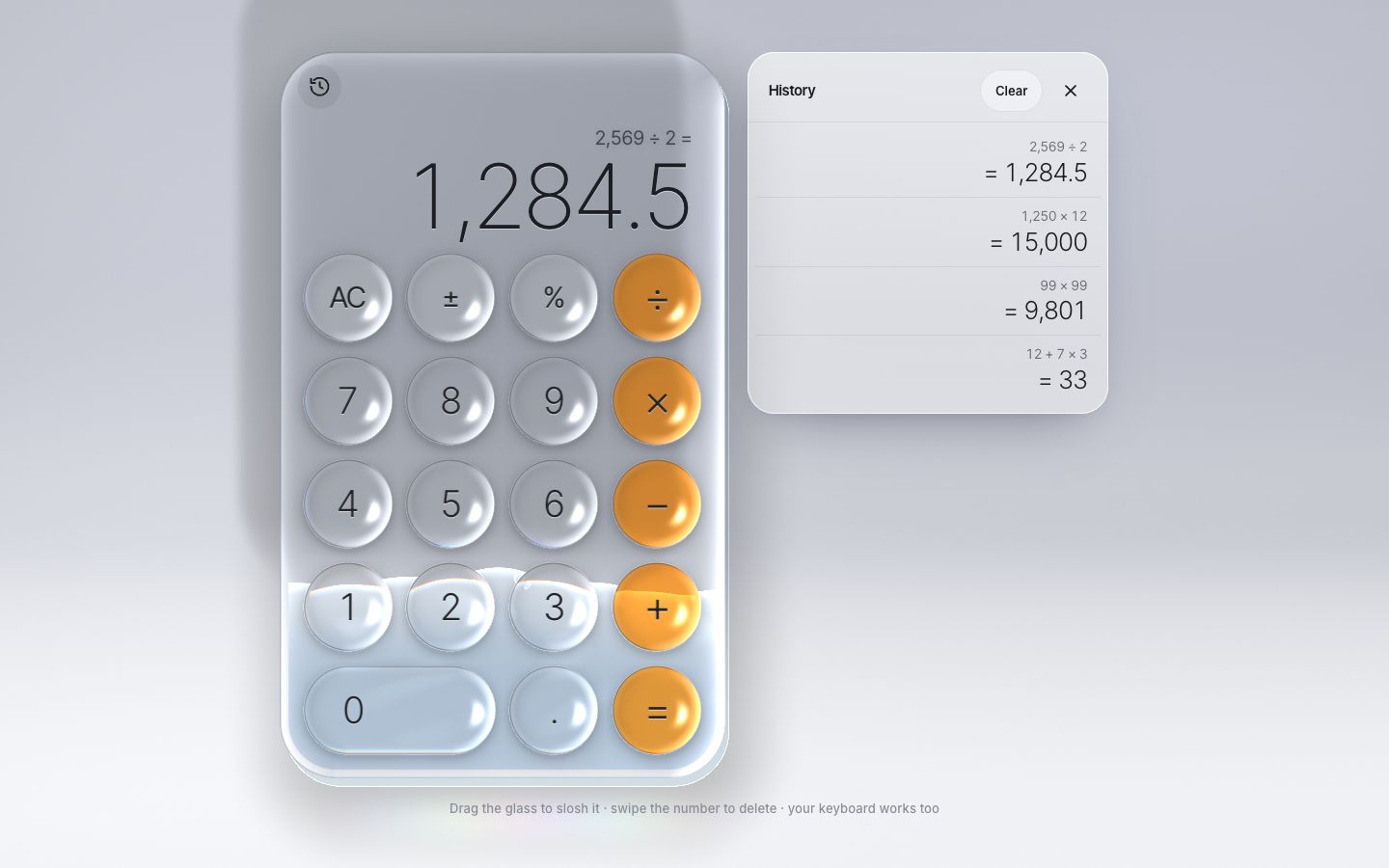
7 · The scientific morph
The fx button on the display switches to the scientific keypad: 30 more keys in a second block, 6 × 5. Three layouts place the two blocks: basic (main only, 4 × 5), sci-wide (the scientific block left of the main one, 10 × 5) and sci-tall (above it, 6 × 10, for a phone held upright). Every key is a real button with a spoken name: "sine", "x to the power of y".
const SCI = [
  ['(', ')', 'mc', 'm+', 'm−', 'mr'],
  ['2nd', 'x²', 'x³', 'xʸ', 'eˣ', '10ˣ'],
  ['¹/x', '²√x', '³√x', 'ʸ√x', 'ln', 'log₁₀'],
  ['x!', 'sin', 'cos', 'tan', 'e', 'EE'],
  ['rad/deg', 'sinh', 'cosh', 'tanh', 'π', 'rand'],
];
const BLOCKS = { main: MAIN, sci: SCI };
// where each block's top-left cell sits in the layout's grid (1-based CSS grid lines); null = not shown
const LAYOUTS = {
  basic: { cols: 4, rows: 5, main: [1, 1], sci: null },
  'sci-wide': { cols: 10, rows: 5, main: [1, 7], sci: [1, 1] },
  'sci-tall': { cols: 6, rows: 10, main: [6, 2], sci: [1, 1] },
};
Scientific is wide unless standing it up gives keys at least 20 % bigger. Where the tape docks, a layout counts only as big as it stays with the tape open beside it.
// where the tape docks, a layout is only as big as it stays with the tape open beside it (the glass shrinks aside)
const withTape = (name) => {
  const k = keyFor(name);
  if (!dockable.matches) return k;
  const L = Keypad.LAYOUTS[name], W = k * (L.cols + (L.cols - 1) * RATIO.gap + 2 * RATIO.pad);
  return k * Math.min(1, (roomW - tapeWidth(vw) - TAPE.gap) / W);
};
// scientific is wide (the phone's landscape layout) unless standing it up gives clearly bigger keys (a phone held upright)
const name = forMode === 'basic' ? 'basic' : withTape('sci-tall') > withTape('sci-wide') * TALL_GAIN ? 'sci-tall' : 'sci-wide';
return { layout: name, key: keyFor(name) };
The two blocks are two grids, so the shader finds keys the same way and its cost does not grow with the number of keys. The arrays just get room for them.
const MAX_KEYS = 64, MAX_CELLS = 64, COLS = 64, BUBBLES = 12;Now the morph. measure() keeps three versions of everything: where it was (from),
where it goes (to) and where it is now. A key that is leaving shrinks where it stands; a key that is
arriving grows in its own cell.
// every key in the slab's own coordinates; a key leaving shrinks where it is, a key arriving grows in its cell
let top = Infinity;
for (const key of keys) {
  const to = key.to;
  if (key.shown) {
    to.hw = key.el.offsetWidth / 2; to.hh = key.el.offsetHeight / 2;
    to.x = key.el.offsetLeft + to.hw - W / 2; to.y = key.el.offsetTop + to.hh - H / 2;
    top = Math.min(top, to.y - to.hh);
    if (key.from.hw === 0) { key.from.x = to.x; key.from.y = to.y; }
  } else { to.x = key.from.x; to.y = key.from.y; to.hw = 0; to.hh = 0; }
}
blocks.forEach((b, i) => {
  const [k00, k01, k10] = b.corner, g = b.to;
  b.on = k00.shown;
  if (b.on) {
    g.pitchX = k01.to.x - k00.to.x; g.pitchY = k10.to.y - k00.to.y;
    g.x0 = k00.to.x - g.pitchX / 2; g.y0 = k00.to.y - g.pitchY / 2;
    if (!wasOn[i]) copyInto(b.from, g);                        // arriving: its grid is already in place
  } else copyInto(g, b.from);                                  // leaving: its grid stays where it was
  b.now.cols = b.on || (morphing && wasOn[i]) ? b.cols : 0;
  b.now.rows = b.rows;
});
One spring (stiffness 190, damping 21) runs from 0 to 1, and applyMorph() mixes everything at that
value: the slab's size, every key's rectangle, the two grids, the liquid's tank, and the display's edges. The number
rides the slab's right edge and the tool bar its left.
// the glass between the two layouts at m (0 old … 1 new; a little past 1 while the spring overshoots)
function applyMorph(m) {
  for (const k in body) body[k] = mix(bodyFrom[k], bodyTo[k], m);
  for (const k in tank) tank[k] = mix(tankFrom[k], tankTo[k], m);
  for (const key of keys) {
    key.lx = mix(key.from.x, key.to.x, m); key.ly = mix(key.from.y, key.to.y, m);
    key.hw = Math.max(0, mix(key.from.hw, key.to.hw, m)); key.hh = Math.max(0, mix(key.from.hh, key.to.hh, m));
  }
  for (const b of blocks) {
    const g = b.now;
    g.x0 = mix(b.from.x0, b.to.x0, m); g.y0 = mix(b.from.y0, b.to.y0, m);
    g.pitchX = mix(b.from.pitchX, b.to.pitchX, m); g.pitchY = mix(b.from.pitchY, b.to.pitchY, m);
    if (m === 1 && !b.on) g.cols = 0;                            // a block that has left switches off
  }
  liquid.shape({ x0: -body.hx + tank.side, x1: body.hx - tank.side, top: -body.hy + 20, bottom: body.hy - 4 });
  if (glass) glass.setScene(body, TONE);                       // the partition behind the glass follows it
  // the display rides on the slab's edges: the number with its right edge, the tool bar with its left
  const flip = m !== 1;
  const dRight = flip ? body.cx + body.hx - edges.right : 0, dLeft = flip ? body.cx - body.hx - edges.left : 0;
  displayWriter.set(dRight, flip ? body.cy - body.hy - edges.top : 0);
  barWriter.set(dLeft - dRight, 0);
}
On the HTML side the keys are already in their new cells (the layout changed at once), so each label is moved back to where the morph has it with a FLIP: a translate and a scale from its new box to its current one. The liquid sloshes as its tank changes shape.
if (morph.value !== 1) {                                     // between two layouts: everything follows the morph
  morph.step(dt);
  if (morph.resting(0.0005)) { morph.value = 1; morph.velocity = 0; }
}
if (morph.value !== morphShown) { applyMorph(morph.value); morphShown = morph.value; }
gx.step(dt); gy.step(dt);
tilt.target = clamp(gx.velocity * 0.00018 + gx.value * 0.0011, -0.24, 0.24);   // it leans into the drag
tilt.step(dt);
level.step(dt); neg.step(dt); err.step(dt);
light.x.step(dt); light.y.step(dt);

// the liquid: its resting height, the glass's lean, and the shove of the glass moving sideways
liquid.rest = restFor(level.value);
liquid.slope = -Math.tan(tilt.value);
if (dt > 0) { liquid.slosh(clamp((gx.velocity - prevVx) * 0.22, -160, 160)); prevVx = gx.velocity; }
liquid.step(dt);

// the HTML follows the glass: the slab's move and lean; each key's squash, and its way to a new cell in a morph
stepView(dt);
slab.set(gx.value + view.dx, gy.value + view.dy, tilt.value, view.s, view.s);
const flip = morph.value !== 1;
for (const key of keys) {
  if (!key.shown) continue;
  const p = calm || Math.abs(key.press.value) < 0.002 ? 0 : key.press.value;
  let tx = 0, ty = 0, sx = 1 + SQUASH.x * p, sy = 1 - SQUASH.y * p;
  if (flip && key.to.hw > 0) {
    tx = key.lx - key.to.x; ty = key.ly - key.to.y;
    sx *= key.hw / key.to.hw; sy *= key.hh / key.to.hh;
  }
  key.writer.set(tx, ty, 0, sx, sy);
}// the mode: it changes the layout, and the glass morphs to it
function setMode(next) {
mode = next === 'sci' ? 'sci' : 'basic';
fit();
measure(true);
}
modeBtn.addEventListener('click', () => setMode(layout === 'basic' ? 'sci' : 'basic'));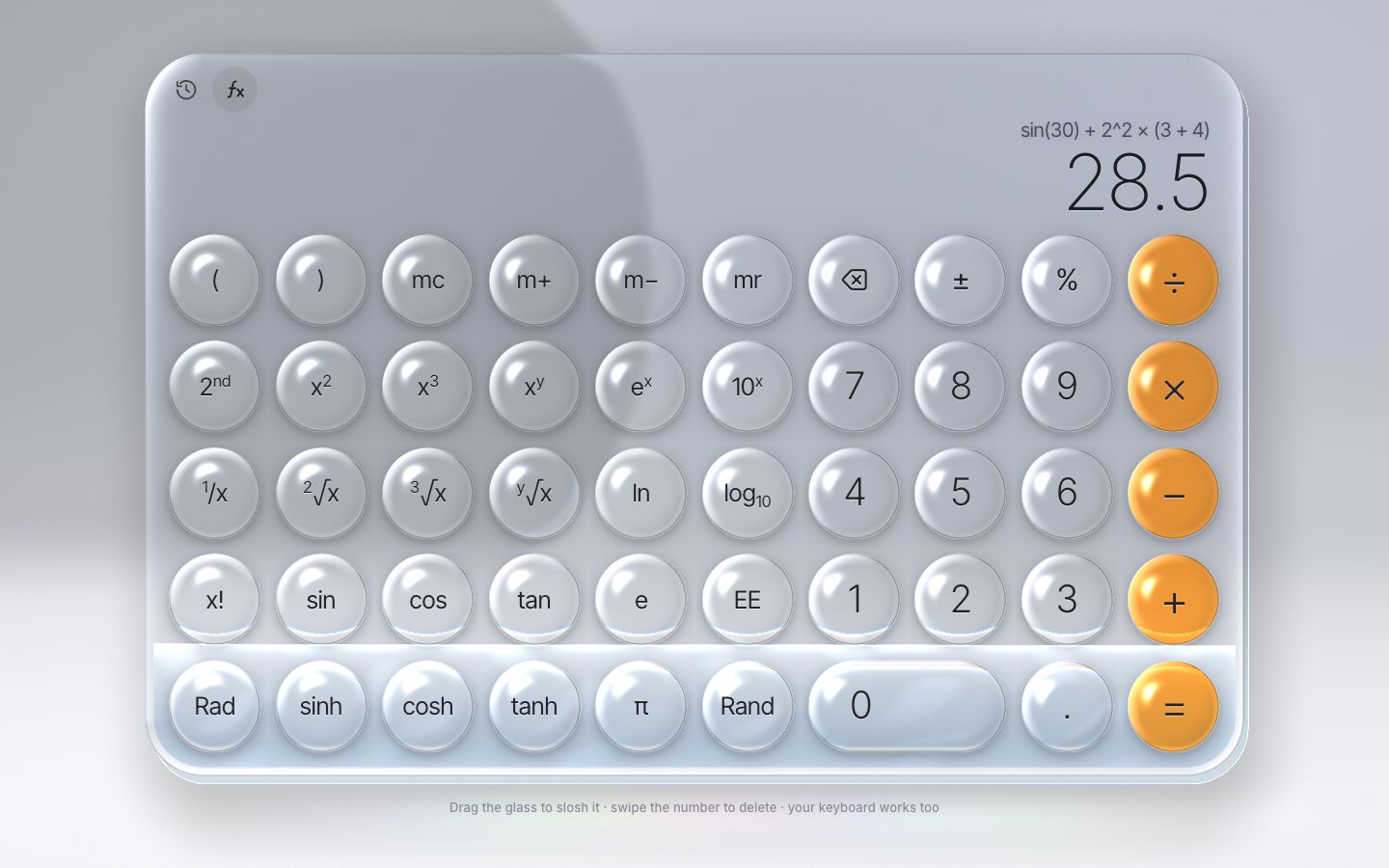
8 · A cheap frame: adaptive resolution and performance
Stage 8 looks exactly like stage 7. It is the same calculator made cheap, and every change was measured
(gpu_bench.py: 40 frames back to back, one sync, best of 8 batches). The shader's true GPU cost per frame,
before and after the studio bake (stage 2), the grid lookup (stage 3) and the single slab() call site:
| Screen | Before | After |
|---|---|---|
| 1440 × 900 at 2× (2880 × 1800 px) | 1.48 ms | 0.75 ms |
| 2560 × 1440 at 2× (5120 × 2880 px) | 2.92 ms | 1.51 ms |
| 390 × 844 at 3× (canvas 2×) | 0.94 ms | 0.50 ms |
The HTML moves without strings. Writing style.transform builds a string every frame. Where the
browser has CSS Typed OM (Chromium, Safari) the writer keeps one CSSTransformValue per element and only
changes its numbers; values are rounded first, and an unchanged transform is not written at all. Firefox gets the
string. The slab is its own compositor layer (will-change) only while it is away from home, so a drag
moves pixels instead of repainting the display on top of the shader: raster tasks during two 1 s drags fell from 885
to 98, paints from 928 to 208. At home it is painted in place, sharp on the pixel grid.
// Moving HTML every frame without building a string every frame: CSS Typed OM where the browser has it (Chromium,
// Safari), a string where it does not (Firefox). Values are rounded first, so an unchanged transform is not rewritten.
// A writer for the slab also makes it its own compositor layer while it is away from home (.is-moving), so a drag
// moves pixels instead of repainting the display every frame; at home it is painted in place, on the pixel grid.
const typedOM = typeof CSSTransformValue === 'function' && 'attributeStyleMap' in Element.prototype;
const round = (v, step) => Math.round(v / step) * step;
function transformWriter(el, { layerWhileMoving = false } = {}) {
  const move = typedOM && new CSSTranslate(CSS.px(0), CSS.px(0)), turn = typedOM && new CSSRotate(CSS.rad(0)), size = typedOM && new CSSScale(1, 1);
  const value = typedOM && new CSSTransformValue([move, turn, size]);
  let x = 0, y = 0, a = 0, sx = 1, sy = 1, moved = false;
  return {
    get moved() { return moved; },
    set(nx, ny, na = 0, nsx = 1, nsy = 1) {                    // translate (px), rotate (rad), scale; all neutral = none
      nx = round(nx, 0.01); ny = round(ny, 0.01); na = round(na, 0.0001); nsx = round(nsx, 0.0001); nsy = round(nsy, 0.0001);
      const still = Math.abs(nx) + Math.abs(ny) + Math.abs(na) < 0.01 && nsx === 1 && nsy === 1;
      if (still ? !moved : nx === x && ny === y && na === a && nsx === sx && nsy === sy) return;
      if (layerWhileMoving && still !== !moved) el.classList.toggle('is-moving', !still);
      x = nx; y = ny; a = na; sx = nsx; sy = nsy; moved = !still;
      if (still) el.style.transform = '';
      else if (typedOM) {
        move.x.value = x; move.y.value = y; turn.angle.value = a; size.x = sx; size.y = sy;
        el.attributeStyleMap.set('transform', value);
      } else el.style.transform = `translate(${x.toFixed(2)}px, ${y.toFixed(2)}px) rotate(${a.toFixed(4)}rad) scale(${sx.toFixed(4)}, ${sy.toFixed(4)})`;
    },
  };
}
The resolution adapts, and changing it is free. The canvas is drawn at up to 2× its CSS size (the text is HTML, so it stays sharp at any size). A budget keeps the glass under 2.6 million device pixels, in eighths of a DPR, so small changes keep the canvas; this only bites on very big slabs, such as scientific mode on a 27″ screen. And when frames start missing their slot (more than 10 of 120 slower than 1.6 × the fastest), it steps down to 1.5× and then 1.25×.
// The canvas is drawn at up to 2× its CSS size (the text is HTML and stays sharp at any size). Two limits:
//  - a budget: the glass is where the shader works hard, so a very big slab (scientific on a 27" screen) is drawn at
//    a resolution that keeps it under GLASS_PIXELS device pixels, and the GPU's frame cost stays flat;
//  - adaptive: when frames start missing their slot it steps down to 1.5× and then 1.25×.
// Neither applies in the capture studio, whose frames are stepped by hand. A lower resolution is drawn into a corner
// of the same canvas and stretched over the screen by a compositor transform (glass.resize), so changing it is free.
const capture = /[?&]studio\b/.test(location.search);
const DPR_STEPS = [2, 1.5, 1.25];
const GLASS_PIXELS = 2.6e6;
function canvasDpr() {
  const want = Math.min(DPR_STEPS[capture ? 0 : resolution.step], fullDpr());
  if (capture) return want;
  const slabArea = 4 * bodyTo.hx * bodyTo.hy;
  return Math.max(1, Math.min(want, Math.floor(Math.sqrt(GLASS_PIXELS / slabArea) * 8) / 8));   // in eighths: a small change keeps the canvas
}
const fullDpr = () => Math.min(DPR_STEPS[0], devicePixelRatio || 1);
const canvasScale = transformWriter(canvas);
function resizeCanvas() {
  if (!glass) return;
  const stretch = glass.resize(page.clientWidth, page.clientHeight, canvasDpr(), fullDpr());
  canvasScale.set(0, 0, 0, stretch.x, stretch.y);
}
const resolution = { step: 0, warm: 90, fastest: 1e9, sampled: 0, missed: 0 };   // warm: the first frames are the page settling in
function adapt(ms) {
  const r = resolution;
  if (capture || r.step === DPR_STEPS.length - 1 || ms > 100 || ms < 3 || document.hidden) return;
  if (r.warm > 0) { r.warm--; return; }
  r.fastest = Math.min(r.fastest, Math.max(ms, 4)); r.sampled++;
  if (ms > r.fastest * 1.6 && ms > 10) r.missed++;
  if (r.sampled < 120) return;
  if (r.missed > 10) { r.step++; resizeCanvas(); }
  r.sampled = 0; r.missed = 0;
}
Setting canvas.width reallocates the buffer and stalls the GPU, even when the size is the same. So the
canvas keeps one backing store per screen size, a lower resolution is drawn into its bottom-left corner, and the
compositor stretches that corner over the screen (transform-origin: 0 100% in the CSS).
// The canvas keeps one backing store for a screen size (w × h CSS px at `full` px per CSS px) and the glass is
// drawn into its bottom-left corner at `dpr` ≤ full; the returned scale stretches that corner over the screen
// (a compositor transform, app.js). A new resolution is then free: no reallocation, no GPU sync, no layout.
resize(w, h, dpr, full = dpr) {
  const cw = Math.max(1, Math.round(w * full)), ch = Math.max(1, Math.round(h * full));
  if (w !== size.w || h !== size.h) studioDirty = true;
  if (canvas.width !== cw || canvas.height !== ch) { canvas.width = cw; canvas.height = ch; }   // a resize clears the canvas: only when it changes
  const rw = Math.min(cw, Math.max(1, Math.round(w * dpr))), rh = Math.min(ch, Math.max(1, Math.round(h * dpr)));
  size = { w, h, rw, rh };
  gl.viewport(0, 0, rw, rh);
  return { x: cw / rw, y: ch / rh };
},
The loop rests. After the last touch the glass counts as played with for 2.5 s; after that only the liquid's
slow shimmer moves, and drawing every other frame is enough. Under reduced motion the loop goes to sleep as soon as
everything has settled, and wake() starts it again.
// the loop: springs and liquid step, the slab and the pressed keys move, the glass is drawn. With motion it runs every
// frame (the liquid shimmers); under reduced motion it stops as soon as everything has settled.
const HOT_MS = 2500;                                         // after the last touch, the glass counts as played with this long
let running = false, last = 0, hotUntil = 0, odd = false, prevVx = 0, morphShown = 1;
function wake() { hotUntil = performance.now() + HOT_MS; if (!running) { running = true; last = performance.now(); requestAnimationFrame(frame); } }if (!rendered) render();
const busy = moving();
if (busy) hotUntil = now + HOT_MS;
// at rest only the liquid's slow shimmer moves: drawing every other frame is enough
odd = !odd;
if (capture || now < hotUntil || odd) { if (glass) paint(t / 1000); else paintFlat(); }
if (!calm || busy) requestAnimationFrame(frame); else running = false;
}The display is written once per frame. show() reads the engine's state at once (the liquid and the
keys answer in the same event), and render() writes the page from the loop. Thirty keys typed in one burst
cost one layout instead of thirty (15 ms at a 4× slower CPU before).
// show(): the engine's state is read at once (the liquid and the keys answer it in the same event), the page is
// written once per frame (render, called from the loop): a burst of keys — typing fast, a pasted sum — costs one layout.
let rendered = true;
const bigNumber = (st) => (st.error ? 'Error' : st.done ? st.display : st.preview || st.display);
function show() {
  const st = (ui = engine.state());
  typing = !st.done && !st.error && st.expression.trim() !== '';   // the top-left key is ⌫ while a sum is typed
  const end = st.expression.trim().slice(-1);
  litOp = !st.done && !st.error && OPS.includes(end) ? end : null;   // the operator the sum ends on waits, lit
  rendered = false;
  wake();
}
The first switch is warmed up. The first time a layout is used, every label is shaped at a new size. While the page is idle, a hidden copy of the calculator is laid out once in the other layout, so the real switch later costs 2.5–2.8 ms instead of 3.9 ms.
// The first switch to a layout shapes every label at a new size. Done once while the page is idle, on a hidden copy
// of the calculator, the real switch later finds the words already shaped and costs half as much.
function warmOtherLayout() {
  const sz = sizing(mode === 'basic' ? 'sci' : 'basic');
  const warm = document.createElement('div');
  warm.className = 'stage warm';
  warm.setAttribute('aria-hidden', 'true');
  warm.inert = true;
  applySizing(warm, sz);
  const copy = calcEl.cloneNode(true);
  copy.removeAttribute('id');
  const copies = [...copy.querySelectorAll('.key')];
  Keypad.place(keys.map((k, i) => ({ ...k, el: copies[i] })), sz.layout);
  warm.append(copy);
  stage.after(warm);
  void warm.offsetWidth;                                        // lay it out once
  warm.remove();
}
And a lost WebGL context (a GPU reset) no longer ends the page: the glass is rebuilt when it comes back.
// lose the WebGL context (a GPU reset) and the page keeps going; get it back and the glass is rebuilt
canvas.addEventListener('webglcontextlost', (e) => e.preventDefault());
canvas.addEventListener('webglcontextrestored', () => { glass.rebuild(); glass.setCells(cellsOf(blocks[0]), cellsOf(blocks[1])); measure(); });
The result, on a 120 Hz screen (an 8.3 ms budget), three runs each of a workout with real clicks, hard drags, a 30-key burst and the tape opened and closed: zero missed frames and no long tasks at 1440 × 900, 2560 × 1440, a phone upright and a phone on its side, even with the CPU slowed 4×. The slowest frame took 10.4 ms.
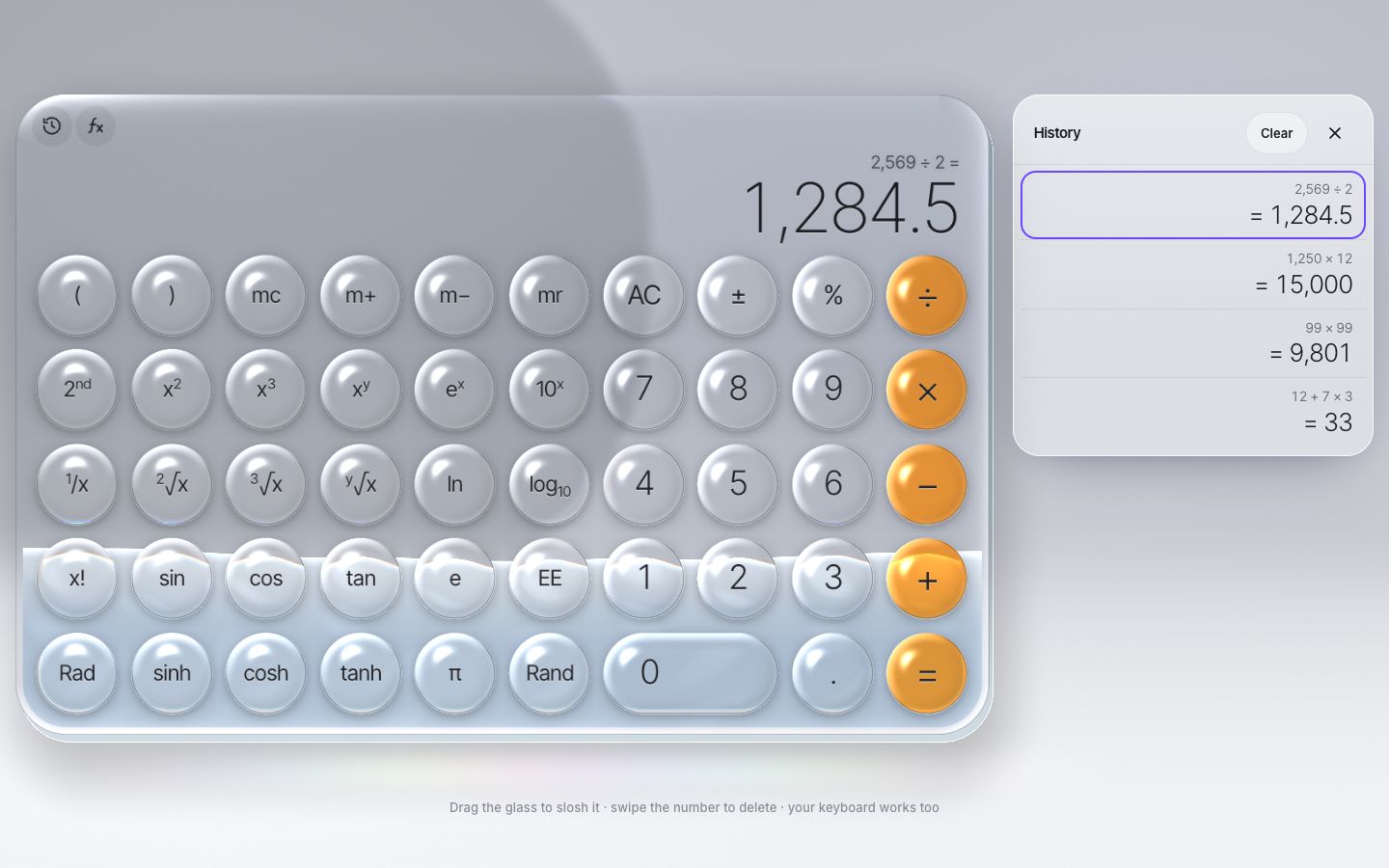
9 · Five tones, a phone on its side, and the rest
A tone is a row in a table: the studio's wall and floor, how dark the partition is, whether the studio is dark,
how opaque the liquid is and its colours, and the operators' tinted glass. Classic has orange operators,
crystal is all clear, amber is warm, graphite is a dark studio with blue liquid, and prism
adds a ribbon of colour inside the glass. The page picks one from the address before anything is drawn:
?tone=graphite.
const TONES = {
  classic:  { wall: [0.700, 0.712, 0.745], floor: [0.940, 0.945, 0.955], panel: 0.80, dark: 0, liqA: 0.55, tint: [1.00, 0.58, 0.12], tintK: 0.85,
              liq: [[0.90, 0.95, 0.99], [0.62, 0.74, 0.86]], ribbon: 0 },
  crystal:  { wall: [0.700, 0.712, 0.745], floor: [0.940, 0.945, 0.955], panel: 0.80, dark: 0, liqA: 0.62, tint: [1, 1, 1], tintK: 0.16,
              liq: [[0.86, 0.93, 0.98], [0.55, 0.70, 0.84]], ribbon: 0 },
  amber:    { wall: [0.770, 0.735, 0.690], floor: [0.955, 0.940, 0.915], panel: 0.82, dark: 0, liqA: 0.78, tint: [1.00, 0.70, 0.30], tintK: 0.55,
              liq: [[1.00, 0.76, 0.36], [0.74, 0.36, 0.06]], ribbon: 0 },
  graphite: { wall: [0.090, 0.094, 0.108], floor: [0.150, 0.155, 0.170], panel: 1.55, dark: 1, liqA: 0.85, tint: [0.55, 0.72, 1.00], tintK: 0.45,
              liq: [[0.42, 0.66, 1.00], [0.06, 0.20, 0.62]], ribbon: 0 },
  prism:    { wall: [0.700, 0.712, 0.745], floor: [0.940, 0.945, 0.955], panel: 0.80, dark: 0, liqA: 0.80, tint: [1, 1, 1], tintK: 0,
              liq: [[0.22, 0.90, 0.88], [0.00, 0.60, 0.70]], ribbon: 1 },
};const toneName = (new URLSearchParams(location.search).get('tone') || '').toLowerCase();
const TONE_NAME = TONES[toneName] ? toneName : 'classic';
const TONE = TONES[TONE_NAME];
html.dataset.tone = TONE_NAME;:root[data-tone="graphite"] { --page: var(--graphite-950); --on-page-muted: var(--graphite-400); }Prism's ribbon hangs from the tank's ceiling to a waving edge above the liquid and rocks with it: violet, blue, magenta and a thin coral, folded and slowly drifting. The colours are mixed in OKLab, because an sRGB mix of coral and blue goes mauve.
// diagonal violet, blue, magenta and a thin coral, folded and slowly drifting
vec3 ribbonColour(vec2 q, float t) {
  vec2 p = q * 0.0042;
  p += 0.18 * vec2(sin(p.y * 2.3 + t * 0.30), cos(p.x * 2.1 - t * 0.24));
  float b = p.x * 0.80 + p.y * 1.05 + 0.12 * sin(p.x * 3.0 + t * 0.45);
  float s = fract(b * 0.50 + t * 0.025);
  vec3 violet = vec3(0.42, 0.16, 0.96), blue = vec3(0.12, 0.40, 1.00), magenta = vec3(0.98, 0.20, 0.62), coral = vec3(1.00, 0.40, 0.36);
  // stops: violet .00, blue .20, violet .38, magenta .58, coral .70, magenta .82, violet 1.0
  if (s < 0.20) return labMix(violet, blue, s / 0.20);
  if (s < 0.38) return labMix(blue, violet, (s - 0.20) / 0.18);
  if (s < 0.58) return labMix(violet, magenta, (s - 0.38) / 0.20);
  if (s < 0.70) return labMix(magenta, coral, (s - 0.58) / 0.12);
  if (s < 0.82) return labMix(coral, magenta, (s - 0.70) / 0.12);
  return labMix(magenta, violet, (s - 0.82) / 0.18);
}
A phone on its side is always scientific (wide), and the history becomes a side sheet with the glass centred in the room left of it.
const landscapePhone = matchMedia('(max-height: 500px) and (orientation: landscape)');   // always scientific
const dockable = matchMedia('(min-width: 720px) and (min-height: 501px), (min-width: 720px) and (orientation: portrait)');const effectiveMode = () => (landscapePhone.matches ? 'sci' : mode);Tilt the phone and the liquid leans against the glass: the slab stays put on the screen, but gravity's direction in the screen's plane turns. It is worked out from the device's beta and gamma, and the screen's own rotation. A phone lying flat has no "down" on the screen, so the lean fades out there. On an iPhone this needs a tap and a yes, so a "Tilt to slosh" button asks.
// tilt the phone: the slab stays put on the screen, but gravity turns, so the surface leans against the glass.
// The angle is gravity's direction in the screen's own plane, worked out from beta and gamma.
const MAX_LEAN = 0.55;                                       // rad
const lean = new Spring(0, critical(40));
function onOrientation(e) {
  if (e.beta == null || e.gamma == null) return;
  const b = (e.beta * Math.PI) / 180, g = (e.gamma * Math.PI) / 180;
  const ux = Math.sin(g) * Math.cos(b), uy = Math.sin(b);        // "up", in the screen's plane
  const m = Math.hypot(ux, uy);
  const turn = ((screen.orientation && screen.orientation.angle) || 0) * Math.PI / 180;
  let a = Math.atan2(ux, uy) - turn;
  a = Math.atan2(Math.sin(a), Math.cos(a));
  lean.target = clamp(a, -MAX_LEAN, MAX_LEAN) * clamp((m - 0.12) / 0.25, 0, 1);   // a phone lying flat has no "down" on screen
  wake();
}
Reduced motion was built in stage by stage, and here is all of it: every spring is critically damped, the liquid lies flat (no slosh, no bubbles), the keys do not squash, the glass cannot be dragged, the layouts switch without a morph, the shimmer stands still, and the loop sleeps as soon as everything has settled. The keyboard was there from stage 5, and a pointer press never takes the focus from it.
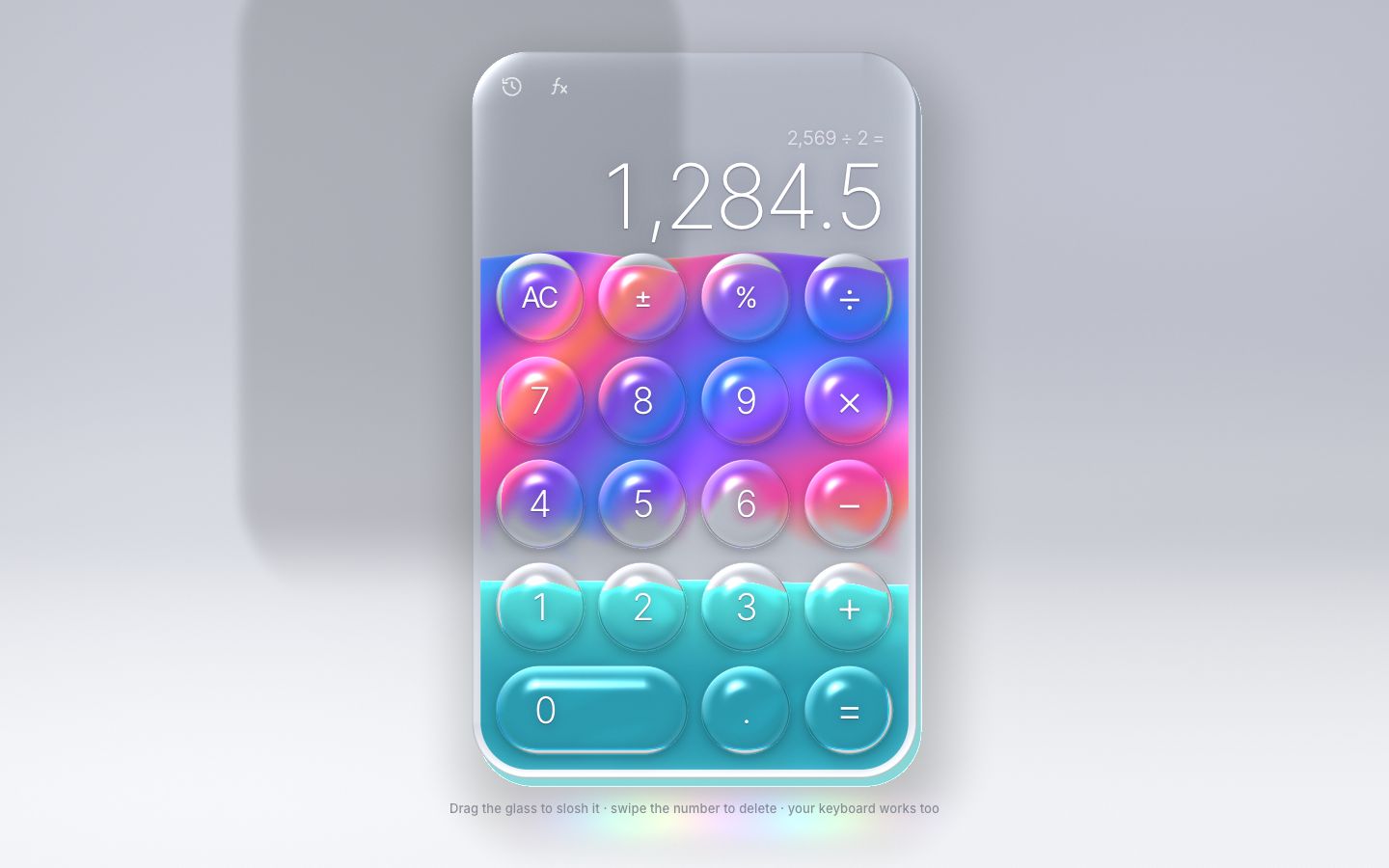
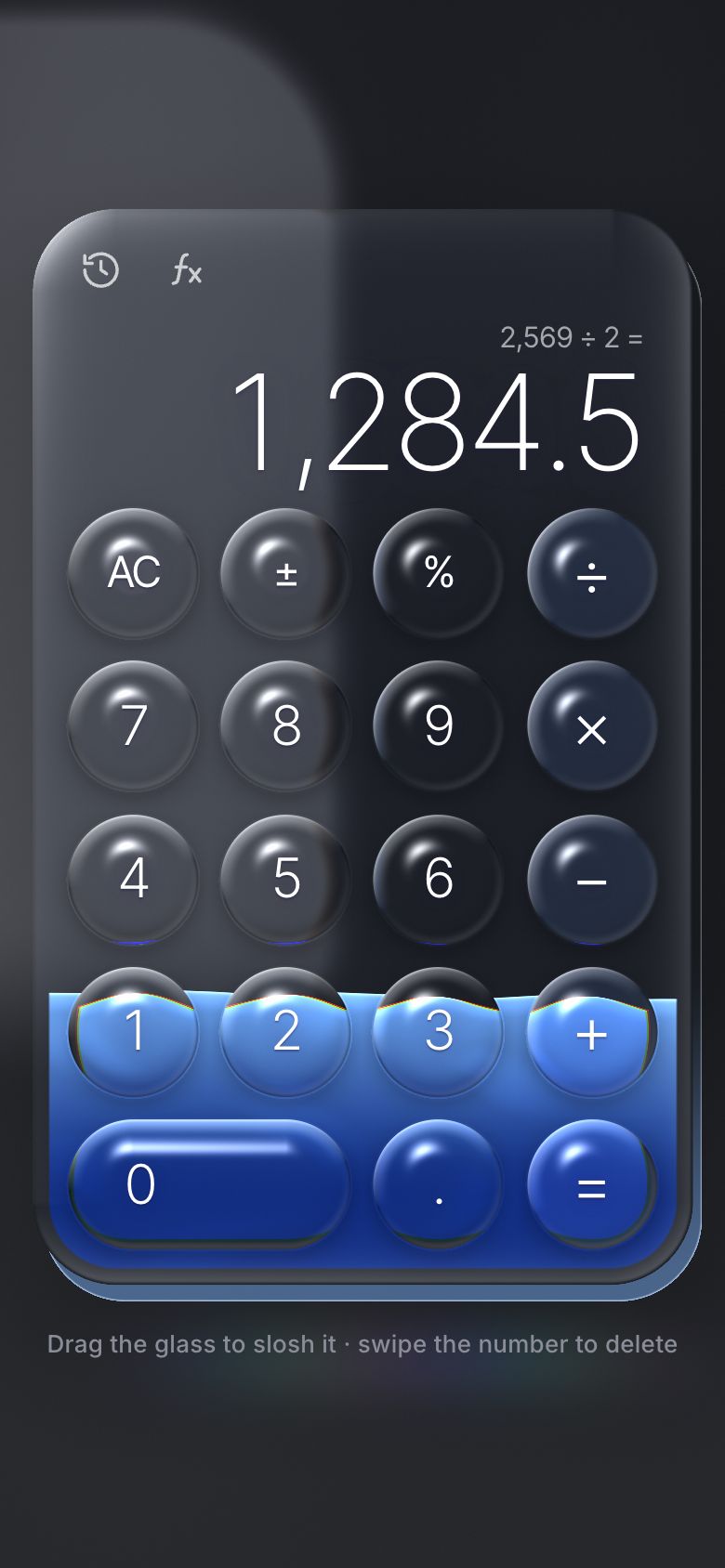
Make it yours
- Tones are rows in the
TONEStable plus a few inks instyle.css: pick one with?tone=classic,crystal,amber,graphiteorprism, or add your own studio, liquid and operator tint. - The glass's feel is a handful of numbers: the bevel (26 px), the colour split (0.92, 1.0, 1.10), the lens's magnification (0.22, plus 0.12 when pressed), the squash (4.5 % and 7.5 %) and the press spring (900, 20).
- The liquid's feel is three numbers in
liquid.js:LEVEL34 (a lazy whole-surface rock),WAVE2,600 (quick ripples) andDAMP1.9; and inreact(), how hard each key kicks or sloshes it. - Keys and layouts live in
keypad.js: a key is a name, a label, a spoken name and a kind; a layout places each block's top-left cell. The shader follows from the grid. - The engine runs without the page:
CalcEngine.evaluate('2 + 3 × 4')is 14, and under Node it is a CommonJS module. New functions are rows in its tables. - Scripts can drive it through
window.__calc:type('12+7*3='),expr('sin(30) + 2^2'),mode('sci'),history(),state(),slosh(),tilt(). - Accessibility is already there: every key a real button with a spoken name, the sum read out in words by a
polite live region, a visible focus ring, the whole keyboard, 44 px targets on touch screens, the history a list of
buttons with arrow keys (a modal sheet on a phone), and
prefers-reduced-motion.
The code is on GitHub at UlviShabanbayli/domvybe-liquid-glass-calculator, under the MIT licence: use it in your own projects, commercial ones included.
Make the background a function you can ask "what colour is here?", and glass is easy: the slab asks the studio at a bent point, and a key asks the slab. Everything else, from the baked studio to the grid lookup, is about asking that question as few times as possible.