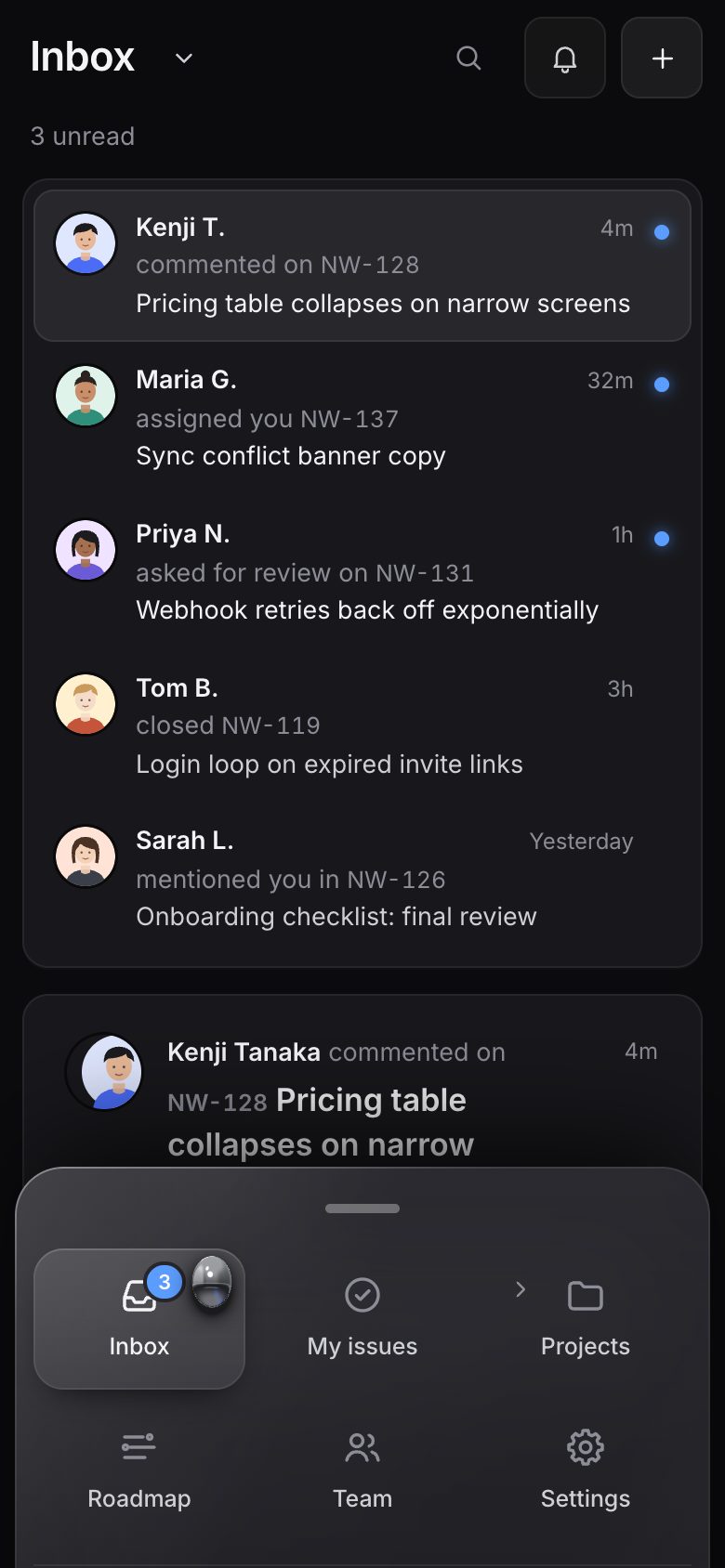
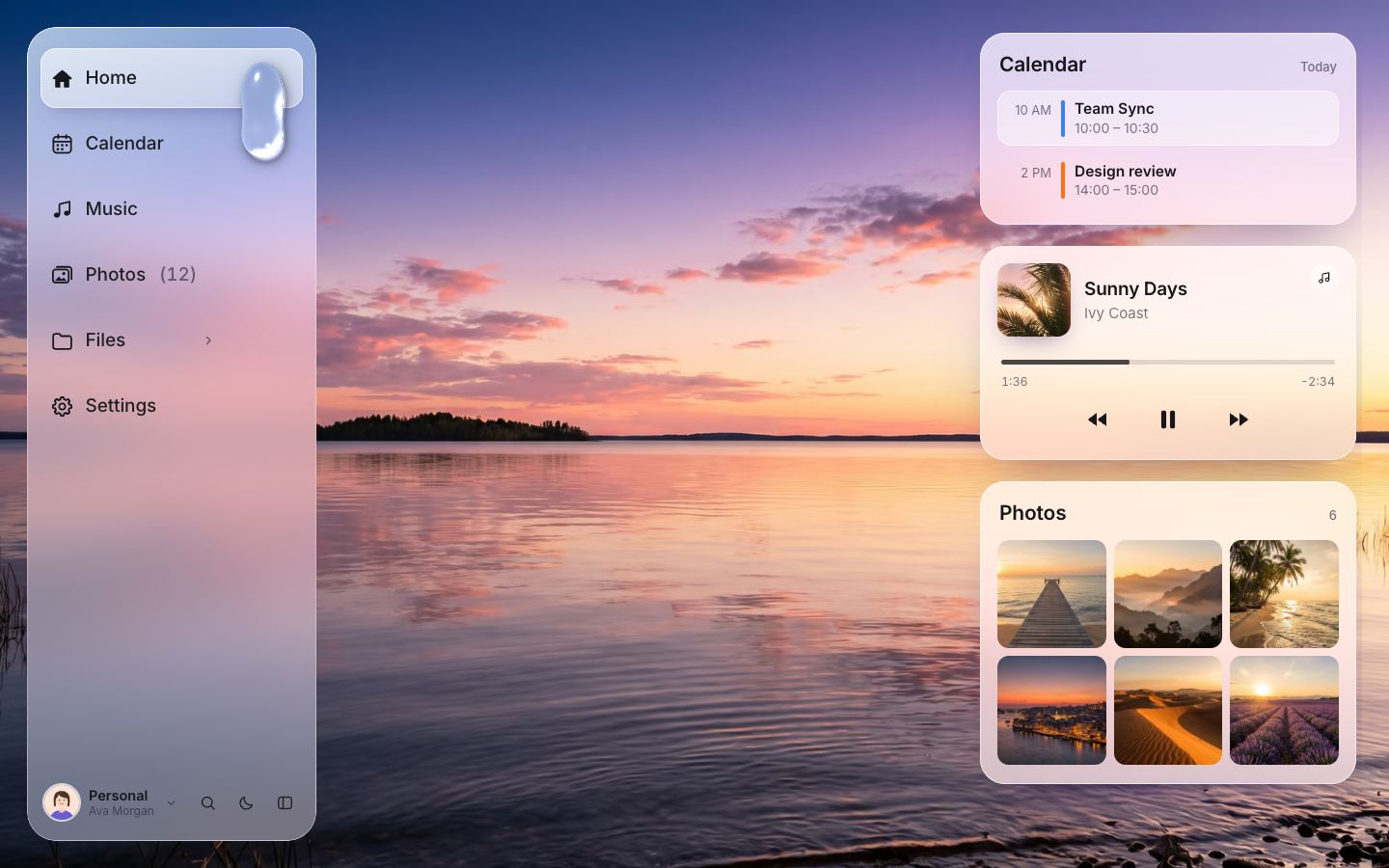
This is the whole build of the liquid glass sidebar, in the order it was written. The active item is not a highlight but a drop of liquid: click another item and the drop runs there, stretches into a teardrop on the way, and settles with a wobble. Around it is a complete sidebar: nested groups, a collapsible icon rail with dock magnification, a Cmd/Ctrl+K palette, drag to reorder, a workspace switcher, live notifications whose ripple knocks the drop, and a bottom sheet on a phone. Two variants share one core: Graphite, a dark project-management app with a mercury drop, and Daylight, a bright app over a lake photo with a water drop that refracts the photo. Each stage below is the sidebar as it stood at that step: a still, and Run it here starts the live page in its place. The code under each heading is only what that stage adds. The finished source is at the end, and on GitHub under the MIT licence.
There is no library and no build step: ES modules loaded by one <script type="module"> per page.
core/app.js exports boot(config), which does everything a sidebar does;
core/liquid.js is the drop; palette.js, reorder.js, menu.js and
sheet.js are one job each; graphite/ and daylight/ are a page, a style sheet and
a config. Stages 1 to 8 build Graphite; stage 9 adds Daylight on the same core.
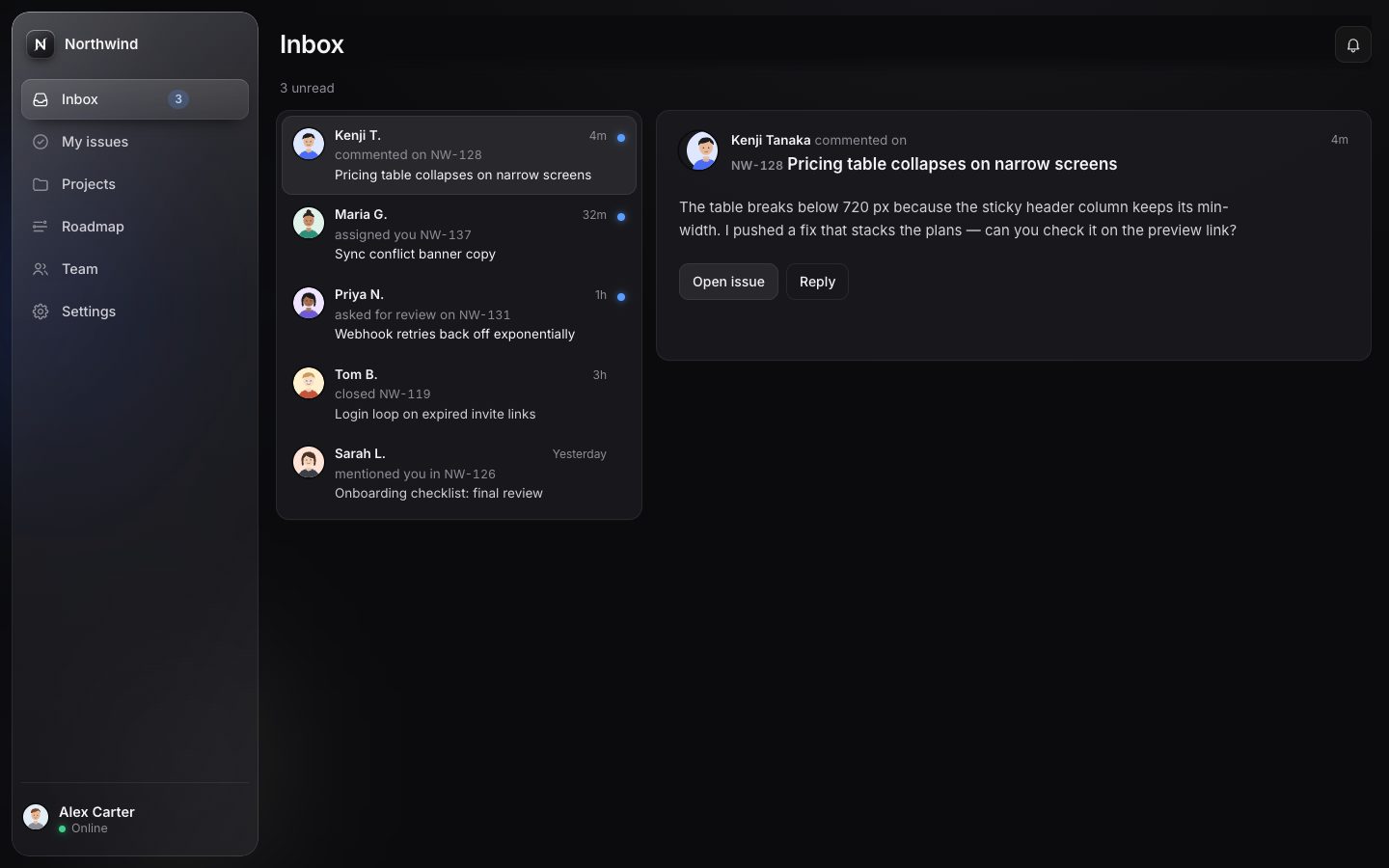
1 · The glass sidebar, built from data
The sidebar is a <nav> holding a clip box with four layers: the glass itself, a head (the
workspace), the body with the list, and a foot (you). The list is empty in the markup; the core fills it.
<nav class="sb" id="sb" aria-label="Main">
  <div class="sb-clip">
    <div class="sb-glass" aria-hidden="true"></div>
    <div class="sb-head">
      <div class="ws-btn">
        <span class="ws-logo" data-ws-logo></span><span class="ws-name" data-ws-name>Northwind</span>
      </div>
    </div>
    <div class="sb-body">
      <ul class="nav" id="nav" role="list"></ul>
    </div>
    <div class="sb-foot">
      <a class="me" href="#/settings" aria-label="Alex Carter, online. Settings">
        <span data-me></span>
        <span class="me-tx"><b>Alex Carter</b><span class="status">Online</span></span>
      </a>
    </div>
    <div class="sb-edge" aria-hidden="true"></div>
  </div>
</nav>
A variant describes its nav as data. Each item has an id (which is also its route), a label, an icon and, for Inbox, a badge.
items: [
  { id: 'inbox', label: 'Inbox', icon: 'inbox', badge: true },
  { id: 'issues', label: 'My issues', icon: 'issues' },
  { id: 'projects', label: 'Projects', icon: 'folder' },
  { id: 'roadmap', label: 'Roadmap', icon: 'roadmap' },
  { id: 'team', label: 'Team', icon: 'team' },
  { id: 'settings', label: 'Settings', icon: 'settings' },
],
Each item becomes a real link, href="#/inbox", so the browser does the routing: deep links, a new tab
and Back all work without a router. The badge's number is spoken as ", 3 unread" (the comma and the noun are for
screen readers only).
function rowHTML(it) {
  const ic = icon(it.icon, cfg.iconClass || '');
  const badge = it.badge ? `<span class="badge" data-badge="${it.id}" hidden></span>` : '';
  return `<a class="item" href="#/${it.id}" data-id="${it.id}" draggable="false">` +
    `<span class="ic-wrap">${ic}</span><span class="label">${it.label}</span>${badge}</a>`;
}
function build() {
  list.innerHTML = items.map(({ id }) => {
    const it = byId.get(id);
    return `<li class="nav-li" data-id="${id}"><div class="row">${rowHTML(it)}</div></li>`;
  }).join('');
  paintBadges();
}function paintBadges() {
for (const el of $$('[data-badge]', document)) {
const n = state.badges[el.dataset.badge] || 0;
el.hidden = !n;
el.innerHTML = `<span class="sr">, </span><span class="n">${n}</span><span class="sr"> ${cfg.badgeNoun || 'new'}</span>`;
el.closest('.item')?.classList.toggle('has-badge', !!n);
}
}The glass is one element behind the content: a translucent gradient, a backdrop-filter that blurs and
saturates what is behind it, a one-pixel rim drawn by a masked gradient border, and a diagonal sheen. Its tokens come
from the variant.
/* glass */
--glass-bg: linear-gradient(172deg, rgba(78, 78, 86, .6) 0%, rgba(44, 44, 49, .55) 36%, rgba(30, 30, 34, .62) 100%);
--glass-filter: blur(26px) saturate(140%);
--glass-rim: linear-gradient(162deg, rgba(255, 255, 255, .42) 0%, rgba(255, 255, 255, .1) 18%, rgba(255, 255, 255, .04) 55%, rgba(255, 255, 255, .12) 100%);
--glass-sheen: linear-gradient(118deg, rgba(255, 255, 255, .12) 0%, rgba(255, 255, 255, .03) 24%, rgba(255, 255, 255, 0) 40%, rgba(255, 255, 255, 0) 72%, rgba(255, 255, 255, .03) 100%);
--glass-shadow: 0 40px 80px -30px rgba(0, 0, 0, .85), 0 2px 6px rgba(0, 0, 0, .35);.sb-glass { position: absolute; inset: 0; border-radius: var(--radius-sb); background: var(--glass-bg); -webkit-backdrop-filter: var(--glass-filter); backdrop-filter: var(--glass-filter); box-shadow: var(--glass-shadow); }
.sb-glass::before { content: ''; position: absolute; inset: 0; border-radius: inherit; padding: 1px; background: var(--glass-rim); -webkit-mask: linear-gradient(#000 0 0) content-box, linear-gradient(#000 0 0); -webkit-mask-composite: xor; mask-composite: exclude; pointer-events: none; }
.sb-glass::after { content: ''; position: absolute; inset: 0; border-radius: inherit; background: var(--glass-sheen); pointer-events: none; }For now the active row is a plain pill: a pseudo-element behind the row, faded in for the row whose parent has
is-active.
.item::before { content: ''; position: absolute; left: 0; top: 0; bottom: 0; right: 0; border-radius: inherit; background: var(--hover-bg); opacity: 0; z-index: -1; transition: opacity .18s, right .32s var(--ease); }
@media (hover: hover) { .item:hover::before { opacity: 1; } }
.is-active > .item { color: var(--ink); }
.is-active > .item::before { background: var(--pill-bg); box-shadow: var(--pill-shadow); opacity: 1; }
Routing is the hashchange event. The active link gets aria-current="page", its row
is-active, and the matching view is shown. The others are hidden and inert, so nothing in a
hidden view can be focused.
function setActive(route) {
  if (!byId.has(route)) route = cfg.defaultRoute;
  const prev = state.route; state.route = route;
  for (const a of $$('.item', list)) {
    const on = a.dataset.id === route;
    a.toggleAttribute('aria-current', on); if (on) a.setAttribute('aria-current', 'page');
    a.closest('.row').classList.toggle('is-active', on);
  }
  showView(route, prev); cfg.onRoute?.(route, api);
}
let mainScrolled = false;
main.addEventListener('scroll', () => { mainScrolled = main.scrollTop > 0; }, { passive: true });
function showView(route, prev) {
  const key = cfg.viewKey ? cfg.viewKey(route) : route;
  for (const v of $$('.view', main)) {
    const on = v.dataset.view === key;
    if (v.inert === on) v.inert = !on;
    if (on === v.classList.contains('is-on')) continue;
    v.classList.toggle('is-on', on);
    if (on && prev != null && !reduced()) reveal(v);
  }
  if (prev != null && mainScrolled) { main.scrollTop = 0; mainScrolled = false; }
  document.title = `${byId.get(route).label} · ${cfg.title}`;
}
addEventListener('hashchange', () => setActive(location.hash.replace(/^#\/?/, '')));
A newly shown view does not appear in one piece: its blocks (board columns, the chart, cards) are revealed one per frame, so each frame paints one block and the switch never stalls. Reduced motion skips the cascade.
// a view's blocks appear one per frame (each frame paints one block), as a short cascade
function reveal(v) {
  const blocks = cfg.blocks ? $$(cfg.blocks, v) : [];
  const gen = (v._gen = (v._gen || 0) + 1);
  if (!blocks.length) { v.classList.remove('enter'); requestAnimationFrame(() => v.classList.add('enter')); return; }
  blocks.forEach((b) => { b.classList.add('blk'); b.classList.remove('shown'); });
  v.classList.add('revealing');
  let i = 0;
  const step = () => {
    if (v._gen !== gen || !v.classList.contains('is-on')) return;
    const b = blocks[i++];
    if (!b) { setTimeout(() => { if (v._gen === gen) { v.classList.remove('revealing'); blocks.forEach((x) => x.classList.remove('shown')); } }, 420); return; }
    b.classList.add('shown'); requestAnimationFrame(step);
  };
  requestAnimationFrame(step);
}// ---------- start ----------
state.badges = { ...(cfg.workspaces[0].badges || {}) };
build();
cfg.renderWorkspace(cfg.workspaces[0], api);
paintBadges();
applyReduced();
setActive(location.hash.replace(/^#\/?/, '') || cfg.defaultRoute);
api.ready = (async () => {
try { await document.fonts.ready; } catch { /* ok */ }
root.classList.add('is-ready');
return true;
})();
2 · The drop
The drop is drawn by a WebGL fragment shader on a canvas laid over the sidebar, 26 px bigger on every side so its shadow and stretch are never cut off. The shape is a signed distance: for every pixel, how far it is outside the drop (negative inside). Three shapes are melted together with a smooth minimum: the head, an ellipse that can stretch along the direction of travel; the tail, a circle that lags behind; and the neck, a capsule between them.
float sdEll(vec2 p, vec2 ab){ vec2 q=p/ab; float k0=length(q); if(k0<1.0) return (k0-1.0)*min(ab.x,ab.y); float k1=length(q/ab); return k0*(k0-1.0)/max(k1,1e-7); }
float sdSeg(vec2 p, vec2 a, vec2 b){ vec2 pa=p-a, ba=b-a; float h=clamp(dot(pa,ba)/max(dot(ba,ba),1e-3),0.,1.); return length(pa-ba*h); }
float smin(float a,float b,float k){ float h=max(k-abs(a-b),0.)/k; return min(a,b)-h*h*k*0.25; }

float sd(vec2 p){
  vec2 d=p-uHead.xy;
  vec2 q=vec2(uSq.x*d.x+uSq.y*d.y, -uSq.y*d.x+uSq.x*d.y);
  float s=uSq.z;
  float h=sdEll(q, uHead.z*vec2(1.0+s, 1.0/(1.0+s*0.85)));
  float t=length(p-uTail.xy)-uTail.z;
  float n=sdSeg(p,uHead.xy,uTail.xy)-uSq.w;
  float k=uHead.z*0.75;
  return smin(smin(h,t,k),n,k*0.8);
}
float height(float d, float R){ float t=clamp(-d,0.,R); float x=R-t; return sqrt(max(R*R-x*x,0.)); }
A flat shape would look like a sticker. So the distance is lifted into a height field (a dome as high as the drop's radius), and the normal of every pixel comes from the heights one pixel to the right and one pixel down. With a normal there is a reflection: mercury reflects a made-up studio, a bright sky with a soft box, a crisp horizon, a dark floor and a hint of the app's blue. A Fresnel term, a dark rim, one sharp highlight and a contact shadow 3.5 px below finish it.
const VS = 'attribute vec2 p;void main(){gl_Position=vec4(p,0.,1.);}';

const FS = `precision highp float;
uniform vec2 uRes;
uniform float uDpr;
uniform vec3 uHead;   // x, y, r (device px, y down)
uniform vec3 uTail;   // x, y, r
uniform vec4 uSq;     // dir cos, dir sin, stretch, neck radius
uniform float uFade;

float sdEll(vec2 p, vec2 ab){ vec2 q=p/ab; float k0=length(q); if(k0<1.0) return (k0-1.0)*min(ab.x,ab.y); float k1=length(q/ab); return k0*(k0-1.0)/max(k1,1e-7); }
float sdSeg(vec2 p, vec2 a, vec2 b){ vec2 pa=p-a, ba=b-a; float h=clamp(dot(pa,ba)/max(dot(ba,ba),1e-3),0.,1.); return length(pa-ba*h); }
float smin(float a,float b,float k){ float h=max(k-abs(a-b),0.)/k; return min(a,b)-h*h*k*0.25; }

float sd(vec2 p){
  vec2 d=p-uHead.xy;
  vec2 q=vec2(uSq.x*d.x+uSq.y*d.y, -uSq.y*d.x+uSq.x*d.y);
  float s=uSq.z;
  float h=sdEll(q, uHead.z*vec2(1.0+s, 1.0/(1.0+s*0.85)));
  float t=length(p-uTail.xy)-uTail.z;
  float n=sdSeg(p,uHead.xy,uTail.xy)-uSq.w;
  float k=uHead.z*0.75;
  return smin(smin(h,t,k),n,k*0.8);
}
float height(float d, float R){ float t=clamp(-d,0.,R); float x=R-t; return sqrt(max(R*R-x*x,0.)); }

vec3 env(vec3 r){
  // a chrome ball's world: bright sky with a soft box above, a crisp horizon, dark floor brightening towards the edges
  float up=-r.y+0.16;
  vec3 sky=mix(vec3(0.50,0.51,0.54), vec3(0.92,0.93,0.96), smoothstep(0.0,0.75,up));
  float box=1.0-smoothstep(0.55,1.0,length(vec2((r.x+0.12)/0.34,(up-0.58)/0.22)));
  sky+=box*vec3(0.9);
  sky*=1.0-0.35*smoothstep(0.35,0.9,abs(r.x))*(1.0-smoothstep(0.5,0.9,up));
  vec3 ground=mix(vec3(0.16,0.165,0.18), vec3(0.62,0.63,0.66), smoothstep(-0.1,-0.8,up));
  ground+=exp(-pow((r.x-0.45)/0.25,2.0)-pow((up+0.5)/0.22,2.0))*vec3(0.03,0.1,0.35);
  vec3 c=mix(ground, sky, smoothstep(-0.05,0.07,up));
  c+=exp(-pow((up-0.06)/0.03,2.0))*vec3(0.25);
  c+=smoothstep(-0.62,-0.85,r.x)*smoothstep(-0.1,0.2,up)*vec3(0.5);
  // the room's own lines: a dark window mullion in the sky, the bright edge of the active row below the horizon
  c+=0.38*exp(-pow((up+0.2)/0.035,2.0))*(1.0-smoothstep(0.35,0.85,abs(r.x)));
  return max(c,vec3(0.0));
}

void main(){
  vec2 p=vec2(gl_FragCoord.x, uRes.y-gl_FragCoord.y);
  float R=uHead.z*min(1.0+uSq.z, 1.0/(1.0+uSq.z*0.85));
  float d=sd(p);
  float e=1.0;
  float H=height(d,R);
  float Hx=height(sd(p+vec2(e,0.)),R);
  float Hy=height(sd(p+vec2(0.,e)),R);
  vec3 n=normalize(vec3(-(Hx-H), -(Hy-H), e));
  float cov=clamp(0.5-d,0.,1.);
  vec3 col=vec3(0.); float a=0.;
  vec3 r=vec3(2.0*n.z*n.x, 2.0*n.z*n.y, 2.0*n.z*n.z-1.0);
  vec3 c=env(r);
  float fres=0.78+0.22*pow(1.0-n.z,3.0);
  c*=fres;
  c*=mix(0.25,1.0,smoothstep(0.0,0.2,n.z));
  vec3 L=normalize(vec3(-0.4,-0.75,0.55));
  c+=pow(max(dot(r,L),0.),180.)*vec3(2.2);
  c=c/(1.0+c*0.25);
  // contact shadow under the drop
  float ds=sd(p-vec2(0.,3.5*uDpr));
  float sh=0.62*exp(-max(ds,0.)/(R*0.34))*step(0.,d);
  col=c*cov; a=cov+sh*(1.0-cov);
  gl_FragColor=vec4(col,a)*uFade;
}vec3 env(vec3 r){
// a chrome ball's world: bright sky with a soft box above, a crisp horizon, dark floor brightening towards the edges
float up=-r.y+0.16;
vec3 sky=mix(vec3(0.50,0.51,0.54), vec3(0.92,0.93,0.96), smoothstep(0.0,0.75,up));
float box=1.0-smoothstep(0.55,1.0,length(vec2((r.x+0.12)/0.34,(up-0.58)/0.22)));
sky+=box*vec3(0.9);
sky*=1.0-0.35*smoothstep(0.35,0.9,abs(r.x))*(1.0-smoothstep(0.5,0.9,up));
vec3 ground=mix(vec3(0.16,0.165,0.18), vec3(0.62,0.63,0.66), smoothstep(-0.1,-0.8,up));
ground+=exp(-pow((r.x-0.45)/0.25,2.0)-pow((up+0.5)/0.22,2.0))*vec3(0.03,0.1,0.35);
vec3 c=mix(ground, sky, smoothstep(-0.05,0.07,up));
c+=exp(-pow((up-0.06)/0.03,2.0))*vec3(0.25);
c+=smoothstep(-0.62,-0.85,r.x)*smoothstep(-0.1,0.2,up)*vec3(0.5);
// the room's own lines: a dark window mullion in the sky, the bright edge of the active row below the horizon
c+=0.38*exp(-pow((up+0.2)/0.035,2.0))*(1.0-smoothstep(0.35,0.85,abs(r.x)));
return max(c,vec3(0.0));
}The motion is two springs. The head springs to the target with a stiffness of 330 and a damping ratio of 0.6 (a little overshoot); the tail springs to the head with 150 and 0.78, so it lags. The faster the head moves, the more it stretches (speed / 2200, at most 0.32), through a third spring that makes the wobble when it lands. The step is split into sub-steps of at most 1/240 s, so a slow frame cannot blow the springs up. When everything is within 0.08 px and still, the loop stops: a drop at rest costs nothing.
moveTo(x, y, r, { instant = false } = {}) {
  this.target.x = x; this.target.y = y; this.rTarget = r;
  if (instant || !this.placed || this.reduced) {
    Object.assign(this.head, { x, y, vx: 0, vy: 0 }); Object.assign(this.tail, { x, y, vx: 0, vy: 0 });
    this.r = r; this.rv = 0; this.s = this.restStretch; this.sv = 0; this.dir = [0, 1]; this.placed = true;
    this.draw(); return;
  }
  this._start();
}_tick(now) {
if (!this.running) return;
if (this.frozen) { this.last = now; requestAnimationFrame(this._tick); return; }
let dt = clamp((now - this.last) / 1000, 0, 1 / 30); this.last = now;
const sub = Math.max(1, Math.ceil(dt / (1 / 240))), h = dt / sub;
const H = this.head, T = this.tail;
const kH = 330, cH = 2 * Math.sqrt(kH) * 0.6, kT = 150, cT = 2 * Math.sqrt(kT) * 0.78;
for (let i = 0; i < sub; i++) {
H.vx += (kH * (this.target.x - H.x) - cH * H.vx) * h; H.vy += (kH * (this.target.y - H.y) - cH * H.vy) * h;
H.x += H.vx * h; H.y += H.vy * h;
T.vx += (kT * (H.x - T.x) - cT * T.vx) * h; T.vy += (kT * (H.y - T.y) - cT * T.vy) * h;
T.x += T.vx * h; T.y += T.vy * h;
const sp = Math.hypot(H.vx, H.vy);
const sT = this.restStretch * (sp > 30 ? Math.max(0, 1 - sp / 600) : 1) + clamp(sp / 2200, 0, 0.32);
this.sv += (420 * (sT - this.s) - 9 * this.sv) * h; this.s += this.sv * h;
this.rv += (260 * (this.rTarget - this.r) - 26 * this.rv) * h; this.r += this.rv * h;
}
const sp = Math.hypot(H.vx, H.vy);
if (sp > 30) this.dir = [H.vx / sp, H.vy / sp];
else { const k = Math.min(1, dt * 6); const dx = this.dir[0] * (1 - k), dy = this.dir[1] * (1 - k) + k; const l = Math.hypot(dx, dy) || 1; this.dir = [dx / l, dy / l]; }
this.draw();
if (this.onFrame) this.onFrame();
const rest = Math.abs(this.target.x - H.x) + Math.abs(this.target.y - H.y) + Math.abs(H.x - T.x) + Math.abs(H.y - T.y) < 0.08 &&
Math.abs(H.vx) + Math.abs(H.vy) + Math.abs(T.vx) + Math.abs(T.vy) < 0.5 && Math.abs(this.s - this.restStretch) < 0.002 && Math.abs(this.sv) < 0.02 &&
Math.abs(this.r - this.rTarget) < 0.02;
if (rest) {
this.running = false; H.x = T.x = this.target.x; H.y = T.y = this.target.y; this.s = this.restStretch; this.r = this.rTarget; this.draw(); return;
}
requestAnimationFrame(this._tick);
}The tail and the neck only exist while the drop is stretched; at rest the head is a clean ellipse. Graphite rests the drop slightly stretched downwards (0.15), so it is about 53 px tall in a 42 px row. Each frame clears the canvas and shades only the drop's bounding box (a scissor), and uniforms that rarely change are sent only when they do.
draw() {
  const gl = this.gl; if (!gl || !this.canvas.width) return;
  const d = this.dpr, H = this.head, T = this.tail;
  const r = this.r;
  const gap = Math.hypot(H.x - T.x, H.y - T.y);
  // tail and neck only exist once the drop is stretched; at rest the head alone is a clean ellipse
  const f = clamp(gap / (r * 0.7), 0, 1), fs = f * f * (3 - 2 * f);
  const rt = r * (0.9 - 0.4 * clamp(gap / (r * 5), 0, 1)) * fs;
  const neck = r * 0.5 * (1 - gap / (r * 6.5)) * fs - (1 - fs) * r;
  // bounding box (css px) + shadow / caustic room
  const pad = r * (1 + Math.abs(this.s)) + 14;
  let x0 = Math.min(H.x, T.x) - pad, x1 = Math.max(H.x, T.x) + pad, y0 = Math.min(H.y, T.y) - pad, y1 = Math.max(H.y, T.y) + pad;
  const W = this.canvas.width, Hh = this.canvas.height;
  // the drawing buffer is not preserved, so the whole canvas must be valid after this frame: clear everything,
  // then shade only the drop's box
  gl.scissor(0, 0, W, Hh); gl.clear(gl.COLOR_BUFFER_BIT);
  if (this.fade <= 0) return;
  const sx = clamp(Math.floor(x0 * d), 0, W), sy = clamp(Math.floor((this.h - y1) * d), 0, Hh);
  const sw = clamp(Math.ceil((x1 - x0) * d), 0, W - sx), shh = clamp(Math.ceil((y1 - y0) * d), 0, Hh - sy);
  gl.scissor(sx, sy, sw, shh);
  const u = this.u;
  // uniforms that rarely change are sent only when they do (each GL call costs main-thread time)
  const stat = `${W}|${Hh}|${d}|${this.fade}`;
  if (stat !== this._stat) {
    this._stat = stat;
    gl.viewport(0, 0, W, Hh);
    gl.uniform2f(u.uRes, W, Hh); gl.uniform1f(u.uDpr, d);
    gl.uniform1f(u.uFade, this.fade);
  }
  gl.uniform3f(u.uHead, H.x * d, H.y * d, r * d);
  gl.uniform3f(u.uTail, T.x * d, T.y * d, rt * d);
  gl.uniform4f(u.uSq, this.dir[0], this.dir[1], this.s, neck * d);
  gl.drawArrays(gl.TRIANGLES, 0, 3);
}
The core tells the drop where to rest. It measures every row once, with offsetLeft and
offsetTop up to the sidebar, and keeps the result until something changes (a badge, a resize), so moving
the drop never forces a layout. Graphite's drop has a radius of 23 px and sits 30 px in from the row's right end.
layout: { sideW: 256 },
drop: { rest: 0.15, side: { inset: 30, r: 23 } },function measure() {
geoDirty = false;
const geo = { items: {}, w: sb.offsetWidth, h: sb.offsetHeight };
for (const a of $$('.item', list)) {
if (!a.offsetParent) continue;
const r = offsetIn(a, sb);
geo.items[a.dataset.id] = r;
}
state.geo = geo;
return geo;
}function dropTarget() {
const id = anchorId(); const g = state.geo?.items[id]; if (!g) return null;
const a = cfg.drop.side;
return { x: g.x + g.w - a.inset, y: g.y + g.h / 2, r: a.r };
}function updateDrop(instant = false) {
if (geoDirty || !state.geo) measure();
const t = dropTarget(); if (!t) return;
if (liquid) liquid.moveTo(t.x + M, t.y + M, t.r, { instant });
else { const f = $('.drop-fallback', sb); if (f) f.style.transform = `translate(${t.x - t.r}px, ${t.y - t.r}px)`; }
}The canvas has one size per mode, so nothing reallocates it while the drop moves. And the click now does its two jobs in two frames: the drop starts this frame, the view switches on the next.
function sizeCanvas() {
  if (!liquid) return;
  // the full sidebar's width in both modes, so the rail or an opening group never reallocates the canvas
  const W = cfg.layout.sideW + M * 2, H = sb.offsetHeight + M * 2;
  canvas.style.width = W + 'px'; canvas.style.height = H + 'px';
  liquid.resize(W, H, devicePixelRatio);
}// the drop moves this frame (cached geometry, no forced layout); the view switches on the next frame
updateDrop(instant || prev == null);
const swap = () => { showView(route, prev); cfg.onRoute?.(route, api); };
cancelAnimationFrame(viewRaf);
if (prev == null) swap(); else viewRaf = requestAnimationFrame(swap);canvas.drop { position: absolute; left: calc(-1 * var(--M)); top: calc(-1 * var(--M)); pointer-events: none; z-index: 5; }
canvas.drop.is-failed { display: none; }
.rm canvas.drop { visibility: hidden; }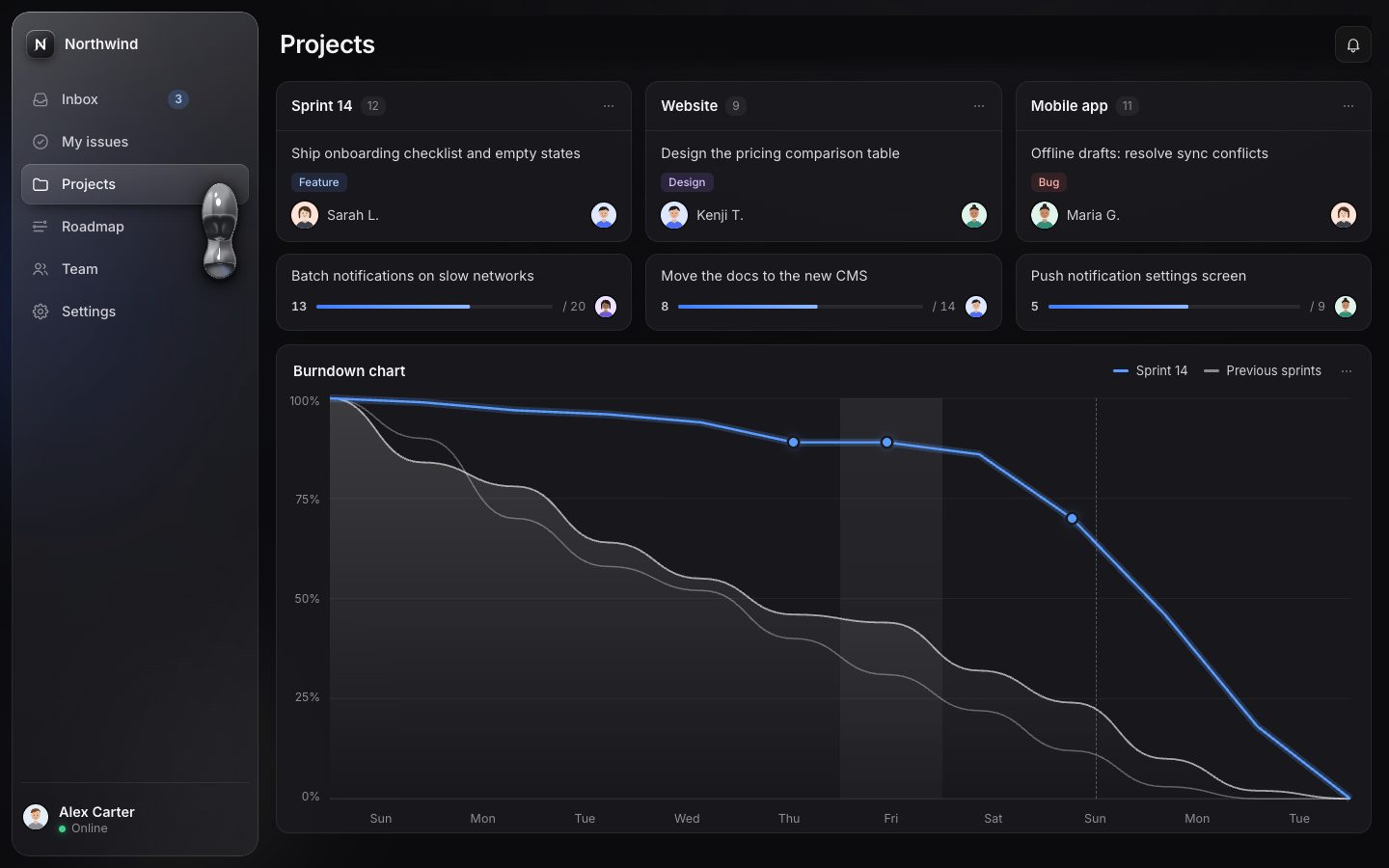
3 · Nested groups
An item with children gets a chevron button (aria-expanded, aria-controls) and a nested
list. Clicking the parent's label navigates; only the chevron opens the group, so the rows stay still while the drop
travels.
const open = state.open.includes(id);
return `<li class="nav-li group${open ? ' is-open' : ''}" data-id="${id}"><div class="row">${rowHTML(it)}` +
  `<button class="disclose" type="button" aria-expanded="${open}" aria-controls="sub-${id}" aria-label="${it.label} sections">${icon('chevRight')}</button></div>` +
  `<ul class="sub" id="sub-${id}" role="list">${it.children.map((c) => `<li class="sub-li" data-id="${c.id}">${rowHTML(c, true)}</li>`).join('')}</ul></li>`;
Opening is a FLIP: the rows below the group are measured, the group opens, and each row is animated from where it was to where it is now (300 ms). The children cascade in 35 ms apart. Closing fades the children out first (the last one first), then closes. The open groups are saved.
function toggleGroup(id, open, { silent = false, quiet = false, keepDrop = false } = {}) {
  const li = $(`.nav-li[data-id="${id}"]`, list); if (!li) return;
  if (open == null) open = !li.classList.contains('is-open');
  if (open === li.classList.contains('is-open')) return;
  const btn = $('.disclose', li), sub = $('.sub', li);
  const animate = !silent && !reduced();
  const after = []; for (let n = li.nextElementSibling; n; n = n.nextElementSibling) after.push(n);
  const before = after.map((n) => n.offsetTop);
  const done = () => {
    li.classList.toggle('is-open', open); btn.setAttribute('aria-expanded', open);
    state.open = open ? [...new Set([...state.open, id])] : state.open.filter((x) => x !== id); store.set(K('open'), state.open);
    if (animate) {
      after.forEach((n, i) => { const dy = before[i] - n.offsetTop; if (dy) n.animate([{ transform: `translateY(${dy}px)` }, { transform: 'none' }], { duration: 300, easing: 'cubic-bezier(.32,.72,0,1)' }); });
      if (open) $$('.sub-li', sub).forEach((n, i) => n.animate([{ opacity: 0, transform: 'translateY(-8px)' }, { opacity: 1, transform: 'none' }], { duration: 260, delay: 30 + i * 35, easing: 'cubic-bezier(.2,.8,.2,1)', fill: 'backwards' }));
    }
    if (animate) measure(); else geoDirty = true;
    if (!keepDrop) { if (animate) updateDrop(silent); else requestAnimationFrame(() => updateDrop(silent)); }
    if (!silent && !quiet) announce(`${byId.get(id).label} ${open ? 'expanded' : 'collapsed'}`);
  };
  if (!open && animate) {
    const kids = $$('.sub-li', sub);
    const anims = kids.map((n, i) => n.animate([{ opacity: 1 }, { opacity: 0, transform: 'translateY(-6px)' }], { duration: 120, delay: (kids.length - 1 - i) * 20, fill: 'forwards' }));
    Promise.all(anims.map((a) => a.finished)).then(() => { done(); anims.forEach((a) => a.cancel()); });
  } else done();
}
If the active item is a child inside a closed group, the drop flows to the parent, and the parent keeps the pill.
function anchorId() {
  const it = byId.get(state.route) || byId.get(cfg.defaultRoute);
  if (!it) return null;
  if (it.parent) { const li = $(`.nav-li[data-id="${it.parent}"]`, list); if (!li?.classList.contains('is-open') || !state.geo.items[it.id]) return it.parent; }
  return it.id;
}
From here the sidebar remembers things in localStorage, under keys with a version in them, so state
saved by an older build is never read (and is deleted). A polite live region reads out what changed.
const store = {
  get(k, d) { try { const v = localStorage.getItem(k); return v == null ? d : JSON.parse(v); } catch { return d; } },
  set(k, v) { try { localStorage.setItem(k, JSON.stringify(v)); } catch { /* private mode: keep it in memory */ } },
};function announce(msg) { live.textContent = ''; setTimeout(() => { live.textContent = msg; }, 30); }.disclose { position: absolute; right: calc(var(--lane) - 2px); top: 50%; width: 28px; height: 28px; margin-top: -14px; display: grid; place-items: center; border-radius: 8px; color: var(--ink-3); transition: background .15s, opacity .2s .1s, color .15s; z-index: 2; }
.disclose:hover { background: var(--hover-bg); color: var(--ink); }
.disclose .ic { width: 16px; height: 16px; transition: transform .28s var(--ease); }
.group.is-open .disclose .ic { transform: rotate(90deg); }
.group .row > .item { padding-right: calc(var(--lane) + 26px); }
.sub { display: none; flex-direction: column; gap: var(--row-gap, 2px); margin: 2px 0 4px; }
.group.is-open > .sub { display: flex; }
.sub-item { --ic: 16px; height: calc(var(--row-h) - 6px); padding-left: calc(var(--item-pl) + 24px); font-size: calc(var(--row-fs, 14.5px) - 1px); }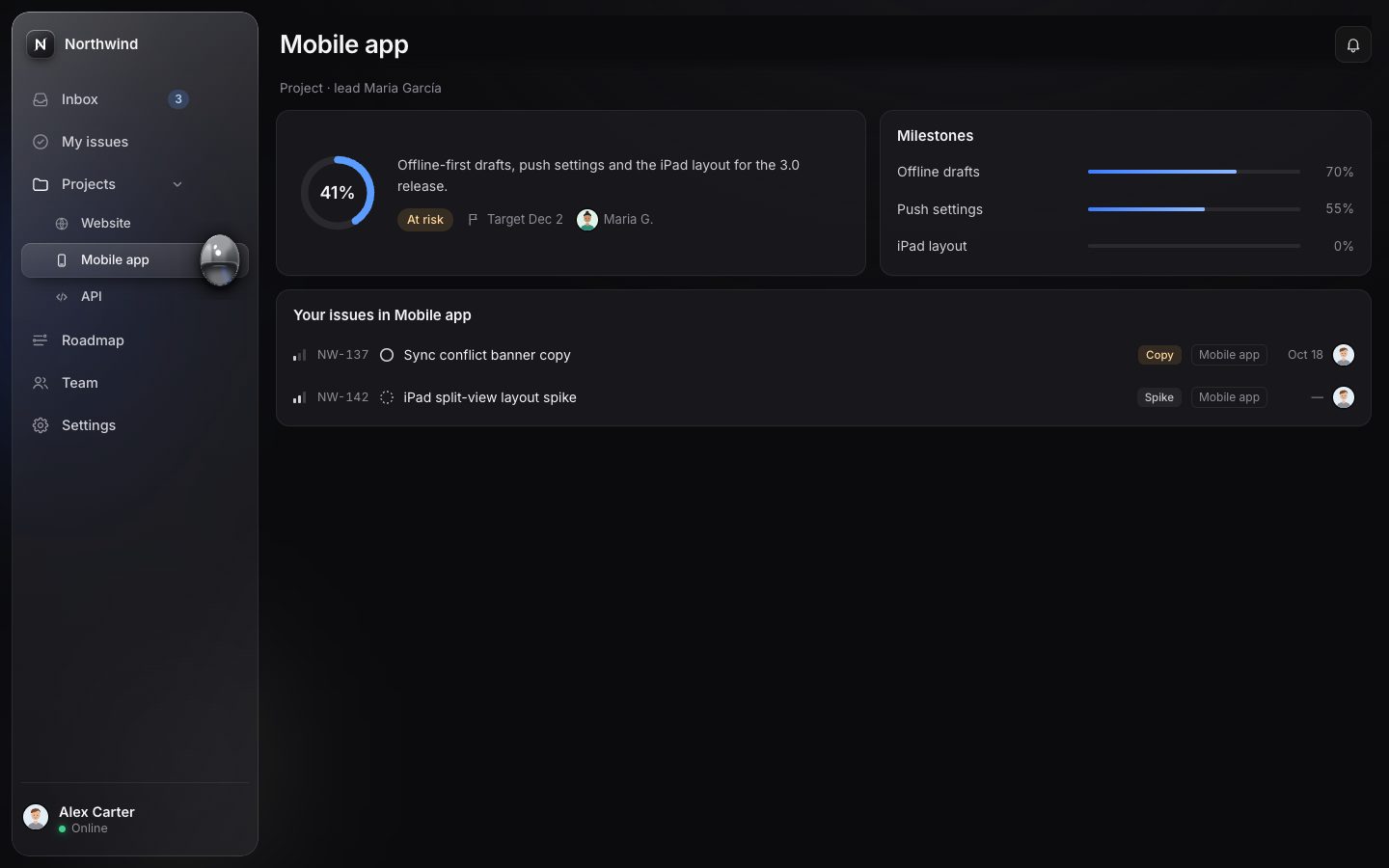
4 · The icon rail
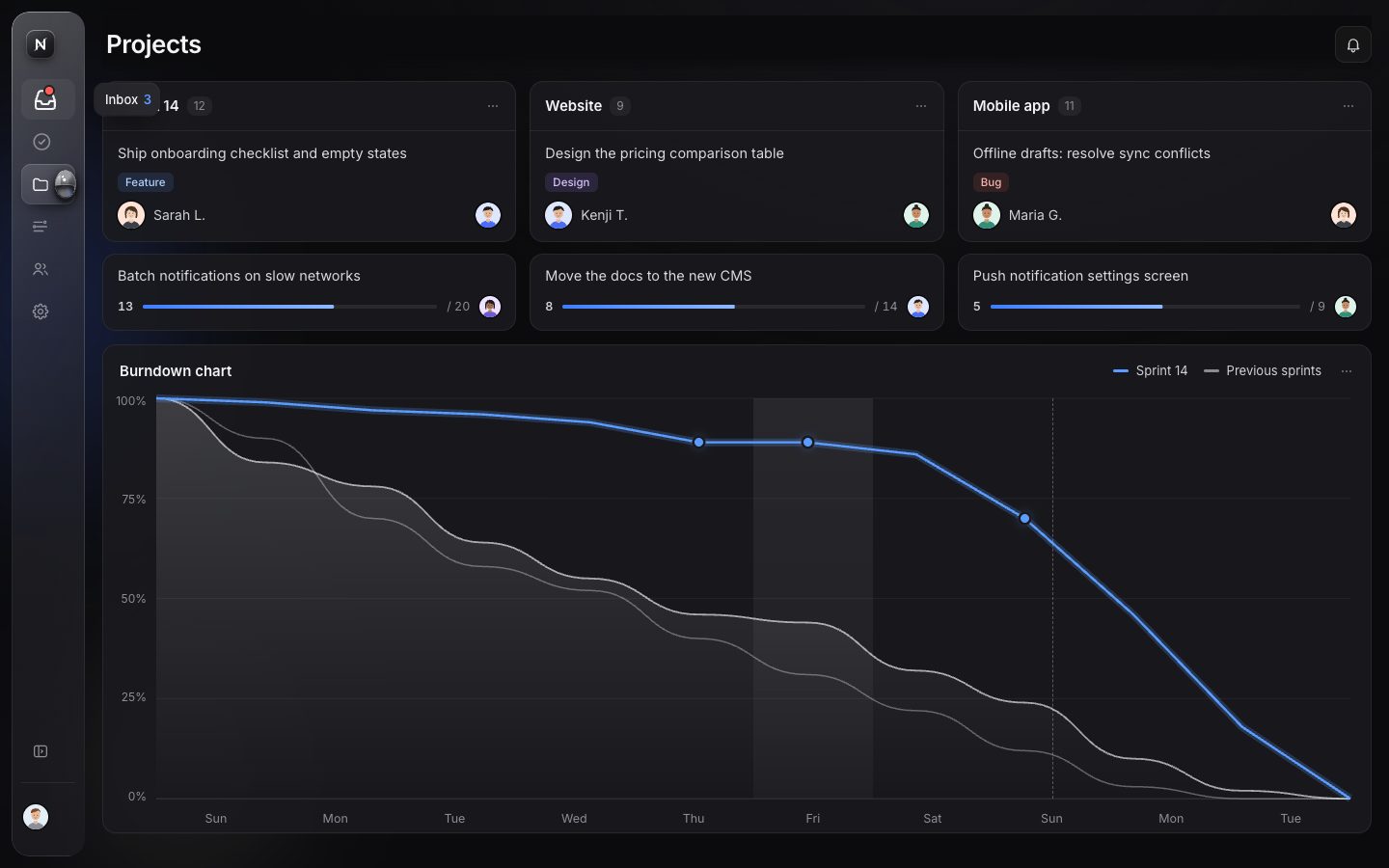
The mode lives on <html>: m-side or m-rail. Below 1100 px the rail
is the default (a tablet), and then expanding it opens an overlay over the content instead of pushing it.
function computeMode() {
  const w = innerWidth;
  if (w < (cfg.layout.wideMin || 1100)) return 'rail';
  return state.railPref ? 'rail' : 'side';
}
function setMode(m) {
  if (m === state.mode) return false;
  state.mode = m;
  root.classList.remove('m-side', 'm-rail');
  root.classList.add('m-' + m);
  root.classList.toggle('is-tablet', m === 'rail' && innerWidth < (cfg.layout.wideMin || 1100));
  if (m !== 'rail') closeOverlay(false);
  return true;
}
Collapsing resizes nothing. The glass and every block keep their full width and are clipped to the rail with an
animated clip-path (420 ms), so nothing inside reflows. The content moves by FLIP: <main>
is measured before and after and slides from the old place to the new.
function toggleRail(force) {
  if (root.classList.contains('is-tablet')) { state.overlay ? closeOverlay() : openOverlay(); return; }
  const next = force ?? !state.railPref;
  if (next === state.railPref) return;
  state.railPref = next; store.set(K('rail'), next);
  const x0 = main.getBoundingClientRect().left;
  setMode(next ? 'rail' : 'side');
  const x1 = main.getBoundingClientRect().left;
  if (!reduced()) {
    main.getAnimations().forEach((a) => a.cancel());
    main.animate([{ transform: `translateX(${x0 - x1}px)` }, { transform: 'none' }], { duration: 420, easing: 'cubic-bezier(.32,.72,0,1)' });
  }
  syncRailButtons();
  measure(); updateDrop(); hideTip();
  announce(next ? 'Sidebar collapsed' : 'Sidebar expanded');
}.sb-glass { clip-path: inset(0 0 0 0 round var(--radius-sb)); transition: clip-path var(--t-rail) var(--ease); }
.sb-head, .sb-body, .sb-foot { clip-path: inset(-40px 0 -40px 0); transition: clip-path var(--t-rail) var(--ease); }
.m-rail:not(.is-overlay) .sb-glass { clip-path: inset(0 calc(var(--side-w) - var(--rail-w)) 0 0 round var(--radius-sb)); }
.m-rail:not(.is-overlay) .sb-head, .m-rail:not(.is-overlay) .sb-body, .m-rail:not(.is-overlay) .sb-foot { clip-path: inset(-40px calc(var(--side-w) - var(--rail-w)) -40px 0); }In the rail the labels fade, the pill becomes a square, a dot stands in for a badge, and anything that cannot be
seen becomes visibility: hidden, so it cannot be focused either. The drop becomes a 12.5 px bead, 20 px in
from the rail's 76 px edge.
/* rail: labels go, the pill becomes a square, things that cannot be seen cannot be focused */
.m-rail:not(.is-overlay) .label, .m-rail:not(.is-overlay) .badge, .m-rail:not(.is-overlay) .disclose, .m-rail:not(.is-overlay) .rail-hide { opacity: 0; transition: opacity .12s, visibility 0s .14s; visibility: hidden; }
.m-rail:not(.is-overlay) .item::before { right: calc(100% - var(--rail-pill)); }
.m-rail:not(.is-overlay) .item.has-badge .dot { opacity: 1; transform: none; }
.m-rail:not(.is-overlay) .sub { display: none; }
.m-rail:not(.is-overlay) .group.has-active > .row > .item::before { background: var(--pill-bg); box-shadow: var(--pill-shadow); opacity: 1; }
.rail-only { opacity: 0; visibility: hidden; transition: opacity .15s, visibility 0s .15s; }
.m-rail:not(.is-overlay) .rail-only { opacity: 1; visibility: visible; transition: opacity .2s .18s; }function dropTarget() {
const id = anchorId(); const g = state.geo?.items[id]; if (!g) return null;
const d = cfg.drop, m = state.mode === 'rail' && !state.overlay ? 'rail' : 'side';
const a = d[m];
if (m === 'rail') return { x: (cfg.layout.railW) - a.inset, y: g.y + g.h / 2, r: a.r };
return { x: g.x + g.w - a.inset, y: g.y + g.h / 2, r: a.r };
}function openOverlay() {
state.overlay = true; root.classList.add('is-overlay'); syncRailButtons(); measure(); updateDrop();
$('.item[aria-current]', list)?.focus({ preventScroll: true });
}
function closeOverlay(update = true) {
if (!state.overlay) return;
state.overlay = false; root.classList.remove('is-overlay'); syncRailButtons();
if (update) { measure(); updateDrop(); }
}Over the rail the icons magnify like the macOS dock: each icon scales by a Gaussian of its distance from the
pointer, up to 1.5 ×, at most once a frame. A tooltip with the label (and the badge's count) shows after 140 ms, at
once on keyboard focus, and is linked with aria-describedby.
function magnify() {
  magRaf = 0;
  for (const a of $$('.nav > .nav-li > .row > .item, .nav .sub-li > .item', list)) {
    const g = state.geo?.items[a.dataset.id]; const ic = $('.ic', a);
    if (!g || magY == null) { ic.style.transform = ''; continue; }
    const dy = (g.icy - magY) / 44; const s = 1 + 0.5 * Math.exp(-dy * dy * 1.6);
    ic.style.transform = `translateX(${(s - 1) * 6}px) scale(${s.toFixed(3)})`;
  }
}
sb.addEventListener('pointermove', (e) => {
  if (!railLike() || !fine.matches || reduced()) return;
  magY = e.clientY - sb.getBoundingClientRect().top;
  sb.classList.add('is-magnifying');
  if (!magRaf) magRaf = requestAnimationFrame(magnify);
});function showTip(a, now = false) {
if (!railLike()) return;
clearTimeout(tipTimer);
tipTimer = setTimeout(() => {
const r = a.getBoundingClientRect(), sr = sb.getBoundingClientRect();
const n = state.badges[a.dataset.id];
tip.innerHTML = `<span>${byId.get(a.dataset.id).label}${n ? ` <b class="tip-n">${n}</b>` : ''}</span>`;
tip.style.transform = `translate(${Math.round(sr.left + cfg.layout.railW + 10)}px, ${Math.round(r.top + r.height / 2)}px) translateY(-50%)`;
tip.classList.add('is-on'); a.setAttribute('aria-describedby', 'tip');
}, now ? 0 : 140);
}
5 · The keyboard and the command palette
In the nav, Up and Down move between the visible rows, Home and End jump to the ends, Right and Left open and close
a group (Left on a child returns to its parent). Anywhere on the page, [ toggles the rail and G then a
letter jumps (G I is Inbox), if the second key comes within 900 ms.
list.addEventListener('keydown', (e) => {
  const a = e.target.closest('.item, .disclose'); if (!a) return;
  const visible = $$('.item', list).filter((x) => x.offsetParent && !x.closest('[inert]'));
  const cur = a.classList.contains('disclose') ? $('.item', a.parentElement) : a;
  const i = visible.indexOf(cur);
  let j = null;
  if (e.key === 'ArrowDown') j = Math.min(visible.length - 1, i + 1);
  else if (e.key === 'ArrowUp') j = Math.max(0, i - 1);
  else if (e.key === 'Home') j = 0; else if (e.key === 'End') j = visible.length - 1;
  else if (e.key === 'ArrowRight' || e.key === 'ArrowLeft') {
    const li = cur.closest('.nav-li');
    if (li.classList.contains('group') && !cur.classList.contains('sub-item')) { e.preventDefault(); toggleGroup(li.dataset.id, e.key === 'ArrowRight'); return; }
    if (cur.classList.contains('sub-item') && e.key === 'ArrowLeft') { e.preventDefault(); $('.row .item', li).focus(); return; }
  }
  if (j != null) { e.preventDefault(); visible[j]?.focus(); }
});let chord = null, chordT = 0;
const typing = (t) => t && (t.isContentEditable || /^(INPUT|TEXTAREA|SELECT)$/.test(t.tagName));
document.addEventListener('keydown', (e) => {
if ((e.metaKey || e.ctrlKey) && e.key.toLowerCase() === 'k') { e.preventDefault(); palette.isOpen ? palette.close() : palette.open(); return; }
if (palette.isOpen || typing(e.target) || e.metaKey || e.ctrlKey || e.altKey) return;
if (e.key === 'Escape') { if (state.overlay) { closeOverlay(); return; } }
if (e.key === '[') { e.preventDefault(); toggleRail(); return; }
const k = e.key.toUpperCase();
if (chord === 'G' && performance.now() - chordT < 900) {
chord = null;
const hit = [...byId.values()].find((it) => it.keys === `G ${k}`);
if (hit) { e.preventDefault(); go(hit.id); }
return;
}
if (k === 'G') { chord = 'G'; chordT = performance.now(); }
});go() changes the route at once, with pushState (which fires no hashchange),
so whoever called it, such as the palette moving the focus to the active row, already sees the new
aria-current. Back still arrives as a hashchange.
// the route changes now (pushState fires no hashchange), so whoever calls go() — the palette moving focus to the
// active item — already sees the new aria-current; Back still arrives as a hashchange
function go(id) { if (location.hash !== `#/${id}`) history.pushState(null, '', `#/${id}`); setActive(id); }
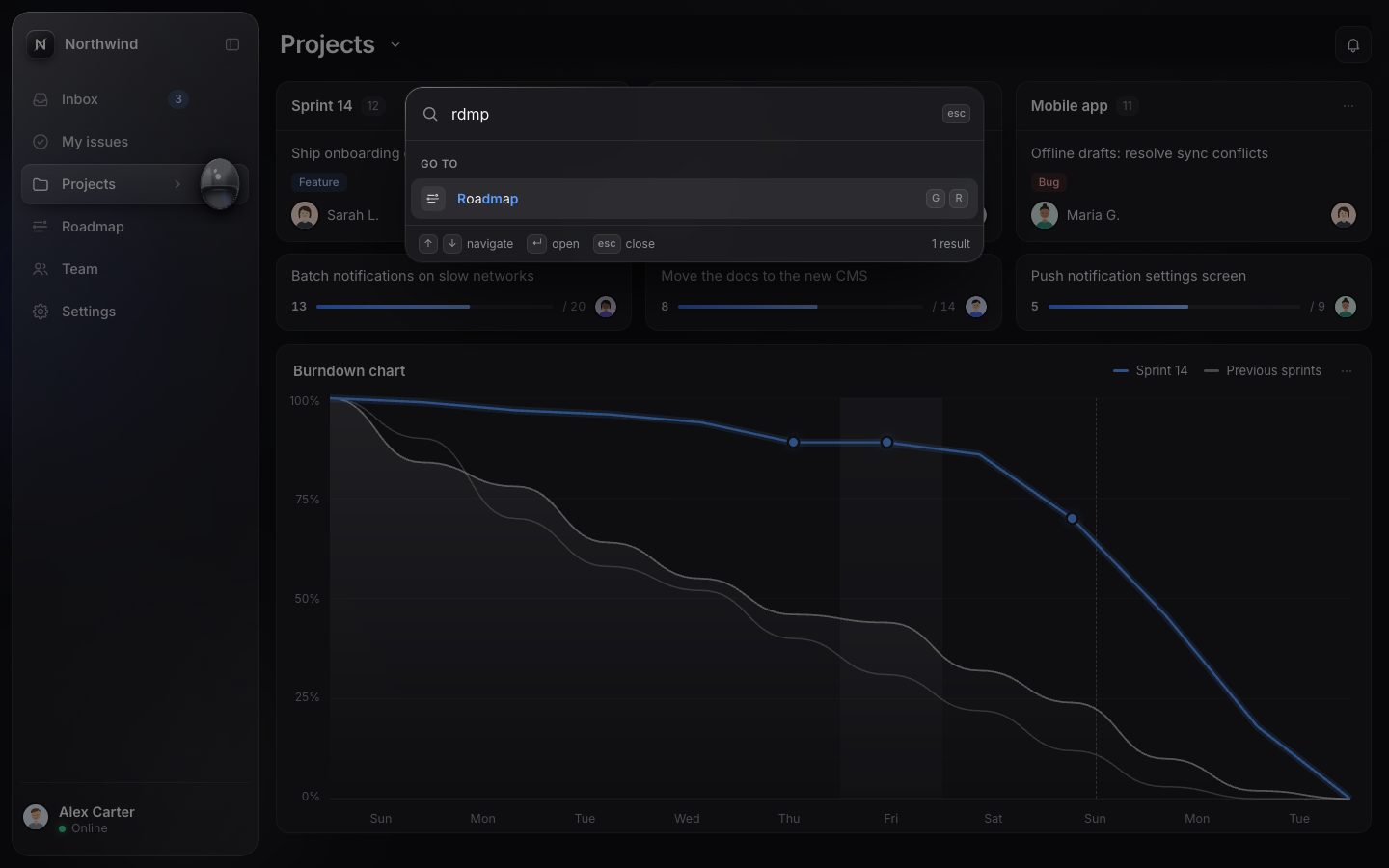
Cmd/Ctrl+K opens the palette: a modal dialog with a combobox and a listbox. It is laid out once up front and kept
invisible, not display: none, so the first open costs no layout.
<div id="palette" hidden>
  <div class="pal-scrim"></div>
  <div class="pal-box" role="dialog" aria-modal="true" aria-label="Command palette">
    <div class="pal-in">
      <svg class="ic" viewBox="0 0 24 24" fill="none" stroke="currentColor" stroke-width="1.7" stroke-linecap="round" aria-hidden="true"><circle cx="11" cy="11" r="6.5"/><path d="m16 16 4 4"/></svg>
      <input type="text" role="combobox" aria-expanded="false" aria-controls="pal-list" aria-autocomplete="list" aria-label="Search pages and actions" placeholder="Search or jump to…" autocomplete="off" spellcheck="false">
      <kbd>esc</kbd>
    </div>
    <div class="pal-list" id="pal-list" role="listbox" aria-label="Results"></div>
    <div class="pal-foot"><span><kbd>↑</kbd><kbd>↓</kbd> navigate</span><span><kbd>↵</kbd> open</span><span><kbd>esc</kbd> close</span><span class="pal-count"></span></div>
  </div>
</div>
The search is fuzzy: every typed letter must appear in order. Runs of consecutive letters, the start of a word, a letter at the same position and an exact prefix (+20) score higher, and longer labels lose a little.
export function fuzzy(q, text) {
  q = q.trim().toLowerCase(); if (!q) return { score: 0, hits: [] };
  const t = text.toLowerCase();
  let qi = 0, score = 0, run = 0; const hits = [];
  for (let i = 0; i < t.length && qi < q.length; i++) {
    if (q[qi] === ' ') { qi++; i--; continue; }
    if (t[i] === q[qi]) {
      const start = i === 0 || /[\s/·-]/.test(t[i - 1]);
      run++; score += 1 + run * 2 + (start ? 6 : 0) + (i === qi ? 3 : 0);
      hits.push(i); qi++;
    } else run = 0;
  }
  if (qi < q.length) return null;
  if (t.startsWith(q)) score += 20;
  score -= t.length * 0.05;
  return { score, hits };
}
Typing does not rebuild the list: each option node is made once and reused, so a keystroke only reorders nodes and rewrites the highlighted label.
// option nodes are made once per entry and reused, so typing only moves nodes and rewrites the highlighted label
this.nodes = this.nodes || new Map(); this.heads = this.heads || new Map();
const kids = []; let i = 0;
for (const g of groups) {
  let h = this.heads.get(g);
  if (!h) { h = document.createElement('div'); h.className = 'pal-gh'; h.setAttribute('role', 'presentation'); h.setAttribute('aria-hidden', 'true'); h.textContent = g; this.heads.set(g, h); }
  kids.push(h);
  for (const r of by.get(g)) {
    const key = `${r.group}|${r.sub || ''}|${r.label}|${r.icon}|${r.hint || ''}`;
    let o = this.nodes.get(key);
    if (!o) {
      o = document.createElement('div'); o.className = 'pal-opt'; o.setAttribute('role', 'option');
      const keys = r.keys ? `<span class="pal-keys">${r.keys.split(' ').map((k) => `<kbd>${esc(k)}</kbd>`).join('')}</span>` : '';
      o.innerHTML = `<span class="pal-ic">${icon(r.icon || 'chevRight')}</span><span class="pal-label"></span>${r.hint ? `<span class="pal-hint">${esc(r.hint)}</span>` : ''}${keys}`;
      o._label = o.querySelector('.pal-label');
      this.nodes.set(key, o);
    }
    const lab = `${r.sub ? `<span class="pal-sub">${esc(r.sub)} ›</span> ` : ''}${mark(r.label, r.m.hits)}`;
    if (o._lab !== lab) { o._label.innerHTML = lab; o._lab = lab; }
    o.id = `pal-o${i}`; o.dataset.i = i; o.setAttribute('aria-selected', 'false');
    kids.push(o); i++;
  }
}run(i) {
const r = this.rows[i]; if (!r) return;
this.close(false);
// give focus to the main region (or the active nav item) so keyboard users are not stranded
requestAnimationFrame(() => { r.run(); const a = document.querySelector('.item[aria-current]'); (a && a.offsetParent ? a : document.getElementById('main')).focus({ preventScroll: true }); });
}The entries are every page (children too, as "Projects › Website") and the sidebar's own actions.
function paletteEntries() {
  const nav = [];
  for (const it of items) {
    nav.push({ group: 'Go to', label: it.label, icon: it.icon, keys: it.keys, run: () => go(it.id), hint: state.badges[it.id] ? `${state.badges[it.id]} new` : '' });
    for (const c of it.children || []) nav.push({ group: 'Go to', label: c.label, sub: it.label, icon: c.icon, keys: c.keys, run: () => go(c.id) });
  }
  const acts = [
    ...(cfg.actions ? cfg.actions(api) : []),
    { group: 'Sidebar', label: state.mode === 'rail' && !state.overlay ? 'Expand sidebar' : 'Collapse sidebar', icon: 'sidebar', keys: '[', run: () => toggleRail() },
    ...items.filter((i) => i.children).map((g) => ({ group: 'Sidebar', label: `${state.open.includes(g.id) ? 'Collapse' : 'Expand'} ${g.label}`, icon: 'chevDown', run: () => toggleGroup(g.id), hidden: state.mode === 'rail' && !state.overlay })),
  ];
  return [...nav, ...acts].filter((x) => !x.hidden);
}
6 · Drag to reorder
A mouse starts a drag after moving 6 px. A touch must press and hold for 280 ms first (moving more than 8 px before that cancels it), so taps and scrolling still work.
down(e) {
  if (e.button !== 0 || this.active) return;
  const a = e.target.closest('.item'); if (!a || a.classList.contains('sub-item') || e.target.closest('.disclose')) return;
  const li = a.closest('.nav-li');
  const touch = e.pointerType !== 'mouse';
  this.p = { id: e.pointerId, x0: e.clientX, y0: e.clientY, x: e.clientX, y: e.clientY, li, a, touch, t0: performance.now() };
  if (touch) this.p.timer = setTimeout(() => { if (this.p && !this.active) this.start(); }, 280);
  addEventListener('pointermove', this.move); addEventListener('pointerup', this.up); addEventListener('pointercancel', this.up);
}move(e) {
const p = this.p; if (!p || e.pointerId !== p.id) return;
p.x = e.clientX; p.y = e.clientY;
if (!this.active) {
const d = Math.hypot(p.x - p.x0, p.y - p.y0);
if (p.touch) { if (d > 8) this.cancelPress(); return; }
if (d > 6) this.start(); else return;
}
e.preventDefault();
if (!p.raf) p.raf = requestAnimationFrame(() => { p.raf = 0; this.place(); });
}When the drag starts, every row's position is read once. From then on a move only writes transforms: a ghost of the row follows the pointer, the row itself stays as a dashed placeholder, and a line shows where it will land.
start() {
  const p = this.p; this.active = true; this.onStart?.();
  try { p.a.setPointerCapture(p.id); } catch { /* fine */ }
  const r = p.a.getBoundingClientRect();
  p.rect = r;
  p.slots = this.lis().map((n) => ({ n, r: (n.querySelector(':scope > .row') || n).getBoundingClientRect() }));
  p.from = p.slots.findIndex((s) => s.n === p.li);
  p.bodyRect = this.body.getBoundingClientRect();
  const g = document.createElement('div');
  g.className = 'drag-ghost'; g.setAttribute('aria-hidden', 'true');
  g.style.width = r.width + 'px'; g.style.height = r.height + 'px';
  g.style.left = r.left + 'px'; g.style.top = r.top + 'px';
  g.appendChild(p.a.cloneNode(true));
  g.firstChild.removeAttribute('href'); g.firstChild.removeAttribute('aria-current');
  document.body.appendChild(g);
  p.ghost = g;
  p.li.classList.add('is-placeholder');
  this.sb.classList.add('is-reordering');
  if (navigator.vibrate && p.touch) navigator.vibrate(8);
  addEventListener('keydown', this.keyEsc, true);
  this.place();
}
On release the rows FLIP into their new order (320 ms) and the ghost glides into the slot. Escape cancels; Alt+Up and Alt+Down do the same move from the keyboard.
flip(mutate) {
  const lis = this.lis();
  const box = (n) => (getComputedStyle(n).display === 'contents' ? n.querySelector(':scope > .row') : n);
  const before = new Map(lis.map((n) => [n, box(n).getBoundingClientRect()]));
  mutate();
  if (this.reduced()) return;
  for (const n of lis) {
    const a = before.get(n), b = box(n).getBoundingClientRect();
    const dx = a.left - b.left, dy = a.top - b.top;
    if (dx || dy) box(n).animate([{ transform: `translate(${dx}px, ${dy}px)` }, { transform: 'none' }], { duration: 320, easing: EASE });
  }
}const reorder = new Reorder({ list, sb, body, getMode: () => state.mode, grid: () => false,
reduced, onChange(order, moved, from, to) {
state.order = order; store.set(K('order'), order);
measure(); updateDrop();
announce(moved ? `${byId.get(moved).label} moved to position ${to + 1} of ${order.length}` : 'Sidebar order reset');
}, onStart: hideTip });const order = (state.order && state.order.length === items.length && state.order.every((id) => byId.has(id))) ? state.order : items.map((i) => i.id);.drop-line { position: absolute; left: 0; top: 0; border-radius: 2px; background: var(--drop-line); box-shadow: 0 0 10px var(--drop-line); opacity: 0; pointer-events: none; transition: opacity .12s; z-index: 4; }
.drop-line.is-on { opacity: 1; }
.drop-line::before, .drop-line::after { content: ''; position: absolute; width: 6px; height: 6px; border-radius: 50%; background: var(--drop-line); top: -2px; }
.drop-line::before { left: -3px; } .drop-line::after { right: -3px; }
.is-placeholder > .row > .item, .is-placeholder > .item { outline: 1.5px dashed var(--placeholder); outline-offset: -2px; }
.is-placeholder > .row > .item > *, .is-placeholder > .row > .disclose { opacity: .35; }
.drag-ghost { position: fixed; z-index: 90; pointer-events: none; display: flex; border-radius: var(--row-r); box-shadow: var(--ghost-shadow); background: var(--ghost-bg); will-change: transform; transform-origin: 20% 50%; }
.drag-ghost .item { flex: 1; color: var(--ink); }
.drag-ghost .item::before { opacity: 0; }
.is-reordering .item { cursor: grabbing; }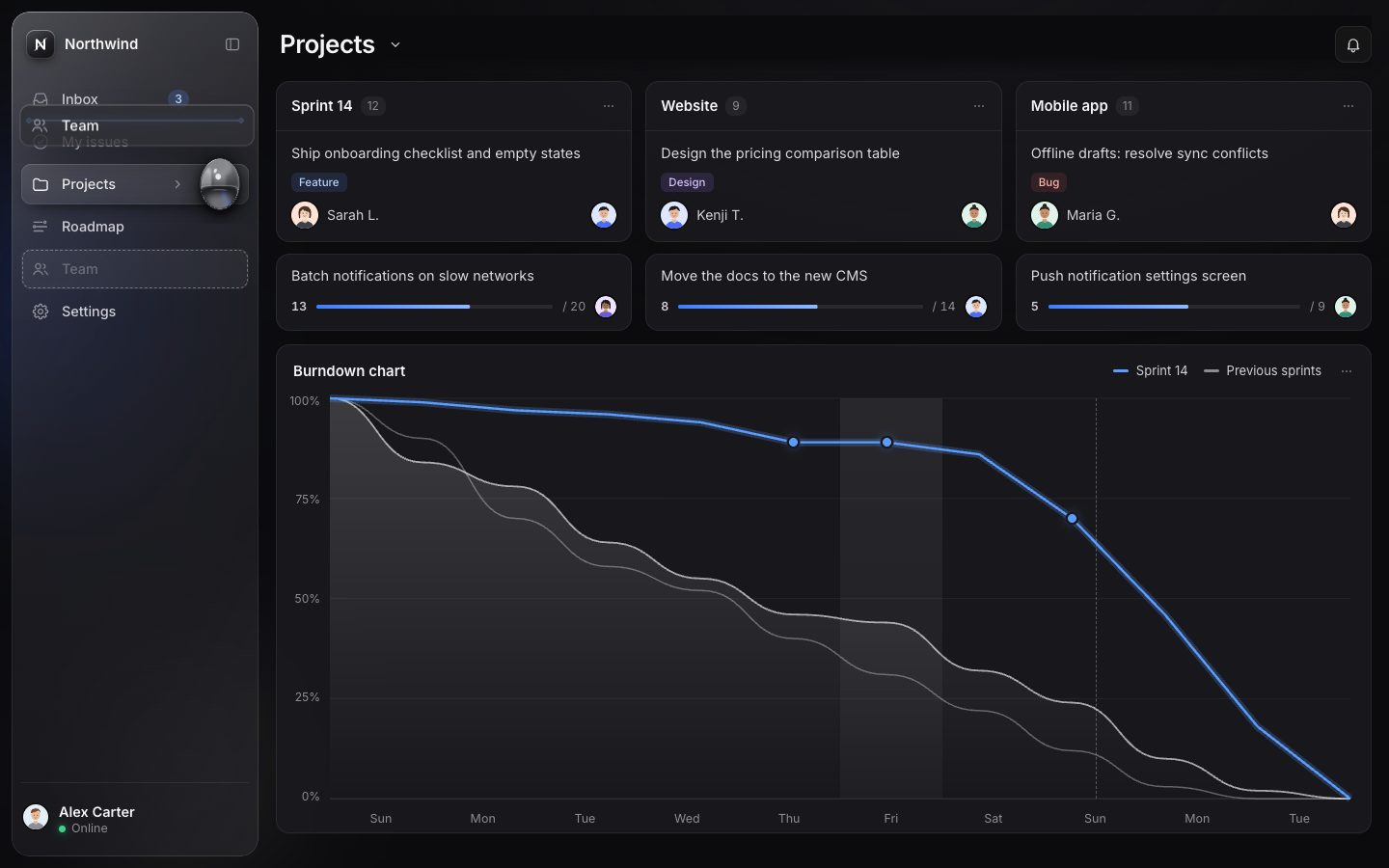
7 · The workspace menu and live notifications
The workspace name in the head becomes a menu button (the WAI-ARIA menu button pattern, with
menuitemradio). Switching redraws every view and the badges, and is saved.
open(focusIdx = null) {
  const list = this.items();
  this.m.innerHTML = list.map((it) => it.sep ? '<div class="menu-sep" role="separator"></div>' : `<button type="button" role="${it.role || 'menuitemradio'}" tabindex="-1" ${it.role === 'menuitem' ? '' : `aria-checked="${!!it.checked}"`} data-id="${it.id}">${it.html}<svg class="ic mi-check" viewBox="0 0 24 24" fill="none" stroke="currentColor" stroke-width="2" aria-hidden="true"><path d="m5 12.5 4.2 4.2L19 7"/></svg></button>`).join('');
  this.m.hidden = false; this.isOpen = true; this.b.setAttribute('aria-expanded', 'true');
  // place it under the button (or above when there is no room), inside its positioned parent
  const b = this.b.getBoundingClientRect(), par = this.m.offsetParent?.getBoundingClientRect() || { left: 0, top: 0 };
  const mh = this.m.offsetHeight, mw = this.m.offsetWidth;
  let top = b.bottom - par.top + 6; if (b.bottom + mh + 12 > innerHeight) top = b.top - par.top - mh - 6;
  let left = b.left - par.left; if (par.left + left + mw > innerWidth - 8) left = innerWidth - 8 - mw - par.left;
  this.m.style.top = Math.round(top) + 'px'; this.m.style.left = Math.round(Math.max(8 - par.left, left)) + 'px';
  requestAnimationFrame(() => this.m.classList.add('is-open'));
  const opts = [...this.m.querySelectorAll('[role^="menuitem"]')];
  const cur = Math.max(0, opts.findIndex((o) => o.getAttribute('aria-checked') === 'true'));
  (opts[focusIdx == null ? cur : (focusIdx < 0 ? opts.length - 1 : focusIdx)] || opts[0])?.focus();
}function setWorkspace(id, { quiet = false } = {}) {
const ws = cfg.workspaces.find((w) => w.id === id) || cfg.workspaces[0];
state.ws = ws.id; store.set(K('ws'), ws.id);
state.badges = { ...(ws.badges || {}) }; state.unread = 0;
cfg.renderWorkspace(ws, api);
paintBadges();
showView(state.route || cfg.defaultRoute, null);
$$('.view', main).forEach((v) => { v.inert = !v.classList.contains('is-on'); });
requestAnimationFrame(() => { measure(); updateDrop(true); });
if (!quiet) { announce(`Switched to ${ws.name}`); toast(`Switched to <b>${ws.name}</b>`, { icon: 'workspace', time: 2400 }); }
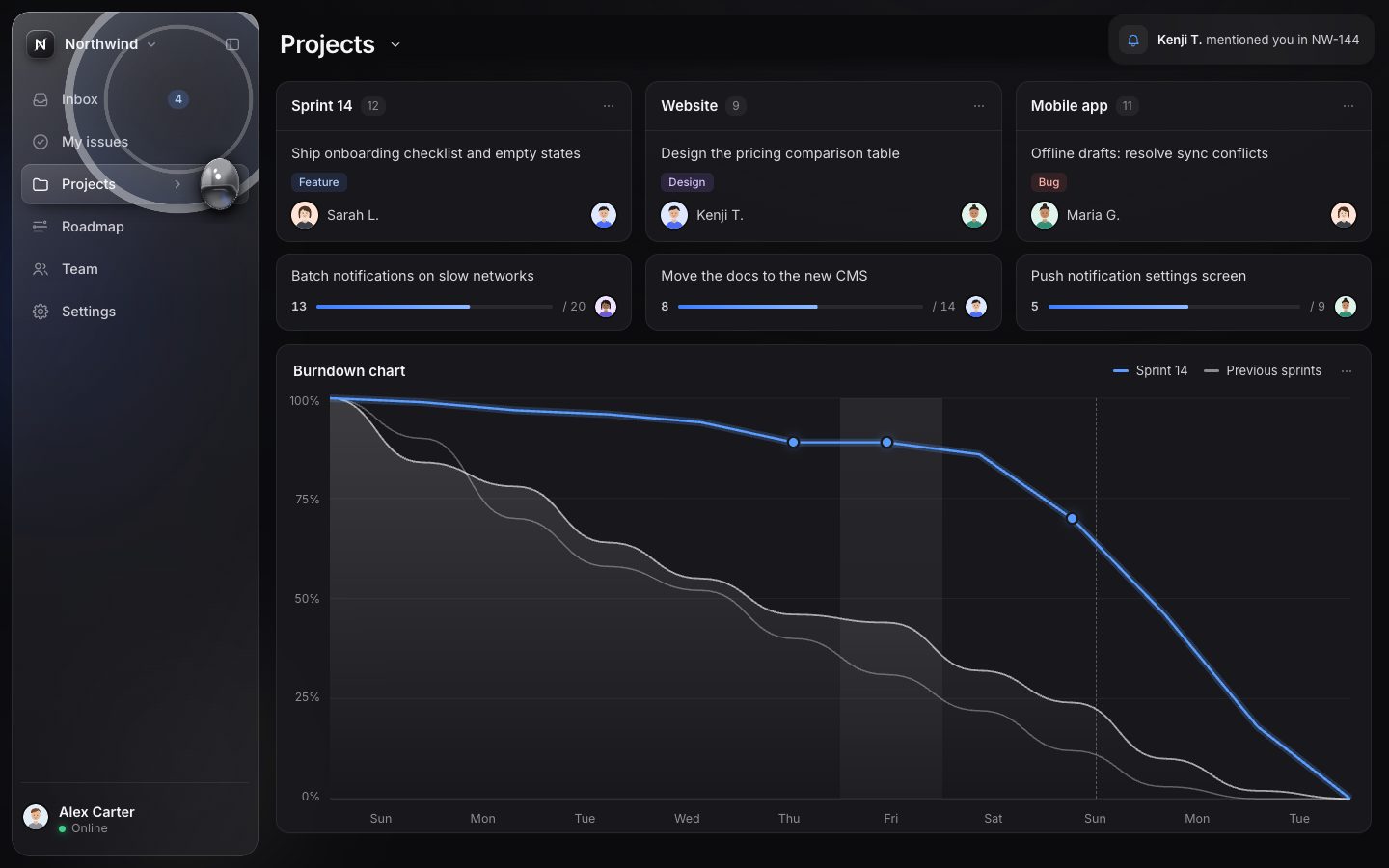
}A notification adds to its item's badge, lets the variant react (Graphite puts the message at the top of the inbox), and sends a ripple from the badge through the glass: a CSS ring that grows 16 times in 1.2 s.
function notify(n) {
  n = n || cfg.nextNotification(noteIdx++, api);
  if (!n) return null;
  state.badges[n.item] = (state.badges[n.item] || 0) + (n.add ?? 1);
  state.unread++;
  paintBadges();
  cfg.onNotify?.(n, api);
  // ripple: from the item's badge (or icon) through the glass and the drop
  measure();
  const g = state.geo.items[n.item] || state.geo.items[byId.get(n.item)?.parent];
  if (g) {
    const badge = $(`[data-badge="${n.item}"]`, list);
    let x = g.icx, y = g.icy;
    if (badge && badge.offsetParent && state.mode !== 'rail') { const b = offsetIn(badge, sb); x = b.x + b.w / 2; y = b.y + b.h / 2; }
    const ring = document.createElement('i'); ring.className = 'ripple';
    ring.style.left = x + 'px'; ring.style.top = y + 'px';
    $('.ripples', sb).append(ring); setTimeout(() => ring.remove(), 1700);
    const item = $(`.item[data-id="${n.item}"]`, list); item?.classList.remove('pinged'); void item?.offsetWidth; item?.classList.add('pinged');
    liquid?.ripple(x + M, y + M);
  }
  if (n.toast) toast(n.toast, { icon: n.icon });
  announce(n.say || 'New notification');
  return n;
}onNotify(n) {
const m = { ...n.data, time: 'now', unread: true };
ws.inbox.unshift(m);
const ul = $('[data-msgs]');
if (ul) {
$$('[data-msg]', ul).forEach((b) => { b.dataset.msg = +b.dataset.msg + 1; });
ul.insertAdjacentHTML('afterbegin', msgRow(m, 0).replace(' is-sel', '').replace('aria-pressed="true"', 'aria-pressed="false"'));
ul.firstElementChild.classList.add('arrive');
$('.view[data-view="inbox"] .vh-sub').textContent = `${ws.inbox.filter((x) => x.unread).length} unread`;
}
},.ripple { position: absolute; width: 40px; height: 40px; margin: -20px 0 0 -20px; border-radius: 50%; box-shadow: 0 0 0 1.5px var(--ripple) inset, 0 0 18px var(--ripple-glow) inset; animation: ripple 1.2s linear forwards; }
.ripple::after { content: ''; position: absolute; inset: 0; border-radius: 50%; box-shadow: 0 0 0 1px var(--ripple) inset; animation: ripple-2 1.2s .14s linear both; }
@keyframes ripple { from { transform: scale(.2); opacity: .95; } 70% { opacity: .35; } to { transform: scale(16); opacity: 0; } }
@keyframes ripple-2 { from { transform: scale(.6); opacity: .8; } to { transform: scale(.82); opacity: 0; } }The same ripple runs through the drop. Its front moves at 265 px a second, and the shader bends the normals along it, so the reflection ripples. When the front reaches the drop, it knocks the stretch spring and the drop wobbles.
ripple(x, y, strength = 0.55) {
  if (this.reduced) return;
  this.rip = { x, y, t0: performance.now(), strength, hit: false };
  this._start();
}if (this.rip) {
const age = (now - this.rip.t0) / 1000;
const front = age * 265;
if (!this.rip.hit && front >= Math.hypot(H.x - this.rip.x, H.y - this.rip.y) - this.r) {
this.rip.hit = true; this.sv += 4.2 * this.rip.strength; // the wave knocks the drop
}
if (age > 1.6) this.rip = null;
}// ripple running through the liquid
float rd=length(p-uRip.xy);
float w=uRip.w*exp(-pow((rd-uRip.z)/(10.0*uDpr),2.0))*sin((rd-uRip.z)/(3.2*uDpr));
n=normalize(n+vec3(normalize(p-uRip.xy+1e-3)*w,0.));The demo sends its own: the first at 6 s, then every 22 s, three in all. Add ?quiet to the URL to stop
them.
if (!params.has('quiet') && cfg.nextNotification) {
  const first = cfg.firstNotificationAt ?? 6000;
  setTimeout(function loop() { if (!document.hidden) notify(); if (noteIdx < 3) setTimeout(loop, 22000); }, first);
}
8 · The phone
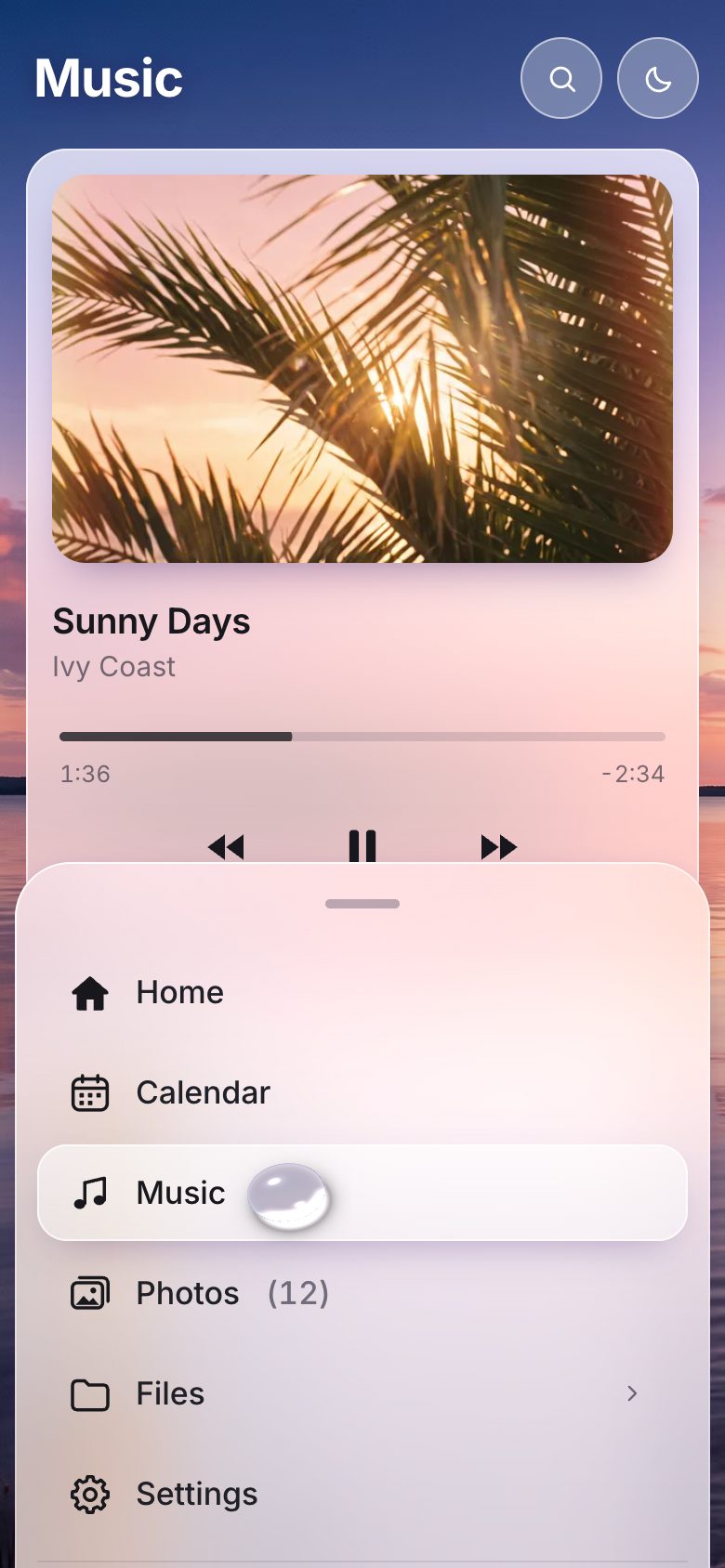
Below 700 px wide, or 500 px tall (a phone on its side), the same <nav> becomes a glass bottom
sheet. There is no second menu to keep in step.
function computeMode() {
  const w = innerWidth, h = innerHeight;
  if (w < 700 || h < 500) return 'sheet';
  if (w < (cfg.layout.wideMin || 1100)) return 'rail';
  return state.railPref ? 'rail' : 'side';
}
The sheet has three snaps: peek (the grip and the first row), half (every top-level item, the
default) and full. Everything is read first and written after, and anything below the visible edge is made
inert, so the keyboard never lands off screen.
layout() {
  if (!this.on) return;
  const sb = this.sb;
  // all reads first, then writes (a read after a style write would force another recalc)
  const H = sb.offsetHeight;
  const off = (el) => { let y = 0; for (let n = el; n && n !== sb; n = n.offsetParent) y += n.offsetTop; return y; };
  const lis = [...sb.querySelectorAll('#nav > .nav-li')];
  const rowOf = (li) => li.querySelector(':scope > .row') || li;
  const first = lis[0] ? off(rowOf(lis[0])) + rowOf(lis[0]).offsetHeight : 80;
  const lastLi = lis.reduce((m, li) => Math.max(m, off(rowOf(li)) + rowOf(li).offsetHeight), 0);
  this.partY = this.parts().map((n) => [n, off(n.querySelector?.(':scope > .row') || n)]);
  this.H = H;
  this.h = { peek: Math.min(H, first + 12), half: Math.min(H, lastLi + 14), full: H };
  if (this.h.half - this.h.peek < 40) this.h.peek = Math.max(56, this.h.half - 80);
  // the content's bottom padding follows the half snap; set on <main> directly (a custom property on :root would
  // restyle the whole document)
  if (this.h.half !== this._half) { this._half = this.h.half; this.onHalf?.(this.h.half); }
  this.apply(this.name, false);
}
Dragging the grip writes only a transform, once a frame, with a rubber band past the ends. On release, the speed of the last moves is projected 180 ms ahead and the sheet goes to the nearest snap. A tap cycles, Up and Down step.
move(e) {
  const d = this.d; if (!d || e.pointerId !== d.id) return;
  const dy = e.clientY - d.y0;
  if (!this.dragged && Math.abs(dy) < 4) return;
  if (!this.dragged) { this.dragged = true; this.sb.classList.add('is-dragging'); this.sb.style.transition = 'none'; }
  const now = performance.now(), dt = Math.max(1, now - d.t);
  d.v = 0.8 * ((e.clientY - d.last) / dt) + 0.2 * d.v; d.t = now; d.last = e.clientY;
  const H = this.H, min = 0, max = H - this.h.peek;
  let y = d.base + dy;
  if (y < min) y = min - Math.sqrt(min - y) * 2; if (y > max) y = max + Math.sqrt(y - max) * 2; // rubber band
  d.y = y;
  if (!d.raf) d.raf = requestAnimationFrame(() => { d.raf = 0; this.sb.style.transform = `translateY(${d.y}px)`; });
}up(e) {
const d = this.d; if (!d || e.pointerId !== d.id) return;
removeEventListener('pointermove', this.move); removeEventListener('pointerup', this.up); removeEventListener('pointercancel', this.up);
cancelAnimationFrame(d.raf); this.d = null;
this.sb.classList.remove('is-dragging');
if (!this.dragged) return;
const H = this.H;
const projected = H - ((d.y ?? this.y) + d.v * 180); // visible height after a short coast
let best = 'half', bd = Infinity;
for (const n of SNAPS) { const dd = Math.abs(this.h[n] - projected); if (dd < bd) { bd = dd; best = n; } }
this.snap(best);
setTimeout(() => { this.dragged = false; }, 0);
}.m-sheet .sb { position: fixed; left: 8px; right: 8px; bottom: 0; width: auto; height: auto; max-height: calc(100dvh - 40px); z-index: 30; transform: translateY(110%); touch-action: none; }
.m-sheet .sb.is-dragging { will-change: transform; }
.m-sheet .sb-clip { position: relative; width: auto; height: auto; max-height: inherit; border-radius: var(--radius-sheet, 26px) var(--radius-sheet, 26px) 0 0; padding-bottom: max(10px, env(safe-area-inset-bottom)); }
.m-sheet .sb-glass, .m-sheet .ripples { border-radius: inherit; }
.m-sheet .sb-glass, .m-sheet .sb-head, .m-sheet .sb-body, .m-sheet .sb-foot, .m-sheet .ripples { clip-path: none; }
.m-sheet .sheet-grip { display: grid; place-items: center; order: -1; position: relative; z-index: 2; width: 100%; height: 30px; flex: none; touch-action: none; cursor: grab; }
.m-sheet .sheet-grip::before { content: ''; width: 40px; height: 5px; border-radius: 3px; background: var(--grip); }Graphite lays the sheet out as tiles, and the drop (radius 12) sits in the active tile's corner.
.m-sheet .nav { display: grid; grid-template-columns: repeat(auto-fill, minmax(96px, 1fr)); gap: 6px; }
.m-sheet .nav-li.group { display: contents; }
.m-sheet .item, .m-sheet .group .row > .item { flex-direction: column; justify-content: center; gap: 7px; height: 76px; padding: 0 6px; font-size: 12.5px; --ic: 24px; border-radius: 16px; }function dropTarget() {
const id = anchorId(); const g = state.geo?.items[id]; if (!g) return null;
const d = cfg.drop, m = state.mode === 'sheet' ? 'sheet' : (state.mode === 'rail' && !state.overlay ? 'rail' : 'side');
const a = d[m];
if (m === 'rail') return { x: (cfg.layout.railW) - a.inset, y: g.y + g.h / 2, r: a.r };
if (a.at === 'corner') return { x: g.x + g.w - a.inset, y: g.y + a.inset, r: a.r };
return { x: g.x + g.w - a.inset, y: g.y + g.h / 2, r: a.r };
}Reduced motion was honoured from the first stage: the system setting puts rm on
<html>, the drop is hidden (the pill gets a stronger outline instead) and every animation takes
1 ms. Now Settings and the palette can turn it on or off for this page too.
const mqReduce = matchMedia('(prefers-reduced-motion: reduce)');
const reduced = () => state.reducedPref === 'on' || (state.reducedPref === 'system' && mqReduce.matches);
function applyReduced() {
  root.classList.toggle('rm', reduced());
  if (liquid) { liquid.reduced = reduced(); liquid.fade = reduced() ? 0 : 1; liquid.draw(); }
}function setReducedPref(v) { state.reducedPref = v; store.set(K('rm'), v); applyReduced(); updateDrop(true); cfg.onReduced?.(reduced()); }/* ---------- reduced motion ---------- */
.rm *, .rm *::before, .rm *::after { animation-duration: 1ms !important; animation-delay: 0ms !important; transition-duration: 1ms !important; transition-delay: 0ms !important; }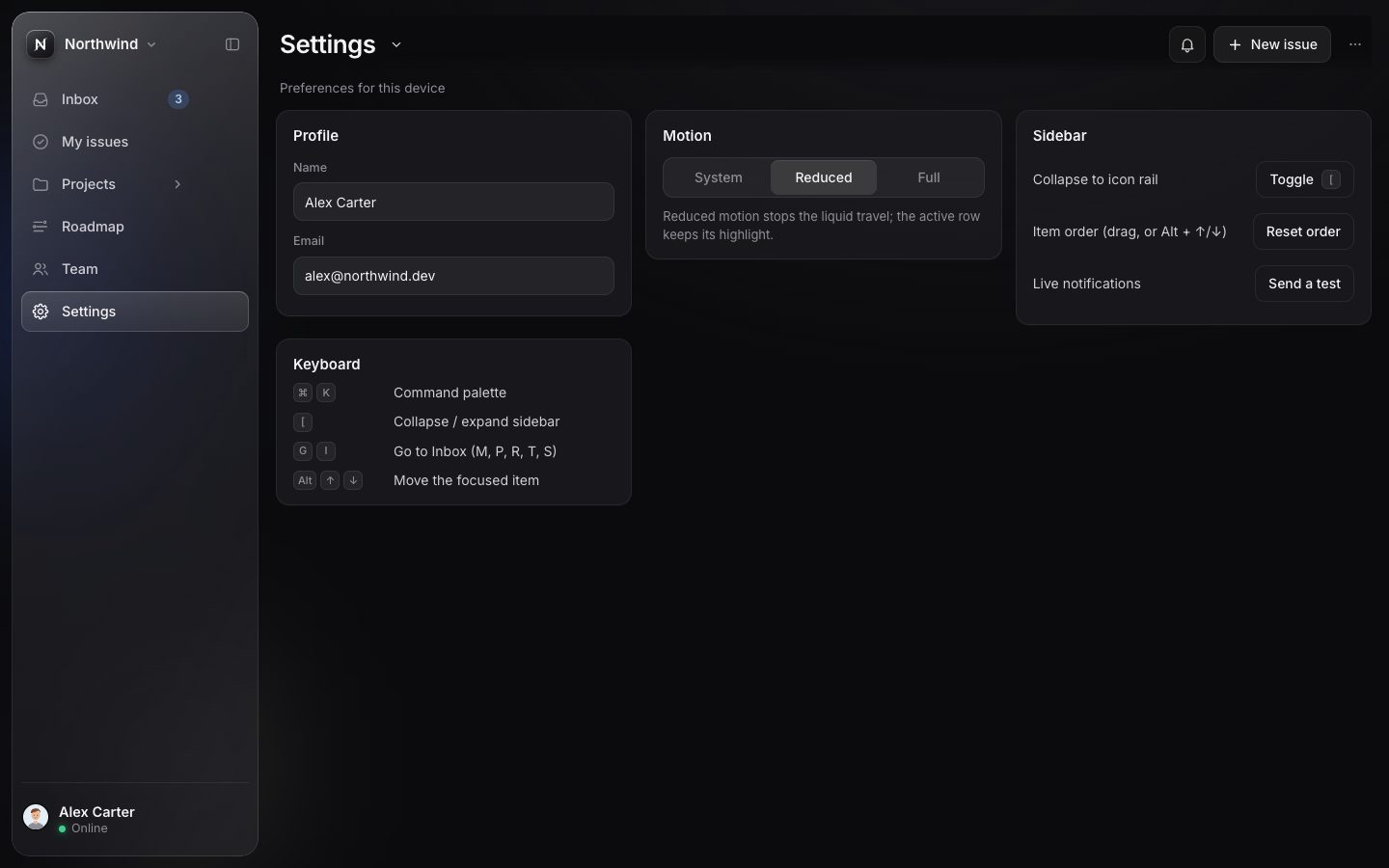
9 · Daylight: a water drop over a photo
The second variant uses the same core with a different config: a wider sidebar (300 px, a 92 px rail, the rail by default below 960 px) and a bigger drop, radius 27 px in the sidebar, 15 in the rail, and on a phone 18 px placed just after the label.
layout: { sideW: 300, railW: 92, wideMin: 960 },
drop: { rest: 0.17, side: { inset: 42, r: 27 }, rail: { inset: 24, r: 15 }, sheet: { at: 'label', gap: 32, r: 18 } },if (a.at === 'label') return { x: Math.min(g.labelRight + a.gap, g.x + g.w - a.r - 8), y: g.y + g.h / 2, r: a.r };The glass is light: more white, more saturation, a brighter rim.
--glass-bg: linear-gradient(180deg, rgba(255, 255, 255, .54) 0%, rgba(255, 252, 255, .42) 45%, rgba(255, 250, 255, .38) 100%);
--glass-filter: blur(30px) saturate(170%) brightness(1.04);
The drop gets a second material in the same shader: water. Water does not reflect a studio, it refracts what is behind it. The page gives the drop a texture and the transform from canvas pixels to texture coordinates.
uniform float uMat;   // 0 mercury, 1 water
uniform float uDark;
uniform float uFade;
uniform sampler2D uBg;
uniform vec4 uBgXf;   // bg uv = p * xy + zw
uniform vec3 uTint;
uniform float uTintAmt;
Each pixel reads the texture shifted against its normal, more where the drop is thicker, so the drop works as a lens. Then a frosted tint, darker edges, two highlights, a caustic crescent inside, and outside it a bright caustic and a soft shadow on the glass, on the side away from the light.
float lens=H/R;
vec2 off=-n.xy*lens*R*1.5;
vec2 uv=(p+off)*uBgXf.xy+uBgXf.zw;
vec3 bg=texture2D(uBg,uv).rgb;
vec3 base=mix(bg,uTint,uTintAmt);
vec3 c=base*mix(vec3(0.97,1.0,1.04),vec3(0.9,0.97,1.08),uDark)*mix(1.1,1.02,uDark);
c*=mix(0.38,1.0,smoothstep(0.02,0.34,n.z));
c=mix(c, c*vec3(0.78,0.86,1.0), smoothstep(0.55,0.95,1.0-n.z));
vec3 r=vec3(2.0*n.z*n.x, 2.0*n.z*n.y, 2.0*n.z*n.z-1.0);
c+=pow(1.0-n.z,3.0)*mix(0.38,0.22,uDark);
vec3 L=normalize(vec3(-0.45,-0.7,0.55));
float sp=max(dot(r,L),0.);
c+=pow(sp,110.)*2.2+pow(sp,14.)*0.14;
vec3 L2=normalize(vec3(0.5,0.75,0.45));
c+=pow(max(dot(r,L2),0.),60.)*0.5;
vec2 ld=normalize(vec2(0.45,0.72));
float edge=1.0-n.z;
float caus=smoothstep(0.3,0.95,dot(normalize(n.xy+1e-5),ld))*smoothstep(0.12,0.45,edge)*(1.0-smoothstep(0.7,0.98,edge));
c+=caus*0.95*vec3(1.0,0.96,0.88);
// outside: shadow ring and focused caustic thrown onto the glass, lee side
float ds=sd(p-vec2(3.0,5.0)*uDpr);
float outside=step(0.,d);
float glow=outside*smoothstep(0.0,-R*0.55,ds)*0.75;
float shade=outside*0.3*exp(-abs(ds)/(R*0.2))*(1.0-smoothstep(0.,-R*0.3,ds));
col=c*cov + (1.0-cov)*glow*vec3(1.0,0.97,0.9);
a=cov+(1.0-cov)*shade;
The texture is the photo itself: the part that is on screen (the same cover fit and focus as the backdrop), drawn small (400 px wide) and slightly blurred. So the lens shows what is really behind the sidebar. The core hands the drop to the page once its canvas exists, and the page maps it again whenever the layout moves.
function photoTexture(theme) {
  const vw = innerWidth, vh = innerHeight, iw = skyImg.naturalWidth, ih = skyImg.naturalHeight;
  const c = document.createElement('canvas'); c.width = 400; c.height = Math.round(400 * vh / vw);
  const x = c.getContext('2d'), k = c.width / vw, sc = Math.max(vw / iw, vh / ih), dw = iw * sc, dh = ih * sc, [fx, fy] = skyFocus();
  x.filter = 'blur(2px)';
  x.drawImage(skyImg, (vw - dw) * fx * k, (vh - dh) * fy * k, dw * k, dh * k);
  if (theme === 'dark') { x.filter = 'none'; x.fillStyle = 'rgba(8, 12, 44, .66)'; x.fillRect(0, 0, c.width, c.height); }
  return c;
}function mapDrop() {
const l = liquidRef; if (!l) return;
const c = $('canvas.drop').getBoundingClientRect();
l.setBackgroundTransform(1 / innerWidth, 1 / innerHeight, c.left / innerWidth, c.top / innerHeight);
l.setTint(root.dataset.theme === 'dark' ? [0.1, 0.13, 0.3] : [1, 1, 1], root.dataset.theme === 'dark' ? 0.3 : 0.42, root.dataset.theme === 'dark' ? 1 : 0);
}onCanvas(liquid) { liquidRef = liquid; if (skyTex) liquid.setBackground(skyTex); mapDrop(); },Daylight also has a dark-photo theme (the photo dimmed, the glass dark) behind a button, and a filled icon set.
function setTheme(t) {
  if (!cfg.themes) return;
  state.theme = t; store.set(K('theme'), t); root.dataset.theme = t;
  cfg.onTheme?.(t, api);
  for (const b of $$('[data-action="theme"]')) b.setAttribute('aria-pressed', t === 'dark');
}export function icon(name, cls = '') {
const body = FILL[name] && cls.includes('fill') ? FILL[name] : (LINE[name] || FILL[name] || '');
return `<svg class="ic ${cls}" viewBox="0 0 24 24" fill="none" stroke="currentColor" stroke-width="1.7" stroke-linecap="round" stroke-linejoin="round" aria-hidden="true" focusable="false">${body}</svg>`;
}
Make it yours
- Your nav is
itemsin the config: an id (the route), a label, an icon, a badge, a G shortcut, children. - The drop:
dropin the config sets its radius and place per mode, andrestits stretch at rest. The springs arekHandkTinliquid.js. - Your look is the tokens in your variant's style sheet: the glass, the pill, the rim, the shadows.
- Notifications: call
window.__liquid.notify({ item: 'inbox', toast: '…', say: '…' }). - Scripts can drive it through
window.__liquid:go(id),toggleGroup(id),toggleRail(),palette.open(),reorder.reset(ids),setWorkspace(id),setReducedPref('on'). - Accessibility is already there: a
navlandmark,aria-current, disclosure buttons, a combobox palette, menu buttons, a live region, the keyboard everywhere, 44 px touch targets and reduced motion.
The code is on GitHub at UlviShabanbayli/domvybe-liquid-glass-sidebar, under the MIT licence: use it in your own projects, commercial ones included. Northwind, its people and Daylight's spaces are made up. Daylight photos AI-generated (Google Gemini). Everything else, the icons, the avatars and both drops, is drawn by the code.
Give the active state a body. A highlight jumps; a drop with a head and a lagging tail on two springs travels, stretches and lands, and a reader knows where they are going before they arrive. Measure once, move only transforms, and let the loop sleep when the drop is still.