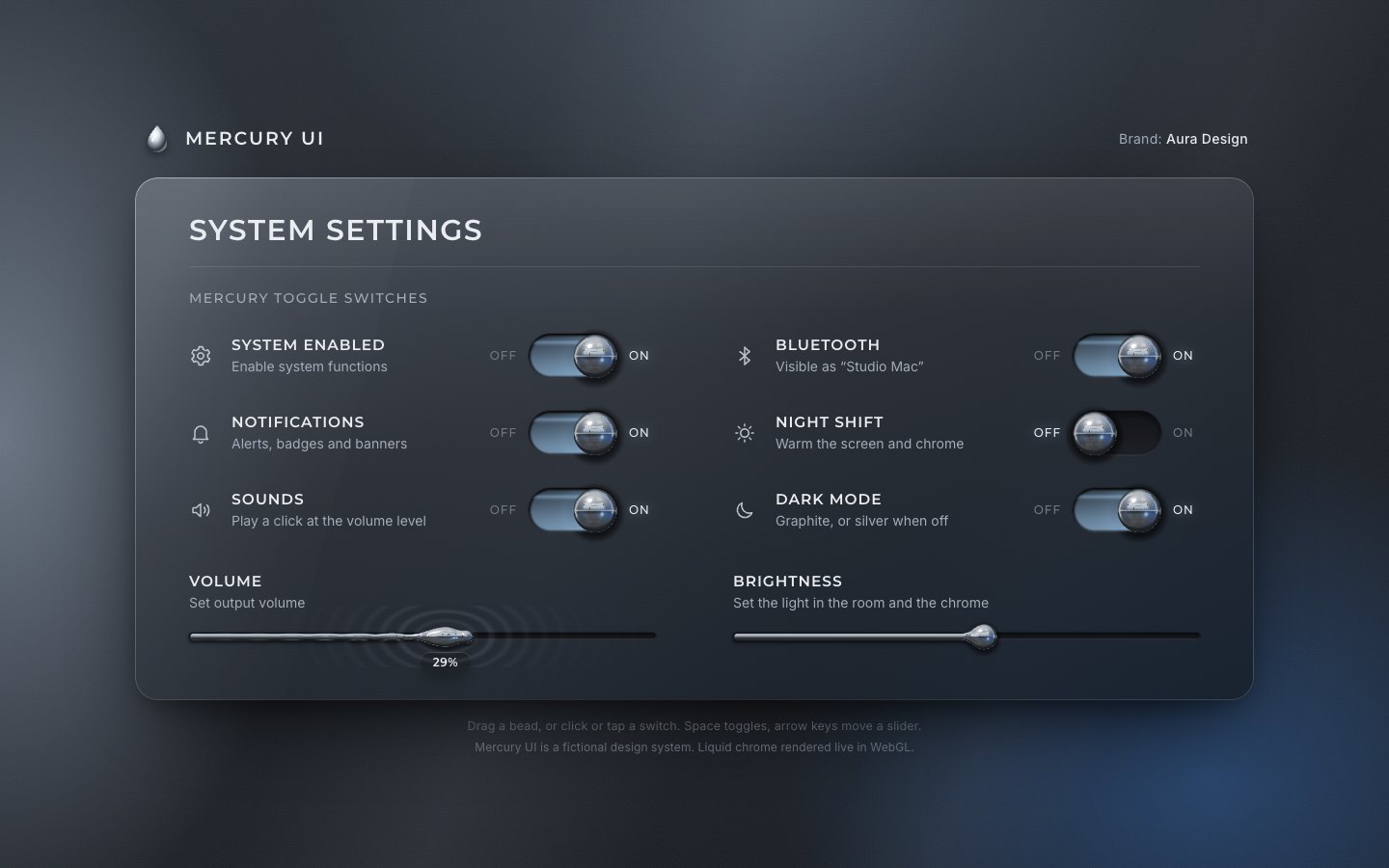
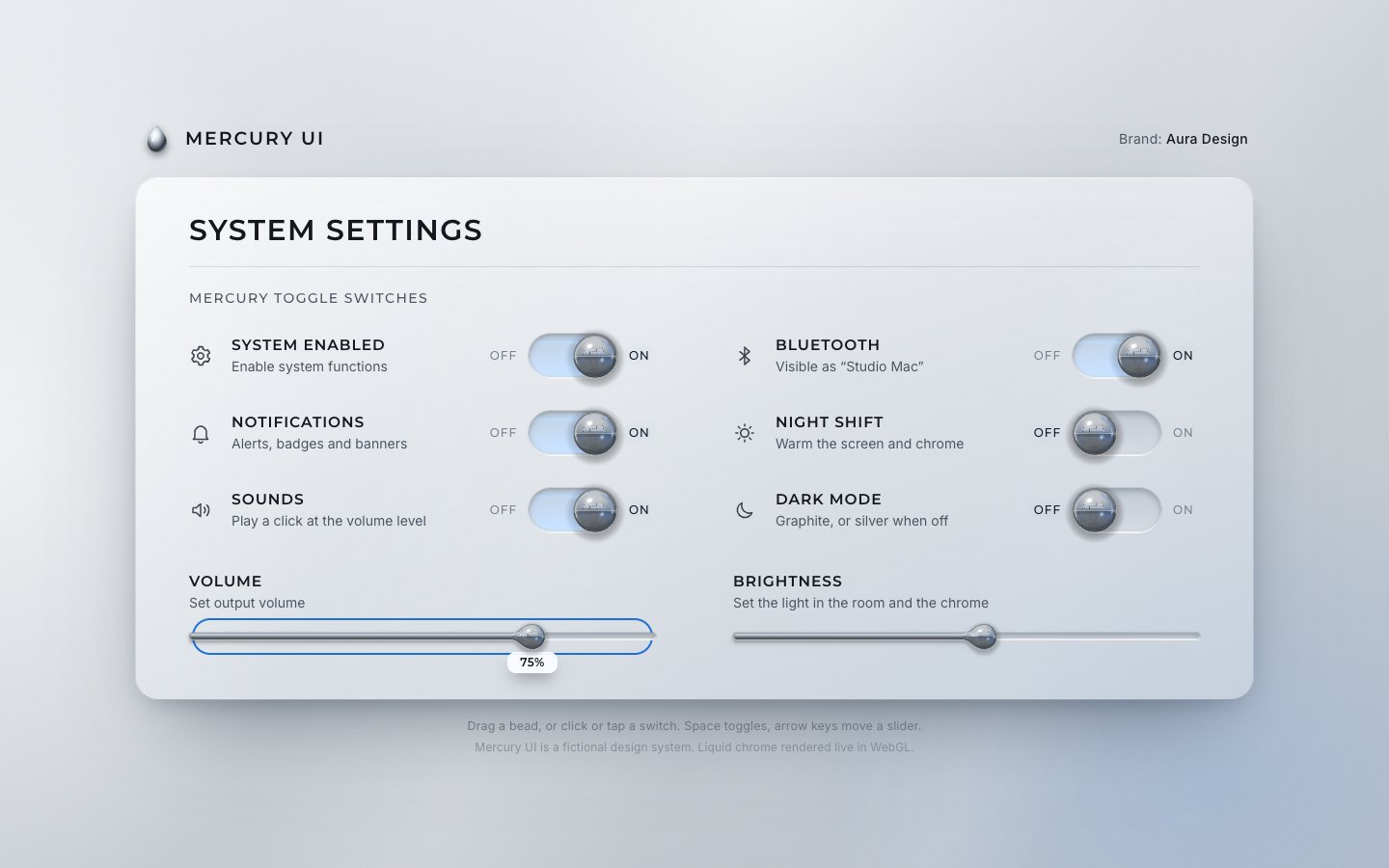
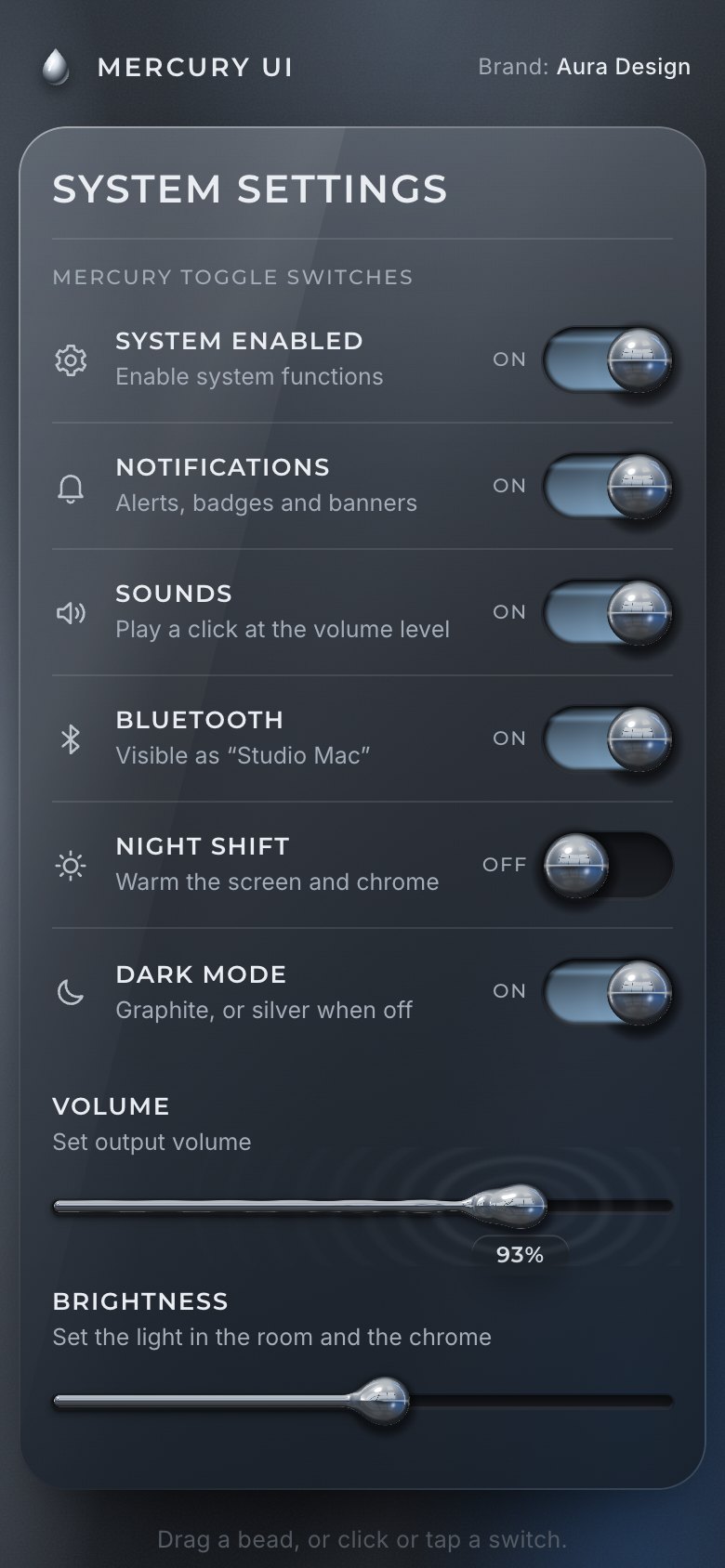
This is the whole build of the mercury toggle switches, in the order it was written. It is a settings panel for a made-up design system, Mercury UI: six switches and two sliders on graphite glass. Every switch is a bead of liquid chrome. Flip one and the bead stretches into a dumbbell as it rolls, stops dead at the end of its groove, squashes and wobbles, and lands with a small metallic tock. The sliders are mercury threads: a heavy bead lags behind the value and the thread ripples. Each stage below is the panel as it stood at that step. It shows a still, and Run it here starts the live page in its place. The code under each heading is only what that stage adds. The finished source is at the end, and on GitHub under the MIT licence.
There is no framework, no library and no build step: one HTML page, one style sheet, a settings module, the renderer (an ES module with one fragment shader), a Canvas2D painter for the studio the chrome reflects, and a few lines of Web Audio. The text and the controls are ordinary HTML: real buttons and native range inputs. WebGL only draws the chrome over them.
1 · The panel, in HTML and CSS
Start with what a screen reader and a keyboard need. A switch is a button with
role="switch" and aria-checked, named by its title and described by its subtitle. The OFF and ON
words beside it are decoration, hidden from assistive technology.
<li class="row" data-key="system">
  <svg class="ico" viewBox="0 0 24 24" aria-hidden="true"><path d="M12 15.2a3.2 3.2 0 1 0 0-6.4 3.2 3.2 0 0 0 0 6.4Z"/><path d="M19.4 13.5a7.7 7.7 0 0 0 0-3l2-1.5-2-3.4-2.3 1a7.6 7.6 0 0 0-2.6-1.5L14.2 2.6h-4l-.4 2.5a7.6 7.6 0 0 0-2.6 1.5l-2.3-1-2 3.4 2 1.5a7.7 7.7 0 0 0 0 3l-2 1.5 2 3.4 2.3-1a7.6 7.6 0 0 0 2.6 1.5l.4 2.5h4l.4-2.5a7.6 7.6 0 0 0 2.6-1.5l2.3 1 2-3.4Z"/></svg>
  <div class="txt"><label class="ttl" id="l-system" for="sw-system">System enabled</label><span class="sub" id="d-system">Enable system functions</span></div>
  <div class="ctl"><span class="w w-off" aria-hidden="true">OFF</span><button class="sw" id="sw-system" type="button" role="switch" aria-checked="true" aria-labelledby="l-system" aria-describedby="d-system"><span class="groove"></span><span class="bead-css"></span></button><span class="w w-on" aria-hidden="true">ON</span></div>
</li>
A slider is a native input type="range" inside a 44 px rail, so it already has a label, a value, arrow
keys, Home and End, and touch.
<div class="sl" data-key="volume">
  <div class="txt"><label class="ttl" for="sl-volume">Volume</label><span class="sub" id="d-volume">Set output volume</span></div>
  <div class="rail"><span class="groove"></span><span class="fill-css"></span><input type="range" id="sl-volume" min="0" max="100" step="1" value="72" aria-describedby="d-volume"></div>
</div>
The panel is graphite glass: two gradients, a bright rim along the top, and a box shadow that lifts it off the room. A switch's groove is a dark pill with an inset shadow.
.panel { position: relative; border-radius: 24px; padding: 38px 56px 44px; outline: none; isolation: isolate;
  background:
    linear-gradient(180deg, rgba(255, 255, 255, .055), transparent 26%),
    linear-gradient(162deg, var(--glass-hi) 0%, var(--glass-mid) 42%, var(--glass-lo) 100%);
box-shadow: inset 0 1px 0 var(--rim), inset 0 0 0 1px var(--rim-lo), inset 0 -1px 0 rgba(0, 0, 0, .25), var(--panel-shadow); }.groove { position: absolute; left: 0; right: 0; top: 50%; height: var(--th); margin-top: calc(var(--th) / -2); border-radius: 999px; pointer-events: none;
background: linear-gradient(180deg, var(--groove) 0%, var(--groove-2) 100%);
box-shadow: inset 0 3px 7px rgba(0, 0, 0, .55), inset 0 -1px 0 var(--groove-rim), 0 1px 0 rgba(255, 255, 255, .07), 0 0 0 1px rgba(0, 0, 0, .25); }The chrome bead in this stage is CSS: a radial gradient with a white glint, slid along the groove by
aria-checked. It stays in the finished build as the fallback for browsers without WebGL.
/* CSS chrome bead: only without WebGL (html.no-fx) */
.bead-css { position: absolute; left: 2px; top: calc(50% - var(--th) / 2 + 2px); width: calc(var(--th) - 4px); height: calc(var(--th) - 4px); border-radius: 50%; display: none;
  background: radial-gradient(circle at 36% 30%, #fff 0 8%, #e3e9ef 16%, #9aa4b0 38%, #2c323a 64%, #7d8996 84%, #cfd8e2 100%);
  box-shadow: 0 3px 6px rgba(0, 0, 0, .55), inset 0 -2px 3px rgba(0, 0, 0, .35); transition: transform .42s cubic-bezier(.5, 1.6, .4, 1); }
.no-fx .bead-css { display: block; }
.no-fx .sw[aria-checked="true"] .bead-css { transform: translateX(calc(var(--tw) - var(--th))); }
.no-fx .sw[aria-checked="true"] .groove { background: linear-gradient(180deg, color-mix(in srgb, var(--ice) 35%, var(--groove)), color-mix(in srgb, var(--ice) 55%, var(--groove-2))); }
The range input is transparent over the rail; without WebGL it shows a chrome thumb, with a CSS fill under it that
reads its width from a --v variable.
.rail input { position: absolute; inset: 0; width: 100%; height: 100%; margin: 0; opacity: 0; cursor: pointer; touch-action: pan-y; -webkit-appearance: none; appearance: none; background: none; }.no-fx .fill-css { display: block; position: absolute; left: 0; top: 50%; height: 6px; margin-top: -3px; width: calc(var(--v, .5) * 100%); border-radius: 99px;
background: linear-gradient(180deg, #f4f7fa, #9aa4af 55%, #dfe5eb); pointer-events: none; }
.no-fx .rail input { opacity: 1; }The script keeps the settings and paints them. That is all a click needs, and Space and Enter already click a button.
function set(k, v) {
  if (typeof DEFAULTS[k] === 'boolean') {
    v = !!v;
    settings[k] = v; paintSwitch(k);
  } else {
    v = Math.round(Math.max(0, Math.min(100, Number(v))));
    settings[k] = v;
    const inp = $(`[data-key="${k}"] input`);
    if (Number(inp.value) !== v) inp.value = v;
    inp.setAttribute('aria-valuetext', `${v}%`);
    $(`[data-key="${k}"] .rail`).style.setProperty('--v', v / 100);
  }
}for (const b of switches) {
const k = keyOf(b);
b.addEventListener('click', () => set(k, !settings[k]));
}On a phone the panel becomes a full-width list. The OFF and ON words go, and the state is written beside each switch
from a data-state attribute.
.ctl::before { content: attr(data-state); min-width: 24px; text-align: right; font: 500 10.5px/1 var(--display); letter-spacing: .08em; color: var(--ink-2); }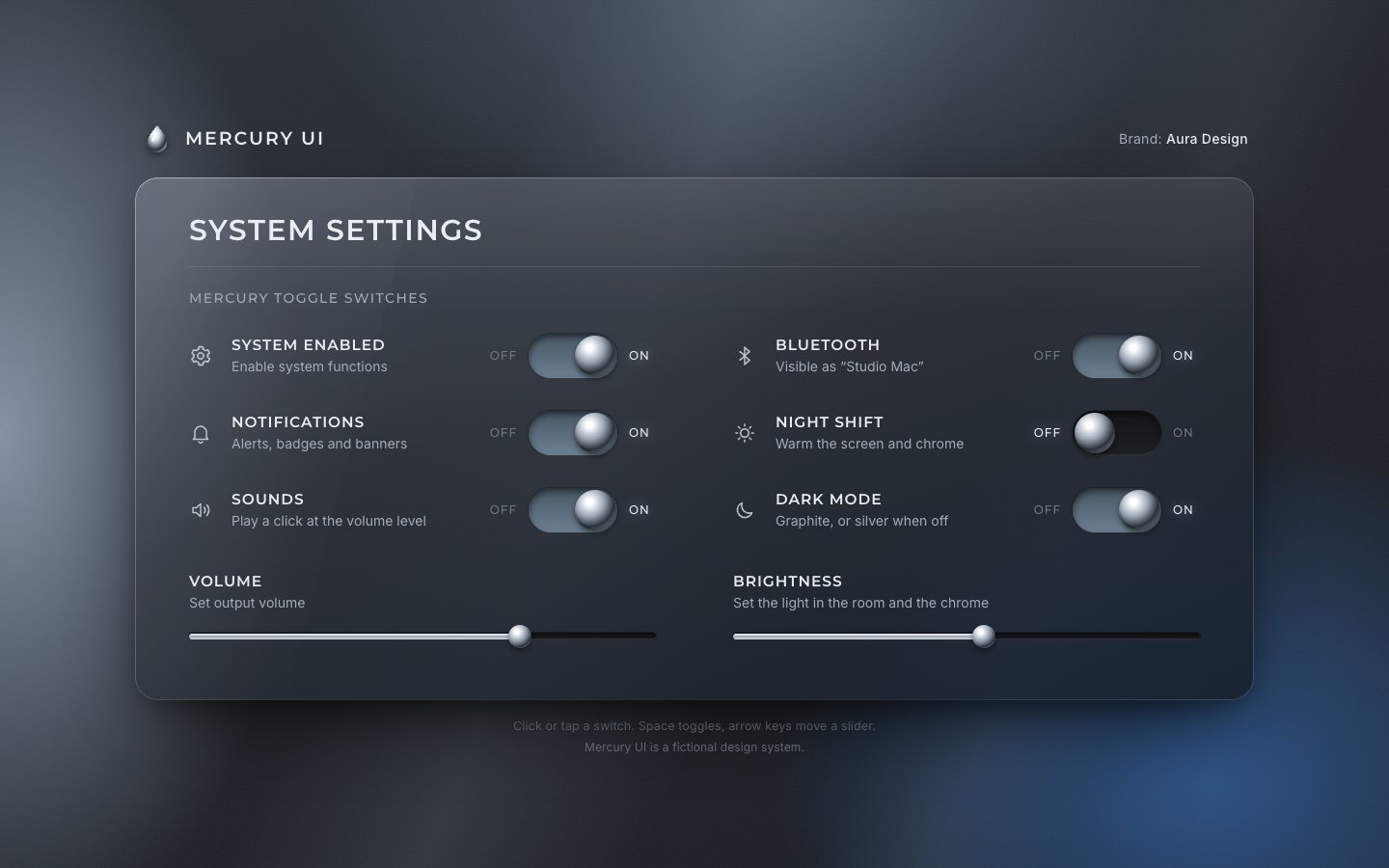
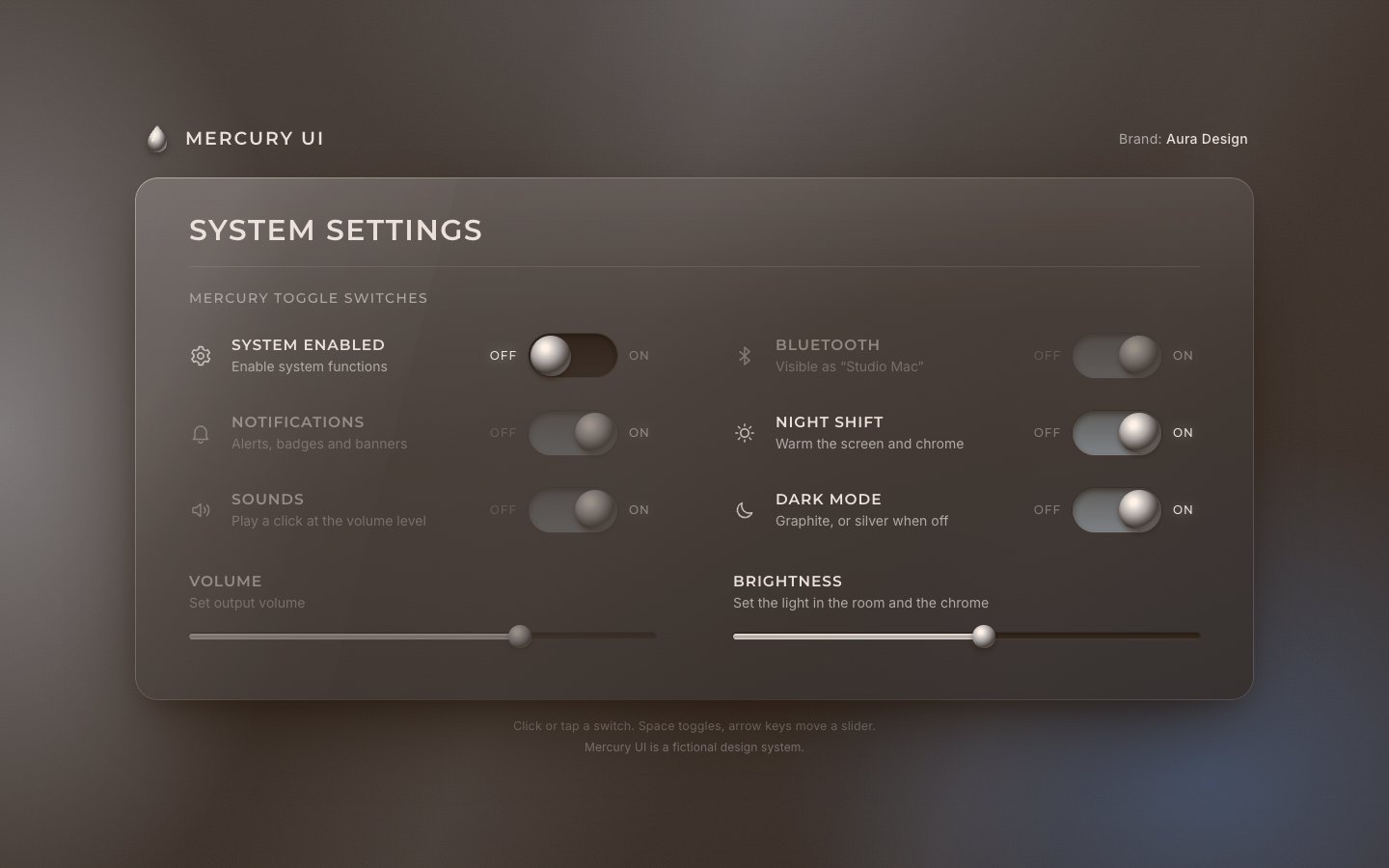
2 · What each setting does, and the keyboard
Next the settings do things. System enabled is the master switch: off, it disables Notifications, Sounds, Bluetooth
and Volume. The switches get aria-disabled (so they stay focusable and are read as dimmed), the range gets
disabled, and a live region says what happened.
function applyDisabled() {
  const off = !settings.system;
  for (const k of CHILDREN) {
    const host = $(`[data-key="${k}"]`);
    host.classList.toggle('is-disabled', off);
    const sw = $('.sw', host), inp = $('input', host);
    if (sw) { if (off) sw.setAttribute('aria-disabled', 'true'); else sw.removeAttribute('aria-disabled'); }
    if (inp) inp.disabled = off;
  }
}<div class="sr-only" id="live" aria-live="polite"></div>Night shift lays a warm amber layer over the whole page. Dark mode off switches to a silver theme: the tokens change
on :root.theme-light, and the color-scheme meta follows, so form controls and scroll bars match.
The theme is the page's own: it never follows the operating system.
function applyLook() {
  applyLight();
  root.classList.toggle('theme-light', !settings.darkmode);
  root.classList.toggle('night', settings.nightshift);
  metaScheme.content = settings.darkmode ? 'dark' : 'light';
  metaTheme.content = settings.darkmode ? '#1b1f25' : '#dfe4e9';
}:root.theme-light {
--bg-0: #b9c0c8; --bg-1: #e7ebef;
--ink: #14181d; --ink-2: #4b5560; --ink-3: #7a838d; --ink-ico: #2b333c;
--glass-hi: rgba(255, 255, 255, .72); --glass-mid: rgba(236, 240, 244, .62); --glass-lo: rgba(208, 216, 225, .7);
--rim: rgba(255, 255, 255, .85); --rim-lo: rgba(120, 130, 142, .25); --rule: rgba(20, 30, 40, .12);
--groove: #c3cad2; --groove-2: #d6dce2; --groove-rim: rgba(255, 255, 255, .9);
--ice: rgb(110, 165, 215); --focus: #1f6fd1;
--glow-left: rgba(255, 255, 255, .85); --glow-right: rgba(120, 165, 225, .45); --glow-top: rgba(255, 255, 255, .6);
--beam: rgba(255, 255, 255, .28);
--panel-shadow: 0 40px 90px -36px rgba(40, 52, 66, .55), 0 10px 26px -12px rgba(40, 52, 66, .35);
--bubble: rgba(250, 252, 255, .94);
color-scheme: light;
}.night-veil { position: fixed; inset: 0; z-index: 40; pointer-events: none; background: rgb(255, 146, 52); opacity: 0; visibility: hidden; transition: opacity .9s ease, visibility 0s linear .9s; }
.night .night-veil { opacity: .13; visibility: visible; transition: opacity .9s ease, visibility 0s; }
.theme-light.night .night-veil { opacity: .16; }Brightness turns the room's lights up and down. The glows are their own compositor layers, so only their opacity changes and nothing is repainted.
function applyLight() {
  const b = settings.brightness / 100;
  const o = (0.28 + 0.72 * Math.pow(b, 0.8)).toFixed(3);
  for (const g of glows) g.style.opacity = o;
}
The left and right arrow keys set a switch off and on, as on a native switch.
b.addEventListener('keydown', (e) => {
  if (b.getAttribute('aria-disabled') === 'true') return;
  if (e.key === 'ArrowRight' || e.key === 'ArrowLeft') {
    e.preventDefault();
    const on = e.key === 'ArrowRight';
    if (settings[k] !== on) set(k, on, { user: true });
  }
});
3 · Liquid chrome in WebGL
Now the chrome. One canvas covers the panel; every control is drawn in its own scissor box, so the canvas costs only the pixels around the beads.
<canvas class="fx" aria-hidden="true"></canvas>The shape is a 2D signed distance: a circle for a switch's bead; for a slider, a thread from the start of the groove to its bead, joined to the bead with a smooth minimum. Each point also gets a local radius: the thread's radius on the thread, the bead's on the bead, blended between.
vec2 shape(vec2 p){
  float h=length(p-uHead.xy)-uHead.z;
  float Rh=uHead.z;
  float wh=smoothstep(Rh*1.6, Rh*0.95, length(p-uHead.xy));
  float d; float R;
  if(uMode<0.5){
    d=h; R=Rh*wh;                                    // the bead's radius on the bead, fading off it
  } else {
    float tr=threadR(p.x);
    float th=sdSeg(p, vec2(uTrack.x+tr, uHead.y), uHead.xy)-tr;
    d=smin(h, th, uHead.z*0.9);
    R=min(Rh, sqrt(tr*tr+pow(Rh*wh,2.0)));   // the thread's radius on the thread, the bead's on the bead
  }
  return vec2(d, max(R, 0.75*uDpr));
}
The distance becomes a height: a quarter circle of that local radius, so the thread is a round cylinder and the bead a dome, with no crease where they meet. Two more samples give the slope, and the slope gives a real surface normal.
float height(vec2 s){ float R=s.y; float t=clamp(-s.x,0.,R); float x=R-t; return sqrt(max(R*R-x*x,0.)); }vec2 s0=shape(p);
float e=0.75;
float H=height(s0);
float Hx=height(shape(p+vec2(e,0.)));
float Hy=height(shape(p+vec2(0.,e)));
vec3 n=normalize(vec3(-(Hx-H), -(Hy-H), e));Chrome is mostly reflection, so the normal's reflection looks up a studio panorama (equirectangular), turned by a slow yaw. Night shift warms it, Brightness scales it, and the silver theme cross-fades to a lighter studio.
vec3 env(vec3 r){
  vec3 d=vec3(r.x,-r.y,r.z);
  float c=cos(uYaw), s=sin(uYaw);
  d.xz=mat2(c,-s,s,c)*d.xz;
  float az=atan(d.x,d.z)/6.2831853;                       // -0.5..0.5, jumps at the back
  float u=d.z<0.0 ? fract(az+1.0)+0.5 : az+0.5;          // at the back use a parametrisation that is continuous there
  vec2 uv=vec2(u, acos(clamp(d.y,-1.0,1.0))/3.1415927);
  vec3 a=toLin(texture2D(uEnvA,uv).rgb);
  vec3 b=toLin(texture2D(uEnvB,uv).rgb);
  vec3 e=mix(a,b,uLight);
  e*=mix(vec3(1.0), vec3(1.12,0.86,0.62), uWarm);
  return e*uExpo;
}
On top come Fresnel, a darker rim where the surface turns away, a sharp key glint, a blue rim light and a soft tone curve.
// ---- the chrome ----
vec3 r=vec3(2.0*n.z*n.x, 2.0*n.z*n.y, 2.0*n.z*n.z-1.0);
vec3 c=env(r);
float fres=0.7+0.3*pow(1.0-n.z,4.0);
c*=fres*vec3(0.93,0.955,0.985);
c*=mix(0.45,1.0,smoothstep(0.0,0.3,n.z));
vec3 L=normalize(vec3(-0.42,-0.78,0.5));
float sp=max(dot(r,L),0.);
c+=(pow(sp,140.0)*4.0+pow(sp,18.0)*0.22)*uExpo*mix(vec3(1.0),vec3(1.0,0.85,0.66),uWarm);
vec3 L2=normalize(vec3(0.62,0.35,0.7));
c+=pow(max(dot(r,L2),0.),90.0)*0.6*uExpo*vec3(0.62,0.78,1.0);
c=c/(1.0+c*0.22);
float lum=dot(c,vec3(0.3,0.59,0.11));
c=mix(c, vec3(lum)*0.55, uDim*0.75);
c=pow(max(c,0.0), vec3(1.0/2.2));
Behind an ON bead the groove fills with pale ice light, with a thin line along the top of its glass.
float behind=smoothstep(uHead.x+R*0.15, uHead.x-R*0.7, p.x);
float vy=clamp((p.y-cy)/hh,-1.,1.);
float body=0.30+0.42*smoothstep(-0.9,0.95,vy);
float lip=0.32*exp(-pow((vy+0.62)/0.1,2.0));                 // a thin light line along the top of the groove glass
float near=0.5*exp(-abs(p.x-uHead.x)/(R*0.9));
float edge=smoothstep(0.0,-4.0*uDpr,tsd);
float g=uGlow*inG*behind*(body*edge+lip+near*edge)*mix(1.0,0.4,uDim);
vec3 ice=uIce*mix(vec3(1.0),vec3(1.15,0.86,0.62),uWarm);
under+=ice*g*0.8; ua+=g*0.55;
The studio is painted once in Canvas2D, 1024 × 512: soft boxes, a dome light, strip lights, a glossy desk, and behind the viewer (what a bead shows in its centre) a window wall with mullions and a skyline.
// the window wall behind the viewer: wide bright panes with thin mullions, a transom, a soft skyline
const wu0 = .34, wu1 = .66, wv0 = .3, wv1 = .488;
box(wu0 - .015, wv0 - .02, wu1 + .015, wv1, 'rgba(225,238,255,.6)', 14, 4);
gr = g.createLinearGradient(0, Y(wv0), 0, Y(wv1));
gr.addColorStop(0, '#ffffff'); gr.addColorStop(.6, '#e3edf8'); gr.addColorStop(1, '#a9bed6');
g.fillStyle = gr; g.fillRect(X(wu0), Y(wv0), X(wu1 - wu0), Y(wv1 - wv0));
g.fillStyle = 'rgba(92,110,132,.45)'; g.beginPath(); g.moveTo(X(wu0), Y(wv1));
for (let i = 0; i <= 48; i++) { const u = wu0 + (wu1 - wu0) * i / 48; const h = .02 + .02 * Math.abs(Math.sin(i * 1.7) * Math.cos(i * .63)) + (i % 9 === 4 ? .018 : 0); g.lineTo(X(u), Y(wv1 - h)); }
g.lineTo(X(wu1), Y(wv1)); g.closePath(); g.fill();
g.fillStyle = L ? 'rgba(60,68,80,.85)' : 'rgba(40,46,56,.9)';
for (let i = 0; i <= 3; i++) { const u = wu0 + (wu1 - wu0) * i / 3; g.fillRect(X(u) - 2, Y(wv0), 4, Y(wv1 - wv0)); }
g.fillRect(X(wu0), Y(.37) - 1.5, X(wu1 - wu0), 3);
Every frame each control hands the shader its groove and its bead.
for (const S of this.switches.values()) {
  if (!S.rect) continue;
  const R = S.rect, r = S.r;
  box(R.x - 10, R.y - 10, R.x + R.w + 10, R.y + R.h + 12);
  gl.uniform4f(u.uTrack, R.x * d, R.y * d, (R.x + R.w) * d, (R.y + R.h) * d);
  gl.uniform3f(u.uHead, S.hx * d, S.cy * d, r * d);
  gl.uniform1f(u.uGlow, S.glow); gl.uniform1f(u.uDim, S.dim);
  gl.uniform4f(u.uRip, 0, 0, 0, 0);
  gl.drawArrays(gl.TRIANGLES, 0, 3);
}
At rest the light still drifts across the chrome, so the loop redraws about 30 times a second. With reduced motion it stops, and it pauses while the panel is off screen or the tab is hidden.
// idle: light wanders slowly across the chrome (two incommensurate swells)
const t = (now - this.t0) / 1000;
if (!this.reduced) this.look.yaw = 0.2 * Math.sin(t * 0.26) + 0.07 * Math.sin(t * 0.61 + 1.3);
// moving → every frame; idle drift → about 30 fps (slow light, nobody sees the step); reduced motion → sleep
if (busy || this.dirty || now - this.lastDraw > 31) { this.dirty = false; this.draw(); this.lastDraw = now; if (this.onFrame) this.onFrame(busy); }
if (!busy && this.reduced) { this.running = false; return; }
requestAnimationFrame(this._tick);let onScreen = true;
new IntersectionObserver((es) => { onScreen = es[es.length - 1].isIntersecting; fx.pause(!hasFx || !onScreen || document.hidden); }).observe(panel);
document.addEventListener('visibilitychange', () => fx.pause(!hasFx || document.hidden || !onScreen));Without WebGL (or with ?nofx in the URL) the CSS chrome of stage 1 stays. A value bubble rides on a
slider's bead while it is hovered, focused or pressed.
const fx = new Mercury(canvas);
const hasFx = !fx.failed && !params.has('nofx');
root.classList.toggle('no-fx', !hasFx);
if (!hasFx) fx.pause(true);function placeBubble(r) {
const k = keyOf(r), b = $('.bubble', r);
const L = fx.sliders.get(k);
const x = hasFx ? fx.sliderX(k) - L.rect.x : 12 + (r.clientWidth - 24) * (settings[k] / 100); // fallback: the 24 px native thumb's centre
const d = devicePixelRatio || 1; b.style.transform = `translateX(${Math.round(x * d) / d}px)`; // whole device pixels: the label stays sharp
}
fx.onFrame = () => { for (const r of active) placeBubble(r); };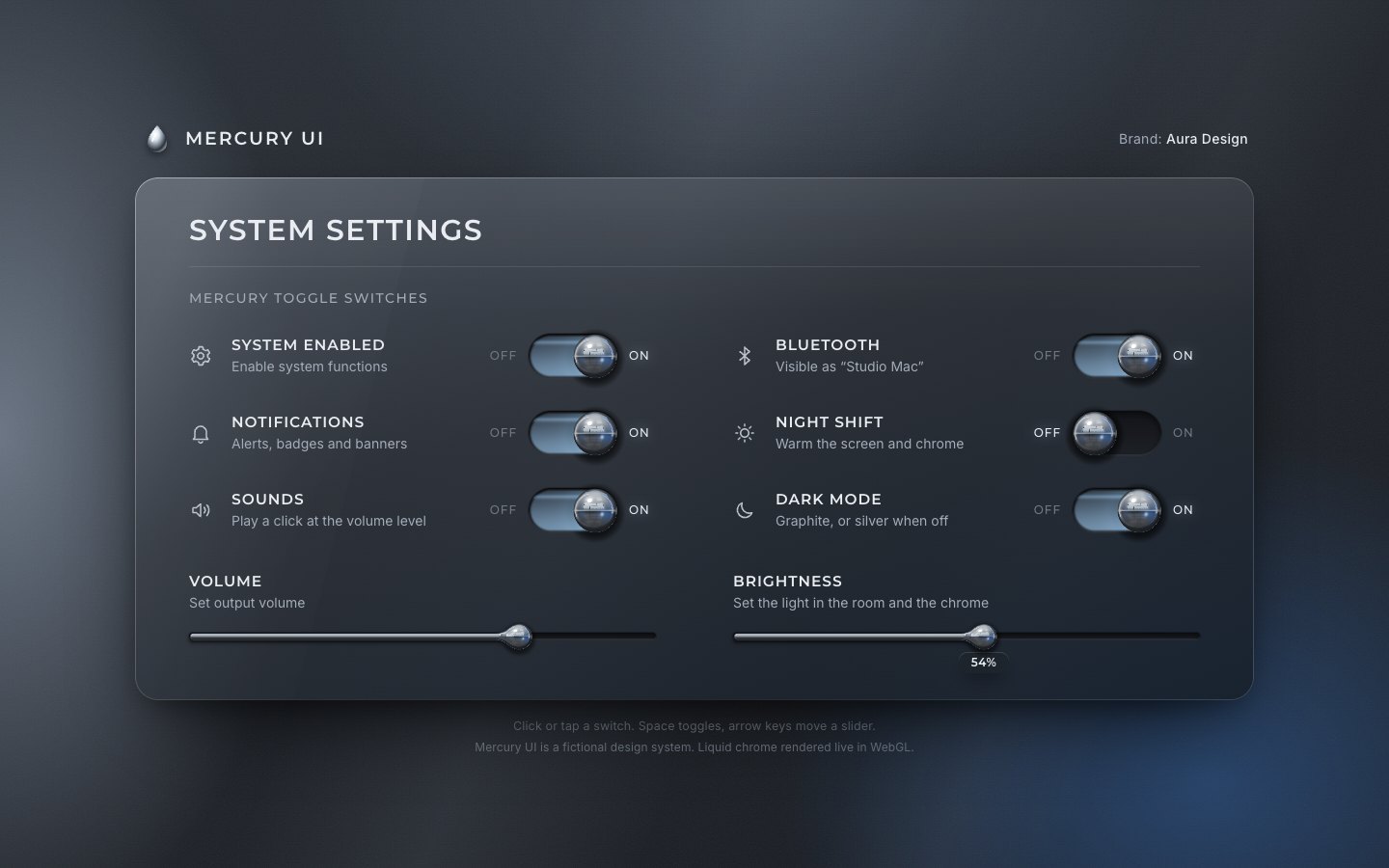
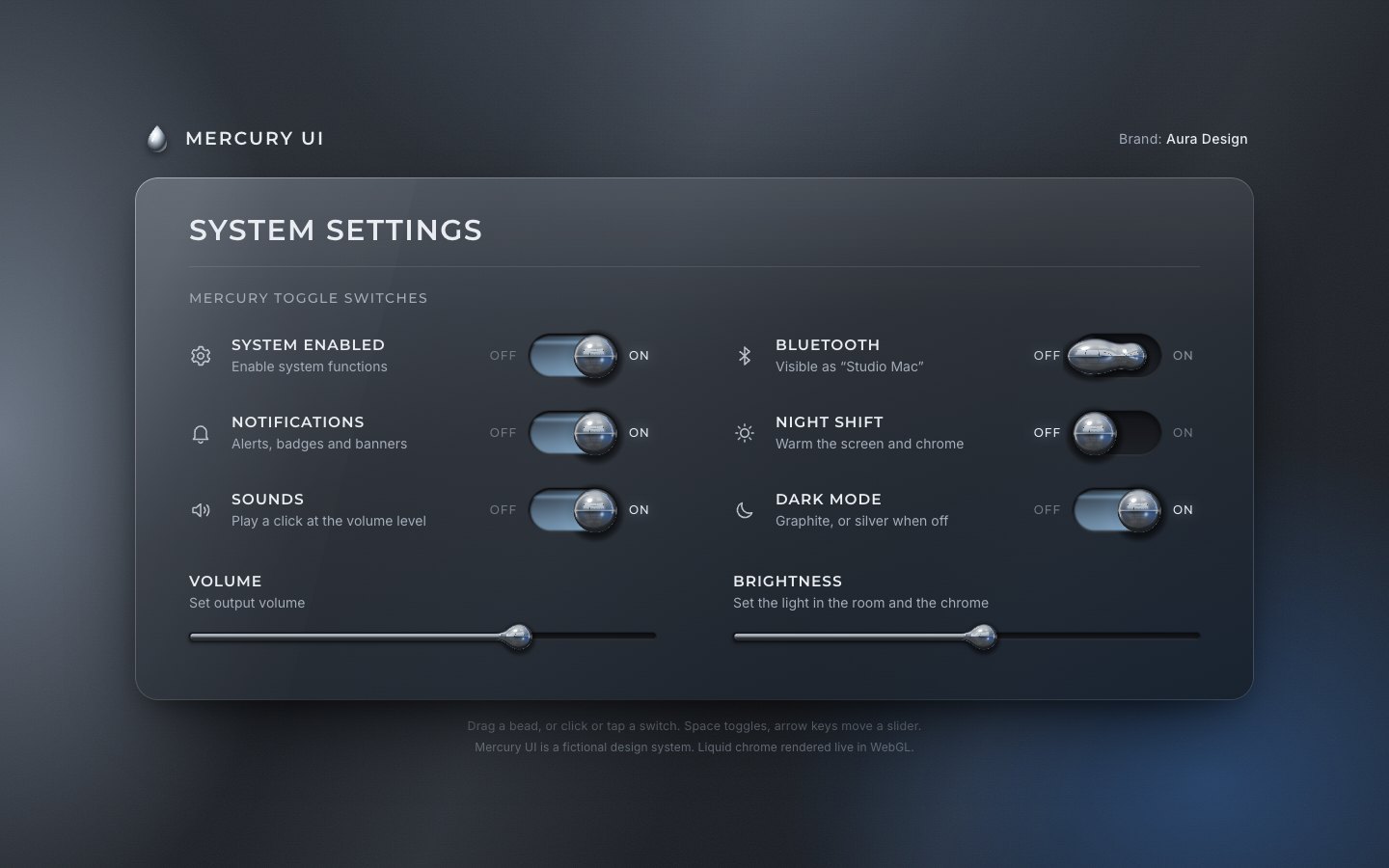
4 · Springs: the dumbbell, the wall, drag and flick
The bead was jumping. Now it is a heavy head and a lighter tail on springs. The head is pulled to its end, the tail follows the head more slowly, and the stretch follows the head's speed. When the head hits the end wall it stops dead, loses its speed, and the stretch is kicked negative: a squash. The springs run in sub-steps of 1/240 s, so the wall holds at any frame rate.
_stepSwitch(S, h) {
  const target = S.drag != null ? S.drag : (S.on ? S.x1 : S.x0);
  const k = S.drag != null ? 520 : 230, c = 2 * Math.sqrt(k) * (S.drag != null ? 0.9 : 0.5);
  S.hv += (k * (target - S.hx) - c * S.hv) * h; S.hx += S.hv * h;
  // the end walls: the bead stops dead, squashes and the impact is heard
  const lo = S.x0 - 1.2, hi = S.x1 + 1.2;
  if (S.hx > hi || S.hx < lo) {
    const v = Math.abs(S.hv);
    S.hx = clamp(S.hx, lo, hi);
    if (v > 25) { S.sv -= Math.min(v, 900) * 0.0062; if (this.onImpact && performance.now() - (S.lastImpact || 0) > 120) { S.lastImpact = performance.now(); this.onImpact(S.id, v); } }
    S.hv = -S.hv * 0.12;
  }
  const kT = 62, cT = 2 * Math.sqrt(kT) * 0.92;
  S.tv += (kT * (S.hx - S.tx) - cT * S.tv) * h; S.tx += S.tv * h;
  S.tx = clamp(S.tx, S.x0 - 1, S.x1 + 1);
  const sT = clamp(Math.abs(S.hv) / 1700, 0, 0.2);
  S.sv += (360 * (sT - S.s) - 8.5 * S.sv) * h; S.s += S.sv * h;
  S.s = clamp(S.s, -0.32, 0.4);
  S.glow += ((S.on ? 1 : 0) - S.glow) * Math.min(1, h * 6);
  S.dim += (S.dimT - S.dim) * Math.min(1, h * 7);
}const sub = Math.max(1, Math.ceil(dt / (1 / 240))), h = dt / sub;
for (let i = 0; i < sub; i++) {
for (const S of this.switches.values()) if (S.placed) this._stepSwitch(S, h);
for (const L of this.sliders.values()) if (L.placed) this._stepSlider(L, h);
}In the shader the head becomes an ellipse stretched along the groove, the tail a second circle, and a neck (a capsule) joins them, all with smooth minimums, so the bead pulls into a dumbbell and snaps back.
vec2 headAxes(){ float s=uSq.x; return uHead.z*vec2(1.0+s, 1.0/(1.0+s*0.85)); }float n=sdSeg(p,uHead.xy,uTail.xy)-uSq.y;
float k=uHead.z*0.75;
d=smin(smin(h,t,k),n,k*0.8);
float rn=max(uSq.y,1.0);
R=min(Rh, sqrt(rn*rn+pow(Rh*wh,2.0)+pow(uTail.z*wt,2.0))); // smooth: no crease where head and tail meetconst R = S.rect, r = S.r, gap = Math.abs(S.hx - S.tx);
const f = clamp(gap / (r * 0.6), 0, 1), fs = f * f * (3 - 2 * f);
const rt = r * (0.8 - 0.22 * clamp(gap / (r * 2), 0, 1)) * fs;
const neck = r * 0.36 * (1 - gap / (r * 2.6)) * fs - (1 - fs) * r;A bead can be dragged. A press is not a drag until it moves 5 px sideways; a vertical move gives the gesture back to
the page, because the button has touch-action: pan-y. Once dragging, the button captures the pointer and
the head follows the hand on a stiff spring.
b.addEventListener('pointermove', (e) => {
  if (!drag || drag.b !== b || e.pointerId !== drag.id) return;
  const dx = e.clientX - drag.x0, dy = e.clientY - drag.y0;
  if (!drag.moved) {
    if (Math.abs(dx) < 5) { if (Math.abs(dy) > 8) drag = null; return; }
    drag.moved = true; try { b.setPointerCapture(e.pointerId); } catch (_) { /* gone */ }
    b.classList.add('is-dragging');
  }
  if (hasFx) fx.dragSwitch(k, e.clientX - drag.left);
});
On release the bead lands where its position plus 0.12 s of its speed points, so a flick is enough. The drag never also counts as a click.
// where a released drag should land: position plus the flick
releaseSwitch(id) {
  const S = this.switches.get(id); if (!S) return null;
  const f = (S.hx - S.x0) / (S.x1 - S.x0), proj = f + S.hv * 0.12 / (S.x1 - S.x0);
  S.drag = null; this.kick();
  return proj > 0.5;
}const end = (e, cancel) => {
if (!drag || drag.b !== b || e.pointerId !== drag.id) return;
const d = drag; drag = null; b.classList.remove('is-dragging');
if (!d.moved) return;
swallowClick = true; setTimeout(() => { swallowClick = false; }, 0);
if (cancel || !hasFx) { set(k, settings[k]); return; }
const on = fx.releaseSwitch(k);
set(k, on, { user: true });
};A slider's bead gets the same treatment: it lags the value, stretches with its speed, and leaves a lump on the thread that stays attached.
_stepSlider(L, h) {
  const target = mix(L.x0, L.x1, L.v);
  const k = 190, c = 2 * Math.sqrt(k) * 0.72;
  L.xv += (k * (target - L.x) - c * L.xv) * h; L.x += L.xv * h;
  L.x = clamp(L.x, L.x0 - 2, L.x1 + 2);
  const kT = 70, cT = 2 * Math.sqrt(kT) * 0.9;
  L.tv += (kT * (L.x - L.tx) - cT * L.tv) * h; L.tx += L.tv * h;
  const lim = L.br * 1.7; if (Math.abs(L.tx - L.x) > lim) L.tx = L.x + Math.sign(L.tx - L.x) * lim; // the lump stays attached
  const sT = clamp(Math.abs(L.xv) / 1500, 0, 0.32);
  L.sv += (340 * (sT - L.s) - 9 * L.sv) * h; L.s += L.sv * h;
  L.dim += (L.dimT - L.dim) * Math.min(1, h * 7);
}
5 · Ripples and sound
A moving slider bead builds up energy. The energy sends a wave down the thread behind the bead, and rings across the glass around it, squashed sideways like light on a curved surface.
L.e = Math.max(L.e * Math.exp(-h * 1.9), clamp(Math.abs(L.xv) / 520, 0, 1));
L.ph += h * 7.5;float threadR(float x){
float dx=max(uHead.x-x,0.);
float w=uRip.x*sin(dx/(5.5*uDpr)-uRip.y*1.7)*exp(-dx/(80.0*uDpr));
return uRip.z*(1.0+0.42*w);
}// rings on the glass around the moving bead
vec2 q=(p-uHead.xy)/uDpr; q.x*=0.55;
float dist=length(q);
float ring=uRip.x*sin(dist*0.62-uRip.y*2.4)*exp(-dist/24.0)*smoothstep(R/uDpr*0.9, R/uDpr*1.7, dist);
under+=vec3(0.86,0.92,1.0)*max(ring,0.0)*0.22; ua+=max(ring,0.0)*0.16+max(-ring,0.0)*0.14;The wall impact gets a sound. Since stage 4 the renderer reports every impact faster than 25 px/s
(onImpact); now the page plays a synthesised tock for it, as strong as the impact, at the Volume level, a
little higher or lower for each switch, and only while Sounds and System are on.
const warmOnce = () => { removeEventListener('pointermove', warmOnce); removeEventListener('keydown', warmOnce); setTimeout(warm, 0); };
addEventListener('pointermove', warmOnce, { passive: true }); addEventListener('keydown', warmOnce);
const soundOn = () => settings.sounds && settings.system;
fx.onImpact = (id, v) => { if (soundOn()) tock(Math.min(1, v / 650), settings.volume / 100, PITCH[id] || 1); };
The tock is a quick falling sine (the liquid body) and two short inharmonic partials (the metal). Nothing is downloaded.
export function tock(strength = 1, volume = 0.7, pitch = 1) {
  if (!ctx || ctx.state !== 'running' || volume <= 0) return;
  const t = ctx.currentTime, gain = Math.min(1, strength) * volume * volume * 0.5;
  if (gain < 0.004) return;
  const out = ctx.createGain(); out.gain.value = gain; out.connect(bus);
  // body: a quick downward sine (a droplet landing)
  const o = ctx.createOscillator(), g = ctx.createGain();
  o.type = 'sine'; o.frequency.setValueAtTime(420 * pitch, t); o.frequency.exponentialRampToValueAtTime(150 * pitch, t + 0.09);
  g.gain.setValueAtTime(0.0001, t); g.gain.exponentialRampToValueAtTime(0.9, t + 0.004); g.gain.exponentialRampToValueAtTime(0.0001, t + 0.14);
  o.connect(g).connect(out); o.start(t); o.stop(t + 0.16);
  // ring: two inharmonic partials, very short
  for (const [f, a, d] of [[2380, 0.16, 0.07], [3710, 0.08, 0.045]]) {
    const p = ctx.createOscillator(), pg = ctx.createGain();
    p.type = 'sine'; p.frequency.value = f * pitch;
    pg.gain.setValueAtTime(0.0001, t); pg.gain.exponentialRampToValueAtTime(a, t + 0.002); pg.gain.exponentialRampToValueAtTime(0.0001, t + d);
    p.connect(pg).connect(out); p.start(t); p.stop(t + d + 0.02);
  }
}
Opening the audio device costs one long main-thread task, so it is paid on the first pointer move, suspended, and a real gesture only resumes it. Nothing ever plays by itself. A slider ticks softly at every 5 %.
// Opening the audio device costs one long main-thread task (~250 ms measured on macOS Chromium). It is paid when the
// pointer first moves over the page (the context is created suspended, nothing plays), not on the first click, where it
// would stall the bead's first travel. A real gesture then only resumes it.
function create() {
  if (ctx) return;
  const AC = window.AudioContext || window.webkitAudioContext; if (!AC) return;
  ctx = new AC();
  bus = ctx.createDynamicsCompressor(); bus.threshold.value = -14; bus.ratio.value = 4; bus.connect(ctx.destination);
}
export function warm() { create(); }
export function unlock() {
  create();
  if (ctx && ctx.state === 'suspended') ctx.resume();
}inp.addEventListener('input', () => {
set(k, inp.value, { user: true });
if (!hasFx) placeBubble(r); // no renderer frames to follow in the CSS fallback
const det = Math.round(settings[k] / 5);
if (det !== lastDetent) { lastDetent = det; if (soundOn()) tick(settings.volume / 100, k === 'volume' ? 1.1 : 0.9); }
});
6 · Saved settings, and the finish
Last, the settings are saved. The key is versioned (dv56a.settings), older keys are wiped, and only values
of the right type are taken.
function load() {
  let s = null;
  try {
    for (let i = localStorage.length - 1; i >= 0; i--) { const k = localStorage.key(i); if (k && k.startsWith('dv56') && k !== KEY) localStorage.removeItem(k); }
    s = JSON.parse(localStorage.getItem(KEY) || 'null');
  } catch (e) { s = null; }
  const out = { ...DEFAULTS };
  if (s && typeof s === 'object') for (const k of Object.keys(DEFAULTS)) if (typeof s[k] === typeof DEFAULTS[k]) out[k] = s[k];
  return out;
}function save() { clearTimeout(saveT); saveT = setTimeout(() => { try { localStorage.setItem(KEY, JSON.stringify(settings)); } catch (e) { /* private mode */ } }, 120); }A returning visitor who chose the silver theme must not see a flash of graphite, so a small script in the head reads the saved theme before the first paint.
// theme is the page's own (never the OS): read the saved settings before first paint so a returning visitor
// does not see a flash of the other theme. Older dv56 keys are wiped in app.js.
try { const s = JSON.parse(localStorage.getItem('dv56a.settings') || 'null');
  if (s && s.darkmode === false) document.documentElement.classList.add('theme-light');
  if (s && s.nightshift === true) document.documentElement.classList.add('night'); } catch (e) {}
Measured with the project's frame probe through clicks, drags, keys and slider moves at 120 Hz: no long tasks in any
run, and no missed frames at 1440 × 900 or on a 390 × 844 phone (also with the CPU slowed four times) in the run on the
quietest machine. The final build also has
?fxdpr=N to raise the chrome's resolution for stills, and window.__mercury for its tests.
window.__mercury = {
  ready: ready.then(() => new Promise((r) => requestAnimationFrame(() => requestAnimationFrame(r)))),
  fx, settings, set: (k, v, o) => set(k, v, o), hasFx,
  state: () => ({ settings: { ...settings }, fx: fx.state() }),
};
Make it yours
- Your settings are the rows in
index.htmlandDEFAULTSinapp.js: add a row with adata-keyand the renderer picks up its groove. What a setting does lives inset(). - Your studio: paint your own in
env.js, or put a 2:1 photographic panorama inassets/env/and name it inmanifest.js. - The feel is a handful of numbers in
_stepSwitch(): the head's spring (230), the tail's (62), the squash on impact, and the 0.12 s look-ahead of a flick inreleaseSwitch(). - Accessibility is already there: real buttons with
role="switch", native range inputs, arrow keys, a skip link, a live region for the master switch, visible focus rings, 44 px targets, a CSS fallback without WebGL, andprefers-reduced-motionhonoured.
The code is on GitHub at UlviShabanbayli/domvybe-mercury-toggles, under the MIT licence: use it in your own projects, commercial ones included. Mercury UI and Aura Design are made up. Everything on the page was made in code for this project: the chrome, the studio it reflects and the sounds.
Give the height field a local radius. A thin thread and a fat bead lifted with one radius either crease where they meet or flatten into a ribbon; lifted with the radius of whatever part is under the pixel, blended between parts, the mercury stays round everywhere.