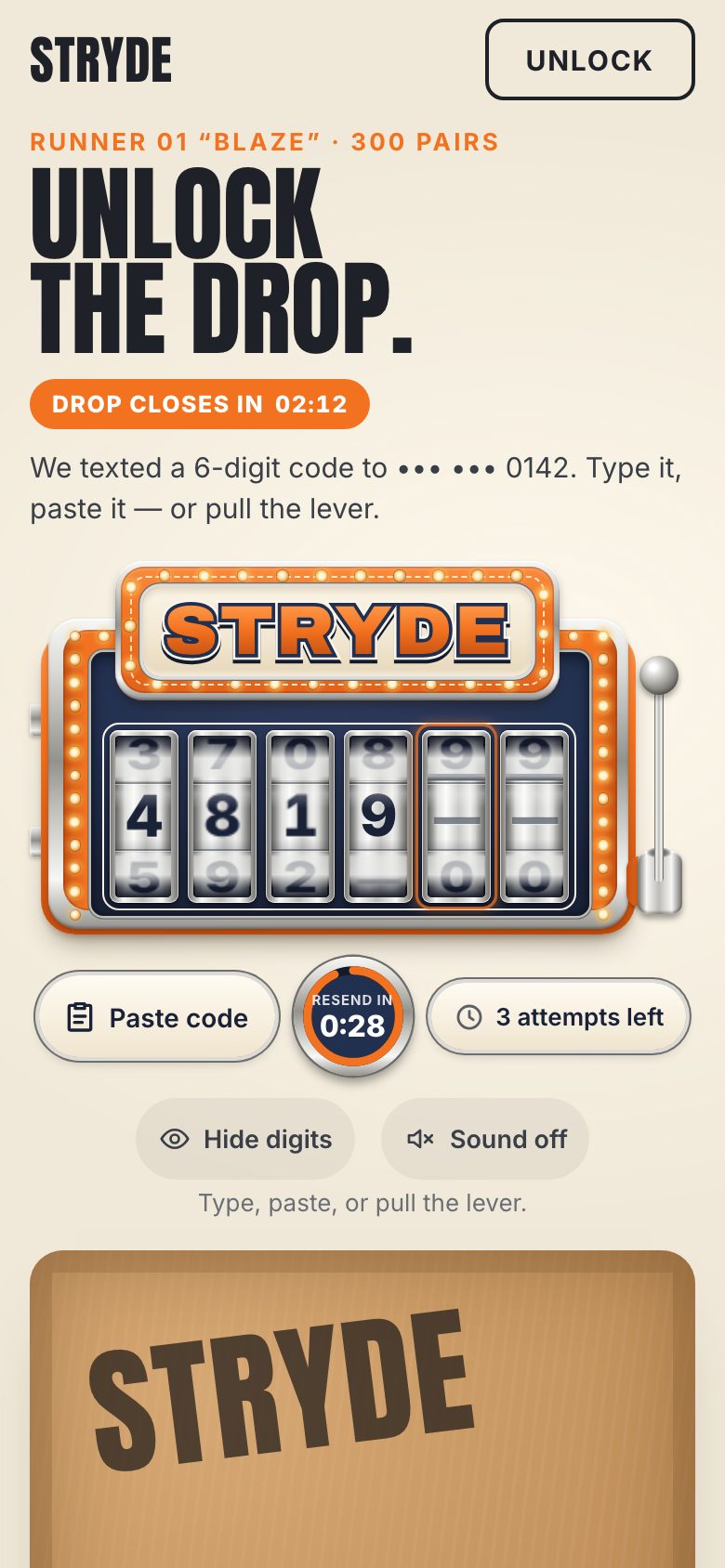
This is the whole build of the slot machine code input, in the order it was written: the page where you type the six-digit code a shop texted you, built as a chrome slot machine. Six reels show the code, a lever submits it, and the marquee hits the jackpot when it is right. Each stage below is the component as it stood at that step. It shows a still, and Run it here starts the live page in its place. The code under each heading is only what that stage adds. The finished source is at the end, and on GitHub under the MIT licence.
There is no library, no build step and no canvas. The cabinet is CSS gradients, the reels are 3D CSS transforms,
and everything that moves is a Web Animation. The files: index.html and style.css;
reel.js is one reel; cabinet.js builds the bulbs and the six reels; lever.js is
the lever; fx.js holds the shake, the confetti, the box and the sound; app.js owns the value
and the states. STRYDE, its sneaker and the drop are made up. The page around the component is a small drop page:
"Unlock the drop.", a closing clock and a shoe box that stays taped shut until the code is right.
1 · The page, and one real input
Most code inputs are six separate boxes. This one is one real text field, and everything later is drawn
over it. That is the decision the whole component rests on. A phone offers the code from the text message for a field
marked autocomplete="one-time-code" and fills it in one go; password managers, paste, undo and screen
readers all treat it as one ordinary field. Six boxes would need code to pass every one of those between them.
inputmode="numeric" asks for the digit keypad, but the type stays text, because a number
field is for quantities: it has no maxlength and may show spinners. enterkeyhint="go" labels
the phone's return key. The label is for screen readers only; the hint under the field is tied to it with
aria-describedby, and two live regions (one polite, one assertive) are ready for messages.
<section class="otp" id="code" aria-labelledby="otp-label" data-fit>
  <!-- the field: ONE real input (stage 2 hides it over the reels of a slot machine) -->
  <div class="reels">
    <label id="otp-label" class="sr-only" for="otp-input">Verification code, 6 digits</label>
    <input id="otp-input" class="code" type="text" inputmode="numeric" autocomplete="one-time-code" maxlength="6"
           pattern="[0-9]*" spellcheck="false" autocorrect="off" autocapitalize="off" enterkeyhint="go"
           aria-describedby="otp-hint">
  </div>

  <div class="under">
    <p id="otp-hint" class="hint">Type or paste the code.</p>
  </div>

  <p class="sr-only live" aria-live="polite"></p>
  <p class="sr-only alert" aria-live="assertive"></p>
</section>
The input refuses a letter before it lands: beforeinput cancels typed text that is not a digit and
says so. Text that arrives any other way (a paste, an autofill) goes through the input event, which strips
everything but digits, keeps six at most, and puts the caret back where it was.
input.addEventListener('beforeinput', (e) => {
  if (e.inputType === 'insertText' && e.data && /\D/.test(e.data)) { e.preventDefault(); say('Digits only.', { visible: true }); }
});
input.addEventListener('input', (e) => {
  const raw = input.value, clean = raw.replace(/\D/g, '').slice(0, 6);
  if (clean !== raw) { const c = Math.min(sel()[0], clean.length); input.value = clean; input.setSelectionRange(c, c); }
  value = clean;
});
Every message goes through say(). It empties the live region and writes the words 40 ms later, so the
same message is read out again if it repeats. A visible message also takes the hint's place for 4.2 seconds.
function say(msg, { visible = false, assertive = false } = {}) {
  const el = assertive ? alertEl : live;
  el.textContent = '';
  setTimeout(() => (el.textContent = msg), 40);   // a fresh text node each time, so the same words are read again
  if (visible) { hint.textContent = msg; clearTimeout(hintTimer); hintTimer = setTimeout(() => (hint.textContent = HINT), 4200); }
}
For this stage the field is plain and visible, with letter spacing wide enough to read as six places. Stage 2 hides it.
/* ---- 3. THE FIELD ---- */
/* the real input, plain and visible for now; stage 2 lays it invisibly over the reels */
.otp { position: relative; width: 100%; max-width: 560px; justify-self: center; }
.reels { position: relative; height: 96px; }
.code { position: absolute; inset: 0; width: 100%; height: 100%; margin: 0; padding: 0 0 0 .7em; border: 2px solid var(--on-page); border-radius: 16px;
  background: var(--cream-50); color: var(--navy-900); font: 800 44px/1 var(--sans); letter-spacing: .7em; font-variant-numeric: tabular-nums; }
The page is stacked on a phone: the words, the machine, the box. On a laptop, or a phone or tablet on its side, the words and the box take the left third of the grid and the machine the right two thirds.
/* stacked by default (phones, portrait tablets): the words, the machine, the box */
.drop { display: grid; grid-template-columns: minmax(0, 1fr); gap: 18px; max-width: 760px; margin: 0 auto; padding: 4px clamp(16px, 4vw, 32px) 56px; grid-template-areas: "copy" "otp" "box"; }/* side by side: laptops, desktops, landscape tablets and phones — the words and the box left, the machine right */
@media (min-width: 1000px), (orientation: landscape) and (min-width: 640px) {
.drop { max-width: 1320px; grid-template-columns: minmax(0, 33fr) minmax(0, 67fr); grid-template-areas: "copy otp" "box otp"; grid-template-rows: auto 1fr;
column-gap: clamp(24px, 3.5vw, 56px); row-gap: 20px; align-items: start; padding-top: clamp(4px, 2vh, 28px); }
h1 { font-size: clamp(56px, min(6.9vw, 13vh), 124px); }
.box { max-width: min(100%, 340px); }
}The payoff is a shoe box. The photo underneath is the open box with the sneaker lifted out; it is cropped from a concept image generated with Google Gemini, for a brand and a shoe that do not exist. Over it lies the closed lid, and the lid is all CSS: two gradients of cardboard, a stamp, a barcode label, two strips of tape and a lock badge.
<figure class="box" data-open="false">
  <div class="box-in">
    <img src="img/runner01-box.jpg" width="584" height="700" alt="The STRYDE Runner 01 in orange, blue and cream, lifted out of its open box." decoding="async">
    <div class="lid" aria-hidden="true">
      <span class="lid-stamp">STRYDE</span>
      <span class="lid-label"><i></i><small>RUNNER 01 · BLAZE · US 10</small></span>
      <span class="tape l"><b>DROP 01 · LOCKED · DROP 01 · LOCKED · DROP 01 · LOCKED</b></span>
      <span class="tape r"><b>DROP 01 · LOCKED · DROP 01 · LOCKED · DROP 01 · LOCKED</b></span>
      <span class="lid-lock"><svg viewBox="0 0 24 24"><rect x="5" y="10.5" width="14" height="10" rx="2"/><path d="M8 10.5V8a4 4 0 0 1 8 0v2.5"/></svg>Code required</span>
    </div>
  </div>
  <figcaption><b class="cap-title">Runner 01 “Blaze”</b><span class="cap-text">Taped shut until the code is right.</span></figcaption>
</figure>
The lid is a size container, so its stamp and its tape are sized in cqw (a hundredth of the lid's
width) and scale with the box. The barcode is one repeating-linear-gradient.
.lid { position: absolute; inset: 0; transform-origin: 50% 0; container-type: inline-size;
  background:
    repeating-linear-gradient(97deg, rgb(255 255 255 / .035) 0 2px, transparent 2px 7px),
    radial-gradient(120% 90% at 28% 18%, var(--cardboard-1), var(--cardboard-2) 62%, var(--cardboard-3));
  box-shadow: inset 0 0 0 12px rgb(120 78 38 / .22), inset 0 0 50px rgb(80 50 20 / .35); }
.lid > * { position: absolute; }
.lid-stamp { left: 9%; top: 9%; font: 400 21cqw/1 var(--display); color: rgb(42 34 30 / .78); transform: rotate(-7deg); letter-spacing: .01em; }
.lid-label { right: 8%; bottom: 8%; width: 36%; padding: 3% 4%; background: #FAF7F0; border-radius: 3px; box-shadow: 0 2px 4px rgb(0 0 0 / .2); transform: rotate(2deg); display: grid; gap: 6px; }
.lid-label i { height: 9cqw; background: repeating-linear-gradient(90deg, #222 0 2px, transparent 2px 4px, #222 4px 5px, transparent 5px 8px, #222 8px 11px, transparent 11px 12px); }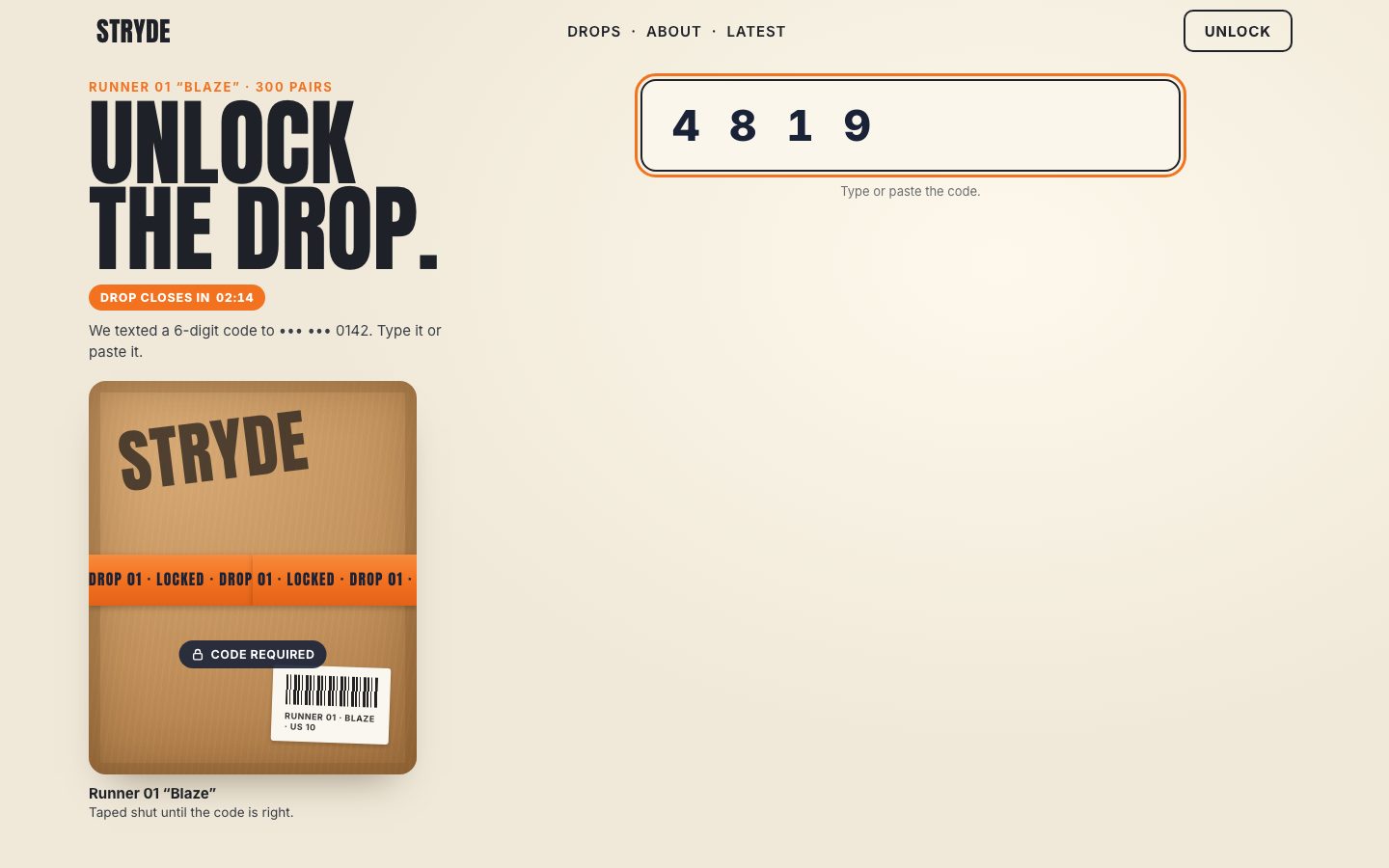
2 · The cabinet and six reels
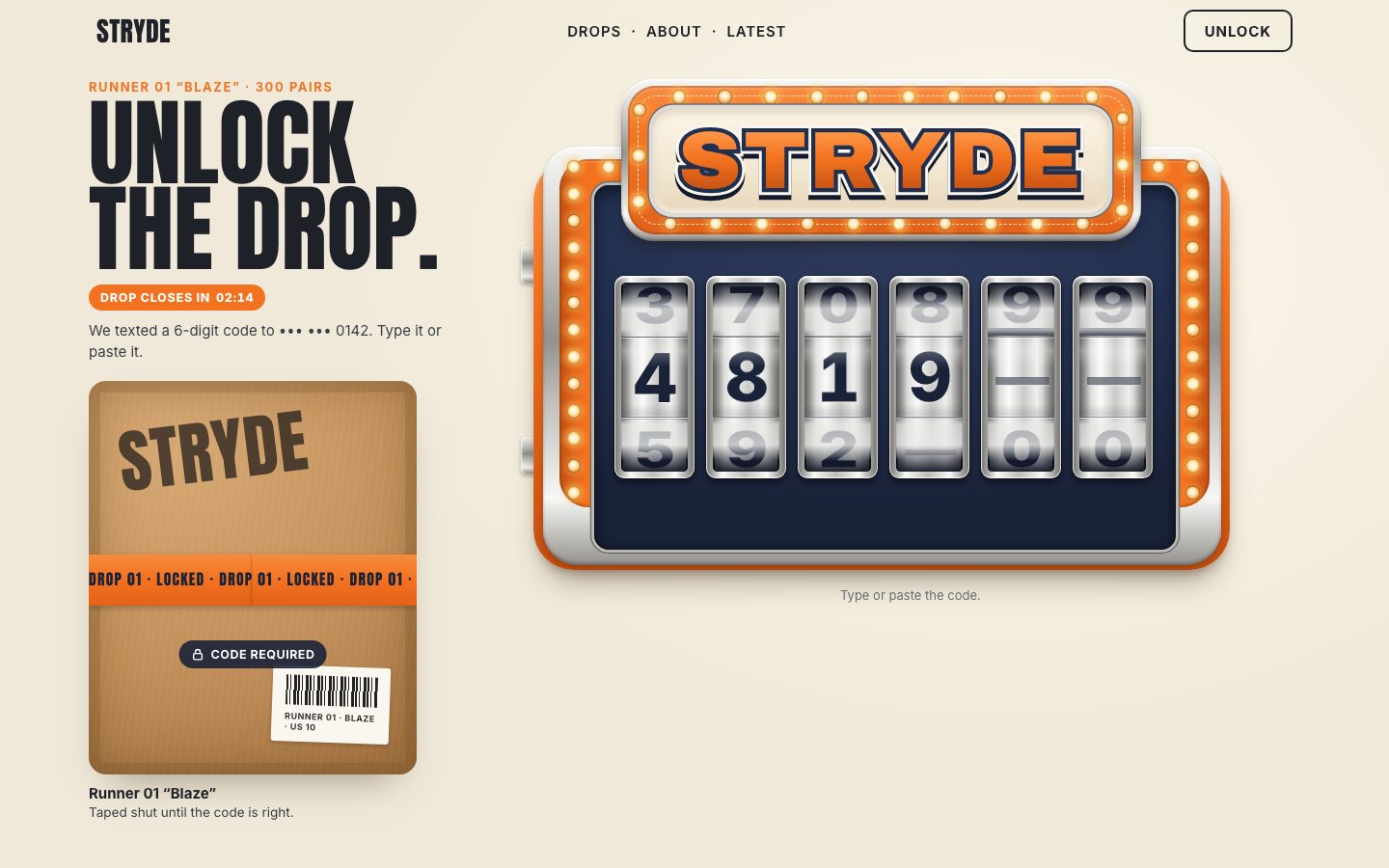
The machine is drawn on a board 85.5 em wide and 54.5 em tall, and every part of it is placed and sized in em. So
the whole cabinet scales from one number: the component's font size, --u. The markup is layers
(the shell, the chrome frame, the rail, the navy panel, two columns of bulbs, the sign) and the reels on top, with the
input still inside them.
<div class="cab">
  <i class="tab t1" aria-hidden="true"></i><i class="tab t2" aria-hidden="true"></i>
  <i class="shell" aria-hidden="true"></i>
  <i class="frame" aria-hidden="true"></i>
  <i class="rail" aria-hidden="true"></i>
  <i class="panel" aria-hidden="true"></i>
  <div class="lights side" aria-hidden="true"></div>

  <!-- the marquee: the sign carries the brand (stage 5 adds the result) -->
  <div class="sign" aria-hidden="true">
    <i class="sign-rim"></i><i class="sign-band"></i><i class="sign-track"></i>
    <div class="lights top"></div>
    <i class="sign-plate"></i>
    <p class="word" data-text="STRYDE"><span class="w-depth"></span><span class="w-out"></span><span class="w-line"></span><span class="w-fill"></span></p>
  </div>

  <!-- the reels: the input sits over them, so a tap on any reel focuses it (and opens the phone's keyboard) -->
  <div class="reels">
    <label id="otp-label" class="sr-only" for="otp-input">Verification code, 6 digits</label>
    <input id="otp-input" class="code" type="text" inputmode="numeric" autocomplete="one-time-code" maxlength="6"
           pattern="[0-9]*" spellcheck="false" autocorrect="off" autocapitalize="off" enterkeyhint="go"
           aria-describedby="otp-hint">
  </div>
</div>.otp { position: relative; font-size: var(--u, 8px); width: 85.5em; max-width: 100%; justify-self: center; --cab-h: 54.5em; }
.cab { position: relative; width: 85.5em; height: var(--cab-h); }
.cab > i, .cab > div, .cab > .sign { position: absolute; }app.js works out the em from the width of the machine's column: the board is 85.5 em wide, so one em is
the column's width divided by 85.5, at most 10.6 px and at least 2.4 px. (Stage 8 also makes it fit the height of the
first screen.)
const BOARD_W = 85.5;
function fit() {
  const cols = getComputedStyle(drop).gridTemplateColumns.split(' ').map(parseFloat).filter((n) => n > 0);
  const W = cols.length > 1 ? cols[1] : cols[0] || otp.parentElement.clientWidth;
  const u = Math.max(2.4, Math.min(W / BOARD_W, 10.6));
  otp.style.setProperty('--u', u.toFixed(3) + 'px');
}
fit();
addEventListener('resize', fit);
Chrome is one recipe, used on the frame, the sign's rim, the reels and later the lever: a vertical and a horizontal gradient of five greys from almost white to dark.
/* component: chrome is one recipe used everywhere on the cabinet */
--chrome-v: linear-gradient(180deg, var(--chrome-0) 0%, var(--chrome-1) 16%, var(--chrome-3) 46%, var(--chrome-2) 60%, var(--chrome-0) 84%, var(--chrome-3) 100%);
--chrome-h: linear-gradient(90deg, var(--chrome-4) 0%, var(--chrome-0) 20%, var(--chrome-2) 48%, var(--chrome-0) 76%, var(--chrome-4) 100%);
The bulbs are placed once, in em, so they scale with the cabinet. Round the sign they sit at even steps along a rounded rectangle: the path is cut into four straights and four quarter arcs, and each bulb is placed half a step into its share of the length. There are 26 round the sign and 28 down the two sides.
function aroundRoundRect({ x, y, w, h, r, count }) {
  const straightW = w - 2 * r, straightH = h - 2 * r, arc = (Math.PI / 2) * r;
  const segs = [
    { len: straightW, at: (t) => [x + r + t, y] },
    { len: arc, at: (t) => { const a = -Math.PI / 2 + t / r; return [x + w - r + r * Math.cos(a), y + r + r * Math.sin(a)]; } },
    { len: straightH, at: (t) => [x + w, y + r + t] },
    { len: arc, at: (t) => { const a = t / r; return [x + w - r + r * Math.cos(a), y + h - r + r * Math.sin(a)]; } },
    { len: straightW, at: (t) => [x + w - r - t, y + h] },
    { len: arc, at: (t) => { const a = Math.PI / 2 + t / r; return [x + r + r * Math.cos(a), y + h - r + r * Math.sin(a)]; } },
    { len: straightH, at: (t) => [x, y + h - r - t] },
    { len: arc, at: (t) => { const a = Math.PI + t / r; return [x + r + r * Math.cos(a), y + r + r * Math.sin(a)]; } },
  ];
  const total = segs.reduce((s, g) => s + g.len, 0), pts = [];
  for (let i = 0; i < count; i++) {
    let d = ((i + 0.5) / count) * total;
    for (const g of segs) { if (d <= g.len) { pts.push(g.at(d)); break; } d -= g.len; }
  }
  return pts;
}
Each bulb is drawn twice: once as dim glass, always there, and once as a glow in one of three groups (every third bulb). The groups are three layers, so lighting the marquee means fading three elements, not fifty-four.
function lightUp(host, pts) {
  const groups = { base: [], g0: [], g1: [], g2: [] };
  pts.forEach(([x, y], i) => {
    const b = `<i class="bulb" style="left:${x.toFixed(2)}em;top:${y.toFixed(2)}em"></i>`;
    groups.base.push(b); groups['g' + (i % 3)].push(b);
  });
  host.innerHTML = `<div class="base">${groups.base.join('')}</div>` +
    ['g0', 'g1', 'g2'].map((g) => `<div class="lit ${g}">${groups[g].join('')}</div>`).join('');
}.bulb { position: absolute; width: 1.3em; height: 1.3em; margin: -.65em 0 0 -.65em; border-radius: 50%;
background: radial-gradient(circle at 42% 38%, #FFF8E8 0 18%, #F6C77A 45%, #B8762F 80%, #7A4512); box-shadow: 0 0 0 .14em rgb(110 45 5 / .55); }
.lit .bulb { width: 3.4em; height: 3.4em; margin: -1.7em 0 0 -1.7em; box-shadow: none;
background: radial-gradient(circle, var(--bulb-core) 0 17%, var(--bulb-warm) 23%, rgb(var(--bulb-glow) / .55) 32%, rgb(var(--bulb-glow) / .16) 52%, transparent 70%); }
.lit { will-change: opacity; }
.lit { animation: idle 3.6s ease-in-out infinite; }
.lit.g1 { animation-delay: -1.2s; } .lit.g2 { animation-delay: -2.4s; }
@keyframes idle { 0%, 100% { opacity: 1; } 50% { opacity: .45; } }The sign's word is four copies of the same text stacked on each other: a navy shadow 0.06 em lower, a cream
outline, a navy line, and the orange fill, which is a gradient clipped to the letters. setWord() writes
all four at once.
.word { left: 0; right: 0; top: .53em; height: .96em; margin: 0; text-align: center; white-space: nowrap; font: 900 8.9em/.96 var(--sign); font-stretch: 108%; letter-spacing: .035em; }
.word span { position: absolute; inset: 0; }
.w-depth { color: var(--navy-950); -webkit-text-stroke: .17em var(--navy-950); transform: translateY(.06em); }
.w-out { color: var(--cream-50); -webkit-text-stroke: .17em var(--cream-50); }
.w-line { color: var(--navy-800); -webkit-text-stroke: .1em var(--navy-800); }
.w-fill { background: linear-gradient(180deg, var(--orange-300) 8%, var(--orange-500) 48%, var(--orange-700) 92%); -webkit-background-clip: text; background-clip: text; color: transparent; }const word = root.querySelector('.word');
const setWord = (text) => {
if (word.dataset.text === text && word.firstElementChild.textContent) return;
word.dataset.text = text;
word.querySelectorAll('span').forEach((s) => (s.textContent = text));
word.classList.toggle('long', text.length > 6);
};
setWord('STRYDE');A reel is a real cylinder. It has eleven faces: a blank, then 0 to 9. Eleven faces 9 em tall close a circle of radius 9 / 2 / tan(π / 11), about 15.3 em, so each face is turned 360 / 11 degrees (about 32.7°) further round and pushed out by that radius. The blank is a dash, which reads as "nothing here yet".
const SYMBOLS = ['–', '0', '1', '2', '3', '4', '5', '6', '7', '8', '9'];
const N = SYMBOLS.length, STEP = 360 / N;
const FACE = 9;                                        // em: one face's height
const R = FACE / 2 / Math.tan(Math.PI / N);            // em: the drum's radius, so eleven faces close the circle
const tf = (deg) => `translateZ(${-R}em) rotateX(${deg}deg)`;
const symOf = (ch) => (ch === '' || ch == null ? 0 : SYMBOLS.indexOf(ch));const faces = SYMBOLS.map((s, i) =>
`<div class="face${i ? '' : ' blank'}" style="transform:rotateX(${-i * STEP}deg) translateZ(${R}em)"><b>${s}</b><i>●</i></div>`).join('');
this.el.innerHTML = `<div class="win"><div class="persp"><div class="drum">${faces}</div></div>` +
`<i class="shade"></i></div>`;
this.drum = this.el.querySelector('.drum');
this.drum.style.transform = tf(0);The drum is pushed back by the radius, so the face in front sits where the window is, and turning it about its
horizontal axis brings a symbol to the front: symbol s rests at s × 32.7°. Faces turned away are
hidden with backface-visibility. Each face also carries a ● that stays hidden until stage 7's Hide
digits.
set(ch) {
  this.sym = symOf(ch);
  this.angle = this.sym * STEP;
  this.drum.style.transform = tf(this.angle);
  return Promise.resolve(true);
}.persp { position: absolute; inset: 0; perspective: 60em; perspective-origin: 50% 50%; }
.drum { position: absolute; left: 0; right: 0; top: 50%; height: 0; transform-style: preserve-3d; will-change: transform; }
.face { position: absolute; left: 0; right: 0; top: -4.5em; height: 9em; display: grid; place-items: center; backface-visibility: hidden; -webkit-backface-visibility: hidden;
background: linear-gradient(90deg, #8E8E8B 0%, #DADAD7 16%, #FBFBFA 32%, #C9C9C6 54%, #EFEFED 74%, #9A9A97 100%);
box-shadow: inset 0 .09em 0 rgb(30 36 52 / .45), inset 0 -.09em 0 rgb(255 255 255 / .55); }
.face b, .face i { grid-area: 1 / 1; font: 800 7.4em/1 var(--sans); font-style: normal; color: var(--navy-900); letter-spacing: -.02em; font-variant-numeric: tabular-nums; text-shadow: 0 .02em 0 rgb(255 255 255 / .7); }
.face i { display: none; font-size: 4.2em; }
.face.blank b { font-weight: 700; color: rgb(30 36 52 / .55); transform: scaleX(1.6); }What makes it read as a polished cylinder is one gradient over the window: dark at the top and bottom where the drum turns away, a silver veil over the neighbouring faces (so the 3 and 5 around a 4 look like ghosts), and a soft highlight just above the middle. Two thin lines mark the edges of the front face.
/* the light on the cylinder: dark top and bottom, a silver veil over the neighbours, a highlight above the middle */
.shade { position: absolute; inset: 0; pointer-events: none;
  background:
    linear-gradient(180deg, rgb(14 19 33 / .94) 0%, rgb(14 19 33 / .5) 6%, rgb(232 232 230 / .82) 14%, rgb(232 232 230 / .7) 25%, rgb(228 228 226 / 0) 29.5%,
      rgb(255 255 255 / .26) 36%, rgb(255 255 255 / 0) 45%, rgb(0 0 0 / 0) 64%, rgb(14 19 33 / .14) 70%, rgb(228 228 226 / 0) 71%, rgb(232 232 230 / .7) 75%,
      rgb(232 232 230 / .82) 86%, rgb(14 19 33 / .5) 94%, rgb(14 19 33 / .94) 100%),
    linear-gradient(90deg, rgb(0 0 0 / .32), rgb(0 0 0 / 0) 18%, rgb(0 0 0 / 0) 82%, rgb(0 0 0 / .34)); }
.shade::before, .shade::after { content: ''; position: absolute; left: 0; right: 0; height: .14em; background: rgb(30 36 52 / .45); box-shadow: 0 .1em 0 rgb(255 255 255 / .5); }
.shade::before { top: 28.6%; } .shade::after { top: 71%; }
The real input now lies over the six reels, invisible. A tap anywhere on the reels lands on it, so it takes the focus and opens the phone's keyboard. Its font size is 16 px, the size below which iOS Safari zooms into a focused field, and its caret, its text and its selection are all transparent.
/* the real input lies over the reels, invisible: taps focus it, the phone's keyboard and SMS autofill bar open for it */
.code { position: absolute; inset: 0; width: 100%; height: 100%; margin: 0; padding: 0; border: 0; opacity: 0; z-index: 2; cursor: pointer;
  font-size: 16px; color: transparent; caret-color: transparent; background: transparent; -webkit-text-fill-color: transparent; letter-spacing: 3em; }
.code::selection { background: transparent; }
render() compares the new value with the old one character by character and turns every reel that
changed.
function render(next) {
  const prev = value;
  value = next;
  for (let i = 0; i < 6; i++) if ((prev[i] || '') !== (next[i] || '')) reels[i].set(next[i] || '');
}
3 · The spin
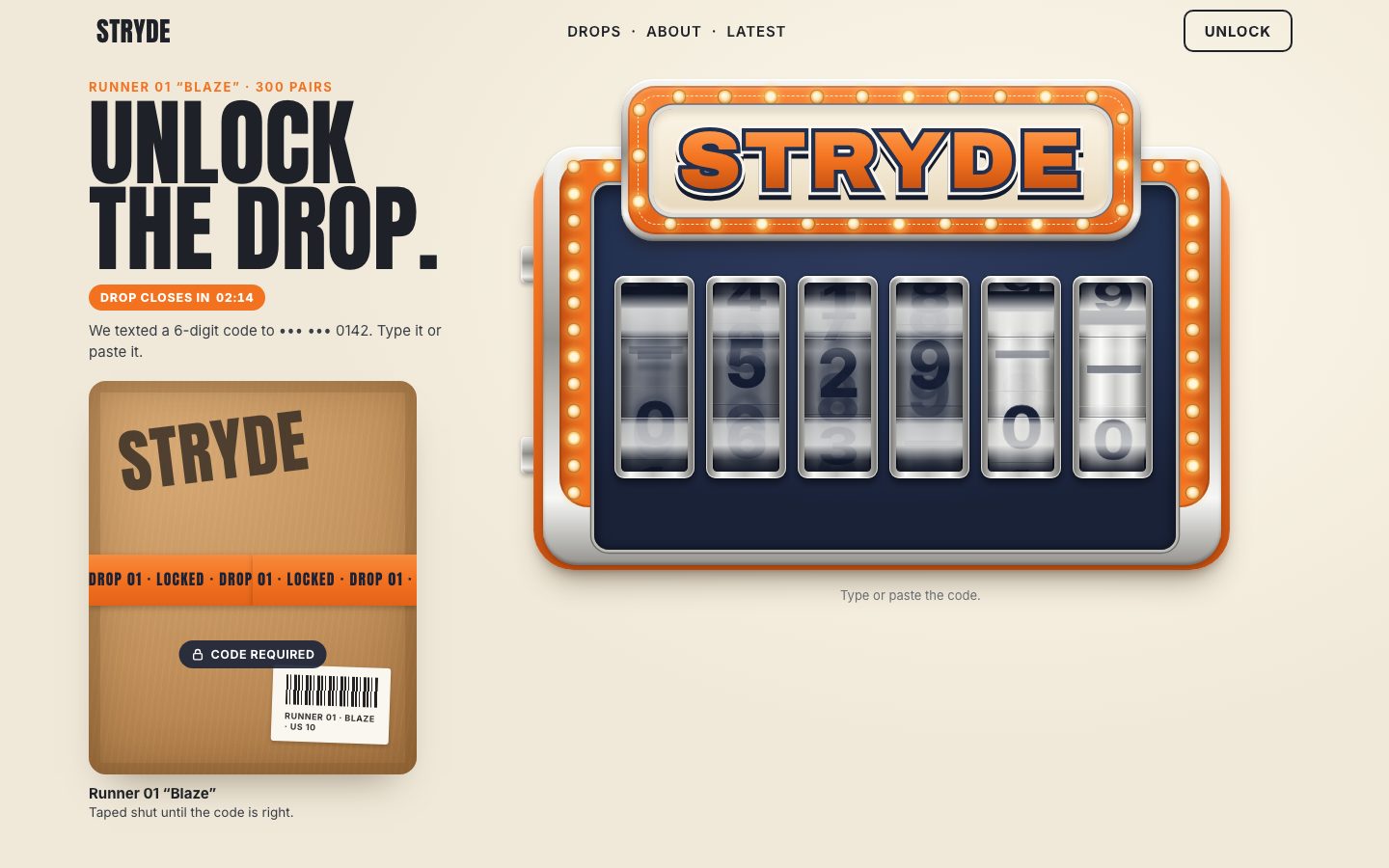
A slot reel does not slide onto a digit. It kicks back a little, pulls hard up to speed, coasts and slows, stops a
little past the digit and springs back onto it, the way a reel drops into its detent. spinCurve() is that
shape: how many degrees the drum has turned at a moment u between 0 and 1. The first 10 % is the kick (when
there is one); the main run lasts until 80 %; the last 20 % is a damped spring (damping 4.4, 1.1 cycles) from the
overshoot back onto the digit, multiplied by 1 − t4 so it lands exactly. The main run's speed
profile is the same for every spin (a quarter sine up to speed over the first 16 %, full speed until 38 %, then a
slowing coast), so it is integrated once, into a table of 64 steps.
// the shape of a spin, in degrees travelled (0 → delta) for u in 0…1. The speed profile of the main run is the same
// for every spin, so it is integrated once.
const M = 64, P = [0];
{
  const speed = (s) => (s < 0.16 ? Math.sin((s / 0.16) * Math.PI / 2) : s < 0.38 ? 1 : Math.pow((1 - s) / 0.62, 1.6));
  let acc = 0;
  for (let i = 1; i <= M; i++) { acc += speed((i - 0.5) / M) / M; P.push(acc); }
  for (let i = 0; i <= M; i++) P[i] /= acc;
}
const main = (s) => { const x = s * M, i = Math.min(M - 1, Math.floor(x)); return P[i] + (P[i + 1] - P[i]) * (x - i); };
function spinCurve(delta, kick, over) {
  const uk = kick ? 0.1 : 0, us = 0.8, zeta = 4.4, w = 2 * Math.PI * 1.1;
  return (u) => {
    if (u <= 0) return 0;
    if (u >= 1) return delta;
    if (u < uk) return -kick * Math.sin((u / uk) * Math.PI / 2);
    if (u < us) return -kick + (delta + over + kick) * main((u - uk) / (us - uk));
    const t = (u - us) / (1 - us);                     // released from rest, past the digit: a damped spring back
    return delta + over * Math.exp(-zeta * t) * (Math.cos(w * t) + (zeta / w) * Math.sin(w * t)) * (1 - t ** 4);
  };
}
That curve becomes a CSS easing. linear() takes a list of points, so the curve is sampled at 37 of them,
each as a fraction of the whole turn. The points may go below 0 (the kick) and above 1 (the overshoot):
linear() allows both.
const SAMPLES = 36, BLUR = 14;
const easingOf = (f, delta) => `linear(${Array.from({ length: SAMPLES + 1 }, (_, i) => +(f(i / SAMPLES) / delta).toFixed(4)).join(', ')})`;
A spin works out where it ends: from where the drum is now, at least the given number of full turns, then on to
the symbol. A normal spin turns the faces downwards; Backspace (dir +1) rolls them back up. Then the whole
spin is one Web Animation on the drum's transform, from the old angle to the new one with that easing. It runs
on the compositor, so typing, pasting or pulling the lever never needs the main thread while the reels turn. Under
prefers-reduced-motion the reel just lands.
// spin onto a symbol. dir −1 rolls the faces downwards (a normal spin), +1 rolls them back up (Backspace).
// min: the least it may travel (degrees), so a reel one face away still visibly rolls
spin(ch, { turns = 1, dir = -1, dur = 650, delay = 0, kick = 8, over = 9, min = 0 } = {}) {
  const sym = symOf(ch);
  if (calm.matches) { this.set(ch); return Promise.resolve(true); }
  const from = this.now();
  this.stop();
  const base = sym * STEP;
  let to;
  if (dir < 0) { const lim = from - turns * 360; to = lim - mod(lim - base, 360); }
  else { const lim = from + turns * 360; to = lim + mod(base - lim, 360); }
  if (Math.abs(to - from) < min) to += dir * 360;
  const delta = Math.abs(to - from);
  if (delta < 0.5) { this.sym = sym; return Promise.resolve(true); }
  const f = spinCurve(delta, kick, over);
  const opts = { duration: dur, delay, fill: 'both', easing: easingOf(f, delta) };
  const anims = [this.drum.animate([{ transform: tf(from) }, { transform: tf(to) }], opts)];
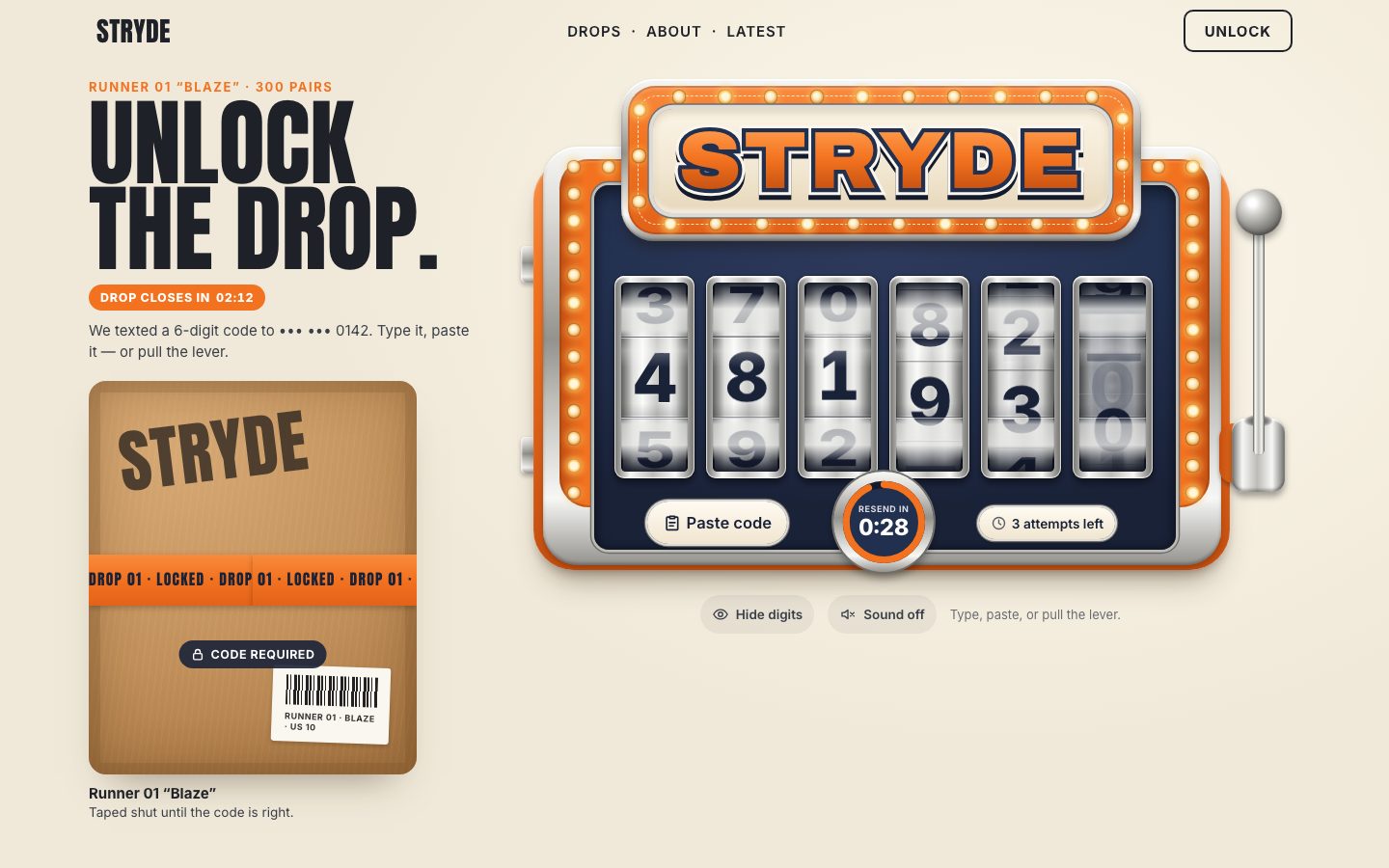
A fast reel blurs. Fifteen samples of the curve give the drum's speed in degrees per millisecond. If its top speed passes 0.45, two opacity animations run beside the turn: a column of smeared digits fades in as the drum fades out, in step with the speed, and the column slides past at the drum's top speed.
// motion blur: how fast the drum turns (degrees per ms) at a few samples → the smear's strength
const peak = { v: 0 }, blur = [];
for (let i = 0; i <= BLUR; i++) {
  const u0 = Math.max(0, (i - 0.5) / BLUR), u1 = Math.min(1, (i + 0.5) / BLUR);
  const v = Math.abs(f(u1) - f(u0)) / ((u1 - u0) * dur);
  peak.v = Math.max(peak.v, v);
  blur.push(Math.min(1, Math.max(0, (v - 0.35) / 0.9)));
}
if (peak.v > 0.45) {
  const lin = { duration: dur, delay, fill: 'both', easing: 'linear' };
  anims.push(this.smear.animate(blur.map((b) => ({ opacity: +(b * 0.92).toFixed(3) })), lin));
  anims.push(this.persp.animate(blur.map((b) => ({ opacity: +(1 - b * 0.55).toFixed(3) })), lin));
  // the smear column slides at the drum's top speed, the way the faces move (downwards when dir is −1)
  const cycle = N * FACE, period = Math.max(120, 360 / peak.v);
  const a = dir < 0 ? -cycle : 0, b = dir < 0 ? 0 : -cycle;
  anims.push(this.strip.animate([{ transform: `translateY(${a}em)` }, { transform: `translateY(${b}em)` }],
    { duration: period, iterations: Math.ceil((dur + delay) / period) + 1, easing: 'linear' }));
}/* motion blur: a column of smeared digits slides past while a reel is fast; it is invisible at rest */
.smear { position: absolute; inset: 0; overflow: hidden; opacity: 0; will-change: opacity; }
.strip { position: absolute; left: 0; right: 0; top: 0; will-change: transform; }
.strip b { display: grid; place-items: center; font: 800 7.4em/1 var(--sans); color: rgb(26 34 56 / .55);
text-shadow: 0 -.18em .06em rgb(26 34 56 / .35), 0 .18em .06em rgb(26 34 56 / .35), 0 -.36em .1em rgb(26 34 56 / .18), 0 .36em .1em rgb(26 34 56 / .18); }
.strip b { height: calc(9em / 7.4); } /* one face tall, in the digit's own em */When the turn finishes, the drum's rest angle is written into its style, the animations are cancelled, and the spin's promise resolves; later stages wait on it.
let resolve;
const done = new Promise((r) => (resolve = r));
const run = (this.run = { anims, from, to, f, dir, delay, dur, resolve, done });
this.sym = sym;
anims[0].onfinish = () => {
  if (this.run !== run) return;
  this.angle = mod(to, 360);
  this.drum.style.transform = tf(this.angle);
  anims.forEach((x) => x.cancel());
  this.run = null;
  resolve(true);
  this.onland?.(this);
};
return done;
A reel can be interrupted: type over a digit while it is still turning. now() reads the animation's
current time, runs it through the same curve and tells where the drum is, so the next spin starts from there and
nothing jumps.
// where the drum is right now, even in the middle of a spin
now() {
  const r = this.run;
  if (!r) return this.angle;
  const t = (r.anims[0].currentTime ?? 0) - r.delay;
  const u = Math.min(1, Math.max(0, t / r.dur));
  return r.from + r.dir * r.f(u);
}
render() now chooses a spin for each changed reel. One digit typed spins one reel, each reel with its
own length (560 ms plus up to 106 ms), so a typed code never ticks like a metronome. A character removed rolls back up
to the blank. Three or more changed at once spin as a cascade: each further reel turns half a turn more, lasts
150 ms longer and starts 70 ms later, so they land left to right.
function render(next, { cascade = false } = {}) {
  const prev = value;
  value = next;
  const changed = [];
  for (let i = 0; i < 6; i++) if ((prev[i] || '') !== (next[i] || '')) changed.push(i);
  const many = cascade || changed.length >= 3;
  changed.forEach((i, k) => {
    const ch = next[i] || '';
    if (many) reels[i].spin(ch, { turns: 2 + k * 0.5, dur: 860 + k * 150, delay: k * 70, kick: 12, over: 11 });   // a cascade, landing left to right
    else if (!ch) reels[i].spin('', { dir: 1, turns: 0, min: 140, dur: 560, kick: 0, over: 8 });                // Backspace rolls it back to blank
    else reels[i].spin(ch, { turns: 1, dur: 560 + ((i * 53) % 110), delay: k * 40, kick: 8, over: 9 });          // each reel its own timing
  });
}
A paste or a replacement in one go always spins as a cascade, whatever the count.
input.addEventListener('input', (e) => {
  const raw = input.value, clean = raw.replace(/\D/g, '').slice(0, 6);
  if (clean !== raw) { const c = Math.min(sel()[0], clean.length); input.value = clean; input.setSelectionRange(c, c); }
  render(clean, { cascade: e.inputType === 'insertFromPaste' || e.inputType === 'insertReplacementText' || !e.inputType });
});
4 · The caret, the arrow keys and paste
The browser's caret sits between characters, and it is invisible here. On a slot machine the caret should be a reel. So the caret is a selection of one character: the reel it covers glows, and a typed digit replaces that digit, which is what a code field should do. At the end of the code it is an ordinary caret. A longer selection (select all) is left alone and lights the whole row.
const sel = () => [input.selectionStart ?? value.length, input.selectionEnd ?? value.length];
// the caret is always one character wide (or the end of the code), so a typed digit replaces the reel it is on
function normalize() {
  if (document.activeElement !== input) return;
  const len = value.length, [s, e] = sel();
  if (e - s > 1) return paintCaret();
  const a = Math.min(s, len, 5);
  const want = a < len ? [a, a + 1] : [len, len];
  if (s !== want[0] || e !== want[1]) input.setSelectionRange(want[0], want[1]);
  paintCaret();
}
function paintCaret() {
  const [s, e] = sel(), all = e - s > 1;
  reels.forEach((r, i) => r.el.classList.toggle('active', all ? i >= s && i < e : i === Math.min(s, 5)));
}
The arrow keys move it a reel at a time, and Home and End (or up and down) jump to the ends. With a modifier held the browser's own behaviour is kept, so Shift-arrows still select and shortcuts still work.
input.addEventListener('keydown', (e) => {
  const len = value.length, [s, end] = sel();
  let a = null;
  if (e.key === 'ArrowLeft') a = end - s > 1 ? s : Math.max(0, Math.min(s, len) - 1);
  else if (e.key === 'ArrowRight') a = end - s > 1 ? Math.min(end, len) : Math.min(len, s + 1);
  else if (e.key === 'Home' || e.key === 'ArrowUp') a = 0;
  else if (e.key === 'End' || e.key === 'ArrowDown') a = len;
  if (a === null || e.shiftKey || e.metaKey || e.ctrlKey || e.altKey) return;
  e.preventDefault();
  a = Math.min(a, len);
  input.setSelectionRange(a, a < len ? a + 1 : a);
  normalize();
});
A click or a tap on a reel puts the caret on that reel. The browser places its own caret first, so this runs after
it, on click; selectionchange catches everything else (a long press, a selection handle).
// a tap or click on a reel puts the caret on it (the browser places its own caret first, so this runs after)
input.addEventListener('click', (e) => {
  const i = reels.findIndex((r) => { const b = r.el.getBoundingClientRect(); return e.clientX < b.right + 6; });
  const a = Math.min(i < 0 ? 5 : i, value.length);
  input.setSelectionRange(a, a < value.length ? a + 1 : a);
  normalize();
});
document.addEventListener('selectionchange', () => { if (document.activeElement === input) normalize(); });
A focus ring round the reels is for the keyboard: a pointer press or tap only lights the caret.
let pointerFocus = false;
addEventListener('pointerdown', () => (pointerFocus = true), true);
addEventListener('keydown', () => (pointerFocus = false), true);
input.addEventListener('focus', () => { otp.classList.add('focused'); otp.classList.toggle('focus-ring', !pointerFocus); requestAnimationFrame(normalize); });
input.addEventListener('blur', () => otp.classList.remove('focused', 'focus-ring'));/* the caret: the reel the next digit lands on (whole row when everything is selected) */
.reel::after { content: ''; position: absolute; inset: -.5em; border-radius: 1.5em; pointer-events: none; opacity: 0;
box-shadow: 0 0 0 .38em var(--orange-500), 0 0 1.6em .3em rgb(255 140 50 / .55); transition: opacity .15s; }
.otp.focused .reel.active::after { opacity: 1; animation: caret 1.1s ease-in-out infinite; }
.otp.focus-ring .reels { outline: .3em solid var(--cream-50); outline-offset: .9em; border-radius: 1.2em; }
@keyframes caret { 0%, 100% { opacity: 1; } 50% { opacity: .45; } }Paste is handled by hand. The digits are pulled out of whatever was copied, so "Your STRYDE code is 123-456" pastes 123456. Six or more replace the whole code; fewer go in at the caret.
input.addEventListener('paste', (e) => {
  e.preventDefault();
  applyPaste(e.clipboardData?.getData('text') || '');
});
function applyPaste(text) {
  const d = (text || '').replace(/\D/g, '');
  if (!d) { say('No digits on the clipboard.', { visible: true }); return false; }
  const [s, e] = sel();
  const next = d.length >= 6 ? d.slice(0, 6) : (value.slice(0, s) + d + value.slice(e)).slice(0, 6);
  input.value = next;
  const c = Math.min(next.length, d.length >= 6 ? 6 : s + d.length);
  input.setSelectionRange(c, c);
  render(next, { cascade: true });
  normalize();
  say(d.length >= 6 ? 'Code pasted.' : `${d.length} digit${d.length > 1 ? 's' : ''} pasted.`);
  return true;
}
The Paste code chip reads the clipboard through the Clipboard API. The browser may ask for permission, or refuse, and the clipboard may hold no code at all; each case gets its own message, and the refusal points to ⌘V or Ctrl+V, or a long press on the reels.
// the Paste code chip: the Clipboard API, which asks for permission (or shows the browser's own Paste button)
$('.paste', otp).addEventListener('click', async () => {
  if (!navigator.clipboard?.readText) { say('Paste is not available here — long-press the reels and choose Paste.', { visible: true }); input.focus(); return; }
  try {
    const perm = await navigator.permissions?.query({ name: 'clipboard-read' }).catch(() => null);
    if (perm?.state === 'denied') throw new DOMException('Clipboard blocked', 'NotAllowedError');
    const text = await navigator.clipboard.readText();
    if (!/\d/.test(text)) { say('No code on your clipboard — copy the 6 digits from the message first.', { visible: true }); input.focus(); return; }
    input.focus({ preventScroll: true });
    applyPaste(text);
  } catch {
    say(`The browser blocked the clipboard. Press ${/Mac|iP/.test(navigator.platform) ? '⌘V' : 'Ctrl+V'} or long-press the reels and choose Paste.`, { visible: true, assertive: true });
    input.focus();
  }
});
The chip sits in the cabinet's foot, in a tray: a layer as wide as the board, with its parts placed in em like everything else.
.tray { position: absolute; left: 0; top: 0; width: 85.5em; height: 0; z-index: 4; }
.tray > * { position: absolute; margin: 0; }
.chip { display: inline-flex; align-items: center; justify-content: center; gap: .55em; border-radius: 999px; white-space: nowrap; color: var(--navy-900);
  background: linear-gradient(180deg, #FFFBF2, #F0E5CF); box-shadow: 0 0 0 .22em var(--chrome-1), 0 0 0 .34em var(--chrome-4), 0 .35em .6em rgb(0 0 0 / .35); }
.chip svg { width: 1.25em; height: 1.25em; flex: none; fill: none; stroke: currentColor; stroke-width: 2; stroke-linecap: round; stroke-linejoin: round; }
.paste { left: 13.8em; top: 46.4em; width: 15.4em; height: 4.6em; padding: 0 1.2em; border: 0; font-size: 1em; }
.paste > span { font-size: 1.75em; font-weight: 600; }
.paste svg { width: 2.1em; height: 2.1em; }
.paste:hover { background: #fff; }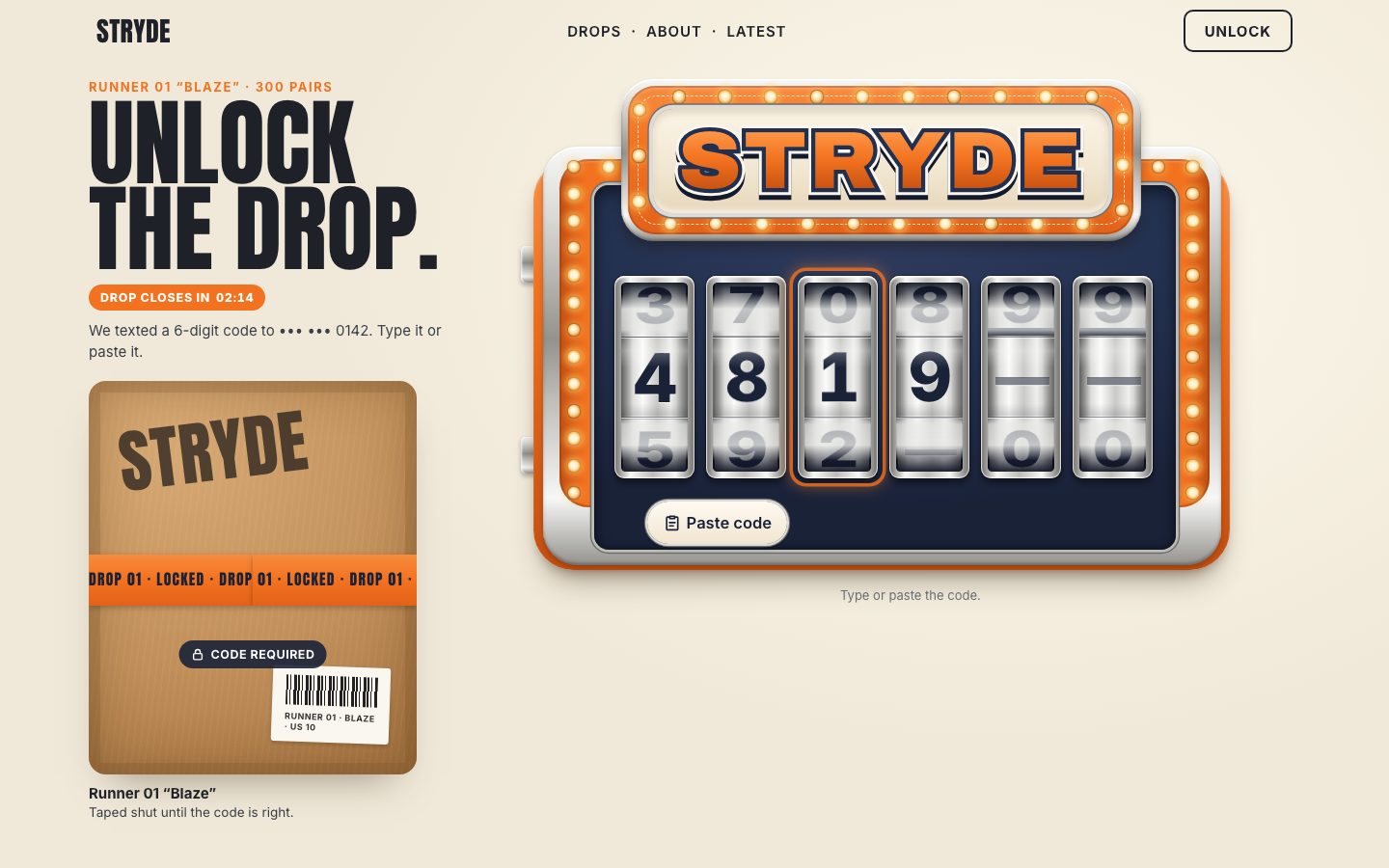
5 · The verifier and its states
Now the code gets checked. The verifier is a mock: the right code is 481927, ?code= in the address sets
another, and ?latency= how long the "server" takes (750 ms by default). There are three attempts and a
30-second lock-out.
const q = new URLSearchParams(location.search);
const CONFIG = {
  code: /^\d{6}$/.test(q.get('code') || '') ? q.get('code') : '481927',   // the code the mock verifier accepts
  latency: Math.max(0, +(q.get('latency') ?? 750)),                       // ms the "server" takes to answer
  attempts: 3, cooldown: 30,                                               // tries, lock-out seconds
};
The code is sent by itself when the sixth digit has landed, not when it was typed: the reels have their moment first. Every change bumps a token, and the auto-submit gives up if the token moved while it waited.
const landed = () => Promise.all(reels.map((r) => (r.run ? r.run.done : true)));
async function autoSubmit() {
  const t = token;
  await landed();
  if (t !== token || value.length !== 6 || state !== 'idle') return;
  submit();
}
The state lives in one place. setState() writes it on the component (data-state), puts the
badge under the sign, makes the input read-only while checking, after a win and while locked, and sets
aria-invalid for a wrong code. Put your own request in place of verify().
const verify = (code) => new Promise((ok) => setTimeout(() => ok(code === CONFIG.code), CONFIG.latency));

function setState(s, badge = '') {
  state = s;
  otp.dataset.state = s;
  setBadge(badge);
  input.readOnly = locked();
  input.setAttribute('aria-invalid', s === 'error' ? 'true' : 'false');
}
submit() (and Enter) asks for the rest of an incomplete code with a shake. A code that was already
turned down is not sent again and does not cost an attempt.
async function submit() {
  if (state === 'checking' || state === 'locked') return;
  if (state === 'success') return;
  if (value.length < 6) {
    const left = 6 - value.length;
    say(`Enter all 6 digits — ${left} to go.`, { visible: true });
    FX.shake(cab);
    input.focus({ preventScroll: true });
    input.setSelectionRange(value.length, value.length);
    return;
  }
  if (value === rejected) { say('That code was already turned down — change a digit or resend.', { visible: true }); FX.shake(cab); return; }
  const code = value, t = token;
  setState('checking', 'Checking');
  say('Checking the code…');
  const ok = await verify(code);
  if (state !== 'checking' || t !== token) return;
  ok ? win() : wrong(code);
}
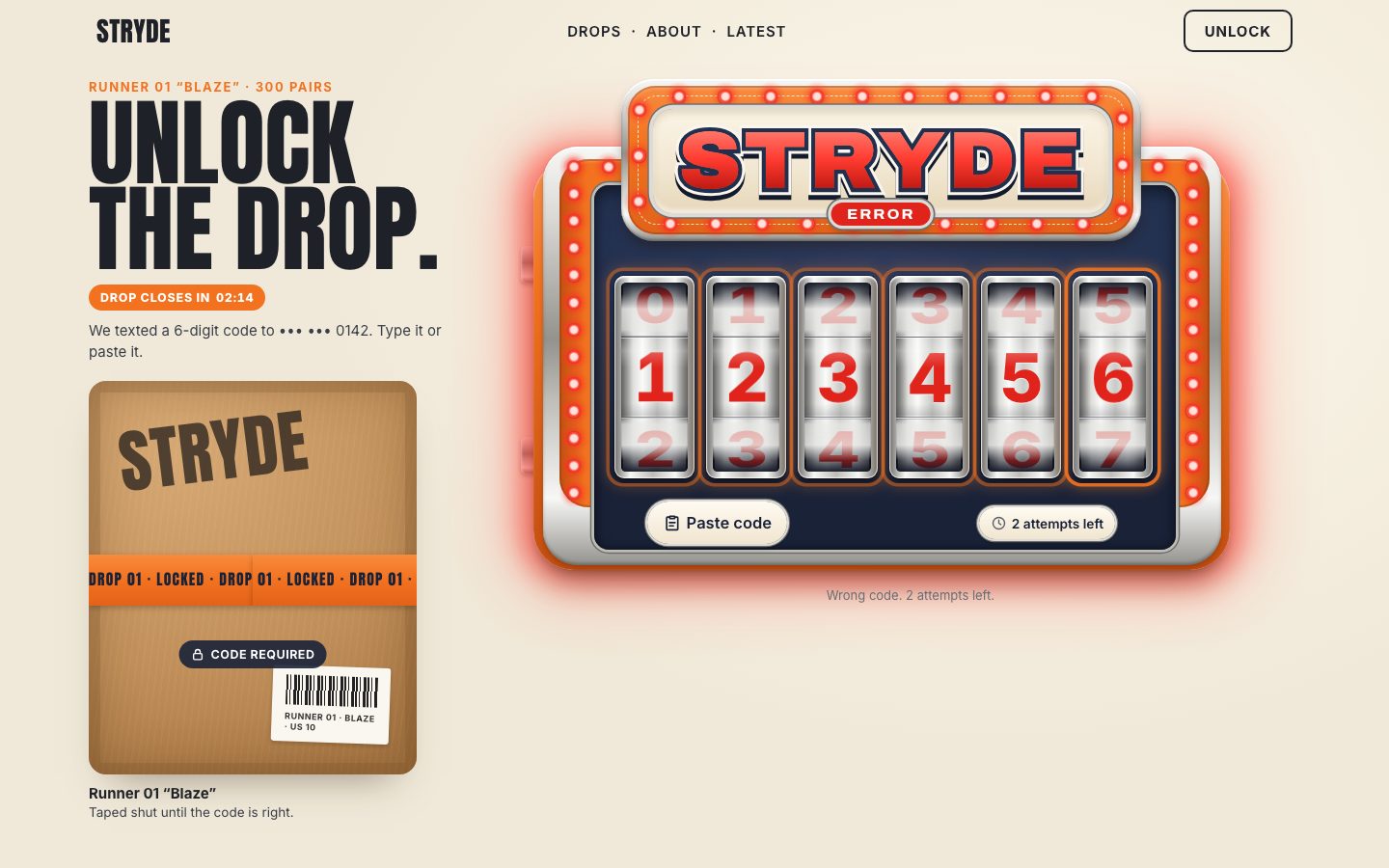
A wrong code costs an attempt, shakes the cabinet and selects the whole code, so the next digit starts a new one. At zero attempts it locks for 30 seconds; then the attempts come back and the reels roll back to blank.
function wrong(code) {
  attempts--;
  rejected = code;
  FX.shake(cab);
  if (attempts <= 0) return lock();
  setState('error', 'Error');
  paintAttempts();
  say(`Wrong code. ${attempts} attempt${attempts > 1 ? 's' : ''} left.`, { visible: true, assertive: true });
  if (document.activeElement === input) input.setSelectionRange(0, value.length);   // the next digit replaces the whole code
  paintCaret();
}

function lock() {
  lockedUntil = performance.now() + CONFIG.cooldown * 1000;
  setState('locked', `Locked ${clock(CONFIG.cooldown)}`);
  paintAttempts();
  say(`Too many wrong codes. Try again in ${CONFIG.cooldown} seconds.`, { visible: true, assertive: true });
  input.blur();
}
function unlock() {
  lockedUntil = 0;
  attempts = CONFIG.attempts;
  rejected = null;
  setState('idle');
  input.value = '';
  render('', { cascade: true });
  paintAttempts();
  say('You can try again.', { visible: true });
}
The lock-out's countdown is one timer, every 250 ms, that touches the DOM only when a whole second changes.
const clock = (sec) => { sec = Math.max(0, Math.ceil(sec)); return `${Math.floor(sec / 60)}:${String(sec % 60).padStart(2, '0')}`; };

const shown = { l: null };
function tick() {
  const now = performance.now();
  if (state === 'locked') {
    const ls = Math.ceil((lockedUntil - now) / 1000);
    if (ls <= 0) unlock();
    else if (ls !== shown.l) { shown.l = ls; setBadge(`Locked ${clock(ls)}`); paintAttempts(); }
  }
}
setInterval(tick, 250);// the jackpot: the marquee lights up
function win() {
setState('success', 'Drop unlocked');
input.blur();
setWord('JACKPOT');
paintAttempts();
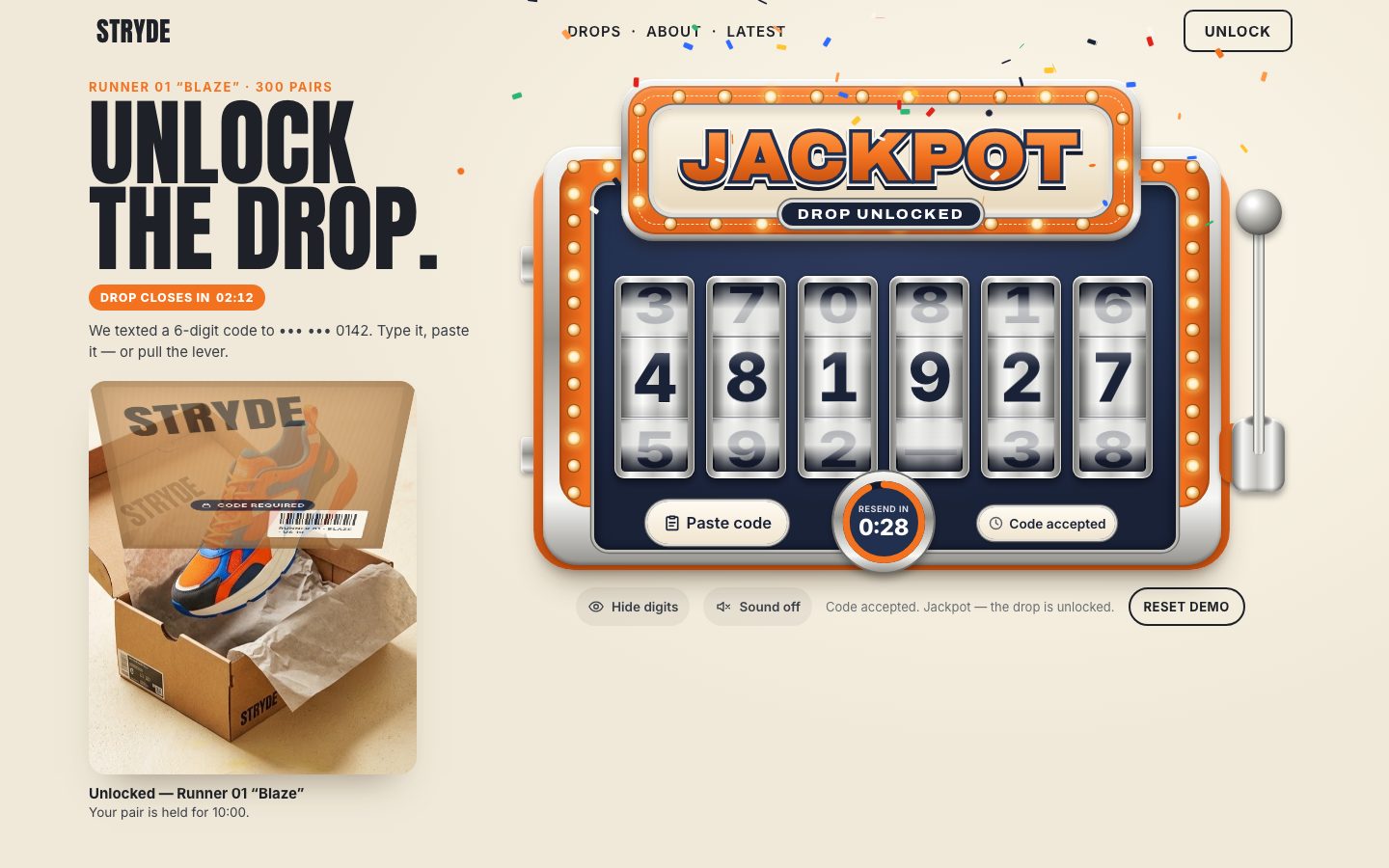
say('Code accepted. Jackpot — the drop is unlocked.', { visible: true, assertive: true });
again.hidden = false;
}The look of every state is CSS on data-state. While checking, the three bulb groups chase round the
cabinet (each a third of the cycle behind the last); a wrong code turns the digits red, switches the warm bulbs off and
blinks the red ones four times, and lights a red halo; the jackpot chases faster; locked greys the digits and the
sign.
/* ---- 9. STATES ---- */
.otp[data-state="checking"] .lit { animation: chase .5s linear infinite; }
.otp[data-state="checking"] .lit.g1 { animation-delay: -.167s; } .otp[data-state="checking"] .lit.g2 { animation-delay: -.333s; }

.otp[data-state="error"] .face b { color: var(--red-600); }
.otp[data-state="error"] .lit { animation: none; opacity: 0; }
.otp[data-state="error"] .red { opacity: 1; animation: blink .32s steps(2, jump-none) 4; }
.otp[data-state="error"] .halo { opacity: 1; transition: opacity .2s; }
.otp[data-state="error"] .w-red { opacity: 1; }
.otp[data-state="error"] .badge { background: var(--red-600); }

.otp[data-state="success"] .lit { animation: chase .36s linear infinite; }
.otp[data-state="success"] .lit.g1 { animation-delay: -.12s; } .otp[data-state="success"] .lit.g2 { animation-delay: -.24s; }
.otp[data-state="success"] .badge { background: var(--navy-900); }

.otp[data-state="locked"] .face b { color: var(--ink-500); }
.otp[data-state="locked"] .lit { animation: none; opacity: .12; }
.otp[data-state="locked"] .red { opacity: .55; }
.otp[data-state="locked"] .w-fill { background-image: linear-gradient(180deg, #A9A7A2 8%, #8A8884 48%, #6A6864 92%); }
.otp[data-state="locked"] .code { cursor: not-allowed; }
Every bulb gets a third element, a red glow, in its own layer.
function lightUp(host, pts) {
  const groups = { base: [], g0: [], g1: [], g2: [], red: [] };
  pts.forEach(([x, y], i) => {
    const b = `<i class="bulb" style="left:${x.toFixed(2)}em;top:${y.toFixed(2)}em"></i>`;
    groups.base.push(b); groups['g' + (i % 3)].push(b); groups.red.push(b);
  });
  host.innerHTML = `<div class="base">${groups.base.join('')}</div>` +
    ['g0', 'g1', 'g2'].map((g) => `<div class="lit ${g}">${groups[g].join('')}</div>`).join('') +
    `<div class="red">${groups.red.join('')}</div>`;
}
The red word is a fifth copy of the word, painted once and only faded in. A wrong code repaints nothing on the sign. The badge pops in with a little overshoot.
/* the red word is painted once, on its own layer, and only fades in: a wrong code repaints nothing on the sign */
.w-red { background: linear-gradient(180deg, #FF7A6E 8%, var(--red-500) 48%, #B5150E 92%); -webkit-background-clip: text; background-clip: text; color: transparent; opacity: 0; will-change: opacity; }.badge { left: 50%; top: 8.75em; margin: 0; transform: translateX(-50%) scale(.6); opacity: 0; white-space: nowrap;
padding: .32em 1.1em .3em; border-radius: 999px; background: var(--navy-900); color: #fff; box-shadow: 0 0 0 .22em var(--chrome-1), 0 0 0 .34em var(--chrome-4), 0 .4em .6em rgb(0 0 0 / .3);
font: 800 1.55em/1 var(--sign); font-stretch: 110%; letter-spacing: .14em; text-transform: uppercase; transition: transform .25s cubic-bezier(.3, 1.6, .5, 1), opacity .15s; }
.otp[data-badge] .badge { transform: translateX(-50%) scale(1); opacity: 1; }The shake is one Web Animation of seven keyframes over 480 ms, each swing smaller than the last.
function shake(el) {
  if (calm.matches) return;
  el.animate([{ transform: 'none' }, { transform: 'translateX(-1.4em) rotate(-.6deg)' }, { transform: 'translateX(1.2em) rotate(.5deg)' },
    { transform: 'translateX(-.9em)' }, { transform: 'translateX(.6em)' }, { transform: 'translateX(-.3em)' }, { transform: 'none' }],
  { duration: 480, easing: 'cubic-bezier(.36,.07,.19,.97)' });
}
6 · The lever
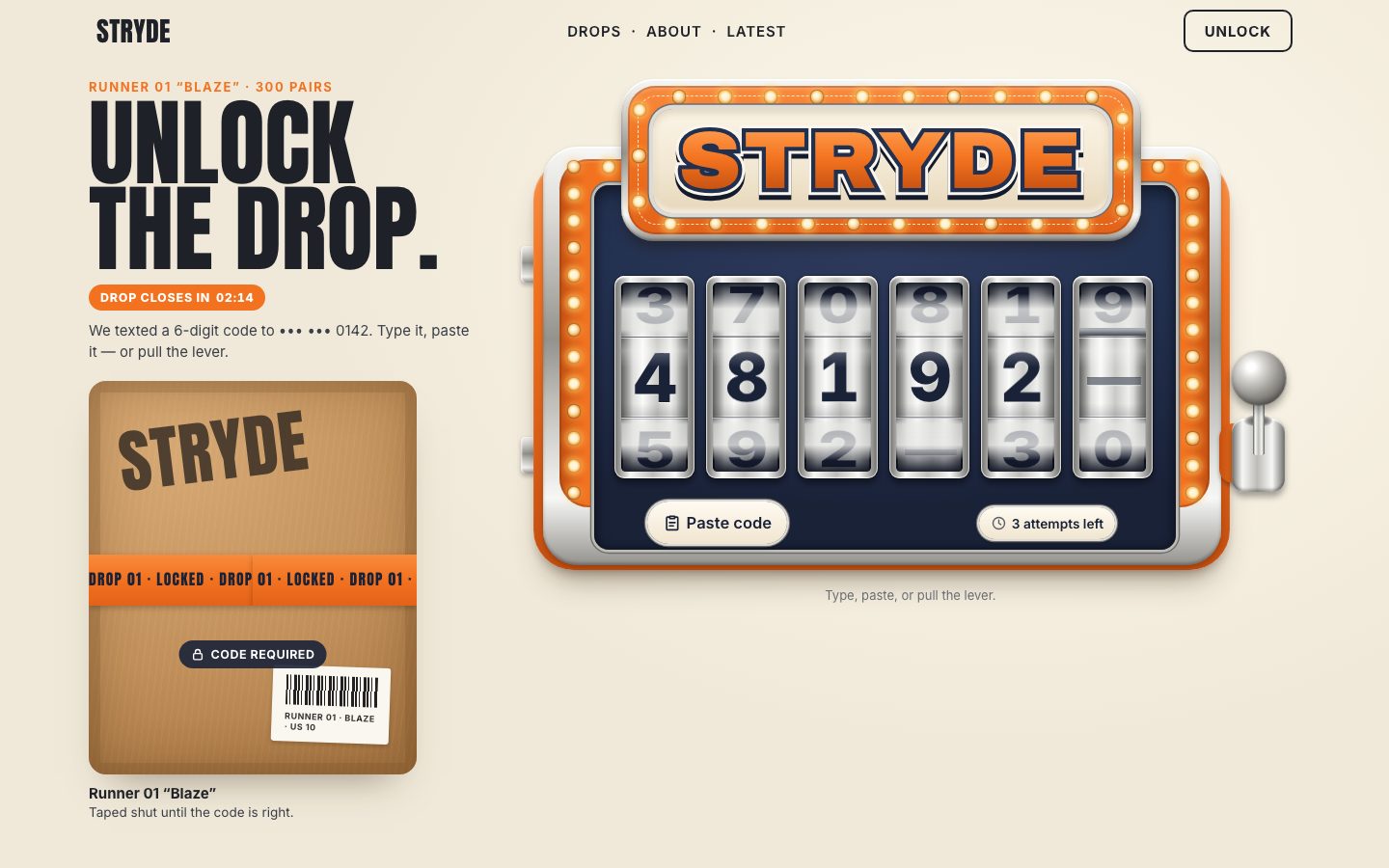
The lever submits. It is a real <button>, so Enter and Space pull it too; the rod and the ball
are inside it.
<div class="lever">
  <i class="lv-base" aria-hidden="true"></i>
  <i class="lv-house" aria-hidden="true"></i>
  <button class="arm" type="button" aria-label="Pull the lever to submit the code">
    <i class="rod" aria-hidden="true"></i><i class="ball" aria-hidden="true"></i>
  </button>
</div>
The machine is seen from the front, so a lever swinging towards you is a rod that gets shorter. The rod pivots at
the bottom: scaleY is the cosine of the swing, and past 90° the cosine is negative, so the rod folds
down below the pivot. The ball rides the rod's tip and grows a little as it comes closer. A full pull is 115°.
/* the rod pivots at the housing's middle (32.3em down): scaleY folds it towards you, the ball rides its tip */
.rod { left: 3.75em; top: 5.5em; width: 1.25em; height: 26.8em; border-radius: .6em; transform-origin: 50% 100%; background: var(--chrome-h);
  box-shadow: inset 0 0 0 .06em rgb(0 0 0 / .2); will-change: transform; }
.ball { left: 1.85em; top: 3.1em; width: 5.1em; height: 5.1em; border-radius: 50%; will-change: transform;
  background: radial-gradient(circle at 36% 30%, #fff 0 8%, var(--chrome-1) 22%, var(--chrome-3) 55%, #5c5b58 82%, #8d8c88);
box-shadow: 0 .5em .8em rgb(0 0 0 / .35), inset 0 -.3em .5em rgb(0 0 0 / .25); }const MAX = 115 * Math.PI / 180; // the swing at the bottom of a pull
const L = 26.8; // em: pivot → ball centre
const calm = matchMedia('(prefers-reduced-motion: reduce)');
const pose = (p) => {
const a = p * MAX, c = Math.cos(a);
return { rod: `scaleY(${c.toFixed(4)})`, ball: `translateY(${(L * (1 - c)).toFixed(3)}em) scale(${(1 + 0.2 * Math.sin(Math.max(0, a))).toFixed(4)})` };
};Dragging sets the pose directly. Everything else (the pull, and the spring back) is a function of time sampled into 29 keyframes for the rod and the ball and played as Web Animations, so it runs on the compositor.
// play p(t) for t in 0…1 over ms, sampled into keyframes for the rod and the ball
play(fn, ms) {
  this.stopAnims();
  const K = 28, rod = [], ball = [];
  for (let i = 0; i <= K; i++) { const s = pose(fn(i / K)); rod.push({ transform: s.rod }); ball.push({ transform: s.ball }); }
  const o = { duration: ms, easing: 'linear', fill: 'forwards' };
  const a = this.rod.animate(rod, o), b = this.ball.animate(ball, o);
  this.anims = [a, b];
  const end = fn(1);
  return a.finished.then(() => { if (this.anims[0] === a) { this.set(end); this.stopAnims(); } }).catch(() => {});
}
Letting go is a damped spring back to the top with a small bounce past it. A click is a pull of its own: 230 ms down, fire, spring back.
// let go: a damped spring back up, with a small bounce past the top
release(from) {
  if (calm.matches) { this.set(0); return Promise.resolve(); }
  return this.play((t) => from * Math.exp(-5.2 * t) * Math.cos(2 * Math.PI * 1.25 * t) * (1 - t ** 6), 720);
}

async pull() {
  if (this.drag) return;
  if (calm.matches) { this.fire(); return; }
  this.dragged = false;
  const from = this.p;
  await this.play((t) => from + (1 - from) * (t * t * (2.2 - 1.2 * t)), 230);
  this.fire();
  await this.release(1);
}
The drag follows the pointer (with pointer capture, so it keeps going off the lever) once it has moved 4 px. It
fires at 94 % of the way down, or on letting go past 55 %. touch-action: none on the button keeps a finger
from scrolling the page instead.
down(e) {
  if (e.button !== 0) return;
  this.stopAnims();
  this.arm.setPointerCapture(e.pointerId);
  this.drag = { id: e.pointerId, y0: e.clientY, span: Math.max(60, (this.arm.getBoundingClientRect().height) * 1.05), fired: false, moved: false, p0: this.p };
  this.dragged = false;
}

move(e) {
  const d = this.drag; if (!d || e.pointerId !== d.id) return;
  const dy = e.clientY - d.y0;
  if (Math.abs(dy) > 4) d.moved = true;
  if (!d.moved) return;
  const p = Math.min(1, Math.max(0, d.p0 + dy / d.span));
  this.set(p);
  if (p >= 0.94 && !d.fired) { d.fired = true; this.fire(); }
}

up(e, cancelled) {
  const d = this.drag; if (!d || e.pointerId !== d.id) return;
  this.drag = null;
  if (!d.moved) return;                       // a plain click: the click handler pulls
  this.dragged = true;
  setTimeout(() => (this.dragged = false), 0);
  if (!cancelled && !d.fired && this.p > 0.55) { d.fired = true; this.fire(); }
  this.release(this.p);
}
A drag ends with a click event too. The click handler knows a drag just happened and ignores it.
this.arm.addEventListener('click', (e) => {
  if (this.dragged) { this.dragged = false; return; }
  e.preventDefault();
  this.pull();
});
In app.js a pull spins every reel at once (the reels further right turn more and longer), lands them on
the code left to right, and then submits. With fewer than six digits the reels still spin, and submit()
asks for the rest; while locked the lever only says how long is left.
// the lever: every reel spins at once and lands on the code, left to right, then the code is checked
const lever = new Lever(otp, () => {
  if (state === 'checking') return;
  if (state === 'locked') { say(`Locked — try again in ${Math.ceil((lockedUntil - performance.now()) / 1000)} s.`, { visible: true }); return; }
  if (state === 'error') setState('idle');
  const t = ++token;
  const spins = reels.map((r, i) => r.spin(value[i] || '', { turns: 2 + i * 0.5, dur: 1050 + i * 170, delay: i * 30, kick: 16, over: 12 }));
  if (state === 'success') return;
  Promise.all(spins).then(() => { if (t === token) submit(); });
});
7 · The payoff
A right code should feel like a jackpot. Confetti flies from the sign, and the box opens. The confetti is 72 plain elements, each flying one Web Animation sampled from a path: launched upwards in a fan, slowed by air drag, pulled down by gravity, swaying as it flutters. The random numbers come from a seeded generator, so every burst is the same. The pieces and their keyframes are made once, twelve at a time, while the page is idle; at the jackpot nothing is built.
const pool = { host: null, launcher: null, anims: [], ready: false };
function prepare(host, count = 72) {
  if (pool.host || calm.matches) return;
  pool.host = host;
  const launcher = (pool.launcher = document.createElement('div'));
  launcher.className = 'launcher';
  host.append(launcher);
  let seed = 7, i = 0;
  const rnd = () => ((seed = (seed * 16807) % 2147483647) / 2147483647);
  const g = 2400, dur = 2200, K = 12;
  const batch = (deadline) => {
    for (let n = 0; n < 12 && i < count; n++, i++) {
      const el = document.createElement('i');
      el.style.background = COLORS[i % COLORS.length];
      if (i % 5 === 0) { el.style.width = '7px'; el.style.height = '7px'; el.style.borderRadius = '50%'; }
      launcher.append(el);
      const ang = -Math.PI / 2 + (rnd() - 0.5) * 2.3, sp = 620 + rnd() * 900;
      const vx = Math.cos(ang) * sp, vy = Math.sin(ang) * sp;
      const spin = (rnd() - 0.5) * 1440, flip = 360 + rnd() * 900, sway = 20 + rnd() * 40, ph = rnd() * 6.28;
      const sx = (rnd() - 0.5) * 120, sy = (rnd() - 0.5) * 30, d = dur * (0.75 + rnd() * 0.35);
      const frames = [];
      for (let k = 0; k <= K; k++) {
        const t = (k / K) * (d / 1000), drag = 2.2, e = Math.exp(-drag * t);
        // air drag slows the burst, gravity takes over, the piece sways as it flutters down
        const x = (vx / drag) * (1 - e) + Math.sin(ph + t * 7) * sway * Math.min(1, t * 2);
        const y = (vy / drag) * (1 - e) + (g / drag) * (t - (1 - e) / drag) * 0.55;
        frames.push({ transform: `translate(${(sx + x).toFixed(1)}px, ${(sy + y).toFixed(1)}px) rotate(${(spin * t).toFixed(1)}deg) rotateX(${(flip * t).toFixed(1)}deg)`,
          opacity: k > K * 0.8 ? 1 - (k - K * 0.8) / (K * 0.2) : 1 });
      }
      const an = el.animate(frames, { duration: d, delay: (i % 6) * 18, easing: 'linear', fill: 'both' });
      an.cancel();
      an.onfinish = () => an.cancel();
      pool.anims.push(an);
    }
    if (i < count) schedule(batch); else pool.ready = true;
  };
  const schedule = (fn) => (window.requestIdleCallback ? requestIdleCallback(fn, { timeout: 1500 }) : setTimeout(fn, 60));
  schedule(batch);
}
A burst moves the launcher to the sign and starts the pieces a quarter at a time over four frames: all seventy-two appearing in one frame would cost that frame its deadline.
function confetti(x0, y0) {
  if (calm.matches || !pool.ready) return;
  pool.launcher.style.transform = `translate(${Math.round(x0)}px, ${Math.round(y0)}px)`;
  // started a quarter at a time over four frames: eighty pieces appearing in one frame cost that frame its deadline
  const all = pool.anims.slice(), go = () => { all.splice(0, 21).forEach((a) => { a.cancel(); a.play(); }); if (all.length) requestAnimationFrame(go); };
  go();
}
The box opens in three motions: the tape splits to both sides, the lid swings up and away (to −58° by 55 % of its 900 ms, then on to −96° as it fades), and the photo underneath settles from 106 % to 100 %. With reduced motion the lid just fades. The box photo, again, is cropped from a Gemini concept image of a made-up product.
function openBox(box) {
  if (box.dataset.open === 'true') return Promise.resolve();
  const lid = box.querySelector('.lid'), img = box.querySelector('img');
  const tl = box.querySelector('.tape.l'), tr = box.querySelector('.tape.r');
  if (calm.matches) {
    return lid.animate([{ opacity: 1 }, { opacity: 0 }], { duration: 250 }).finished.then(() => (box.dataset.open = 'true'));
  }
  const ease = 'cubic-bezier(.3,.7,.2,1)';
  tl.animate([{ transform: 'none' }, { transform: 'translateX(-40%) rotate(-8deg)', opacity: 0 }], { duration: 520, easing: ease, fill: 'forwards' });
  tr.animate([{ transform: 'none' }, { transform: 'translateX(40%) rotate(7deg)', opacity: 0 }], { duration: 520, easing: ease, fill: 'forwards' });
  img.animate([{ transform: 'scale(1.06)' }, { transform: 'scale(1)' }], { duration: 1400, delay: 260, easing: ease, fill: 'both' });
  const a = lid.animate([
    { transform: 'rotateX(0deg)', opacity: 1 },
    { transform: 'rotateX(-58deg)', opacity: 1, offset: 0.55 },
    { transform: 'rotateX(-96deg)', opacity: 0 },
  ], { duration: 900, delay: 240, easing: 'cubic-bezier(.45,.05,.3,1)', fill: 'both' });
  return a.finished.then(() => { box.dataset.open = 'true'; [tl, tr, img, lid].forEach((el) => el.getAnimations().forEach((x) => x.cancel())); });
}
The jackpot now flies the confetti, opens the box, holds the pair for ten minutes, and scrolls the box into view if it is off screen. A pull after the win is a celebration: the reels spin and the confetti flies again.
// the jackpot: the marquee, the confetti, the box
async function win() {
  setState('success', 'Drop unlocked');
  input.blur();
  FX.sound.win();
  setWord('JACKPOT');
  burst();
  paintAttempts();
  say('Code accepted. Jackpot — the drop is unlocked.', { visible: true, assertive: true });
  heldUntil = performance.now() + 10 * 60 * 1000;
  again.hidden = false;
  $('.cap-title', box).textContent = 'Unlocked — Runner 01 “Blaze”';
  await FX.openBox(box);
  const r = box.getBoundingClientRect();
  if (r.top < 0 || r.bottom > (visualViewport?.height ?? innerHeight)) box.scrollIntoView({ behavior: calm.matches ? 'auto' : 'smooth', block: 'center' });
}// the lever after the win: the reels spin for fun, the confetti flies again a moment later
function celebrate() {
FX.sound.win();
setTimeout(burst, 90);
}The sound is off by default and made with Web Audio, no files: a short click as each reel lands (a little higher for each reel), a four-note chime for the jackpot, and a low buzz for a wrong code.
const sound = {
  on: false, ctx: null,
  enable(v) { this.on = v; if (v && !this.ctx) { try { this.ctx = new (window.AudioContext || window.webkitAudioContext)(); } catch { this.on = false; } } if (v) this.ctx?.resume?.(); },
  tone(freq, t0, len, type = 'sine', gain = 0.12) {
    const c = this.ctx, o = c.createOscillator(), g = c.createGain();
    o.type = type; o.frequency.value = freq;
    g.gain.setValueAtTime(0, t0); g.gain.linearRampToValueAtTime(gain, t0 + 0.005); g.gain.exponentialRampToValueAtTime(0.0001, t0 + len);
    o.connect(g).connect(c.destination); o.start(t0); o.stop(t0 + len + 0.02);
  },
  tick(i = 0) { if (!this.on || !this.ctx) return; const t = this.ctx.currentTime; this.tone(1800 + i * 90, t, 0.035, 'square', 0.035); this.tone(240, t, 0.05, 'triangle', 0.08); },
  win() { if (!this.on || !this.ctx) return; const t = this.ctx.currentTime; [659, 784, 988, 1319].forEach((f, i) => this.tone(f, t + i * 0.09, 0.32, 'triangle', 0.09)); },
  buzz() { if (!this.on || !this.ctx) return; const t = this.ctx.currentTime; this.tone(110, t, 0.28, 'sawtooth', 0.06); this.tone(104, t + 0.02, 0.28, 'square', 0.03); },
};
The resend ring counts 30 seconds down before a new code may be asked for. The arc is an SVG circle with
pathLength="100", so its dash offset is simply the share of time gone. A click too early says how long is
left; afterwards the button turns orange, and a resend gives the attempts back (unless the input is locked).
function startResend() { resendAt = performance.now() + CONFIG.resend * 1000; resendBtn.setAttribute('aria-disabled', 'true'); shown.r = null; tick(); }
resendBtn.addEventListener('click', () => {
  if (resendBtn.getAttribute('aria-disabled') === 'true') { say(`You can ask for a new code in ${clock((resendAt - performance.now()) / 1000)}.`, { visible: true }); return; }
  if (state === 'success') return;
  resendBtn.setAttribute('aria-disabled', 'true');
  say('Sending a new code…', { visible: true });
  setTimeout(() => {
    if (state !== 'locked') { attempts = CONFIG.attempts; rejected = null; if (state === 'error') setState('idle'); paintAttempts(); }
    startResend();
    say('A new code is on its way.', { visible: true });
  }, 600);
});.ring { position: absolute; inset: .8em; }
.ring svg { width: 100%; height: 100%; transform: rotate(-90deg); display: block; }
.ring circle { fill: none; stroke-width: 8; }
.r-track { stroke: var(--navy-950); }
.r-arc { stroke: var(--orange-500); stroke-dasharray: 100 100; stroke-dashoffset: 0; stroke-linecap: round; }One timer runs every clock on the page: the resend ring, the drop's closing time, the lock-out and the held pair. Each writes to the DOM only when its second changes.
function tick() {
  const now = performance.now();
  const rs = Math.max(0, Math.ceil((resendAt - now) / 1000));
  if (rs !== shown.r) {
    shown.r = rs;
    rTime.textContent = clock(rs);
    rArc.style.strokeDashoffset = (100 * (1 - rs / CONFIG.resend)).toFixed(2);
    rDesc.textContent = rs > 0 ? `available in ${rs} seconds` : '';
    if (rs === 0 && resendBtn.getAttribute('aria-disabled') === 'true') resendBtn.setAttribute('aria-disabled', 'false');
  }
  const cs = Math.max(0, Math.ceil((closesAt - now) / 1000));
  if (cs !== shown.c) { shown.c = cs; closesEl.textContent = `${String(Math.floor(cs / 60)).padStart(2, '0')}:${String(cs % 60).padStart(2, '0')}`; }
  if (state === 'locked') {
    const ls = Math.ceil((lockedUntil - now) / 1000);
    if (ls <= 0) unlock();
    else if (ls !== shown.l) { shown.l = ls; setBadge(`Locked ${clock(ls)}`); paintAttempts(); }
  }
  if (heldUntil) {
    const hs = Math.max(0, Math.ceil((heldUntil - now) / 1000));
    if (hs !== shown.h) { shown.h = hs; $('.cap-text', box).textContent = `Your pair is held for ${clock(hs)}.`; }
  }
}
setInterval(tick, 250);
Hide digits shows each face's ● instead of its digit, and hides the input's own text the same way.
maskBtn.addEventListener('click', () => {
  const on = !otp.classList.contains('masked');
  otp.classList.toggle('masked', on);
  maskBtn.setAttribute('aria-pressed', String(on));
  maskBtn.querySelector('span').textContent = on ? 'Show digits' : 'Hide digits';
  input.style.webkitTextSecurity = on ? 'disc' : '';
});
8 · The first screen, the phone and the frame budget
The last stage makes it fit any screen. The em is now the largest that fits both the column's width and the height left on the first screen under the words. Under about 600 px wide the tray's words would be too small inside the cabinet, so the tray moves out under it, and the cabinet loses its foot (48.5 em tall instead of 54.5). It runs twice, because the row under the cabinet may wrap once the cabinet is narrower. A phone's address bar coming and going changes the height without being a real resize, so a change of less than 140 px at the same width is ignored, and so is a resize while the input has the focus (the keyboard opening).
const BOARD_W = 85.5, FULL_H = 54.5 + 1.4, COMPACT_H = 48.5;
let lastW = 0, lastH = 0;
function fit(force) {
  const vw = innerWidth, vh = innerHeight;
  if (!force && vw === lastW && Math.abs(vh - lastH) < 140) return;   // the phone's URL bar coming and going is not a resize
  if (!force && document.activeElement === input && vw === lastW) return;
  lastW = vw; lastH = vh;
  const cols = getComputedStyle(drop).gridTemplateColumns.split(' ').map(parseFloat).filter((n) => n > 0);
  const W = cols.length > 1 ? cols[1] : cols[0] || otp.parentElement.clientWidth;
  const top = otp.getBoundingClientRect().top + scrollY;
  // twice: the row under the cabinet may wrap once the cabinet is narrower, and then it is taller
  for (let pass = 0; pass < 2; pass++) {
    const under = $('.under', otp).offsetHeight + 14;
    const room = vh - top - under - 10;
    let u = Math.min(W / BOARD_W, room / FULL_H, 10.6);
    // under ~600 px wide the tray's words would be too small inside the cabinet: it moves under it, full size
    const compact = u * BOARD_W < 600;
    if (compact) u = Math.min(W / BOARD_W, (room - 74) / COMPACT_H, 10.6);
    u = Math.max(2.4, u);
    otp.classList.toggle('compact', compact);
    otp.style.setProperty('--u', u.toFixed(3) + 'px');
  }
}
fit(true);
addEventListener('resize', () => fit(false));
document.fonts?.ready.then(() => fit(true));/* a phone: the tray leaves the cabinet and becomes a row of full-size buttons under it */
.otp.compact .tray { position: relative; width: auto; height: auto; display: flex; align-items: center; justify-content: center; gap: 10px; margin-top: 10px; font-size: 16px; }
.otp.compact .tray > * { position: relative; left: auto; top: auto; }
.otp.compact .paste { width: auto; height: 44px; padding: 0 14px 0 12px; font-size: 16px; gap: 6px; }
.otp.compact .paste > span { font-size: 14px; } .otp.compact .paste svg { width: 20px; height: 20px; }
.otp.compact .attempts { width: auto; height: 36px; padding: 0 12px; gap: 6px; }
.otp.compact .attempts span { font-size: 13px; } .otp.compact .attempts svg { width: 17px; height: 17px; }
.otp.compact .chip { box-shadow: 0 0 0 2px var(--chrome-1), 0 0 0 3px var(--chrome-4), 0 3px 6px rgb(0 0 0 / .2); }
.otp.compact .resend { width: 64px; height: 64px; font-size: 6px; flex: none; }
.otp.compact .r-wait small { font-size: 7.5px; } .otp.compact .r-wait b { font-size: 16px; }
.otp.compact .r-go { font-size: 9.5px; }A finger needs more than the rod: on a touch screen the lever's button reaches further left over the cabinet's edge while the rod stays put, and the chip and toggles are at least 44 px.
/* a finger needs a wider handle than the rod: the button reaches left over the cabinet's edge, the rod stays put */
@media (pointer: coarse) {
  .arm { left: -4.6em; width: 13.5em; }
  .arm .rod { left: 8.35em; } .arm .ball { left: 6.45em; }
}
The phone's keyboard covers the bottom of the screen. The visual viewport says how much (the page asks for that
with interactive-widget=resizes-visual in its viewport tag), so the body gets that much padding and the
machine is scrolled above the keyboard. The padding goes on the body and only when it changes: a custom property on
<html> restyled the whole page.
// the phone's keyboard covers the bottom of the screen: keep the whole machine above it
const vv = window.visualViewport;
const shownKb = { open: false, kb: 0 };
function keepInView() {
  if (!vv) return;
  const kb = Math.round(Math.max(0, innerHeight - vv.height)), open = kb > 120;
  // only when it changes: a custom property set on <html> restyles the whole page
  if (open !== shownKb.open || (open && kb !== shownKb.kb)) {
    shownKb.open = open; shownKb.kb = kb;
    document.body.style.paddingBottom = open ? kb + 'px' : '';
  }
  if (kb <= 120 || document.activeElement !== input) return;
  const r = otp.getBoundingClientRect(), top = vv.offsetTop + 8, bottom = vv.offsetTop + vv.height - 8;
  if (r.top < top || r.bottom > bottom) scrollBy({ top: r.top - top, behavior: 'auto' });
}
vv?.addEventListener('resize', keepInView);
The jackpot does a lot at once: the marquee, the confetti, the words, the box. Spread over a few frames, no single frame does all of it, and Reset demo is spread the same way.
// the jackpot, spread over three frames so no single frame does all of it: the marquee, then the confetti, then the box
const nextFrame = () => new Promise((r) => requestAnimationFrame(() => r()));
async function win() {
  setState('success', 'Drop unlocked');
  input.blur();
  FX.sound.win();
  await nextFrame();
  setWord('JACKPOT');
  await nextFrame();
  burst();
  await nextFrame(); await nextFrame();
  paintAttempts();
  say('Code accepted. Jackpot — the drop is unlocked.', { visible: true, assertive: true });
  await nextFrame();
  heldUntil = performance.now() + 10 * 60 * 1000;
  again.hidden = false;
  $('.cap-title', box).textContent = 'Unlocked — Runner 01 “Blaze”';
  await nextFrame();
  await FX.openBox(box);
  const r = box.getBoundingClientRect();
  if (r.top < 0 || r.bottom > (visualViewport?.height ?? innerHeight)) box.scrollIntoView({ behavior: calm.matches ? 'auto' : 'smooth', block: 'center' });
}
Much of the speed was built in on the way: the spin curve integrated once, every spin a compositor animation, the bulbs in three layers, the red word painted once, the confetti built in idle time. Measured with the studio's frame probe (typing, a wrong code, Backspace, a lever drag, a paste that hits the jackpot, a pull after the win, a reset) at 1440 × 900 and on a 390 × 844 phone, also with the CPU slowed four times, no frame was missed and there were no long tasks.
Reduced motion was built in stage by stage. Here is all of it in CSS; in the scripts, the reels land at once, the lever does not swing, the cabinet does not shake, there is no confetti and the lid fades.
/* ---- 12. REDUCED MOTION ---- */
@media (prefers-reduced-motion: reduce) {
  .lit, .otp[data-state] .lit { animation: none; opacity: 1; }
  .otp[data-state="error"] .red { animation: none; }
  .otp[data-state="locked"] .lit { opacity: .12; }
  .otp.focused .reel.active::after { animation: none; }
  .badge { transition: none; }
}
Last, window.__slot lets a script drive the component down the same paths a person takes: its
type() fires the input's own events, one digit at a time.
type(text) {
  input.focus({ preventScroll: true });
  for (const d of String(text)) {
    normalize();
    const [s, e] = sel();
    if (!input.dispatchEvent(new InputEvent('beforeinput', { inputType: 'insertText', data: d, bubbles: true, cancelable: true }))) continue;
    input.setRangeText(d, s, e, 'end');
    input.dispatchEvent(new InputEvent('input', { inputType: 'insertText', data: d, bubbles: true }));
  }
},
Make it yours
- Your own verifier goes in place of
verify()inapp.js: it takes the code and returns a promise of true or false. The attempts (3), the lock-out (30 s) and the resend wait (30 s) are inCONFIG;?code=123456and?latency=mstry it out. - The spin's feel is a few numbers: the kick, the overshoot and the length passed to
spin()inrender()and the lever, and inspinCurve()where the run ends (80 %) and the detent spring (damping 4.4, 1.1 cycles). - A longer or shorter code means
maxlength, the six inrender(),applyPaste()andCabinet.build(), and the board's width. - The brand is the word on the sign (
setWord()), the colours in the tokens at the top ofstyle.css(safety orange, navy, chrome, warm bulbs), and the three fonts. - The box is your product: the photo here is cropped from a concept image generated with Google Gemini, of a
made-up STRYDE sneaker, so put your own picture in
img/. - Scripts can drive it through
window.__slot:type('481927'),backspace(),paste(text),pull(),submit(),reset(),state(),idle(). - Accessibility is already there: one real labelled input with SMS autofill, paste and undo, the digit
keypad, two live regions (polite and assertive), the caret's glow and a keyboard focus ring, the lever a real button,
44 px targets on touch screens, Hide digits, and
prefers-reduced-motion.
The code is on GitHub at UlviShabanbayli/domvybe-slot-code, under the MIT licence: use it in your own projects, commercial ones included.
Keep one real input and draw the show over it. The phone's autofill, paste, undo and screen readers keep working because they never see the reels; the reels only mirror a value that an ordinary text field already owns.