This is the whole build of the stadium seat picker, in the order it was written: a ticketing page for a made-up tour (NOVA LIVE, "The Midnight Echo Tour" at a made-up Meridian Stadium). You look down into a tilted stadium; a section lifts when you hover it, and a click flies the map in to its seats. You pick seats one by one or several together, let it find the best ones, filter by price, and the cart holds your seats for ten minutes. Checkout prints QR tickets whose stubs tear off. Each stage below is the picker as it stood at that step. It shows a still, and Run it here starts the live page in its place. The code under each heading is only what that stage adds. The finished source is at the end, and on GitHub under the MIT licence.
There is no library, no build step, no WebGL and no picture. The stadium is numbers in model.js; it is
projected and painted onto plain 2D canvases by render.js; the "view from your seat" is drawn too
(view.js, view-paint.js); qr.js is a QR encoder and ticket.js prints
the tickets; app.js wires it all and keeps the state. They are ES modules loaded by one
<script type="module">. app.js is written in nine parts with banners of its own; the
tutorial's nine stages follow the build instead, so a stage often adds a few lines to several parts.
1 · The stadium as data, and the bowl painted
The page is one app window: a bar, then the map. The map is a rig holding the canvases (the bowl, the stage) with the title and the tier legend floating over it.
<div class="nl" id="nl">
<header class="nl-bar">
<a class="nl-logo" href="#" aria-label="NOVA LIVE home">NOVA LIVE</a>
<nav class="nl-tabs" aria-label="Main">
<a href="#" aria-current="page">Stadium</a><a href="#">News</a><a href="#">Contact</a>
</nav>
<div class="nl-bar-end">
<a class="nl-login" href="#">Log in</a>
</div>
</header>
<main class="nl-body">
<!-- the map: the bowl and everything that floats over it -->
<section class="nl-map" aria-label="Stadium map">
<div class="nl-rig" aria-hidden="false">
<canvas class="nl-base" aria-hidden="true"></canvas>
<canvas class="nl-stage" aria-hidden="true"></canvas>
<i class="nl-stage-glow" aria-hidden="true"></i>
</div>
<div class="nl-intro">
<h1 class="nl-title">The Midnight Echo Tour</h1>
<p class="nl-sub">Stadium ticket map · <span>Sat Oct 17 · Meridian Stadium</span></p>
<p class="nl-k">Colour-coded price tiers</p>
<ul class="nl-tiers" aria-label="Price tiers">
<li style="--c: var(--tier-1)"><i></i><span>Tier 1</span><b>$150</b></li>
<li style="--c: var(--tier-2)"><i></i><span>Tier 2</span><b>$100</b></li>
<li style="--c: var(--tier-3)"><i></i><span>Tier 3</span><b>$75</b></li>
<li style="--c: var(--tier-4)"><i></i><span>Tier 4</span><b>$50</b></li>
</ul>
</div>
</section>
</main>
</div>Everything starts as numbers, in world units of about a metre. The field is a rounded rectangle, 72 × 44 with a corner radius of 14. Around it run a lower ring (10 rows, 16 sections) and, above a concourse, an upper ring (12 rows, 24 sections). Each row climbs by its depth times the ring's rake, so the upper ring is steeper.
export const G = {
  A: 36, B: 22, R: 14,                                   // the field: half length, half width, corner radius
  wall: 0.9,                                             // the low wall around the field
  lower: { d0: 1.6, depth: 0.95, rows: 10, z0: 0.9, rake: 0.42, sections: 16 },
  conc: { d0: 11.2, d1: 13.6, z: 5.2 },                  // the concourse between the two rings
  upper: { d0: 13.8, depth: 1.0, rows: 12, z0: 7.6, rake: 0.6, sections: 24 },
  rim: { d0: 25.9, d1: 27.4, z: 15.4 },
  seatW: 1.0,                                            // the width one seat takes along its row
  aisle: 0.5,                                            // the stair at each end of a section's rows
  stage: { x0: 26, x1: 35, y: 11, h: 1.6, run: [13.2, 1.3], thrust: [12.4, 2.4], screen: { x: 34.4, y: 9.5, z0: 2.2, z1: 11.5 } },
};export const TIERS = [
null,
{ n: 1, price: 150, name: 'Tier 1' },
{ n: 2, price: 100, name: 'Tier 2' },
{ n: 3, price: 75, name: 'Tier 3' },
{ n: 4, price: 50, name: 'Tier 4' },
];
export const FEE = 7.5; // service fee per ticket
export const MAX_SEATS = 8;
export const ROWS = 'ABCDEFGHJKLMNPQR'; // no I or O, like real venuesA place in the bowl is written as (u, d): u runs along the field's edge (0 is the middle of the
stage end), and d is how far out from that edge. The edge is nine pieces: four straights and four quarter
circles round the corner centres (the first straight is split at u = 0). frame(u) finds the piece, the
point on it and the direction that points out; P(u, d) steps R + d out along it. So a row is
just "every u at one d", and it bends round the corners by itself.
// ---- the edge of the field, walked by u -----------------------------------------------------------------------
const a = G.A - G.R, b = G.B - G.R, q = (Math.PI / 2) * G.R;
const SEGS = [
  { len: b, c0: [a, 0], dir: [0, 1], n: [1, 0] },
  { len: q, c: [a, b], th0: 0 },
  { len: 2 * a, c0: [a, b], dir: [-1, 0], n: [0, 1] },
  { len: q, c: [-a, b], th0: Math.PI / 2 },
  { len: 2 * b, c0: [-a, b], dir: [0, -1], n: [-1, 0] },
  { len: q, c: [-a, -b], th0: Math.PI },
  { len: 2 * a, c0: [-a, -b], dir: [1, 0], n: [0, -1] },
  { len: q, c: [a, -b], th0: 1.5 * Math.PI },
  { len: b, c0: [a, -b], dir: [0, 1], n: [1, 0] },
];
export const L = SEGS.reduce((s, g) => s + g.len, 0);

// where the edge is at u, and which way is "out"
export function frame(u) {
  u = ((u % L) + L) % L;
  for (const g of SEGS) {
    if (u <= g.len) {
      if (g.dir) return { c: [g.c0[0] + g.dir[0] * u, g.c0[1] + g.dir[1] * u], n: g.n, curve: 0 };
      const th = g.th0 + u / G.R;
      return { c: g.c, n: [Math.cos(th), Math.sin(th)], curve: 1 };
    }
    u -= g.len;
  }
  return { c: SEGS[0].c0, n: [1, 0], curve: 0 };
}
export function P(u, d) {
  const f = frame(u), r = G.R + d;
  return [f.c[0] + r * f.n[0], f.c[1] + r * f.n[1]];
}
A row round a corner is longer than the field's edge under it, by (R + d) / R. To give every seat the same width,
splitRow() measures the row's true length in 96 steps and cuts it into equal pieces, leaving half a metre
of stair at each end.
// how much longer the row is than the field's edge at u (1 on the straights, (R + d) / R round the corners)
const stretch = (u, d) => (frame(u).curve ? (G.R + d) / G.R : 1);

// u positions that split [u0, u1] at depth d into n pieces of equal length along the row
export function splitRow(u0, u1, d, n, inset = 0) {
  const K = 96, us = [u0], s = [0];
  for (let i = 1; i <= K; i++) {
    const uu = u0 + ((u1 - u0) * i) / K;
    s.push(s[i - 1] + ((u1 - u0) / K) * stretch(uu - (u1 - u0) / K / 2, d));
    us.push(uu);
  }
  const total = s[K], from = inset, to = total - inset, out = [];
  for (let j = 0; j <= n; j++) {
    const target = from + ((to - from) * j) / n;
    let k = 1; while (k < K && s[k] < target) k++;
    const t = (target - s[k - 1]) / (s[k] - s[k - 1] || 1);
    out.push(us[k - 1] + (us[k] - us[k - 1]) * t);
  }
  return { us: out, length: total };
}
A section of a ring is a span of u. Each of its rows gets as many 1-metre seats as fit (at least 8, at most 20), so the corner sections fan out: section 101 has 10 seats in row A and 17 in row K.
function ringSection(ringName, ring, id, u0, u1) {
  const rows = [];
  for (let r = 0; r < ring.rows; r++) {
    const dMid = ring.d0 + (r + 0.5) * ring.depth;
    const len = rowLength(u0, u1, dMid) - 2 * G.aisle;
    const n = Math.max(8, Math.min(20, Math.round(len / G.seatW)));
    const { us } = splitRow(u0, u1, dMid, n, G.aisle);
    rows.push({ r, label: ROWS[r], d0: ring.d0 + r * ring.depth, d1: ring.d0 + (r + 1) * ring.depth, z: zRow(ring, r), us, n });
  }
  const um = (u0 + u1) / 2, center = P(um, ring.d0 + ring.rows * ring.depth / 2);
  return { id, ring: ringName, u0, u1, um, center, rows, n: frame(um).n };
}
The lower ring leaves out the straight behind the stage; the upper ring goes all the way round, and its section straight behind the stage is closed. Eight floor blocks stand either side of the runway. Tiers come from distance: the six lower sections nearest the stage are $150, the next six $100, the rest $75; the upper ring is $50; the four floor blocks nearest the stage are $150 and the other four $100. That makes 47 sections on sale, with 6,912 seats.
export function buildStadium() {
  const sections = [];
  // lower ring: everywhere but the stage end's straight
  const lr = G.lower, lMid = lr.d0 + (lr.rows * lr.depth) / 2;
  const lowerU = divide(b, L - b, lMid, lr.sections);
  const lower = [];
  for (let i = 0; i < lr.sections; i++) lower.push(ringSection('lower', lr, '', lowerU[i], lowerU[i + 1]));
  // upper ring: all the way round; the section straight behind the stage is closed
  const ur = G.upper, uMid = ur.d0 + (ur.rows * ur.depth) / 2;
  const half = rowLength(0, L, uMid) / ur.sections / 2;
  const u0 = -half / 1;                                   // a section centred on u = 0 (behind the stage)
  const upperU = divide(u0, u0 + L, uMid, ur.sections);
  const upper = [];
  for (let i = 0; i < ur.sections; i++) upper.push(ringSection('upper', ur, '', upperU[i], upperU[i + 1]));

  // numbering: lower 101–116 round the bowl from the stage (112 is near the camera, bottom right, as in the concept), upper 201–223
  lower.forEach((s, i) => { s.id = String(101 + i); });
  upper.forEach((s, i) => { s.id = i === 0 ? 'closed' : String(200 + i); });

  // tiers by how near the stage the section is
  const byDist = [...lower].sort((p, q2) => dist(p.center, STAGE_FRONT) - dist(q2.center, STAGE_FRONT));
  byDist.forEach((s, i) => { s.tier = i < 6 ? 1 : i < 12 ? 2 : 3; });
  upper.forEach((s) => { s.tier = 4; });
  upper[0].closed = true;

  // floor: eight blocks either side of the runway, the four nearest the stage in tier 1
  const floor = [], cols = [[9.2, 20.6], [-3.6, 7.8], [-16.4, -5], [-29.2, -17.8]];
  cols.forEach(([x0, x1], c) => {
    floor.push(floorSection('F' + 'ACEG'[c], x0, x1, 2.6, 15.4));
    floor.push(floorSection('F' + 'BDFH'[c], x0, x1, -15.4, -2.6));
  });
  floor.forEach((s, i) => { s.tier = i < 4 ? 1 : 2; s.label = 'Floor ' + s.id[1]; });

  sections.push(...floor, ...lower, ...upper);
  for (const s of sections) {
    s.label = s.label || (s.closed ? 'Closed' : 'Section ' + s.id);
    s.short = s.ring === 'floor' ? s.id[1] : s.id;
    s.price = TIERS[s.tier].price;
    seatSection(s);
  }
  return sections;
}
Some seats are already sold, and every load must see the same ones (so the tests do too). Each section seeds a small random generator from its own id, and sold seats come in runs of one to four, the way friends buy. The better the tier, the more of it is already sold. The two seats at each end of row A in the ring sections are accessible places.
function hash(s) { let h = 2166136261; for (const c of s) h = Math.imul(h ^ c.charCodeAt(0), 16777619); return h >>> 0; }
function rng(seed) {
  let t = seed >>> 0;
  return () => { t += 0x6D2B79F5; let r = Math.imul(t ^ (t >>> 15), 1 | t); r ^= r + Math.imul(r ^ (r >>> 7), 61 | r); return ((r ^ (r >>> 14)) >>> 0) / 4294967296; };
}// the seats: who already bought (in runs, the way friends buy), and the accessible places at the row ends
const SOLD = [0, 0.5, 0.42, 0.34, 0.26];
function seatSection(s) {
const rand = rng(hash('nova-' + s.id));
s.seats = [];
for (const row of s.rows) {
row.seats = [];
let run = 0;
for (let j = 0; j < row.n; j++) {
if (run <= 0 && rand() < SOLD[s.tier] * 0.42) run = 1 + Math.floor(rand() * 4);
const access = s.ring !== 'floor' && row.r === 0 && (j < 2 || j >= row.n - 2);
const seat = {
id: s.id + '-' + row.label + '-' + (j + 1), section: s, row, j, num: j + 1,
state: s.closed ? 'taken' : run > 0 ? 'taken' : 'free', access,
};
if (run > 0) run--;
row.seats.push(seat); s.seats.push(seat);
}
}
s.free = () => s.seats.filter((x) => x.state === 'free').length;
}Now the drawing. A fixed camera turns the stadium by its yaw (0.8 rad), tips it by its elevation
(0.84 rad) and shrinks far things a little (persp 620). makeView() then fits the outside of the
bowl into a box: it projects 160 points of the rim, at the ground and at the top, and scales and centres the result.
export const CAM = { yaw: 0.8, elev: 0.84, persp: 620 };

export function makeView(w, h, box, yaw = CAM.yaw, elev = CAM.elev) {
  const cy = Math.cos(yaw), sy = Math.sin(yaw), ce = Math.cos(elev), se = Math.sin(elev);
  const raw = (x, y, z) => {
    const x1 = x * cy - y * sy, y1 = x * sy + y * cy;
    const up = y1 * se + z * ce, depth = y1 * ce - z * se, s = CAM.persp / (CAM.persp + depth);
    return [x1 * s, -up * s, depth];
  };
  // fit the outside of the bowl (and the top of the stage's screen) into the box
  let x0 = 1e9, x1 = -1e9, y0 = 1e9, y1 = -1e9;
  for (let i = 0; i < 160; i++) {
    const u = (L * i) / 160;
    for (const z of [0, G.rim.z]) { const [x, y] = P(u, G.rim.d1); const p = raw(x, y, z); x0 = Math.min(x0, p[0]); x1 = Math.max(x1, p[0]); y0 = Math.min(y0, p[1]); y1 = Math.max(y1, p[1]); }
  }
  const k = Math.min(box.w / (x1 - x0), box.h / (y1 - y0));
  const ox = box.x + (box.w - (x1 - x0) * k) / 2 - x0 * k, oy = box.y + (box.h - (y1 - y0) * k) / 2 - y0 * k;
  const proj = (x, y, z) => { const p = raw(x, y, z); return [ox + p[0] * k, oy + p[1] * k, p[2]]; };
  // which way the camera looks along the ground: "far" sides of the bowl face away from it
  return { w, h, k, proj, look: [sy, cy], bounds: [ox + x0 * k, oy + y0 * k, ox + x1 * k, oy + y1 * k] };
}
The canvas and the page share one palette: the map's materials and the tier colours are CSS tokens, and
readPalette() reads them once. A row's seat ticks are its tier colour mixed 28 % towards a dark brown, its
top edge 30 % towards white.
/* the map's materials (read by the canvas) */
--map-closed: #D9D3C9; --map-concrete: #DAD3C6; --map-riser: #CCC3B3; --map-tread: #E4DDD0; --map-concourse: #EEE8DC;
--map-rim: #F4F0E8; --map-facade: #E6E0D5; --map-facade-dark: #C3BAA9; --map-field: #EADFCB; --map-plate: #D6CCBA;
--map-dim: rgb(248 241 229 / .8); --map-label: #FFFFFF; --map-shadow: rgb(95 70 35 / .32);export function readPalette(el) {
const cs = getComputedStyle(el), v = (n) => cs.getPropertyValue(n).trim();
const tiers = [null, v('--tier-1'), v('--tier-2'), v('--tier-3'), v('--tier-4')];
return {
tiers, closed: v('--map-closed'), concrete: v('--map-concrete'), riser: v('--map-riser'), tread: v('--map-tread'),
concourse: v('--map-concourse'), rim: v('--map-rim'), facade: v('--map-facade'), facadeDark: v('--map-facade-dark'),
field: v('--map-field'), plate: v('--map-plate'), dim: v('--map-dim'), label: v('--map-label'), shadow: v('--map-shadow'),
};
}
const hex = (c) => { const m = c.match(/\w\w/g); return m.map((h) => parseInt(h, 16)); };
const mix = (c, to, t) => { const a = hex(c), b = to === 'w' ? [255, 255, 255] : to === 'k' ? [20, 16, 12] : hex(to); return `rgb(${a.map((x, i) => Math.round(x + (b[i] - x) * t)).join(' ')})`; };Each section becomes a unit: the polygons to paint, in order, already projected to the screen. A ring section
has a concrete wedge, a coloured band per row with a tick per seat, and for the upper ring the concourse, the rim and,
on the near side, the facade with its ribs. Whether a section's outward side faces away from the camera
(far) decides which walls show and the order inside it. The unit also keeps its footprint (the
outline of its seats) and a label point; the next stages use both.
function ringUnit(view, s, pal) {
  const ring = s.ring === 'lower' ? G.lower : G.upper, parts = [];
  const far = s.n[0] * view.look[0] + s.n[1] * view.look[1] > 0;          // the outward side faces away from us
  const zBack = rowZ(ring, ring.rows - 1) + 0.3, dBack = ring.d0 + ring.rows * ring.depth;
  const tier = s.closed ? pal.closed : pal.tiers[s.tier];
  const band = s.closed ? pal.closed : tier, tick = s.closed ? null : mix(tier, 'k', 0.28), top = s.closed ? null : mix(tier, 'w', 0.3);

  if (s.ring === 'lower' && far) parts.push({ poly: quad(edge(view, s.u0, s.u1, 0, 0), edge(view, s.u0, s.u1, 0, G.wall)), fill: pal.riser, d: -1 });
  if (s.ring === 'upper') {
    parts.push({ poly: quad(edge(view, s.u0, s.u1, G.conc.d0, G.conc.z), edge(view, s.u0, s.u1, G.conc.d1, G.conc.z)), fill: pal.concourse, d: G.conc.d0 });
    if (far) parts.push({ poly: quad(edge(view, s.u0, s.u1, ring.d0, G.conc.z), edge(view, s.u0, s.u1, ring.d0, ring.z0 - 0.2)), fill: pal.riser, d: ring.d0 });
  }
  const wedge = quad(edge(view, s.u0, s.u1, ring.d0, ring.z0 - 0.2), edge(view, s.u0, s.u1, dBack, zBack));
  parts.push({ poly: wedge, fill: far ? pal.riser : pal.tread, d: ring.d0 + 0.01 });
  const rows = s.rows.map((row) => {
    const z = row.z + 0.3;
    const f = along(view, row.us, row.d0 + 0.1, z), bk = along(view, row.us, row.d1 - 0.3, z);
    return { poly: quad(f, bk), fill: band, back: bk, ticks: tick ? f.map((p, i) => [p, bk[i]]) : null, tick, top, d: row.d0 + 0.02, row: true };
  });
  parts.push(...rows);
  if (s.ring === 'upper') {
    parts.push({ poly: quad(edge(view, s.u0, s.u1, dBack, zBack), edge(view, s.u0, s.u1, G.rim.d0, G.rim.z)), fill: pal.tread, d: dBack });
    parts.push({ poly: quad(edge(view, s.u0, s.u1, G.rim.d0, G.rim.z), edge(view, s.u0, s.u1, G.rim.d1, G.rim.z)), fill: pal.rim, d: G.rim.d0 });
    if (!far) {
      const top2 = edge(view, s.u0, s.u1, G.rim.d1, G.rim.z), bot = edge(view, s.u0, s.u1, G.rim.d1, 0);
      const ribs = [];
      for (let i = 1; i < K; i += 2) ribs.push([top2[i], bot[i]]);
      parts.push({ poly: quad(top2, bot), fill: 'facade', ribs, d: G.rim.d1 });
    }
  }
  // paint order inside the section: near side inner → outer, far side outer → inner; the concrete wedge goes in
  // just before the first row of seats so the rows always sit on it
  const w = parts.splice(parts.indexOf(parts.find((p) => p.poly === wedge)), 1)[0];
  parts.sort((p, q2) => (far ? q2.d - p.d : p.d - q2.d));
  const firstRow = parts.findIndex((p) => p.row);
  parts.splice(firstRow < 0 ? 0 : firstRow, 0, w);
  const ordered = parts;
  // the footprint: the seating area's outline (front row to back row)
  const foot = quad(edge(view, s.u0, s.u1, ring.d0, ring.z0 + 0.3), edge(view, s.u0, s.u1, dBack, zBack + 0.3));
  const lab = (() => { const [x, y] = P(s.um, ring.d0 + (ring.rows * ring.depth) / 2); return view.proj(x, y, rowZ(ring, ring.rows / 2) + 0.5); })();
  return { s, parts: ordered, foot, label: lab, depth: depthOf(foot), far };
}
The units are sorted far to near, and painted in that order, so near sections cover far ones: the painter's algorithm, with no depth buffer.
export function buildScene(view, sections, pal) {
  const units = [], floor = [];
  for (const s of sections) (s.ring === 'floor' ? floor : units).push(s.ring === 'floor' ? floorUnit(view, s, pal) : ringUnit(view, s, pal));
  units.push(backstage(view, pal));
  units.sort((p, q2) => q2.depth - p.depth);
  floor.sort((p, q2) => q2.depth - p.depth);
  const field = []; for (let i = 0; i < 96; i++) { const [x, y] = P((L * i) / 96, 0); field.push(view.proj(x, y, 0)); }
  const outline = []; for (let i = 0; i < 96; i++) { const [x, y] = P((L * i) / 96, G.rim.d1); outline.push(view.proj(x, y, 0)); }
  const byId = new Map(); for (const u of [...units, ...floor]) if (u.s) byId.set(u.s.id, u);
  return { view, pal, units, floor, field, outline, byId };
}
Painting every polygon of the bowl takes longer than a frame on a slow phone, so paintBase() works in
jobs and gives the frame back whenever 6 ms have passed. An AbortSignal stops a paint that a newer resize
has made pointless.
// the whole bowl, in slices of a few milliseconds so it never blocks a frame for long
export async function paintBase(ctx, scene, { budget = 6, signal } = {}) {
  const { pal, view } = scene;
  const jobs = [];
  jobs.push(() => {
    ctx.save(); ctx.shadowColor = pal.shadow; ctx.shadowBlur = 50 * view.k / 6; ctx.shadowOffsetY = 18 * view.k / 6;
    ctx.fillStyle = pal.facadeDark; path(ctx, scene.outline); ctx.fill(); ctx.restore();
  });
  jobs.push(() => {
    ctx.fillStyle = pal.field; path(ctx, scene.field); ctx.fill();
  });
  for (const u of scene.floor) jobs.push(() => { for (const p of u.parts) paintPart(ctx, p, pal); });
  for (const u of scene.units) jobs.push(() => { for (const p of u.parts) paintPart(ctx, p, pal); });
  let t = performance.now();
  for (const job of jobs) {
    if (signal?.aborted) return false;
    job();
    if (performance.now() - t > budget) { await new Promise(requestAnimationFrame); t = performance.now(); }
  }
  return true;
}
The stage gets a canvas of its own: a warm spill on the field, two towers and the screen with a radial glow, the
platform, the runway and its round thrust, and a light added on top ('lighter').
// light spilling on the field in front of the stage
const [gx, gy] = pr(S.x0 - 6, 0, 0), r0 = view.k * 26;
const spill = ctx.createRadialGradient(gx, gy, 0, gx, gy, r0);
spill.addColorStop(0, 'rgb(255 170 70 / .55)'); spill.addColorStop(0.45, 'rgb(255 140 50 / .22)'); spill.addColorStop(1, 'rgb(255 140 50 / 0)');
ctx.fillStyle = spill; ctx.beginPath(); ctx.arc(gx, gy, r0, 0, 7); ctx.fill();
// towers and the screen behind the platform
box(S.screen.x + 0.6, S.screen.x + 1.6, -S.screen.y - 1.4, -S.screen.y, 0, S.screen.z1 + 0.8, '#5B544C', '#3E3832', '#4A443D');
box(S.screen.x + 0.6, S.screen.x + 1.6, S.screen.y, S.screen.y + 1.4, 0, S.screen.z1 + 0.8, '#5B544C', '#3E3832', '#4A443D');
const sc = [pr(S.screen.x, -S.screen.y, S.screen.z0), pr(S.screen.x, S.screen.y, S.screen.z0), pr(S.screen.x, S.screen.y, S.screen.z1), pr(S.screen.x, -S.screen.y, S.screen.z1)];
ctx.fillStyle = '#2B2621'; path(ctx, sc.map((p) => [p[0] + 2, p[1] + 2])); ctx.fill();
const [cx, cy] = pr(S.screen.x, 0, (S.screen.z0 + S.screen.z1) / 2);
const g = ctx.createRadialGradient(cx, cy, 0, cx, cy, view.k * 11);
g.addColorStop(0, '#FFF6DC'); g.addColorStop(0.35, '#FFD48A'); g.addColorStop(0.75, '#F7962F'); g.addColorStop(1, '#C8561A');
ctx.fillStyle = g; path(ctx, sc); ctx.fill();
// the platform, the runway and the round thrust at its end
box(S.x0, S.x1, -S.y, S.y, 0, S.h, '#7A6F63', '#4F463D', '#5E544A');
box(S.run[0], S.x0, -S.run[1], S.run[1], 0, S.h - 0.2, '#7A6F63', '#4F463D', '#5E544A');
const [tx, tr] = S.thrust, ring = [];
for (let i = 0; i < 28; i++) { const t = (i / 28) * Math.PI * 2; ring.push(pr(tx + Math.cos(t) * tr, Math.sin(t) * tr, S.h - 0.2)); }
ctx.fillStyle = '#7A6F63'; path(ctx, ring); ctx.fill();
// warm light on the stage floor
ctx.save(); ctx.globalCompositeOperation = 'lighter';
const [lx, ly] = pr(S.x0 + 3, 0, S.h), lr = view.k * 13;
const lg = ctx.createRadialGradient(lx, ly, 0, lx, ly, lr);
lg.addColorStop(0, 'rgb(255 200 110 / .85)'); lg.addColorStop(.5, 'rgb(255 150 60 / .3)'); lg.addColorStop(1, 'rgb(255 120 40 / 0)');
ctx.fillStyle = lg; ctx.beginPath(); ctx.arc(lx, ly, lr, 0, 7); ctx.fill();
ctx.restore();
layoutMap() runs once per size. It reads the rig's box once (nothing reads layout while you play),
picks the camera (a tall map, a phone held upright, turns the bowl so its long side runs up the screen), paints the
bowl off screen and copies it to the visible canvas in one go. Canvases are drawn at the screen's pixel ratio, at most
3.
function fitBox(w, h) {
  if (mq.sheet.matches) return { x: 10, y: 6, w: w - 20, h: h - 12 };
  if (mq.cover.matches && h < 600) return { x: w * 0.2, y: h * 0.06, w: w * 0.6, h: h * 0.9 };
  return { x: w * 0.1, y: h * 0.1, w: w * 0.72, h: h * 0.78 };
}

function sizeCanvas(c, w, h, dpr) {
  c.width = Math.round(w * dpr); c.height = Math.round(h * dpr); c.style.width = w + 'px'; c.style.height = h + 'px';
  const ctx = c.getContext('2d'); ctx.setTransform(dpr, 0, 0, dpr, 0, 0); return ctx;
}const rigBox = { x: 0, y: 0, w: 0, h: 0 }; // read once per resize; nothing reads layout while you interact
async function layoutMap() {
const w = rig.clientWidth, h = rig.clientHeight, dpr = dprOf();
Object.assign(rigBox, { x: rig.offsetLeft, y: rig.offsetTop, w, h });
if (w < 40 || h < 40) return;
pal = pal || readPalette(root);
// a tall map (a phone held upright) turns the bowl so its long side runs up the screen, the stage still top right
const tall = h > w * 1.1, view = makeView(w, h, fitBox(w, h), tall ? 1.12 : undefined, tall ? 0.98 : undefined);
scene = buildScene(view, sections, pal);
// the bowl: painted off screen in slices, then shown in one go
paintJob?.abort(); const job = new AbortController(); paintJob = job;
const off = document.createElement('canvas'), octx = sizeCanvas(off, w, h, dpr);
const done = await paintBase(octx, scene, { budget: 6, signal: job.signal });
if (!done || job.signal.aborted) return;
const bctx = sizeCanvas(canvases.base, w, h, dpr); bctx.setTransform(1, 0, 0, 1, 0, 0); bctx.drawImage(off, 0, 0);
const sctx = sizeCanvas(canvases.stage, w, h, dpr), glow = paintStage(sctx, view);
const g = $('.nl-stage-glow'); g.style.left = glow.screen[0] + 'px'; g.style.top = glow.screen[1] + 'px'; g.style.setProperty('--r', glow.r + 'px');
root.classList.add('is-ready');
}let resizeTimer = 0, lastSize = '';
new ResizeObserver(() => {
const key = rig.clientWidth + 'x' + rig.clientHeight + '@' + dprOf();
if (key === lastSize) return; lastSize = key;
clearTimeout(resizeTimer);
resizeTimer = setTimeout(() => { layoutMap(); }, scene ? 120 : 0);
}).observe(rig);The finished bowl fades and rises 14 px into place, and a CSS glow throbs over the stage's screen every 2.6 s.
.nl-base { opacity: 0; transition: opacity .7s var(--ease-out), translate .9s var(--ease-out); translate: 0 14px; }
.nl.is-ready .nl-base { opacity: 1; translate: 0 0; }
.nl-stage { pointer-events: none; }
.nl-stage-glow { position: absolute; width: 0; height: 0; pointer-events: none; }
.nl-stage-glow::before { content: ''; position: absolute; left: calc(var(--r) * -1); top: calc(var(--r) * -1); width: calc(var(--r) * 2); height: calc(var(--r) * 2); border-radius: 50%;
  background: radial-gradient(closest-side, rgb(255 190 100 / .5), rgb(255 150 60 / .18) 50%, transparent); animation: nl-throb 2.6s ease-in-out infinite; }
@keyframes nl-throb { 0%, 100% { opacity: .75; scale: .96; } 50% { opacity: 1; scale: 1.04; } }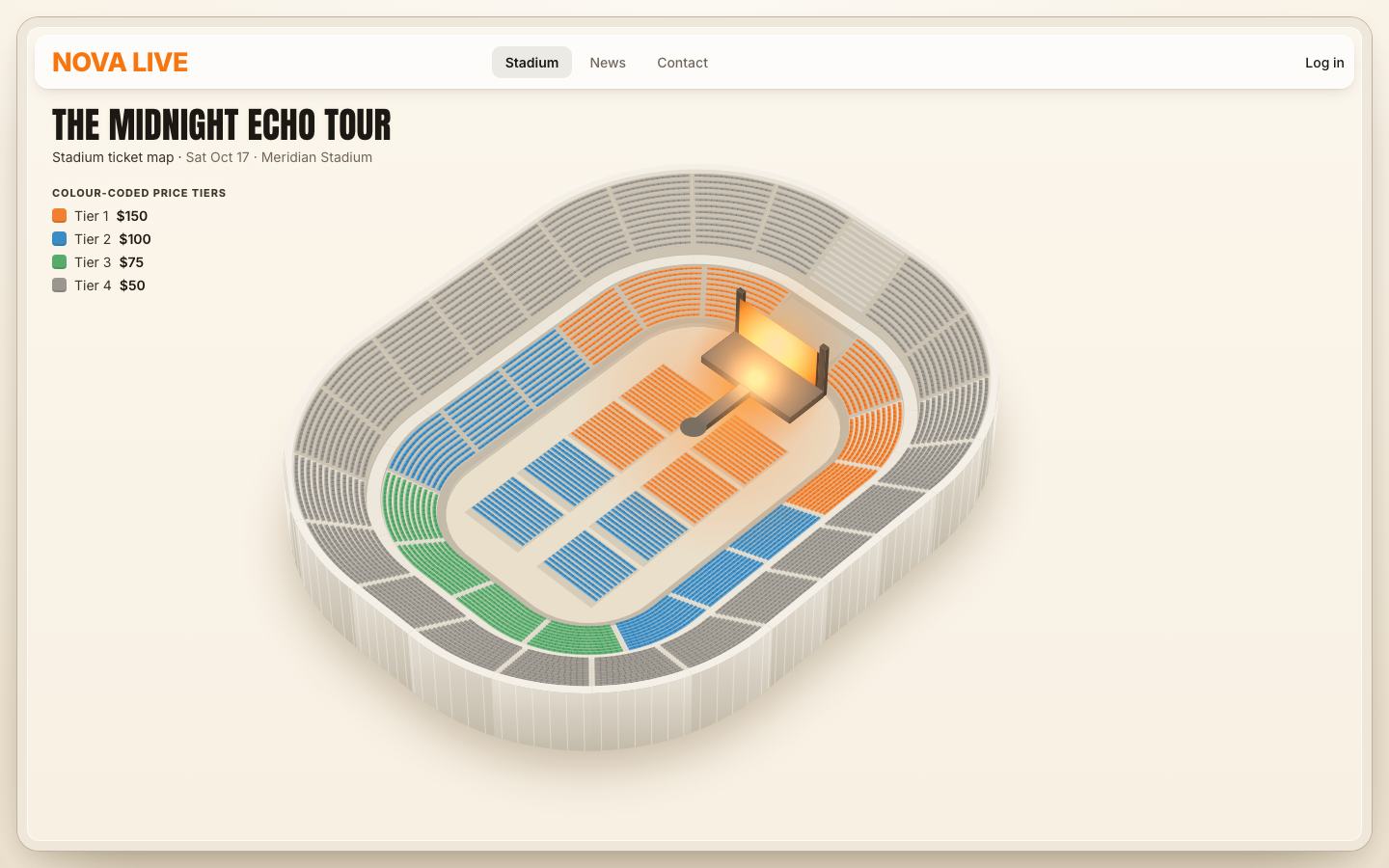
2 · Numbers, hit areas, the lift and the tooltip
Every section's number goes on a second canvas over the bowl, so the bowl never has to be painted again when the labels change (stage 6 dims them). The size follows the map's scale, between 10 and 16 px.
// every section's number
export function paintMarks(ctx, scene, fontFamily) {
  const { pal, view } = scene;
  ctx.clearRect(0, 0, view.w, view.h);
  const size = Math.max(10, Math.min(16, view.k * 1.5));
  ctx.textAlign = 'center'; ctx.textBaseline = 'middle';
  for (const u of [...scene.floor, ...scene.units]) {
    if (!u.s || u.s.closed) continue;
    const s = size * (u.s.ring === 'floor' ? 0.9 : 1);
    ctx.font = `800 ${s}px ${fontFamily}`;
    ctx.fillStyle = 'rgb(0 0 0 / .28)'; ctx.fillText(u.s.short, u.label[0], u.label[1] + 1);
    ctx.fillStyle = pal.label; ctx.fillText(u.s.short, u.label[0], u.label[1]);
  }
}
A canvas cannot be hovered or focused, so an SVG lies over the bowl with one invisible path per section, drawn from
its footprint. Each path is a role="button" with words for screen readers: "Section 112, Tier 2, $100 a
seat, 88 seats left".
// the hit areas: one path per section, with words for screen readers
function sectionWords(s) {
  const left = s.free();
  return `${s.label}, ${TIERS[s.tier].name}, $${s.price} a seat, ${left} ${left === 1 ? 'seat' : 'seats'} left`;
}
function buildHits(w, h) {
  hits.setAttribute('viewBox', `0 0 ${w} ${h}`);
  hits.innerHTML = [...scene.floor, ...scene.units].filter((u) => u.s && !u.s.closed)
    .map((u) => `<path d="${footPath(u.foot)}" data-id="${u.s.id}" role="button" aria-label="${sectionWords(u.s)}"></path>`).join('');
}
The section under the pointer lifts. It is painted again, alone, on a small canvas placed exactly over it, and CSS does the rest: a translate raises it, one drop-shadow in its tier colour makes it glow, a second one under it is its shadow. The canvas never blurs anything, which is the slow part of a canvas glow. And every section shares one canvas size (the biggest section's box plus 6 px), so hovering from one to the next never reallocates it.
let liftBox = null;
function sizeLifts() {
  // one size for every section (the biggest one), so hovering never reallocates a canvas
  let w = 0, h = 0;
  for (const u of scene.byId.values()) { const b = unitBox(u, 6); w = Math.max(w, b.w); h = Math.max(h, b.h); }
  liftBox = { w, h };
  const c = liftHover, dpr = dprOf();
  c.width = Math.round(w * dpr); c.height = Math.round(h * dpr); c.style.width = w + 'px'; c.style.height = h + 'px';
  c.getContext('2d').setTransform(dpr, 0, 0, dpr, 0, 0);
}// one section on its own, for the lifted copy (its glow and the shadow it leaves are CSS drop-shadows on the canvas)
export function paintLifted(ctx, unit, pal, dx, dy) {
ctx.fillStyle = pal.concrete; path(ctx, unit.foot, dx, dy); ctx.fill();
for (const p of unit.parts) if (p.fill !== 'facade') paintPart(ctx, p, pal, dx, dy);
}function liftSection(canvas, s, on) {
if (!on || !scene) { canvas.classList.remove('is-up'); return; }
const u = scene.byId.get(s.id), b = unitBox(u, 6), lift = Math.max(5, scene.view.k * 1.4);
const ox = b.x - (liftBox.w - b.w) / 2, oy = b.y - (liftBox.h - b.h) / 2;
canvas.style.left = ox + 'px'; canvas.style.top = oy + 'px';
canvas.style.setProperty('--lift', lift + 'px'); canvas.style.setProperty('--glow', pal.tiers[s.tier]);
const ctx = canvas.getContext('2d');
ctx.save(); ctx.setTransform(1, 0, 0, 1, 0, 0); ctx.clearRect(0, 0, canvas.width, canvas.height); ctx.restore();
paintLifted(ctx, u, pal, -ox, -oy);
// its number on top
ctx.font = `800 ${Math.max(10, Math.min(16, scene.view.k * 1.5))}px ${FONT}`; ctx.textAlign = 'center'; ctx.textBaseline = 'middle';
ctx.fillStyle = 'rgb(0 0 0 / .3)'; ctx.fillText(s.short, u.label[0] - ox, u.label[1] - oy + 1);
ctx.fillStyle = '#fff'; ctx.fillText(s.short, u.label[0] - ox, u.label[1] - oy);
if (!canvas.classList.contains('is-up')) canvas.classList.add('is-up');
else { canvas.classList.remove('is-up'); requestAnimationFrame(() => canvas.classList.add('is-up')); }
}.nl-lift { width: auto; height: auto; pointer-events: none; opacity: 0; translate: 0 0; transition: translate .28s var(--ease-pop), opacity .18s linear; }
.nl-lift.is-up { opacity: 1; translate: 0 calc(var(--lift, 10px) * -1); }
.nl-lift { filter: drop-shadow(0 0 9px var(--glow, #F2802E)) drop-shadow(0 var(--lift, 10px) 5px rgb(60 40 20 / .3)); }The tooltip is a white card above the section's label point: its tier, price and seats left. The hit areas use
pointer events through one listener each (event delegation). A touch has no hover: on a phone the tap's
pointerover and pointerout come together and no tooltip shows; there, from stage 4, a tap
simply opens the section.
// rig coordinates → the map's coordinates
function toMap(p) {
  return [rigBox.x + p[0], rigBox.y + p[1]];
}
function showTip(html, x, y) { tip.innerHTML = html; tip.style.left = x + 'px'; tip.style.top = y + 'px'; tip.classList.add('is-on'); }
function hideTip() { tip.classList.remove('is-on'); }

function hoverSection(s, pointer = 'mouse') {
  if (state.hover === s) return;
  state.hover = s;
  if (!s) { liftSection(liftHover, null, false); hideTip(); return; }
  liftSection(liftHover, s, true);
  if (pointer !== 'touch') {
    const u = scene.byId.get(s.id), [x, y] = toMap([u.label[0], u.label[1] - scene.view.k * 3.2]), left = s.free();
    showTip(`<b>${s.label}</b><i style="--c: var(--tier-${s.tier})"></i>${TIERS[s.tier].name} · <em>$${s.price}</em> · ${left} seats left`, x, y);
  }
}hits.addEventListener('pointerover', (e) => { const p = e.target.closest('path'); if (p) hoverSection(byId.get(p.dataset.id), e.pointerType); });
hits.addEventListener('pointerout', (e) => { const p = e.target.closest('path'); if (p && !p.contains(e.relatedTarget)) { if (state.hover?.id === p.dataset.id) hoverSection(null); } });.nl-tip { position: absolute; z-index: 9; left: 0; top: 0; padding: 9px 12px; border-radius: 12px; pointer-events: none; white-space: nowrap; font-size: 13px; color: var(--text-2);
background: var(--white); box-shadow: var(--shadow-2); opacity: 0; translate: -50% calc(-100% - 6px); transition: opacity .15s; }
.nl-tip.is-on { opacity: 1; }
.nl-tip b { display: block; font-size: 15px; font-weight: 800; color: var(--text); }
.nl-tip i { font-style: normal; display: inline-block; width: 9px; height: 9px; margin-right: 6px; border-radius: 3px; background: var(--c); }
.nl-tip em { font-style: normal; font-weight: 650; color: var(--text); }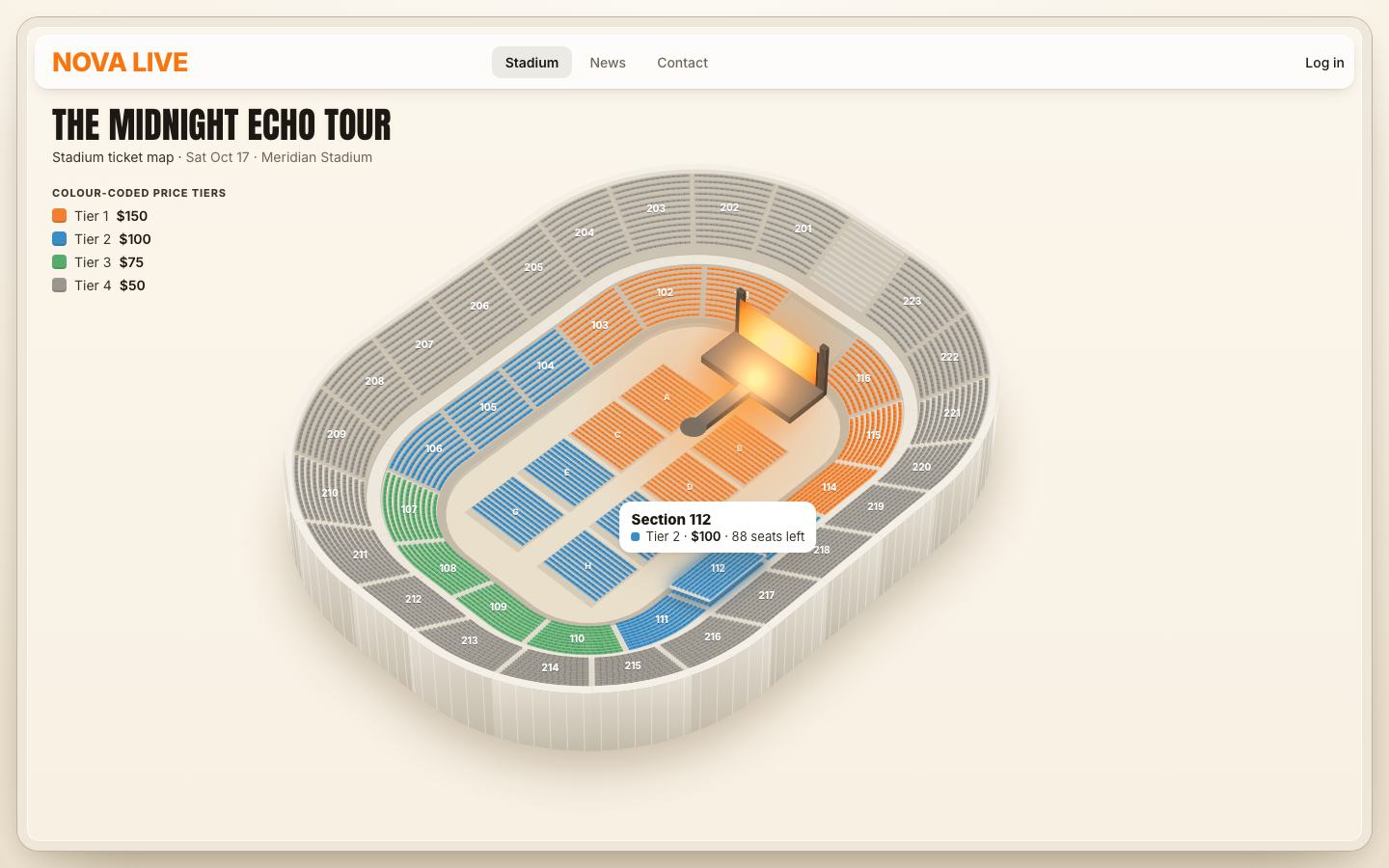
3 · The view from your seat
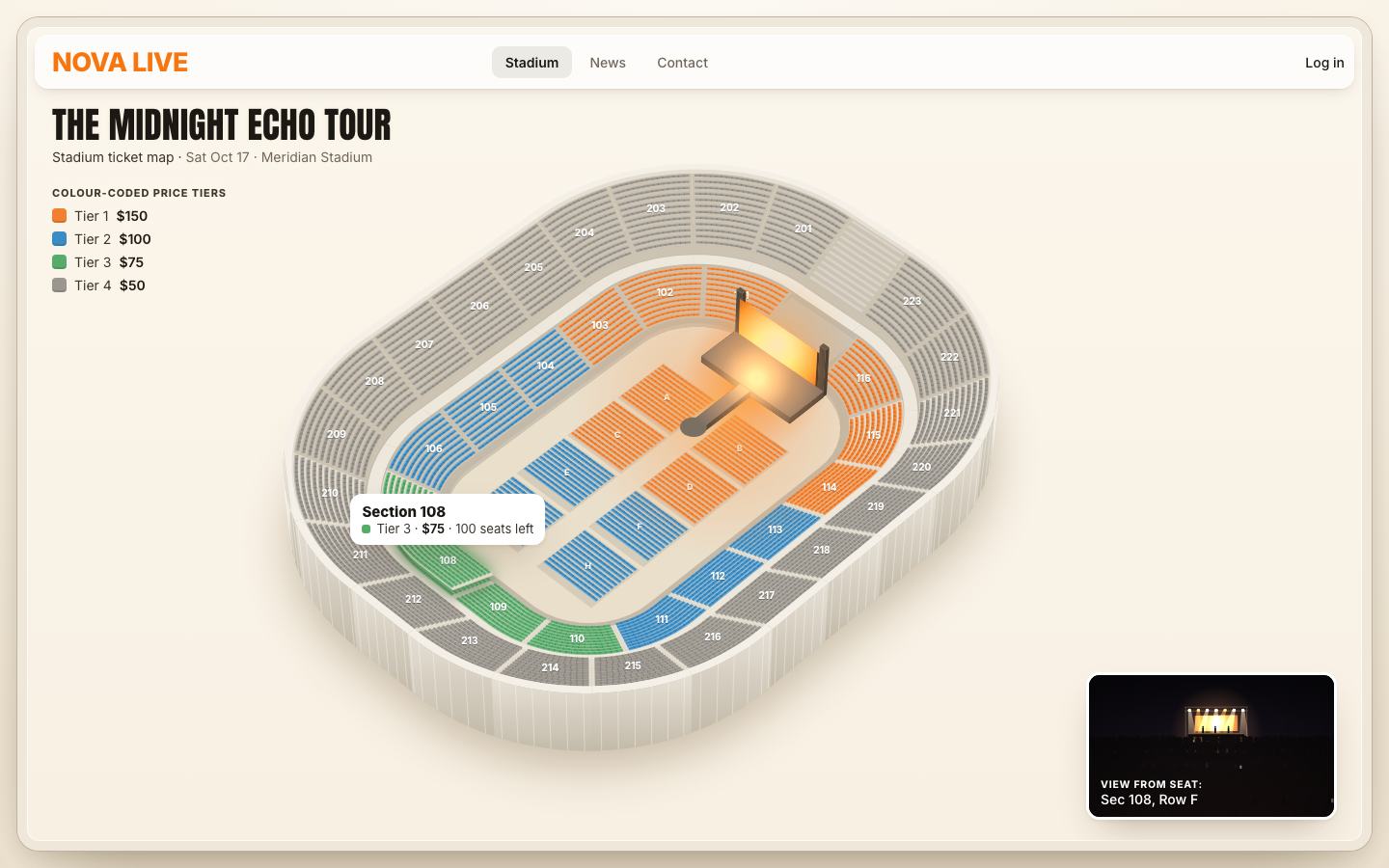
A card in the corner shows the stage as a seat sees it. It is drawn, not photographed. Three numbers describe a seat's view: the bearing (the angle between the way the seat faces and the way to the stage's screen), the distance to it, and the eye height. A floor seat faces the stage end; a ring seat faces into the bowl.
// a seat's geometry relative to the stage: bearing (−1 left … 1 right), distance, height
export function viewOf(seat) {
  const [x, y, z] = seatWorld(seat), s = seat.section, S = G.stage;
  const face = s.ring === 'floor' ? [1, 0] : [-s.n[0], -s.n[1]];               // a seat looks into the bowl
  const tx = S.screen.x - x, ty = 0 - y, dist = Math.hypot(tx, ty);
  const cross = face[0] * ty - face[1] * tx, dot = face[0] * tx + face[1] * ty;
  const bearing = Math.atan2(cross, dot);                                      // radians, + = stage to the left
  return { bearing, dist, z, ring: s.ring };
}
Those numbers place the stage in the picture: sideways by the bearing, smaller with distance, lower in the frame the higher you sit, and its face turned (skewed) for a seat off to the side.
// where the stage lands: sideways by the bearing, smaller with distance, lower in the frame the higher you sit
// (you face the stage to take the picture, so it stays near the middle; the angle shows in how its face turns)
const cx = w * (0.5 - Math.max(-0.2, Math.min(0.2, Math.sin(v.bearing) * 0.22)));
const scale = Math.max(0.28, Math.min(1.35, 26 / v.dist));
const horizon = h * (0.36 + Math.min(0.2, v.z / 70));
const sw = w * 0.62 * scale, sh = sw * 0.5, sy = horizon - sh * 0.75;
const skew = Math.sin(v.bearing) * 0.35;                                    // the stage's face turns away from a side seat
Then a dark room, the truss, seven light beams added with 'lighter', the glowing screen, three players
on the deck, and the crowd: big heads in four rows from the floor, a sea of small ones in nine rows from the upper
ring, with a few phone screens held up. A seed made from the seat varies the crowd.
// the crowd: rows of heads, big and few when you are on the floor, a sea of small ones from up high
const rows = v.ring === 'floor' ? 4 : v.ring === 'lower' ? 6 : 9;
for (let r = 0; r < rows; r++) {
  const t = r / (rows - 1), y = deckY + sh * 0.25 + (h - deckY - sh * 0.25) * Math.pow(t, 1.3);
  const size = (v.ring === 'floor' ? 9 : v.ring === 'lower' ? 6 : 3.6) * (0.55 + t * 0.9), gap = size * 1.9;
  ctx.fillStyle = `rgb(${12 + r * 2} ${9 + r} ${10 + r} / .96)`;
  ctx.beginPath();
  for (let x = -gap + (r % 2) * gap * 0.5 + R() * 3; x < w + gap; x += gap * (0.8 + R() * 0.4)) {
    const yy = y + (R() - 0.5) * size * 0.6;
    ctx.moveTo(x + size, yy); ctx.ellipse(x, yy, size, size * 1.1, 0, 0, 7);
    ctx.rect(x - size * 1.3, yy + size * 0.8, size * 2.6, size * 2.2);
  }
  ctx.fill();
  // a few phone screens held up
  ctx.fillStyle = 'rgb(255 236 200 / .5)';
  if (r % 2) { const x = R() * w; ctx.fillRect(x, y - size * 2.2, Math.max(1, size * 0.3), Math.max(1.5, size * 0.5)); }
}
The picture is soft by nature, so it is painted at no more than 1.5 × the screen's pixels, and the canvas is resized
only when its size changes. (A worker with an OffscreenCanvas was tried and dropped: handing frames back
stalled the page for 100–200 ms at a time with the CPU slowed 4 ×.)
// a painter for one canvas. It paints on the main thread at no more than 1.5× pixels: the picture is soft by nature,
// and a canvas that small rasterises in a few milliseconds even on a slow phone (a worker was tried — handing frames
// back from an OffscreenCanvas stalled the page for 100–200 ms at a time under a 4× CPU throttle)
export function createViewPainter(canvas) {
  return (seat) => {
    const w = canvas.clientWidth, h = canvas.clientHeight, dpr = Math.min(1.5, window.devicePixelRatio || 1);
    if (!w || !h) return;
    if (canvas.width !== Math.round(w * dpr) || canvas.height !== Math.round(h * dpr)) { canvas.width = Math.round(w * dpr); canvas.height = Math.round(h * dpr); }
    const ctx = canvas.getContext('2d'); ctx.setTransform(dpr, 0, 0, dpr, 0, 0);
    paintScene(ctx, w, h, viewOf(seat), seedOf(seat));
  };
}
A real photo can replace the drawing: assets/incoming/views.json lists photos by section id or by ring
(floor, lower, upper). It ships empty, so every view is drawn.
let photos = null;
export async function loadPhotos() {
  try { const r = await fetch('assets/incoming/views.json', { cache: 'no-store' }); photos = r.ok ? (await r.json()).photos || {} : {}; } catch { photos = {}; }
  return photos;
}
export function photoFor(section) { return photos && (photos[section.id] || photos[section.ring]) ? 'assets/incoming/' + (photos[section.id] || photos[section.ring]) : null; }
A section's view is the one from the middle seat of its middle row. Hovering paints it after 110 ms, so sweeping the pointer across the bowl does not repaint the card for every section it crosses; the caption and the canvas's spoken label change with it.
// a section's "typical" seat, for its view: the middle of its middle row
function repSeat(s) { const row = s.rows[Math.floor(s.rows.length / 2)]; return row.seats[Math.floor(row.n / 2)]; }

let viewTimer = 0, viewSeat = null;
const paintViewFor = createViewPainter(viewCanvas);
function queueView(seat, now = false) {
  clearTimeout(viewTimer);
  const run = () => {
    if (!seat || seat === viewSeat) return;
    viewSeat = seat;
    const s = seat.section, photo = photoFor(s);
    bind('view').textContent = `${s.ring === 'floor' ? s.label : 'Sec ' + s.id}, Row ${seat.row.label}`;
    viewCanvas.setAttribute('aria-label', `Drawing of the view from ${seatLabel(seat).replace(/, \$\d+$/, '')}`);
    if (photo) { viewPhoto.src = photo; viewPhoto.hidden = false; viewPhoto.alt = 'Photo of the view from ' + s.label; }
    else { viewPhoto.hidden = true; paintViewFor(seat); }
    viewFig.classList.remove('is-swap'); requestAnimationFrame(() => viewFig.classList.add('is-swap'));
  };
  if (now) run(); else viewTimer = setTimeout(run, 110);
}
4 · Opening a section: the fly-in and the seat card
A click on a section opens it. The camera never moves in JavaScript: flying in is a CSS transform of the finished canvases. The whole rig (bowl, labels, lifts, stage and hit areas) is translated and scaled, and the compositor moves pixels it already has. Opening is done in phases, a frame each: the fly and the card's frame now, the lifted section next frame, then the rows two per frame. No single frame of the fly-in carries the whole job.
function openSection(s) {
  if (!s || s.closed) return;
  const switching = state.open && state.open !== s;
  state.open = s; state.mode = 'section'; root.dataset.mode = 'section';
  // in phases, a frame each: the fly and the card's frame now, the lifted section next, then the rows two by two,
  // the view last — so no single frame of the fly-in carries the whole job
  hideTip(); liftSection(liftHover, null, false); state.hover = null;
  card.classList.add('is-open');
  flyTo(s);
  if (switching) card.classList.remove('is-in');
  buildSeats(s, true);
  requestAnimationFrame(() => {
    if (state.open !== s) return;
    card.classList.add('is-in');
    liftSection(liftOpen, s, true);
    requestAnimationFrame(() => { if (state.open === s) buildSeats.rows?.(); });
  });
  queueView(repSeat(s));
  say(`${sectionWords(s)}. ${s.rows.length} rows.`);
}
On a phone, and on small screens where the card covers the map, the map zooms 1.5 × and centres the section. On a desk it zooms only 1.1 ×, then slides left just enough to keep the section and the stage clear of the card, and keeps the section between 28 % and 72 % of the map's height.
function flyTo(s) {
  if (!s) { fly = { x: 0, y: 0, k: 1 }; rig.style.transform = ''; return; }
  const u = scene.byId.get(s.id), { w, h } = rigBox;
  const covered = mq.sheet.matches || mq.cover.matches, [px, py] = u.label;
  if (covered) { const k = 1.5; fly = { x: w / 2 - px * k, y: h * 0.5 - py * k, k }; }
  else {
    // zoom in around the section itself, then slide the bowl left only as far as it takes to keep the section and
    // the stage clear of the card, and the section away from the top and bottom edges
    const k = 1.1, right = w - cardSize.w - 22 - 40;
    let x = px - px * k, y = py - py * k;
    const far = Math.max(px, stagePt[0]) * k + x;
    if (far > right) x -= far - right;
    const sy = py * k + y;
    y += Math.max(h * 0.28, Math.min(h * 0.72, sy)) - sy;
    fly = { x, y, k };
  }
  rig.style.transform = `translate(${fly.x}px, ${fly.y}px) scale(${fly.k})`;
}
The transition is 0.8 s on an ease that starts slow and lands softly; the transform's origin is the rig's top-left corner, which is what the numbers above assume. A veil softens the bowl while a section is open. The open section has a second lift canvas, drawn at 1.6 × the pixel ratio because it is seen up close.
.nl-rig { position: absolute; inset: var(--rig-inset, 0); transform-origin: 0 0; transition: transform .8s var(--ease-fly); will-change: transform; }
.nl-rig canvas, .nl-hits, .nl-veil { position: absolute; left: 0; top: 0; width: 100%; height: 100%; }
.nl-base, .nl-marks { opacity: 0; transition: opacity .7s var(--ease-out), translate .9s var(--ease-out); translate: 0 14px; }
.nl.is-ready .nl-base, .nl.is-ready .nl-marks { opacity: 1; translate: 0 0; }
.nl-veil { background: rgb(248 241 229 / .28); opacity: 0; transition: opacity .5s var(--ease-out); pointer-events: none; }
.nl[data-mode="section"] .nl-veil { opacity: 1; }
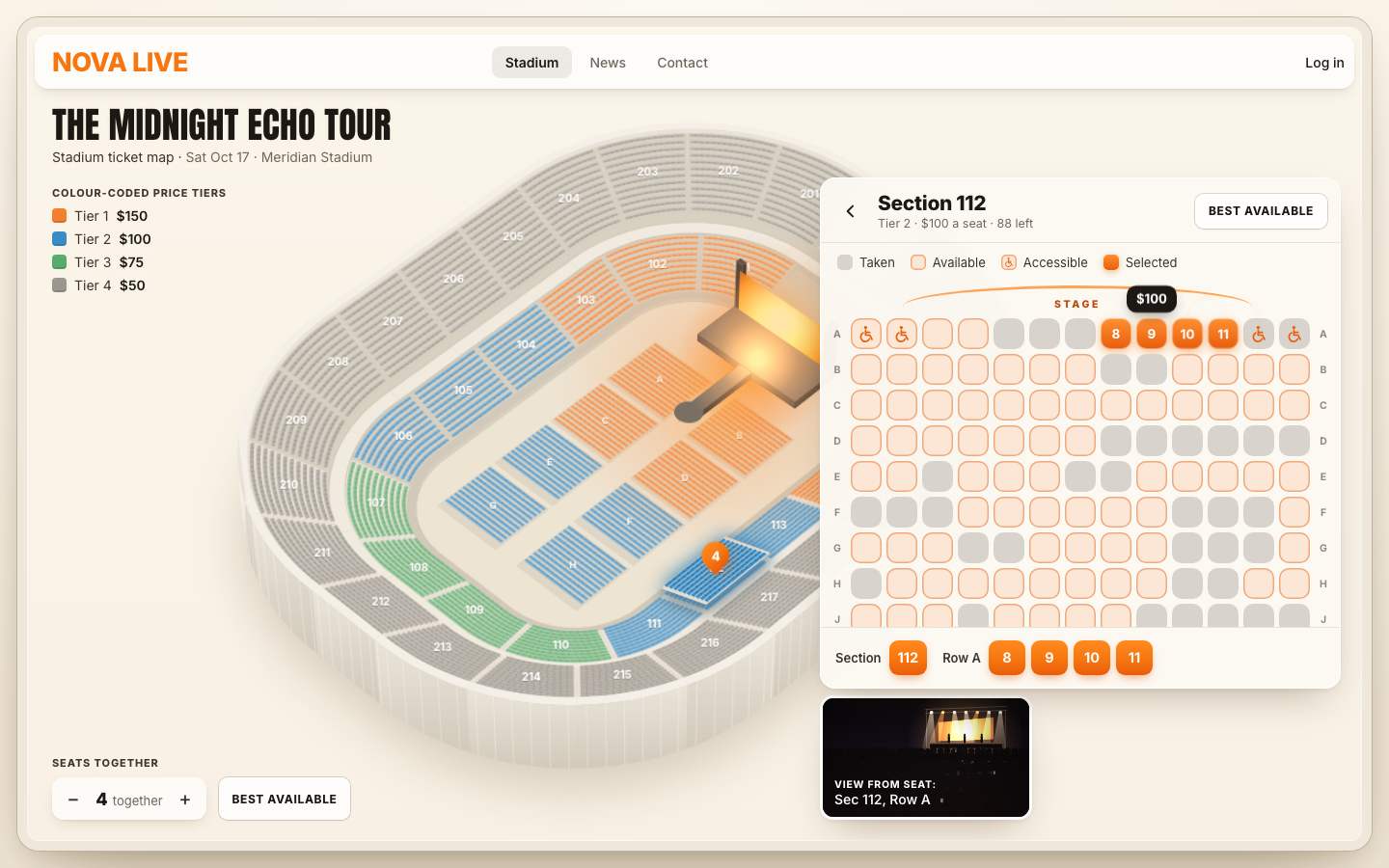
The card lists every seat as a chip, row A nearest the stage. Each chip is a real <button> with a
spoken label ("Section 112, row A, seat 1, $100, accessible, available"); taken seats are
aria-disabled; accessible ones carry an icon. The grid reserves its full height first, so the card does not
grow as the rows arrive. On a phone, rows wider than the card start scrolled to their middle.
function buildSeats(s, later = false) {
  $('#nl-card-h').textContent = s.label;
  bind('card-sub').textContent = `${TIERS[s.tier].name} · $${s.price} a seat · ${s.free()} left`;
  grid.setAttribute('role', 'group'); grid.setAttribute('aria-label', `Seats in ${s.label}, row A nearest the stage`);
  // the rows go in two per frame while the card fades in, so opening a section never stalls the fly-in
  const rowHtml = (row) => `<div class="nl-row" role="group" aria-label="Row ${row.label}"><span class="nl-rl" aria-hidden="true">${row.label}</span>` +
    row.seats.map((x) => {
      return `<button type="button" class="seat${x.access ? ' acc' : ''}" data-id="${x.id}" data-s="${x.state}"` +
        `${x.state === 'taken' ? ' aria-disabled="true"' : ''} aria-label="${seatLabel(x)}, ${stateWord(x)}">${x.access ? ACC : ''}</button>`;
    }).join('') + `<span class="nl-rl" aria-hidden="true">${row.label}</span></div>`;
  grid.innerHTML = '';
  sizeSeats();
  const chip = parseFloat(grid.style.getPropertyValue('--chip')), gap = parseFloat(grid.style.getPropertyValue('--gap'));
  grid.style.minHeight = s.rows.length * (chip + gap) + 'px';
  const token = (buildSeats.token = (buildSeats.token || 0) + 1);
  let i = 0;
  buildSeats.rows = null;
  const step = () => {
    if (token !== buildSeats.token) return;
    grid.insertAdjacentHTML('beforeend', s.rows.slice(i, i + 2).map(rowHtml).join(''));
    i += 2;
    if (i < s.rows.length) requestAnimationFrame(step);
    else { grid.style.minHeight = ''; centreRows(); }
  };
  if (later) buildSeats.rows = step; else step();
}
The card is always laid out, hidden by visibility, so its size is read once per resize and never while
opening. The chips' size is one variable, --chip: as big as the widest row allows, between 18 and 34 px
(26 at least on a touch screen).
// the card is always laid out (hidden by visibility), so its size is read once per resize, never while opening
const cardSize = { w: 0, inner: 0 };
function measureCard() { cardSize.w = card.offsetWidth; cardSize.inner = grid.parentElement.clientWidth; }
function sizeSeats() {
  if (!state.open) return;
  const maxN = Math.max(...state.open.rows.map((r) => r.n));
  const avail = cardSize.inner - 24 - 2 * 22;
  let gap = 4, chip = Math.floor((avail - gap * (maxN - 1)) / maxN);
  const touch = matchMedia('(pointer: coarse)').matches;
  chip = Math.max(touch ? 26 : 18, Math.min(34, chip));
  if (chip >= 26) gap = 5;
  grid.style.setProperty('--chip', chip + 'px'); grid.style.setProperty('--gap', gap + 'px');
}.nl-card { contain: layout style; position: absolute; z-index: 6; right: 22px; top: 92px; max-height: calc(100% - 114px); width: var(--card-w); display: flex; flex-direction: column;
border-radius: var(--radius-card); background: rgb(252 249 243 / .96); box-shadow: 0 0 0 1px rgb(255 255 255 / .9) inset, var(--shadow-2);
opacity: 0; translate: 24px 0; scale: .98; visibility: hidden; transition: opacity .35s var(--ease-out), translate .5s var(--ease-out), scale .5s var(--ease-out); }
.nl-card.is-open { visibility: visible; }
.nl-card.is-in { opacity: 1; translate: 0 0; scale: 1; }Each chip is its own containment box (contain: size layout style), so changing one never lays out its
neighbours.
.seat { contain: size layout style; position: relative; width: var(--chip, 22px); height: var(--chip, 22px); flex: none; border-radius: 32%; background: var(--seat-free);
  box-shadow: inset 0 0 0 1.5px var(--seat-free-edge); color: var(--accent-strong); display: grid; place-items: center; font-size: calc(var(--chip) * .42); font-weight: 750;
  transition: background .15s, box-shadow .15s, translate .15s var(--ease-out); }
.seat:hover:not([data-s="taken"]) { background: var(--seat-hover); translate: 0 -1px; }
.seat[data-s="taken"] { background: var(--seat-taken); box-shadow: none; cursor: not-allowed; }
‹, Escape, a click on the map or on the logo go back: the map flies home, the card slides out and is hidden 380 ms later. Where the card covered the view card (a phone), the view is painted on the way back instead of while nobody can see it. The page's spoken line is a polite live region; it is emptied first and filled a frame later, so the same words are read again.
function back() {
  if (state.mode !== 'section') return;
  state.mode = 'stadium'; state.open = null; root.dataset.mode = 'stadium';
  liftSection(liftOpen, null, false);
  card.classList.remove('is-in');
  flyTo(null);
  if (viewPending) { const v = viewPending; viewPending = null; queueView(v); }
  setTimeout(() => { if (state.mode === 'stadium') card.classList.remove('is-open'); }, calm() ? 0 : 380);
}// Escape steps back
document.addEventListener('keydown', (e) => {
if (e.key !== 'Escape') return;
if (state.mode === 'section') { e.preventDefault(); back(); return; }
});
// the spoken line
function say(text) { const s = bind('say'); s.textContent = ''; requestAnimationFrame(() => { s.textContent = text; }); }Hovering a seat shows its own tooltip and its view.
grid.addEventListener('pointerover', (e) => {
  const b = e.target.closest('.seat'); if (!b || e.pointerType === 'touch') return;
  const x = seatById.get(b.dataset.id), r = b.getBoundingClientRect(), m = map.getBoundingClientRect();
  showTip(`${x.section.ring === 'floor' ? x.section.label.toUpperCase() : 'SEC ' + x.section.id} · ROW ${x.row.label} · SEAT ${x.num} · <em>$${x.section.price}</em>${x.state === 'taken' ? ' · taken' : x.access ? ' · accessible' : ''}`,
    r.left - m.left + r.width / 2, r.top - m.top - 4);
  if (x.state !== 'taken') queueView(x);
});
grid.addEventListener('pointerout', (e) => { if (!grid.contains(e.relatedTarget)) hideTip(); });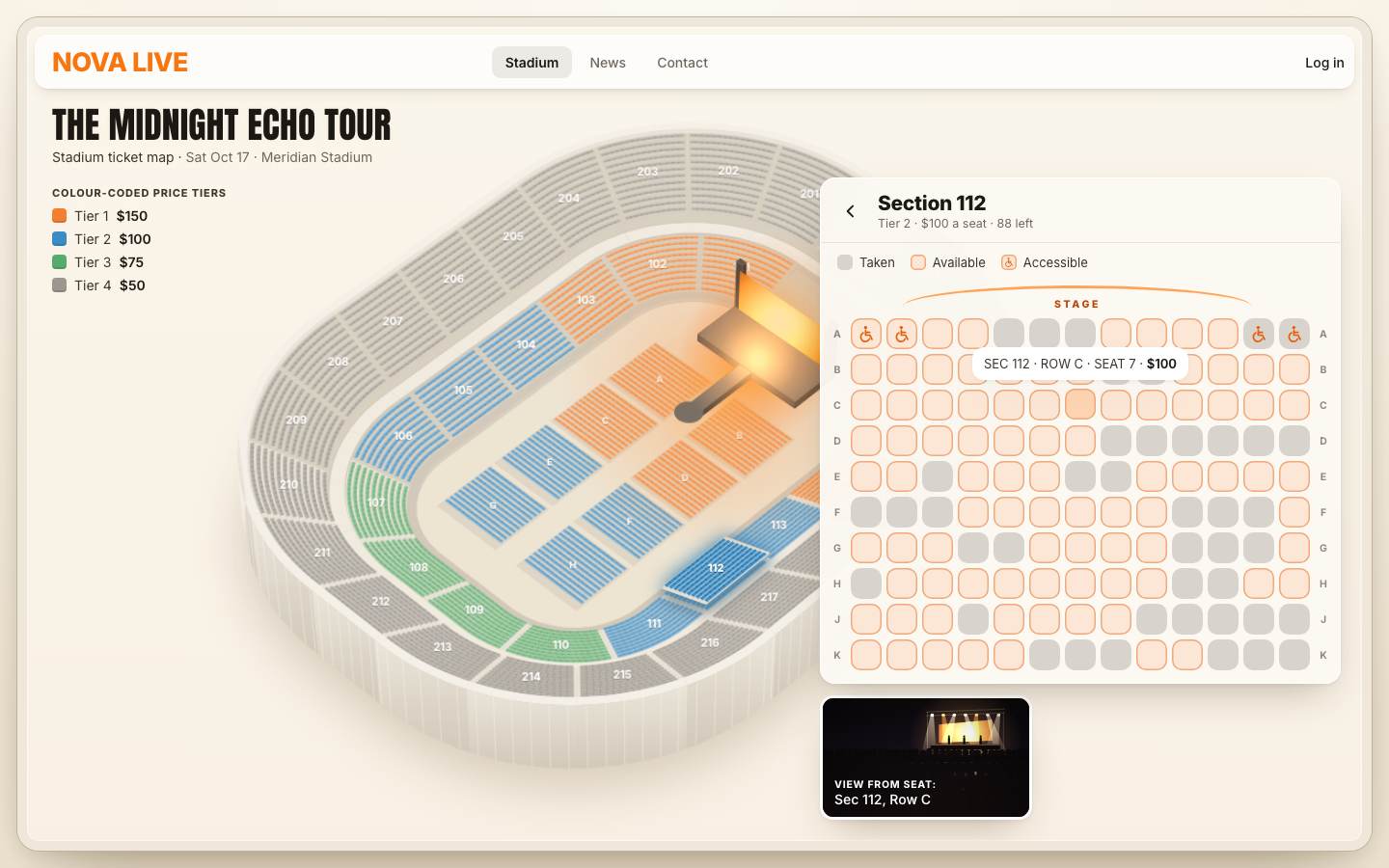
5 · Choosing seats: one by one, seats together, best available
A click on a free seat picks it, up to 8. With Seats together at 2 or more, one click picks a whole block in that row: the free run of that many seats that contains the clicked one, as centred on it as it can be. Clicking one of them again clears the selection; a new block replaces the old one.
function pickSeat(seat) {
  if (seat.state === 'taken') return nope(seat, `Seat ${seat.row.label}${seat.num} is taken.`);
  const n = state.group;
  if (n > 1) {
    if (state.cart.includes(seat)) { setCart([]); say('Group cleared.'); return; }
    const block = blockAround(seat.row, seat.j, n);
    if (!block) return nope(seat, `No ${n} seats together around ${seat.row.label}${seat.num} — try another row, or fewer seats together.`);
    setCart(block);
    block.forEach((x, i) => setTimeout(() => pop(x, x === seat), i * 45));
    say(`Picked ${n} seats together: ${describe(block)}.`);
    return;
  }
  if (state.cart.includes(seat)) { setCart(state.cart.filter((x) => x !== seat)); say(`Seat ${seat.row.label}${seat.num} removed.`); return; }
  if (state.cart.length >= MAX_SEATS) return nope(seat, `You can hold up to ${MAX_SEATS} seats in one order.`);
  setCart([...state.cart, seat]);
  pop(seat, true);
  say(`${seatLabel(seat)} selected. ${state.cart.length} ${state.cart.length === 1 ? 'seat' : 'seats'}.`);
}// the block of n free seats in this row that contains seat j, as centred on it as it can be
function blockAround(row, j, n) {
let best = null;
for (let start = Math.max(0, j - n + 1); start <= Math.min(j, row.n - n); start++) {
const seats = row.seats.slice(start, start + n);
if (seats.some((x) => x.state !== 'free')) continue;
const off = Math.abs(start + (n - 1) / 2 - j);
if (!best || off < best.off) best = { seats, off };
}
return best?.seats || null;
}A pick pops: the chip turns orange, scales 0.8 → 1.2 → 1, a ring ripples out, and a dark price chip rises from the clicked seat. Removing the class and adding it again a frame later restarts the animation. A seat that cannot be picked shakes, and a toast says why.
function pop(seat, withPrice) {
  const b = grid.querySelector(`[data-id="${seat.id}"]`); if (!b) return;
  b.classList.remove('is-pop');
  requestAnimationFrame(() => {
    b.classList.add('is-pop');
    if (!withPrice) return;
    const wrap = grid.parentElement;
    const chip = document.createElement('span'); chip.className = 'nl-price-chip'; chip.textContent = '$' + seat.section.price; chip.setAttribute('aria-hidden', 'true');
    chip.style.left = b.offsetLeft + grid.offsetLeft + b.offsetWidth / 2 + 'px'; chip.style.top = b.parentElement.offsetTop + grid.offsetTop - 6 + 'px';
    wrap.append(chip); chip.addEventListener('animationend', () => chip.remove(), { once: true });
  });
}
function nope(seat, why) {
  const b = grid.querySelector(`[data-id="${seat.id}"]`);
  if (b) { b.classList.remove('is-nope'); requestAnimationFrame(() => b.classList.add('is-nope')); }
  if (why) toast(why);
}.seat[aria-pressed="true"] { background: var(--seat-sel); box-shadow: 0 0 0 1px rgb(255 255 255 / .4) inset, 0 3px 10px var(--seat-glow); color: var(--white); z-index: 1; }
.seat.is-pop { animation: nl-seat-pop .42s var(--ease-pop); }
.seat.is-pop::after { content: ''; position: absolute; inset: -2px; border-radius: 34%; border: 2px solid var(--orange-500); animation: nl-ripple .6s var(--ease-out) forwards; pointer-events: none; }
@keyframes nl-seat-pop { 0% { scale: .8; } 55% { scale: 1.2; } 100% { scale: 1; } }
@keyframes nl-ripple { from { opacity: .9; scale: 1; } to { opacity: 0; scale: 2.3; } }
.seat.is-nope { animation: nl-nope .32s linear; }
@keyframes nl-nope { 25% { translate: -3px 0; } 75% { translate: 3px 0; } }Best available scores every block of n free seats: its distance from the front of the stage, plus 0.4 × its height, plus 0.55 for every seat it sits off the middle of its row. Lowest wins. Accessible places are left out (they stay for the people who need them; you can still pick them by hand). The map's button searches the whole stadium, the card's button only its section, and the map flies to the winner.
// the best n seats side by side: nearest the stage, in the middle of the row, not the
// accessible places (those stay for the people who need them — you can still pick them by hand)
function bestBlock(n, only = null) {
  let best = null;
  for (const s of only ? [only] : sections) {
    if (s.closed) continue;
    for (const row of s.rows) {
      for (let start = 0; start + n <= row.n; start++) {
        const seats = row.seats.slice(start, start + n);
        if (seats.some((x) => x.state !== 'free' || x.access)) continue;
        const mid = seats[Math.floor(n / 2)], [x, y, z] = seatWorld(mid);
        const score = Math.hypot(x - STAGE_PT[0], y - STAGE_PT[1]) + z * 0.4 + Math.abs(start + (n - 1) / 2 - (row.n - 1) / 2) * 0.55;
        if (!best || score < best.score) best = { seats, score };
      }
    }
  }
  return best?.seats || null;
}function bestAvailable(here = false) {
const n = state.group, s = here ? state.open : null;
const block = bestBlock(n, s);
if (!block) return toast(here ? `No ${n} seats together left in ${s.label}.` : `No ${n} seats together left in the stadium.`);
setCart(block);
const sec = block[0].section;
if (state.open !== sec) openSection(sec, { seat: block[0] }); else queueView(block[0], true);
block.forEach((x, i) => setTimeout(() => pop(x, i === 0), 120 + i * 60));
say(`Best available: ${describe(block)}.`);
toast(`Best ${n === 1 ? 'seat' : n + ' together'}: ${describe(block)}`);
}The seats you clicked change at once; the pins on the map follow a frame later, so a pick never does all the work
in one frame. syncSeats() touches only chips whose state changed: each chip carries its last state in
data-k.
function setCart(seats) {
  state.cart = seats;
  // the seats you clicked change now; the pins follow a frame later (stage 7 adds the cart and the money there)
  syncSeats();
  if (!setCart.queued) { setCart.queued = true; requestAnimationFrame(() => requestAnimationFrame(() => { setCart.queued = false; placePins(); })); }
  if (seats.length) queueView(seats[0]);
}function syncSeats() {
if (!state.open) return;
for (const b of grid.querySelectorAll('.seat')) {
const x = seatById.get(b.dataset.id), sel = state.cart.includes(x), key = (sel ? 'S' : '') + x.state;
if (b.dataset.k === key) continue; // only the seats that changed are touched
b.dataset.k = key;
if (b.getAttribute('aria-pressed') !== String(sel)) { b.setAttribute('aria-pressed', String(sel)); b.innerHTML = x.access ? ACC : sel ? x.num : ''; }
if (b.dataset.s !== x.state) b.dataset.s = x.state;
b.setAttribute('aria-label', `${seatLabel(x)}, ${stateWord(x)}`);
if (x.state === 'taken') b.setAttribute('aria-disabled', 'true'); else b.removeAttribute('aria-disabled');
}
bind('card-sub').textContent = `${TIERS[state.open.tier].name} · $${state.open.price} a seat · ${state.open.free()} left`;
footer();
}Seats are said and shown as runs where they can be: "Sec 112, Row A, Seats 8–11".
function describe(seats) {
  // "Sec 112, Row K, Seats 15–18" for a run; seats listed one by one otherwise
  const groups = new Map();
  for (const x of [...seats].sort((a, b) => a.section.id.localeCompare(b.section.id) || a.row.r - b.row.r || a.j - b.j)) {
    const k = x.section.id + '|' + x.row.label; if (!groups.has(k)) groups.set(k, []); groups.get(k).push(x);
  }
  return [...groups.values()].map((g) => {
    const s = g[0].section, nums = g.map((x) => x.num), run = nums.every((v, i) => !i || v === nums[i - 1] + 1);
    const where = s.ring === 'floor' ? s.label : 'Sec ' + s.id;
    return `${where}, Row ${g[0].row.label}, ${g.length === 1 ? 'Seat ' + nums[0] : run ? `Seats ${nums[0]}–${nums.at(-1)}` : 'Seats ' + nums.join(', ')}`;
  }).join(' · ');
}
A pin marks each section where you have seats, with how many.
// the pins that mark sections where you have seats
function placePins() {
  const box = $('.nl-pins'); if (!scene) return;
  const per = new Map(); for (const x of state.cart) per.set(x.section, (per.get(x.section) || 0) + 1);
  box.innerHTML = [...per].map(([s, n]) => { const u = scene.byId.get(s.id); return `<span class="nl-pin" style="left:${u.label[0]}px;top:${u.label[1] - scene.view.k * 1.2}px"><span>${n}</span></span>`; }).join('');
}
6 · The price range
Two thumbs on one track set the lowest and highest price, from $50 to $150 in $25 steps. The track's limits live
in the markup, and each thumb is a role="slider" with its value spoken as a price.
<div class="nl-filter">
  <p class="nl-k" id="nl-price-k">Price range</p>
  <div class="nl-range" data-min="50" data-max="150" data-step="25">
    <div class="nl-range-track"><i class="nl-range-fill"></i></div>
    <span class="nl-thumb" role="slider" tabindex="0" aria-labelledby="nl-price-k" aria-label="Lowest price" data-k="lo"></span>
    <span class="nl-thumb" role="slider" tabindex="0" aria-labelledby="nl-price-k" aria-label="Highest price" data-k="hi"></span>
  </div>
<p class="nl-range-v"><span class="nl-range-end">$50</span><b data-bind="range">$50 – $150</b><span class="nl-range-end">$150</span></p>function setRange(lo, hi, from = null) {
lo = Math.max(R.min, Math.min(hi, lo)); hi = Math.min(R.max, Math.max(lo, hi));
if (lo === state.lo && hi === state.hi) return;
state.lo = lo; state.hi = hi;
renderRange();
queueMarks(); refreshHitWords(); noteRange();
if (state.open) grid.dataset.dim = String(!inRange(state.open));
if (from !== 'drag') say(`Price range $${lo} to $${hi}.`);
}
function renderRange() {
const pct = (v) => ((v - R.min) / (R.max - R.min)) * 100;
range.style.setProperty('--a', pct(state.lo) + '%'); range.style.setProperty('--b', pct(state.hi) + '%');
thumbs[0].style.setProperty('--p', pct(state.lo) + '%'); thumbs[1].style.setProperty('--p', pct(state.hi) + '%');
for (const [t, v] of [[thumbs[0], state.lo], [thumbs[1], state.hi]]) { t.setAttribute('aria-valuemin', R.min); t.setAttribute('aria-valuemax', R.max); t.setAttribute('aria-valuenow', v); t.setAttribute('aria-valuetext', '$' + v); }
bind('range').textContent = `$${state.lo} – $${state.hi}`;
}A press anywhere on the track takes the nearer thumb, and the pointer is captured so the drag keeps working off the track. The track's box is read once per drag. The range is spoken when the drag ends, not on every step. The arrow keys move a thumb $25; Home and End jump to the ends.
let rangeDrag = null, rangeRect = null;
const valueAt = (x) => { const r = rangeRect || range.getBoundingClientRect(); return Math.round((R.min + Math.max(0, Math.min(1, (x - r.left) / r.width)) * (R.max - R.min)) / R.step) * R.step; };
range.addEventListener('pointerdown', (e) => {
  e.preventDefault();
  rangeRect = range.getBoundingClientRect();   // once per drag
  const v = valueAt(e.clientX), which = e.target.closest('.nl-thumb')?.dataset.k || (Math.abs(v - state.lo) <= Math.abs(v - state.hi) && v <= state.lo + (state.hi - state.lo) / 2 ? 'lo' : 'hi');
  rangeDrag = which; range.setPointerCapture(e.pointerId);
  thumbs[which === 'lo' ? 0 : 1].classList.add('is-drag'); thumbs[which === 'lo' ? 0 : 1].focus({ preventScroll: true });
  if (which === 'lo') setRange(v, state.hi, 'drag'); else setRange(state.lo, v, 'drag');
});
range.addEventListener('pointermove', (e) => { if (!rangeDrag) return; const v = valueAt(e.clientX); if (rangeDrag === 'lo') setRange(Math.min(v, state.hi), state.hi, 'drag'); else setRange(state.lo, Math.max(v, state.lo), 'drag'); });
const endRange = () => { if (!rangeDrag) return; rangeDrag = null; rangeRect = null; thumbs.forEach((t) => t.classList.remove('is-drag')); say(`Price range $${state.lo} to $${state.hi}.`); };
range.addEventListener('pointerup', endRange); range.addEventListener('pointercancel', endRange);thumbs.forEach((t) => t.addEventListener('keydown', (e) => {
const d = { ArrowLeft: -1, ArrowDown: -1, ArrowRight: 1, ArrowUp: 1 }[e.key], end = { Home: -99, End: 99 }[e.key];
if (!d && !end) return; e.preventDefault();
const delta = (d || end) * R.step;
if (t.dataset.k === 'lo') setRange(state.lo + delta, state.hi); else setRange(state.lo, state.hi + delta);
}));.nl-range { position: relative; height: 26px; touch-action: none; cursor: pointer; }
.nl-range-track { position: absolute; left: 0; right: 0; top: 11px; height: 5px; border-radius: 99px; background: rgb(60 45 25 / .14); }
.nl-range-fill { position: absolute; top: 0; bottom: 0; left: var(--a, 0%); right: calc(100% - var(--b, 100%)); border-radius: inherit; background: linear-gradient(90deg, var(--orange-400), var(--orange-600)); }
.nl-thumb { position: absolute; top: 2px; left: var(--p); width: 22px; height: 22px; margin-left: -11px; border-radius: 50%; background: var(--white);
box-shadow: 0 0 0 1px rgb(60 45 25 / .15), 0 3px 8px rgb(60 40 15 / .25); transition: scale .15s var(--ease-out); touch-action: none; }
.nl-thumb:hover, .nl-thumb.is-drag { scale: 1.12; }
.nl-thumb::after { content: ''; position: absolute; inset: -11px; border-radius: 50%; } /* a bigger place to grab */Outside the range, a section is dimmed on the marks canvas (its footprint filled with the page's cream at 80 %) and its number fades to 40 %; the bowl itself is not repainted. Its spoken label adds "outside your price range", its tooltip says so, and an out-of-range section still opens, with a note.
// the price filter's dimming and every section's number
export function paintMarks(ctx, scene, inRange, fontFamily) {
  const { pal, view } = scene;
  ctx.clearRect(0, 0, view.w, view.h);
  ctx.fillStyle = pal.dim;
  for (const u of [...scene.floor, ...scene.units]) {
    if (!u.s || u.s.closed || inRange(u.s)) continue;
    path(ctx, u.foot); ctx.fill();
  }
  const size = Math.max(10, Math.min(16, view.k * 1.5));
  ctx.textAlign = 'center'; ctx.textBaseline = 'middle';
  for (const u of [...scene.floor, ...scene.units]) {
    if (!u.s || u.s.closed) continue;
    const on = inRange(u.s), s = size * (u.s.ring === 'floor' ? 0.9 : 1);
    ctx.font = `800 ${s}px ${fontFamily}`;
    ctx.globalAlpha = on ? 1 : 0.4;
    ctx.fillStyle = 'rgb(0 0 0 / .28)'; ctx.fillText(u.s.short, u.label[0], u.label[1] + 1);
    ctx.fillStyle = pal.label; ctx.fillText(u.s.short, u.label[0], u.label[1]);
  }
  ctx.globalAlpha = 1;
}
The stadium-wide Best available looks only inside the range (a section's own button still searches the section):
if (s.closed || (!only && !inRange(s))) continue;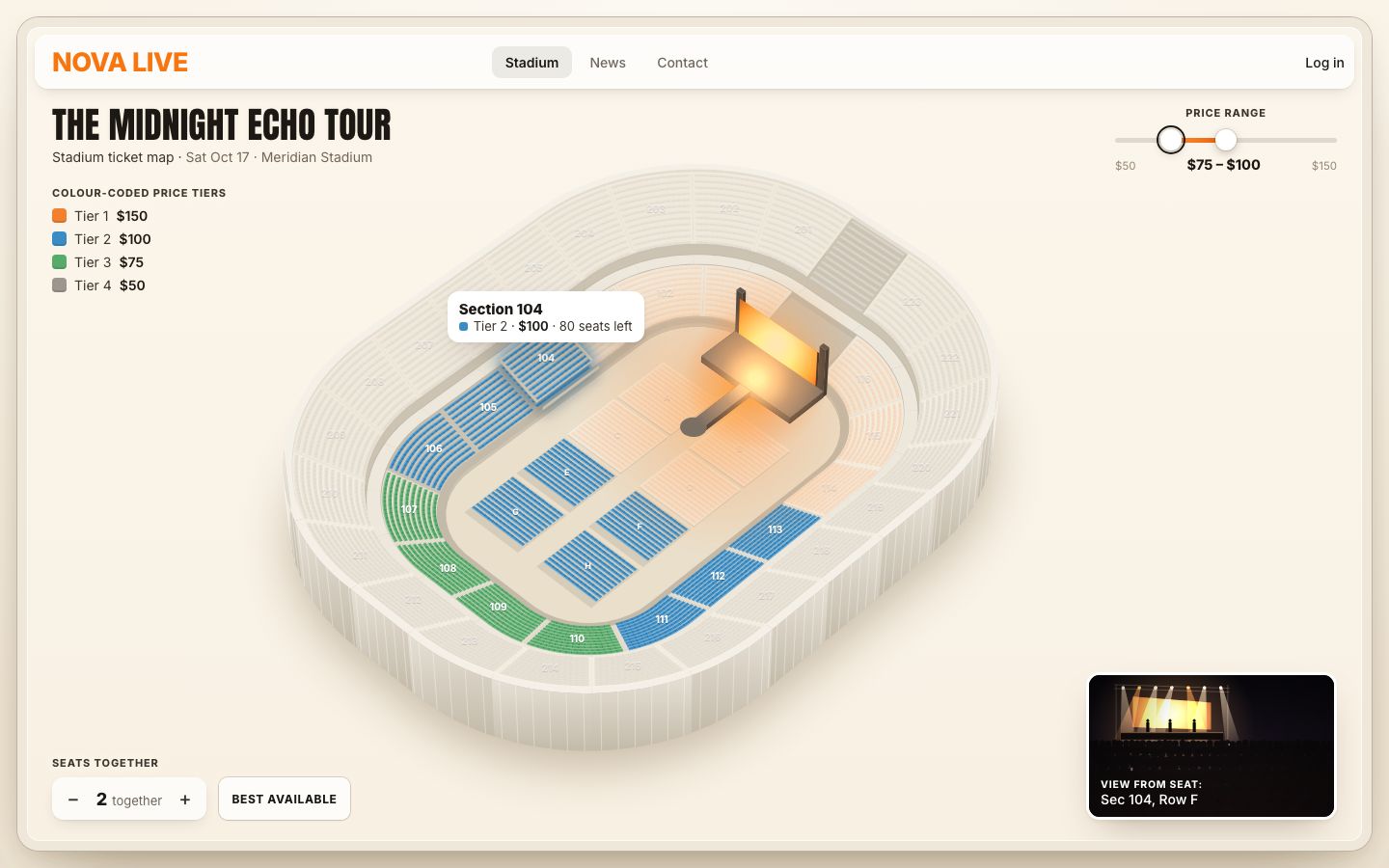
7 · The cart, the fees and the 10:00 hold
The cart is a column beside the map. It lists every seat with its price and a remove button, then the tickets, the fees ($7.50 a ticket) and the total.
const HOLD = 600;
function totals() { const sub = state.cart.reduce((t, x) => t + x.section.price, 0), fees = state.cart.length * FEE; return { sub, fees, total: sub + fees }; }function renderCart() {
const c = state.cart, t = totals(), n = c.length, sheet = mq.sheet.matches;
bind('sel-k').textContent = sheet ? 'Your selection' : 'Selected seats';
bind('sel-n').textContent = sheet ? `${n} ${n === 1 ? 'seat' : 'seats'}` : `(${n})`;
bind('summary').textContent = n ? describe(c) : 'No seats yet — pick a section';
bind('peek-total').textContent = n ? money(t.total) : '';
bind('sub').textContent = money(t.sub); bind('fees').textContent = money(t.fees); bind('total').textContent = money(t.total);
bind('fee-x').textContent = n ? `(${n} × ${money(FEE)})` : '';
$('.nl-lines').innerHTML = [...c].sort((a, b) => a.section.id.localeCompare(b.section.id) || a.row.r - b.row.r || a.j - b.j).map((x) =>
`<li><span><b>${x.section.ring === 'floor' ? x.section.label : 'Sec ' + x.section.id}</b> · Row ${x.row.label} · Seat ${x.num}${x.access ? ' ♿︎' : ''}</span><span>$${x.section.price}</span>` +
`<button type="button" class="nl-x" data-remove="${x.id}" aria-label="Remove ${seatLabel(x)}"><svg viewBox="0 0 24 24" aria-hidden="true"><path d="m7 7 10 10M17 7 7 17"/></svg></button>` + '</li>').join('');
$('[data-act="clear"]').disabled = !n;
tick(true);
}The first seat into an empty cart starts a 10-minute hold; an empty cart stops it. The cart is written two frames after the seats change, together with the pins.
function setCart(seats) {
  const was = state.cart.length;
  state.cart = seats;
  if (!was && seats.length) { state.hold = { end: performance.now() + HOLD * 1000, warned: false, extended: false }; }
  if (!seats.length) state.hold.end = 0;
  // the seats you clicked change now; the cart, the pins and the money follow a frame later (half the work each)
  syncSeats();
  if (!setCart.queued) { setCart.queued = true; requestAnimationFrame(() => requestAnimationFrame(() => { setCart.queued = false; renderCart(); placePins(); })); }
  if (seats.length) queueView(seats[0]);
}
A timer ticks four times a second while seats are held, and writes the clock only when the text changes. At one minute left: a warning colour, a toast, a spoken warning and "Hold 5 more minutes" (once per hold). At zero the seats go back on sale.
let lastShown = '';
function tick(force = false) {
  const hold = $('.nl-hold'), ext = $('.nl-extend');
  if (!state.cart.length || !state.hold.end) { hold.dataset.state = 'idle'; bind('hold').textContent = '10:00'; ext.hidden = true; lastShown = ''; return; }
  const left = Math.max(0, Math.ceil((state.hold.end - performance.now()) / 1000));
  const txt = `${String(Math.floor(left / 60)).padStart(2, '0')}:${String(left % 60).padStart(2, '0')}`;
  if (txt !== lastShown || force) { bind('hold').textContent = txt; lastShown = txt; }
  const warn = left <= 60;
  hold.dataset.state = warn ? 'warn' : 'on';
  ext.hidden = !warn || state.hold.extended;
  if (warn && !state.hold.warned) { state.hold.warned = true; toast('One minute left on your hold — check out or add 5 minutes.', 'warn'); say('One minute left on your seat hold.'); }
  if (left === 0) {
    const n = state.cart.length;
    setCart([]);
    toast(`Your hold ran out — the ${n === 1 ? 'seat went' : n + ' seats went'} back on sale.`, 'warn');
    say('Your hold ran out. The seats were released.');
  }
}
setInterval(() => { if (state.cart.length) tick(); }, 250);else if (act === 'extend') { state.hold.end += 300000; state.hold.extended = true; state.hold.warned = false; tick(true); toast('Held for 5 more minutes.'); say('Hold extended by 5 minutes.'); }On a phone the cart is a sheet: it peeks 172 px from the bottom (your selection, how many seats, the total)
and slides up by its grip. What is below the peek is hidden until it opens, and its lines are not even laid out
(content-visibility: hidden), so a closed sheet costs nothing when the cart changes.
.nl-side { position: absolute; z-index: 12; left: 0; right: 0; bottom: 0; height: min(88%, 760px); padding: 0 14px calc(14px + env(safe-area-inset-bottom)); gap: 10px; border: 0;
  border-radius: 22px 22px 0 0; background: var(--surface); box-shadow: 0 -1px 0 rgb(60 45 25 / .08), 0 -18px 40px -18px rgb(60 40 15 / .35);
  translate: 0 calc(100% - var(--peek)); transition: translate .5s var(--ease-out); overflow: hidden; }
.nl-side.is-open { translate: 0 0; overflow: auto; }
.nl-side.is-drag { transition: none; }
.nl-sheet-grip { display: grid; place-items: center; flex: none; height: 26px; margin: 0 -14px; cursor: grab; touch-action: none; }
.nl-sheet-grip i { width: 40px; height: 5px; border-radius: 99px; background: rgb(60 45 25 / .2); }
.nl-cart { padding: 0; background: none; box-shadow: none; }
.nl-cart > * { order: 5; }
.nl-sum { order: 1; padding-bottom: 10px; border-bottom: 1px solid var(--line); }
.nl-cart-h { order: 3; margin: 14px 0 0; }
.nl-sum-total { display: block; align-self: end; }
.nl-sum-line { font-size: 15px; white-space: nowrap; overflow: hidden; text-overflow: ellipsis; }
.nl-lines { max-height: none; }
/* what is below the peek is out of reach until the sheet opens */
.nl-side:not(.is-open) .nl-cart > :not(.nl-sum) { visibility: hidden; transition: visibility 0s .5s; }
/* …and not even laid out: a closed sheet costs nothing when the cart changes */
.nl-side:not(.is-open):not(.is-drag) .nl-lines { content-visibility: hidden; }
The grip follows the finger and lands by the last move: a flick up opens it, a flick down closes it, otherwise it goes to the nearer end. A tap, Enter or Space toggles it, and so does a tap on the summary.
// the phone's sheet: pull it up or down by its grip, or tap the grip
const grip = $('.nl-sheet-grip');
function openSheet(on) {
  side.classList.toggle('is-open', on); grip.setAttribute('aria-expanded', String(on));
  grip.setAttribute('aria-label', on ? 'Hide your seats' : 'Show your seats');
  side.style.translate = '';
  if (!on) side.scrollTop = 0;
}
let sheetDrag = null;
grip.addEventListener('pointerdown', (e) => {
  if (!mq.sheet.matches) return;
  grip.setPointerCapture(e.pointerId);
  const r = side.getBoundingClientRect(), peek = parseFloat(getComputedStyle(root).getPropertyValue('--peek')) || 172;
  sheetDrag = { y: e.clientY, t: performance.now(), base: side.classList.contains('is-open') ? 0 : r.height - peek, max: r.height - peek, moved: 0, last: e.clientY };
  side.classList.add('is-drag');
});
grip.addEventListener('pointermove', (e) => {
  if (!sheetDrag) return;
  const y = Math.max(0, Math.min(sheetDrag.max, sheetDrag.base + e.clientY - sheetDrag.y));
  sheetDrag.moved = Math.max(sheetDrag.moved, Math.abs(e.clientY - sheetDrag.y)); sheetDrag.v = e.clientY - sheetDrag.last; sheetDrag.last = e.clientY;
  side.style.translate = `0 ${y}px`;
});
const endSheet = (e) => {
  if (!sheetDrag) return;
  const d = sheetDrag; sheetDrag = null; side.classList.remove('is-drag');
  if (d.moved < 6) return openSheet(!side.classList.contains('is-open'));
  const y = d.base + e.clientY - d.y;
  openSheet(d.v < -2 ? true : d.v > 2 ? false : y < d.max / 2);
};
grip.addEventListener('pointerup', endSheet); grip.addEventListener('pointercancel', endSheet);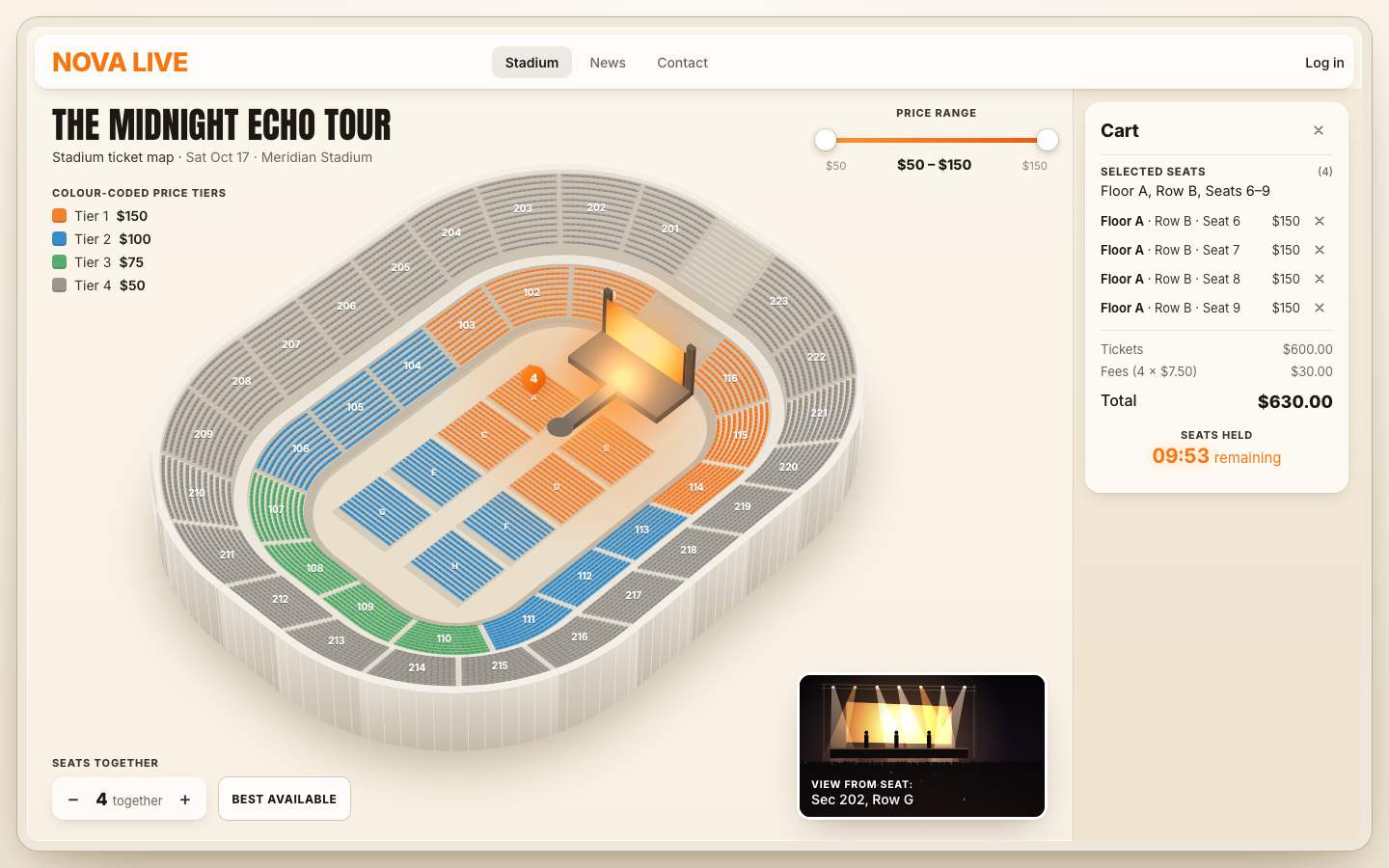
8 · Checkout, QR codes and the printed tickets
Checkout is a demo: no payment is taken. It says "Paying…" for at least 850 ms (150 ms with reduced motion) while the tickets are made, then the seats become sold, the cart shows the order, and the tickets print. On a phone the sheet rises first, so the tickets print in view.
async function checkout() {
  if (!state.cart.length || state.paid) return;
  const btn = $('.nl-checkout'); btn.classList.add('is-busy'); btn.textContent = 'Paying…';
  if (mq.sheet.matches) openSheet(true);   // the sheet rises while the payment runs, so the tickets print in view
  const pending = sortSeats(state.cart);
  await Promise.all([new Promise((r) => setTimeout(r, calm() ? 150 : 850)), prepareTickets(pending, orderId(pending))]);
  btn.classList.remove('is-busy'); btn.textContent = 'Checkout';
  const seats = sortSeats(state.cart), order = orderId(seats);
  for (const x of seats) x.state = 'taken';
  state.paid = { order, seats };
  const paid = $('.nl-paid'); paid.hidden = false;
  paid.innerHTML = `<b>Paid ✓</b> Order <b>${order}</b> · ${seats.length} ${seats.length === 1 ? 'ticket' : 'tickets'}<br><button type="button" data-act="again">Start a new order</button>`;
  root.classList.add('is-paid');
  const frame = () => new Promise(requestAnimationFrame);
  renderCart(); await frame(); syncSeats(); await frame(); refreshHitWords();
  say(`Paid. Order ${order}. ${seats.length} tickets are printing.`);
  const list = ticketList(seats, order);
  await tickets.print(list);
}
The wait is put to use: the tickets are built during it, one per frame (the QR code in one frame, the ticket's DOM in the next), and laid out unseen. Printing a ticket later is only a change of class.
async function prepareTickets(seats, order) {
  const list = ticketList(seats, order);
  const frame = () => new Promise((r) => requestAnimationFrame(() => setTimeout(r, 0)));
  await frame(); await frame();                                   // let the sheet (on a phone) open first
  for (let k = 0; k < list.length; k++) { tickets.qr(list[k].code); await frame(); tickets.prepare(list, k); await frame(); }
  tickets.measure();
}
Each ticket's QR code holds the date, the seat, the gate and the order: for example
NOVALIVE|2026-10-17|FA-B-6|G1|NL-1G8QX-1/4, the front ticket in the still below. The order id is a hash of
the seats; the gate is which 26 m stretch of the field's edge the section's middle is on (the floor uses gate 1).
function orderId(seats) { let h = 7; for (const x of seats) for (const ch of x.id) h = (h * 31 + ch.charCodeAt(0)) >>> 0; return 'NL-' + h.toString(36).toUpperCase().slice(0, 5).padStart(5, '7'); }
function gateOf(s) { if (s.ring === 'floor') return 1; return 1 + (Math.floor(((s.um % 207.96) + 207.96) % 207.96 / 26)) % 8; }

// the tickets for a set of seats; their QR codes are worked out ahead, in idle time, whenever the cart changes
function ticketList(seats, order) {
  return seats.map((x, i) => {
    const code = `NOVALIVE|2026-10-17|${x.section.id}-${x.row.label}-${x.num}|G${gateOf(x.section)}|${order}-${i + 1}/${seats.length}`;
    return { where: seatLabel(x).replace(/, \$\d+$/, ''), ring: x.section.ring, sec: x.section.short, row: x.row.label, seat: x.num, gate: gateOf(x.section), order, code };
  });
}
qr.js is a QR encoder, written after the specification as laid out by Project Nayuki's reference
implementation: byte mode, error correction level M, versions 1 to 10. It picks the smallest version the text fits (the
42-character code above needs version 3, 29 × 29 modules; a section's code is one character longer and needs version
4, 33 × 33), writes the bits (mode, length, data, terminator, padding)…
export function qr(text) {
  const bytes = [...new TextEncoder().encode(text)];
  let ver = 1;
  for (; ver <= 10; ver++) if (4 + (ver < 10 ? 8 : 16) + bytes.length * 8 <= dataCodewords(ver) * 8) break;
  if (ver > 10) throw new Error('QR: text too long');
  // the bit stream: mode, length, data, terminator, padding
  const bits = [], put = (v, n) => { for (let i = n - 1; i >= 0; i--) bits.push((v >>> i) & 1); };
  put(4, 4); put(bytes.length, ver < 10 ? 8 : 16); for (const b of bytes) put(b, 8);
  const cap = dataCodewords(ver) * 8;
  put(0, Math.min(4, cap - bits.length)); put(0, (8 - (bits.length % 8)) % 8);
  for (let pad = 0xEC; bits.length < cap; pad ^= 0xEC ^ 0x11) put(pad, 8);
  const data = []; for (let i = 0; i < bits.length; i += 8) data.push(parseInt(bits.slice(i, i + 8).join(''), 2));
…adds Reed–Solomon error correction over GF(2⁸) (the polynomial 0x11D), in blocks interleaved as the version asks…
// Reed–Solomon over GF(2^8) with the polynomial 0x11D
function mul(x, y) { let z = 0; for (let i = 7; i >= 0; i--) { z = (z << 1) ^ ((z >>> 7) * 0x11D); z ^= ((y >>> i) & 1) * x; } return z & 0xFF; }
function divisor(deg) {
  const r = new Array(deg).fill(0); r[deg - 1] = 1; let root = 1;
  for (let i = 0; i < deg; i++) {
    for (let j = 0; j < r.length; j++) { r[j] = mul(r[j], root); if (j + 1 < r.length) r[j] ^= r[j + 1]; }
    root = mul(root, 0x02);
  }
  return r;
}
function remainder(data, div) {
  const r = div.map(() => 0);
  for (const b of data) { const f = b ^ r.shift(); r.push(0); div.forEach((c, i) => { r[i] ^= mul(c, f); }); }
  return r;
}
…draws the finder, timing and alignment patterns, lays the codewords in the zigzag, and tries all eight masks, keeping the one with the lowest penalty (long runs, 2 × 2 blocks, finder-like patterns, too much dark or light).
const MASKS = [(x, y) => (x + y) % 2, (x, y) => y % 2, (x) => x % 3, (x, y) => (x + y) % 3, (x, y) => (Math.floor(x / 3) + Math.floor(y / 2)) % 2,
  (x, y) => ((x * y) % 2) + ((x * y) % 3), (x, y) => (((x * y) % 2) + ((x * y) % 3)) % 2, (x, y) => (((x + y) % 2) + ((x * y) % 3)) % 2];
const applyMask = (m) => { for (let y = 0; y < size; y++) for (let x = 0; x < size; x++) if (!F[y][x] && MASKS[m](x, y) === 0) M[y][x] = !M[y][x]; };
let best = 0, bestP = Infinity;
for (let m = 0; m < 8; m++) { applyMask(m); drawFormat(m); const p = penalty(M, size); if (p < bestP) { bestP = p; best = m; } applyMask(m); }
applyMask(best); drawFormat(best);
The code is drawn one pixel per module on a tiny canvas, and CSS scales it up with
image-rendering: pixelated, so it stays sharp at 108 px and costs almost nothing to lay out. (An SVG path
of the same code cost 8–11 ms of layout.) The stage checker reads the printed code back with OpenCV's QR detector and
gets the ticket's text.
// a canvas one pixel per module (plus the quiet zone); CSS scales it up with image-rendering: pixelated, so it stays
// sharp at any size and costs the page almost nothing to lay out or paint
export function qrCanvas(text, quiet = 2) {
  const { size, modules } = qr(text), n = size + quiet * 2;
  const c = document.createElement('canvas'); c.width = n; c.height = n;
  const ctx = c.getContext('2d'), img = ctx.createImageData(n, n);
  for (let y = 0; y < n; y++) for (let x = 0; x < n; x++) {
    const on = y >= quiet && x >= quiet && y < size + quiet && x < size + quiet && modules[y - quiet][x - quiet], i = (y * n + x) * 4;
    const v = on ? 20 : 255; img.data[i] = v; img.data[i + 1] = on ? 17 : 255; img.data[i + 2] = on ? 14 : 255; img.data[i + 3] = 255;
  }
  ctx.putImageData(img, 0, 0);
  return c;
}
A ticket is an <article> with its own spoken label; its stub is a role="button".
function make(t, i, n) {
  const el = document.createElement('article');
  el.className = 'tk';
  el.setAttribute('aria-label', `Ticket ${i + 1} of ${n}: ${t.where}`);
  el.innerHTML = `
    <div class="tk-body">
      <div class="tk-qr" role="img" aria-label="QR code for ${t.where}"></div>
      <p class="tk-brand">NOVA LIVE</p>
      <p class="tk-tour">The Midnight Echo Tour</p>
      <p class="tk-date">SAT OCT 17 · 8 PM</p>
      <p class="tk-small">Meridian Stadium · Gate ${t.gate} · <span class="tk-order">${t.order}</span></p>
      <span class="tk-kept">Stub kept — enjoy the show</span>
    </div>
    <div class="tk-stub" role="button" tabindex="0" aria-label="Tear off the stub of ticket ${i + 1}">
      <span>${t.ring === 'floor' ? 'Floor' : 'Section'}<b>${t.sec}</b></span><span>Row<b>${t.row}</b></span><span>Seat<b>${t.seat}</b></span>
      <i>Admit one · pull to tear</i>
    </div>`;
  el.querySelector('.tk-qr').append(qrFor(t.code)); qrs.delete(t.code);
  const stub = el.querySelector('.tk-stub');
  const item = { ...t, el, stub, torn: false };
  el.addEventListener('click', () => { const idx = list.indexOf(item); if (idx !== front && !drag) { front = idx; layout(); } });
  tearable(item);
  return item;
}
The tickets feed out of the slot one after another, 520 ms apart: each slides down in 1.15 s with two short pauses, like paper from a printer. Then they fan out behind the front one, turned apart by up to 5° a place (less when there are many) and shifted 12 px a place. Click one behind to bring it to the front; ‹ and › step through them.
print(tickets) {
  this.clear(true);
  if (needH) scale = Math.min(1, (box.clientHeight - 8) / needH);   // the page has settled by now: a cheap read
  host.classList.add('has-tickets');
  const n = tickets.length;
  tickets.forEach((t, i) => {
    const go = () => {
      const item = prepared(t, i, n); made.delete(t.code + '#' + i + '/' + n);
      list.push(item); front = list.length - 1;
      item.el.classList.remove('is-waiting');
      if (!calm()) { item.el.classList.add('is-printing'); item.el.addEventListener('animationend', () => item.el.classList.remove('is-printing'), { once: true }); }
      layout();
    };
    timers.push(setTimeout(go, calm() ? i * 16 : i * 520));
  });
  const done = calm() ? n * 16 + 50 : (n - 1) * 520 + 1200;
  return new Promise((r) => timers.push(setTimeout(() => { front = 0; layout(); r(); }, done)));
},.tk.is-printing .tk-body, .tk.is-printing .tk-stub { animation: nl-feed 1.15s cubic-bezier(.4, 0, .3, 1) both; }
@keyframes nl-feed { 0% { translate: 0 -105%; } 30% { translate: 0 -62%; } 38% { translate: 0 -60%; } 70% { translate: 0 -18%; } 76% { translate: 0 -16%; } 100% { translate: 0 0; } }function layout() {
const n = list.length;
list.forEach((t, i) => {
const k = i - front, behind = i !== front;
const spread = Math.min(5, 14 / Math.max(1, n - 1));
t.el.style.zIndex = String(behind ? 10 - Math.abs(k) : 20);
t.el.style.rotate = behind ? `${(i - (n - 1) / 2) * spread}deg` : '0deg';
t.el.style.translate = behind ? `${(i - (n - 1) / 2) * 12}px ${4 + Math.abs(k) * 3}px` : '0 0';
t.el.classList.toggle('is-front', !behind);
t.el.setAttribute('aria-hidden', behind ? 'true' : 'false');
t.stub.tabIndex = behind ? -1 : 0;
});
nav.hidden = n < 2;
count.textContent = `${front + 1} / ${n}`;
if (scale) fit(); else requestAnimationFrame(() => fit(true)); // (normally measured ahead, see prepare)
}The stub tears off along its perforation. While you drag, it hangs from its far corner and follows the pointer a little behind it; past 78 px it rips, falls and fades, and the ticket's edge becomes a zigzag. Let go early and it springs back. Enter or Space tears it too.
function tearable(item) {
  const s = item.stub;
  s.addEventListener('pointerdown', (e) => {
    if (item.torn || list.indexOf(item) !== front) return;
    e.preventDefault(); s.setPointerCapture(e.pointerId);
    drag = { x: e.clientX, y: e.clientY, item, moved: false }; s.classList.add('is-drag');
  });
  s.addEventListener('pointermove', (e) => {
    if (!drag || drag.item !== item) return;
    const dx = e.clientX - drag.x, dy = Math.max(-6, e.clientY - drag.y), far = Math.hypot(dx, Math.max(0, dy));
    drag.moved = drag.moved || far > 4;
    // the paper gives a little, then rips: the stub hangs from its far corner as you pull
    s.style.translate = `${dx * 0.55}px ${Math.max(0, dy) * 0.8}px`;
    s.style.rotate = `${dx * 0.06 + Math.max(0, dy) * 0.06}deg`;
    if (far > 78) { const d = drag; drag = null; tear(item, dx * 2, 260); }
  });
  const end = () => {
    if (!drag || drag.item !== item) return;
    setTimeout(() => { drag = null; }, 0);
    s.classList.remove('is-drag'); s.style.translate = ''; s.style.rotate = '';
  };
  s.addEventListener('pointerup', end); s.addEventListener('pointercancel', end);
  s.addEventListener('keydown', (e) => { if (e.key === 'Enter' || e.key === ' ') { e.preventDefault(); tear(item); } });
}.tk-stub.is-torn { pointer-events: none; transition: translate .9s cubic-bezier(.5, 0, .8, .4), rotate .9s ease-in, opacity .9s ease-in; opacity: 0; }
.tk.is-torn .tk-body { -webkit-mask: none; mask: none; clip-path: polygon(0 0, 100% 0, 100% 100%, 95% calc(100% - 3px), 90% 100%, 85% calc(100% - 3px), 80% 100%, 75% calc(100% - 3px), 70% 100%, 65% calc(100% - 3px), 60% 100%, 55% calc(100% - 3px), 50% 100%, 45% calc(100% - 3px), 40% 100%, 35% calc(100% - 3px), 30% 100%, 25% calc(100% - 3px), 20% 100%, 15% calc(100% - 3px), 10% 100%, 5% calc(100% - 3px), 0 100%); }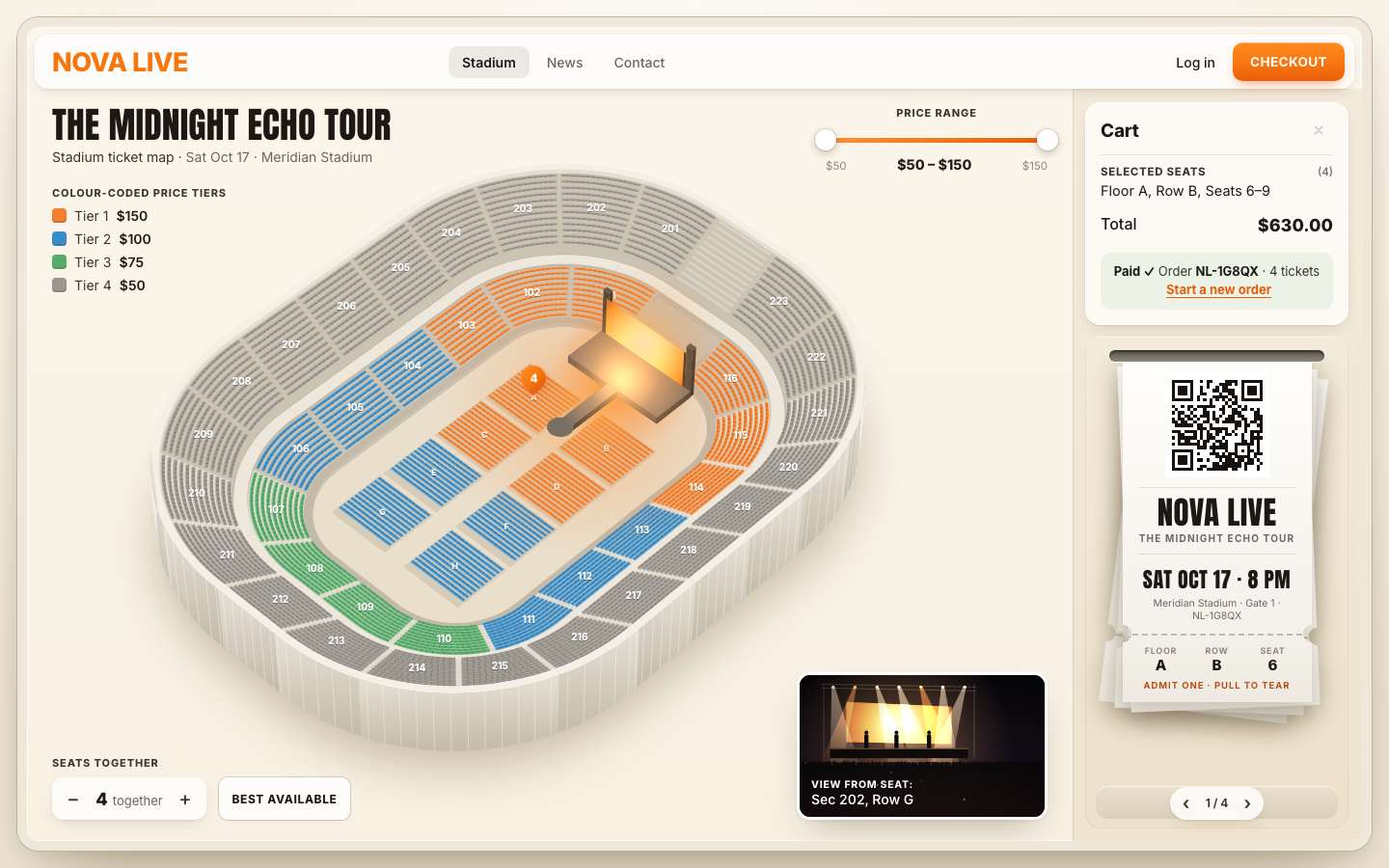
9 · The keyboard, the help and a warm-up
The map becomes a keyboard map. Only one section is in the tab order at a time (a roving tabindex), so
Tab lands on the map once, on section 112, and moves on. ← and → walk round the ring; ↑ and ↓ jump to the nearest
section in the ring outside or inside (floor, lower, upper). Focus lifts the section and shows its tooltip, as hover
does.
// the hit areas: one path per section, focusable, with words for screen readers
const ORDER = { floor: [], lower: [], upper: [] };
for (const s of sections) if (!s.closed) ORDER[s.ring].push(s);
ORDER.lower.sort((a, b) => a.u0 - b.u0); ORDER.upper.sort((a, b) => a.u0 - b.u0);function setRovingSection(s) { state.focusSection = s; for (const p of hits.children) p.tabIndex = p.dataset.id === s.id ? 0 : -1; }
function nextSection(s, key) {
const ring = ORDER[s.ring], i = ring.indexOf(s);
if (key === 'ArrowRight' || key === 'ArrowLeft') return ring[(i + (key === 'ArrowRight' ? 1 : -1) + ring.length) % ring.length];
const rings = ['floor', 'lower', 'upper'], to = rings[rings.indexOf(s.ring) + (key === 'ArrowUp' ? 1 : -1)];
if (!to) return s;
const [cx, cy] = s.center;
return ORDER[to].reduce((b, t) => { const d = Math.hypot(t.center[0] - cx, t.center[1] - cy); return !b || d < b.d ? { t, d } : b; }, null).t;
}hits.addEventListener('keydown', (e) => {
const p = e.target.closest('path'); if (!p) return;
const s = byId.get(p.dataset.id);
if (e.key === 'Enter' || e.key === ' ') { e.preventDefault(); openSection(s, { focus: true }); return; }
if (!e.key.startsWith('Arrow')) return;
e.preventDefault();
const t = nextSection(s, e.key); setRovingSection(t);
const q = hits.querySelector(`[data-id="${t.id}"]`); q.focus({ preventScroll: true }); hoverSection(t, 'key');
});
hits.addEventListener('focusin', (e) => { const p = e.target.closest('path'); if (p && state.mode === 'stadium') hoverSection(byId.get(p.dataset.id), 'key'); });
hits.addEventListener('focusout', () => { setTimeout(() => { if (!hits.contains(document.activeElement) && state.mode === 'stadium') hoverSection(null); }, 0); });Enter opens the section and puts the focus on a seat once its rows are built. In the grid, ← and → move along the row, ↑ and ↓ to the row in front or behind at the same place (rows differ in length, so the position is kept centred), Home and End to the row's ends; Enter or Space picks. Escape goes back and gives the focus to the section's hit area.
function rove(b) { for (const x of grid.querySelectorAll('.seat[tabindex="0"]')) x.tabIndex = -1; b.tabIndex = 0; }
grid.addEventListener('keydown', (e) => {
  const b = e.target.closest('.seat'); if (!b) return;
  const x = seatById.get(b.dataset.id), s = x.section;
  let t = null;
  if (e.key === 'ArrowLeft') t = x.row.seats[x.j - 1];
  else if (e.key === 'ArrowRight') t = x.row.seats[x.j + 1];
  else if (e.key === 'ArrowUp' || e.key === 'ArrowDown') {
    const row = s.rows[x.row.r + (e.key === 'ArrowUp' ? -1 : 1)];
    if (row) t = row.seats[Math.max(0, Math.min(row.n - 1, Math.round(x.j + (row.n - x.row.n) / 2)))];
  } else if (e.key === 'Home') t = x.row.seats[0];
  else if (e.key === 'End') t = x.row.seats[x.row.n - 1];
  else if (e.key === 'Enter' || e.key === ' ') { e.preventDefault(); state.focusSeat = x; pickSeat(x); return; }
  if (!t) return;
  e.preventDefault();
  const nb = grid.querySelector(`[data-id="${t.id}"]`); rove(nb); nb.focus(); state.focusSeat = t;
  nb.scrollIntoView({ block: 'nearest', inline: 'nearest' });
  if (t.state !== 'taken') queueView(t);
});
Escape steps back one thing at a time: the help card first, then the section, then the phone's sheet. The ? in the bar opens the help.
document.addEventListener('keydown', (e) => {
  if (e.key !== 'Escape') return;
  if (!helpPop.hidden) { helpPop.hidden = true; help.setAttribute('aria-expanded', 'false'); help.focus(); return; }
  if (state.mode === 'section') { e.preventDefault(); back(); return; }
  if (side.classList.contains('is-open')) openSheet(false);
});
Last, a warm-up. The first tap on a slow phone pays for compiling every function it runs. So while the bowl fades in, the page runs those paths once, silently and unseen: it opens section 205, builds its rows, picks two seats, empties the cart, goes back and lays out one ticket. The toast and the spoken line stay quiet meanwhile, and CSS keeps everything it touches drawn but invisible. Last, section 112 is made the one the first Tab lands on.
// the first tap on a slow phone pays for compiling every function it runs; run the tap's paths once, silently and
// unseen, while the bowl fades in (open a section, pick a group, empty the cart, go back, one QR code)
let warmed = false;
function warmUp() {
  warmed = true; quiet = true; root.classList.add('is-warming');
  const s = byId.get('205'), row = s.rows[s.rows.length - 1], free = row.seats.find((x, j) => x.state === 'free' && row.seats[j + 1]?.state === 'free');
  openSection(s); buildSeats.rows?.();
  if (free) { pickSeat(free); describe(state.cart); }
  setCart([]); back(); card.classList.remove('is-open');
  const dummy = ticketList([byId.get('112').rows[0].seats[2]], 'NL-WARM0'); tickets.prepare(dummy, 0);   // a ticket laid out once, unseen
  setRovingSection(byId.get('112')); state.focusSeat = null; viewSeat = null;   // Tab lands on 112, as in the concept
  hoverSection(byId.get('112'));
  requestAnimationFrame(() => requestAnimationFrame(() => requestAnimationFrame(() => { hoverSection(null); tickets.discard(); quiet = false; root.classList.remove('is-warming'); })));
}/* while the page warms its code up (js: warmUp) nothing it touches may show or move */
.nl.is-warming .nl-card, .nl.is-warming .nl-lift, .nl.is-warming .nl-pins, .nl.is-warming .nl-tip { opacity: .002 !important; } /* drawn once, never seen */
.nl.is-warming .nl-rig, .nl.is-warming .nl-card, .nl.is-warming .nl-veil, .nl.is-warming .nl-view, .nl.is-warming .nl-lift { transition: none !important; }Reduced motion was built in stage by stage, and here it is in one place: the map does not fly, seats do not pop, pins do not drop, tickets do not feed (they print 16 ms apart), and the stub and the card simply appear.
/* ---- 10. reduced motion: no flying, popping or printing — things simply appear ---- */
@media (prefers-reduced-motion: reduce) {
  .nl-rig { transition: none; }
  .nl-stage-glow::before { animation: none; }
  .seat.is-pop, .seat.is-pop::after, .nl-pin, .nl-lines li, .nl-hold[data-state="warn"] .nl-hold-v { animation: none; }
  .tk.is-printing, .tk.is-printing .tk-body, .tk.is-printing .tk-stub { animation: none; }
  .nl-card, .nl-side, .tk, .tk-stub, .nl-lift { transition-duration: .01s; }
  .nl-price-chip { animation-duration: 2.4s; }
}
The result, measured with the project's frame probe on a 120 Hz screen (8.3 ms a frame) through a run of hovers, a slider drag, a section, a block of four, Best available, a checkout of four tickets and a torn stub: no missed frames and no long tasks at 1440 × 900 or on a 390 × 844 phone, even with the CPU slowed 4 ×. The slowest frame took 10.4 ms.
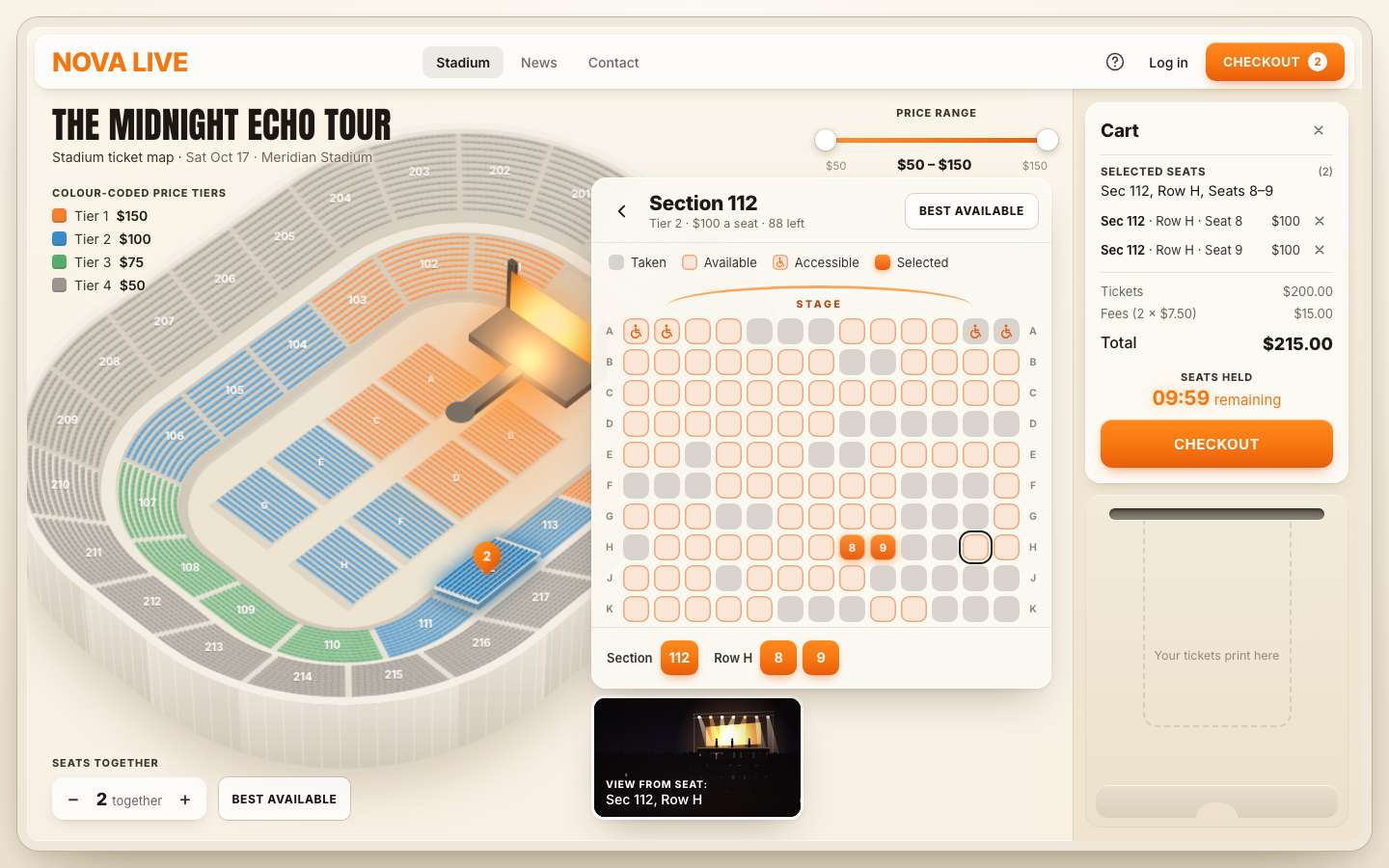
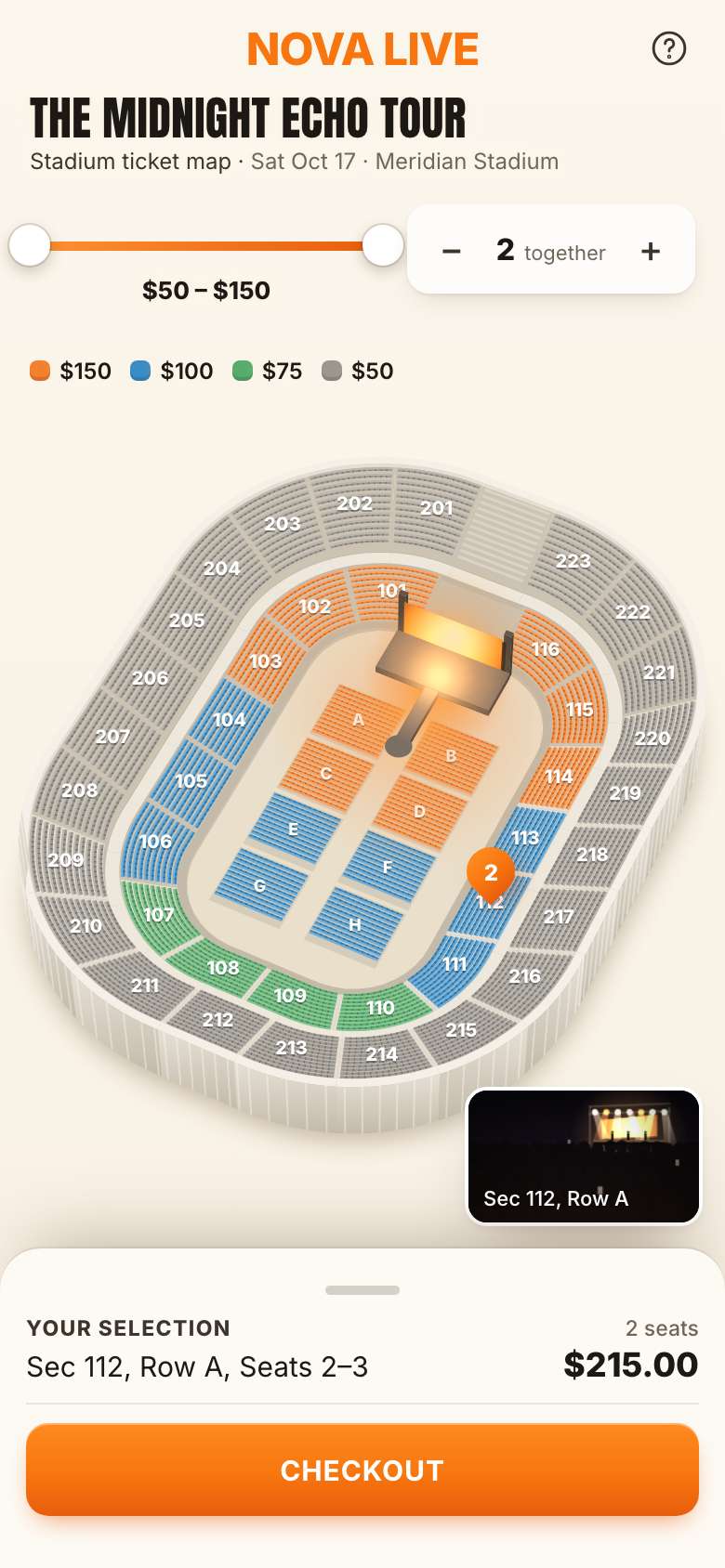
Make it yours
- Your venue is the numbers at the top of
model.js: the field, the rings (rows, depth, rake, sections), the floor blocks inbuildStadium(), the prices inTIERS,FEE,MAX_SEATS, and how much is already sold (SOLD). The sold seats are seeded from'nova-' + id; change the word for another night. - Colours are tokens in
style.css. The canvas reads--tier-1…4and the--map-*materials, so one edit recolours the drawing and the page. - The camera is
CAMinrender.js(yaw 0.8, elevation 0.84, perspective 620), and a phone's tall map uses yaw 1.12 and elevation 0.98 (layoutMap()). - Photos of the view: drop them in
assets/incoming/and list them inviews.json, by section or by ring, for example{ "photos": { "112": "view_112.jpg", "upper": "view_upper.jpg" } }. - A real sale:
checkout()is where a payment request would go (today it waits at least 850 ms), the hold isHOLD(600 s), and a seat'sstateis what your inventory would set. - Scripts can drive it through
window.__seats:state(),sections(),open('112'),pick(id),select(ids),best(),setGroup(4),setRange(75, 100),checkout(),tear(),setHold(60),openSheet(true). - Accessibility is already there: every section and seat has a spoken label, the map and the grid work with
the arrow keys, picks, holds and prints are read out by a polite live region, every control is at least 44 px on a
touch screen, and
prefers-reduced-motionis honoured.
The code is on GitHub at UlviShabanbayli/domvybe-stadium-seat-map, under the MIT licence: use it in your own projects, commercial ones included. The tour, the stadium and the brand are made up, and no AI picture is used: the bowl, the stage and the view from every seat are drawn by the code.
Paint the expensive picture once, then move it with CSS. The bowl is painted once per size; flying in is a transform of finished canvases, the lift is a small copy raised by a translate, and the glow is a drop-shadow. After the first paint, the main thread only ever draws small things.