This is the whole build of ClayMart, the magnetic checkout, in the order it was written. ClayMart is a small grocery shop made of clay: a shelf of eight products on the left and a basket panel on the right. The basket hangs under a magnet. Grab a product off the shelf and throw it, and it becomes a real object: it flies with gravity, the magnet pulls it in when it comes near, and it lands in a pile with weight. The pile is the picture; the list under it is the same basket in words, so a keyboard, a screen reader and reduced motion get the whole shop too.
Each stage below is a page of its own. Its picture shows what the stage adds; press Run it here to load the
stage live in the page, or Open ↗ to see it full size. In this column a stage runs at the column's width, so it
shows the basket docked at the bottom, as on a phone or an upright tablet; full size it is the panel at the right. The
code under each heading is only what that stage adds. There is no library and no build step: index.html,
style.css, nav.css, and a folder of ES modules, one job each. The stage pages share one folder
of pictures, so their paths start ../../img/; in the finished source the pictures sit next to the page, in
img/. The product photos, the clay basket, the magnet and the coin were generated with Google Gemini; the
products are fictional.
1 · The look: clay, from three layers of tokens
Every colour, shadow and size comes from a CSS variable, in three layers. At the bottom are the primitives: values with no meaning, a few ramps of cream, brown, coral, butter and mint. The warm brown every shadow is made of is kept as bare rgb numbers, so any shadow can take its own opacity.
/* primitive */
--cream-0: #FFFBF4; --cream-50: #FDF8EF; --cream-100: #FAF2E3; --cream-200: #F7EBD3; --cream-300: #F0E1C9; --cream-400: #E6D3B6;
--brown-600: #8A4A3E; --brown-700: #763C31; --brown-800: #642F26;
--coral-300: #F8BEA6; --coral-400: #F3AE92; --coral-500: #EE9F81; --coral-600: #E08A6C; --coral-700: #C25F4A;
--butter-300: #F3D78D; --butter-400: #E8C371; --mint-100: #E5F2DD; --mint-500: #8DBF9C; --olive-600: #5E8A4A;
--shade: 150 92 66;                 /* the warm brown every clay shadow is made of, as rgb numbers */
--light: 255 255 255;
--font: 'Fredoka', 'Baloo 2', ui-rounded, system-ui, sans-serif;
On top of them, the semantic tokens say what a value is for: the page, a surface, the text, the accent.
/* semantic */
--bg: var(--cream-200);
--surface: var(--cream-100);
--surface-hi: var(--cream-50);
--text: var(--brown-800);
--text-muted: #8B6556;
--heading: var(--brown-600);
--accent: var(--coral-500);
--accent-text: var(--coral-700);
--on-accent: #FFF4E8;
--focus: var(--brown-700);
--success: var(--olive-600);
Claymorphism is three things at once: a big soft shadow under the lump, light pressed into its top left corner and
shade pressed into its bottom right. Each is one box-shadow list, in three sizes, plus a pressed state (the
outer shadow tucks in, the inner shade deepens) and a well pressed into the clay, used for tiles, the price chip
and the bars. The words are embossed the same way: a light lip above, a soft dark below.
/* clay: a big soft shadow under the lump, light pressed into its top left, shade pressed into its bottom right */
--clay-l: 0 18px 30px -12px rgb(var(--shade) / .38), 0 4px 8px rgb(var(--shade) / .08),
          inset 6px 6px 12px rgb(var(--light) / .75), inset -8px -8px 16px rgb(var(--shade) / .18);
--clay-m: 0 12px 22px -10px rgb(var(--shade) / .4), 0 3px 5px rgb(var(--shade) / .08),
          inset 4px 4px 9px rgb(var(--light) / .7), inset -6px -6px 12px rgb(var(--shade) / .2);
--clay-s: 0 7px 12px -5px rgb(var(--shade) / .42),
          inset 3px 3px 6px rgb(var(--light) / .6), inset -4px -4px 8px rgb(var(--shade) / .22);
/* pressed: the outer shadow tucks in, the inner shade deepens */
--clay-pressed: 0 3px 6px -3px rgb(var(--shade) / .4), inset 4px 5px 10px rgb(var(--shade) / .28), inset -3px -3px 7px rgb(var(--light) / .45);
/* a well pressed INTO the clay (tiles, wells, bars) */
--clay-well: inset 5px 5px 10px rgb(var(--shade) / .16), inset -5px -5px 10px rgb(var(--light) / .8);
--clay-tile: inset 5px 5px 11px rgb(var(--light) / .6), inset -7px -8px 14px rgb(var(--shade) / .2), 0 3px 6px rgb(var(--shade) / .1);
/* embossed words: a light lip on top, a soft dark under */
--emboss: 0 -1px 0 rgb(var(--light) / .75), 0 1.5px 1.5px rgb(var(--shade) / .3);
--emboss-on-colour: 0 -1px 0 rgb(var(--light) / .35), 0 1.5px 0 rgb(160 74 50 / .55);
The component tokens are the shop's own measures: the header's height, the card's picture, the basket panel's width, how much of the panel's height is not basket art, and the order of the layers from the panel up to the stage where products fly.
/* component */
--header-h: 92px;
--card-art-h: 150px;
--art-k: 1.12;                      /* how big a product stands on its card, against its size as an object */
--shop-max: 1320px;                /* the content's width; wider screens get margins (and a bigger basket) */
--basket-w: 384px;
--tray-reserve: 490px;             /* the panel's height that is not basket art: header, totals, Checkout, a line */
--strip-w: 236px;                  /* the basket strip of a phone on its side */
/* the layers, bottom to top: the basket panel, the header, the open basket sheet (and its scrim), the stage where
   products fly, the header lifted over the stage while its account popover is open (nav.css) */
--z-basket: 20; --z-header: 30; --z-scrim: 34; --z-sheet: 35; --z-stage: 40; --z-header-over-stage: 41; --z-touch: 50; --z-skip: 100;
--odo-size: 30px;
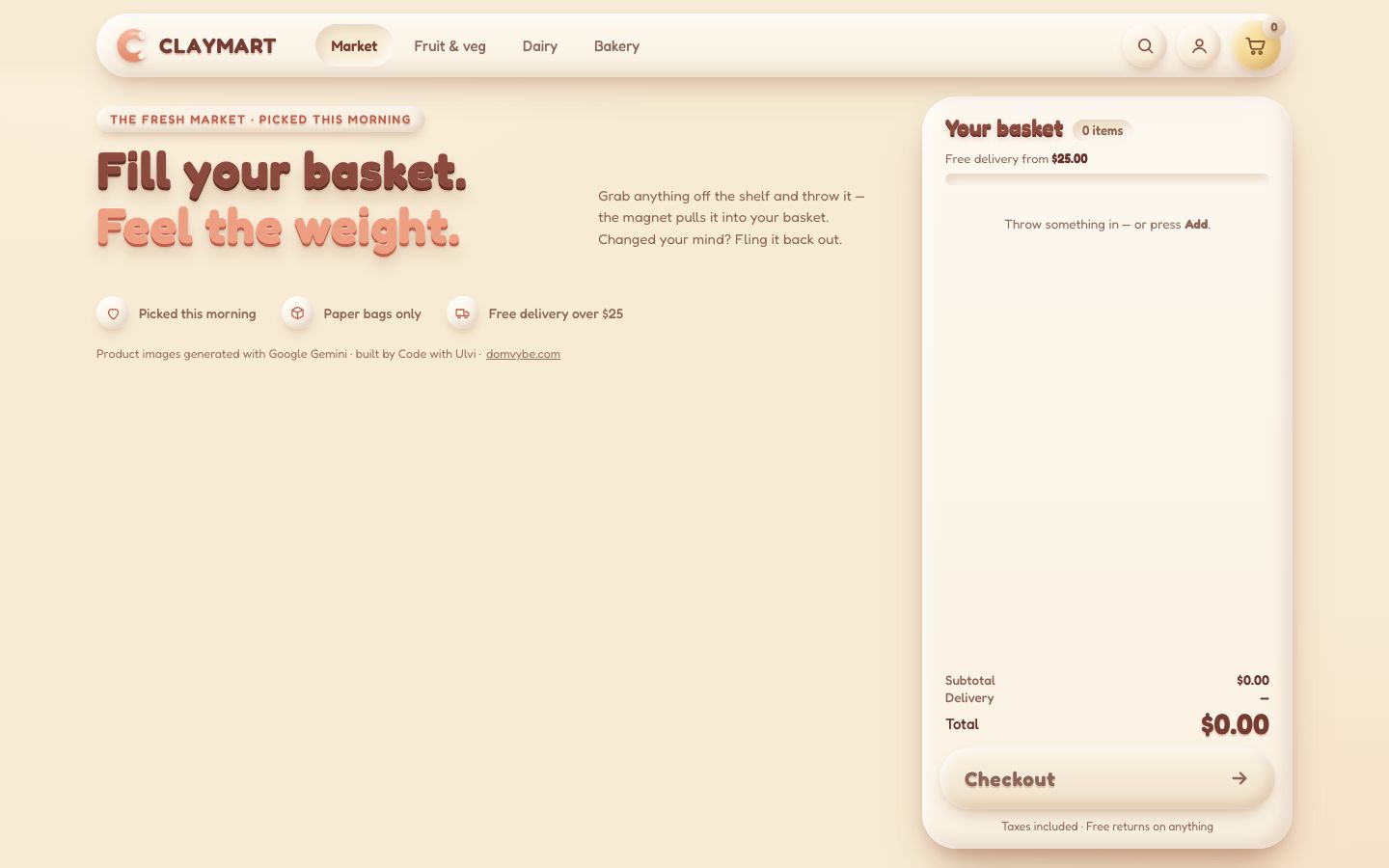
The header is one long clay pill: the brand, the aisles, search, the account and the basket button. In this stage it is only its markup and its look; stage 9 makes every control work.
<header class="site">
<div class="site-pill">
<a class="brand" href="./" aria-label="ClayMart, the whole market, back to top">
<svg class="mark" viewBox="0 0 48 48" aria-hidden="true">
<defs><linearGradient id="markClay" x1="0" y1="0" x2="0" y2="1"><stop offset="0" stop-color="#F6B49A"/><stop offset="1" stop-color="#E48C70"/></linearGradient></defs>
<path d="M36 12 A15 15 0 1 0 36 36" fill="none" stroke="#C9705A" stroke-width="11" stroke-linecap="round" transform="translate(0 1.5)" opacity=".35"/>
<path d="M36 12 A15 15 0 1 0 36 36" fill="none" stroke="url(#markClay)" stroke-width="11" stroke-linecap="round"/>
<path d="M33 10.4 A15 15 0 0 0 23 9.4" fill="none" stroke="#FFE3D4" stroke-width="2.4" stroke-linecap="round" opacity=".8"/>
<rect x="33.5" y="6.6" width="8" height="10.5" rx="3.6" fill="#F7EEE4" transform="rotate(-38 37.5 11.8)"/>
<rect x="33.5" y="30.9" width="8" height="10.5" rx="3.6" fill="#F7EEE4" transform="rotate(38 37.5 36.2)"/>
</svg>
<span class="wordmark">CLAYMART</span>
</a>
<!-- the aisles (stage 9: one tab stop, ← → between them, the chosen one in the URL) -->
<nav class="links" aria-label="Aisles">
<a href="./" data-aisle="market" aria-current="page">Market</a><a href="#fruitveg" data-aisle="fruitveg" tabindex="-1">Fruit & veg</a><a href="#dairy" data-aisle="dairy" tabindex="-1">Dairy</a><a href="#bakery" data-aisle="bakery" tabindex="-1">Bakery</a>
</nav>
<div class="tools">
<button class="icon-btn nav-search-btn" type="button" aria-label="Search products"><svg viewBox="0 0 24 24" aria-hidden="true"><circle cx="11" cy="11" r="6.5"/><path d="M20 20l-4.2-4.2"/></svg></button>
<button class="icon-btn nav-account-btn" type="button" aria-label="Your account"><svg viewBox="0 0 24 24" aria-hidden="true"><circle cx="12" cy="8.5" r="3.8"/><path d="M4.5 20c1.4-3.6 4.2-5.2 7.5-5.2s6.1 1.6 7.5 5.2"/></svg></button>
<button class="bag-btn" type="button" aria-label="Basket, empty">
<svg viewBox="0 0 32 32" aria-hidden="true"><path d="M4 7h3.2l2.6 12.2a2 2 0 0 0 2 1.6h10.6a2 2 0 0 0 2-1.5L26.8 11H8.6"/><circle cx="12.6" cy="25.4" r="1.6"/><circle cx="21.8" cy="25.4" r="1.6"/></svg>
<span class="bag-count is-zero" aria-hidden="true">0</span>
</button>
</div>
</div>
</header>.site { position: sticky; top: 0; z-index: var(--z-header); height: var(--header-h); padding: 14px max(var(--space-10), calc((100vw - var(--shop-max)) / 2 + var(--space-10))) 0;
background: linear-gradient(180deg, var(--bg) 70%, rgb(247 235 211 / 0)); }
.site-pill { display: flex; align-items: center; gap: var(--space-8); height: 66px; padding: 0 12px 0 16px; border-radius: var(--radius-pill);
background: linear-gradient(180deg, var(--surface-hi), var(--surface)); box-shadow: var(--clay-l); }
.brand { display: flex; align-items: center; gap: 9px; text-decoration: none; border-radius: var(--radius-pill); }
.mark { width: 40px; height: 40px; filter: drop-shadow(0 3px 3px rgb(var(--shade) / .28)); }
.wordmark { font-weight: 700; font-size: 22px; letter-spacing: .04em; color: var(--brown-700); text-shadow: var(--emboss); }
.links { display: flex; gap: 6px; margin-left: var(--space-2); }
.links a { padding: 9px 16px; border-radius: var(--radius-pill); font-size: 15px; font-weight: 500; color: var(--text-muted); text-decoration: none; transition: color var(--dur-fast), box-shadow var(--dur); }
.links a:hover { color: var(--text); box-shadow: var(--clay-s); }
.links a[aria-current] { color: var(--brown-700); font-weight: 600; background: var(--cream-200); box-shadow: var(--clay-well); }The basket panel is a big clay slab fixed at the right of the shelf. Its parts are in the order a phone needs them, and
CSS order puts them back for a desk. The total says a plain $0.00 for now; stage 7 makes it
roll. Checkout is aria-disabled, not disabled, so it can still take the focus and say why it
does nothing.
<aside class="basket" aria-labelledby="basket-title" data-state="empty">
  <div class="b-head">
    <h2 id="basket-title">Your basket <span class="b-count"><span class="b-count-n">0</span> <span class="b-count-w">items</span></span></h2>
  </div>

  <div class="b-ship" aria-hidden="true">
    <p class="ship-text">Free delivery from <b>$25.00</b></p>
    <div class="ship-bar"><i class="ship-fill"></i></div>
  </div>

  <div class="b-lines" id="lines">
    <ul class="lines" aria-label="Items in your basket"></ul>
    <p class="empty-hint">Throw something in — or press <b>Add</b>.</p>
  </div>

  <div class="b-foot">
    <dl class="sum">
      <div class="sum-row"><dt>Subtotal</dt><dd class="sum-sub">$0.00</dd></div>
      <div class="sum-row sum-row--fee"><dt>Delivery</dt><dd class="sum-fee"><s class="fee-was">$3.99</s><span class="fee-now">—</span></dd></div>
      <div class="sum-row sum-row--total"><dt>Total<span class="sum-note"></span></dt><dd><span class="odo" aria-hidden="true">$0.00</span><span class="sr-only sum-text">$0.00</span></dd></div>
    </dl>
    <button class="checkout" type="button" aria-disabled="true">
      <span class="co-label">Checkout</span>
      <span class="co-bar" aria-hidden="true"><i></i></span>
      <svg class="co-arrow" viewBox="0 0 24 24" aria-hidden="true"><path d="M5 12h14M13 6l6 6-6 6"/></svg>
    </button>
    <p class="fine">Taxes included <span aria-hidden="true">·</span> Free returns on anything</p>
  </div>
</aside>.basket { position: fixed; z-index: var(--z-basket); top: calc(var(--header-h) + 8px); bottom: 20px; right: max(var(--space-10), calc((100vw - var(--shop-max)) / 2 + var(--space-10)));
width: var(--basket-w); display: flex; flex-direction: column; padding: 16px 18px 16px; border-radius: var(--radius-xl);
background: linear-gradient(180deg, var(--surface-hi), var(--surface)); box-shadow: 0 30px 50px -20px rgb(var(--shade) / .4), var(--clay-l); }
.b-head { order: 1; display: flex; align-items: baseline; gap: 10px; padding: 2px 6px 0; }
.b-head h2 { display: flex; align-items: baseline; gap: 10px; margin: 0; font-size: 23px; font-weight: 700; color: var(--heading); text-shadow: 0 -1px 0 rgb(255 226 210 / .8), 0 2px 0 var(--brown-800), 0 4px 6px rgb(var(--shade) / .25); }
.b-count { text-shadow: none; padding: 3px 10px; border-radius: var(--radius-pill); background: var(--cream-200); box-shadow: var(--clay-well); font-size: 13px; font-weight: 600; color: var(--text-muted); font-variant-numeric: tabular-nums; }
.b-toggle { display: none; }
.tray { order: 2; }
.b-ship { order: 3; padding: 10px 6px 4px; }
.b-lines { order: 4; flex: 1 1 auto; min-height: 0; overflow: auto; margin: 8px -6px 0; padding: 4px 8px; scrollbar-width: thin; }
.b-foot { order: 5; padding-top: 10px; }.checkout { position: relative; width: 100%; height: 64px; display: flex; align-items: center; justify-content: space-between; padding: 0 26px; overflow: hidden;
border-radius: var(--radius-pill); font-size: 21px; font-weight: 700; letter-spacing: .03em; color: #FFF4EA;
text-shadow: 0 -1px 0 rgb(var(--light) / .6), 0 2.5px 0 #D27C60, 0 3px 3px rgb(150 66 44 / .35);
background: linear-gradient(180deg, #F6B497 0%, #F0A285 45%, #E58F71 100%);
box-shadow: 0 18px 30px -12px rgb(var(--shade) / .5), inset 6px 6px 12px rgb(var(--light) / .45), inset -8px -9px 16px rgb(190 96 66 / .32);
transition: transform var(--dur) var(--squash), box-shadow var(--dur), filter var(--dur); will-change: transform, filter; }
.checkout:hover { filter: brightness(1.03); }
.checkout:active { transform: scale(.97); box-shadow: var(--clay-pressed); }
.checkout[aria-disabled="true"] { cursor: not-allowed; color: var(--text-muted); text-shadow: var(--emboss); background: linear-gradient(180deg, var(--cream-100), var(--cream-300)); box-shadow: var(--clay-m); }The panel has three places, and the page is laid out for all three from the start, so every stage works on a phone. From 1024 px up it stands at the right. A phone or an upright tablet docks it at the bottom of the screen, and the shelf leaves room under its last card for it. A phone on its side makes it a narrow strip at the right.
/* ---- 11. screens ----
   The basket is in one of three places (js/util.js asks the same two questions):
     panel   at the right of the shelf (desks, laptops, tablets on their side). Its art shrinks on short screens so the
             totals and Checkout always fit (--tray-reserve), and the panel grows on wide screens
     docked  at the bottom (phones and tablets held upright, under 1024 px): throws go down, the list folds into a sheet
strip a narrow column at the right (phones on their side): throws go right, the list folds into a sheet */@media (max-width: 1023px) and (orientation: portrait) {
:root { --dock-h: 340px; } /* js/sheet.js keeps it to the dock's real height */
.pantry { margin-right: 0; padding: 12px 0 calc(var(--dock-h) + 24px + env(safe-area-inset-bottom)); }
.basket { top: auto; left: 8px; right: 8px; bottom: 8px; width: auto; max-height: 86dvh; padding: 10px 14px calc(12px + env(safe-area-inset-bottom)); border-radius: 30px; }
.b-lines { order: 2; margin: 0 -6px 8px; }
/* a phone keeps its 214 px basket; a tablet's is bigger; a short phone's smaller, so the dock never takes the screen */
.tray { order: 3; width: min(max(214px, 30vw), 300px, max(150px, calc((50dvh - 128px) * 816 / 900))); margin: -10px auto 0; }
.b-foot { order: 4; display: flex; align-items: center; gap: var(--space-3); padding-top: 6px; }
.checkout { flex: 1; height: 56px; padding: 0 22px; font-size: 19px; }
}On narrow screens the aisles leave the pill and become a row of clay chips under it, so the pill never overflows.
@media (max-width: 979px) and (min-height: 541px), (max-width: 760px) {
  :root { --header-h: 140px; }
  .site .links { position: absolute; z-index: 1; top: calc(100% + 6px); left: -6px; right: -6px; display: flex; gap: 8px; margin: 0; padding: 6px 6px 12px;
    overflow-x: auto; overscroll-behavior-x: contain; scroll-snap-type: x proximity; scrollbar-width: none; -webkit-overflow-scrolling: touch; }
  .site .links::-webkit-scrollbar { display: none; }
  .site .links a { flex: none; scroll-snap-align: start; padding: 0 18px; font-size: 15px; font-weight: 600; color: var(--text-muted);
    background: linear-gradient(180deg, var(--surface-hi), var(--surface)); box-shadow: var(--clay-s); }
  .site .links a:hover { box-shadow: var(--clay-s); color: var(--text); }
  .site .links a[aria-current] { color: var(--brown-700); background: var(--cream-200); box-shadow: var(--clay-pressed); }
}
2 · The cards
A product card is markup the browser parses but never shows: a <template>, cloned once per
product.
<!-- one product on the shelf -->
<template id="card">
  <li class="card">
    <article>
      <div class="art"><i class="floor"></i><span class="pic"><img alt="" draggable="false"></span><span class="tag"></span></div>
      <div class="meta">
        <h3 class="name"></h3>
        <p class="note"></p>
        <div class="buy">
          <p class="price"></p>
          <button class="add" type="button"><svg viewBox="0 0 24 24" aria-hidden="true"><path d="M12 5v14M5 12h14"/></svg><span>Add</span></button>
        </div>
      </div>
    </article>
  </li>
</template>
The products live in js/catalogue.js. Besides its words and its price, each one already says how it
will behave as an object in stage 4: how wide its picture is drawn (dw, in px at product scale 1), a
shape for the physics (a rounded box a little inside the picture, so things rest touching) and a material.
Prices are plain numbers here; the order keeps money in whole cents (stage 4).
// how each kind of thing behaves when it lands: firm boxes, soft packs, round fruit that rolls a little
const firm = { density: 0.0012, friction: 0.7, restitution: 0.08 };
const soft = { density: 0.0008, friction: 0.85, restitution: 0.04 };
const round = { density: 0.001, friction: 0.55, restitution: 0.18 };export const PRODUCTS = [
{ id: 'bread', category: 'bakery', name: 'Sourdough loaf', note: 'Baked at dawn, long-fermented', size: '800 g', price: 5.9, badge: 'Bestseller',
img: '../../img/bread.webp', iw: 800, ih: 681, dw: 104, shape: { w: 98, h: 80, r: 30 }, material: soft },
// … seven more
];PRODUCTS.forEach((p, i) => {
[p.tint, p.tint2] = TINTS[TINT_ORDER[i % TINT_ORDER.length]];
p.dh = p.dw * p.ih / p.iw;
});shelf.js clones the template for every product and fills it. The card's picture gets its own size
through a CSS variable, so a milk carton and a loaf stand on their tiles at the size they will fly at.
export const cards = PRODUCTS.map((p, i) => {
  const el = template.content.firstElementChild.cloneNode(true);
  el.dataset.id = p.id;
  el.style.setProperty('--tint', p.tint);
  el.style.setProperty('--tint2', p.tint2);
  const img = $('.pic img', el);
  img.src = p.img; img.width = p.iw; img.height = p.ih; img.alt = p.name;
  img.style.setProperty('--dw', p.dw);
  $('.name', el).textContent = p.name;
  $('.note', el).textContent = `${p.note} · ${p.size}`;
  $('.price', el).textContent = money(p.price);
  $('.tag', el).textContent = p.badge || '';
  const add = $('.add', el);
  add.setAttribute('aria-label', `Add ${p.name} to basket, ${money(p.price)}`);
  shelfEl.append(el);
  return {
    p, i, el, art: $('.art', el), img, pic: $('.pic', el), add,
  };
});
The tile is a radial gradient of the card's tint pressed into the clay; the product stands on a soft shadow ellipse.
Hovering lifts the picture 5 px and squashes its shadow. Both have will-change: a change on their own small
layer never repaints the whole shelf.
.art { position: relative; height: var(--card-art-h); border-radius: 22px;
  background: radial-gradient(100% 90% at 35% 22%, color-mix(in srgb, var(--tint) 70%, white), var(--tint) 55%, var(--tint2)); box-shadow: var(--clay-tile); }
.floor { position: absolute; left: 50%; bottom: 12px; width: 62%; height: 16px; margin-left: -31%; border-radius: 50%;
  background: radial-gradient(closest-side, rgb(var(--shade) / .3), rgb(var(--shade) / 0)); transition: transform var(--dur), opacity var(--dur);
  will-change: transform, opacity; }   /* the hover squash is a compositor change: a first hover never repaints the shelf */
.pic { position: absolute; left: 50%; bottom: 16px; transform: translate(-50%, 0); transform-origin: 50% 100%; transition: translate var(--dur) var(--squash);
  will-change: transform, opacity; }   /* its own small layer: the restock never repaints the shelf */
.pic img { display: block; width: calc(var(--dw) * var(--art-k) * 1px); height: auto; max-height: calc(var(--card-art-h) - 26px); object-fit: contain;
  filter: drop-shadow(0 5px 5px rgb(var(--shade) / .3)); pointer-events: none; }
.art:hover .pic { translate: 0 -5px; }
.art:hover .floor { transform: scaleX(.9); opacity: .8; }.price { margin: 0; padding: 6px 12px; border-radius: var(--radius-pill); background: var(--cream-200); box-shadow: var(--clay-well);
font-size: 16px; font-weight: 700; font-variant-numeric: tabular-nums; color: var(--brown-700); text-shadow: var(--emboss); }
.add { display: inline-flex; align-items: center; gap: 5px; height: 44px; padding: 0 17px 0 13px; border-radius: var(--radius-pill);
font-size: 15px; font-weight: 700; letter-spacing: .02em; color: var(--on-accent); text-shadow: var(--emboss-on-colour);
background: linear-gradient(180deg, var(--coral-400), var(--accent) 55%, var(--coral-600)); box-shadow: var(--clay-m);
transition: transform var(--dur) var(--squash), box-shadow var(--dur), filter var(--dur-fast); touch-action: manipulation;
will-change: transform, filter; } /* its own small layer: the hover brightening and the press repaint only the button */
.add svg { width: 15px; height: 15px; fill: none; stroke: currentColor; stroke-width: 3; stroke-linecap: round; filter: drop-shadow(0 1px 0 rgb(160 74 50 / .5)); }
.add:hover { filter: brightness(1.04); }
.add:active { transform: scale(.96); box-shadow: var(--clay-pressed); }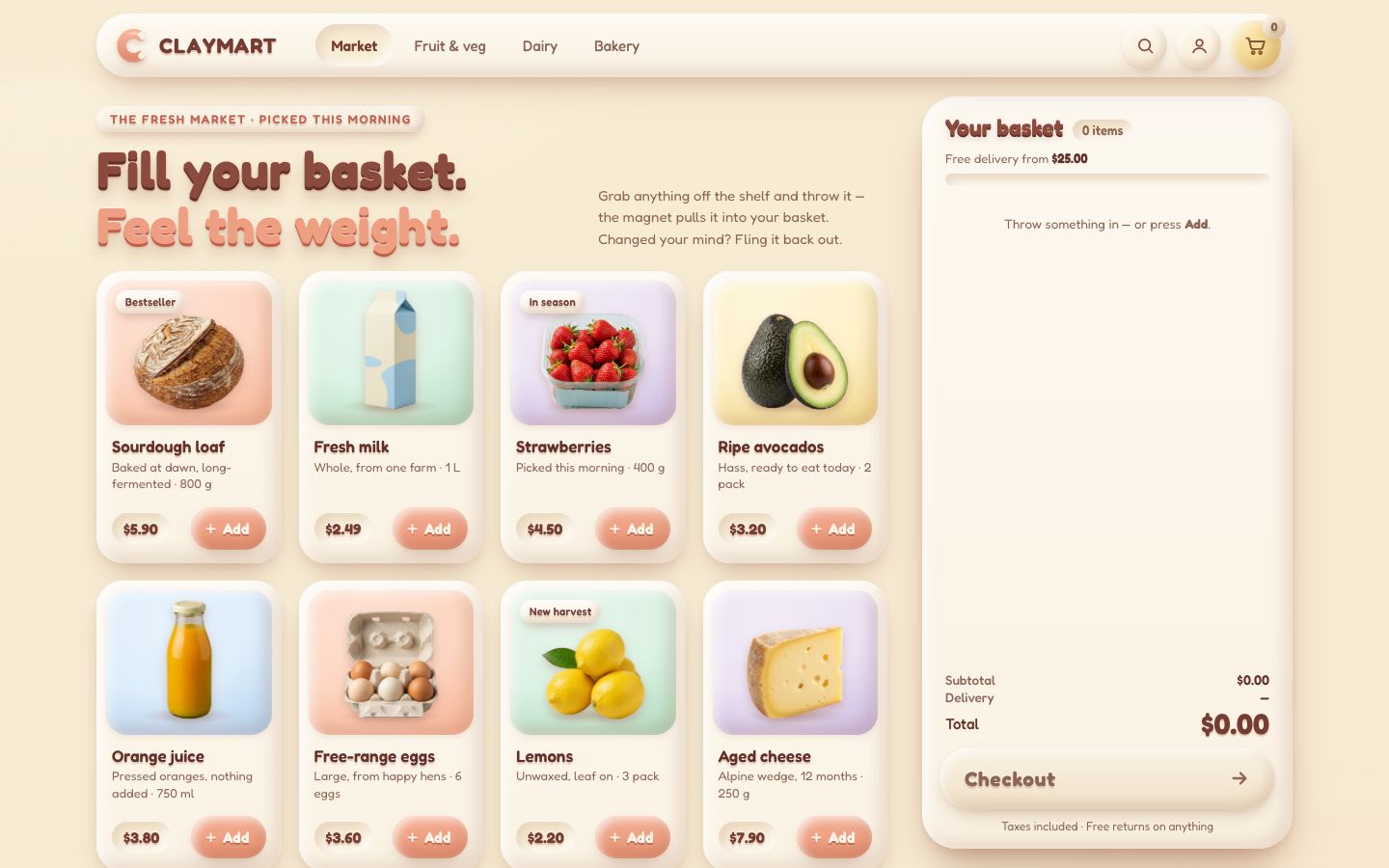
3 · The basket, in layers
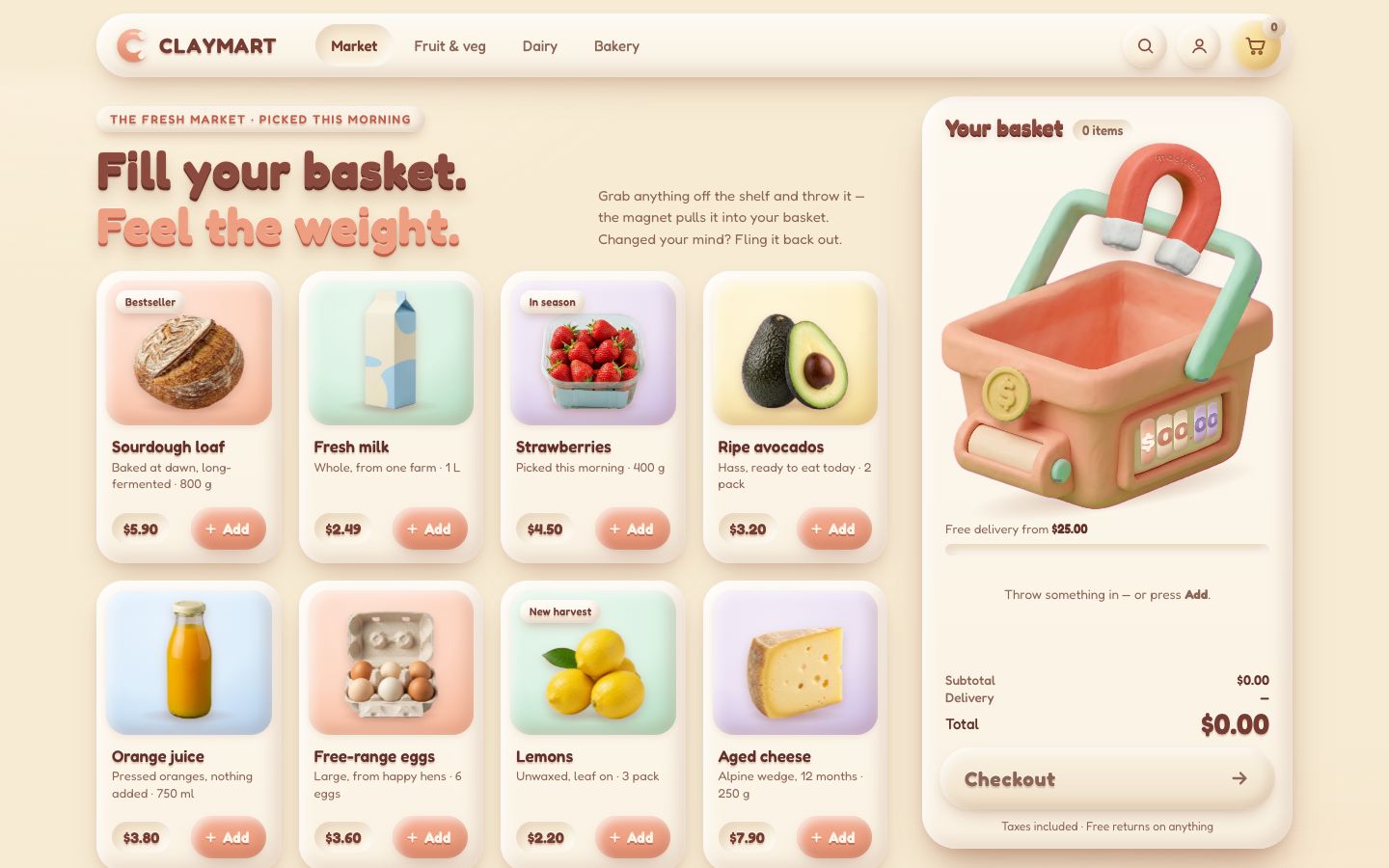
The basket has to hold things inside it: a loaf must sit behind the basket's front wall, not on top of it. So the picture is cut in two. Its back stays in the panel, in the tray; its front (the front walls, the handle's right leg, the coin, the roller counter and the magnet) goes on the stage, a fixed layer over the whole page. Whatever lies between the two is in the basket.
<div class="tray" aria-hidden="true">
  <div class="rig rig--back">
    <i class="rig-shadow"></i>
    <img class="basket-back" src="../../img/basket-back.webp" width="816" height="790" alt="" draggable="false">
  </div>
</div><div class="stage" aria-hidden="true">
<div class="rig rig--front">
<img class="basket-front" src="../../img/basket-front.webp" width="816" height="790" alt="" draggable="false">
<div class="coin"><img src="../../img/coin.webp" width="385" height="400" alt="" draggable="false"></div>
<div class="counter"><div class="counter__face"></div></div>
<div class="magnet">
<div class="magnet__swing">
<img src="../../img/magnet.webp" width="632" height="700" alt="" draggable="false">
<svg class="magnet__word" viewBox="0 0 632 700"><defs><path id="magArc" d="M96 318 A220 220 0 0 1 536 318"/></defs>
<text class="magnet__word-shade"><textPath href="#magArc" startOffset="50%" text-anchor="middle">magnetic</textPath></text>
<text class="magnet__word-face"><textPath href="#magArc" startOffset="50%" text-anchor="middle">magnetic</textPath></text>
</svg>
<i class="magnet__glow magnet__glow--l"></i><i class="magnet__glow magnet__glow--r"></i>
</div>
</div>
</div>
</div>Both halves are one rig of 816 × 900 "basket px", scaled by the same factor k. The tray is never
taller than the screen allows: its width follows the screen's height minus what the panel needs for everything else.
The stage lets every click through (pointer-events: none) and is contain: strict, so nothing
on it can cost the page a layout.
.tray { position: relative; flex: none; width: min(100%, calc((100dvh - var(--tray-reserve)) * 816 / 900)); aspect-ratio: 816 / 900; margin: 0 auto; }   /* never taller than the screen allows */
.rig { position: absolute; left: 0; top: 0; width: 816px; height: 900px; transform-origin: 0 0; }
.rig--back { transform: scale(var(--k, .42)); will-change: transform; }   /* the dip moves a layer, it does not repaint the panel */
.rig-shadow { position: absolute; left: 70px; right: 40px; top: 800px; height: 100px; border-radius: 50%; transform: rotate(-9deg);
  background: radial-gradient(closest-side, rgb(var(--shade) / .38), rgb(var(--shade) / 0)); }
.basket-back, .basket-front { position: absolute; left: 0; top: 110px; width: 816px; height: 790px; pointer-events: none; }.stage { position: fixed; inset: 0; z-index: var(--z-stage); pointer-events: none; overflow: hidden; contain: strict; }Everything about the basket's shape was measured once on its picture, in basket px: the inside line of the front rim, the floor 64 px under it, the inside walls at 92 and 732, the blank where the counter goes.
const RIG_W = 816;
export const BASKET_Y = 110;                                      // the basket's top in the rig
// measured on the basket's picture (basket px)
const RIM = [[74, 344], [388, 444], [601, 383], [754, 322]];     // the inside line of the front rim (basket-front's cut)
const DEPTH = 64;                                                 // the floor, under the rim line
const WALL_L = 92, WALL_R = 732;                                  // the inside walls
const MOUTH = 352;                                                // the mouth's middle height
export const COUNTER_WINDOW = [[478, 562], [681, 514], [679, 610], [480, 698]];   // the counter's blank, TL TR BR BL
The two halves have to line up to the pixel, and reading layout is expensive, so the basket is measured only when
something can have moved it: a ResizeObserver on the panel and its parts, a resize, the fonts arriving.
Then measure() reads the tray once and works out k and the mouth's place in screen px.
// the basket only moves when the layout changes (a resize, the panel's contents, the sheet sliding, the panel's pulse):
// it is measured then, never on an ordinary frame, so a frame in flight reads no layout at all
let dirty = true, onMove = () => {};
export function onBasketMove(fn) { onMove = fn; }   // main.js: wake the frame loop
function remeasure() { dirty = true; onMove(); }
const watch = new ResizeObserver(remeasure);
[panelEl, trayEl, $('.b-head'), $('.b-lines'), $('.b-foot')].forEach((el) => watch.observe(el));
addEventListener('resize', remeasure);
document.fonts.ready.then(remeasure);const toScreen = (bx, by) => ({ x: rig.left + bx * rig.k, y: rig.top + (by + BASKET_Y) * rig.k });
export function measure(always = false) {
if (!dirty && !always) return;
dirty = false;
const r = trayEl.getBoundingClientRect();
if (measured && r.left === rig.left && r.top === rig.top && r.width === rig.width) return;
rig.left = r.left; rig.top = r.top; rig.width = r.width; rig.k = r.width / RIG_W;
backRig.style.setProperty('--k', rig.k);
tray.inL = toScreen(WALL_L, 0).x; tray.inR = toScreen(WALL_R, 0).x;
tray.w = tray.inR - tray.inL; tray.cx = (tray.inL + tray.inR) / 2;
tray.top = toScreen(0, MOUTH).y; tray.floor = toScreen(0, 444 + DEPTH).y;
measured = true;
}drawRig() puts the front on the stage exactly over the back: a translate to the tray's corner and the
same scale. The dip and the magnet's lean are springs; nothing moves them until stage 6. Every write happens only when
the value changed.
export function drawRig(dt) {
  dip.step(dt); lean.step(dt);
  const d = Math.round(dip.value * 100) / 100;
  const front = `translate3d(${rig.left.toFixed(2)}px, ${(rig.top + d).toFixed(2)}px, 0) scale(${rig.k.toFixed(5)})`;
  if (d !== dipShown) { dipShown = d; backRig.style.transform = `translateY(${d}px) scale(var(--k))`; }
  if (front !== rigShown) { rigShown = front; frontRig.style.transform = front; }
  const l = Math.round((MAGNET_REST + lean.value) * 100) / 100;
  if (l !== leanShown) { leanShown = l; magnetSwing.style.transform = `rotate(${l}deg)`; }
  return d;
}
The roller counter sits in a blank on the basket's front, which is drawn in perspective. Four clay rollers are laid
out in a flat 220 × 150 box, and one matrix3d warps that box onto the blank's four corners. The matrix is
the projective transform that maps a rectangle onto a quad: eight equations, solved once.
function quadMatrix(w, h, q) {
  const src = [[0, 0], [w, 0], [w, h], [0, h]], A = [], B = [];
  for (let i = 0; i < 4; i++) {
    const [x, y] = src[i], [u, v] = q[i];
    A.push([x, y, 1, 0, 0, 0, -u * x, -u * y]); B.push(u);
    A.push([0, 0, 0, x, y, 1, -v * x, -v * y]); B.push(v);
  }
  for (let c = 0; c < 8; c++) {                     // Gauss–Jordan with partial pivoting
    let p = c; for (let r = c + 1; r < 8; r++) if (Math.abs(A[r][c]) > Math.abs(A[p][c])) p = r;
    [A[c], A[p]] = [A[p], A[c]]; [B[c], B[p]] = [B[p], B[c]];
    for (let r = 0; r < 8; r++) if (r !== c) { const f = A[r][c] / A[c][c]; for (let k = c; k < 8; k++) A[r][k] -= f * A[c][k]; B[r] -= f * B[c]; }
  }
  const H = B.map((b, i) => b / A[i][i]);
  return `matrix3d(${H[0]},${H[3]},0,${H[6]},${H[1]},${H[4]},0,${H[7]},0,0,1,0,${H[2]},${H[5]},0,1)`;
}const COUNTER_W = 220, COUNTER_H = 150, ROLLER_CELL = 126; // px in the counter's own box
const counterEl = $('.counter');
counterEl.style.transform = quadMatrix(COUNTER_W, COUNTER_H, COUNTER_WINDOW.map(([x, y]) => [x, y + BASKET_Y]));One frame loop draws the shop. It runs only while something moves and stops when everything rests; anything that changes wakes it again.
export function wake() {
  if (running) return;
  running = true;
  last = performance.now();
  requestAnimationFrame(frame);
}

function frame(now) {
  const dt = clamp((now - last) / 1000, 0, MAX_DT);
  last = now;
  const t0 = performance.now();
  measure();                                          // reads layout only when the basket moved
  drawRig(dt);
  const moving = !rigResting();
  frameTimes.push(performance.now() - t0);
  if (frameTimes.length > TIMING_KEEP) frameTimes.shift();
  running = moving;
  if (running) requestAnimationFrame(frame);
}
4 · The physics world
A product out of its card is a body in a small 2D rigid-body engine, written from scratch for this basket. Every body is a rounded box; a circle is a rounded box with no box inside. The engine's own header says what one step does.
// A small 2D rigid-body engine, written from scratch for the basket.
//
// Every body is a ROUNDED BOX: an inner box (half-width hx, half-height hy) with a skin of radius r around it.
// A circle is the same thing with no inner box (hx = hy = 0). That one shape covers a carton, a bottle, a loaf and a
// lemon, and two of them can always be tested against each other the same way.
//
// One step of the world, 120 times a second whatever the screen does (a fixed step keeps it the same on every machine):
//   1. gravity and the app's own forces change each body's velocity
//   2. every pair of bodies that might touch is tested: where they touch, how deep, which way to push (a "manifold")
//   3. the contacts are solved a few times over with impulses: push apart, no sinking in, friction along the surface,
//      a little bounce. Each contact starts from the push it needed last step ("warm starting"), which is what lets
//      a pile stand still instead of shivering
//   4. positions move by the new velocities
//   5. bodies that have been still for a moment go to sleep and stop costing anything until something hits them
// Units are CSS pixels, seconds and radians. Nothing here reads the clock or Math.random: the same inputs give the
// same pile, every time (the seeded RNG below is for the app's small variations).
The world steps 120 times a second whatever the screen does, so a 60 Hz and a 120 Hz screen build the same pile. A frame runs as many fixed steps as the time it covers, at most four, so a stalled tab does not explode.
advance(dt, max = 4) {
  this.acc = Math.min(this.acc + dt, this.h * max);
  let n = 0;
  while (this.acc >= this.h - 1e-9) { this.step(); this.acc -= this.h; n++; }
  return n;
}
A few numbers decide how a pile feels. Overlaps under 0.6 px are left alone (pushing them out exactly makes a stack shiver); contacts are found 5 px before they touch, so a fast throw never passes through the floor; nothing slower than 150 px/s bounces; a body still for 0.45 s goes to sleep.
const SLOP = 0.6;          // px of overlap we leave alone (pushing it out exactly makes stacks shiver)
const BIAS = 0.2;          // how much of the remaining overlap is pushed out per step
const MAX_PUSH = 420;      // px/s, the fastest an overlap is pushed out
const SPECULATIVE = 5;     // px: contacts are found a little before they touch, so fast throws never tunnel
const BOUNCE_FROM = 150;   // px/s: slower hits than this never bounce (a resting pile must not buzz)
const MAX_SPEED = 4200;    // px/s
// a body is still when its centre and its surface (spin × its size) both move slower than SLEEP_SPEED, for SLEEP_AFTER s.
// Judging the spin by the surface keeps a small, thin body (a bottle in a phone's basket) from buzzing awake forever
const SLEEP_SPEED = 14, SLEEP_AFTER = 0.45;
Everything the modules share is one object: the world (gravity 2600 px/s², 10 solver passes, 120 Hz), the products out of their cards, the order, the hand and the phase.
export const shop = {
  world: new World({ gravity: 2600, iterations: 10, hz: 120 }),
  rng: new RNG(40),
  order: new Order(PRODUCTS),
  items: [],              // every product out of its card: flying, held or in the pile
  hold: null,             // what the hand is holding (hand.js)
  phase: 'shop',          // shop → paying → packing → receipt (one frame) → done
  phaseAt: 0,             // world time the phase began
  scale: 0,               // how big the products are as objects (against their dw): it follows the basket (basket.js)
  landedAt: -Infinity,    // world time of the last landing
  pileCap: 1,             // the most the pile may be shown at (lowered when a settled pile still rises over the lid)
  pileChecked: true,      // the settled pile has been checked against the lid
  pileScale: 1,           // the pile's own scale: a full basket shrinks its contents a little so they stay inside it
};export class Order {
constructor(products) {
this.products = products;
this.ordered = products.map(() => 0);
this.inBasket = products.map(() => 0);
this.sequence = []; // product indexes, in the order their lines first appeared
}
get count() { return this.inBasket.reduce((a, n) => a + n, 0); }
get subtotal() { return fromCents(this.inBasket.reduce((a, n, i) => a + n * toCents(this.products[i].price), 0)); }
// … land(), lines(), clear()
}The physics lives in screen px, so the basket's walls are static bodies laid along the measured rim, under it, and moved whenever the basket moves. The floor is three slabs that follow the rim; two side walls guide what comes in; the pile has its own side walls, one piece each from 320 px above the rim down past the floor. The filter says which pairs may touch: the walls only touch what is coming in over the rim or already in the pile, so a product thrown past the basket never bounces off its outside.
// ---- the walls ----------------------------------------------------------------------------------------------------
// the floor follows the rim (three slabs); two side walls up to the mouth guide what is coming in; the pile has its own
// side walls, one piece each from high above the rim down past the floor (two pieces would leave a seam a carton's
// corner can catch on and buzz). Only the pile touches those (see filter below), so anything may fly in over the rim
const walls = { floor: [], side: [], pile: [] };
function wall(kind) {
  const b = new Body({ hx: 1, hy: 1, r: 1, isStatic: true, friction: 0.7, restitution: 0.1 });
  b.wall = kind;
  return shop.world.add(b);
}
for (let i = 1; i < RIM.length; i++) walls.floor.push(wall('floor'));
walls.side.push(wall('side'), wall('side'));
walls.pile.push(wall('pile'), wall('pile'));

// lay a slab along the line a → b, under it
function lay(body, a, b) {
  const dx = b.x - a.x, dy = b.y - a.y, L = Math.hypot(dx, dy), nx = -dy / L, ny = dx / L;
  body.setPose((a.x + b.x) / 2 + nx * SLAB / 2, (a.y + b.y) / 2 + ny * SLAB / 2, Math.atan2(dy, dx), L / 2 + 12, SLAB / 2 - 1);
}
function placeWalls() {
  RIM.forEach((p, i) => { if (i) lay(walls.floor[i - 1], toScreen(RIM[i - 1][0], RIM[i - 1][1] + DEPTH), toScreen(p[0], p[1] + DEPTH)); });
  const top = tray.top - 30, half = SLAB / 2 - 1;
  [tray.inL - SLAB / 2, tray.inR + SLAB / 2].forEach((x, i) => {
    walls.side[i].setPose(x, (top + tray.floor) / 2, 0, half, (tray.floor - top) / 2 + SLAB);
    walls.pile[i].setPose(x, (top - ABOVE_RIM + tray.floor + SLAB) / 2, 0, half, (tray.floor + SLAB - top + ABOVE_RIM) / 2);
  });
}

// which pairs may touch. Items touch each other; the basket's walls only touch what is coming in over the rim or
// already in it, so a product thrown past the basket never bounces off its outside
shop.world.filter = (a, b) => {
  if (!a.isStatic && !b.isStatic) return true;
  const wallBody = a.isStatic ? a : b, body = wallBody === a ? b : a, it = body.item;
  if (!it) return false;
  if (wallBody.wall === 'pile') return it.mode === 'cart';
  if (wallBody.wall === 'floor' && it.mode === 'cart') return true;
  return (it.mode === 'pull' || it.mode === 'held') && inColumn(body);
};
makeItem() turns a product into a body and a picture on the stage. Products are sized by the basket
(0.74 of their dw on a 1440 × 900 desk), so a pile looks the same in a big basket and a small one.
export function makeItem(pi, x, y) {
  const p = PRODUCTS[pi], { w, h, r } = p.shape, S = shop.scale;
  const circle = w === h && r * 2 === w;
  const body = new Body({ x, y, hx: circle ? 0 : (w / 2 - r) * S, hy: circle ? 0 : (h / 2 - r) * S, r: r * S, ...p.material });
  const el = document.createElement('div');
  el.className = 'item is-ghost';
  const W = p.dw * S, H = p.dh * S;
  el.style.width = W + 'px'; el.style.height = H + 'px';
  el.innerHTML = `<img src="${p.img}" alt="" draggable="false"><span class="units"></span>`;
  stage.append(el);
  const it = {
    pi, p, body, el, badge: $('.units', el), units: 1, mode: 'new', t0: shop.world.time, counted: false,
    W, H, half: { x: w / 2 * S, y: h / 2 * S }, area: w * h * S * S,
    vis: new Spring(1, spring(380, 22)),   // its drawn scale (grows off the card, lifts in the hand, pops on a merge)
    alpha: 1, shown: { tf: '', alpha: 1 }, card: null, bodyScale: 1,
  };
  body.item = it;
  shop.world.add(body);
  shop.items.push(it);
  return it;
}
Landing is the moment the order counts it, not before. For now the only way in is dropOneIn(): made
just above the mouth, turned a little, and let fall into the pile.
// over the rim and in: it is in the basket now. The numbers change on landing, not before
export function land(it) {
  setMode(it, 'cart');
  const b = it.body;
  b.vy = Math.min(Math.max(b.vy, 240), 1000); b.vx *= 0.5;
  shop.order.land(it.pi, it.units);
  shop.landedAt = shop.world.time;
  changed('add', it.pi);
}

// one more, dropped in from just above the basket (stage 7 puts this on the list's +)
export function dropOneIn(pi) {
  if (shop.phase !== 'shop') return;
  const it = makeItem(pi, tray.cx + shop.rng.range(-0.25, 0.25) * tray.w, tray.top - 90 * shop.scale);
  commit(it);
  if (calm) return placeCalm(it);
  it.body.angle = shop.rng.range(-0.5, 0.5); it.body.w = shop.rng.range(-3, 3);
  land(it);
  wake();                                  // this can come while the frame loop sleeps
}
A full basket must not cover the magnet or rise over the handle, so the pile has a ceiling: a line under the magnet's tips and inside the handle. It is soft. A rigid lid wedges a carton against a side wall; a soft one presses whatever rises over it straight down, tips a tall bottle over, and only for 1.2 s after a landing, so a pile with nowhere to go can still fall asleep.
// the pile's ceiling: under the magnet's tips and inside the handle's frame, so a full basket never covers either. It
// is soft (items.js pushes down whatever rises over it) rather than a wall: a rigid lid wedges a carton against the
// side wall, a soft one lets the pile find its own way under it
const LID = [[92, 225], [180, 222], [260, 214], [330, 210], [400, 200], [480, 210], [560, 244], [640, 250], [732, 226]];// the soft lid: whatever in the pile rises over it is pressed straight down (never sideways, so nothing wedges), and a
// tall thing standing up is tipped over, towards the middle of the basket. It presses for a moment after each landing
// only: a pile with nowhere to go must still be allowed to sleep
function underLid(it, h) {
const b = it.body, c = Math.abs(Math.cos(b.angle)), s = Math.abs(Math.sin(b.angle));
const over = lidAt(b.x) - (b.y - (s * b.hx + c * b.hy + b.r));
if (over <= 0 || !b.awake || shop.world.time - shop.landedAt > LID_BUDGET) return;
b.vy = Math.max(b.vy, Math.min(LID_PUSH_MAX, over * LID_PUSH));
if (b.hy > b.hx && c > 0.8 && Math.abs(b.w) < TIP_SPIN) b.w += (b.x < tray.cx ? 1 : -1) * TIP_SPIN * 0.2;
}
const MODES = {
cart(it, h) {
// a last guard: anything that ever ends up outside the basket is put back in at the top
const b = it.body;
if (b.y > tray.floor + 40 || b.x < tray.inL - 6 || b.x > tray.inR + 6 || b.y < tray.top - 300) {
b.x = aimFor(it); b.y = tray.top - it.half.y - 40; b.vx = b.vy = b.w = 0; shop.world.wakeAll();
}
if (b.circle) b.w *= 1 - h * 1.2; // a little rolling resistance
underLid(it, h);
},
};Every frame draws each product where its body is, with one transform, written only when it changed. In the
basket a product is .is-in: it sits under the basket's front on the stage.
export function drawItems(dt, dip) {
  let moving = false;
  for (const it of shop.items) {
    it.vis.step(dt);
    if (!it.vis.resting(0.001)) moving = true;
    const b = it.body, y = it.mode === 'cart' ? b.y + dip : b.y;
    const tf = `translate3d(${(b.x - it.W / 2).toFixed(2)}px,${(y - it.H / 2).toFixed(2)}px,0) rotate(${b.angle.toFixed(4)}rad) scale(${it.vis.value.toFixed(4)})`;
    if (tf !== it.shown.tf) {
      it.shown.tf = tf; it.el.style.transform = tf;
      if (it.units > 1) it.badge.style.transform = `rotate(${(-b.angle).toFixed(4)}rad)`;
    }
    if (it.alpha !== it.shown.alpha) { it.shown.alpha = it.alpha; it.el.style.opacity = it.alpha.toFixed(3); }
  }
  return moving;
}.item { position: absolute; left: 0; top: 0; z-index: 3; will-change: transform; pointer-events: auto; cursor: grab; touch-action: none; user-select: none; -webkit-user-select: none; transform-origin: 50% 50%; }
.item img { display: block; width: 100%; height: 100%; pointer-events: none; filter: drop-shadow(0 8px 8px rgb(var(--shade) / .3)); }
.item.is-in { z-index: 1; }
.item.is-in img { filter: drop-shadow(0 4px 4px rgb(var(--shade) / .35)); }
.item.is-held { z-index: 4; cursor: grabbing; }
.item.is-ghost { pointer-events: none; }function frame(now) {
const dt = clamp((now - last) / 1000, 0, MAX_DT);
last = now;
const t0 = performance.now();
measure(); // reads layout only when the basket moved
shop.world.advance(dt);
let moving = shop.world.active;
const dip = drawRig(dt);
moving = drawItems(dt, dip) || moving;
moving = moving || !rigResting() || shop.items.some((it) => it.mode !== 'cart');
frameTimes.push(performance.now() - t0);
if (frameTimes.length > TIMING_KEEP) frameTimes.shift();
running = moving;
if (running) requestAnimationFrame(frame);
}Until stage 5 the Add button drops one straight in.
// for now the Add button drops one straight in (stage 5: it throws it)
for (const card of cards) card.add.addEventListener('click', () => dropOneIn(card.i));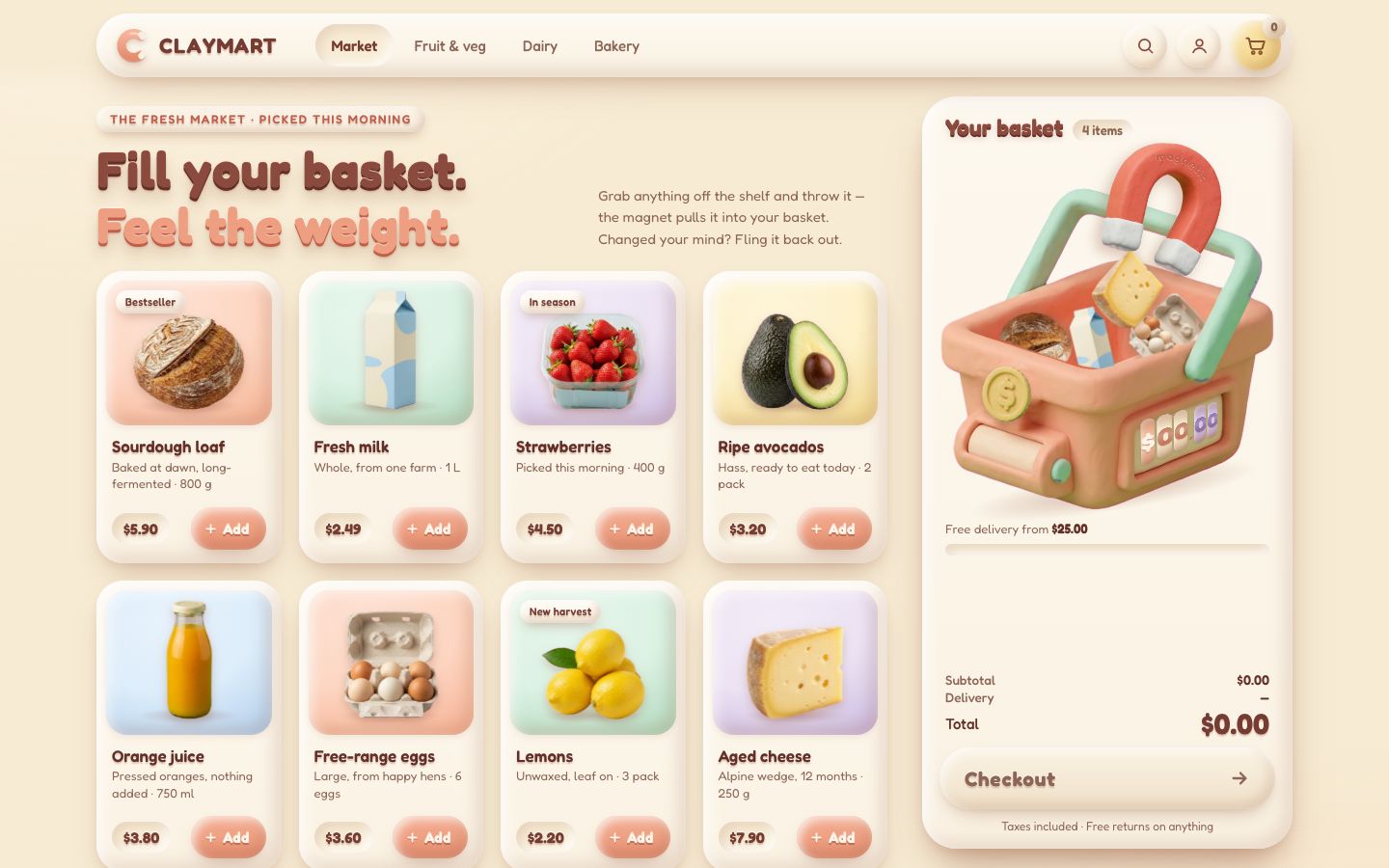
5 · Grab and throw
Press a product's picture and it comes off its card into your hand. The hand is a soft spring between the point you pressed (on the body) and the pointer: a carton grabbed by its top hangs from there and swings.
// the hand: a soft spring between a point on a body and the pointer. Grab a carton by its top and it hangs from there.
class Grab {
  constructor(body, wx, wy, { hz = 5.5, damping = 0.8, maxForce = 60000 } = {}) {
    this.body = body; this.hz = hz; this.damping = damping; this.maxForce = maxForce * body.mass;
    const c = Math.cos(body.angle), s = Math.sin(body.angle), dx = wx - body.x, dy = wy - body.y;
    this.lx = c * dx + s * dy; this.ly = -s * dx + c * dy;   // where it was grabbed, on the body
    this.tx = wx; this.ty = wy; this.px = 0; this.py = 0;
  }
  // … pre() and solve(): the spring, solved with the contacts every step
}// press on a product's picture: it comes off the card into your hand
export function takeFromCard(card, x, y) {
if (shop.phase !== 'shop' || shop.hold || card.out || card.el.hidden) return null;
const a = artBox(card);
if (!a) return null;
const it = makeItem(card.i, a.x, a.y);
it.card = card;
it.vis.value = a.scale; it.vis.target = calm ? 1 : LIFT; // it grows from the card's size to its own, lifted
card.out = it;
emptyCard(card); // the card is empty while it is in the hand
beginHold(it, x ?? a.x, y ?? a.y, false);
return it;
}// the hand holds it where you pressed (on the object), with a soft spring
function beginHold(it, x, y, fromCart) {
setMode(it, 'held');
const b = it.body;
const gx = clamp(x, b.x - it.half.x * 0.85, b.x + it.half.x * 0.85), gy = clamp(y, b.y - it.half.y * 0.85, b.y + it.half.y * 0.85);
const grab = shop.world.grab(b, gx, gy, { hz: calm ? 9 : 5.5, damping: calm ? 1 : 0.7 });
shop.hold = { it, grab, fromCart, x, y, ox: x - gx, oy: y - gy, samples: [{ x, y, at: performance.now() }] };
grab.tx = x - shop.hold.ox; grab.ty = y - shop.hold.oy;
wake();
}Every move is kept with its time from performance.now(). When you let go, the speed comes from the last
80 ms only: a hand that stopped before it let go does not throw. The speed is capped at 3200 px/s.
const SAMPLE_WINDOW = 80;          // ms: the hand's speed is measured over its last 80 ms (a hand that stopped does not throw)
const MAX_THROW = 3200;            // px/s
const THROW_FROM = 420;            // px/s: slower than this is a drop, not a throw
const HEADING = Math.cos(40 * Math.PI / 180);   // a throw within 40° of the basket's mouth is meant for it
const ADD_GRAVITY = 0.62;          // the Add arc flies under a lighter gravity
const ADD_HOP = -320; // px/s: the arc always hops up a little first, even when the basket is belowexport function moveHold(x, y) {
const hold = shop.hold;
if (!hold) return;
hold.x = x; hold.y = y;
hold.grab.tx = x - hold.ox; hold.grab.ty = y - hold.oy;
const now = performance.now();
hold.samples.push({ x, y, at: now });
while (hold.samples.length > 2 && now - hold.samples[0].at > 150) hold.samples.shift();
}
// how fast the hand was moving, from the last 80 ms only (performance.now(), not event times)
function handSpeed() {
const now = performance.now(), s = shop.hold.samples.filter((p) => now - p.at <= SAMPLE_WINDOW);
if (s.length < 2) return { x: 0, y: 0 };
const dt = Math.max(16, s.at(-1).at - s[0].at) / 1000;
const v = { x: (s.at(-1).x - s[0].x) / dt, y: (s.at(-1).y - s[0].y) / dt }, sp = Math.hypot(v.x, v.y);
return sp > MAX_THROW ? { x: v.x * MAX_THROW / sp, y: v.y * MAX_THROW / sp } : v;
}What letting go does depends on where and how fast. Over the basket, it drops in. Faster than 420 px/s, it is a throw: it flies, and if it was heading within 40° of the mouth it is "bound" for it. Anything else goes back to its card. Something lifted out of the pile and let go outside the basket comes off the order.
export function releaseHold(given) {
  const hold = shop.hold;
  if (!hold) return null;
  const { it, fromCart } = hold, b = it.body;
  const v = given || handSpeed();
  shop.world.release(hold.grab);
  const over = handOver(hold.x, hold.y, fromCart);
  shop.hold = null;
  it.vis.target = 1;
  b.vx = v.x; b.vy = v.y;
  wake();
  if (fromCart) {
    if (!over) { flingOut(it, v); return it; }                 // let go outside the basket: it is taken off the order
    if (calm) b.vx = b.vy = b.w = 0;
    setMode(it, 'cart');                                       // back into the pile (stage 6: the magnet takes it)
    return it;
  }
  if (calm) { if (over) placeCalm(commit(it)); else goHome(it); return it; }
  if (over) { setMode(it, 'free'); it.bound = true; return it; }   // let go over the basket: it drops in
  if (Math.hypot(v.x, v.y) > THROW_FROM) {                     // thrown: it flies; coming down into the mouth, it is in
    setMode(it, 'free');
    it.bound = heading(b, v);
    it.flight = 0.5;
    b.w += clamp(v.x / 600, -6, 6);
    return it;
  }
  goHome(it);                                                  // let go anywhere else: back onto its card
  return it;
}
A flying product has no magnet to catch it yet, so the rule is plain physics: coming down into the mouth, it is in. A miss flies home onto its card after 0.6 s, or as soon as it leaves the screen.
free(it, h, age) {
  const b = it.body;
  if (inColumn(b) && b.vy > 0 && b.y + it.half.y > tray.top) { land(commit(it)); return; }   // coming down into the mouth: it is in
  const gone = b.y > innerHeight + 200 || b.x < -200 || b.x > innerWidth + 200;
  if ((!it.bound && age > MISS_AFTER) || gone) goHome(it);           // a miss: back to its card
},home(it, h, age) {
const b = it.body, a = artBox(it.card), k = 1 - Math.exp(-h * 13);
if (!a) { setMode(it, 'out'); return; } // its card left the shelf (a filter): it just fades
b.x += (a.x - b.x) * k; b.y += (a.y - b.y) * k;
b.angle += (Math.round(b.angle / (2 * Math.PI)) * 2 * Math.PI - b.angle) * k;
it.vis.target = a.scale;
if (Math.hypot(a.x - b.x, a.y - b.y) < 0.8 || age > 1.2) arriveHome(it);
},
// back to the card it came from (a throw that was not taken)
export function goHome(it) {
if (!it.card) return dropItem(it);
setMode(it, 'home');
if (calm) arriveHome(it);
}
function arriveHome(it) {
restockNow(it.card);
dropItem(it);
}// let go of something outside the basket: it flies off where you threw it, fades, and comes off the order
export function flingOut(it, v) {
shop.order.inBasket[it.pi] -= it.units; shop.order.ordered[it.pi] -= it.units;
setMode(it, 'out');
const b = it.body;
if (calm) dropItem(it);
else { b.vx = v.x; b.vy = Math.min(v.y, -260); b.w += clamp(v.x / 300, -9, 9); }
shop.world.wakeAll();
changed('remove', it.pi, it.units);
}The card empties while its product is out, and grows it back from 55 % of its size when it is gone for good. The frame loop must never read layout, so each card's picture is measured once per layout and kept in page px; the scroll comes from the scroll event.
export function emptyCard(card) { card.stock.value = card.stock.target = 0; }
export function restockLater(card, delay) { card.restockAt = shop.world.time + delay; }
export function restockNow(card) { card.out = null; card.stock.value = card.stock.target = 1; }

export function stepCards(dt) {
  let moving = false;
  for (const c of cards) {
    if (c.restockAt >= 0) {
      moving = true;
      if (shop.world.time >= c.restockAt) { c.restockAt = -1; if (!c.out) c.stock.target = 1; }
    }
    if (c.stock.resting(0.002) && c.stock.value === c.shownStock) continue;
    moving = true;
    c.stock.step(dt);
    c.shownStock = c.stock.value;
    const v = clamp(c.stock.value, 0, 1.2);
    c.pic.style.transform = `translate(-50%, 0) scale(${(PIC_MIN + (1 - PIC_MIN) * v).toFixed(4)})`;
    c.pic.style.opacity = clamp(v * 1.4, 0, 1).toFixed(3);
  }
  return moving;
}// Measured once per layout change (load, resize, a filter) and kept in page px, so the frame loop never reads layout:
// the bottom middle of the picture, and its size before the stock scale
let scroll = { x: scrollX, y: scrollY };
addEventListener('scroll', () => { scroll = { x: scrollX, y: scrollY }; }, { passive: true });
export function measureCards() {
scroll = { x: scrollX, y: scrollY };
for (const c of cards) {
if (c.el.hidden) { c.box = null; continue; }
const a = c.art.getBoundingClientRect();
c.box = { x: a.left + c.pic.offsetLeft + scroll.x, bottom: a.top + c.pic.offsetTop + c.pic.offsetHeight + scroll.y,
w: c.pic.offsetWidth, h: c.pic.offsetHeight };
}
}The Add button throws for you. The arc is solved to land in the mouth after 0.5 to 0.85 s, under a lighter gravity (0.62), and it always hops up a little first, even when the basket is below.
export function addFromCard(pi, from = null) {
  if (shop.phase !== 'shop') return null;
  const card = cards[pi];
  const art = from ? null : artBox(card);
  const a = from ? { x: from.x, y: from.y, scale: 0.6 } : art && card.out ? { ...art, scale: 1 } : art;
  if (!a) return null;
  const it = makeItem(pi, a.x, a.y);
  it.vis.value = a.scale; it.vis.target = 1;
  commit(it);
  if (!from && !card.out) { emptyCard(card); restockLater(card, 0.22); }   // the shelf restocks itself
  wake();
  if (calm) return placeCalm(it);
  launch(it, tray.cx + shop.rng.range(-0.24, 0.24) * tray.w, tray.top - it.half.y - 30);
  return it;
}
function launch(it, tx, ty) {
  const b = it.body, g = shop.world.gravity * ADD_GRAVITY, dx = tx - b.x, dy = ty - b.y;
  let t = clamp(0.42 + Math.hypot(dx, dy) / 2600, 0.5, 0.85);
  let vy = (dy - 0.5 * g * t * t) / t;
  if (vy > ADD_HOP) { t = (-ADD_HOP + Math.sqrt(ADD_HOP * ADD_HOP + 2 * g * dy)) / g; vy = ADD_HOP; }
  setMode(it, 'free');
  b.gravityScale = ADD_GRAVITY;
  b.vx = dx / t; b.vy = vy; b.w = shop.rng.range(3.5, 7) * (dx > 0 ? 1 : -1);
  it.bound = true; it.flight = t;
}
Pointer events, so a mouse, a finger and a pen all work. The pointer is captured on the card's picture, so the drag
keeps going wherever the finger goes; touch-action: none on the tile keeps the page from scrolling under it.
function capture(e, el) {
  shop.hold.id = e.pointerId; shop.hold.el = el;
  el.setPointerCapture(e.pointerId);
  el.addEventListener('pointermove', onMove);
  el.addEventListener('pointerup', onUp);
  el.addEventListener('pointercancel', onUp);
}
function onMove(e) { if (shop.hold && e.pointerId === shop.hold.id) moveHold(e.clientX, e.clientY); }
function onUp(e) {
  if (!shop.hold || e.pointerId !== shop.hold.id) return;
  const el = shop.hold.el;
  el.removeEventListener('pointermove', onMove); el.removeEventListener('pointerup', onUp); el.removeEventListener('pointercancel', onUp);
  releaseHold(e.type === 'pointercancel' ? { x: 0, y: 0 } : null);
}export function listen() {
for (const card of cards) {
card.art.addEventListener('pointerdown', (e) => {
if (e.button !== 0) return;
e.preventDefault();
if (takeFromCard(card, e.clientX, e.clientY)) capture(e, card.art);
});
card.add.addEventListener('click', () => addFromCard(card.i));
}
// … and one pointerdown on the stage for anything in the pile
}Under the basket, words say what letting go will do: "Let go to add", or "Let go to remove" for something carried out of the pile.
<p class="drop-hint"><span class="dh-add">Let go to add</span><span class="dh-out">Let go to remove</span></p>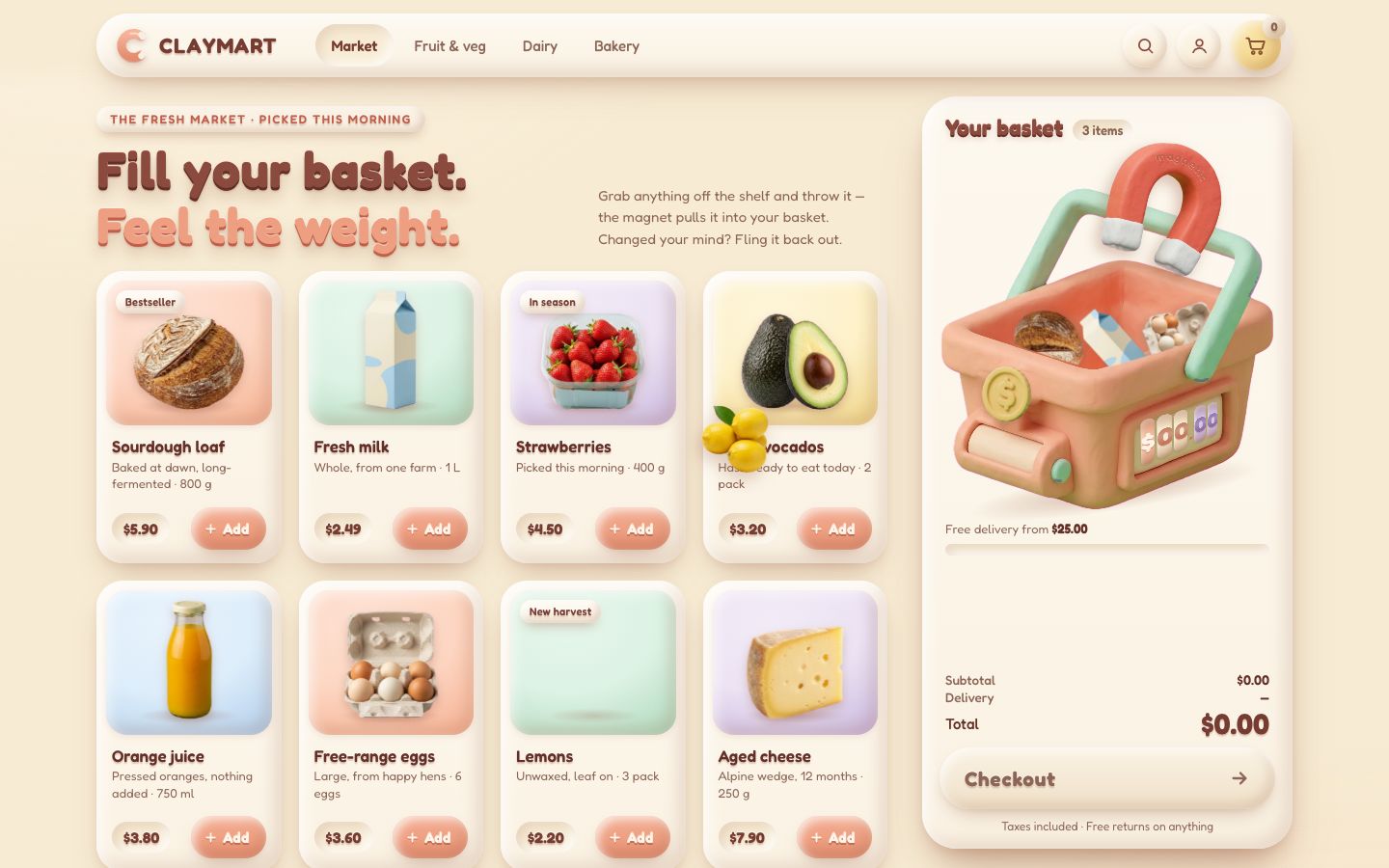
6 · The magnet
The magnet has a field: nothing far away, all of it right over the mouth. Its reach is 750 × the basket's scale (320 px on a desk), and it fades out from a quarter of that to all of it.
// how hard it pulls on something at this point: nothing far away, all of it right over the mouth
function field(b) {
  const x = clamp(b.x, tray.inL + 24, tray.inR - 24);
  return 1 - smoothstep(tray.reach * 0.25, tray.reach, Math.hypot(b.x - x, b.y - tray.top));
}
Once the field is stronger than 0.55, the magnet has it. A caught product is steered, not teleported: its velocity bends towards a point over the mouth a little more every step, faster the farther it is, up to 2400 px/s.
export function catchIt(it) {
  setMode(it, 'pull');
  it.aim = aimFor(it);
  ring(it.body.x, it.body.y, 0.6);
  return it;
}
// steer a velocity towards a point; s (0..1) is how much the magnet has hold of it
function steer(b, tx, ty, s, h, top = 2400) {
  const dx = tx - b.x, dy = ty - b.y, d = Math.hypot(dx, dy) || 1, sp = Math.min(top, 240 + d * 7);
  const k = 1 - Math.exp(-h * 16 * s);
  b.vx += (dx / d * sp - b.vx) * k; b.vy += (dy / d * sp - b.vy) * k;
  b.w *= 1 - Math.min(1, h * 2.5 * s);
}
Now a flying product feels the field, and one that is bound for the basket is caught for sure: its own flight time adds to the field, from 55 % of the flight on.
free(it, h, age) {
  const b = it.body;
  let s = field(b);
  if (it.bound) s = Math.max(s, clamp((age - it.flight * 0.55) / (it.flight * 0.45), 0, 1));
  if (s > 0) { steer(b, aimFor(it), tray.top - it.half.y - 10, s, h); b.gravityScale = (it.bound ? 0.62 : 1) * (1 - s); }
  if (s > CATCH_AT) { commit(it); catchIt(it); return; }
  const gone = b.y > innerHeight + 200 || b.x < -200 || b.x > innerWidth + 200;
  if (!it.bound && (age > MISS_AFTER || gone)) goHome(it);
},
Even in the hand the magnet tugs: carry something near the basket and it leans in towards the mouth. While it pulls, a caught product has no gravity; over its aim it is pulled down past the rim, and then it lands (after 1.4 s it lands whatever happens).
held(it, h) {
  // in the hand, near the basket: the magnet already tugs at it, so it leans in towards the mouth
  if (shop.hold?.fromCart) return;
  const b = it.body, s = field(b);
  if (s <= 0) return;
  const dx = aimFor(it) - b.x, dy = tray.top - b.y, d = Math.hypot(dx, dy) || 1;
  b.vx += dx / d * s * 2200 * h; b.vy += dy / d * s * 2200 * h;
},pull(it, h, age) {
const b = it.body;
b.gravityScale = 0;
const over = Math.abs(b.x - it.aim) < Math.max(14, it.half.x * 0.6);
steer(b, it.aim, over ? tray.top + it.half.y + 30 : tray.top - it.half.y - 16, 1, h);
if ((over && b.y > tray.top - it.half.y * 0.25) || age > 1.4) land(it);
},Landing now marks the catch with a ring, the magnet lets go with a small buck, and the pile makes room.
// over the rim and in: it is in the basket now. The numbers change on landing, not before
export function land(it) {
  setMode(it, 'cart');
  const b = it.body;
  b.vy = Math.min(Math.max(b.vy, 240), 1000); b.vx *= 0.5;
  shop.order.land(it.pi, it.units);
  shop.landedAt = shop.world.time;
  ring(b.x, tray.top + 6, 1);
  buck(160);                                                     // the magnet lets go: it bucks a little
  changed('add', it.pi);
  makeRoom(it);
  fitPile();
}
The pile has limits: two of a kind, ten things in all on a desk (six in a phone's smaller basket). Past that, an extra one melts into one already there and its badge counts ×2, ×3.
// how many of one product may lie in the pile before an extra unit merges into one already there (×2, ×3 …), and how
// many objects the pile holds in all
const PILE_CAPS = { panel: { each: 2, total: 10 }, docked: { each: 2, total: 6 } };// the pile has a limit: past it, an extra unit of something merges into one already there (its badge counts ×2, ×3)
function makeRoom(newest) {
const { each, total } = caps();
const same = pile().filter((x) => x.pi === newest.pi);
if (same.length > each) return mergeInto(newest, same[0]);
if (pile().length <= total) return;
const groups = PRODUCTS.map((_, i) => pile().filter((x) => x.pi === i));
const most = groups.reduce((a, g) => (g.length > a.length ? g : a), []);
if (most.length > 1) mergeInto(most.at(-1), most[0]);
}The basket holds so much and no more. The room between its floor and its lid is measured once, in basket px². When what is in it needs more than that (a real pile fills about 62 % of its room), everything in it is shown, and is as a body, a little smaller, down to 0.72. One or two products look exactly as before.
// the room between the floor and the lid, in basket px² (the pile's capacity; it scales with k²)
const ROOM = (() => {
  let area = 0;
  for (let x = WALL_L; x < WALL_R; x += 2) area += 2 * Math.max(0, lineAt(RIM, x) + DEPTH - lineAt(LID, x));
  return area;
})();
export const room = () => ROOM * rig.k * rig.k;// ---- the pile's scale --------------------------------------------------------------------------------------------------
// The basket holds so much and no more: when what is in it needs more room than there is under the magnet and the
// handle, everything in it is shown (and is, as a body) a little smaller, so the pile always stays inside the basket
function fitPile() {
const inPile = pile();
const need = inPile.reduce((a, it) => a + it.area, 0) / PACKING;
const s = need ? clamp(Math.sqrt(room() / need), MIN_PILE_SCALE, shop.pileCap) : 1;
if (Math.abs(s - shop.pileScale) >= 0.004 || s === 1) shop.pileScale = s;
let resized = false;
for (const it of inPile) {
if (it.bodyScale === shop.pileScale) continue;
it.body.resize(shop.pileScale); it.bodyScale = shop.pileScale; it.vis.target = shop.pileScale;
if (calm) it.vis.snap();
resized = true;
}
if (resized) shop.world.wakeAll();
shop.pileChecked = false;
}The rig comes alive. The basket gives under every landing, the harder and heavier the deeper; the magnet leans up to 7° more while it pulls and jiggles on a loose spring.
// the basket gives under every landing (dip, px); the magnet leans and jiggles on top of its 25° (lean, degrees)
export const dip = new Spring(0, spring(460, 15));
export const lean = new Spring(0, spring(240, 8));
export function thud(speed, mass) { if (!calm) dip.velocity += clamp(speed * mass / shop.scale / shop.scale * 0.012, 0, 120); }
export function buck(magnet, basket = 0) { if (!calm) { lean.velocity += magnet; dip.velocity += basket; } }// the basket gives under every landing in the pile: the harder and heavier, the deeper
shop.world.afterStep = () => {
for (const hit of shop.world.impacts) {
const it = (hit.a.item?.mode === 'cart' && hit.a.item) || (hit.b.item?.mode === 'cart' && hit.b.item);
if (!it) continue;
const other = it.body === hit.a ? hit.b : hit.a;
if (other.wall === 'floor' || other.item?.mode === 'cart') thud(hit.speed, it.body.mass);
}
};// how hard the magnet pulls on what is in the hand or in the air (for its glow and lean)
export function magnetPull() {
let pull = 0;
for (const it of shop.items) {
if (it.mode === 'held' && !shop.hold?.fromCart) pull = Math.max(pull, 0.15 + 0.85 * field(it.body));
else if (it.mode === 'free') pull = Math.max(pull, field(it.body));
else if (it.mode === 'pull') pull = 1;
}
return pull;
}// pull: how hard the magnet pulls right now (0..1): its tips glow, it leans in
export function drawRig(dt, pull) {
lean.target = MAGNET_LEAN * pull;
dip.step(dt); lean.step(dt);
if (Math.abs(pull - pullShown) > 0.01) { pullShown = pull; frontRig.style.setProperty('--pull', pull.toFixed(3)); }
// … the dip and the lean are written as in stage 3
}The glow under each tip was in the page since stage 3; its opacity is the pull.
.magnet__glow { position: absolute; top: 76%; width: 36%; height: 28%; border-radius: 50%; opacity: var(--pull, 0);
  background: radial-gradient(closest-side, rgb(255 246 214 / .95), rgb(255 214 150 / .5) 45%, rgb(255 200 140 / 0)); mix-blend-mode: screen; filter: blur(2px); will-change: opacity; }
.magnet__glow--l { left: 1%; } .magnet__glow--r { right: 1%; }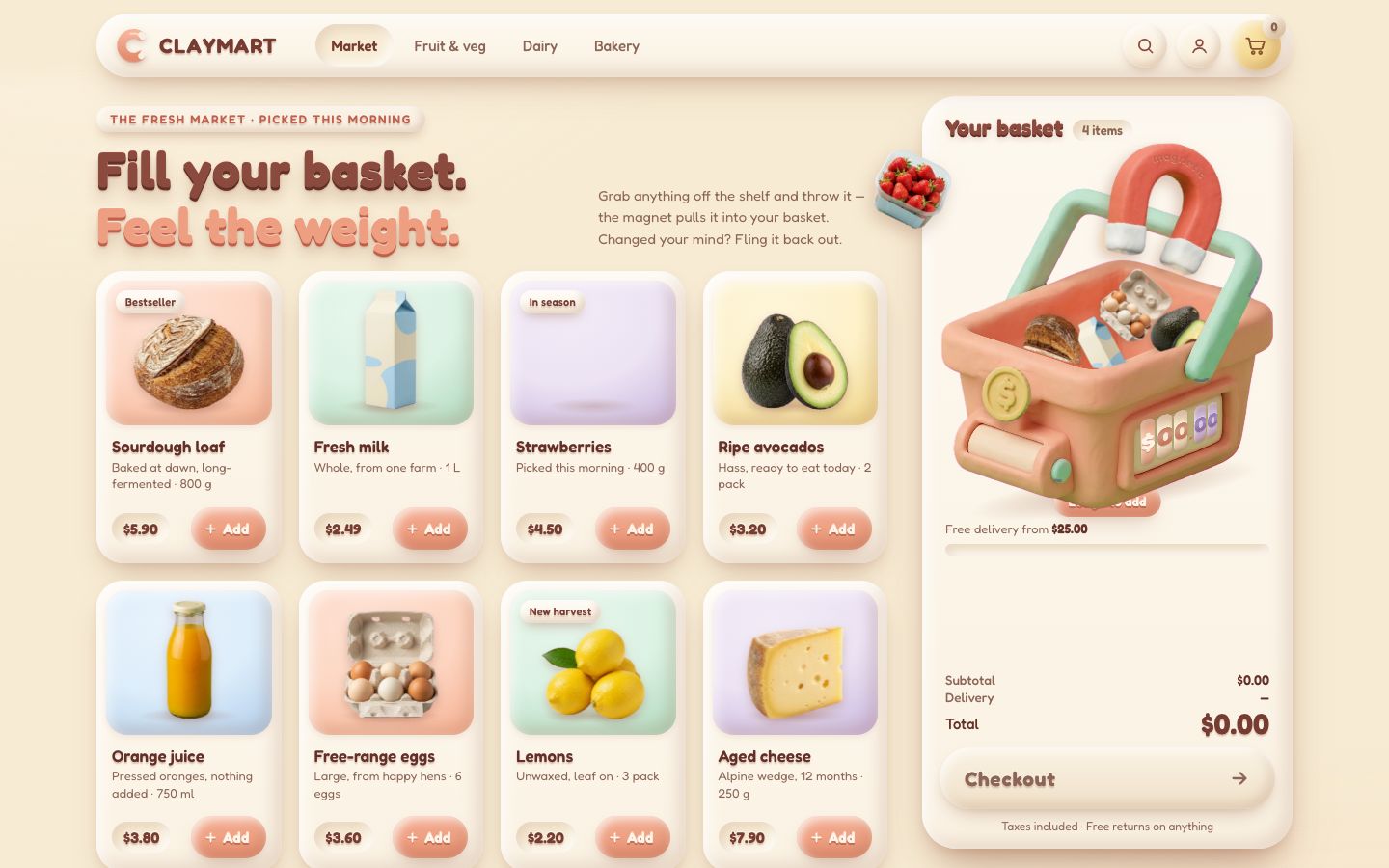
7 · The numbers: list, totals, rollers, delivery
The delivery rule is two constants: $3.99 under $25, free from $25. An empty basket is not delivered, so it costs nothing. Money is kept in whole cents, so $33.59 is always $33.59.
export const DELIVERY_FEE = 3.99;
export const FREE_DELIVERY_FROM = 25;
const toCents = (v) => Math.round(v * 100);
const fromCents = (c) => c / 100;get count() { return this.inBasket.reduce((a, n) => a + n, 0); }
get subtotal() { return fromCents(this.inBasket.reduce((a, n, i) => a + n * toCents(this.products[i].price), 0)); }
get freeDelivery() { return this.subtotal >= FREE_DELIVERY_FROM; }
// an empty basket is not delivered, so it costs nothing
get delivery() { return this.count === 0 || this.freeDelivery ? 0 : DELIVERY_FEE; }
get total() { return fromCents(toCents(this.subtotal) + toCents(this.delivery)); }
get toFreeDelivery() { return fromCents(Math.max(0, toCents(FREE_DELIVERY_FROM) - toCents(this.subtotal))); }Everything the page says about the basket changes in one place, changed(), called when something lands
or leaves. Each value is written only when it changed (a text written again is still a style and layout invalidation).
When delivery turns free or comes back, the fee gives a clay pop and the announcement says so. The page hears about
every change through a document event, cart:change.
// something came in or went out (kind 'add' | 'remove' | 'reset'): every number, the list, the words
export function changed(kind, pi = -1, n = 1) {
  const { order } = shop, count = order.count, sub = order.subtotal, total = order.total, free = order.freeDelivery;
  write(panel.dataset, 'state', count ? 'full' : 'empty');
  write(panel.dataset, 'fee', !count ? 'none' : free ? 'free' : 'paid');
  write(el.count, 'textContent', String(count));
  write(el.countWord, 'textContent', count === 1 ? 'item' : 'items');
  write(el.subtotal, 'textContent', money(sub));
  write(el.feeNow, 'textContent', !count ? '—' : free ? 'Free' : money(DELIVERY_FEE));
  write(el.feeNote, 'textContent', !count ? '' : free ? ' · free delivery' : ` · +${money(DELIVERY_FEE)} delivery`);
  odometer.set(total);
  setCounter(total);
  write(el.totalText, 'textContent', money(total));
  ship.spring.target = clamp(sub / FREE_DELIVERY_FROM, 0, 1);
  if (calm) ship.spring.snap();
  write(el.shipText, 'innerHTML', free
    ? '<span class="ok"><svg viewBox="0 0 24 24" aria-hidden="true"><path d="M5 12.5l4.5 4.5L19 7.5"/></svg>Free delivery unlocked</span>'
    : count ? `<b>${money(order.toFreeDelivery)}</b> away from free delivery` : `Free delivery from <b>${money(FREE_DELIVERY_FROM)}</b>`);
  write(el.checkout, 'ariaDisabled', String(!count));
  renderLines();
  const flipped = free !== freeShown;
  freeShown = free;
  if (flipped && !calm) el.fee.animate([{ transform: 'scale(1)' }, { transform: 'scale(1.18)', offset: 0.35 }, { transform: 'scale(.96)', offset: 0.7 }, { transform: 'scale(1)' }], { duration: 480, easing: 'ease-out' });
  document.dispatchEvent(new CustomEvent('cart:change', { detail: { count, subtotal: sub, delivery: order.delivery, total, kind, id: PRODUCTS[pi]?.id ?? null } }));
  const p = PRODUCTS[pi];
  if (!p) return;
  const what = n > 1 ? `${n} × ${p.name}` : p.name;
  const fee = !flipped ? '' : free ? ' Free delivery unlocked.' : count ? ` Delivery ${money(DELIVERY_FEE)} added back.` : '';
  announce(`${what} ${kind === 'add' ? 'added to' : 'removed from'} your basket. ${countText(count)}, ${money(total)}.${fee}`);
}
The total rolls: one column per digit, each a strip 0–9 that a spring rolls to the right number. The columns are made once (up to $9999.99) and leading digits are hidden, so an amount gaining a digit builds nothing.
// ---- the rolling total: one column per digit, each a strip 0–9 that a spring rolls to the right number ----------------------
class Odometer {
  constructor(host, intDigits = 4) {
    this.host = host; this.text = '';
    const proto = money(0).replace(/^\$\d+/, '$' + '0'.repeat(intDigits));   // "$0000.00"
    this.cols = [...proto].map((ch) => {
      const span = document.createElement('span');
      if (!/\d/.test(ch)) { span.className = 'sym'; span.textContent = ch; host.append(span); return { el: span }; }
      span.className = 'col d';
      const strip = document.createElement('span');
      strip.className = 'strip';
      strip.innerHTML = '0123456789'.split('').map((d) => `<span>${d}</span>`).join('');
      span.append(strip); host.append(span);
      return { el: span, strip, spring: new Spring(0, spring(210, 21)), shown: null, on: true };
    });
  }
  // … set(value): each column's spring gets its digit; step(dt) rolls them
}.odo { display: inline-flex; height: var(--odo-size); overflow: hidden; font: 700 var(--odo-size)/1 var(--font); color: var(--brown-700); font-variant-numeric: tabular-nums; text-shadow: var(--emboss); }
.odo .col { display: inline-block; height: 1em; overflow: hidden; }
.odo .col[hidden] { display: none; } /* the leading digits an amount does not use (the columns are made once) */
.odo .strip { display: flex; flex-direction: column; will-change: transform; }
.odo .strip span, .odo .sym { display: block; height: 1em; line-height: 1; text-align: center; }
.odo .col.d { width: .6em; }The rollers on the basket roll like an odometer: only one way per change, up when the total grows, down when it falls. The coin beside them flips.
function setCounter(value) {
  const cents = Math.min(9999, Math.round(value * 100));
  if (cents === counterCents) return;
  const up = cents > counterCents;
  counterCents = cents;
  String(cents).padStart(4, '0').split('').forEach((ch, i) => {
    const r = rollers[i], d = +ch, cur = ((Math.round(r.spring.target) % 10) + 10) % 10;
    r.spring.target += up ? (d - cur + 10) % 10 : -((cur - d + 10) % 10);   // an odometer only rolls one way per change
    if (calm) r.spring.snap();
  });
  rollers[0].el.style.opacity = cents < 1000 ? '.5' : '1';
  if (!calm) coin.animate([
    { transform: 'translateY(0) rotateY(24deg)' }, { transform: 'translateY(-26px) rotateY(204deg)', offset: 0.45 }, { transform: 'translateY(0) rotateY(384deg)' },
  ], { duration: 820, easing: 'cubic-bezier(.3,.9,.4,1)' });
}
The list is the same basket in words: a line per product with − and + (− turns into × on the last one). Nothing in the shop needs a drag.
function row(pi) {
  if (rows.has(pi)) return rows.get(pi);
  const p = PRODUCTS[pi], li = document.createElement('li');
  li.className = 'line';
  li.style.setProperty('--tint', p.tint); li.style.setProperty('--tint2', p.tint2);
  li.innerHTML = `<span class="l-thumb"><img src="${p.img}" alt=""></span>
    <div class="l-text"><p class="l-name">${p.name}</p><p class="l-price"></p></div>
    <div class="stepper"><button class="minus" type="button"></button><span class="qty"></span><button class="plus" type="button" aria-label="Add one more ${p.name}">${ICON.plus}</button></div>`;
  const r = { li, minus: $('.minus', li), qty: $('.qty', li), price: $('.l-price', li), last: null, n: -1 };
  r.minus.addEventListener('click', () => takeOne(pi));
  $('.plus', li).addEventListener('click', () => dropOneIn(pi));
  rows.set(pi, r);
  return r;
}// − in the list: one unit fewer. From a merged one, its badge counts down; otherwise one pops out of the pile
export function takeOne(pi) {
if (shop.phase !== 'shop' || shop.order.inBasket[pi] <= 0) return;
const mine = pile().filter((x) => x.pi === pi).sort((a, b) => b.units - a.units || a.body.y - b.body.y);
const it = mine[0];
if (!it) return;
shop.order.inBasket[pi]--; shop.order.ordered[pi]--;
if (it.units > 1) {
setUnits(it, it.units - 1);
if (!calm) { it.body.vy -= 300; it.vis.velocity -= 1.5; }
shop.world.wakeIsland(it.body);
} else {
setMode(it, 'out');
if (calm) dropItem(it);
else { const b = it.body; b.vy = -720; b.vx = (b.x < tray.cx ? -1 : 1) * 160; b.w = shop.rng.range(-5, 5); }
shop.world.wakeAll();
}
changed('remove', pi, 1);
wake(); // the list's − can be pressed while the frame loop sleeps
}/* delivery: the fee, or (from $25) the fee struck through and a mint clay "Free" */
.sum-fee { display: inline-flex; align-items: baseline; gap: 6px; }
.fee-was { display: none; font-weight: 500; color: var(--text-muted); }
.basket[data-fee="free"] .fee-was { display: inline; }
.basket[data-fee="free"] .fee-now { padding: 1px 9px; border-radius: var(--radius-pill); color: var(--success); background: var(--mint-100); box-shadow: var(--clay-s); }A screen reader hears each change from a polite live region. A repeated sentence would not be read again, so every other one gets a trailing space.
// ---- what a screen reader hears ------------------------------------------------------------------------------------------
let saidCount = 0;
export function announce(text) { el.say.textContent = text + (saidCount++ % 2 ? ' ' : ''); }   // a changed string, so a repeat is read again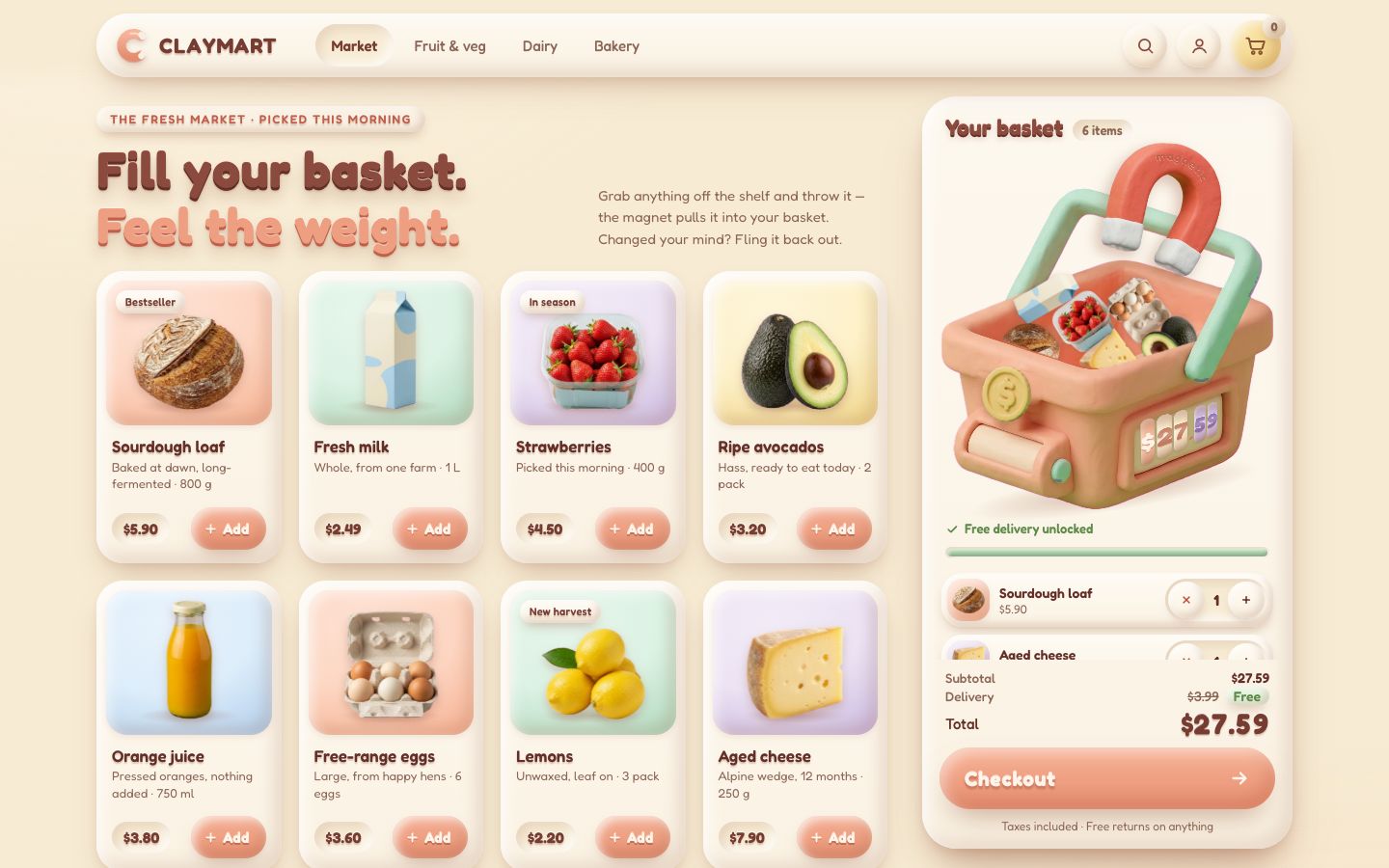
8 · Checkout and the receipt
Checkout pays for what is shown: the order as it stands is copied, the button fills over 0.9 s while it "pays", and the magnet heaves.
export function checkout() {
  if (shop.phase !== 'shop') return false;
  if (!shop.order.count) { announce('Your basket is empty. Add something first.'); return false; }
  if (shop.hold) return false;
  const { order } = shop;
  paid = { count: order.count, subtotal: order.subtotal, delivery: order.delivery, total: order.total,
    items: order.lines().map(({ product, qty, sum }) => ({ id: product.id, name: product.name, price: product.price, qty, sum })) };
  shop.phase = 'paying'; shop.phaseAt = shop.world.time;
  button.setAttribute('aria-busy', 'true');
  label.textContent = 'Paying…';
  announce(`Paying ${money(paid.total)}…`);
  buck(-300, -160);                                             // the magnet heaves, the basket hops
  if (calm) finishOrder();
  wake();
  return true;
}
Then the pile goes into the bag one by one, from the top, 55 ms apart.
function startPacking() {
  shop.phase = 'packing'; shop.phaseAt = shop.world.time;
  const going = shop.items.filter((x) => x.mode !== 'out' && x.mode !== 'home').sort((a, b) => a.body.y - b.body.y);
  going.forEach((it, k) => {
    it.from = { x: it.body.x, y: it.body.y, a: it.body.angle, s: it.vis.value };
    setMode(it, 'pack');
    it.delay = k * PACK_STAGGER;
  });
  for (const c of cards) if (c.out) { c.out = null; c.stock.target = 1; }
}

pack(it, h, age) {
  const t = clamp((age - it.delay) / PACK_TIME, 0, 1), e = t * t * t, b = it.body;
  b.x = it.from.x + (tray.cx - it.from.x) * e; b.y = it.from.y + (tray.floor - 10 - it.from.y) * e;
  b.angle = it.from.a * (1 - e);
  it.vis.value = it.vis.target = it.from.s * (1 - 0.65 * e); it.alpha = t < 0.55 ? 1 : 1 - (t - 0.55) / 0.45;
  if (t >= 1) dropItem(it);
},
The receipt is a big change, and a big change in one frame is a dropped frame. So it is spread over four: the panel
makes room and the pile goes; the receipt is written and laid out while still invisible
(visibility: hidden, never display: none); it appears with a visibility flip, which needs no
layout; then it takes the focus and the page hears about the order (cart:checkout).
// a big change spread over the next frames, one step per frame, so no single frame does all the layout at once
const nextFrames = (...steps) => { const run = () => { steps.shift()?.(); if (steps.length) requestAnimationFrame(run); }; requestAnimationFrame(run); };// the order is packed. Frame 1: the panel makes room (on a phone it becomes a sheet) and the pile goes; frame 2: the
// receipt is written, laid out while still invisible; frame 3: it appears (no layout, a visibility flip) and the tick
// starts drawing; frame 4: it takes focus and the page hears about the order. No single frame does all the layout
function finishOrder() {
shop.phase = 'receipt';
for (const it of [...shop.items]) dropItem(it);
panel.dataset.state = 'done';
showFrontRig(false);
const no = 'CM-' + (24817 + Math.round(paid.subtotal * 7) + paid.count * 31);
nextFrames(() => {
receipt.no.textContent = no;
receipt.lines.innerHTML = paid.items.map((l) => `<li><span>${l.name}${l.qty > 1 ? ' ×' + l.qty : ''}</span><span>${money(l.sum)}</span></li>`).join('');
receipt.subtotal.textContent = money(paid.subtotal);
receipt.fee.innerHTML = paid.delivery ? money(paid.delivery) : `<s>${money(DELIVERY_FEE)}</s> Free`;
receipt.total.textContent = money(paid.total);
}, () => {
done.classList.add('is-shown');
shop.phase = 'done'; shop.phaseAt = shop.world.time;
wake();
}, () => {
done.focus({ preventScroll: true });
announce(`Order ${no} confirmed. ${countText(paid.count)}, ${money(paid.total)}${paid.delivery ? '' : ', free delivery'}. Arriving tomorrow morning.`);
const { items, count, subtotal, delivery, total } = paid;
document.dispatchEvent(new CustomEvent('cart:checkout', { detail: { no, items, count, subtotal, delivery, total, date: new Date().toISOString() } }));
});
}.done:not(.is-shown) { visibility: hidden; } /* laid out while hidden: showing it is no layout, only a flip */<div class="done" tabindex="-1" aria-labelledby="done-title">
<div class="receipt">
<svg class="done-check" viewBox="0 0 64 64" aria-hidden="true"><circle class="dc-ring" cx="32" cy="32" r="29"/><path class="dc-tick" d="M19 33.5l9 9 17-19"/></svg>
<p class="done-eyebrow">Order <span class="done-no">CM-24817</span></p>
<h2 id="done-title">Thanks! It’s on its way.</h2>
<p class="done-text">Packed this afternoon, at your door <b>tomorrow morning</b>.</p>
<ul class="done-lines"></ul>
<dl class="done-sum">
<div><dt>Subtotal</dt><dd class="done-sub">$0.00</dd></div>
<div><dt>Delivery</dt><dd class="done-fee">$0.00</dd></div>
<div class="done-sum-total"><dt>Total</dt><dd class="done-total">$0.00</dd></div>
</dl>
<button class="again" type="button">Start a new basket</button>
</div>
</div>"Start a new basket" is the same the other way: the numbers reset under the receipt, the next frame it goes and the shelf grows its products back, the frame after that the shelf takes the focus.
// a new basket: the numbers and the list are reset now (under the receipt, if it is up); next frame the receipt goes
// and the shelf grows its products back; the frame after, `then` (e.g. focus the shelf)
export function newBasket(then = null) {
  const fromReceipt = done.classList.contains('is-shown');
  shop.phase = 'shop';
  shop.order.clear();
  for (const it of [...shop.items]) dropItem(it);
  if (shop.hold) { shop.world.release(shop.hold.grab); shop.hold = null; }
  shop.pileScale = 1; shop.pileCap = 1;
  button.removeAttribute('aria-busy');
  label.textContent = 'Checkout';
  bar.style.transform = 'scaleX(0)';
  changed('reset');
  const reveal = () => {
    done.classList.remove('is-shown');
    panel.dataset.state = 'empty';
    showFrontRig(true);
    for (const c of cards) { c.out = null; c.stock.target = 1; }   // every card grows its product back
    announce('Your basket is empty.');
    wake();
  };
  if (!fromReceipt) { reveal(); then?.(); return; }
  panel.dataset.state = 'done';                                   // the receipt stays up for this frame
  nextFrames(reveal, () => then?.());
}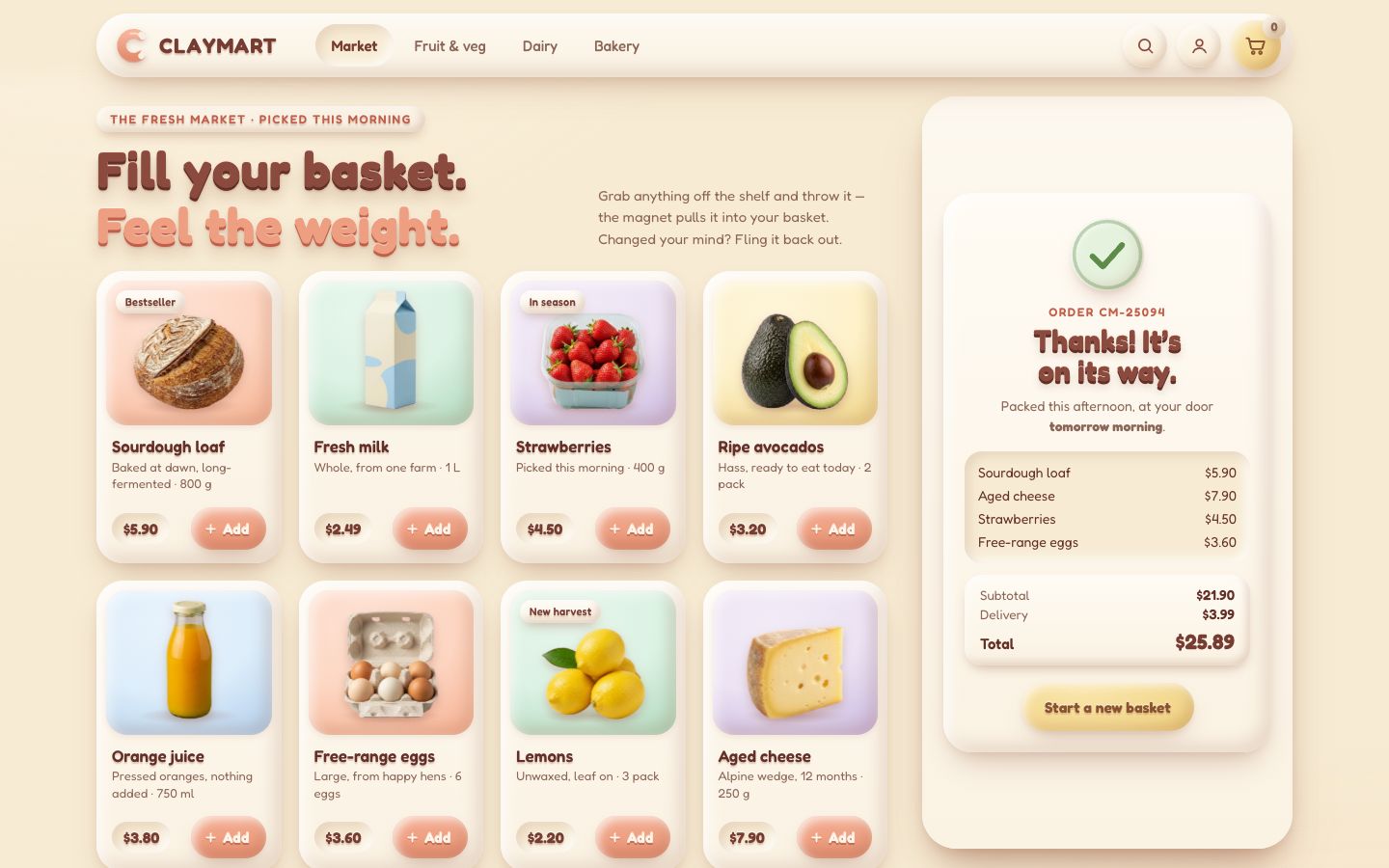
9 · Every screen, reduced motion, and the header
The shop asks the same two questions as the CSS from stage 1. Docked (a phone or an upright tablet under 1024 px) throws go down into the basket; a strip (a phone on its side) throws go right. In both, the list is folded away.
// reduced motion: from the system, or ?reduce for tests
export const calm = matchMedia('(prefers-reduced-motion: reduce)').matches || query.has('reduce');
// where the basket is (style.css, section 11, uses the same two queries):
//   docked  a phone or a tablet held upright: the basket docks at the bottom of the screen and throws go down
//   strip   a phone on its side: the basket is a narrow strip at the right, throws go right
// anything else: the basket panel at the right of the shelf
export const docked = matchMedia('(max-width: 1023px) and (orientation: portrait)');
export const strip = matchMedia('(orientation: landscape) and (max-height: 540px)');
// the basket's list is folded away (Details opens it as a sheet)
export const folded = () => docked.matches || strip.matches;
A phone's basket is smaller, so it holds fewer things before they merge, and a desk is generous by 28 px around the panel when you let go over it.
const PILE_CAPS = { panel: { each: 2, total: 10 }, docked: { each: 2, total: 6 } };

export const shop = {
  world: new World({ gravity: 2600, iterations: 10, hz: 120 }),
  rng: new RNG(40),
  order: new Order(PRODUCTS),
  items: [],              // every product out of its card: flying, held or in the pile
  hold: null,             // what the hand is holding (hand.js)
  phase: 'shop',          // shop → paying → packing → receipt (one frame) → done
  phaseAt: 0,             // world time the phase began
  scale: 0,               // how big the products are as objects (against their dw): it follows the basket (basket.js)
  landedAt: -Infinity,    // world time of the last landing
  pileCap: 1,             // the most the pile may be shown at (lowered when a settled pile still rises over the lid)
  pileChecked: true,      // the settled pile has been checked against the lid
  pileScale: 1,           // the pile's own scale: a full basket shrinks its contents a little so they stay inside it
};

export const caps = () => (docked.matches ? PILE_CAPS.docked : PILE_CAPS.panel);// where the hand is over the basket, it counts as "in" (a desk is generous by 28 px)
const handOver = (x, y, fromCart) => overBasket(x, y, fromCart || docked.matches ? 0 : 28);Where the list is folded, Details opens the basket as a sheet over the page: its height changes once, then it slides from where it was with a transform. The scrim, a drag down by its head (90 px, or a flick), Esc and Hide close it. On a desk the header's basket button gives the panel a clay pulse and the focus.
// open or close the sheet: its height changes once, then it slides from where it was (transform only)
function setSheet(open) {
  if (open === sheetOpen()) return;
  const before = panel.getBoundingClientRect().top;
  panel.classList.toggle('is-open', open);
  scrim.hidden = !open;
  toggle.setAttribute('aria-expanded', String(open));
  toggleText.textContent = open ? 'Hide' : 'Details';
  const dy = before - panel.getBoundingClientRect().top;
  if (!calm) {
    panel.animate([{ transform: `translateY(${dy}px)` }, { transform: 'none' }], { duration: SHEET_MS, easing: EASE });
    if (open) scrim.animate([{ opacity: 0 }, { opacity: 1 }], { duration: SHEET_MS });
  }
  keepAwake(SHEET_MS + 60);            // the tray moves with the panel: the pile follows it frame by frame
}

export function openBasket() {
  if (folded()) setSheet(true);
  else {
    if (!calm) panel.animate([{ transform: 'none' }, { transform: 'scale(1.025)', offset: 0.35 }, { transform: 'scale(.995)', offset: 0.7 }, { transform: 'none' }], { duration: 520, easing: 'ease-out' });
    keepAwake(560);
  }
  firstControl().focus({ preventScroll: true });
}
Folded, the list stays laid out, invisible and out of the flow, at the width it opens to; opening only moves it into the flow, so its lines are not styled and laid out all at once in that frame.
/* folded, the list stays laid out (invisible, out of the flow, at the width it opens to), so opening the sheet only
   moves it into the flow: its rows are not styled and laid out all at once in that frame */
.b-lines { position: absolute; left: 8px; right: 8px; top: 0; max-height: 50dvh; visibility: hidden; pointer-events: none; }
.basket.is-open .b-lines { position: static; max-height: none; visibility: visible; pointer-events: auto; }
.basket.is-open .b-head { cursor: grab; touch-action: none; }
When the basket changes size for good (a new layout, not a slide or a pulse), the products are a different size as objects, so the pile is rebuilt at the new size and settled in one go.
// the basket changed size (a new layout): the products are a different size as objects, so the pile is rebuilt at the
// new size and whatever was in the air goes back to its card
export function rescalePile() {
  const keep = pile().map((x) => ({ pi: x.pi, units: x.units }));
  for (const it of [...shop.items]) dropItem(it);
  for (const c of cards) if (c.out) restockNow(c);
  if (shop.hold) { shop.world.release(shop.hold.grab); shop.hold = null; }
  shop.pileScale = 1; shop.pileCap = 1;
  keep.forEach((k, n) => {
    const it = makeItem(k.pi, tray.inL + tray.w * ((n % 3) + 0.5) / 3, tray.top - 40 - Math.floor(n / 3) * 70 * shop.scale);
    setUnits(it, k.units); it.counted = true;
    setMode(it, 'cart');
  });
  fitPile();
  shop.world.settle(600, () => shop.items.map((x) => x.body));
}
Reduced motion has been there all along, through one switch, calm. Every spring is critically
damped (it still arrives, it never overshoots), and nothing flies: a product is put straight into its resting place,
settled by the physics in one go. No ring, no dip, no buck, no coin flip, no rolling digits; the list and the totals
work the same.
// springs: a bouncy one for things that land, a critically damped one for things that just arrive. Under reduced
// motion every spring is critically damped
export const spring = (stiffness, damping) => ({ stiffness, damping: calm ? 2 * Math.sqrt(stiffness) : damping });
export const critical = (stiffness) => ({ stiffness, damping: 2 * Math.sqrt(stiffness) });// reduced motion: no flight at all. It is put straight into its resting place, settled by the physics in one go
export function placeCalm(it) {
const b = it.body;
const top = pile().reduce((m, x) => Math.min(m, x.body.y - x.half.y), tray.floor);
b.x = aimFor(it); b.y = Math.max(tray.top - 120, Math.min(top, tray.floor) - it.half.y - 2);
b.vx = b.vy = b.w = 0; b.angle = 0;
it.vis.value = it.vis.target = 1;
land(it);
b.vx = b.vy = 0;
it.vis.snap();
shop.world.settle(360, () => pile().map((x) => x.body));
return it;
}The header's controls live in nav.js. It talks to the shop only through window.__checkout
and the document events, and checks for each piece before using it. The aisles and search become one predicate on a
product's public facts; the shelf only animates the result: the cards that leave squash out where they were, the rest
slide to their new places (FLIP: first, last, invert, play), the ones that come back pop in.
function predicate() {
  const terms = fold(filter.query).split(/\s+/).filter(Boolean);
  if (filter.aisle === 'market' && !terms.length) return null;
  return (p) => (filter.aisle === 'market' || p.category === filter.aisle) && terms.every((t) => words(p).includes(t));
}function applyFilter({ animate = true } = {}) {
if (!has('setFilter')) return;
const fn = predicate();
const n = shop().setFilter(fn, { animate: animate && !calm() });
filter.shown = typeof n === 'number' ? n : countShown(fn);
renderResults();
}export function setFilter(fn, { animate = true } = {}) {
wanted = fn ? (p) => !!fn(productInfo(p)) : () => true;
for (const c of cards) c.el.getAnimations().forEach((a) => a.finish());
const first = new Map(cards.filter(onShelf).map((c) => [c, c.el.getBoundingClientRect()]));
const host = shelfEl.getBoundingClientRect();
// … the leaving cards squash out where they were, the rest slide (FLIP), the new ones pop in
}The account shows only what this browser knows: the orders checked out here, each with Reorder, kept in
localStorage (the newest 12).
// cart:checkout → one remembered order (only what the event says: no invented fields)
function remember(d) {
  const items = (Array.isArray(d?.items) ? d.items : [])
    .map((l) => ({ id: String(l.id), name: String(l.name ?? l.id), qty: Math.max(1, Number(l.qty ?? l.count ?? 1) | 0), price: Number(l.price) || 0 }))
    .filter((l) => l.id);
  if (!items.length) return;
  const order = { no: d.no ? String(d.no) : null, date: d.date || new Date().toISOString(), items,
    count: Number(d.count) || items.reduce((a, l) => a + l.qty, 0), subtotal: Number(d.subtotal) || 0, delivery: Number(d.delivery) || 0, total: Number(d.total) || 0 };
  memory = [order, ...memory].slice(0, HISTORY_MAX);
  store.write(memory);
  if (!account.hidden) renderOrders();
}// ---- for scripts (reel capture, tests). Products by id ('milk') or index; points and speeds in client px ------------------
const inPile = (k) => shop.items.find((x) => x.pi === indexOf(k) && x.mode === 'cart');
window.__checkout = {
ready,
products: () => PRODUCTS.map((p, i) => ({ i, ...productInfo(p) })),
add: (k) => { const it = addFromCard(indexOf(k)); return it ? it.body.id : null; }, // the Add button's path
// … addOne, remove, fling, grab, move, release, checkout, reset, addMany, openBasket, setFilter, settled, state
};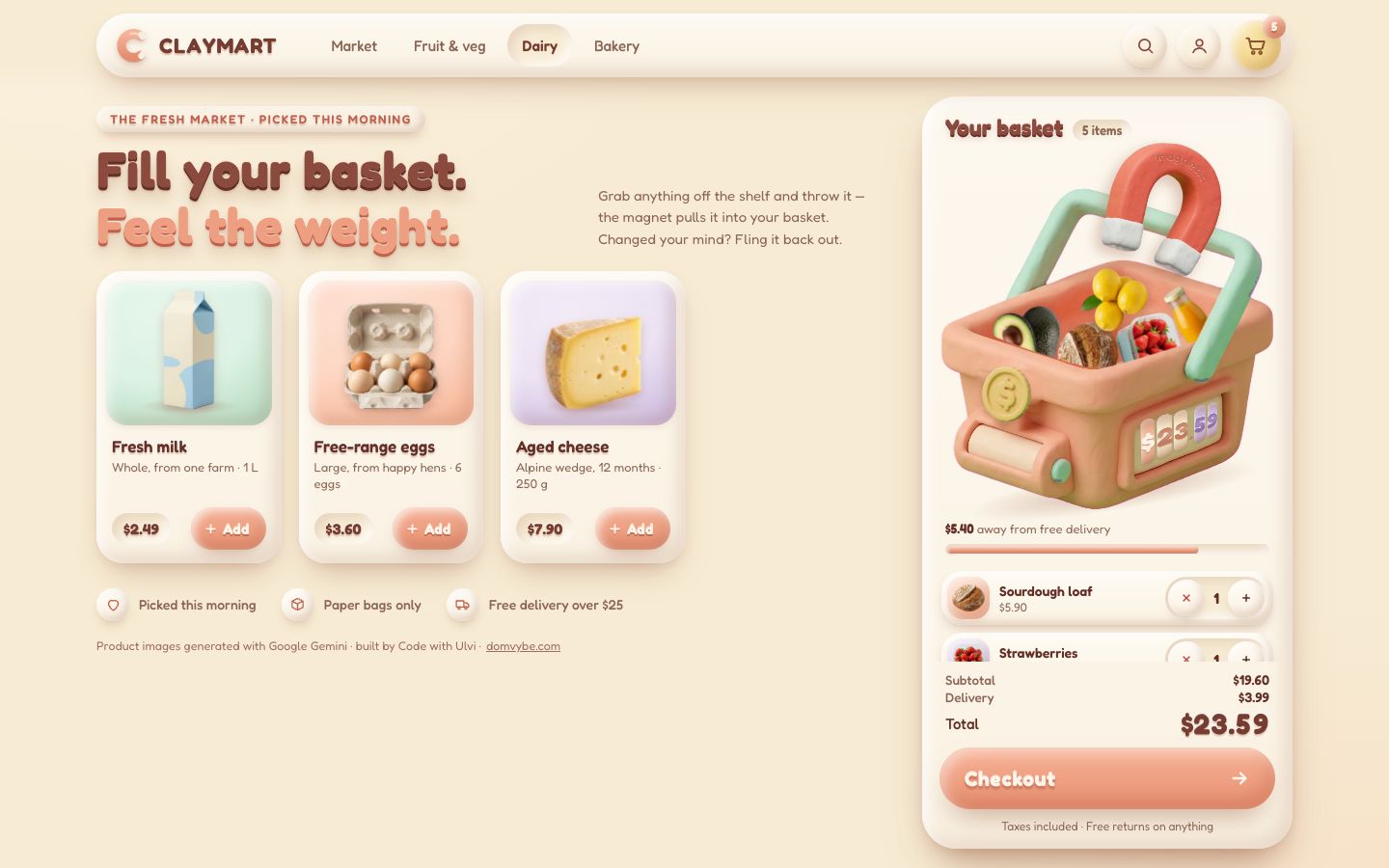
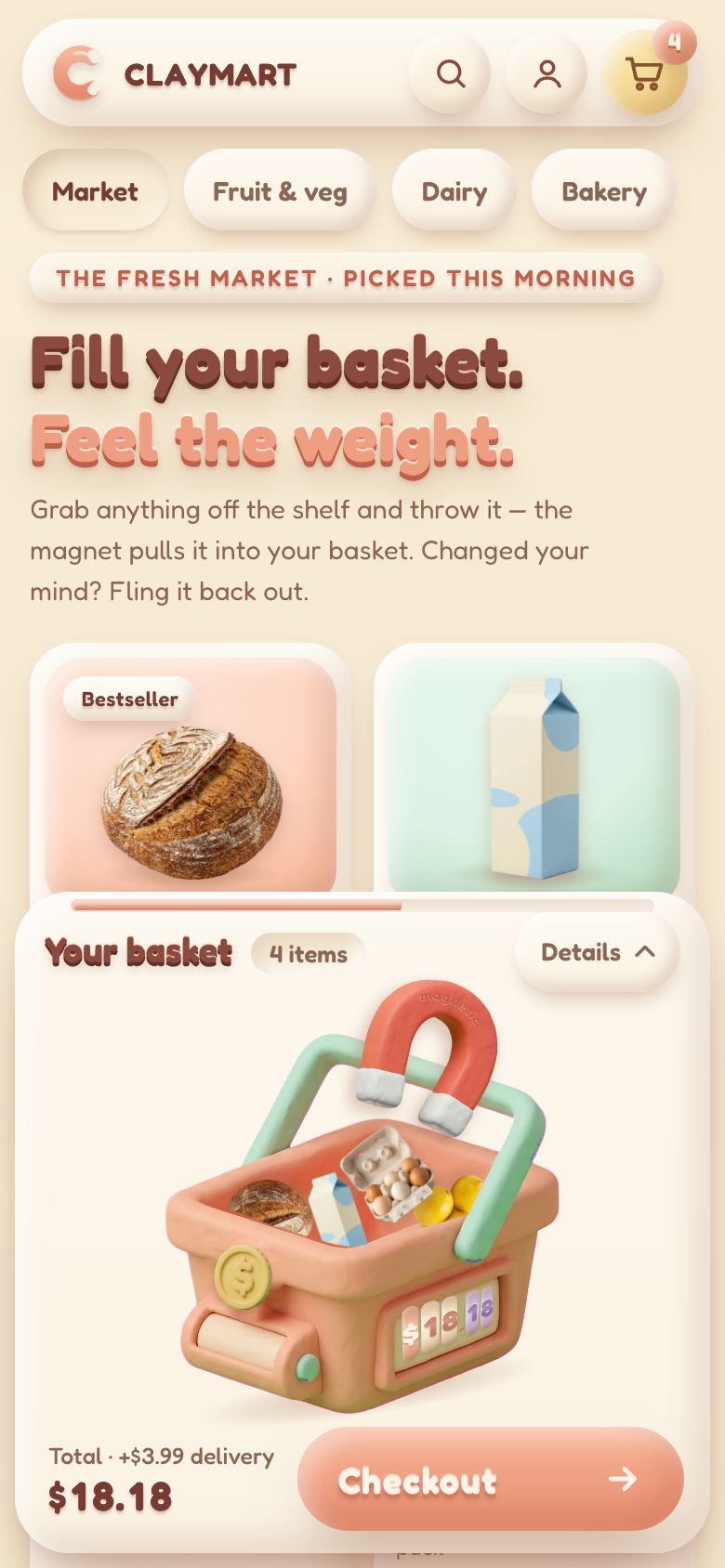
Make it yours
- Your own products are
js/catalogue.js: a name, a note, a price, a picture with a transparent background, its drawn widthdw, ashapea little inside the picture and a material (firm, soft or round). The cards, the list, the receipt and the physics all follow. - Your own basket is a picture cut in two (back and front) and a few lines measured on it in
js/basket.js: the rim, the floor's depth, the inside walls, the mouth, the lid and the counter's blank. - The feel is a handful of numbers: gravity 2600 px/s², the hand's spring (5.5 Hz), the throw (the last 80 ms, at most 3200 px/s, a throw from 420 px/s), the Add arc (0.62 gravity), the magnet (reach 750 × the basket's scale, catch at 0.55), the dip and the lean springs.
- The delivery rule is two constants in
js/order.js:DELIVERY_FEEandFREE_DELIVERY_FROM. - The clay is the tokens: change the primitives and the shadow colour, and every lump follows.
- Accessibility is already there: real buttons with labels and focus rings, the list with − and + for every
line, a polite live region for every change, Checkout that explains itself when the basket is empty, the receipt that
takes the focus, 44 px targets on touch screens, and
prefers-reduced-motion(no flight, no bounce, no rolling numbers; products go straight into their place).
The source is also on GitHub, MIT licensed: UlviShabanbayli/domvybe-claymart.
Cut the picture in two and let the physics live between the halves. The basket's back in the page, its front on a layer over everything, and every product a body that moves between them: that one choice is why a loaf can sit inside a basket, why a throw that misses flies over it, and why the whole pile can be a real stack with weight instead of an animation.